minder ACURA RDX 2023 Owners Manual
[x] Cancel search | Manufacturer: ACURA, Model Year: 2023, Model line: RDX, Model: ACURA RDX 2023Pages: 713, PDF Size: 21.99 MB
Page 6 of 713
Contents
This owner’s manual should be considered a permanent part of the
vehicle and should remain with the vehicle when it is sold.
The Navigation Manual is available online at owners.acura.com
(U.S.) or acura.ca (Canada). If you are the firs t registered owner
of your vehicle, you may request a complimentary printed
copy of the Navigation Manual within the first six months of
vehicle purchase. To request a copy, visit owners.acura.com. In
Canada, please request a copy from your Acura dealer.
This owner’s manual covers all models of your vehicle. You may find
descriptions of equipment and features that are not on your
particular model.
Images throughout this owner’s ma nual (including the front cover)
represent features and equipment that are available on some, but
not all, models. Your particular mo del may not have some of these
features.
This owner’s manual is for vehicles sold in the United States and
Canada.
The information and specifications in cluded in this publication were
in effect at the time of approval for printing. Honda Motor Co., Ltd.
reserves the right, however, to discontinue or change specifications
or design at any time without notice and without incurring any
obligation.2 Safe Driving P. 31
For Safe Driving P. 32 Seat Belts P. 37 Airbags P. 46
2Instrument Panel P. 79
Indicators P. 80 Gauges and Displays P. 136
2Controls P. 153
Clock P. 154 Locking and Unlocking the Doors P. 156
Panoramic Roof P. 189
Seats P. 216
2 Features P. 253
Audio System P. 254 Audio System Basic Operation P. 260
Customized Features P. 359 HomeLink® Universal Transceiver P. 386
2 Driving P. 429
Before Driving P. 430 Towing a Trailer P. 435
Braking P. 545Parking Your Vehicle P. 555
Fuel Economy and CO2 Emissions P. 578 Turbo Engine Vehicle P. 579
2 Maintenance P. 581
Before Performing Maintenance P. 582 Maintenance MinderTM P. 585
Checking and Maintaining Wiper Blades P. 609
Climate Control System Main tenance P. 627 Cleaning P. 629
2Handling the Unexpected P. 639
Tools P. 640 If a Tire Goes Flat P. 641
Overheating P. 669 Indicator, Coming On/Blinking P. 671
If You Cannot Unlock the Fuel Fill Door P. 686
2 Information P. 689
Specifications P. 690 Identification Numbers P. 692
Warranty Coverages P. 697 Authorized Manuals P. 700
23 ACURA RDX-31TJB6400.book 4 ページ 2022年8月4日 木曜日 午後1時51分
Page 36 of 713
34
uuFor Safe Driving uImportant Handling Information
Safe Driving
Important Handling Information
Your vehicle has higher ground clearance than a passenger vehicle designed for use
only on pavement. Higher ground clearance has many advantages for off-highway
driving. It allows you to travel over bumps, obstacles, and rough terrain. It also
provides good visibility so you can anticipate problems earlier.
These advantages come at some cost. Beca use your vehicle is taller and rides higher
off the ground, it has a higher center grav ity making it more susceptible to tipping
or rollover if you make abrupt turns. Util ity vehicles have a significantly higher
rollover rate than other types of vehicles. In a rollover crash, an unbelted person is
significantly more likely to die than a pe rson wearing a seat belt. As a reminder,
make sure you and your passeng ers always wear seat belts.1Important Handling Information
For information on how to reduce the risk of rollover,
read:
2 Driving Guidelines for Your Utility Vehicle
P. 449
2 Off-Highway Driving Guidelines P. 441
Failure to operate your vehicle correctly might result
in a crash or a rollover.
23 ACURA RDX-31TJB6400.book 34 ページ 2022年8月4日 木曜日 午後1時51分
Page 41 of 713
Continued39
uuSeat Belts uAbout Your Seat Belts
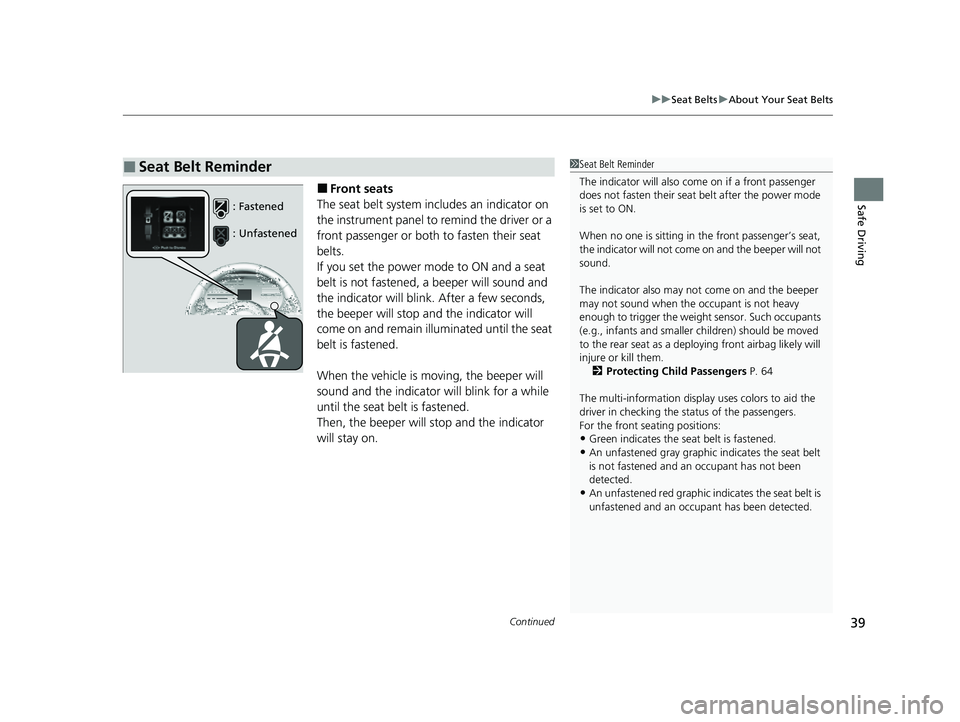
Safe Driving■Front seats
The seat belt system includes an indicator on
the instrument panel to remind the driver or a
front passenger or both to fasten their seat
belts.
If you set the power mode to ON and a seat
belt is not fastened, a beeper will sound and
the indicator will blink. After a few seconds,
the beeper will stop and the indicator will
come on and remain illuminated until the seat
belt is fastened.
When the vehicle is mo ving, the beeper will
sound and the indicator will blink for a while
until the seat belt is fastened.
Then, the beeper will stop and the indicator
will stay on.
■Seat Belt Reminder1 Seat Belt Reminder
The indicator will also co me on if a front passenger
does not fasten their seat belt after the power mode
is set to ON.
When no one is sitting in th e front passenger’s seat,
the indicator will not come on and the beeper will not
sound.
The indicator also may no t come on and the beeper
may not sound when the occupant is not heavy
enough to trigger the weight sensor. Such occupants
(e.g., infants and smaller children) should be moved
to the rear seat as a deploying front airbag likely will
injure or kill them. 2 Protecting Child Passengers P. 64
The multi-information display uses colors to aid the
driver in checking the st atus of the passengers.
For the front seating positions:
•Green indicates the seat belt is fastened.•An unfastened gray graphic indicates the seat belt
is not fastened and an occupant has not been
detected.
•An unfastened red graphic i ndicates the seat belt is
unfastened and an occupa nt has been detected.
: Fastened
: Unfastened
23 ACURA RDX-31TJB6400.book 39 ページ 2022年8月4日 木曜日 午後1時51分
Page 42 of 713
uuSeat Belts uAbout Your Seat Belts
40
Safe Driving
■Rear seats
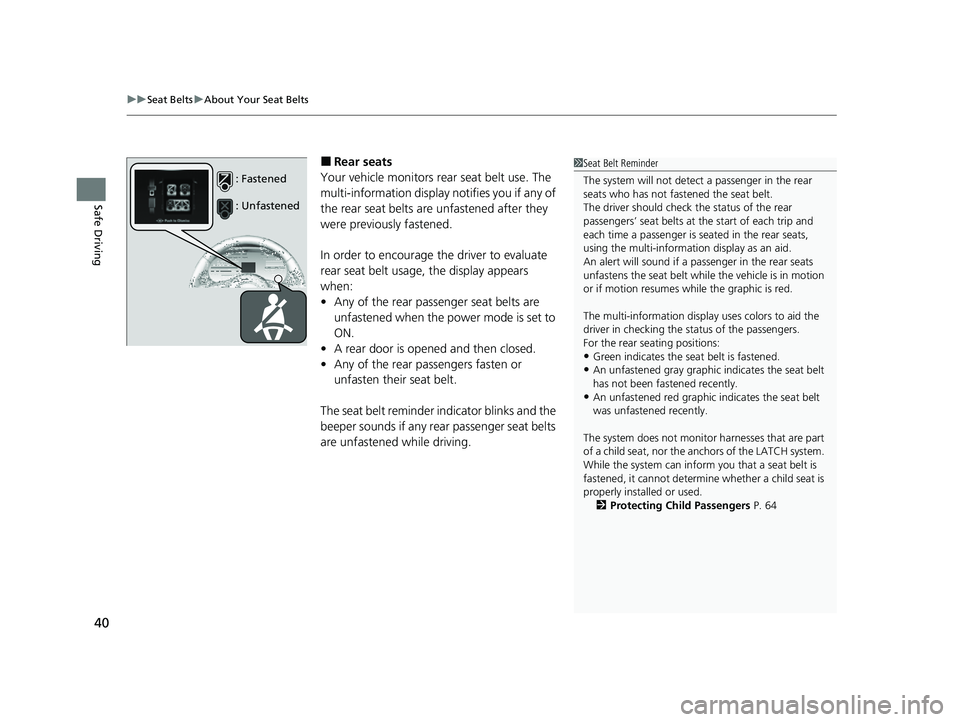
Your vehicle monitors rear seat belt use. The
multi-information display notifies you if any of
the rear seat belts are unfastened after they
were previously fastened.
In order to encourage the driver to evaluate
rear seat belt usage, the display appears
when:
• Any of the rear passenger seat belts are
unfastened when the power mode is set to
ON.
• A rear door is opened and then closed.
• Any of the rear passengers fasten or
unfasten their seat belt.
The seat belt reminder i ndicator blinks and the
beeper sounds if any rear passenger seat belts
are unfastened while driving.1 Seat Belt Reminder
The system will not detect a passenger in the rear
seats who has not fastened the seat belt.
The driver should check the status of the rear
passengers’ seat belts at th e start of each trip and
each time a passenger is seated in the rear seats,
using the multi-information display as an aid.
An alert will sound if a pa ssenger in the rear seats
unfastens the seat belt whil e the vehicle is in motion
or if motion resumes wh ile the graphic is red.
The multi-information display uses colors to aid the
driver in checking the st atus of the passengers.
For the rear seating positions:
•Green indicates the seat belt is fastened.
•An unfastened gray graphic indicates the seat belt
has not been fastened recently.
•An unfastened red graphic indicates the seat belt
was unfastened recently.
The system does not monito r harnesses that are part
of a child seat, nor the anchors of the LATCH system.
While the system can inform you that a seat belt is
fastened, it cannot determine whether a child seat is
properly installed or used.
2 Protecting Child Passengers P. 64
: Fastened
: Unfastened
23 ACURA RDX-31TJB6400.book 40 ページ 2022年8月4日 木曜日 午後1時51分
Page 82 of 713
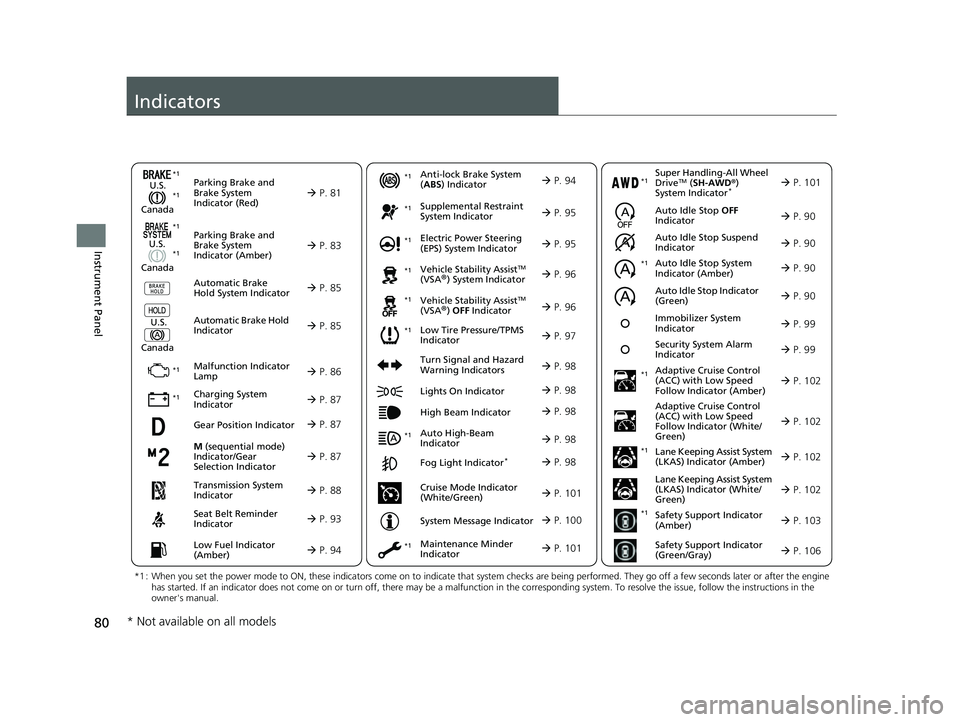
80
Instrument Panel
Indicators
M (sequential mode)
Indicator/Gear
Selection Indicator P. 87
Parking Brake and
Brake System
Indicator (Red)
Parking Brake and
Brake System
Indicator (Amber)
U.S.
Canada
U.S.
Canada Automatic Brake
Hold System Indicator
Automatic Brake Hold
IndicatorU.S.
Canada
*1 : When you set the power mode to ON, these indicators come on to indicate that system checks are being performed. They go off a few seconds later or after the engine
has started. If an indicator does not come on or turn off, ther e may be a malfunction in the corresponding system. To resolve the issue, follow the instructions in the
owner's manual.
P. 81*1
Malfunction Indicator
Lamp
Charging System
Indicator
Anti-lock Brake System
(ABS ) Indicator
Seat Belt Reminder
Indicator
Low Fuel Indicator
(Amber)
Vehicle Stability AssistTM
(VSA®) System Indicator
Vehicle Stability Assist
TM
(VSA®) OFF Indicator
Supplemental Restraint
System Indicator
Auto High-Beam
Indicator
Low Tire Pressure/TPMS
Indicator Electric Power Steering
(EPS) System Indicator
Turn Signal and Hazard
Warning Indicators
Lights On Indicator
High Beam Indicator
Fog Light Indicator*
Maintenance Minder
Indicator
System Message Indicator
P. 83
P. 85
P. 85
P. 86
P. 87*1 *1
P. 97
*1
*1
Gear Position Indicator P. 87
Transmission System
Indicator P. 88
P. 93
P. 94
P. 94
P. 95
P. 98
P. 96
*1
*1
*1
P. 96
*1 P. 95
P. 98
*1
P. 98
P. 98
P. 101
P. 98
Immobilizer System
Indicator P. 99
Security System Alarm
Indicator P. 99
P. 100
*1
*1 *1
Super Handling-All Wheel
DriveTM ( SH-AWD ®)
System Indicator* P. 101*1
Cruise Mode Indicator
(White/Green) P. 101
Auto Idle Stop Suspend
Indicator
Auto Idle Stop System
Indicator (Amber)
Auto Idle Stop Indicator
(Green) P. 90
P. 90
P. 90
Adaptive Cruise Control
(ACC) with Low Speed
Follow Indicator (Amber)
Auto Idle Stop OFF
Indicator P. 90
P. 102
P. 102
P. 102
P. 102
P. 103
P. 106
Adaptive Cruise Control
(ACC) with Low Speed
Follow Indicator (White/
Green)
Lane Keeping Assist System
(LKAS) Indicator (Amber)
Lane Keeping Assist System
(LKAS) Indicator (White/
Green)
Safety Support Indicator
(Amber)
Safety Support Indicator
(Green/Gray)
*1
*1
*1
*1
*1
* Not available on all models
23 ACURA RDX-31TJB6400.book 80 ページ 2022年8月4日 木曜日 午後1時51分
Page 95 of 713

93
uuIndicators u
Continued
Instrument Panel
IndicatorNameOn/BlinkingExplanationMessage
Seat Belt
Reminder
Indicator
•Blinks and the beep er sounds for a
few seconds if you are not wearing
a seat belt when you set the power
mode to ON, then the indicator
comes on.
• If the front passenger is not
wearing a seat belt, the indicator
comes on a few seconds later.
• Comes on for a while when the rear
seat belt is unfastened while the
power mode in ON.
• Blinks while driving if you and/or
any passenger has not fastened a
seat belt. The beeper sounds and
the indicator blinks at regular
intervals.•The beeper stops and the indicator goes
off when you and the passengers fasten
their seat belts.
• Stays on after you and/or the
passengers have fastened the seat
belt(s) - A detection error may have
occurred in the sensor. Have your vehicle
checked by a dealer.
2 Seat Belt Reminder P. 39
23 ACURA RDX-31TJB6400.book 93 ページ 2022年8月4日 木曜日 午後1時51分
Page 103 of 713

101
uuIndicators u
Continued
Instrument Panel
IndicatorNameOn/BlinkingExplanationMessage
Super
Handling-All
Wheel Drive
TM
( SH-AWD ®)
Indicator
*
●Comes on if there is a problem with
the SH-AWD ® system.●Stays on constantly - The engine drives
the front wheels only in this state. Have
your vehicle checked by a dealer.
●Blinks when the differential
temperature is too high.●Blinks while driving - Stop in a safe
place, put the transmission into
(P, and
idle the engine until the indicator goes off.
If the indicator does not stop blinking,
take your vehicle to a dealer.
2 Super Handling-All Wheel DriveTM
(SH-AWD® )* P. 474
Maintenance
Minder
Indicator
●Comes on when the scheduled
maintenance is due soon.
●Consequently, Maintenance Due
Now and Maintenance Past Due
follow.2 Maintenance MinderTM P. 585
Cruise Mode
Indicator
(White/Green)●Lights up in white when you change
to cruise mode.
●Lights up in green when you have
set a speed for cruise control.
2To Switch ACC with Low Speed
Follow to Cruise Control P. 518—
* Not available on all models
23 ACURA RDX-31TJB6400.book 101 ページ 2022年8月4日 木曜日 午後1時51分
Page 115 of 713

113
uuIndicators uMulti-Information Display Warning and Information Messages
Continued
Instrument Panel
MessageConditionExplanation
●Appears if the automatic br ake hold is automatically
canceled while it is in operation.●Immediately depress the brake pedal.
●Appears when the electric parking brake switch is
pulled without depressing the brake pedal while the
electric parking brake is in operation.●Pull the electric parking brake switch with the brake
pedal depressed.
2 Parking Brake P. 545
●Appears when you set the power mode to VEHICLE
OFF, if the rear doors were opened shortly before or
after the vehicle was powered on.●Check the rear seat for passengers or items before
exiting the vehicle.
2 Rear Seat Reminder P. 224
●Appears as soon as a problem is detected in the
keyless access system or keyless starting system.●Appears constantly - Have your vehicle checked by a
dealer.
23 ACURA RDX-31TJB6400.book 113 ページ 2022年8月4日 木曜日 午後1時51分
Page 116 of 713

114
uuIndicators uMulti-Information Display Warn ing and Information Messages
Instrument Panel
MessageConditionExplanation
●Appears when you close the door with the power
mode in ON without the keyless remote inside the
vehicle.●Disappears when you bring the keyless remote back
inside the vehicle and close the door.
2 Keyless Remote Reminder P. 195
●Appears when the keyless remote battery becomes
weak.
2Replacing the Remote Battery P. 625
●Appears after you set the power mode to
ACCESSORY or ON.
●Appears after you unlock and open the driver’s door.
2Starting the Engine P. 443
•Appears when the engine does not restart
automatically due to the following reasons:
- The hood is open.
- There is a problem in the system that disables Auto
Idle Stop.●Follow the normal procedure to start the engine.
2 Starting the Engine P. 443
Canadian models
23 ACURA RDX-31TJB6400.book 114 ページ 2022年8月4日 木曜日 午後1時51分
Page 144 of 713

uuGauges and Displays uMulti-Information Display
142
Instrument Panel
2 Indicators P. 80
2 Multi-Information Display Warning and Information Messages P. 107
Shows the remaining oil life and Maintenance MinderTM.
2Maintenance MinderTM P. 585
Shows each tire’s pressure.
2Tire Pressure Monitoring System (TPMS) with Tire Fill Assist P. 475
Enables you to show another unit on the
multi-information display, head-up display*
and audio/information screen and set the
displayed measurements to read in either
miles and mph or km and km/h.
Press the right selector wheel when you select
the Speed/Distance Units on the multi-
information display. Roll the right selector
wheel to select the unit and press it. After this,
a confirmation screen will appear for a few
seconds.
■Warning
■Maintenance
■Tire Pressure Monitor
■Speed/Distance Units
1 Warning
If there are multiple warnings, you can move the right
selector wheel to the right or left to see other
warnings.
1 Tire Pressure Monitor
The following colors indicate the state of tire
pressure:
•Green: Within tire pressure regulation.•Amber: Above or Below tire pressure regulation.
•Gray: There is a problem with the system.
* Not available on all models
23 ACURA RDX-31TJB6400.book 142 ページ 2022年8月4日 木曜日 午後1時51分