stop ACURA RDX 2023 Owners Manual
[x] Cancel search | Manufacturer: ACURA, Model Year: 2023, Model line: RDX, Model: ACURA RDX 2023Pages: 713, PDF Size: 21.99 MB
Page 3 of 713
Service Diagnostic Recorders
This vehicle is equipped with service-related devices that record
information about powertrain perfo rmance. The data can be used
to verify emissions law requirem ents and/or help technicians
diagnose and solve service problems . It may also be combined with
data from other sources for research purposes, but it remains
confidential. Some diagnostic and maintenance information is
uploaded to Acura upon vehicle start up.
California Perchlorate Conta mination Prevention Act
The airbags, seat belt tensioners , and CR type batteries in this
vehicle may contain perchlorate materials - special handling may
apply. See www.dtsc.ca.gov/hazardouswaste/perchlorate/
As you read this manual, you will find information that is preceded
by a symbol. This information is intended to help you avoid
damage to your vehicle, othe r property, or the environment.
NOTICE
Software End User License Agreement
Your vehicle comes equipped with software, which is governed by
the End User License Agreement in this Owner’s Manual, and
which contains a binding arbitration clause. Please refer to the End
User License Agreement for the terms and conditions governing
your use of the installed software, as well as the applications,
services, functions, and content provided through the software.
Your use of the installed software will serve as your consent to the
terms and conditions of the End User License Agreement.
You may opt out within 30 days of your initial use of the Software
by sending a signed, written notice to Acura at American Honda
Motor Co., Inc., Acura Client Relations, Mail Stop CHI-4, 1919
Torrance Blvd., Torrance, CA 90501-2746.
Privacy Notice
This vehicle may share location and usage information. To manage
this setting, visit www.acuralink.com/vehicle-data-choices .
To learn more about how we collect and use Personal
Information, please read our Privacy Policy, accessible
at www.acura.com .
23 ACURA RDX-31TJB6400.book 1 ページ 2022年8月4日 木曜日 午後1時51分
Page 8 of 713
6
Quick Reference Guide
Quick Reference Guide
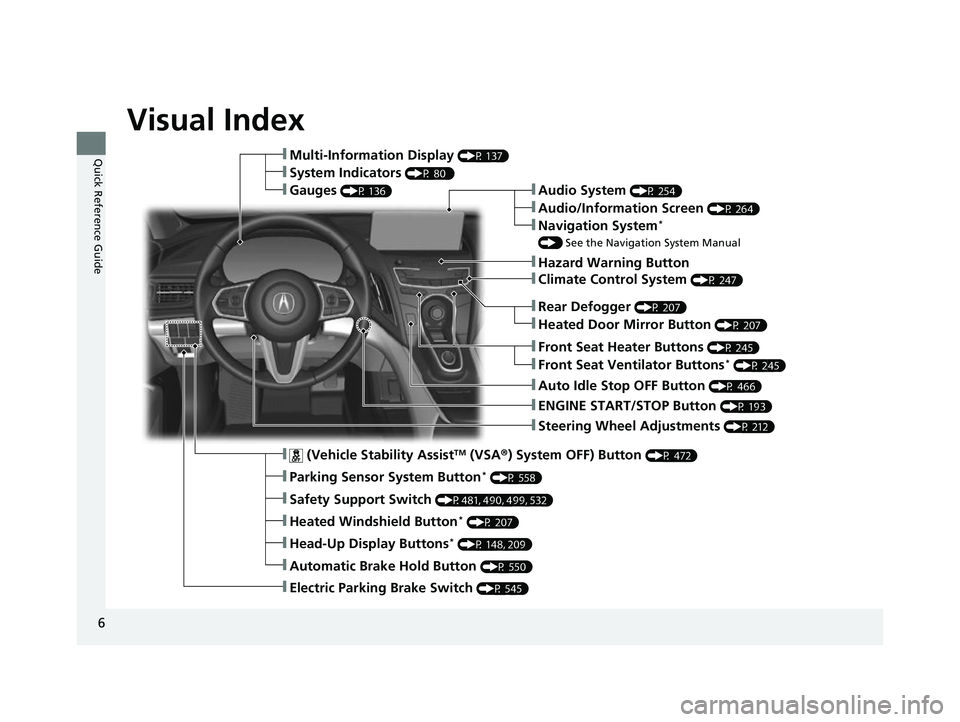
Visual Index
❚Steering Wheel Adjustments (P 212)
❚ENGINE START/STOP Button (P 193)
❚Rear Defogger (P 207)
❚Heated Door Mirror Button (P 207)
❚Climate Control System (P 247)
❚Audio System (P 254)
❚Hazard Warning Button
❚Audio/Information Screen (P 264)
❚Navigation System*
() See the Navigation System Manual
❚Front Seat Heater Buttons (P 245)
❚Front Seat Ventilator Buttons* (P 245)
❚Auto Idle Stop OFF Button (P 466)
❚ (Vehicle Stability AssistTM (VSA ®) System OFF) Button (P 472)
❚Parking Sensor System Button* (P 558)
❚Safety Support Switch (P481, 490, 499, 532)
❚Heated Windshield Button* (P 207)
❚Head-Up Display Buttons* (P 148, 209)
❚Automatic Brake Hold Button (P 550)
❚Electric Parking Brake Switch (P 545)
❚Multi-Information Display (P 137)
❚System Indicators (P 80 )
❚Gauges (P 136)
23 ACURA RDX-31TJB6400.book 6 ページ 2022年8月4日 木曜日 午後1時51分
Page 13 of 713
11
Quick Reference Guide
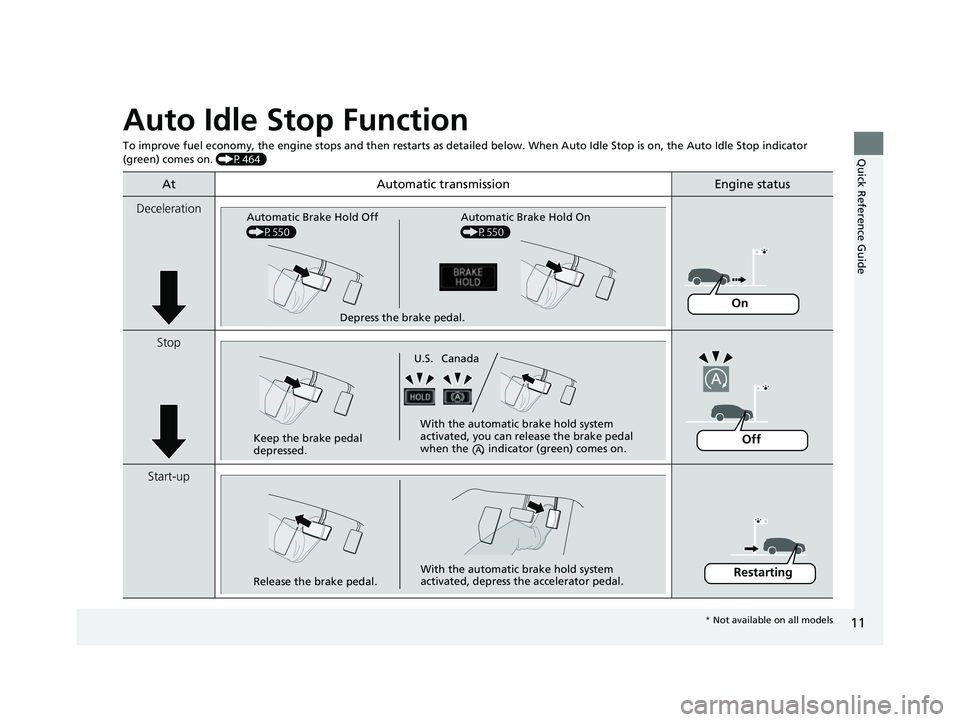
Auto Idle Stop Function
To improve fuel economy, the engine stops and then restarts as detailed below. When Auto Idle Stop is on, the Auto Idle Stop in dicator
(green) comes on. (P464)
At Automatic transmissionEngine status
Deceleration
Stop
Start-up
Depress the brake pedal.
Automatic Brake Hold Off
(P550) Automatic Brake Hold On
(P550)
On
Keep the brake pedal
depressed. With the automatic brake hold system
activated, you can release the brake pedal
when the indicato
r (green) comes on.
U.S. Canada
Off
Release the brake pedal. With the automatic brake hold system
activated, depress the accelerator pedal.Restarting
*
Not available on all models
23 ACURA RDX-31TJB6400.book 11 ページ 2022年8月4日 木曜日 午後1時51分
Page 16 of 713
14
Quick Reference Guide
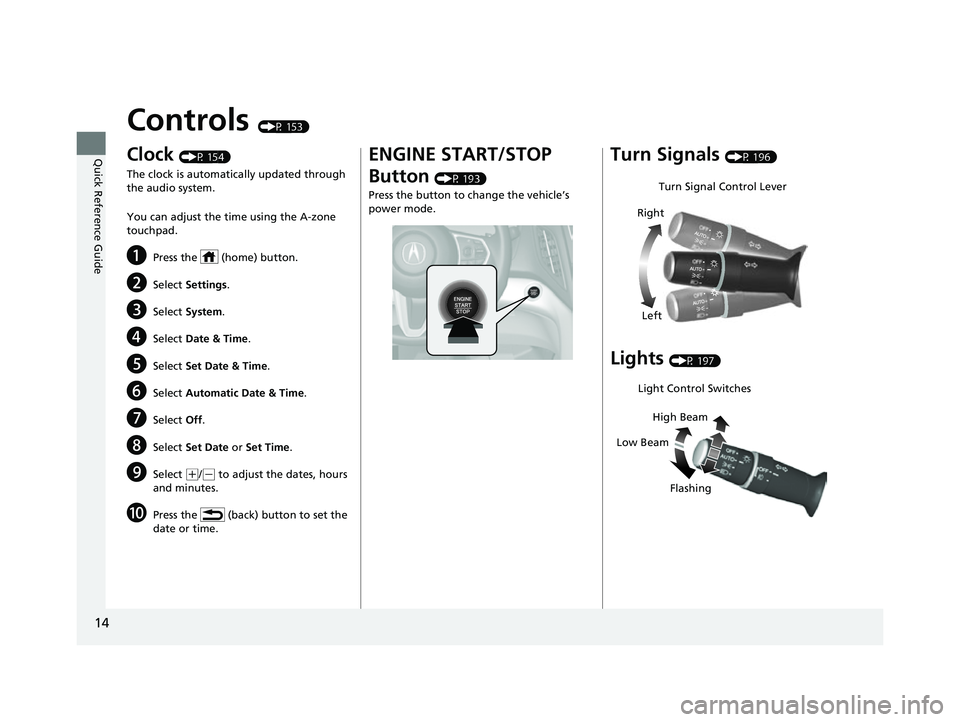
Controls (P 153)
Clock (P 154)
The clock is automatically updated through
the audio system.
You can adjust the time using the A-zone
touchpad.
aPress the (home) button.
bSelect Settings .
cSelect System .
dSelect Date & Time .
eSelect Set Date & Time .
fSelect Automatic Date & Time .
gSelect Off.
hSelect Set Date or Set Time .
iSelect (+/(- to adjust the dates, hours
and minutes.
jPress the (back) button to set the
date or time.
ENGINE START/STOP
Button
(P 193)
Press the button to change the vehicle’s
power mode.
Turn Signals (P 196)
Lights (P 197)
Turn Signal Control Lever
Right
Left
Light Control Switches
Low Beam High Beam
Flashing
23 ACURA RDX-31TJB6400.book 14 ページ 2022年8月4日 木曜日 午後1時51分
Page 27 of 713
25
Quick Reference Guide
Adaptive Cruise Control
(ACC) with Low Speed
Follow
(P502)
Helps maintain a constant vehicle speed and
a set following-interval behind a vehicle
detected ahead of yours and, if the detected
vehicle comes to a stop, can decelerate and
stop your vehicle, without you having to
keep your foot on the brake or the
accelerator.
Lane Keeping Assist
System (LKAS)
(P522)
Provides steering input to help keep the
vehicle in the middle of a detected lane and
provides tactile and visual alerts if the
vehicle is detected drifting out of its lane.
Road Departure
Mitigation System
(P530)
Alerts and helps to assist you when the
system detects a possibility of your vehicle
unintentionally crossing over detected lane
markings and/or leaving the roadway
altogether.
Traffic Sign Recognition
System
(P 535)
Reminds you of road sign information, such
as the current speed limit your vehicle has
just passed through, showing it on the
multi-information display and the head-up
display
*.
* Not available on all models
23 ACURA RDX-31TJB6400.book 25 ページ 2022年8月4日 木曜日 午後1時51分
Page 30 of 713
28
Quick Reference Guide
What to Do If
Why does the brake pedal
pulsate slightly when
applying the brakes?This can occur when the ABS activates and does not indicate a
problem. Apply firm, steady pressure on the brake pedal. Never
pump the brake pedal.
2Anti-lock Brake System (ABS) (P553)
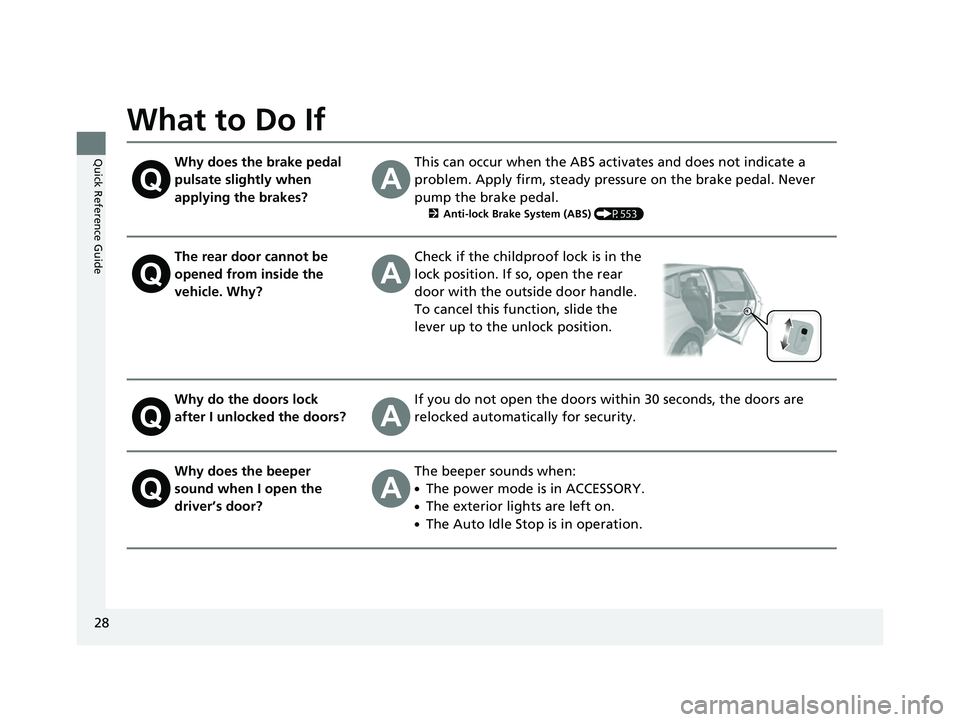
The rear door cannot be
opened from inside the
vehicle. Why?Check if the childproof lock is in the
lock position. If so, open the rear
door with the outside door handle.
To cancel this function, slide the
lever up to the unlock position.
Why do the doors lock
after I unlocked the doors?If you do not open the doors within 30 seconds, the doors are
relocked automatically for security.
Why does the beeper
sound when I open the
driver’s door?The beeper sounds when:
●The power mode is in ACCESSORY.
●The exterior lights are left on.
●The Auto Idle Stop is in operation.
23 ACURA RDX-31TJB6400.book 28 ページ 2022年8月4日 木曜日 午後1時51分
Page 39 of 713
37Continued
Safe Driving
Seat Belts
About Your Seat Belts
Seat belts are the single most effective safety device because they keep you
connected to the vehicle so that you can take advantage of many built-in safety
features. They also help keep you from be ing thrown against the inside of the
vehicle, against any passengers, or out of the vehicle. When worn properly, seat
belts also keep your body properly positioned in a crash so that you can take full
advantage of the additional protection provided by the airbags.
In addition, seat belts help protect you in almost every type of crash, including:
- frontal impacts
- side impacts
- rear impacts
- rollovers
■Lap/shoulder seat belts
All five seating positions are equipped with lap/shoulder seat belts with emergency
locking retractors. In normal driving, the re tractor lets you move freely while keeping
some tension on the belt. During a collision or sudden stop, the retractor locks to
restrain your body.
The front passenger’s and rear seat belts al so have a lockable retractor for use with
child seats.
2 Installing a Child Seat with a Lap/Shoulder Seat Belt P. 71
1About Your Seat Belts
If you extend the seat belt t oo quickly, it will lock in
place. If this happens, sli ghtly retract the seat belt,
then extend it slowly.
Seat belts cannot complete ly protect you in every
crash. But in most cases, seat belts can reduce your
risk of serious injury.
Most states and all Canadian provinces and territories
require you to w ear seat belts.
3WARNING
Not wearing a seat belt properly increases
the chance of serious injury or death in a
crash, even though your vehicle has
airbags.
Be sure you and your passengers always
wear seat belts and wear them properly.
23 ACURA RDX-31TJB6400.book 37 ページ 2022年8月4日 木曜日 午後1時51分
Page 41 of 713
Continued39
uuSeat Belts uAbout Your Seat Belts
Safe Driving■Front seats
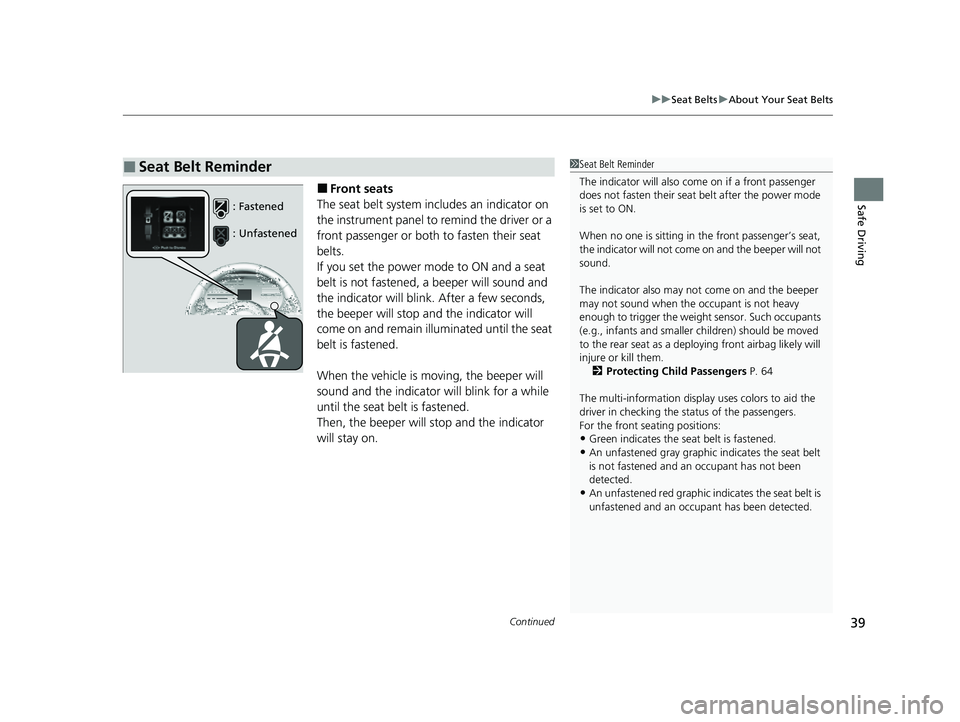
The seat belt system includes an indicator on
the instrument panel to remind the driver or a
front passenger or both to fasten their seat
belts.
If you set the power mode to ON and a seat
belt is not fastened, a beeper will sound and
the indicator will blink. After a few seconds,
the beeper will stop and the indicator will
come on and remain illuminated until the seat
belt is fastened.
When the vehicle is mo ving, the beeper will
sound and the indicator will blink for a while
until the seat belt is fastened.
Then, the beeper will stop and the indicator
will stay on.
■Seat Belt Reminder1 Seat Belt Reminder
The indicator will also co me on if a front passenger
does not fasten their seat belt after the power mode
is set to ON.
When no one is sitting in th e front passenger’s seat,
the indicator will not come on and the beeper will not
sound.
The indicator also may no t come on and the beeper
may not sound when the occupant is not heavy
enough to trigger the weight sensor. Such occupants
(e.g., infants and smaller children) should be moved
to the rear seat as a deploying front airbag likely will
injure or kill them. 2 Protecting Child Passengers P. 64
The multi-information display uses colors to aid the
driver in checking the st atus of the passengers.
For the front seating positions:
•Green indicates the seat belt is fastened.•An unfastened gray graphic indicates the seat belt
is not fastened and an occupant has not been
detected.
•An unfastened red graphic i ndicates the seat belt is
unfastened and an occupa nt has been detected.
: Fastened
: Unfastened
23 ACURA RDX-31TJB6400.book 39 ページ 2022年8月4日 木曜日 午後1時51分
Page 73 of 713
Continued71
uuChild Safety uSafety of Infants and Small Children
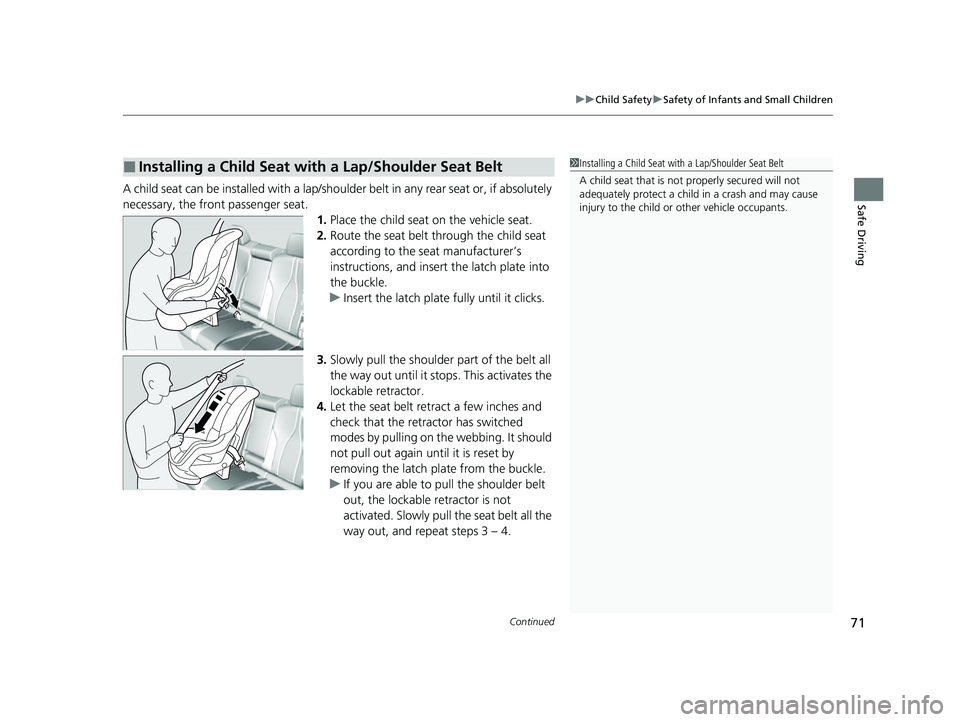
Safe DrivingA child seat can be installed with a lap/should er belt in any rear seat or, if absolutely
necessary, the front passenger seat. 1.Place the child seat on the vehicle seat.
2. Route the seat belt through the child seat
according to the seat manufacturer’s
instructions, and insert the latch plate into
the buckle.
u Insert the latch plate fully until it clicks.
3. Slowly pull the shoulder part of the belt all
the way out until it stops. This activates the
lockable retractor.
4. Let the seat belt retract a few inches and
check that the retractor has switched
modes by pulling on the webbing. It should
not pull out again until it is reset by
removing the latch pl ate from the buckle.
u If you are able to pull the shoulder belt
out, the lockable retractor is not
activated. Slowly pull the seat belt all the
way out, and repeat steps 3 – 4.
■Installing a Child Seat with a Lap/Shoulder Seat Belt1Installing a Child Seat with a Lap/Shoulder Seat Belt
A child seat that is not properly secured will not
adequately protect a child in a crash and may cause
injury to the child or other vehicle occupants.
23 ACURA RDX-31TJB6400.book 71 ページ 2022年8月4日 木曜日 午後1時51分
Page 82 of 713
80
Instrument Panel
Indicators
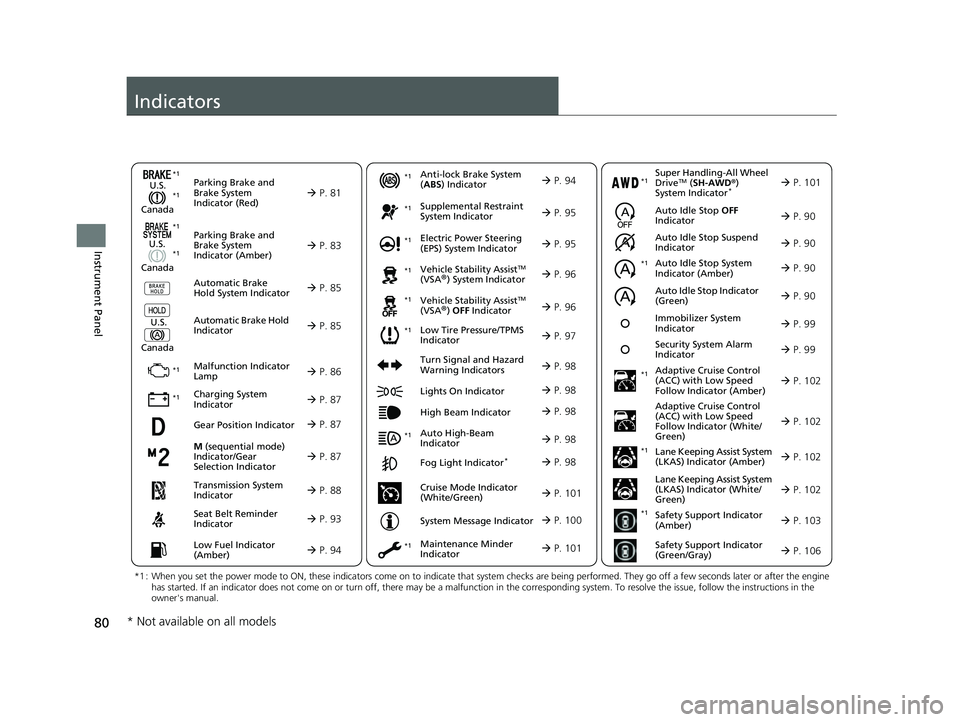
M (sequential mode)
Indicator/Gear
Selection Indicator P. 87
Parking Brake and
Brake System
Indicator (Red)
Parking Brake and
Brake System
Indicator (Amber)
U.S.
Canada
U.S.
Canada Automatic Brake
Hold System Indicator
Automatic Brake Hold
IndicatorU.S.
Canada
*1 : When you set the power mode to ON, these indicators come on to indicate that system checks are being performed. They go off a few seconds later or after the engine
has started. If an indicator does not come on or turn off, ther e may be a malfunction in the corresponding system. To resolve the issue, follow the instructions in the
owner's manual.
P. 81*1
Malfunction Indicator
Lamp
Charging System
Indicator
Anti-lock Brake System
(ABS ) Indicator
Seat Belt Reminder
Indicator
Low Fuel Indicator
(Amber)
Vehicle Stability AssistTM
(VSA®) System Indicator
Vehicle Stability Assist
TM
(VSA®) OFF Indicator
Supplemental Restraint
System Indicator
Auto High-Beam
Indicator
Low Tire Pressure/TPMS
Indicator Electric Power Steering
(EPS) System Indicator
Turn Signal and Hazard
Warning Indicators
Lights On Indicator
High Beam Indicator
Fog Light Indicator*
Maintenance Minder
Indicator
System Message Indicator
P. 83
P. 85
P. 85
P. 86
P. 87*1 *1
P. 97
*1
*1
Gear Position Indicator P. 87
Transmission System
Indicator P. 88
P. 93
P. 94
P. 94
P. 95
P. 98
P. 96
*1
*1
*1
P. 96
*1 P. 95
P. 98
*1
P. 98
P. 98
P. 101
P. 98
Immobilizer System
Indicator P. 99
Security System Alarm
Indicator P. 99
P. 100
*1
*1 *1
Super Handling-All Wheel
DriveTM ( SH-AWD ®)
System Indicator* P. 101*1
Cruise Mode Indicator
(White/Green) P. 101
Auto Idle Stop Suspend
Indicator
Auto Idle Stop System
Indicator (Amber)
Auto Idle Stop Indicator
(Green) P. 90
P. 90
P. 90
Adaptive Cruise Control
(ACC) with Low Speed
Follow Indicator (Amber)
Auto Idle Stop OFF
Indicator P. 90
P. 102
P. 102
P. 102
P. 102
P. 103
P. 106
Adaptive Cruise Control
(ACC) with Low Speed
Follow Indicator (White/
Green)
Lane Keeping Assist System
(LKAS) Indicator (Amber)
Lane Keeping Assist System
(LKAS) Indicator (White/
Green)
Safety Support Indicator
(Amber)
Safety Support Indicator
(Green/Gray)
*1
*1
*1
*1
*1
* Not available on all models
23 ACURA RDX-31TJB6400.book 80 ページ 2022年8月4日 木曜日 午後1時51分