ignition Acura RL 2000 3.5 User Guide
[x] Cancel search | Manufacturer: ACURA, Model Year: 2000, Model line: RL, Model: Acura RL 2000Pages: 330, PDF Size: 4.53 MB
Page 61 of 330
Gauge
s
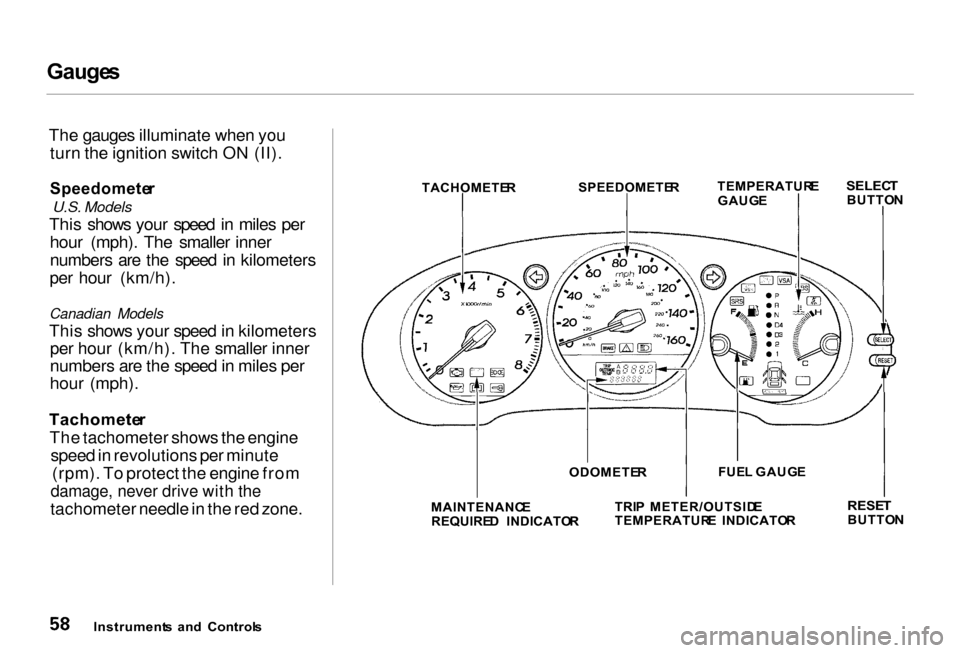
The gauges illuminate when you turn the ignition switch ON (II).
Speedomete r
U.S. Models
This shows your speed in miles per hour (mph). The smaller inner
numbers are the speed in kilometers
per hour (km/h).
Canadian Models
This shows your speed in kilometers per hour (km/h). The smaller inner
numbers are the speed in miles per
hour (mph).
Tachomete r
The tachometer shows the engine speed in revolutions per minute (rpm). To protect the engine from
damage, never drive with the
tachometer needle in the red zone. MAINTENANC
E
REQUIRE D INDICATO RTRI
P METER/OUTSID E
TEMPERATUR E INDICATO R
RESE
T
BUTTO N
Instrument s an d Control s ODOMETE
R FUE
L GAUG E
TACHOMETE
R
SPEEDOMETE
R
TEMPERATUR
E
GAUG E
SELEC
T
BUTTO N
Page 62 of 330
Gauge
s
Odomete r
The odometer shows the total dis- tance your car has been driven. It
measures miles in U.S. models and
kilometers in Canadian models.
It is illegal under U.S. federal law and Canadian provincial regulations to
disconnect, reset, or alter the
odometer with the intent to change
the number of miles or kilometers
indicated.
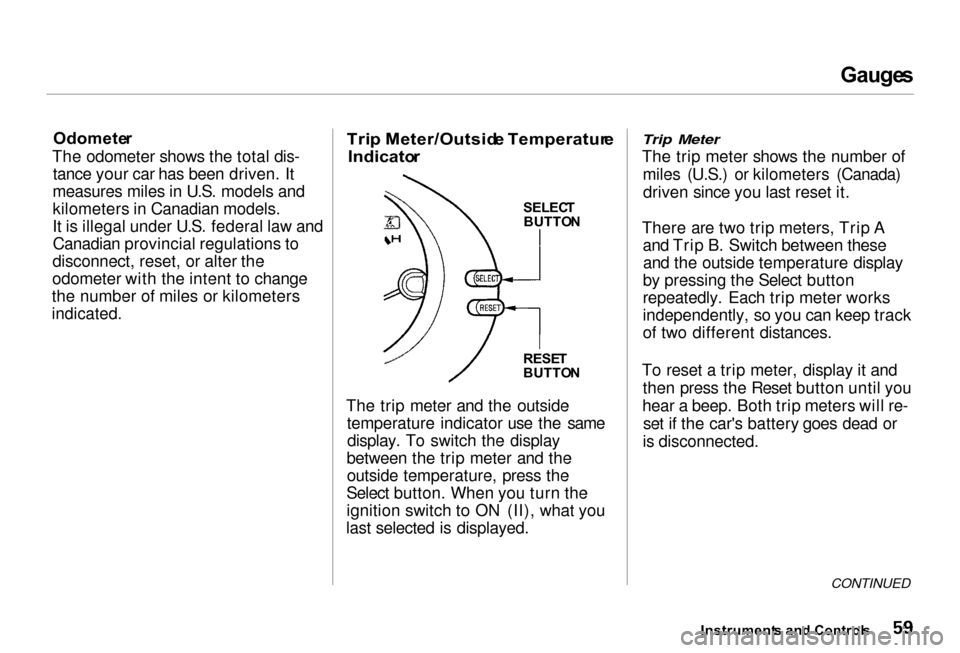
Tri
p Meter/Outsid e Temperatur e
Indicato r
SELECT
BUTTO N
RESE T
BUTTO N
The trip meter and the outside temperature indicator use the samedisplay. To switch the display
between the trip meter and the outside temperature, press the
Select button. When you turn the
ignition switch to ON (II), what you
last selected is displayed.
Trip Meter
The trip meter shows the number of
miles (U.S.) or kilometers (Canada)driven since you last reset it.
There are two trip meters, Trip A and Trip B. Switch between theseand the outside temperature display
by pressing the Select button
repeatedly. Each trip meter works
independently, so you can keep track
of two different distances.
To reset a trip meter, display it and then press the Reset button until you
hear a beep. Both trip meters will re- set if the car's battery goes dead or
is disconnected.
CONTINUED
Instrument s an d Control s
Page 63 of 330
Gauge
s
Outside Temperature Indicator
This indicator displays the outside temperature in Fahrenheit in U.S.
models, and in Centigrade inCanadian models.
The temperature sensor is located in the front bumper. Therefore, the
temperature reading can be affected
by heat reflection from the road sur-
face, engine heat, and the exhaust
from the surrounding traffic. This can cause the temperature reading
not to be correct when your speed is
under 19 mph (30 km/h).
In certain weather conditions,
temperature readings near freezing (32°F, 0°C) could mean that ice is
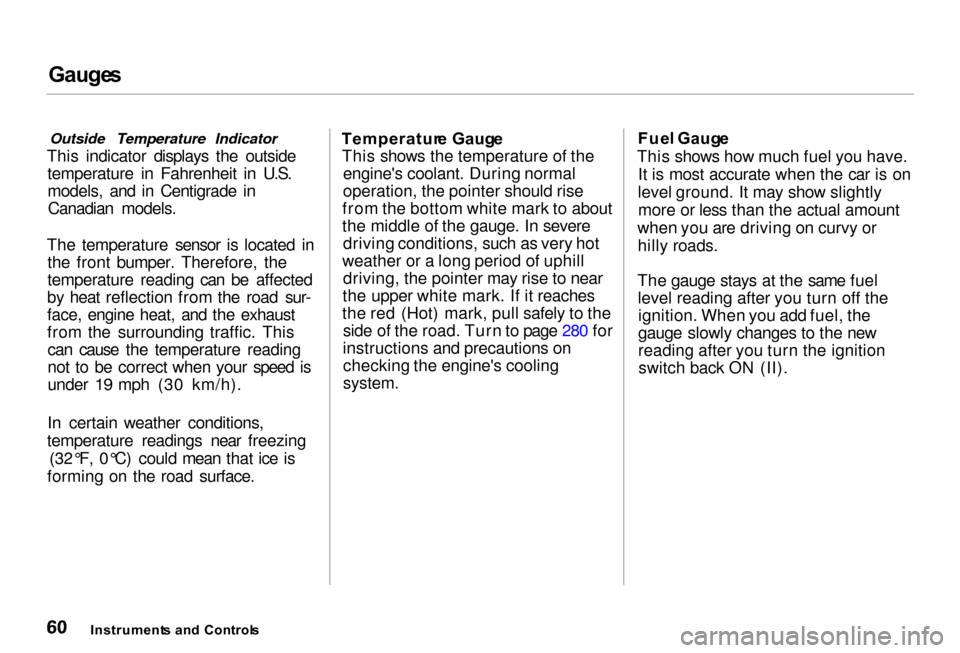
forming on the road surface. Temperatur
e Gaug e
This shows the temperature of the engine's coolant. During normal
operation, the pointer should rise
from the bottom white mark to about
the middle of the gauge. In severe driving conditions, such as very hot
weather or a long period of uphill driving, the pointer may rise to near
the upper white mark. If it reaches
the red (Hot) mark, pull safely to the side of the road. Turn to page 280 for
instructions and precautions on checking the engine's cooling
system.
Fue
l Gaug e
This shows how much fuel you have. It is most accurate when the car is on
level ground. It may show slightly more or less than the actual amount
when you are driving on curvy or hilly roads.
The gauge stays at the same fuel level reading after you turn off theignition. When you add fuel, the
gauge slowly changes to the new
reading after you turn the ignitionswitch back ON (II).
Instrument s an d Control s
Page 64 of 330
Gauge
s
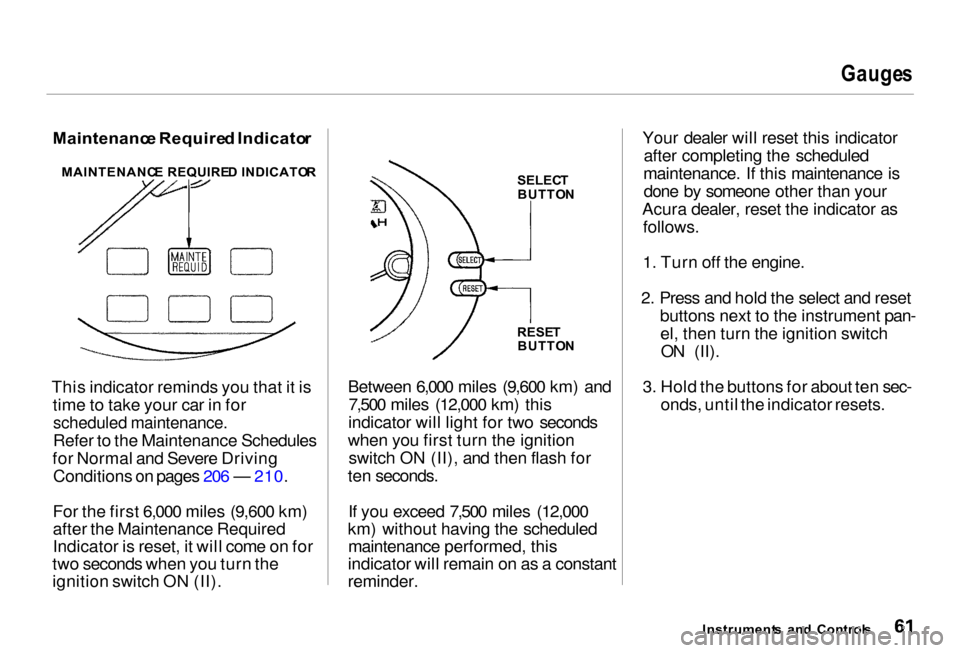
Maintenanc e Require d Indicato r
This indicator reminds you that it is time to take your car in for
scheduled maintenance.
Refer to the Maintenance Schedules
for Normal and Severe Driving Conditions on pages 206 — 210.
For the first 6,000 miles (9,600 km)
after the Maintenance Required
Indicator is reset, it will come on for
two seconds when you turn the
ignition switch ON (II). Between 6,000 miles (9,600 km) and
7,500 miles (12,000 km) this
indicator will light for two seconds
when you first turn the ignition switch ON (II), and then flash for
ten seconds.
If you exceed 7,500 miles (12,000
km) without having the scheduled maintenance performed, this
indicator will remain on as a constant
reminder. Your dealer will reset this indicator
after completing the scheduled
maintenance. If this maintenance is done by someone other than your
Acura dealer, reset the indicator as follows.
1. Turn off the engine.
2. Press and hold the select and reset buttons next to the instrument pan-el, then turn the ignition switchON (II).
3. Hold the buttons for about ten sec- onds, until the indicator resets.
Instrument s an d Control s
MAINTENANC
E REQUIRE D INDICATO R
SELECT
BUTTO N
RESE T
BUTTO N
Page 66 of 330
Control
s Nea r th e Steerin g Whee l
Headlight s
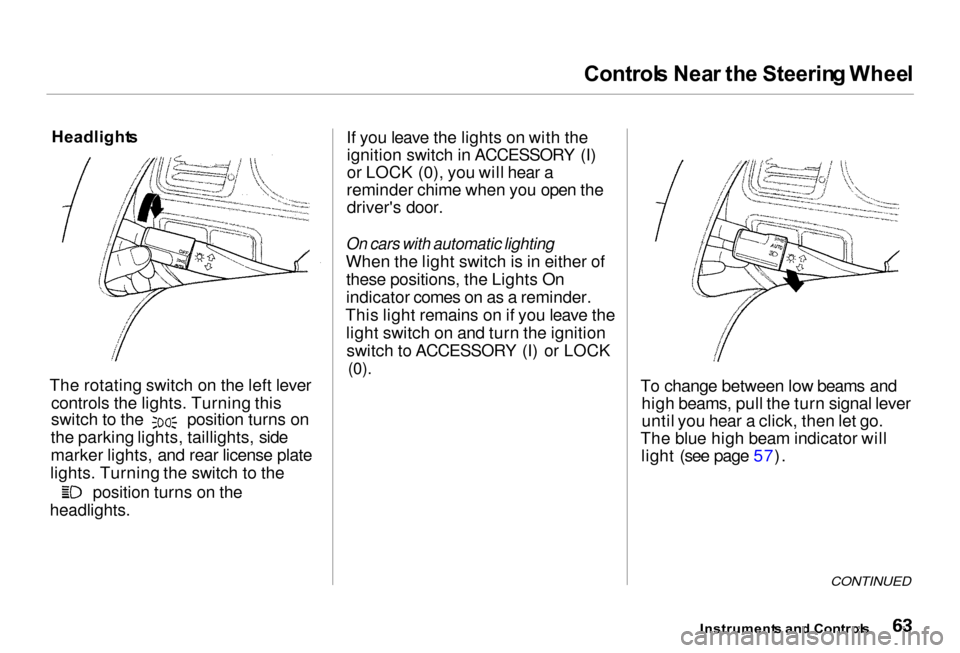
The rotating switch on the left lever controls the lights. Turning this switch to the position turns on
the parking lights, taillights, side
marker lights, and rear license plate
lights. Turning the switch to the position turns on the
headlights. If you leave the lights on with the
ignition switch in ACCESSORY (I)
or LOCK (0), you will hear a
reminder chime when you open the driver's door.
On cars with automatic lighting
When the light switch is in either of these positions, the Lights On
indicator comes on as a reminder.
This light remains on if you leave the light switch on and turn the ignitionswitch to ACCESSORY (I) or LOCK
(0).
To change between low beams andhigh beams, pull the turn signal lever
until you hear a click, then let go.
The blue high beam indicator will light (see page 57).
CONTINUED
Instrument s an d Control s
Page 67 of 330
Control
s Nea r th e Steerin g Whee l
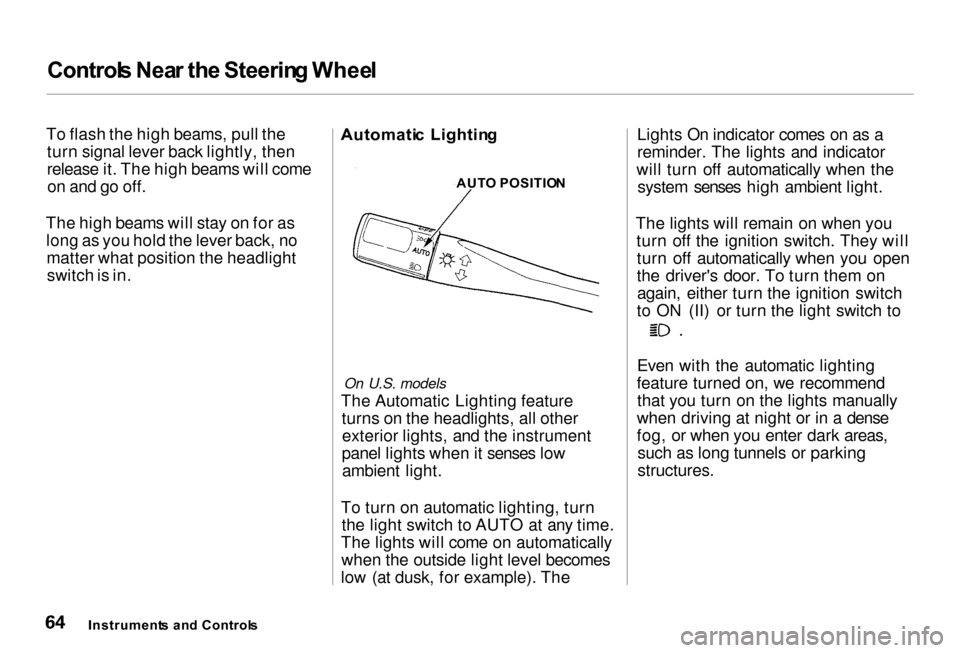
To flash the high beams, pull the turn signal lever back lightly, then
release it. The high beams will comeon and go off.
The high beams will stay on for as long as you hold the lever back, nomatter what position the headlightswitch is in. Automati
c Lightin g
On U.S. models
The Automatic Lighting feature turns on the headlights, all otherexterior lights, and the instrument
panel lights when it senses low ambient light.
To turn on automatic lighting, turn the light switch to AUTO at any time.
The lights will come on automatically when the outside light level becomes
low (at dusk, for example). The Lights On indicator comes on as a
reminder. The lights and indicator
will turn off automatically when the system senses high ambient light.
The lights will remain on when you turn off the ignition switch. They willturn off automatically when you open
the driver's door. To turn them onagain, either turn the ignition switch
to ON (II) or turn the light switch to Even with the automatic lighting
feature turned on, we recommend that you turn on the lights manually
when driving at night or in a dense
fog, or when you enter dark areas, such as long tunnels or parking
structures.
Instrument s an d Control s AUT
O POSITIO N
Page 68 of 330
Control
s Nea r th e Steerin g Whee l
Do not leave the light switch in
AUTO if you will not be driving the car for an extended period (a week
or more). You should also turn off
the lights if you plan to leave the engine idling or the engine off for a
long time. This will prevent the
battery from discharging.
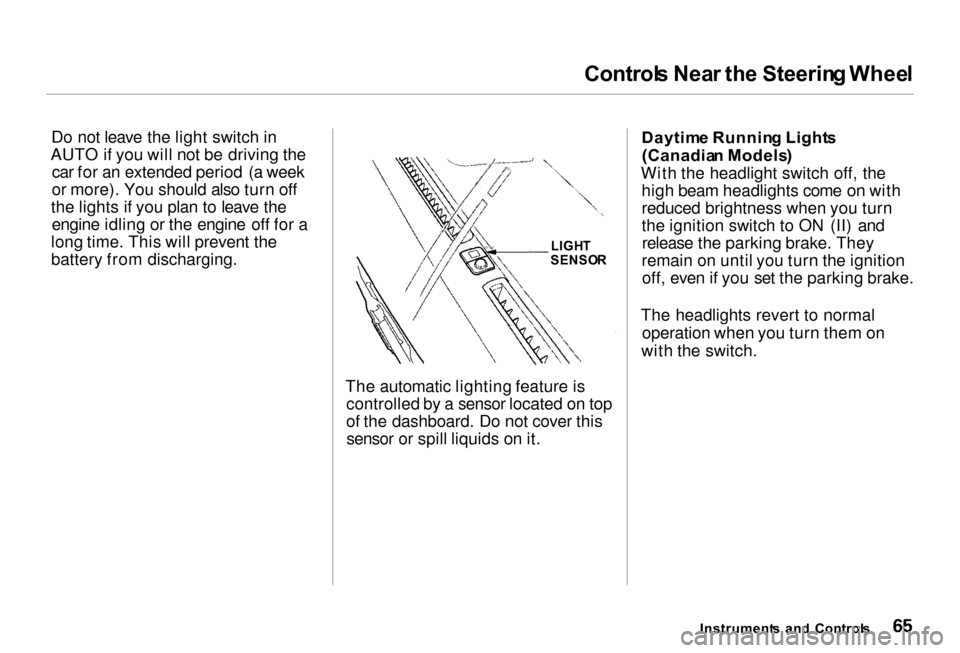
The automatic lighting feature iscontrolled by a sensor located on top
of the dashboard. Do not cover thissensor or spill liquids on it. Daytim
e Runnin g Light s
(Canadia n Models )
With the headlight switch off, the high beam headlights come on with
reduced brightness when you turn
the ignition switch to ON (II) andrelease the parking brake. They
remain on until you turn the ignition off, even if you set the parking brake.
The headlights revert to normal operation when you turn them on
with the switch.
Instrument s an d Control s
LIGH
T
SENSO R
Page 74 of 330
Control
s Nea r th e Steerin g Whee l
Rea r Windo w Defogge r
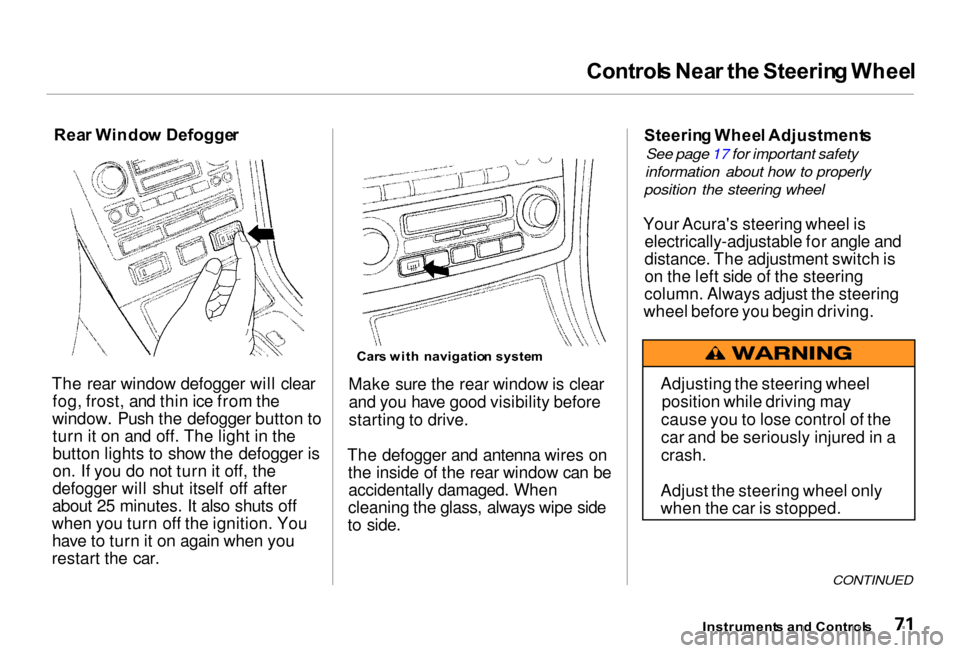
The rear window defogger will clear fog, frost, and thin ice from the
window. Push the defogger button to turn it on and off. The light in the
button lights to show the defogger is
on. If you do not turn it off, the
defogger will shut itself off after
about 25 minutes. It also shuts off
when you turn off the ignition. You have to turn it on again when you
restart the car.
Car
s wit h navigatio n syste m
Make sure the rear window is clear and you have good visibility before
starting to drive.
The defogger and antenna wires on the inside of the rear window can beaccidentally damaged. When
cleaning the glass, always wipe side
to side. Steerin
g Whee l Adjustment s
See page 17 for important safety
information about how to properly
position the steering wheel
Your Acura's steering wheel is electrically-adjustable for angle and
distance. The adjustment switch is
on the left side of the steering
column. Always adjust the steering
wheel before you begin driving.
CONTINUED
Instrument s an d Control s
Adjusting the steering wheel
position while driving may
cause you to lose control of the
car and be seriously injured in a
crash.
Adjust the steering wheel only
when the car is stopped.
Page 75 of 330
Control
s Nea r th e Steerin g Whee l
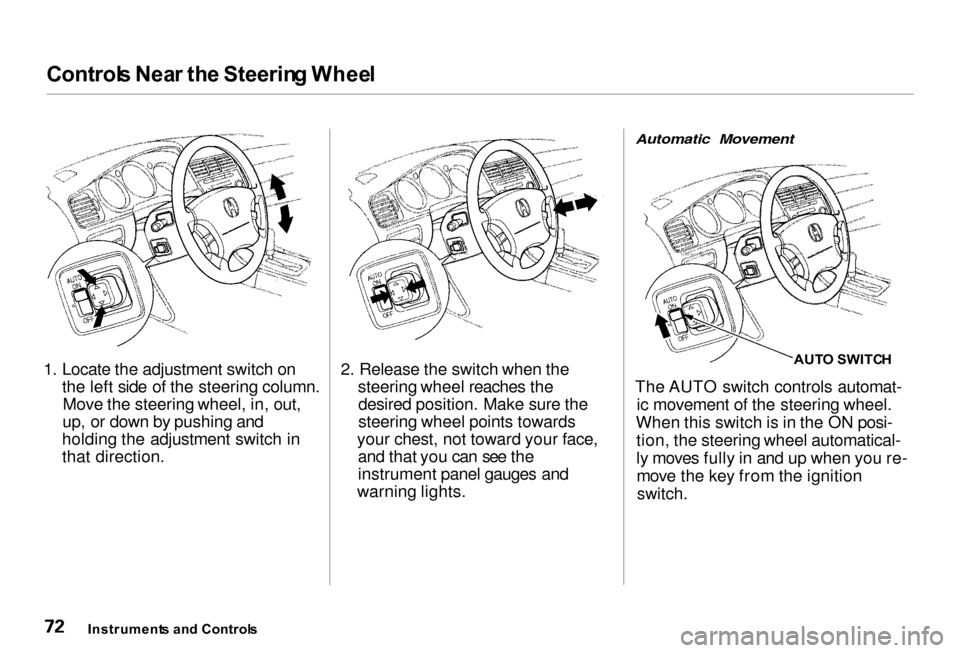
1. Locate the adjustment switch on the left side of the steering column.Move the steering wheel, in, out,
up, or down by pushing and
holding the adjustment switch in
that direction. 2. Release the switch when the
steering wheel reaches thedesired position. Make sure the
steering wheel points towards
your chest, not toward your face, and that you can see the
instrument panel gauges and
warning lights.
Automatic Movement
AUTO SWITC H
The AUTO switch controls automat- ic movement of the steering wheel.
When this switch is in the ON posi- tion, the steering wheel automatical-
ly moves fully in and up when you re-move the key from the ignition
switch.
Instrument s an d Control s
Page 76 of 330

Control
s Nea r th e Steerin g Wheel , Steerin g Whee l Control s
The steering wheel then returns to its original position when you insert
the key back in the ignition switch.
Steering wheel movement is also
controlled by the Driving Position
Memory System (see page 100). Cruis
e Contro l
Cruise control allows you to maintain
a set speed above 25 mph (40 km/h)
without keeping your foot on the accelerator pedal. It should be used
for cruising on straight, open highways. It is not recommended for
conditions such as city driving,
winding roads, slippery roads, heavy rain, or bad weather. You should
have full control of the car under
those conditions. Using the Cruise Control
CRUIS E CONTRO L MASTE R SWITC H
1. Push in the Cruise Control Master Switch to the left of the steering
column. The indicator in theswitch will light.
2. Accelerate to the desired cruising speed above 25 mph (40 km/h).
CONTINUED
Instrument s an d Control s
Improper use of the cruise
control can lead to a crash.
Use the cruise control only
when traveling on open highways in good weather.