ignition Acura RL 2000 3.5 Workshop Manual
[x] Cancel search | Manufacturer: ACURA, Model Year: 2000, Model line: RL, Model: Acura RL 2000Pages: 330, PDF Size: 4.53 MB
Page 186 of 330
Automati
c Transmissio n
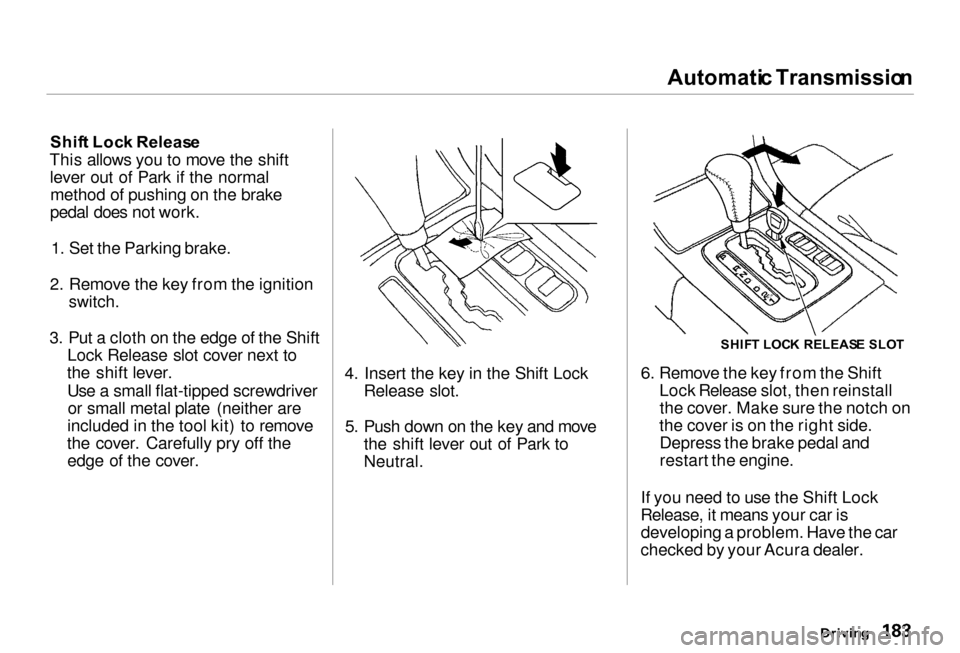
Shif t Loc k Releas e
This allows you to move the shift lever out of Park if the normalmethod of pushing on the brake
pedal does not work.
1. Set the Parking brake.
2. Remove the key from the ignition
switch.
3. Put a cloth on the edge of the Shift
Lock Release slot cover next to
the shift lever.
Use a small flat-tipped screwdriveror small metal plate (neither are
included in the tool kit) to remove
the cover. Carefully pry off the edge of the cover.
4. Insert the key in the Shift Lock
Release slot.
5. Push down on the key and move
the shift lever out of Park to
Neutral.
6. Remove the key from the Shift
Lock Release slot, then reinstallthe cover. Make sure the notch on
the cover is on the right side. Depress the brake pedal and
restart the engine.
If you need to use the Shift Lock
Release, it means your car is developing a problem. Have the car
checked by your Acura dealer.
Driving
SHIF
T LOC K RELEAS E SLO T
Page 193 of 330
Vehicl
e Stabilit y Assis t (VSA ) Syste m
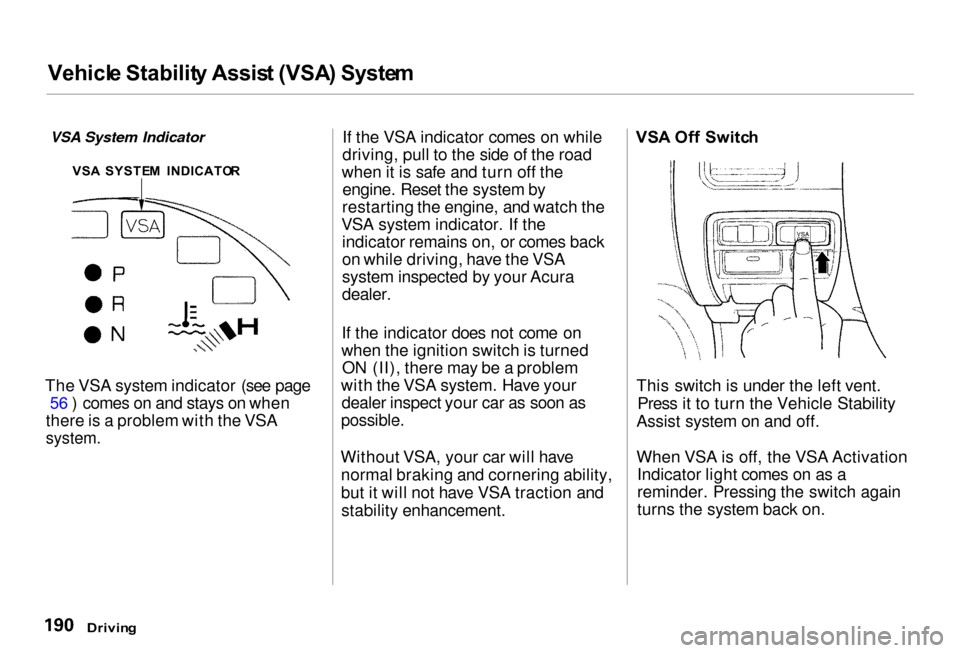
VSA System Indicator
The VSA system indicator (see page 56 ) comes on and stays on when
there is a problem with the VSA
system.
If the VSA indicator comes on while
driving, pull to the side of the road
when it is safe and turn off the engine. Reset the system by
restarting the engine, and watch the
VSA system indicator. If the indicator remains on, or comes back
on while driving, have the VSA
system inspected by your Acura
dealer.
If the indicator does not come on
when the ignition switch is turned ON (II), there may be a problem
with the VSA system. Have your dealer inspect your car as soon as
possible.
Without VSA, your car will have normal braking and cornering ability,
but it will not have VSA traction andstability enhancement. VS
A Of f Switc h
This switch is under the left vent. Press it to turn the Vehicle Stability
Assist system on and off.
When VSA is off, the VSA Activation Indicator light comes on as a
reminder. Pressing the switch again
turns the system back on.
Drivin g
VS
A SYSTE M INDICATO R
Page 224 of 330
Coolin
g Syste m
Replacin g Engin e Coolan t
The cooling system should be completely drained and refilled with
new coolant according to the time and distance recommendations in
the maintenance schedule. Only use Genuine Honda Antifreeze/Coolant.
Draining the coolant requires access
to the underside of the car. Unless
you have the tools and knowledge,
you should have this maintenance done by a skilled mechanic.
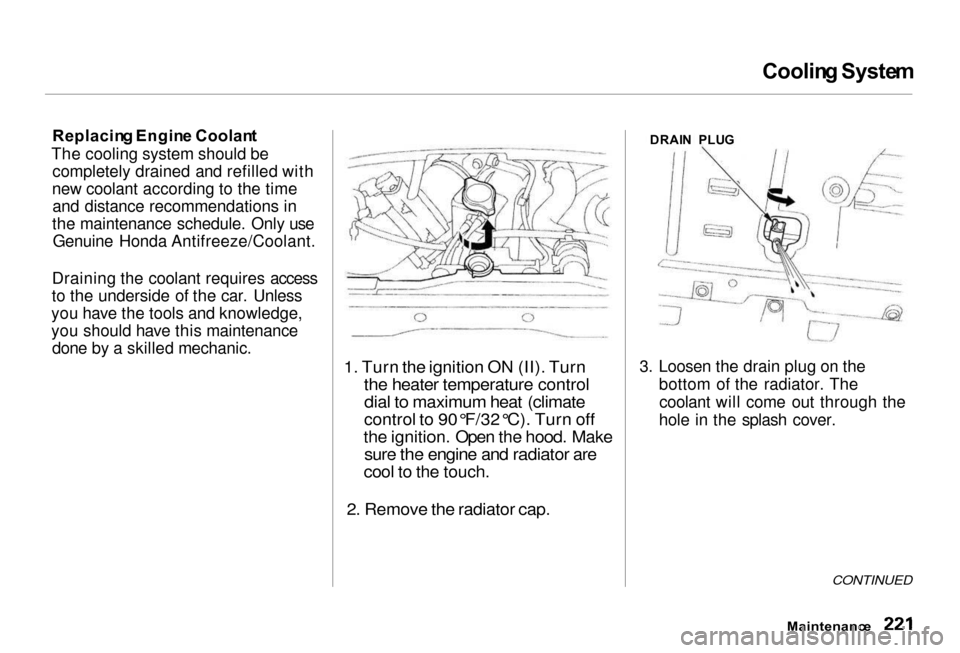
1. Turn the ignition ON (II). Turn
the heater temperature controldial to maximum heat (climate
control to 90°F/32°C). Turn off
the ignition. Open the hood. Make
sure the engine and radiator are
cool to the touch.
2. Remove the radiator cap.
DRAI
N PLU G
3. Loosen the drain plug on the bottom of the radiator. Thecoolant will come out through the
hole in the splash cover.
CONTINUED
Maintenanc e
Page 234 of 330
Spar
k Plug s
The spark plugs in your car are a special platinum-tipped design for
longer life. The spark plugs should
be replaced according to the time
and distance recommendations in
the maintenance schedule. Replacemen
t
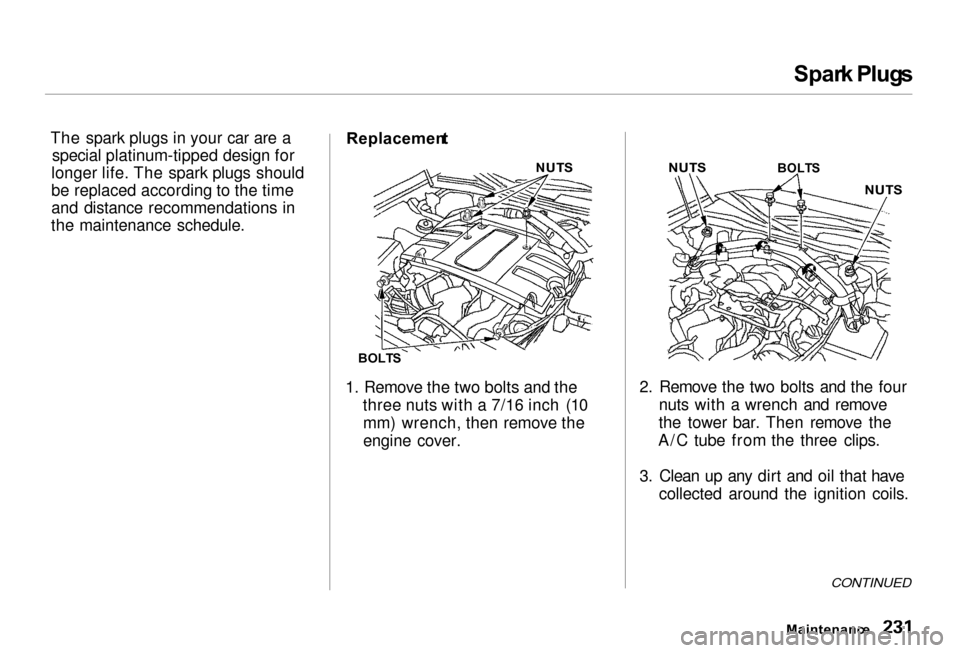
1. Remove the two bolts and the three nuts with a 7/16 inch (10mm) wrench, then remove the
engine cover. 2. Remove the two bolts and the four
nuts with a wrench and remove
the tower bar. Then remove the
A/C tube from the three clips.
3. Clean up any dirt and oil that have collected around the ignition coils.
CONTINUED
Maintenanc e
NUT
S
BOLT S
NUT
S
BOLTS
NUTS
Page 235 of 330
Spar
k Plug s
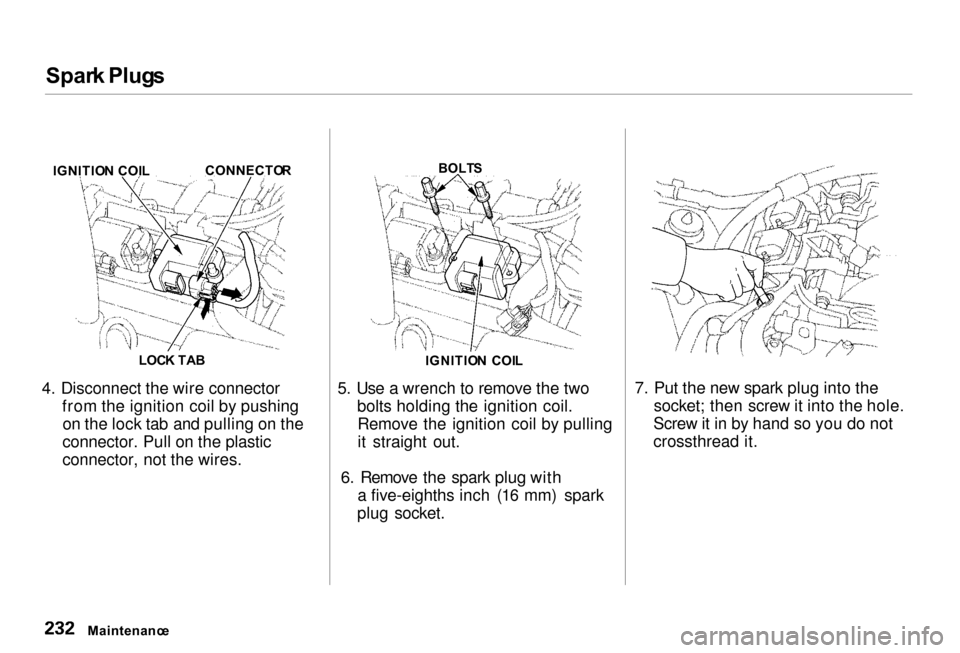
4. Disconnect the wire connector from the ignition coil by pushingon the lock tab and pulling on the
connector. Pull on the plastic
connector, not the wires. 5. Use a wrench to remove the two
bolts holding the ignition coil.Remove the ignition coil by pulling
it straight out.
6. Remove the spark plug with a five-eighths inch (16 mm) spark
plug socket. 7. Put the new spark plug into the
socket; then screw it into the hole.
Screw it in by hand so you do not
crossthread it.
Maintenanc e
IGNITIO
N COI L CONNECTO
R
LOC K TA B
BOLT
S
IGNITIO N COI L
Page 236 of 330
Spar
k Plug s
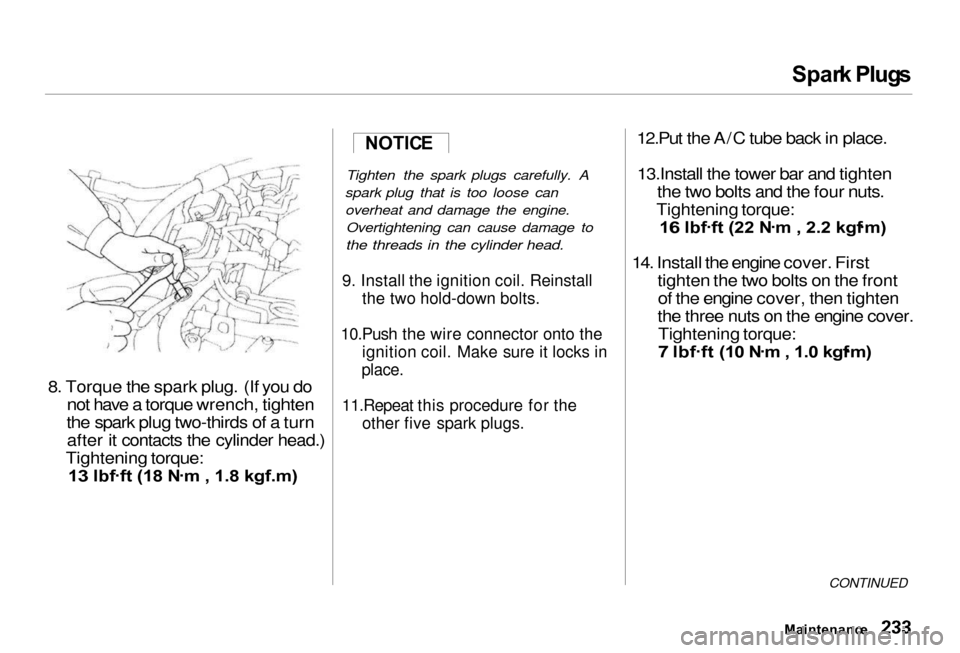
8. Torque th e spark plug . (If you do
not hav
e a torque wrench, tighten
the spark plug two-thirds of a turn after it contacts the cylinder head.)
Tightening torque:
13 lbf .
ft (18 N .
m , 1.8 kgf.m)
Tighten the spark plugs carefully. A
spark plug that is too loose can overheat and damage the engine. Overtightening can cause damage to
the threads in the cylinder head.
9. Install the ignition coil. Reinstall the two hold-down bolts.
10.Push the wire connector onto the ignition coil. Make sure it locks in
place.
11.Repeat this procedure for the other five spark plugs.
12.Put the A/C tube back in place.
13.Install the tower bar and tighten the two bolts and the four nuts.
Tightening torque:
16 lbf .
ft (22 N .
m , 2.2 kgf .
m)
14. Install the engine cover. First
tighten th e two bolts on the front
of the engine cover, then tighten
the three nuts on the engine cover.
Tightening torque:
7 lbf .
ft (10 N .
m , 1.0 kgf .
m)
CONTINUED
Maintenanc e
NOTIC
E
Page 240 of 330
Wipe
r Blade s
Check the condition of the wiper
blades at least every six months. Look for signs of cracking in the
rubber, or areas that are getting
hard. Replace the blades if you find
these signs, or they leave streaks and unwiped areas when used.
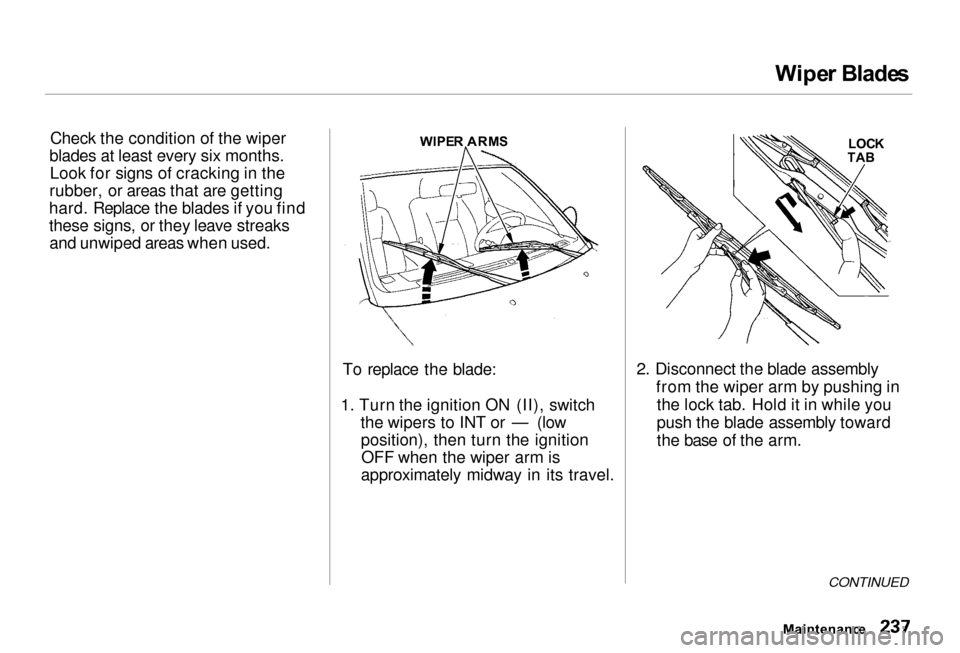
To replace the blade:
1. Turn the ignition ON (II), switch the wipers to INT or — (lowposition), then turn the ignitionOFF when the wiper arm is
approximately midway in its travel. 2. Disconnect the blade assembly
from the wiper arm by pushing inthe lock tab. Hold it in while you
push the blade assembly toward
the base of the arm.
CONTINUED
Maintenanc e
WIPE
R ARM S
LOCK
TA B
Page 241 of 330
Wipe
r Blade s
Wipe r Blade s
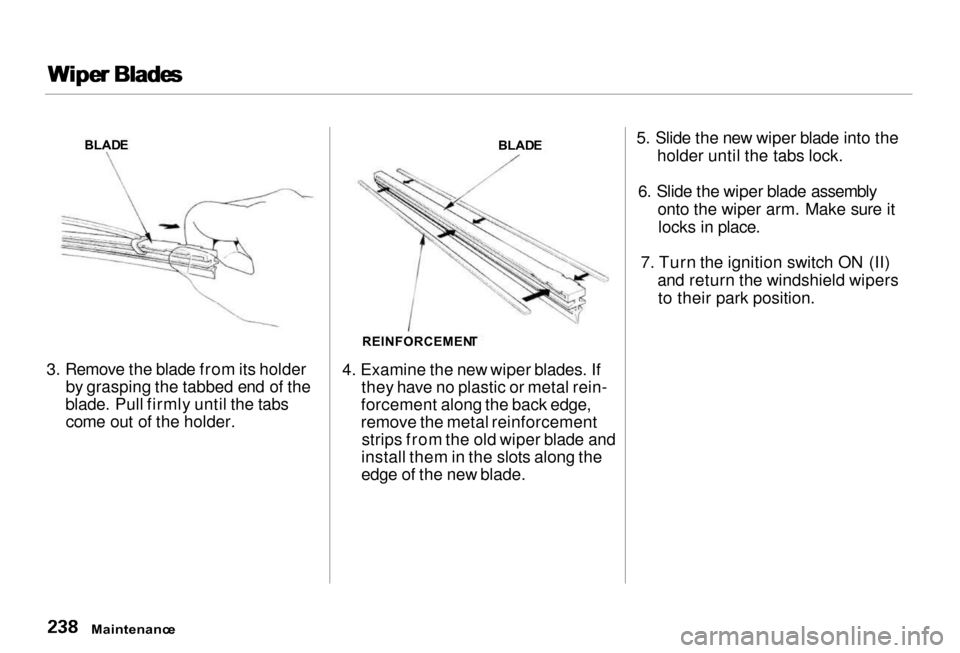
3. Remove the blade from its holder by grasping the tabbed end of the
blade. Pull firmly until the tabs come out of the holder. 4. Examine the new wiper blades. If
they have no plastic or metal rein-
forcement along the back edge,
remove the metal reinforcement strips from the old wiper blade and
install them in the slots along the
edge of the new blade. 5. Slide the new wiper blade into the
holder until the tabs lock.
6. Slide the wiper blade assembly onto the wiper arm. Make sure itlocks in place.
7. Turn the ignition switch ON (II) and return the windshield wipersto their park position.
Maintenanc e
BLAD
E
BLADE
REINFORCEMEN T
Page 274 of 330
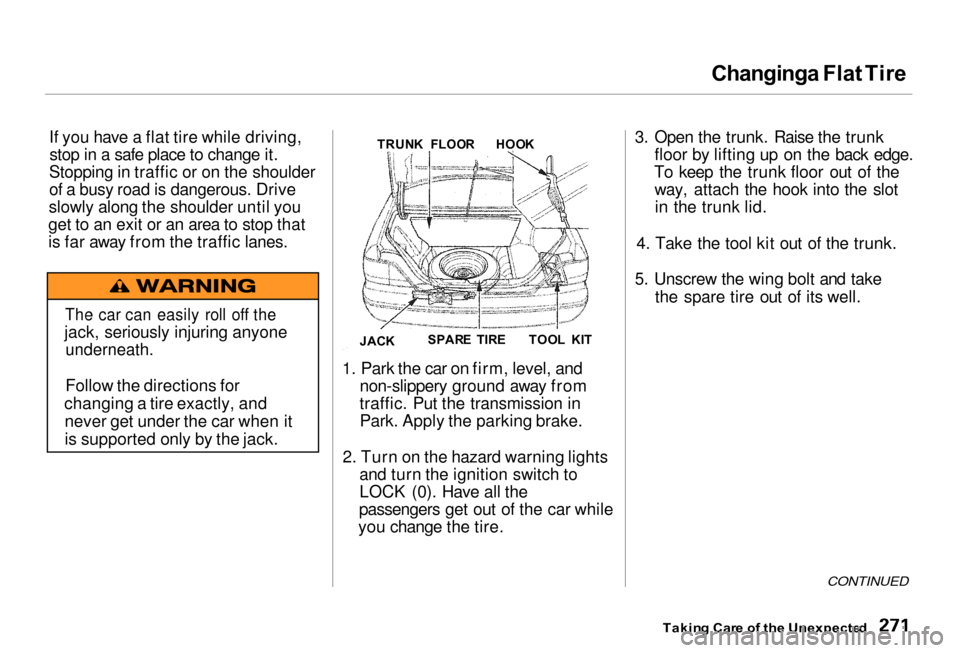
Changing
a Flat Tir e
If you have a flat tire while driving, stop in a safe place to change it.
Stopping in traffic or on the shoulder
of a busy road is dangerous. Drive
slowly along the shoulder until you
get to an exit or an area to stop that
is far away from the traffic lanes.
1. Park the car on firm, level, andnon-slippery ground away from
traffic. Put the transmission in Park. Apply the parking brake.
2. Turn on the hazard warning lights and turn the ignition switch to
LOCK (0). Have all the
passengers get out of the car while
you change the tire. 3. Open the trunk. Raise the trunk
floor by lifting up on the back edge.
To keep the trunk floor out of the way, attach the hook into the slotin the trunk lid.
4. Take the tool kit out of the trunk.
5. Unscrew the wing bolt and take the spare tire out of its well.
CONTINUED
Takin g Car e o f th e Unexpecte d
The car can easily roll off the
jack, seriously injuring anyone
underneath.
Follow the directions for
changing a tire exactly, and never get under the car when it
is supported only by the jack. TRUN
K FLOO R
HOO K
TOO L KI T
SPAR E TIR E
JAC K
Page 279 of 330
Changin
g a Fla t Tire , I f You r Engin e Won' t Star t
19. Slip the hole at the top of the jack over the bracket in the trunk well.
Turn the jack's end bracket to lock
it in place. Store the tool kit back
in its place.
20. Unclip the hook from the trunk lid and lower the trunk floor.
21. Store the center cap and spacer
basket i
n the trunk. Make sure the
center cap will
not get scratched
or damaged.
22. Close th
e trunk lid. I
f You r
Engin
e Won' t Star t
Diagnosing why your engine won't start falls into two areas, depending
on what you hear when you turn the
key to START (III): You hear nothing, or almost
nothing. The engine's starter
motor does not operate at all, or
operates very slowly. You can hear the starter motor
operating normally, or the starter
motor sounds like it is spinning
faster than normal, but the engine does not start up
and run. Nothin
g Happen s
o
r th e Starte r
Moto r Operate s Ver y Slowl y
When you turn the ignition switch to START (III), you do not hear the
normal noise of the engine trying to
start. You may hear a clicking sound
or series of clicks, or nothing at all.Check these things:
Your car has the ImmobilizerSystem. You should use a
properly-coded master or valet key
to start the engine (see page 78).
A key that is not properly coded will cause the immobilizer systemindicator in the dash panel to blinkrapidly. Check the transmission interlock.
The transmission must be in Park or Neutral or the starter will not
operate.
Takin g Car e o f th e Unexpecte d
Loose items can fly around the
interior in a crash and could
seriously injure the occupants.
Store the wheel, jack and tools
securely before driving.