lock Acura RL 2000 3.5 Workshop Manual
[x] Cancel search | Manufacturer: ACURA, Model Year: 2000, Model line: RL, Model: Acura RL 2000Pages: 330, PDF Size: 4.53 MB
Page 190 of 330
Th
e Brakin g Syste m
Important Safety Reminders
AB S doe s no t reduc e th e tim e o r
distanc e i t take s t o sto p th e car , it
only helps with steering control
during braking. You should always
maintain a safe following distance
from other vehicles.
AB S wil l no t preven t a ski d tha t
result s fro m changin g directio n
abruptly , such as trying to take a
corner too fast or making a sudden
lane change. Always drive at a safe,
prudent speed for the road and
weather conditions.
AB S canno t preven t a los s o f
stability . Always steer moderately
when you are braking hard. Severe or sharp steering wheel movement
can still cause your car to veer into
oncoming traffic or off the road. A
vehicl e wit h AB S ma y requir e a
longe r distanc e t o sto p on loose or
uneven surfaces, such as gravel or snow, than a vehicle without anti-
lock. Slow down and allow a greater distance between vehicles under
those conditions.
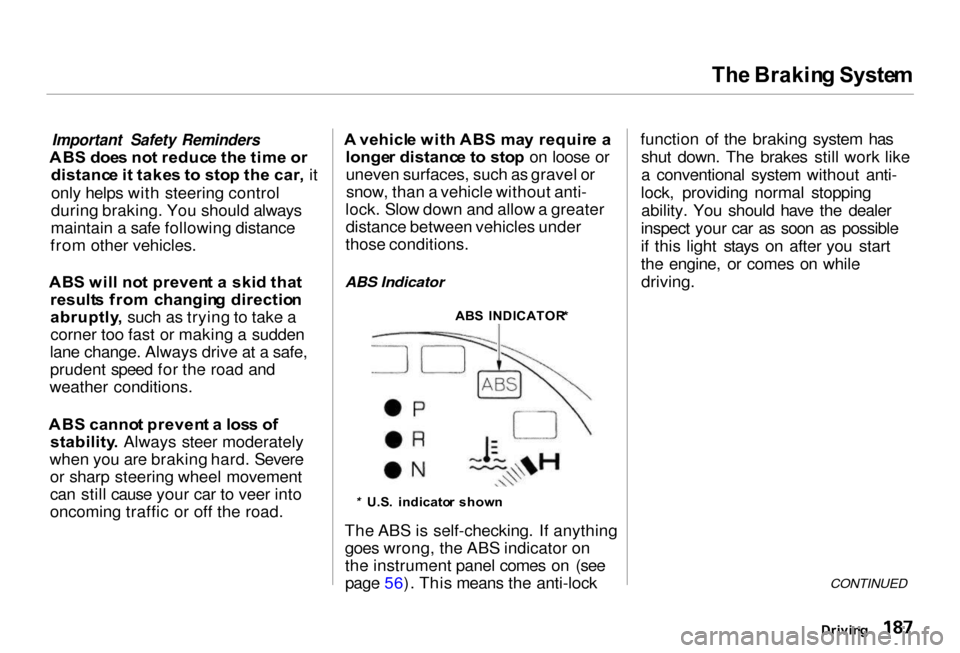
ABS Indicator
* U.S . indicato r show n
The ABS is self-checking. If anything goes wrong, the ABS indicator on
the instrument panel comes on (see
page 56). This means the anti-lock function of the braking system has
shut down. The brakes still work like
a conventional system without anti-
lock, providing normal stopping ability. You should have the dealer
inspect your car as soon as possible
if this light stays on after you start
the engine, or comes on while driving.
CONTINUED
Drivin g
AB
S INDICATOR *
Page 191 of 330

Th
e Brakin g Syste m
If the ABS indicator and the brake system indicator come on together,
and the parking brake is fully
released, the front-to-rear braking distribution system may also shut
down.
Test your brakes as instructed on page 285 . If the brakes feel normal,drive slowly and have your car
repaired by your dealer as soon as
possible. Avoid sudden hard braking
which could cause the rear wheels to lock up and possibly lead to a loss of
control.
The VSA system indicator may come on along with the ABS indicator if
there is a problem with the anti-lock
brake system.
Driving
Page 196 of 330
Drivin
g in Ba d Weathe r
Visibilit y — Being able to see
clearly in all directions and being
visible to other drivers are important in all weather conditions. This is
more difficult in bad weather. To be seen more clearly during daylight
hours, turn on your headlights.
Inspect your windshield wipers and
washers frequently. Keep the wind- shield washer reservoir full of the
proper fluid. Have the windshield
wiper blades replaced if they start to streak the windshield or leave parts
unwiped. Use the defroster and air conditioning to keep the windows
from fogging up on the inside (see
pages 126 and 131). Tractio
n — Check your tires
frequently for wear and proper pressure. Both are important in
preventing "hydroplaning" (loss of
traction on a wet surface). In the
winter, mount snow tires on all four
wheels for the best handling.
Watch road conditions carefully, they can change from moment to
moment. Wet leaves can be as slip-
pery as ice. "Clear" roads can have
patches of ice. Driving conditions can be very hazardous when the
outside temperature is near freezing.
The road surface can become covered with areas of water puddles
mixed with areas of ice, so your
traction can change without warning.
Be careful when downshifting. If
traction is low, you can lock up the drive wheels for a moment and cause
a skid. Be very cautious when passing, or
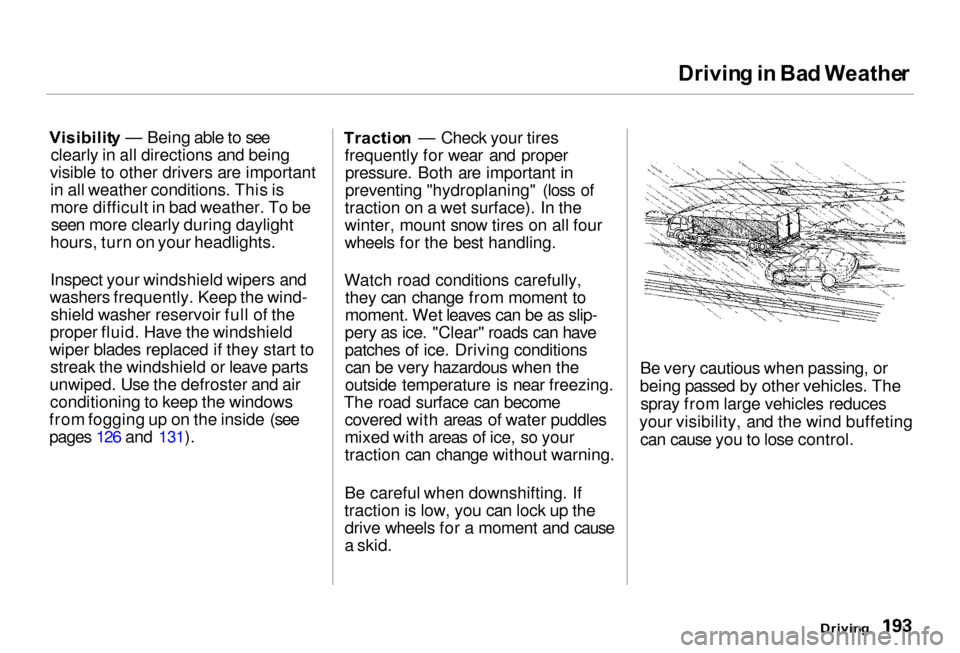
being passed by other vehicles. The spray from large vehicles reduces
your visibility, and the wind buffeting can cause you to lose control.
Driving
Page 223 of 330
Coolin
g Syste m
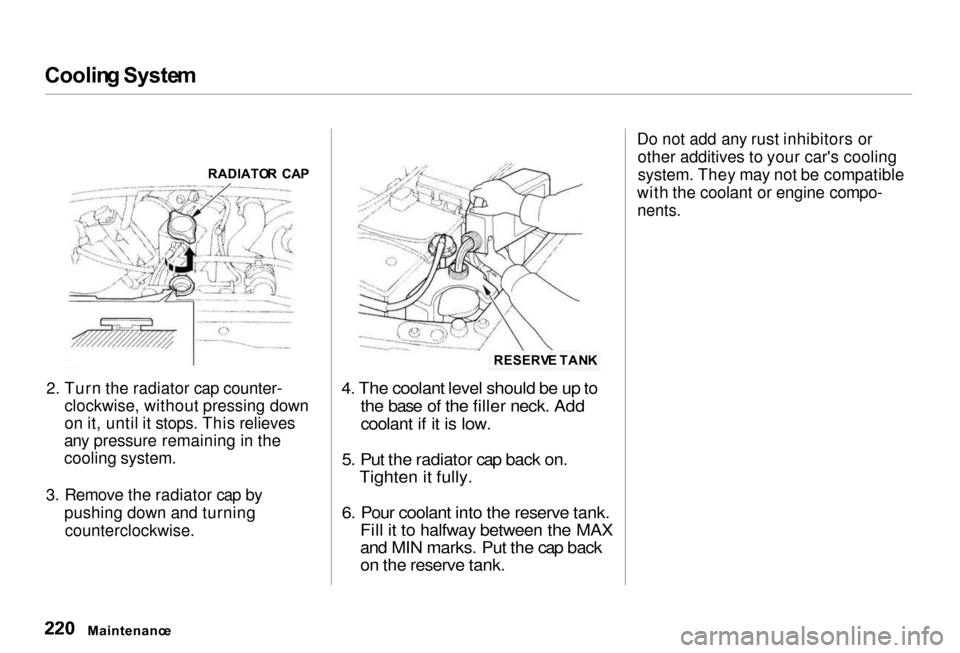
2. Turn the radiator cap counter-
clockwise, without pressing down
on it, until it stops. This relieves
any pressure remaining in the
cooling system.
3. Remove the radiator cap by
pushing down and turning
counterclockwise.
4. The coolant level should be up to
the base of the filler neck. Add
coolant if it is low.
5. Put the radiator cap back on.
Tighten it fully.
6. Pour coolant into the reserve tank.
Fill it to halfway between the MAX
and MIN marks. Put the cap back
on the reserve tank.
Do not add any rust inhibitors or
other additives to your car's cooling
system. They may not be compatible
with the coolant or engine compo-
nents.
Maintenanc e
RADIATO
R CA P
RESERVE TAN K
Page 225 of 330
Coolin
g Syste m
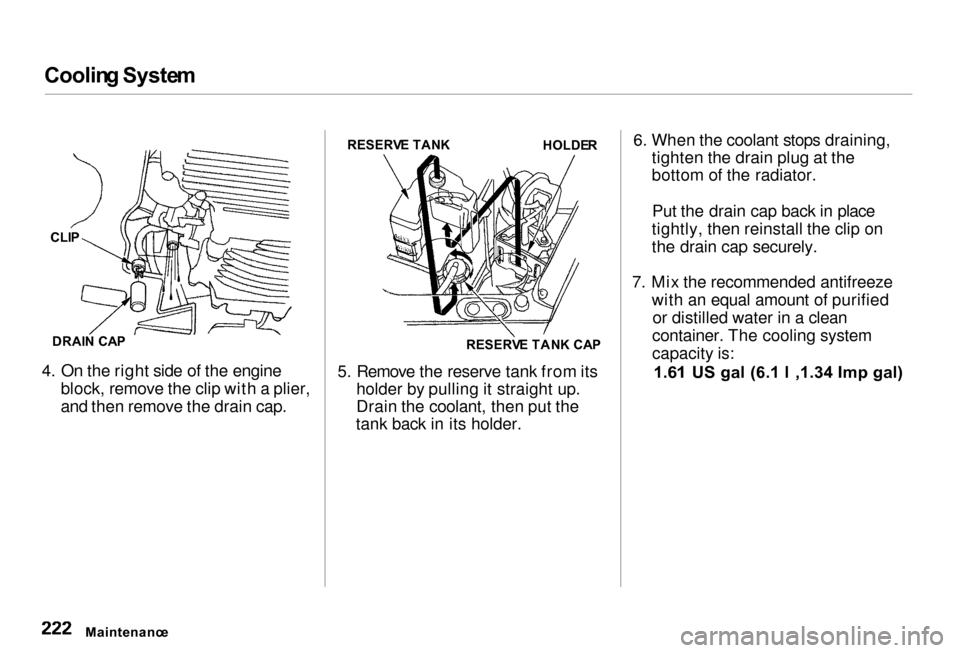
4. On the right side of the engine block, remove the clip with a plier,
and then remove the drain cap. 5. Remove the reserve tank from its
holder by pulling it straight up.
Drain the coolant, then put the
tank back in its holder. 6. When the coolant stops draining,
tighten the drain plug at the
bottom of the radiator.
Put the drain cap back in place
tightly, then reinstall the clip on
the drain cap securely.
7. Mix the recommended antifreeze with an equal amount of purifiedor distilled water in a clean
container. The cooling system
capacity is:
1.61 US gal (6.1 l ,1.34 Imp gal)
Maintenanc e
CLI
P
DRAI N CA P RESERV
E TAN K
HOLDER
RESERV E TAN K CA P
Page 232 of 330

Powe
r Steering , Hoo d Latch , Ai r Cleane r Elemen t
Always use Genuine Honda Power Steering Fluid. If it is not available,
you may use another power steering fluid as an emergency replacement.However, continued use can causeincreased wear and poor steering in
cold weather. Have the powersteering system flushed and refilled
with Honda PSF as soon as possible.
A low power steering fluid level can indicate a leak in the system. Check
the fluid level frequently and have
the system inspected as soon as
possible.
Turning the steering wheel to full left
or right lock and holding it there can
damage the power steering pump.
Hoo d Latc h
Clean the hood latch assembly with a
mild cleaner, then lubricate it with a
multipurpose grease. Lubricate all
the moving parts (as shown),
including the pivot. Follow the time
and distance recommendations in
the Maintenance Schedule. If you are not sure how to clean and grease
the latch, contact your Acura dealer.
Ai
r Cleane r Elemen t
The air cleaner element should be cleaned or replaced according to the
time and distance recommendations
in the maintenance schedule.
Cleaning (Severe Conditions)
Clean the air cleaner element by
blowing compressed air through it in
the opposite direction to normal air
flow. If you do not have actcess to
compressed air (such as a service station), ask your Acura dealer to do
this service.
Follow the replacement procedure
for removal and reinstallation.
CONTINUED
Maintenanc e
PIVOT
S
LATC H
ASSEMBL Y
NOTIC E
Page 235 of 330
Spar
k Plug s
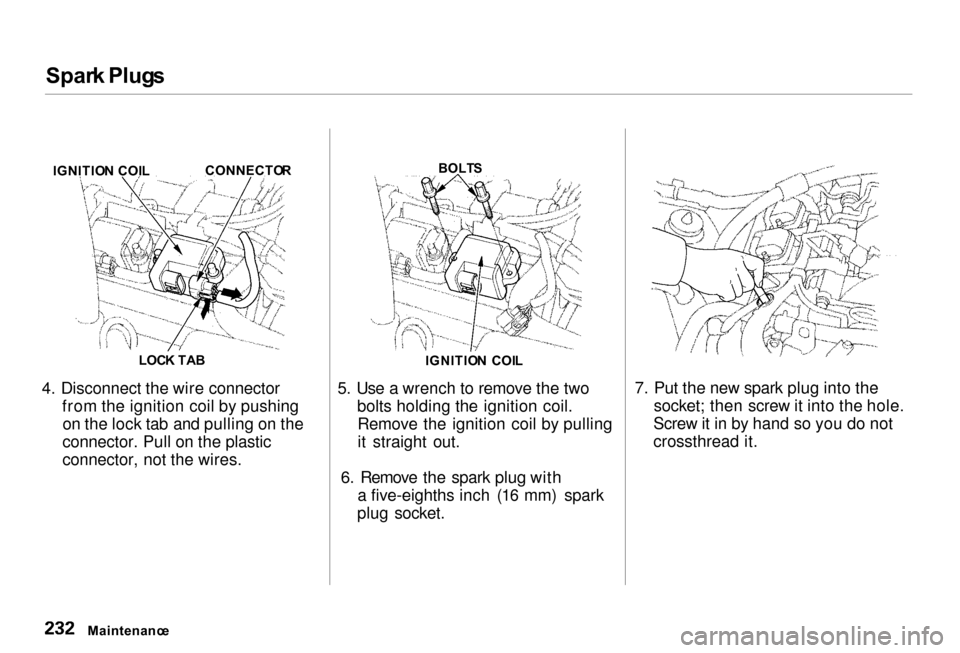
4. Disconnect the wire connector from the ignition coil by pushingon the lock tab and pulling on the
connector. Pull on the plastic
connector, not the wires. 5. Use a wrench to remove the two
bolts holding the ignition coil.Remove the ignition coil by pulling
it straight out.
6. Remove the spark plug with a five-eighths inch (16 mm) spark
plug socket. 7. Put the new spark plug into the
socket; then screw it into the hole.
Screw it in by hand so you do not
crossthread it.
Maintenanc e
IGNITIO
N COI L CONNECTO
R
LOC K TA B
BOLT
S
IGNITIO N COI L
Page 236 of 330
Spar
k Plug s
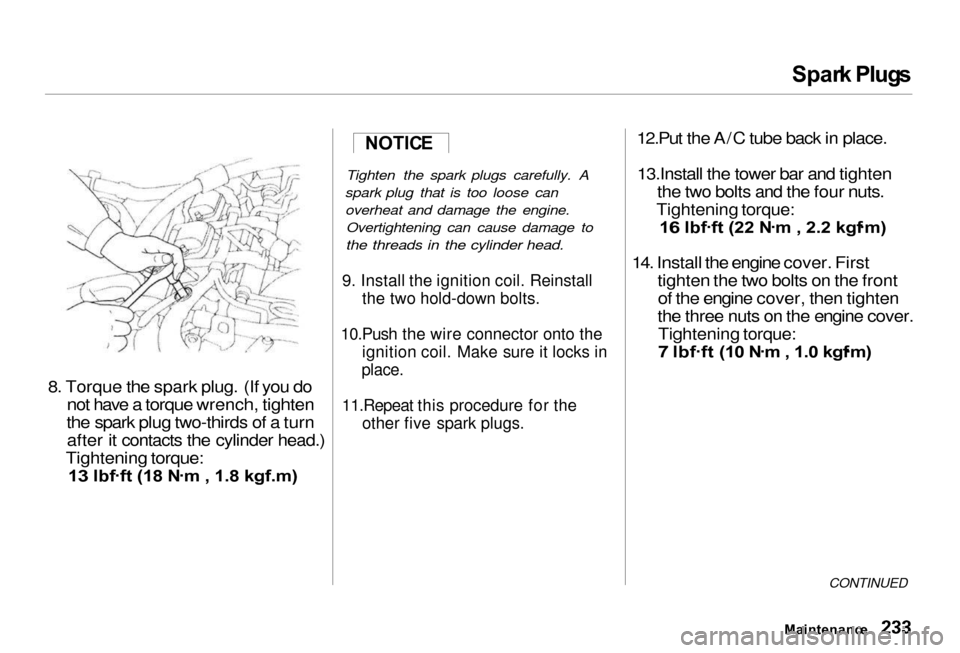
8. Torque th e spark plug . (If you do
not hav
e a torque wrench, tighten
the spark plug two-thirds of a turn after it contacts the cylinder head.)
Tightening torque:
13 lbf .
ft (18 N .
m , 1.8 kgf.m)
Tighten the spark plugs carefully. A
spark plug that is too loose can overheat and damage the engine. Overtightening can cause damage to
the threads in the cylinder head.
9. Install the ignition coil. Reinstall the two hold-down bolts.
10.Push the wire connector onto the ignition coil. Make sure it locks in
place.
11.Repeat this procedure for the other five spark plugs.
12.Put the A/C tube back in place.
13.Install the tower bar and tighten the two bolts and the four nuts.
Tightening torque:
16 lbf .
ft (22 N .
m , 2.2 kgf .
m)
14. Install the engine cover. First
tighten th e two bolts on the front
of the engine cover, then tighten
the three nuts on the engine cover.
Tightening torque:
7 lbf .
ft (10 N .
m , 1.0 kgf .
m)
CONTINUED
Maintenanc e
NOTIC
E
Page 240 of 330
Wipe
r Blade s
Check the condition of the wiper
blades at least every six months. Look for signs of cracking in the
rubber, or areas that are getting
hard. Replace the blades if you find
these signs, or they leave streaks and unwiped areas when used.
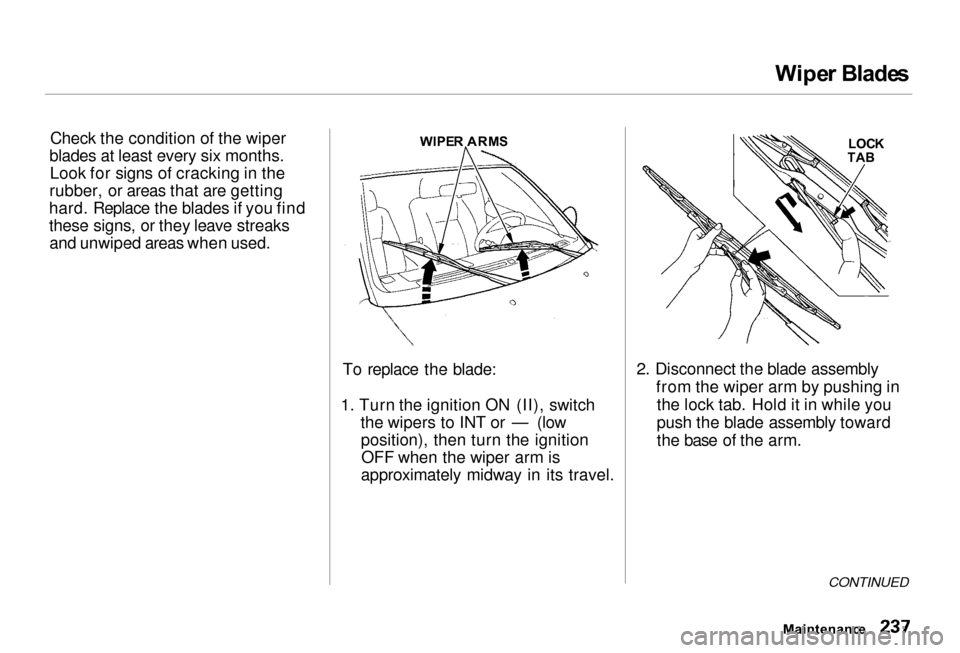
To replace the blade:
1. Turn the ignition ON (II), switch the wipers to INT or — (lowposition), then turn the ignitionOFF when the wiper arm is
approximately midway in its travel. 2. Disconnect the blade assembly
from the wiper arm by pushing inthe lock tab. Hold it in while you
push the blade assembly toward
the base of the arm.
CONTINUED
Maintenanc e
WIPE
R ARM S
LOCK
TA B
Page 241 of 330
Wipe
r Blade s
Wipe r Blade s
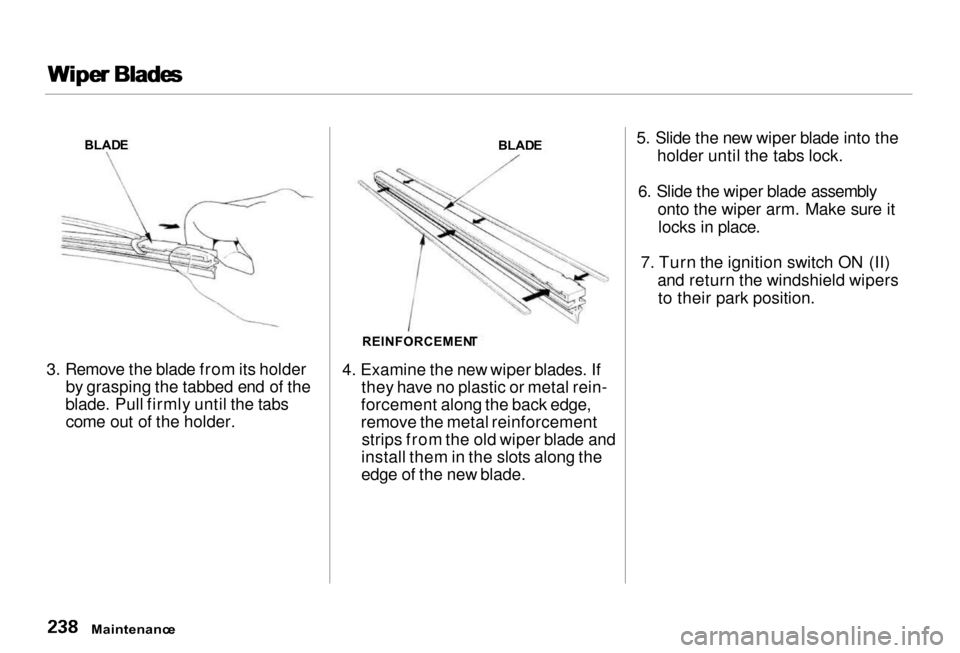
3. Remove the blade from its holder by grasping the tabbed end of the
blade. Pull firmly until the tabs come out of the holder. 4. Examine the new wiper blades. If
they have no plastic or metal rein-
forcement along the back edge,
remove the metal reinforcement strips from the old wiper blade and
install them in the slots along the
edge of the new blade. 5. Slide the new wiper blade into the
holder until the tabs lock.
6. Slide the wiper blade assembly onto the wiper arm. Make sure itlocks in place.
7. Turn the ignition switch ON (II) and return the windshield wipersto their park position.
Maintenanc e
BLAD
E
BLADE
REINFORCEMEN T