lights Acura RL 2001 3.5 Owner's Guide
[x] Cancel search | Manufacturer: ACURA, Model Year: 2001, Model line: RL, Model: Acura RL 2001Pages: 333, PDF Size: 4.28 MB
Page 102 of 333

Mirrors
Keep the inside and outside mirrors
clean and adjusted for best visibility.
Be sure to adjust the mirrors before
you start driving.
The inside mirror has an automaticanti-glare mechanism. When the
AUTO switch is pushed in, the indicator will light. When the mirrorsenses light from the headlights of
the car behind you, the mirror surface will automatically darken to
reduce the glare. Adjusting the Power Mirrors
Adjust the outside mirrors with the adjustment button on the driver's
door armrest:
1. Turn the ignition switch ON (II).
2. Move the selector switch to L (driver's side) or R (passenger's
side).
CONTINUED
Instruments and Controls
INDICATOR
SENSOR
AUTO SWITCH SELECTOR SWITCH
Page 107 of 333

Seat Heaters, Ski Sleeve
The HI or LO indicator lights and remains lit until you turn it off by
pushing the opposite side of theswitch lightly. The indicator will turn
off.
In HI, the heater turns off when the
seat gets warm, and turns back on
after the seat's temperature drops. It
continues to cycle as long as you
leave it set on HI. The HI indicator
remains lit as a reminder that you
have the heater on.
In LO, the heater runs continuously.It does not cycle with temperature
changes.
Because of the sensors for the side
airbag system, there is no heater in
the passenger's seat-back. Follow these precautions whenever
you use the seat heaters: Use the HI setting only to heat the
seats quickly. Select the LO
setting when the seats feel warm.
The HI setting draws large amounts of current from the
battery. Do not use the seat heaters, even
on the LO setting, if the engine is
left idling for an extended period.
They can weaken the battery, causing hard starting.
Ski Sleeve
The ski sleeve allows you to carry skis or other long objects safely
without soiling or damaging the
interior of your car. It attaches to the
trunk pass-through.
KNOB
To use the ski sleeve: 1. Pull down the rear seat armrest. Open the trunk pass-through
cover by sliding the knob down-
ward and pulling on the cover.
Instruments and Controls
LID
Page 110 of 333

Power Windows, Moonroof
The master control panel also con- tains these extra features:
AUTO — To open the driver's window fully, push the windowswitch firmly down and release it.
The window automatically goes all the way down. To stop the window
from going all the way down, pull back on the window switch briefly.
To open the driver's window only partially, push the window switchdown lightly and hold it. The window
will stop as soon as you release the
switch.
The AUTO function only works to lower the driver's window. To raise
the window, you must pull back on
the window switch and hold it until the window reaches the desired
position.
The MAIN switch controls power to
the passengers'windows. With thisswitch off, the passengers'windows
cannot be raised or lowered. The
MAIN switch does not affect the driv-
er's window. Keep the MAIN switch
off when you have children in the car
so they do not injure themselves by
operating the windows unintentional-
ly. The lights inside the switches
come on when you turn the parking
lights or headlights on.
The power window system has a key- off delay function. The windows willstill operate for up to ten minutes
after you turn off the ignition.
Opening either front door cancels
the delay function. You must turn
the ignition switch ON (II) again
before you can raise or lower the
windows. Moonroof
There are two switches on the ceiling near the front ceiling light.
The ignition switch must be ON (II).
To open the moonroof, pull the OPEN/CLOSE switch backward and
hold it until the moonroof reaches
the desired position.
CONTINUED
Instruments and Controls
OPEN/CLOSE
SWITCH
Page 121 of 333

Ceiling Lights
Both front and rear ceiling lights contain a main light as well as twospotlights.
The front ceiling light has a three- position switch. With the switch in
the OFF position (far left), the main
lights do not come on. In the center
position, the main lights come on
when you open any door. After all doors are closed tightly, they dim
slightly then fade out in about 10
seconds. In the ON position (far right), the main lights stay on
continuously.
Turn on the spotlights in the front and rear ceiling lights by pushing the
grey button next to each light. Push
the button again to turn it off. You
can use the front spotlights at all
times. The rear spotlights only light
when the parking lights or head-
lights are on.
On cars with automatic lighting
With the light switch in the AUTO
position, you can use the rearspotlights only when the headlights
turn on automatically.
Instruments and Controls
OFF
ON
FRONT
REAR
Page 122 of 333

Courtesy Lights
In addition to the ceiling lights, your
Acura has courtesy lights in each door and the ignition switch.
The door courtesy lights come on whenever you open any door. After all doors are closed tightly, they dim
slightly then fade out in about 10
seconds.
Even if the door is open, the lights
will turn off after three minutes
when the key is not in the ignition switch or the ignition switch is in the
LOCK (0) or ACCESSORY (I)
position, and the light switch is in the
off position.
The door courtesy lights and ceiling lights (with the switch in the center
position) come on when you unlock
the door with the key, lock tab on
the driver's door, master door lockswitch, or remote transmitter (see
page 82). If you relock the driver's door or close the driver's door with
the key in the ignition switch, the lights turn off immediately.Otherwise, they remain on, then fade
out in about 10 seconds. The door courtesy lights and ceiling
lights (with the switch in the center
position) also come on when youremove the key from the ignitionswitch. If you do not open a door,
they stay on, then fade out in about
10 seconds.
The courtesy light in the ignition switch comes on when you open the
driver's door. It remains on about 10 seconds after the door is closed.
Instruments and Controls
Page 144 of 333

Audio System
Audio System Lighting
You can use the instrument panel brightness control dial to adjust the il-
lumination of the audio system (see
page 66). The audio system illuminates when the parking lightsare on, even if the radio is turned off.
Radio Frequencies and Reception
For information, See page 149.
Operating the Cassette Player
The ignition switch must be in
ACCESSORY (I) or ON (II). Make sure the tape opening on the
cassette is facing to the right, then
insert the cassette most of the way
into the slot. The system will pull it
in the rest of the way, and begin to
play.
The tape direction indicator will light to show you which side of the cassette is playing. The indicates
the side you inserted facing upward is now playing. If you want to play
the other side, press the PROG/ PLAY button.
Dolby noise reduction turns on when
you insert a cassette. If the tape was not recorded with Dolby noise reduc-
tion, turn it off by pressing the
button.
When the system reaches the end of
the tape, it will automatically reversedirection and play the other side. If
you want to remove the cassette
from the drive, press the EJECT button.
If you turn the system off while a
tape is playing, either with the PWR/ VOL knob or by turning off the
ignition, the cassette will remain in
the drive. When you turn the system
back on, the tape will begin playing
where it left off.
To switch to the radio or CD changer while listening to a tape,
press the AM/FM or CD/TAPE but-
ton. To change back to the cassette
player, press the CD/TAPE button.
Comfort and Convenience Features
Page 154 of 333

Audio System
Audio System Lighting
You can use the instrument panel
brightness control dial to adjust the il- lumination of the audio system (seepage 66). The audio system
illuminates when the parking lights
are on, even if the radio is turned off.
Radio Frequencies
Your Acura's radio can receive the
complete AM and FM bands.
Those bands cover these frequen-
cies:
AM band:
530 to 1,710 kilohertz
FM band:
87.7 to 107.9 megahertz
Radio stations on the AM band are
assigned frequencies at least ten
kilohertz apart (530, 540, 550).
Stations on the FM band are
assigned frequencies at least 0.2
megahertz apart (87.9, 88.1, 88.3). Stations must use these exact
frequencies. It is fairly common for
stations to round-off the frequency in
their advertising, so your radio could
display a frequency of 100.9 even
though the announcer may identity
the station as "FM101."
Radio Reception How well your Acura's radio receives
stations is dependent on many
factors, such as the distance from
the station's transmitter, nearby
large objects, and atmospheric
conditions.
A radio station's signal gets weaker as you get farther away from itstransmitter. If you are listening to an
AM station, you will notice the sound volume becoming weaker, and the station drifting in and out. If you are
listening to an FM station, you will
see the stereo indicator flickering off
and on as the signal weakens.
Eventually, the stereo indicator will go off and the sound will fade
completely as you get out of range of
the station's signal.
Driving very near the transmitter of
a station that is broadcasting on a frequency close to the frequency of
the station you are listening to can
also affect your radio's reception.
You may temporarily hear both stations, or hear only the station you
are close to.
Comfort and Convenience Features
CONTINUED
Page 168 of 333
Security System
The security system helps to protect your car and valuables from theft.
The horn sounds and a combination of headlights, parking lights, side
marker lights and taillights flashes if someone attempts to break into your
car or remove the radio. This alarm
continues for two minutes, then the system resets. To reset an alarming
system before the two minutes have
elapsed, unlock either front door
with the key or the remote
transmitter.
The security system sets auto- matically fifteen seconds after you
lock the doors, hood, and trunk. For
the system to activate, you must lock
the doors from the outside with the
key, lock tab, door lock switch, or
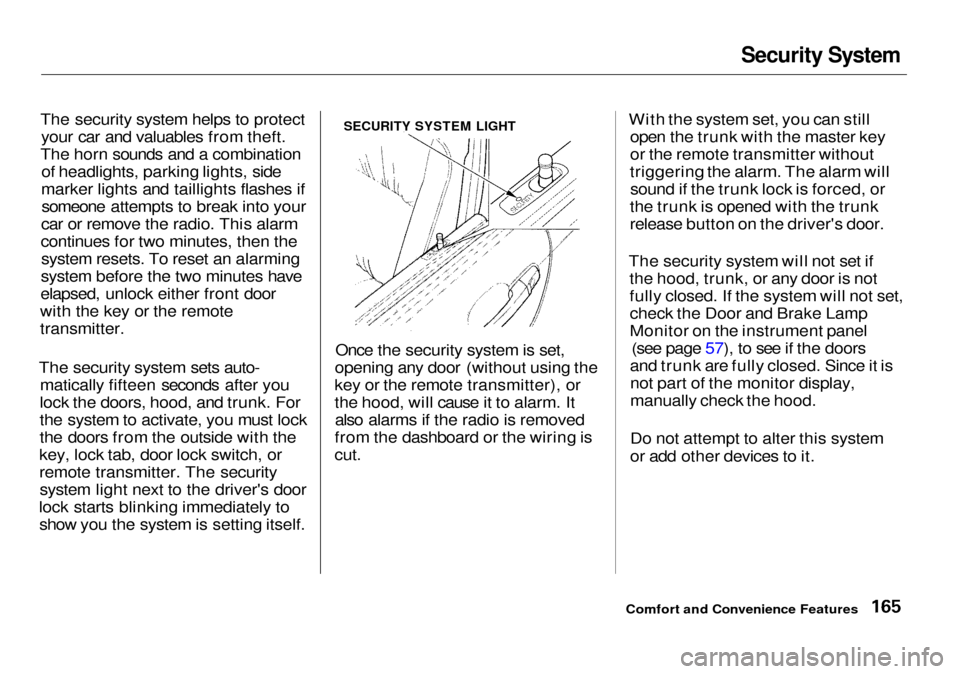
remote transmitter. The security system light next to the driver's door
lock starts blinking immediately to show you the system is setting itself. Once the security system is set,
opening any door (without using the
key or the remote transmitter), or
the hood, will cause it to alarm. It also alarms if the radio is removed
from the dashboard or the wiring is
cut.
With the system set, you can still
open the trunk with the master key
or the remote transmitter without
triggering the alarm. The alarm will sound if the trunk lock is forced, or
the trunk is opened with the trunk
release button on the driver's door.
The security system will not set if the hood, trunk, or any door is not
fully closed. If the system will not set,check the Door and Brake Lamp
Monitor on the instrument panel (see page 57), to see if the doors
and trunk are fully closed. Since it is not part of the monitor display,
manually check the hood.
Do not attempt to alter this system
or add other devices to it.
Comfort and Convenience Features
SECURITY SYSTEM LIGHT
Page 177 of 333

Accessories and Modifications
Modifying your car, or installing
some non-Acura accessories, can
make your car unsafe. Before you
make any modifications or add any
accessories, be sure to read the
following information.
Accessories
Your dealer has Genuine Acura accessories that allow you to
personalize your car. These accessories have been designed and
approved for your car, and are
covered by warranty.
Non-Acura accessories are usuallydesigned for universal applications.
Although aftermarket accessories may fit on your car, they may not
meet factory specifications, andcould adversely affect your car's
handling and stability. (See "Modifications" on the page 175 for
additional information.) When properly installed, cellular
phones, alarms, two-way radios, and
low-powered audio systems should not interfere with your car's
computer-controlled systems, such
as the SRS and anti-lock brake
system.
However, if electronic accessories
are improperly installed, or exceed
your car's electrical system capacity, they can interfere with the operationof your car, or even cause the
airbags to deploy.
Before installing any accessory:
Make sure the accessory does not
obscure any lights, or interfere
with proper car operation or
performance.
Be sure electronic accessories do
not overload electrical circuits
(see page 292 ). Have the installer contact your
Acura dealer for assistance before
installing any electronic accessory.
If possible, have your dealer inspect
the final installation.
Before Driving
Improper accessories or
modifications can affect your
car's handling, stability and performance, and cause a
crash in which you can be hurt
or killed.
Follow all instructions in this
owner's manual regarding
accessories and modifications.
Page 183 of 333

Preparing to Drive
You should do the following checks and adjustments every day before
you drive your car.
1. Make sure all windows, mirrors, and outside lights are clean and
unobstructed. Remove frost, snow,or ice.
2. Check that the hood and trunk are
fully closed.
3. Visually check the tires. If a tire
looks low, use a gauge to check its
pressure.
4. Check that any items you may be
carrying with you inside are stored
properly or fastened down
securely.
5. Check the adjustment of the seat (see page 94 ).
6. Check the adjustment of the
inside and outside mirrors (see
page 99 ).
7. Check the adjustment of the
steering wheel (see page 7 1 ).
8. Make sure the doors are securely
closed and locked.
9. Fasten your seat belt. Check that
your passengers have fastened
their seat belts (see page 15 ).
10.Turn the ignition switch ON (II).
Check the indicator lights in the
instrument panel.
11.Start the engine (see page 181).
12.Check the gauges and indicator
lights in the instrument panel (see
page 53).
Driving