parking brake ACURA RL KA9 1996 Service User Guide
[x] Cancel search | Manufacturer: ACURA, Model Year: 1996, Model line: RL KA9, Model: ACURA RL KA9 1996Pages: 1954, PDF Size: 61.44 MB
Page 1157 of 1954
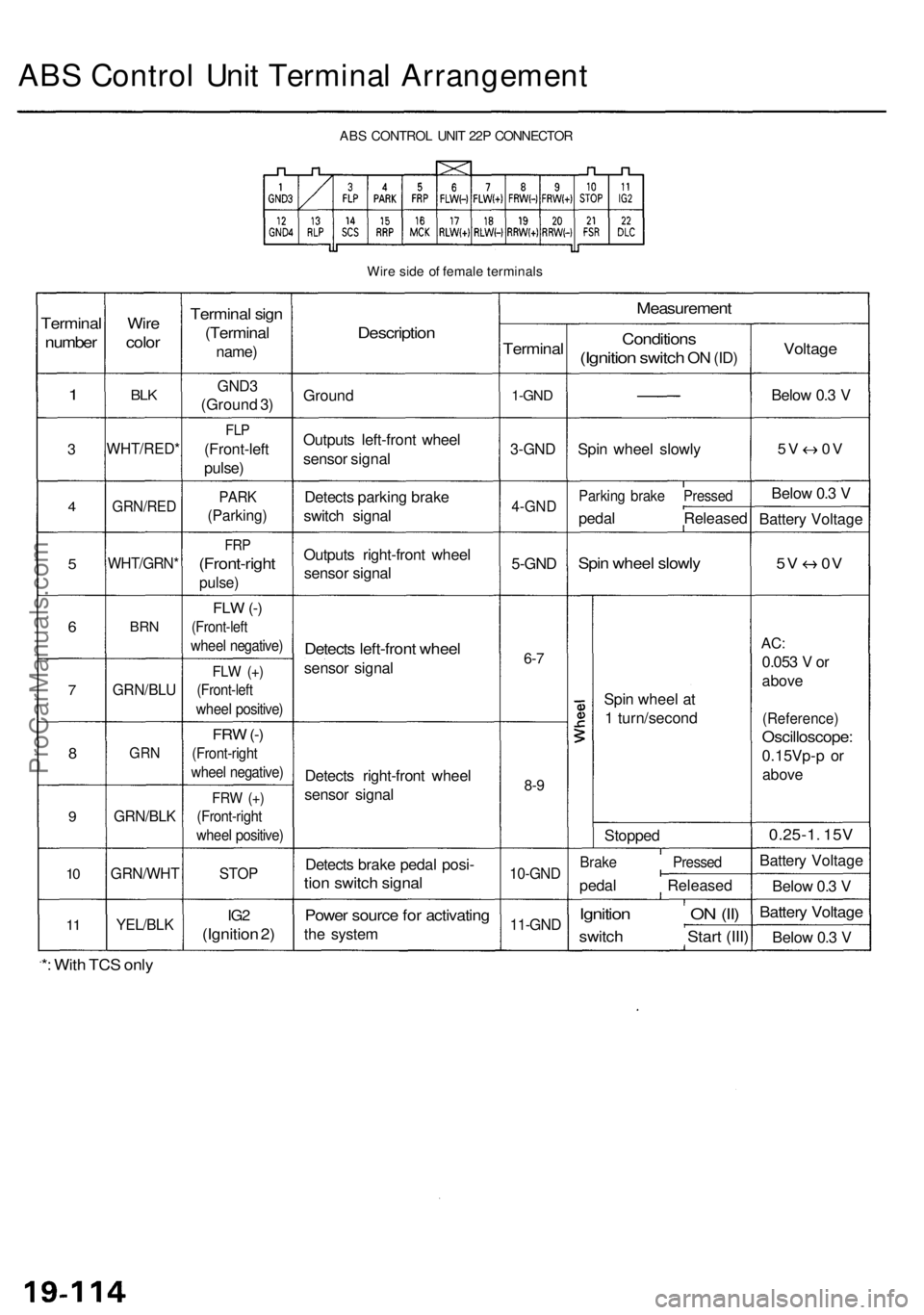
ABS Contro l Uni t Termina l Arrangemen t
ABS CONTRO L UNI T 22 P CONNECTO R
Wir e sid e o f femal e terminal s
Terminal
number
1
3
4
5
6
7
8
9
10
1 1
Wir e
colo r
BLK
WHT/RED *
GRN/RED
WHT/GRN *
BRN
GRN/BL U
GRN
GRN/BL K
GRN/WH T
YEL/BLK
Termina l sig n
(Termina l
name)
GND3
(Groun d 3 )
FL P
(Front-lef t
pulse )
PARK
(Parking )
FRP
(Front-righ t
pulse)
FLW (-)
(Front-lef t
wheel negative )
FLW (+ )
(Front-lef t
wheel positive )
FRW (-)
(Front-righ t
wheel negative )
FRW (+ )
(Front-righ t
wheel positive )
STOP
IG2
(Ignitio n 2 )
Descriptio n
Ground
Output s left-fron t whee l
senso r signa l
Detect s parkin g brak e
switc h signa l
Output s right-fron t whee l
senso r signa l
Detect s left-fron t whee l
senso r signa l
Detect s right-fron t whee l
senso r signa l
Detect s brak e peda l posi -
tion switc h signa l
Power sourc e fo r activatin g
the syste m
Measuremen t
Terminal
1-GND
3-GN D
4-GN D
5-GND
6-7
8- 9
10-GN D
11-GND
Condition s
(Ignition switch ON (ID )
Spi n whee l slowl y
Parkin g brak e Presse d
pedal Release d
Spin whee l slowl y
Spin whee l a t
1 turn/secon d
Stoppe d
Brake Presse d
pedal Release d
Ignition O N (II )
switc h Star t (III )
Voltag e
Below 0. 3 V
5 V 0 V
Below 0. 3 V
Batter y Voltag e
5V 0 V
AC:
0.05 3 V or
abov e
(Reference )
Oscilloscope :
0.15Vp-p o r
abov e
0.25-1 . 15 V
Batter y Voltag e
Belo w 0. 3 V
Batter y Voltag e
Below 0. 3 V
*: Wit h TC S onl y
ProCarManuals.com
Page 1196 of 1954

TCS CONTROL UNIT 20P CONNECTOR
Wire side of female terminals
VB: Battery Voltage
Terminal
number
1
2
4
5
6
9
10
11
12
13
14
15
16
17
20
Wire
color
BLK/YEL
GRN/RED
BLU
PNK/BLU
BLK/WHT
BLK
BRN/WHT
GRN/WHT
BLU
GRN/ORN
BLK/ORN
BRN/BLK
WHT/BLU
BLU/GRY
GRN
BRN
Terminal sign
(Terminal name)
IG1
(Ignition 1)
PARK
(Parking)
SCS
(Service check
signal)
STR-GND
(Steering ground)
AT-SHIFT
(AT shift)
FSR
(Fail-safe relay)
PMG
(Power motor
Ground)
VPM
(Voltage power
motor)
STOP
(Stop)
NEP (Engine
speed pulse)
BARO
(Barometric)
TC-FC
(Traction control
fuel cut)
LG2
(Logic ground 2)
STR-VCC (Steer-
ing power supply)
WARN2
(Warning 2)
SH-MOT
(Shield motor)
MOT +
(Motor +)
MOT-
(Motor -)
Description
Detects ignition switch
IG1 signal
Detects parking brake
switch signal
Detects service check
connector signal
(Diagnostic trouble
code indication)
Ground for the steering
angle sensor
Detects A/T shift posi-
tion signal
Drives fail-safe relay
Power ground for the
TCS control valve
actuator motor
Power source for the
TCS control valve
actuator motor
Detects brake pedal
position switch signal
Detects engine speed
signal
Detects barometric
sensor signal
TCS Fl, Fuel cut
(torque down) signal
Ground for the logic
circuit
Power source for the
steering angle sensor
Drives TCS indicator light
(The indicator light comes
on by the self-bias)
Shield for the TCS con-
trol valve actuator motor
Drives TCS control
valve actuator motor
Drives TCS control
valve actuator motor
Measurement
terminals
1-GND
2
3-GND
4-GND
5-GND
6-GND
9-GND
10-GND
11-GND
12-GND
13-GND
14-GND
15-GND
16-GND
17-GND
19-20
20-19
Voltage
Conditions
(Ignition Switch ON (II))
Depress the parking
brake pedal.
Release the parking
brake pedal.
SCS service connector
connected.
SCS service connector
disconnected.
Shift the transmission
to position, then
start the engine.
Start the engine.
Start the engine.
Brake pedal depressed.
Brake pedal released.
Engine idling
TCS is functioning,
(maximum fuel cut)
TCS is not functioning.
Indicator light ON
Indicator light OFF
TCS is functioning.
TCS is not functioning.
TCS is functioning.
TCS is not functioning.
Output
voltage
VB
Below 0.6 V
VB
0V
5V
Below 0.3V
About 4V
(5V 0V)
VB
1.5V
Below 0.3 V
0V
VB
VB
0V
About 6V
(12V
0V)
About 3 V
About 1.5V
About 4.5 V
(5 V,
PWM)
Below 0.3V
About 5 V
About 2 V
VB
VB
0V
VB
0VProCarManuals.com
Page 1197 of 1954

Troubleshooting Precautions
1. In any of these cases, the TCS indicator light may come on or stay on even the TCS system is normal.
The coolant temperature is 32°F (0°C) or below.
The parking brake is applied for more than 30 seconds while the vehicle is being driven.
The tires are not inflated to the specified pressure.
The wheel sensor signal is interrupted during driving at speeds of 6 mph (10 km/h) or above due to, for example, a
vehicle spinning.
The MAP sensor, the coolant temperature sensor, the ICM or the atmospheric pressure sensor system of the PGM-FI
system is faulty.
2. TCS does not function when the TCS indicator light is ON.
3. When both the TCS indicator light and the MIL are ON, troubleshoot the PGM-FI system first.
4. When both the TCS indicator light and the ABS indicator light are ON, troubleshoot the ABS first.
5. The DTC 4-9 (ABS down) is memorized when the ABS control unit cannot output the wheel speed signal due to, for
example, a missing or blown ABS B2 (15 A) fuse. If you fail to erase the DTC of the TCS after troubleshooting the ABS,
the DTC remains in the TCS control unit memory. Therefore, be sure to test-drive the vehicle, and check the TCS indica-
tor light before starting to troubleshoot the TCS.ProCarManuals.com
Page 1199 of 1954
Diagnostic Trouble Code (DTC)
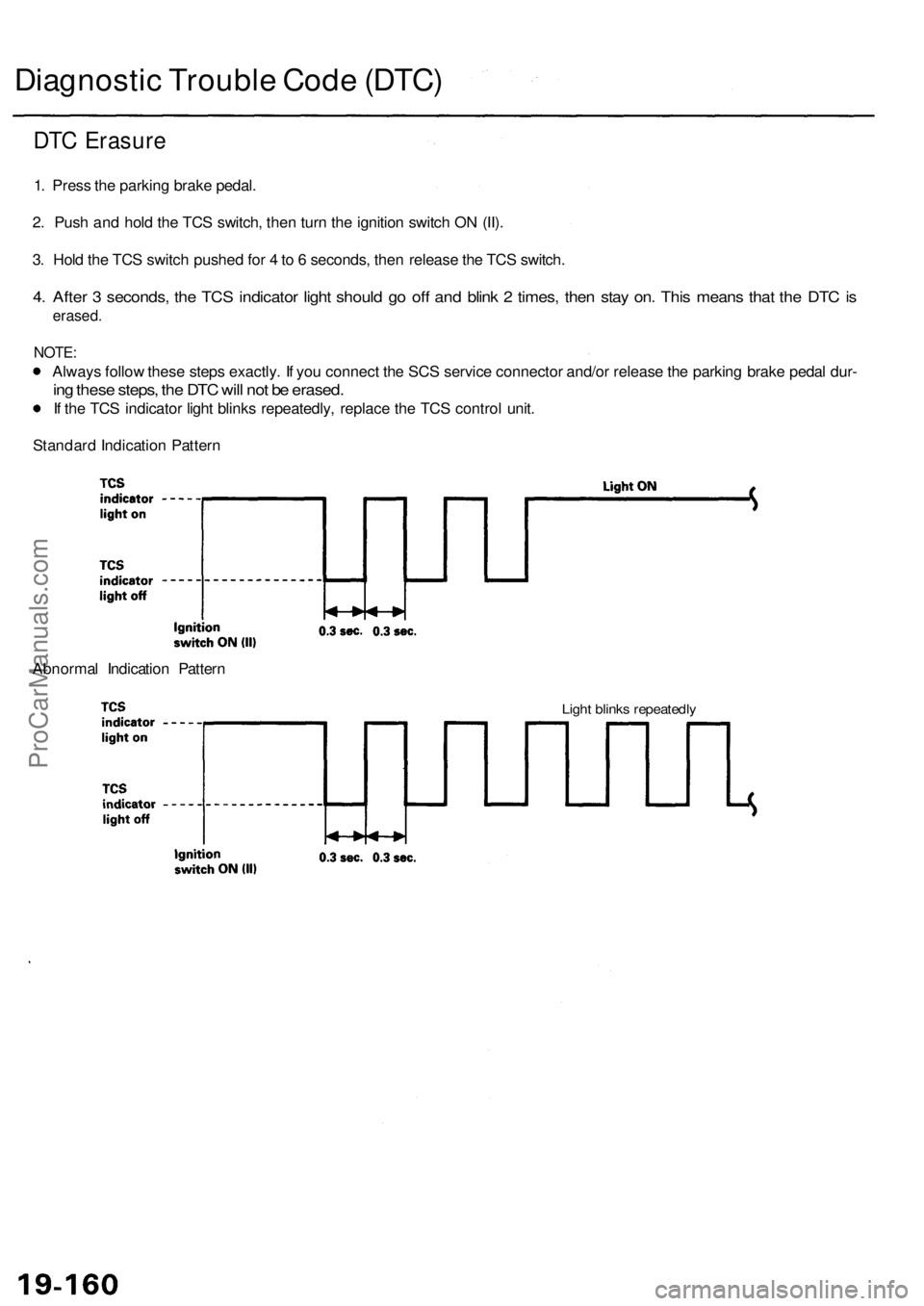
DTC Erasure
1. Press the parking brake pedal.
2. Push and hold the TCS switch, then turn the ignition switch ON (II).
3. Hold the TCS switch pushed for 4 to 6 seconds, then release the TCS switch.
4. After 3 seconds, the TCS indicator light should go off and blink 2 times, then stay on. This means that the DTC is
erased.
NOTE:
Always follow these steps exactly. If you connect the SCS service connector and/or release the parking brake pedal dur-
ing these steps, the DTC will not be erased.
If the TCS indicator light blinks repeatedly, replace the TCS control unit.
Standard Indication Pattern
Abnormal Indication Pattern
Light blinks repeatedlyProCarManuals.com
Page 1245 of 1954
Troubleshooting
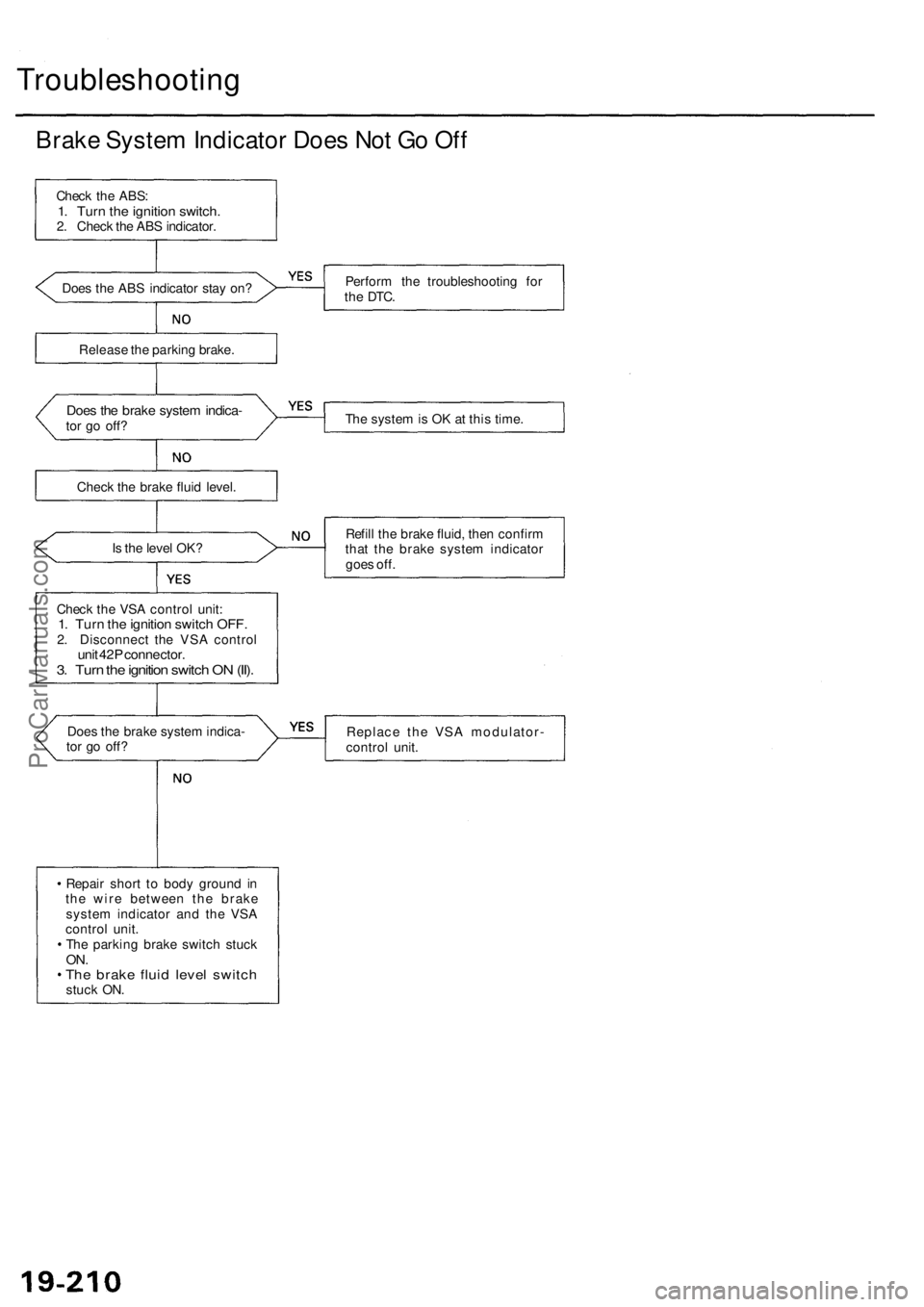
Brake System Indicator Does Not Go Off
Check the ABS:
1. Turn the ignition switch.
2. Check the ABS indicator.
Does the ABS indicator stay on?
Perform the troubleshooting for
the
DTC.
Release the parking brake.
Does the brake system indica-
tor go off?
The system is OK at this time.
Check the brake fluid level.
Is the level OK?
Refill the brake fluid, then confirm
that the brake system indicator
goes off.
Check the VSA control unit:
1. Turn the ignition switch OFF.
2. Disconnect the VSA control
unit 42P connector.
3. Turn the ignition switch ON (II).
Does the brake system indica-
tor go off?
Replace the VSA modulator-
control unit.
Repair short to body ground in
the wire between the brake
system indicator and the VSA
control unit.
The parking brake switch stuck
ON.
The brake fluid level switch
stuck ON.ProCarManuals.com
Page 1306 of 1954
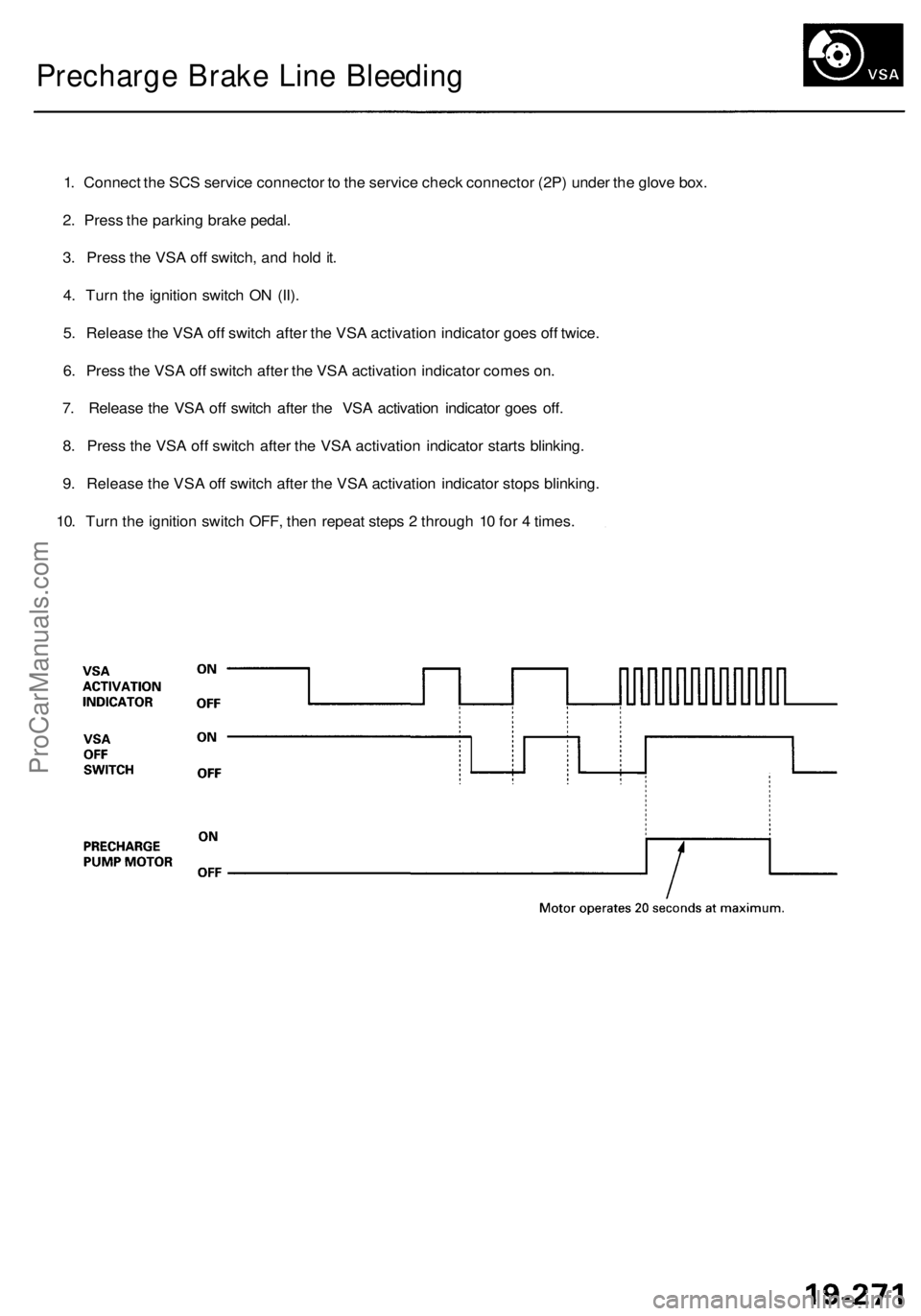
Precharge Brake Line Bleeding
1. Connect the SCS service connector to the service check connector (2P) under the glove box.
2. Press the parking brake pedal.
3. Press the VSA off switch, and hold it.
4. Turn the ignition switch ON (II).
5. Release the VSA off switch after the VSA activation indicator goes off twice.
6. Press the VSA off switch after the VSA activation indicator comes on.
7. Release the VSA off switch after the VSA activation indicator goes off.
8. Press the VSA off switch after the VSA activation indicator starts blinking.
9. Release the VSA off switch after the VSA activation indicator stops blinking.
10. Turn the ignition switch OFF, then repeat steps 2 through 10 for 4 times.ProCarManuals.com