ECO mode ACURA RL KA9 1996 Service Repair Manual
[x] Cancel search | Manufacturer: ACURA, Model Year: 1996, Model line: RL KA9, Model: ACURA RL KA9 1996Pages: 1954, PDF Size: 61.44 MB
Page 15 of 1954
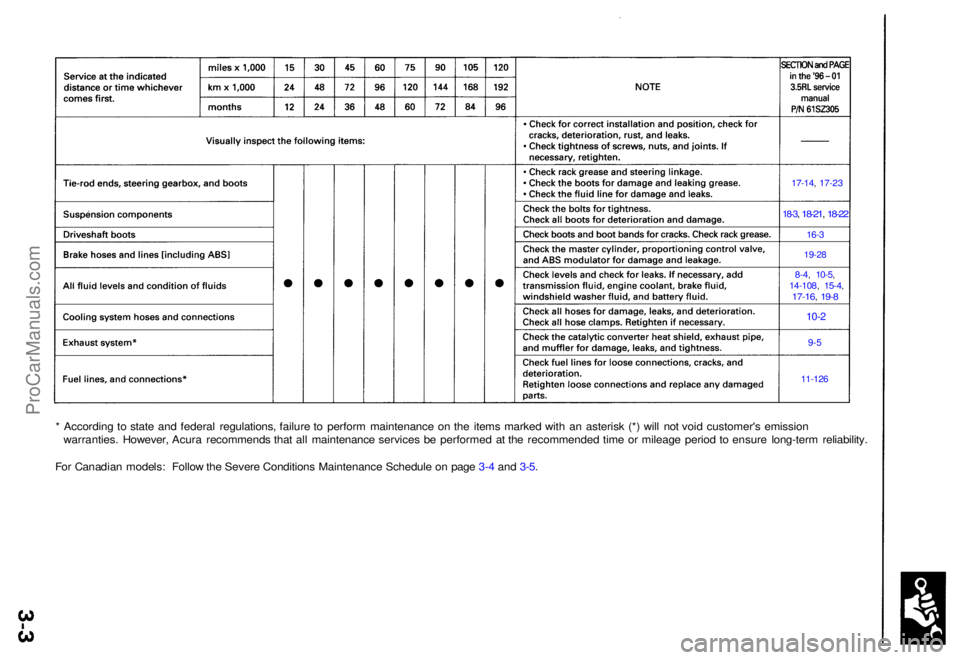
* Accordin g t o stat e an d federa l regulations , failur e t o perfor m maintenanc e o n th e item s marke d wit h a n asteris k (* ) wil l no t voi d customer' s emissio n
warranties . However , Acur a recommend s tha t al l maintenanc e service s b e performe d a t th e recommende d tim e o r mileag e perio d t o ensur e long-ter m reliability .
Fo r Canadia n models : Follo w th e Sever e Condition s Maintenanc e Schedul e o n pag e 3- 4 an d 3-5 .
17-14 , 17-2 3
18-3, 18-21 , 18-22
16- 3
19-2 8
8-4, 10-5 ,14-10 8, 15-4 ,17-16 , 19- 8
10-2
9-5
11-126
ProCarManuals.com
Page 33 of 1954
Power Doo r Lock s
Transmitte r Tes t ('0 2-04 Models )
NOTE:
• I f th e door s unloc k o r loc k wit h th e transmitter , bu t
th e LE D o n th e transmitte r doe s no t com e on , th e
LE D is faulty ; replac e th e transmitter .
• I f an y doo r i s open , yo u canno t loc k th e doo r wit h th e
transmitter .
• I f yo u unlocke d th e door s wit h th e transmitter , bu t d o
no t ope n an y o f th e door s withi n 3 0 seconds , th e
door s reloc k automatically .
• Th e door s d o no t loc k o r unloc k wit h th e transmitte r
if th e ignitio n ke y is inserte d in th e ignitio n switch .
• Fo r PANI C butto n an d TRUN K butto n operation , hol d
th e butto n lo r mor e tha n 1 second .
1 . Pres s th e loc k o r unloc k butto n fiv e o r si x time s t o
rese t th e transmitter .
• I f th e lock s work , th e transmitte r i s OK .
• I f th e lock s don' t work , g o to ste p 2 .
2 . Ope n th e transmitte r an d chec k fo r wate r damage .
• I f yo u fin d an y wate r damage , replac e th e trans -
mitter.
• I f ther e is n o wate r damage , g o to ste p 3 .
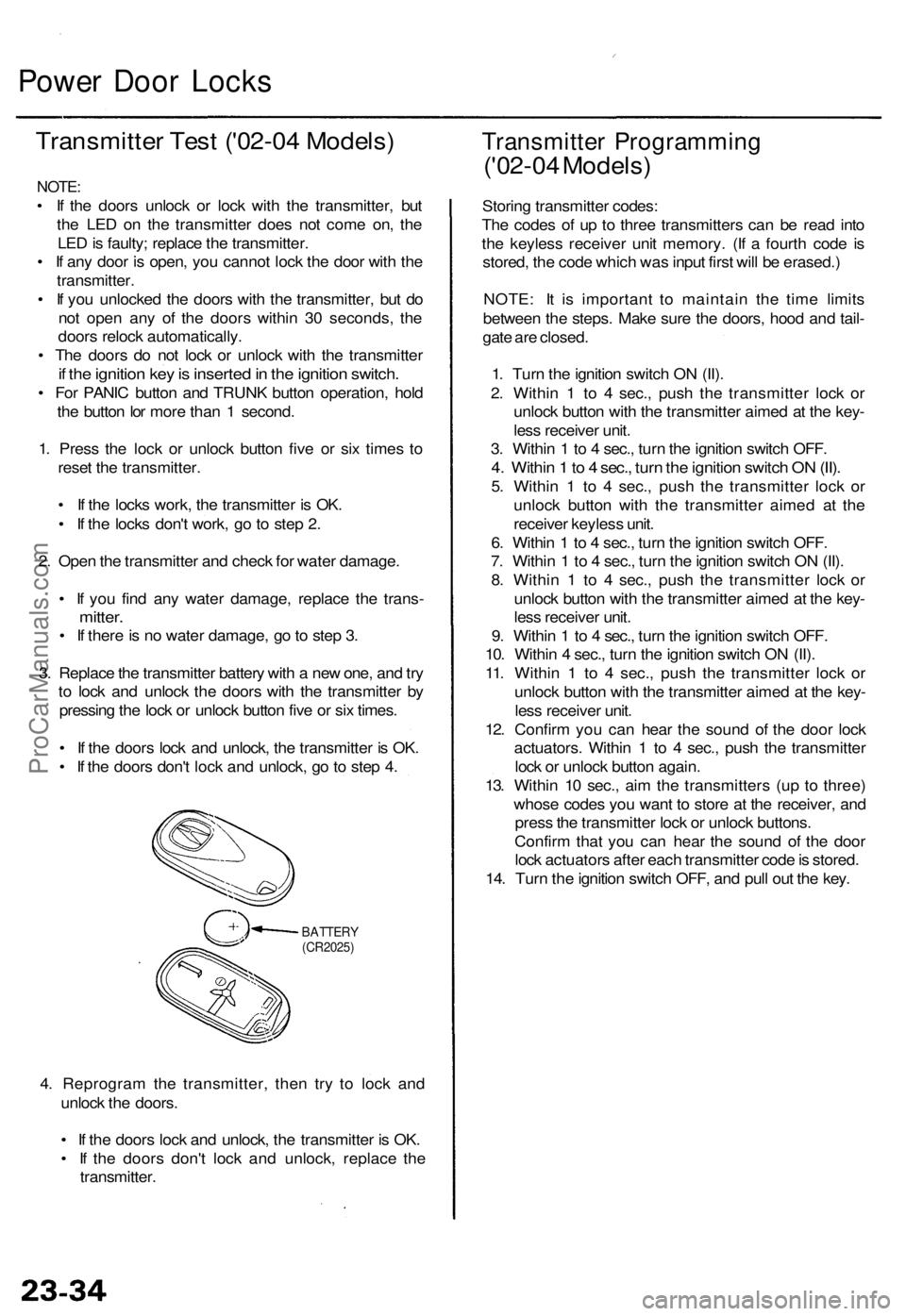
3 . Replac e th e transmitte r batter y wit h a ne w one , an d tr y
t o loc k an d unloc k th e door s wit h th e transmitte r b y
pressin g th e loc k o r unloc k butto n fiv e o r si x times .
• I f th e door s loc k an d unlock , th e transmitte r i s OK .
• I f th e door s don' t loc k an d unlock , g o to ste p 4 .
BATTER Y(CR2025)
4. Reprogra m th e transmitter , the n tr y t o loc k an d
unloc k th e doors .
• I f th e door s loc k an d unlock , th e transmitte r i s OK .
• I f th e door s don' t loc k an d unlock , replac e th e
transmitter .
Transmitte r Programmin g
('02-04 Models )
Storing transmitte r codes :
Th e code s o f u p t o thre e transmitter s ca n b e rea d int o
th e keyles s receive r uni t memory . (I f a fourt h cod e i s
stored , th e cod e whic h wa s inpu t firs t wil l b e erased. )
NOTE : I t i s importan t t o maintai n th e tim e limit s
betwee n th e steps . Mak e sur e th e doors , hoo d an d tail -
gat e ar e closed .
1 . Tur n th e ignitio n switc h O N (II) .
2 . Withi n 1 to 4 sec. , pus h th e transmitte r loc k o r
unloc k butto n wit h th e transmitte r aime d a t th e key -
les s receive r unit .
3 . Withi n 1 to 4 sec. , tur n th e ignitio n switc h OFF .
4. Withi n 1 to 4 sec. , tur n th e ignitio n switc h O N (II) .
5. Withi n 1 to 4 sec. , pus h th e transmitte r loc k o r
unloc k butto n with the transmitte r aime d a t th e
receive r keyles s unit .
6 . Withi n 1 to 4 sec. , tur n th e ignitio n switc h OFF .
7 . Withi n 1 to 4 sec. , tur n th e ignitio n switc h O N (II) .
8 . Withi n 1 to 4 sec. , pus h th e transmitte r loc k o r
unloc k butto n wit h th e transmitte r aime d a t th e key -
les s receive r unit .
9 . Withi n 1 to 4 sec. , tur n th e ignitio n switc h OFF .
10 . Withi n 4 sec. , tur n th e ignitio n switc h O N (II) .
11 . Withi n 1 to 4 sec. , pus h th e transmitte r loc k o r
unloc k butto n wit h th e transmitte r aime d a t th e key -
les s receive r unit .
12 . Confir m yo u ca n hea r th e soun d o f th e doo r loc k
actuators . Withi n 1 to 4 sec. , pus h th e transmitte r
loc k o r unloc k butto n again .
13 . Withi n 1 0 sec. , ai m th e transmitter s (u p t o three )
whos e code s yo u wan t t o stor e a t th e receiver , an d
pres s th e transmitte r loc k o r unloc k buttons .
Confir m tha t yo u can hea r th e soun d o f th e doo r
loc k actuator s afte r eac h transmitte r cod e is stored .
14 . Tur n th e ignitio n switc h OFF , an d pul l ou t th e key .
ProCarManuals.com
Page 36 of 1954
Driver's Windo w Moto r Tes t ('0 2-04 Models )
Motor Test :
1 . Remov e th e driver' s doo r panel .
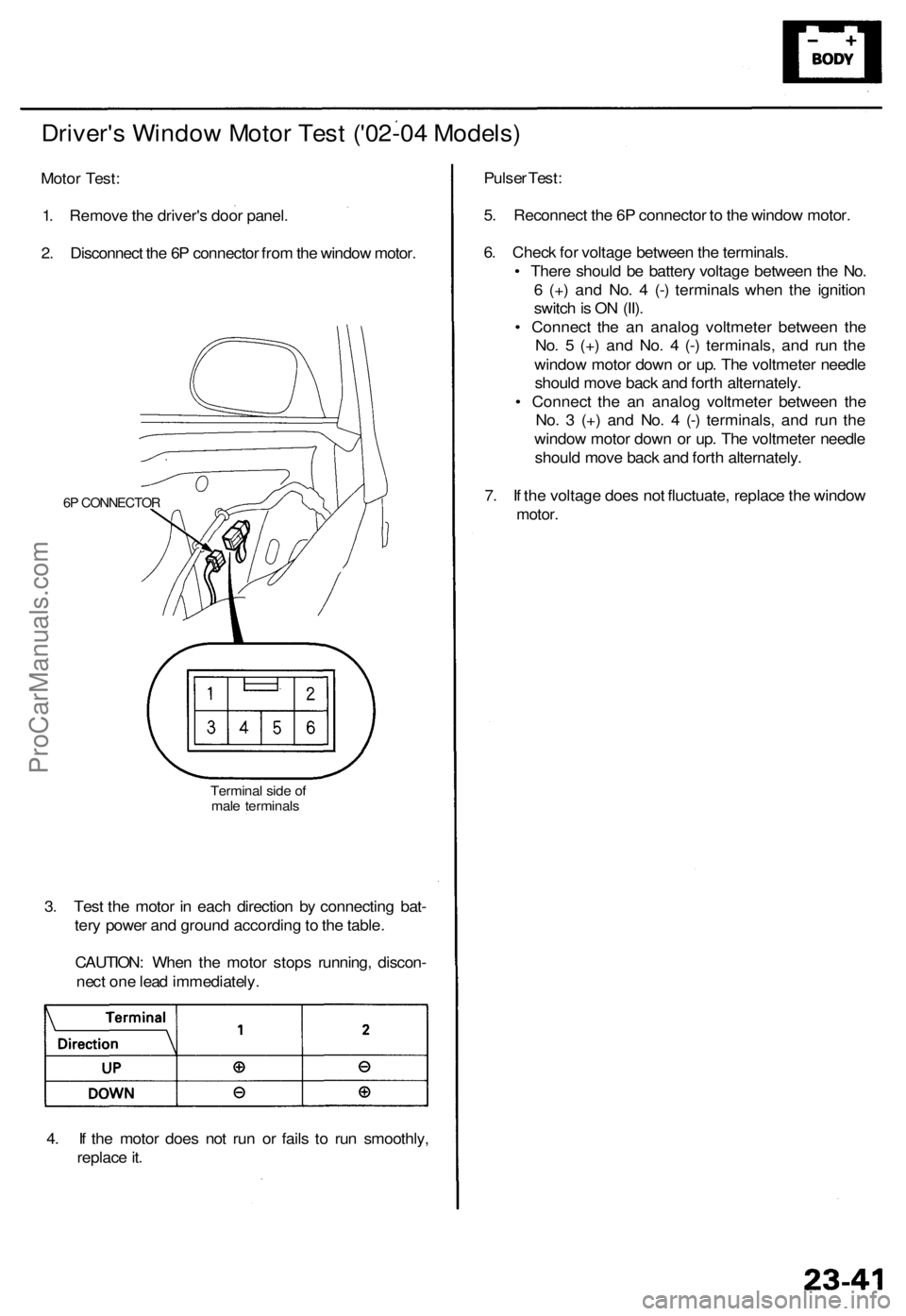
2 . Disconnec t th e 6 P connecto r fro m th e windo w motor .
6P CONNECTO R
Terminal sid e o f
mal e terminal s
3. Tes t th e moto r i n eac h directio n b y connectin g bat -
ter y powe r an d groun d accordin g to th e table .
CAUTION : Whe n th e moto r stop s running , discon -
nec t on e lea d immediately .
4 . I f th e moto r doe s no t ru n o r fail s t o ru n smoothly ,
replac e it . Pulse
r Test :
5 . Reconnec t th e 6 P connecto r t o th e windo w motor .
6 . Chec k fo r voltag e betwee n th e terminals .
• Ther e shoul d b e batter y voltag e betwee n th e No .
6 (+ ) an d No . 4 (- ) terminal s whe n th e ignitio n
switc h is O N (II) .
• Connec t th e a n analo g voltmete r betwee n th e
No . 5 (+ ) an d No . 4 (- ) terminals , an d ru n th e
windo w moto r dow n o r up . Th e voltmete r needl e
shoul d mov e bac k an d fort h alternately .
• Connec t th e a n analo g voltmete r betwee n th e
No . 3 (+ ) an d No . 4 (- ) terminals , an d ru n th e
windo w moto r dow n o r up . Th e voltmete r needl e
shoul d mov e bac k an d fort h alternately .
7 . I f th e voltag e doe s no t fluctuate , replac e th e windo w
motor.
ProCarManuals.com
Page 46 of 1954
OnStar Syste m ('0 2 Mode l USA )
Descriptio n (cont'd )
Stolen vehicl e tracking :
If th e vehicl e i s stolen , th e owne r ca n repor t i t t o th e cal l center . The y wil l notif y th e authoritie s an d trac k th e vehicl e loca -
tio n t o assis t i n recovery .
Virtual advisor :
1. Virtua l adviso r setup . A subscribe r set s u p a persona l profil e o n thei r hom e compute r throug h th e interne t a t th e
OnSta r we b site .
— Stoc k portfoli o
— Traffi c
— Sport s
— New s
— Weather
— E-mai l
2 . Subscribe r call s OnSta r cal l center .
3 . OnSta r receive s an d processe s request .
4 . Profil e accesse d fo r requeste d information .
5 . OnSta r send s informatio n bac k t o subscriber . A compute r voic e relay s th e requeste d information .
Cellular phone :
The use r can mak e a hands-fre e cellula r phon e cal l wit h on e touc h (b y pressin g th e "dot " button) , an d b y usin g voic e
recognitio n commands .
Remote operation :
Vehicle door s ca n b e locke d remotel y if forgotte n o r unlocke d whe n key s ar e accidentall y lef t insid e th e vehicle . I f th e vehi -
cl e is misplace d in a parkin g lot , vehicl e aler t (honk s th e hor n an d Flashe s th e parkin g lights ) ca n b e requeste d remotely .
NOTE : Durin g norma l vehicl e operation , th e syste m is i n hig h powe r mode . Afte r th e ignitio n switc h i s turne d OF F th e sys -
te m wil l g o int o lo w powe r mod e fo r 4 8 hours , afte r tha t th e syste m wil l switc h t o slee p mod e t o conserv e batter y power .
Whe n
in lo w powe r mode , the syste m will switc h back to th e hig h powe r mod e for 1 minut e out o f ever y 10 minute s for a
perio d o f 4 8 hours . Remot e operatio n is onl y availabl e durin g th e 1 minut e perio d o f hig h powe r operation . Whe n th e sys -
te m is i n slee p mode , remot e operatio n i s no t possible .
Registerin g replacemen t components :
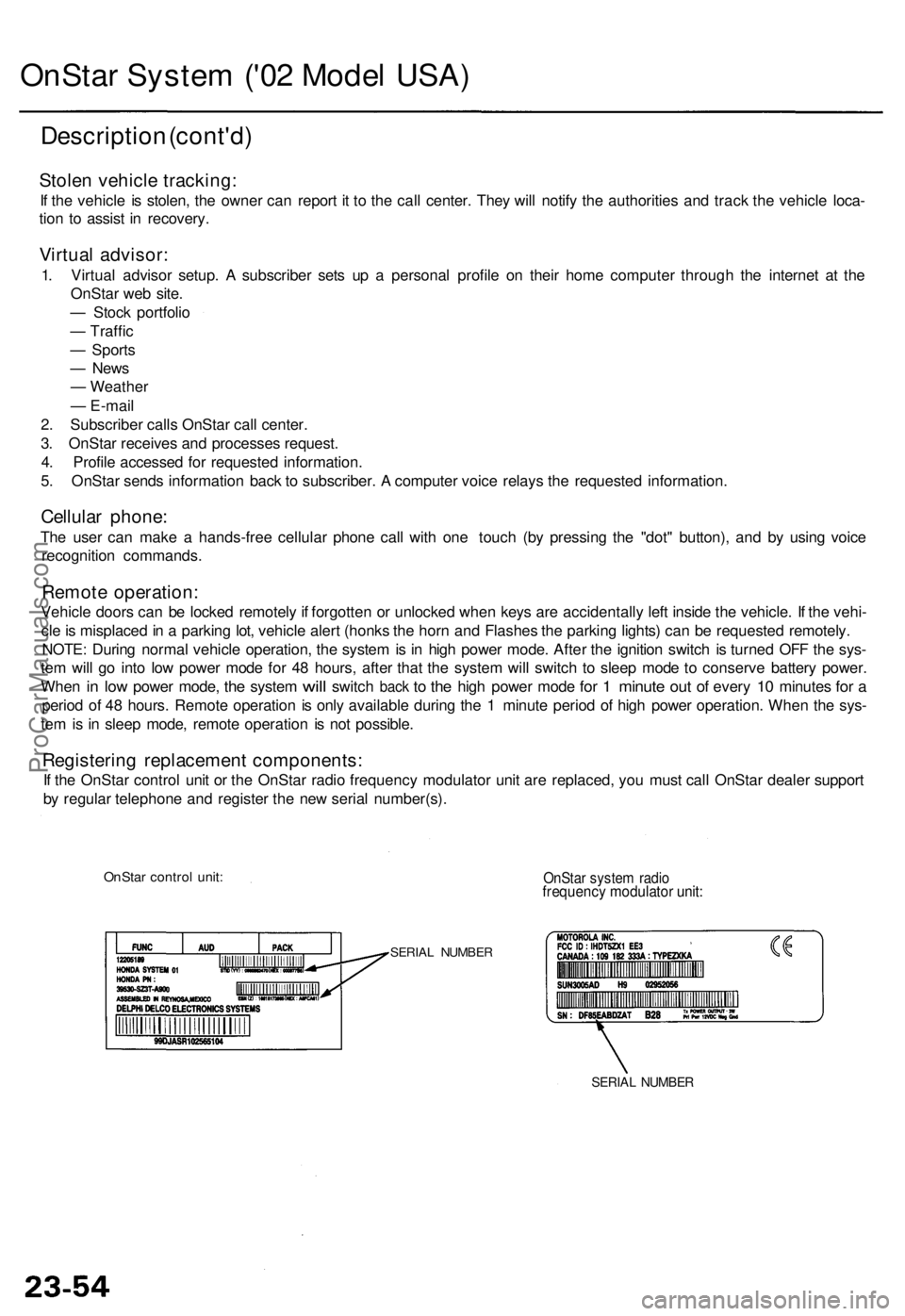
If th e OnSta r contro l uni t o r th e OnSta r radi o frequenc y modulato r uni t ar e replaced , yo u mus t cal l OnSta r deale r suppor t
b y regula r telephon e an d registe r th e ne w seria l number(s) .
OnStar contro l unit :OnSta r syste m radi ofrequenc y modulato r unit :
SERIA L NUMBE R
SERIAL NUMBE R
ProCarManuals.com
Page 47 of 1954
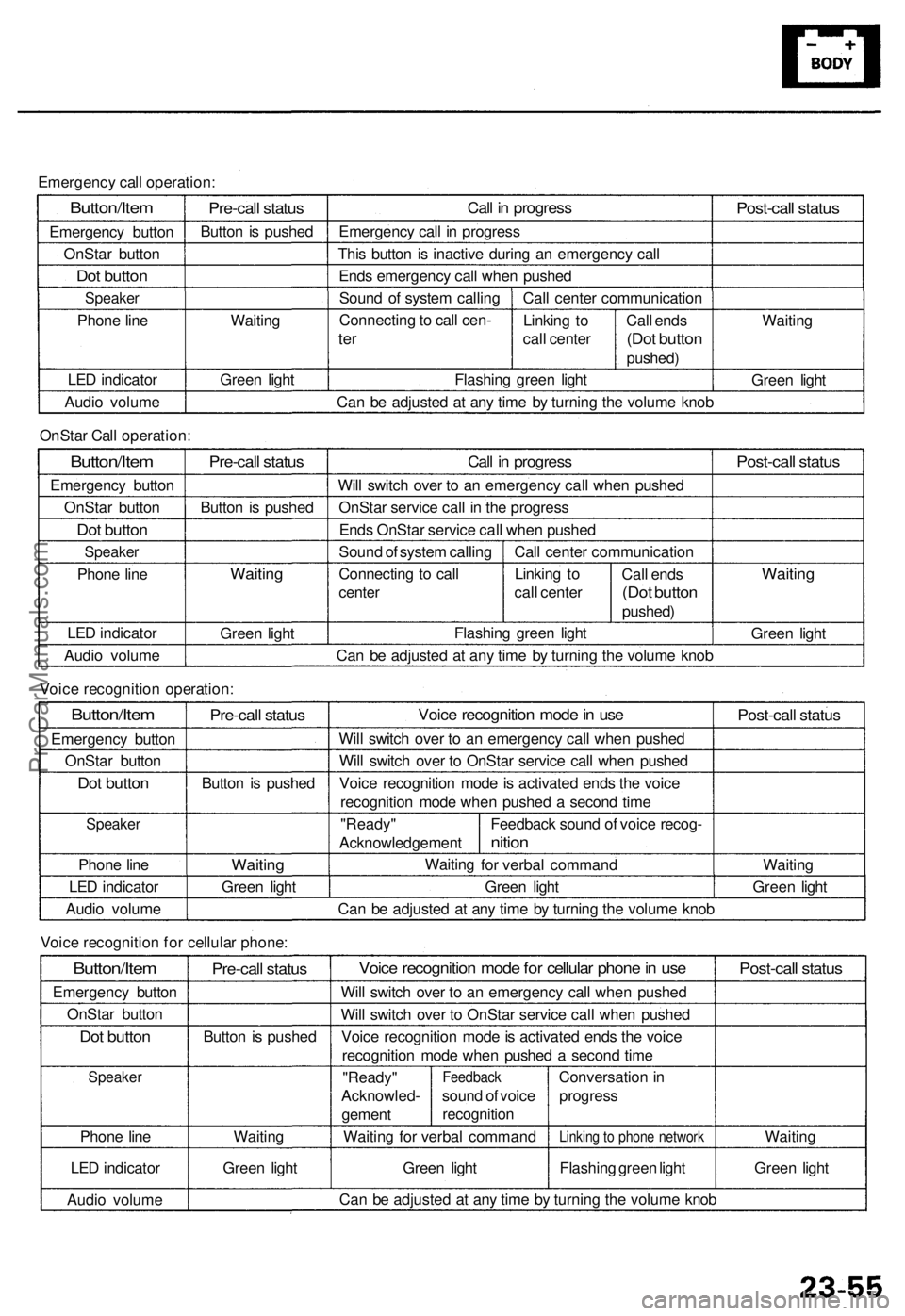
Emergency call operation:
Button/Item
Emergency button
OnStar button
Dot button
Speaker
Phone line
LED indicator
Audio volume
Pre-call status
Button is pushed
Waiting
Green light
Call in progress
Emergency call in progress
This button is inactive during an emergency call
Ends emergency call when pushed
Sound of system calling
Connecting to call cen-
ter
Call center communication
Linking to
call center
Flashing green light
Call ends
(Dot button
pushed)
Post-call status
Waiting
Green light
Can be adjusted at any time by turning the volume knob
OnStar Call operation:
Button/Item
Emergency button
OnStar button
Dot button
Speaker
Phone line
LED indicator
Audio volume
Pre-call status
Button is pushed
Waiting
Green light
Call in progress
Will switch over to an emergency call when pushed
OnStar service call in the progress
Ends OnStar service call when pushed
Sound of system calling
Connecting to call
center
Call center communication
Linking to
call center
Call ends
(Dot button
pushed)
Flashing green light
Post-call status
Waiting
Green light
Can be adjusted at any time by turning the volume knob
Voice recognition operation:
Button/Item
Emergency button
OnStar button
Dot button
Speaker
Phone line
LED indicator
Audio volume
Pre-call status
Button is pushed
Waiting
Green light
Voice recognition mode in use
Will switch over to an emergency call when pushed
Will switch over to OnStar service call when pushed
Voice recognition mode is activated ends the voice
recognition mode when pushed a second time
"Ready"
Acknowledgement
Waiting
Feedback sound of voice recog-
nition
for verbal command
Green light
Post-call status
Waiting
Green light
Can be adjusted at any time by turning the volume knob
Voice recognition for cellular phone:
Button/Item
Emergency button
OnStar button
Dot button
Speaker
Phone line
LED indicator
Audio volume
Pre-call status
Button is pushed
Waiting
Green light
Voice recognition mode for cellular phone in use
Will switch over to an emergency call when pushed
Will switch over to OnStar service call when pushed
Voice recognition mode is activated ends the voice
recognition mode when pushed a second time
"Ready"
Acknowled-
gement
Feedback
sound of voice
recognition
Waiting for verbal command
Green light
Conversation in
progress
Linking to phone network
Flashing green light
Post-call status
Waiting
Green light
Can be adjusted at any time by turning the volume knobProCarManuals.com
Page 48 of 1954
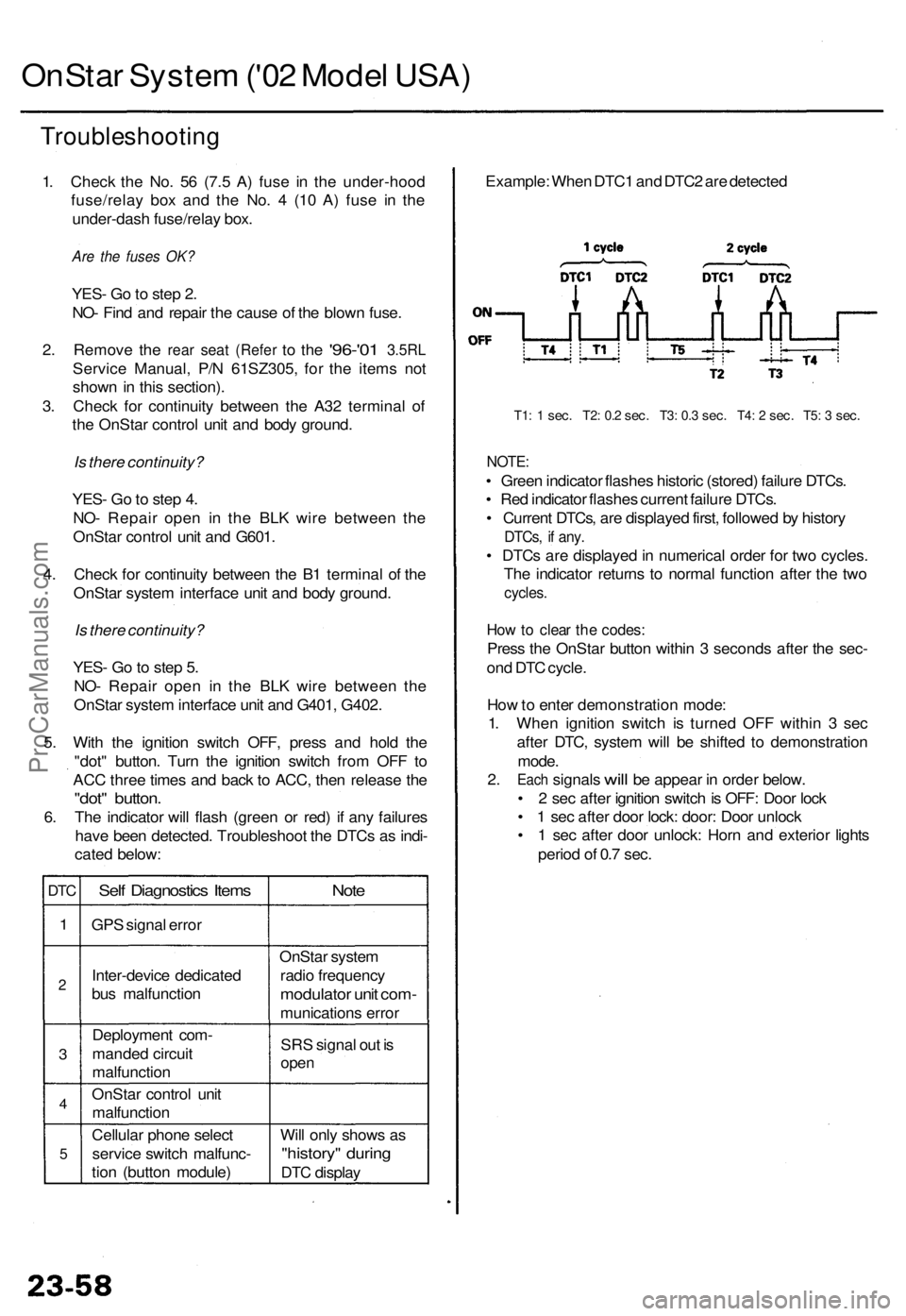
OnStar Syste m ('0 2 Mode l USA )
Troubleshootin g
1. Chec k th e No . 5 6 (7. 5 A ) fus e i n th e under-hoo d
fuse/rela y bo x an d th e No . 4 (1 0 A ) fus e i n th e
under-das h fuse/rela y box .
Are the fuses OK?
YES - G o to ste p 2 .
NO - Fin d an d repai r th e caus e o f th e blow n fuse .
2. Remov e the rea r sea t (Refe r to th e '96-'0 1 3.5R L
Servic e Manual , P/ N 61SZ305 , fo r th e item s no t
show n in thi s section) .
3 . Chec k fo r continuit y betwee n th e A3 2 termina l o f
th e OnSta r contro l uni t an d bod y ground .
Is there continuity?
YES - G o to ste p 4 .
NO - Repai r ope n i n th e BL K wir e betwee n th e
OnSta r contro l uni t an d G601 .
4 . Chec k fo r continuit y betwee n th e B 1 termina l o f th e
OnSta r syste m interfac e uni t an d bod y ground .
Is there continuity?
YES - G o to ste p 5 .
NO - Repai r ope n i n th e BL K wir e betwee n th e
OnSta r syste m interfac e uni t an d G401 , G402 .
5 . Wit h th e ignitio n switc h OFF , pres s an d hol d th e
"dot " button . Tur n th e ignitio n switc h fro m OF F t o
AC C thre e time s an d bac k t o ACC , the n releas e th e
"dot " button .
6. Th e indicato r wil l flas h (gree n o r red ) i f an y failure s
hav e bee n detected . Troubleshoo t th e DTC s a s indi -
cate d below :
DTC
1
2
3
4
5
Sel f Diagnostic s Item s
GPS signa l erro r
Inter-devic e dedicate d
bu s malfunctio n
Deploymen t com -
mande d circui t
malfunctio n
OnSta r contro l uni t
malfunctio n
Cellula r phon e selec t
servic e switc h malfunc -
tio n (butto n module )
Note
OnSta r syste m
radi o frequenc y
modulator uni t com -
munication s erro r
SR S signa l ou t i s
ope n
Will onl y show s a s
"history " durin g
DTC displa y Example
: Whe n DTC 1 an d DTC 2 ar e detecte d
T1: 1 sec . T2 : 0. 2 sec . T3 : 0. 3 sec . T4 : 2 sec . T5 : 3 sec .
NOTE :
• Gree n indicato r flashe s histori c (stored ) failur e DTCs .
• Re d indicato r flashe s curren t failur e DTCs .
• Curren t DTCs , ar e displaye d first , followe d b y histor y
DTCs, i f any .
• DTC s ar e displaye d in numerica l orde r fo r tw o cycles .
Th e indicato r return s t o norma l functio n afte r th e tw o
cycles .
How to clea r th e codes :
Press th e OnSta r butto n withi n 3 second s afte r th e sec -
on d DT C cycle .
Ho w to ente r demonstratio n mode :
1 . Whe n ignitio n switc h i s turne d OF F withi n 3 se c
afte r DTC , syste m wil l b e shifte d t o demonstratio n
mode .
2. Eac h signals will be appea r in orde r below .
• 2 sec afte r ignitio n switc h is OFF : Doo r loc k
• 1 sec afte r doo r lock : door : Doo r unloc k
• 1 sec afte r doo r unlock : Hor n an d exterio r light s
perio d o f 0. 7 sec .
ProCarManuals.com
Page 50 of 1954
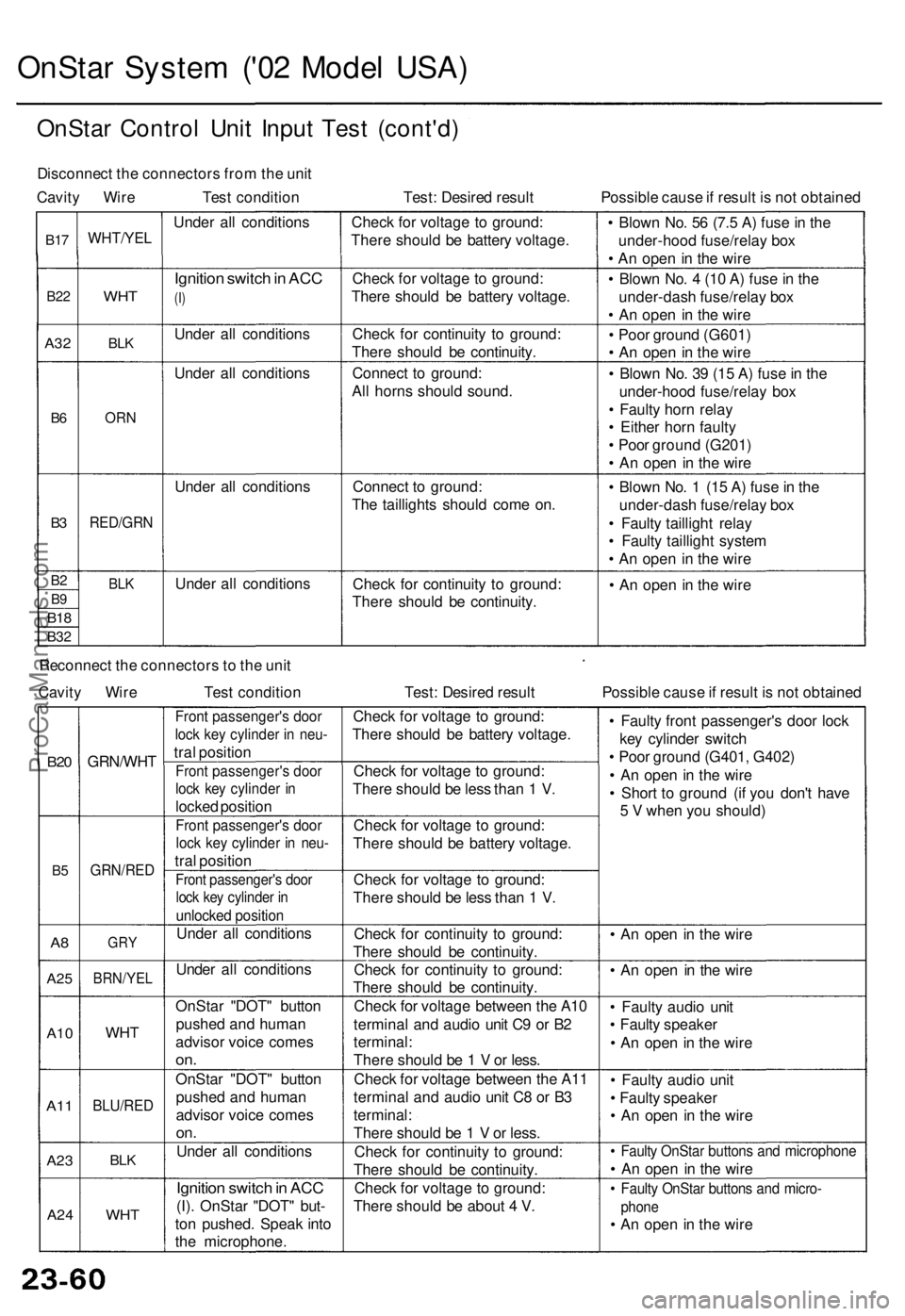
OnStar System ('02 Model USA)
OnStar Control Unit Input Test (cont'd)
Disconnect the connectors from the unit
Cavity Wire Test condition
Test: Desired result
Possible cause if result is not obtained
B17
B22
A32
B6
B3
B2
B9
B18
B32
WHT/YEL
WHT
BLK
ORN
RED/GRN
BLK
Under all conditions
Ignition switch in ACC
(I)
Under all conditions
Under all conditions
Under all conditions
Under all conditions
Check for voltage to ground:
There should be battery voltage.
Check for voltage to ground:
There should be battery voltage.
Check for continuity to ground:
There should be continuity.
Connect to ground:
All horns should sound.
Connect to ground:
The taillights should come on.
Check for continuity to ground:
There should be continuity.
• Blown No. 56 (7.5 A) fuse in the
under-hood fuse/relay box
• An open in the wire
• Blown No. 4 (10 A) fuse in the
under-dash fuse/relay box
• An open in the wire
• Poor ground (G601)
• An open in the wire
• Blown No. 39 (15 A) fuse in the
under-hood fuse/relay box
• Faulty horn relay
• Either horn faulty
• Poor ground (G201)
• An open in the wire
• Blown No. 1 (15 A) fuse in the
under-dash fuse/relay box
• Faulty taillight relay
• Faulty taillight system
• An open in the wire
• An open in the wire
Reconnect the connectors to the unit
Cavity Wire
Test condition
Test: Desired result
Possible cause if result is not obtained
B20
B5
A8
A25
A10
A11
A23
A24
GRN/WHT
GRN/RED
GRY
BRN/YEL
WHT
BLU/RED
BLK
WHT
Front passenger's door
lock key cylinder in neu-
tral position
Front passenger's door
lock key cylinder in
locked position
Front passenger's door
lock key cylinder in neu-
tral position
Front passenger's door
lock key cylinder in
unlocked position
Under all conditions
Under all conditions
OnStar "DOT" button
pushed and human
advisor voice comes
on.
OnStar "DOT" button
pushed and human
advisor voice comes
on.
Under all conditions
Ignition switch in ACC
(I). OnStar "DOT" but-
ton pushed. Speak into
the microphone.
Check for voltage to ground:
There should be battery voltage.
Check for voltage to ground:
There should be less than 1 V.
Check for voltage to ground:
There should be battery voltage.
Check for voltage to ground:
There should be less than 1 V.
Check for continuity to ground:
There should be continuity.
Check for continuity to ground:
There should be continuity.
Check for voltage between the A10
terminal and audio unit C9 or B2
terminal:
There should be 1 V or less.
Check for voltage between the A11
terminal and audio unit C8 or B3
terminal:
There should be 1 V or less.
Check for continuity to ground:
There should be continuity.
Check for voltage to ground:
There should be about 4 V.
• Faulty front passenger's door lock
key cylinder switch
• Poor ground (G401, G402)
• An open in the wire
• Short to ground (if you don't have
5 V when you should)
• An open in the wire
• An open in the wire
• Faulty audio unit
• Faulty speaker
• An open in the wire
• Faulty audio unit
• Faulty speaker
• An open in the wire
• Faulty OnStar buttons and microphone
• An open in the wire
• Faulty OnStar buttons and micro-
phone
• An open in the wireProCarManuals.com
Page 51 of 1954
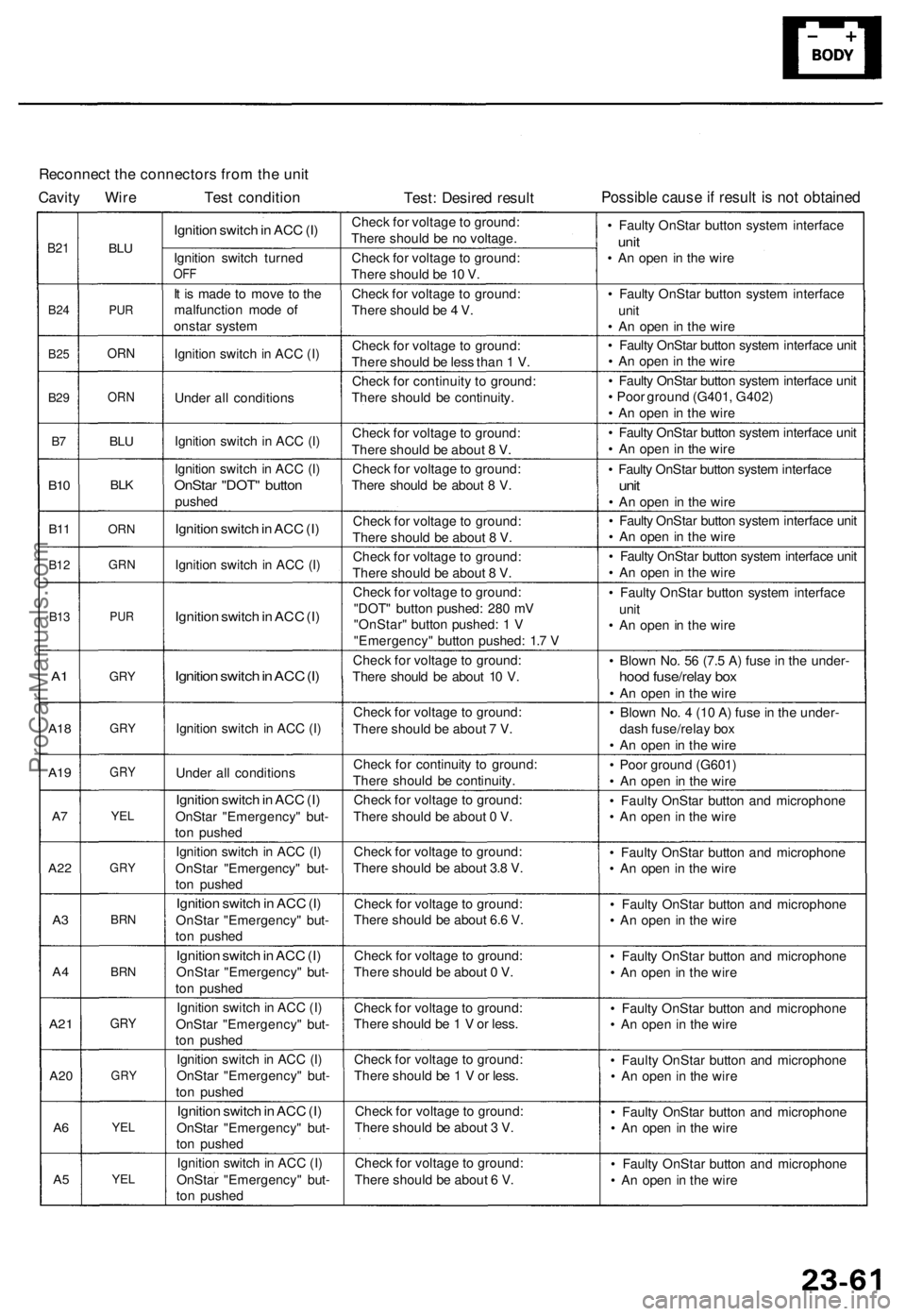
Reconnect the connectors from the unit
Cavity Wire Test condition
Test: Desired result
Possible cause if result is not obtained
B21
B24
B25
B29
B7
B10
B11
B12
B13
A1
A18
A19
A7
A22
A3
A4
A21
A20
A6
A5
BLU
PUR
ORN
ORN
BLU
BLK
ORN
GRN
PUR
GRY
GRY
GRY
YEL
GRY
BRN
BRN
GRY
GRY
YEL
YEL
Ignition switch in ACC (I)
Ignition switch turned
OFF
It is made to move to the
malfunction mode of
onstar system
Ignition switch in ACC (I)
Under all conditions
Ignition switch in ACC (I)
Ignition switch in ACC (I)
OnStar "DOT" button
pushed
Ignition switch in ACC (I)
Ignition switch in ACC (I)
Ignition switch in ACC (I)
Ignition switch in ACC (I)
Ignition switch in ACC (I)
Under all conditions
Ignition switch in ACC (I)
OnStar "Emergency" but-
ton pushed
Ignition switch in ACC (I)
OnStar "Emergency" but-
ton pushed
Ignition switch in ACC (I)
OnStar "Emergency" but-
ton pushed
Ignition switch in ACC (I)
OnStar "Emergency" but-
ton pushed
Ignition switch in ACC (I)
OnStar "Emergency" but-
ton pushed
Ignition switch in ACC (I)
OnStar "Emergency" but-
ton pushed
Ignition switch in ACC (I)
OnStar "Emergency" but-
ton pushed
Ignition switch in ACC (I)
OnStar "Emergency" but-
ton pushed
Check for voltage to ground:
There should be no voltage.
Check for voltage to ground:
There should be 10 V.
Check for voltage to ground:
There should be 4 V.
Check for voltage to ground:
There should be less than 1 V.
Check for continuity to ground:
There should be continuity.
Check for voltage to ground:
There should be about 8 V.
Check for voltage to ground:
There should be about 8 V.
Check for voltage to ground:
There should be about 8 V.
Check for voltage to ground:
There should be about 8 V.
Check for voltage to ground:
"DOT" button pushed: 280 mV
"OnStar" button pushed: 1 V
"Emergency" button pushed: 1.7 V
Check for voltage to ground:
There should be about 10 V.
Check for voltage to ground:
There should be about 7 V.
Check for continuity to ground:
There should be continuity.
Check for voltage to ground:
There should be about 0 V.
Check for voltage to ground:
There should be about 3.8 V.
Check for voltage to ground:
There should be about 6.6 V.
Check for voltage to ground:
There should be about 0 V.
Check for voltage to ground:
There should be 1 V or less.
Check for voltage to ground:
There should be 1 V or less.
Check for voltage to ground:
There should be about 3 V.
Check for voltage to ground:
There should be about 6 V.
• Faulty OnStar button system interface
unit
• An open in the wire
• Faulty OnStar button system interface
unit
• An open in the wire
• Faulty OnStar button system interface unit
• An open in the wire
• Faulty OnStar button system interface unit
• Poor ground (G401, G402)
• An open in the wire
• Faulty OnStar button system interface unit
• An open in the wire
• Faulty OnStar button system interface
unit
• An open in the wire
• Faulty OnStar button system interface unit
• An open in the wire
• Faulty OnStar button system interface unit
• An open in the wire
• Faulty OnStar button system interface
unit
• An open in the wire
• Blown No. 56 (7.5 A) fuse in the under-
hood fuse/relay box
• An open in the wire
• Blown No. 4 (10 A) fuse in the under-
dash fuse/relay box
• An open in the wire
• Poor ground (G601)
• An open in the wire
• Faulty OnStar button and microphone
• An open in the wire
• Faulty OnStar button and microphone
• An open in the wire
• Faulty OnStar button and microphone
• An open in the wire
• Faulty OnStar button and microphone
• An open in the wire
• Faulty OnStar button and microphone
• An open in the wire
• Faulty OnStar button and microphone
• An open in the wire
• Faulty OnStar button and microphone
• An open in the wire
• Faulty OnStar button and microphone
• An open in the wireProCarManuals.com
Page 230 of 1954
Muting Logi c
Wheneve r th e navigatio n syste m is givin g guidance ,
fron t speaker s ar e muted . Whe n th e voic e contro l sys -
te m is bein g used , al l o f th e speaker s ar e muted .
Whe n usin g On-Star , bot h th e audi o syste m an d th e
navigatio n syste m ar e muted , an d th e voic e contro l
switc h (TAL K an d BAC K buttons ) i s disabled .
Voice Contro l Limitation s
Before assumin g tha t a voic e contro l complain t i s hard -
war e related , ensur e tha t th e voic e contro l syste m is be -
in g operate d correctl y (se e "Voic e recognitio n doe s no t
work" , pag e 23-35) .
LCD Displa y Uni t Limitation s
• I n col d temperatures , th e displa y ma y sta y dar k fo r th e
firs t 2 o r 3 minute s unti l i t warm s up .
• Whe n th e displa y i s to o ho t becaus e o f direc t summe r
sunlight , i t wil l remai n dar k unti l th e temperatur e
drops .
• Whe n th e humidit y i s hig h an d th e interio r tempera -
tur e i s low , th e displa y ma y appea r cloudy . Th e dis -
pla y wil l clea r u p afte r som e use .
• Fingerprint s o n th e touc h pane l ma y sometime s b e
noticeabl e becaus e o f th e panel' s low-reflectio n coat -
ing. Whe n cleanin g th e panel , wip e i t gentl y wit h a
sof t cloth . T o avoi d scratchin g th e panel , d o no t ru b
to o hard , o r us e abrasiv e cleaner s o r sho p towels .
• Th e touc h pane l i s a n infrare d system , s o ther e i s n o
nee d t o pres s hard . I f a touc h switc h doe s no t functio n
immediately , shif t you r finge r slightly , an d touc h i t
again .
Note : Inpu t ma y b e affecte d b y direc t sunlight .
Symptom Duplicatio n
• Whe n th e sympto m ca n b e duplicated , follo w th e self -
diagnosti c procedure s an d th e appropriat e trou -
bleshootin g procedures .
• Whe n th e sympto m doe s no t reappea r o r onl y reap -
pear s intermittently , as k th e custome r abou t th e condi -
tion s whe n th e sympto m occured .
-Tr y t o establis h i f outsid e interferenc e ma y hav e
bee n th e cause .
-Tr y t o duplicat e th e sympto m unde r th e sam e condi -
tion s th e custome r wa s experiencing .
-Vibration , temperatur e extremes , an d moistur e (dew ,
humidity ) ar e factor s tha t ar e difficul t t o duplicate .
- Inspec t th e vehicl e fo r after-marke t electroni c device s
(vehicl e locators , amps , rada r detectors , etc) that
ma y b e hidden .
Service Precaution s
• Befor e disconnectin g th e battery , mak e sur e yo u hav e
th e anti-thef t code s fo r th e radi o an d th e navigatio n
system , an d writ e dow n th e frequencie s fo r th e radio' s
prese t buttons .
• Whe n th e batter y i s disconnected , th e interna l GP S
cloc k
is rese t to "0:00" . The cloc k will rese t to th e cor -
rec t tim e afte r th e syste m finishe s GP S initialization .
• Afte r reconnectin g th e battery , yo u hav e t o wai t t o ge t
the initia l signa l fro m th e satellite , whic h ma y tak e fro m
10 to 4 5 minutes . Follo w th e instruction s o n th e screen .
• Afte r reconnectin g th e battery , d o th e powe r windo w
control uni t resettin g procedure .
• Befor e returnin g th e vehicl e t o th e customer , ente r th e
radi o code , the n ente r th e customer' s radi o statio n
presets , an d se t th e clock . D o th e engin e contro l mod -
ul e (PCM ) idl e lear n procedure .
After Servicing-Ma p Matchin g
• Par k th e vehicl e in a n are a wher e th e GP S satellit e sig -
nal s wil l b e unobstructed . Mak e sur e th e GP S indica -
to r o n th e ma p scree n i s green .
• Driv e th e vehicl e 1 mil e befor e enterin g a destinatio n
an d confir m th e roa d bein g use d i s displaye d a t th e
botto m o f th e scree n (ma p matched) .
• Ente r th e deale r addres s an d confir m th e syste m
route s an d perform s normally .
• Clea r an y previou s destination s tha t ma y hav e bee n
entere d fo r testin g purposes .
Obtaining A Navigatio n DV D
If th e navigatio n DV D is los t o r damaged , o r yo u nee d a
yearl y updat e DVD , yo u hav e 2 way s t o purchas e one .
Yo u ca n eithe r cal l (888 ) 549-3798 , o r orde r on-lin e a t
www.Acura.com .
Both method s requir e a credi t card . Th e DV D fo r thi s
mode l ha s a n orang e label , an d canno t b e ordere d
throug h th e part s system . Th e followin g DVD s wil l no t
wor k in thi s navigatio n system :
• Earlie r mode l Acur a Navigatio n DVD s (blac k label )
• Ma p softwar e program s manufacture d b y othe r com -
panie s
• DV D movies , o r DVD s containin g audi o recording s
Updat e DVD s ar e availabl e fo r purchas e usuall y i n th e
fal l o f eac h year . The y ma y contai n th e following :
• Enhance d ma p an d Point s o f interes t (PO D coverag e
• Fixe s fo r mino r softwar e bug s
• Additiona l feature s
Note : Updat e i s o f cours e optional , an d ther e i s n o pro -
gra m to provid e fre e DVD s containin g yearl y mappin g
updates.
ProCarManuals.com
Page 239 of 1954
Navigation System
System Description (cont'd)
Overview
The Acura Navigation System is a highly-sophisticated, hybrid locating system that uses satellites and a map database to
show you where you are and to help guide you to a desired destination.
The navigation system receives signals from the Global Positioning System (GPS), a network of 24 satellites in orbit
around the earth. By receiving signals from serveral of these satellites, the navigation system can determine the latitude,
longitude, and elevation of the vehicle. In addition, signals from the system's yaw rate sensor and the PCM (vehicle
speed pulse) enable the system to keep track of the vehicle's direction and speed of travel.
This hybrid system has advantages over a system that is either entirely self-contained or one that relies totally on the
GPS. For example, the self-contained portion of the system can keep track of vehicle position even when satellite signals
cannot be received. When the navigation system is on, the GPS can keep track of the vehicle position even when the vehi-
cle is transported by ferry.
The navigation system applies all this location, direction, and speed information to the maps and calculates a route to the
destination entered. As you drive to that destination, the system provides both visual and audio guidance.
This navigation system also has voice recognition that allows voice control of most of the navigation functions. The TALK
and BACK buttons on the steering wheel activate the voice control.
The illumination signal is used for two purposes. The display unit uses the signal to light up the hard buttons surrounding
the display. In addition the signal is used by the navigation unit to automatically switch from the "Day" to "Night" display
mode when the headlights are on. This automatic switching occurs only if the "Display" setting in setup screen 1 is set to
"AUTO". If the headlights are on and the customer has the dash light brightness control to "full bright," then this overrides
the "Night" mode.
The use of the audio speakers follows a hierarchy. The highest priority is the OnStar voice, followed by the navigation voice,
and finally the radio/CD. The audio unit enforces this hierarchy. The GA-Net bus is used to pass commands to mute the speak-
ers, and to disable the voice control system. Prior systems used dedicated wires to accomplish this function.
• If On-Star is in use, the audio unit passes a command on the GA-Net bus to the navigation unit to disable the voice control
system. The navigation unit then ignores the voice control switch, and temporarily ceases voice route guidance prompts.
• When the navigation system issues route guidance, the navigation unit uses the GA-Net bus to tell the audio unit to mute just
the front speakers. When the voice control system is being used (the TALK/BACK buttons), the navigation unit uses the GA-
Net bus to tell the audio unit to mute all speakers.ProCarManuals.com