audio Acura RLX 2017 Owner's Guide
[x] Cancel search | Manufacturer: ACURA, Model Year: 2017, Model line: RLX, Model: Acura RLX 2017Pages: 557, PDF Size: 37.97 MB
Page 198 of 557
197
uuAudio System Basic Operation uOn Demand Multi-Use DisplayTM
Continued
Features
On Demand Multi-Use DisplayTM
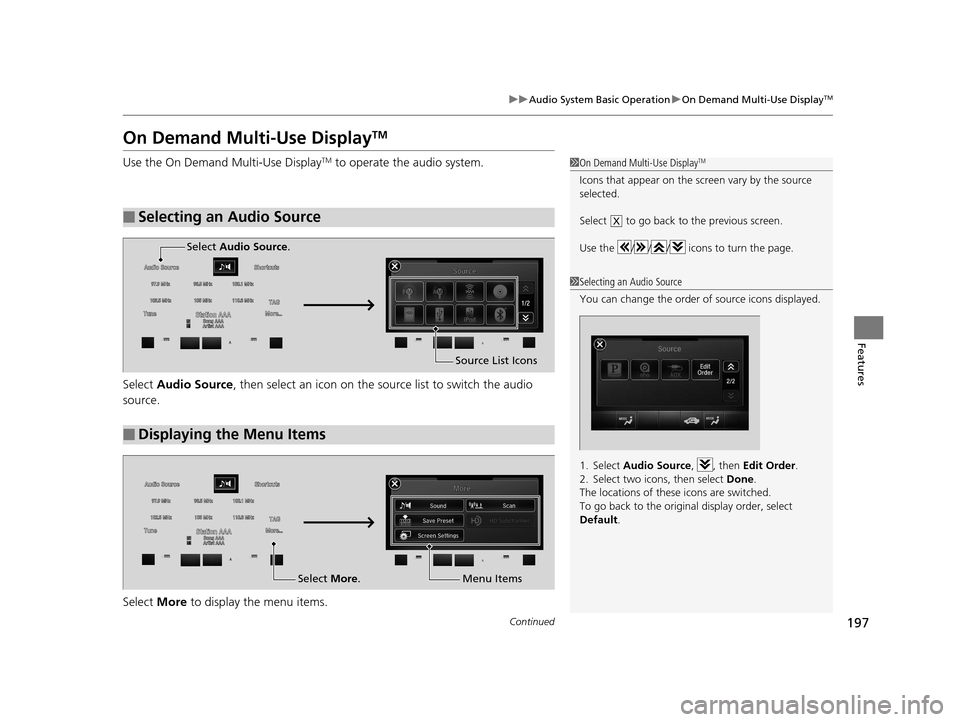
Use the On Demand Multi-Use DisplayTM to operate the audio system.
Select Audio Source , then select an icon on the s ource list to switch the audio
source.
Select More to display the menu items.
■Selecting an Audio Source
1On Demand Multi-Use DisplayTM
Icons that appear on the sc reen vary by the source
selected.
Select to go back to the previous screen.
Use the / / / icons to turn the page.
X
1 Selecting an Audio Source
You can change the order of source icons displayed.
1. Select Audio Source , , then Edit Order .
2. Select two icons, then select Done.
The locations of these icons are switched.
To go back to the original display order, select
Default .
■Displaying the Menu Items
Select Audio Source .
Source List Icons
Select More. Menu Items
17 ACURA RLX-31TY26300.book 197 ページ 2016年6月17日 金曜日 午前8時12分
Page 199 of 557
uuAudio System Basic Operation uOn Demand Multi-Use DisplayTM
198
Features
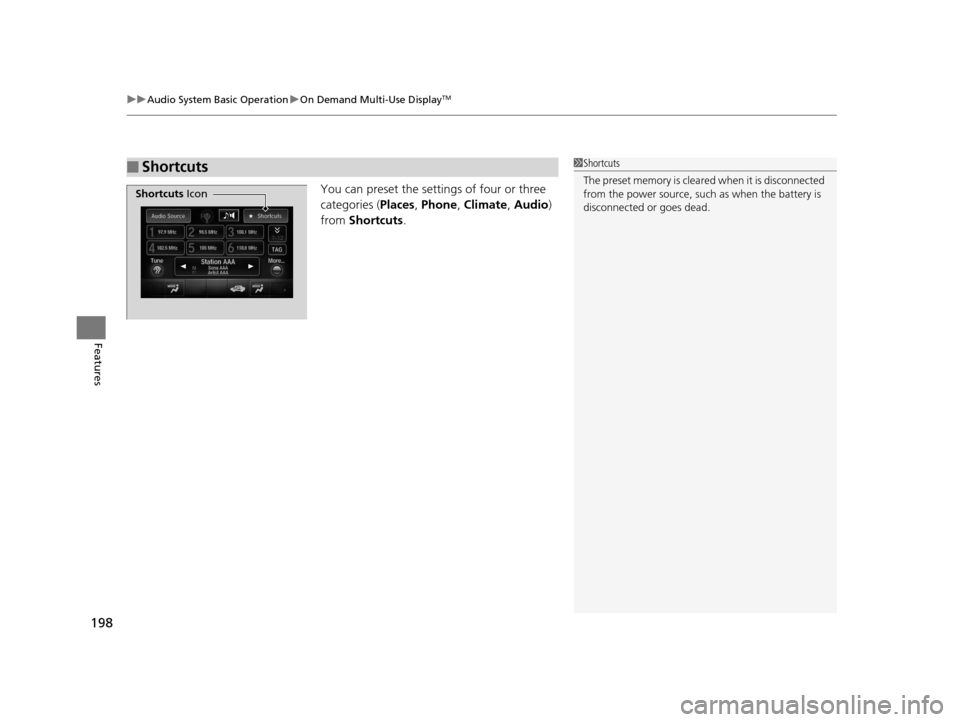
You can preset the settings of four or three
categories ( Places, Phone , Climate , Audio)
from Shortcuts.
■Shortcuts1Shortcuts
The preset memory is cleare d when it is disconnected
from the power source, such as when the battery is
disconnected or goes dead.
Shortcuts Icon
17 ACURA RLX-31TY26300.book 198 ページ 2016年6月17日 金曜日 午前8時12分
Page 200 of 557
Continued199
uuAudio System Basic Operation uOn Demand Multi-Use DisplayTM
Features
■Places
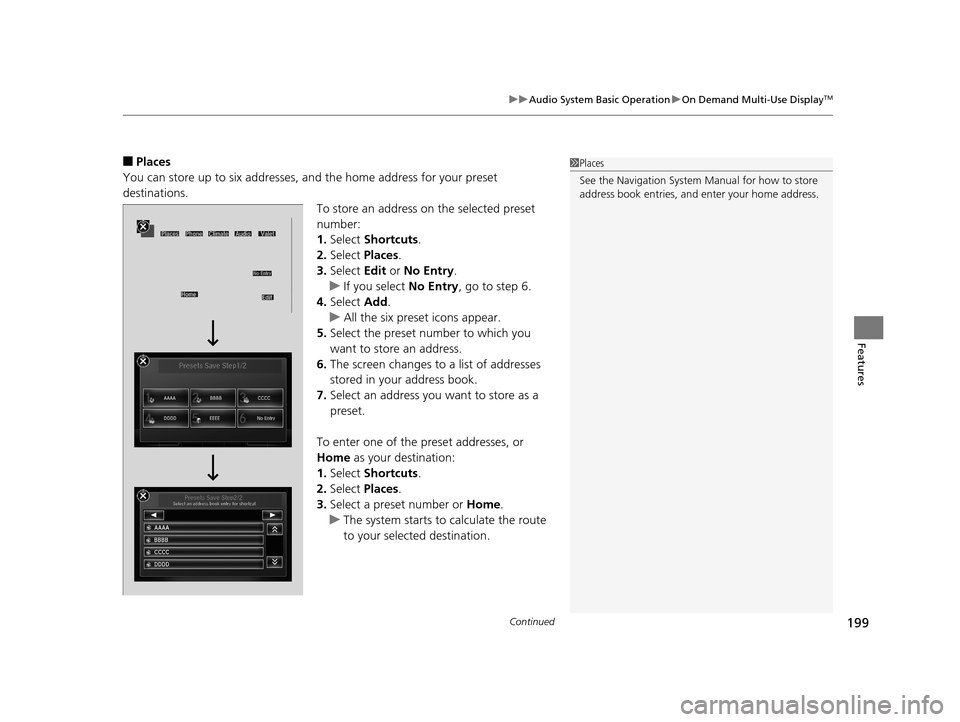
You can store up to six addresses, an d the home address for your preset
destinations.
To store an address on the selected preset
number:
1.Select Shortcuts .
2. Select Places .
3. Select Edit or No Entry .
u If you select No Entry, go to step 6.
4. Select Add.
u All the six preset icons appear.
5. Select the preset number to which you
want to store an address.
6. The screen changes to a list of addresses
stored in your address book.
7. Select an address you want to store as a
preset.
To enter one of the preset addresses, or
Home as your destination:
1. Select Shortcuts .
2. Select Places .
3. Select a preset number or Home.
u The system starts to calculate the route
to your selected destination.1Places
See the Navigation System Manual for how to store
address book entries, and enter your home address.
17 ACURA RLX-31TY26300.book 199 ページ 2016年6月17日 金曜日 午前8時12分
Page 201 of 557
200
uuAudio System Basic Operation uOn Demand Multi-Use DisplayTM
Features
To delete a preset address:
1. Select Shortcuts .
2. Select Places .
3. Select Edit.
4. Select Delete.
5. Select the preset number with the destination you want to delete.
17 ACURA RLX-31TY26300.book 200 ページ 2016年6月17日 金曜日 午前8時12分
Page 202 of 557
Continued201
uuAudio System Basic Operation uOn Demand Multi-Use DisplayTM
Features
■Phone
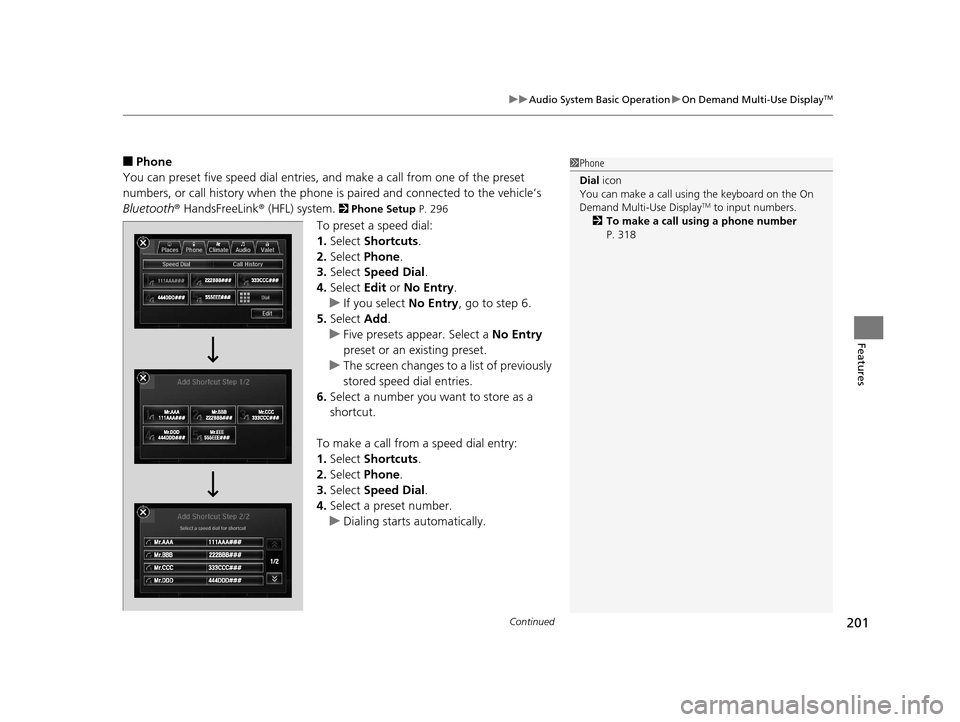
You can preset five speed dial entries, and make a call from one of the preset
numbers, or call history when the phone is paired and connected to the vehicle‘s
Bluetooth ® HandsFreeLink ® (HFL) system.
2 Phone Setup P. 296
To preset a speed dial:
1.Select Shortcuts .
2. Select Phone.
3. Select Speed Dial .
4. Select Edit or No Entry .
u If you select No Entry, go to step 6.
5. Select Add.
u Five presets appear. Select a No Entry
preset or an existing preset.
u The screen changes to a list of previously
stored speed dial entries.
6. Select a number you want to store as a
shortcut.
To make a call from a speed dial entry:
1. Select Shortcuts .
2. Select Phone.
3. Select Speed Dial .
4. Select a preset number.
u Dialing starts automatically.
1Phone
Dial icon
You can make a call using the keyboard on the On
Demand Multi-Use Display
TM to input numbers.
2 To make a call using a phone number
P. 318
17 ACURA RLX-31TY26300.book 201 ページ 2016年6月17日 金曜日 午前8時12分
Page 203 of 557
uuAudio System Basic Operation uOn Demand Multi-Use DisplayTM
202
Features
To delete a speed dial:
1. Select Shortcuts .
2. Select Phone .
3. Select Speed Dial .
4. Select Edit.
5. Select Delete.
6. Select the preset number with the phone
number you want to delete.
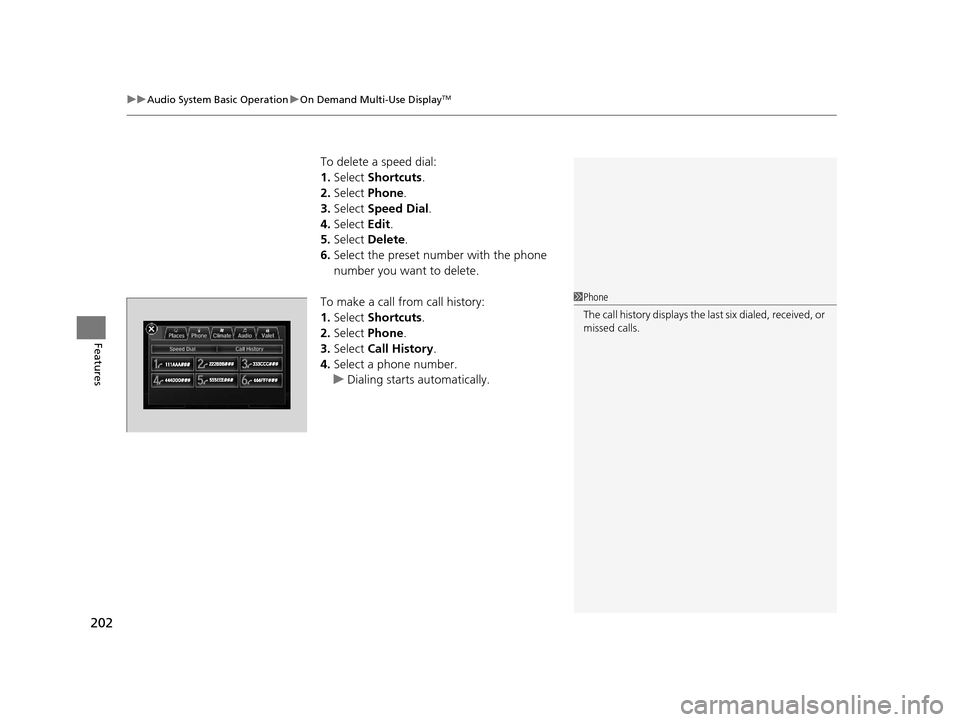
To make a call from call history:
1. Select Shortcuts .
2. Select Phone .
3. Select Call History .
4. Select a phone number.
u Dialing starts automatically.
1Phone
The call history displays the last six dialed, received, or
missed calls.
17 ACURA RLX-31TY26300.book 202 ページ 2016年6月17日 金曜日 午前8時12分
Page 204 of 557
Continued203
uuAudio System Basic Operation uOn Demand Multi-Use DisplayTM
Features
■Audio
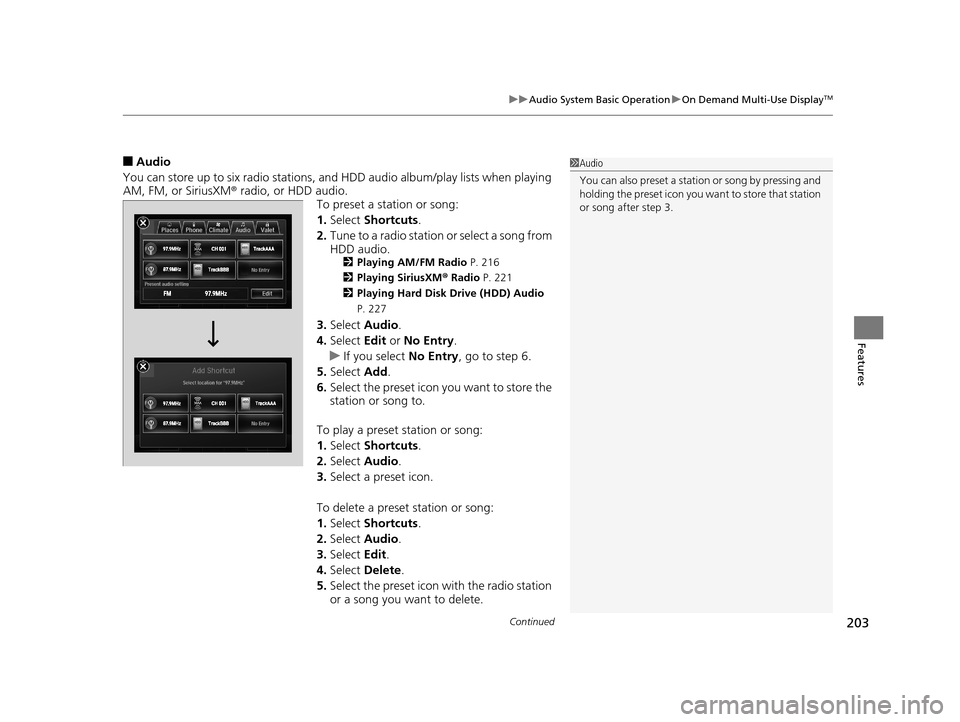
You can store up to six radio stations, and HDD audio album/play lists when playing
AM, FM, or SiriusXM ® radio, or HDD audio.
To preset a station or song:
1.Select Shortcuts .
2. Tune to a radio station or select a song from
HDD audio.
2 Playing AM/FM Radio P. 216
2 Playing SiriusXM ® Radio P. 221
2 Playing Hard Disk Drive (HDD) Audio
P. 227
3. Select Audio .
4. Select Edit or No Entry .
u If you select No Entry, go to step 6.
5. Select Add.
6. Select the preset icon you want to store the
station or song to.
To play a preset station or song:
1. Select Shortcuts .
2. Select Audio .
3. Select a preset icon.
To delete a preset station or song:
1. Select Shortcuts .
2. Select Audio .
3. Select Edit.
4. Select Delete .
5. Select the preset icon with the radio station
or a song you want to delete.
1Audio
You can also preset a stat ion or song by pressing and
holding the preset icon you want to store that station
or song after step 3.
17 ACURA RLX-31TY26300.book 203 ページ 2016年6月17日 金曜日 午前8時12分
Page 205 of 557
uuAudio System Basic Operation uOn Demand Multi-Use DisplayTM
204
Features
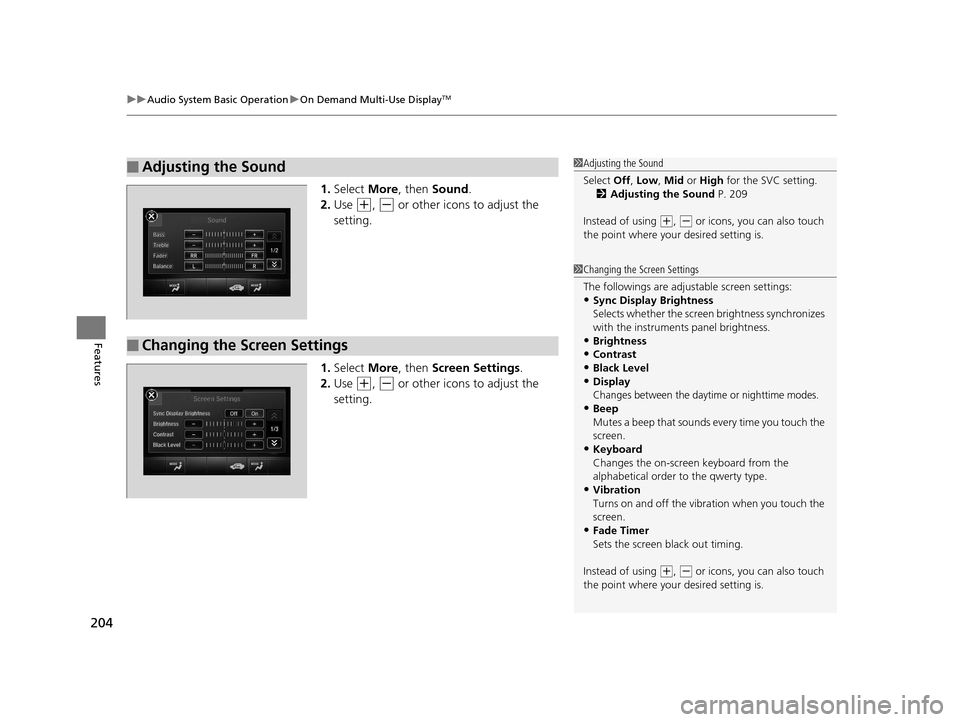
1. Select More, then Sound .
2. Use
(+, (- or other icons to adjust the
setting.
1. Select More, then Screen Settings .
2. Use
(+, (- or other icons to adjust the
setting.
■Adjusting the Sound1 Adjusting the Sound
Select Off, Low , Mid or High for the SVC setting.
2 Adjusting the Sound P. 209
Instead of using
( +, (- or icons, you can also touch
the point where your desired setting is.
■Changing the Screen Settings
1Changing the Screen Settings
The followings are adjustable screen settings:
•Sync Display Brightness
Selects whether the screen brightness synchronizes
with the instruments panel brightness.
•Brightness
•Contrast•Black Level
•Display
Changes between the daytime or nighttime modes.•Beep
Mutes a beep that sounds every time you touch the
screen.
•Keyboard
Changes the on-screen keyboard from the
alphabetical order to the qwerty type.
•Vibration
Turns on and off the vibration when you touch the
screen.
•Fade Timer
Sets the screen black out timing.
Instead of using
( +, (- or icons, you can also touch
the point where your desired setting is.
17 ACURA RLX-31TY26300.book 204 ページ 2016年6月17日 金曜日 午前8時12分
Page 206 of 557
205
uuAudio System Basic Operation uAudio/Information Screen
Continued
Features
Audio/Information Screen
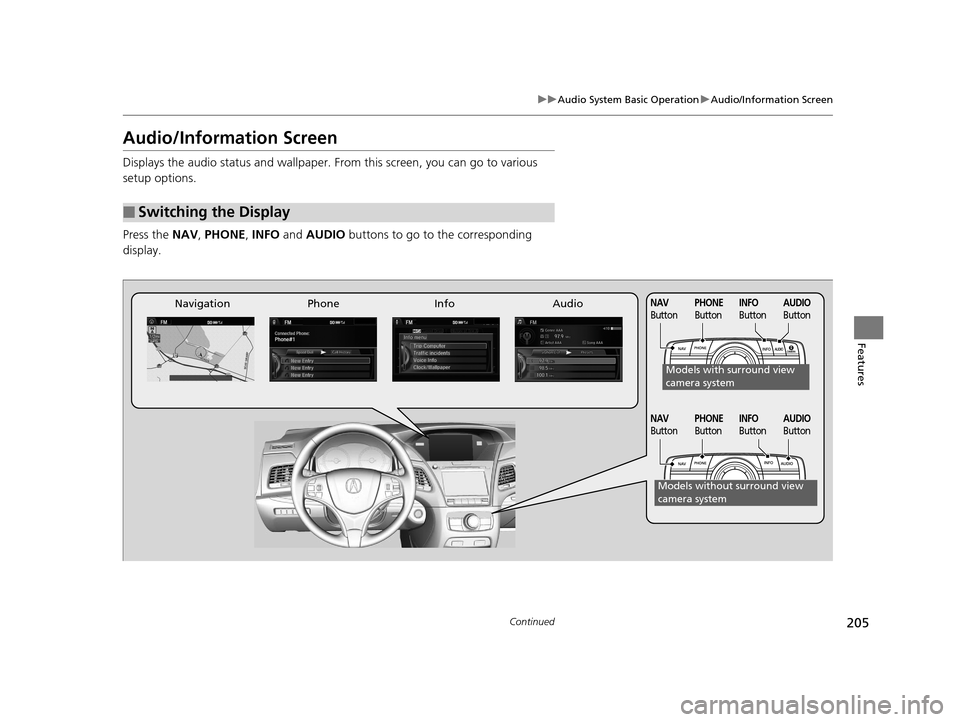
Displays the audio status and wallpaper. From this screen, you can go to various
setup options.
Press the NAV, PHONE , INFO and AUDIO buttons to go to the corresponding
display.
■Switching the Display
Audio
Info
Navigation PhoneAUDIO
ButtonNAV
ButtonPHONE
ButtonINFO
Button
Models with surround view
camera system
Models without surround view
camera system
AUDIO
ButtonNAV
ButtonPHONE
ButtonINFO
Button
17 ACURA RLX-31TY26300.book 205 ページ 2016年6月17日 金曜日 午前8時12分
Page 207 of 557
206
uuAudio System Basic Operation uAudio/Information Screen
Features
■Audio
Shows the current audio information.
■Navigation
Shows the navigation screen.
2 Refer to the Navigation System Manual
■Phone
Shows the HFL information.
2 Bluetooth ® HandsFreeLink® P. 290
■Info
Shows the Trip Computer or Clock/Wallpaper and other information. Rotate
to select an item, then press .
■Trip computer (Current Drive)
Shows the range, and instant and average fu el economy of the current trip, as well
as the average fuel economy from your last trip.
■Trip computer (History of Trip A)
Shows the range, average fuel economy and distances traveled for the current trip, as well
as the average fuel economy and distances tr aveled during the last three driving cycles.
Each time you reset the trip meter A, the information on the display updates. The
history of the previous th ree driving cycles is kept.
■Deleting the history manually
1. Move on the History of Trip A screen to select Delete History, then press .
2. You will receive a confirmation message on the screen. Rotate to select Yes,
then press .
■Clock/Wallpaper
Shows a clock screen or an image you import.
17 ACURA RLX-31TY26300.book 206 ページ 2016年6月17日 金曜日 午前8時12分