audio Acura RLX 2017 Repair Manual
[x] Cancel search | Manufacturer: ACURA, Model Year: 2017, Model line: RLX, Model: Acura RLX 2017Pages: 557, PDF Size: 37.97 MB
Page 238 of 557

237
uuAudio System Basic Operation uPlaying an iPod
Continued
Features
Playing an iPod
Connect the iPod using your dock connector to the USB port, then select the iPod
mode.
2 USB Port P. 193
Audio/Information Screen
MENU Button
Press to display the menu items. Album Bar
Select to search for an album.
Audio Source
Select to change an audio source.
Skip/Seek Icons
Select or to change songs.
Select and hold to move rapidly
within a song.
More
Select to display the menu items.
(Power) Button
Press to turn the audio system
on and off.
BACK Button
Press to go back to the previous display. Interface Dial/ENTER Button
Press and turn to select an item, then
press to set your selection.
Move up, down, right and left to select
secondary menu. USB Indicator
Appears when an iPod is connected.
Album Art
On Demand Multi-Use Display
TM
VOL (Volume) Knob (Pushed out)
Turn to adjust the volume.Album Art Icon
Repeat
Select to use a repeat feature.
Play/Pause Icon
Select to resume or play a song.
Shuffle
Select to use a shuffle feature.
17 ACURA RLX-31TY26300.book 237 ページ 2016年6月17日 金曜日 午前8時12分
Page 239 of 557

uuAudio System Basic Operation uPlaying an iPod
238
Features
You can select albums in the category you selected by the Music Search list.
1. Select the album bar.
u The image of the current album is displayed.
2. Select or icon to search for an album.
u When the album image you are looking for appears, select it to play.
■How to Select an Album1How to Select an Album
This function may not be available depending on
models or versions.
Select to go back to the previous screen.
XSelect an album
image.
Select the album
bar.
Album Bar
Album Image
17 ACURA RLX-31TY26300.book 238 ページ 2016年6月17日 金曜日 午前8時12分
Page 240 of 557
Continued239
uuAudio System Basic Operation uPlaying an iPod
Features
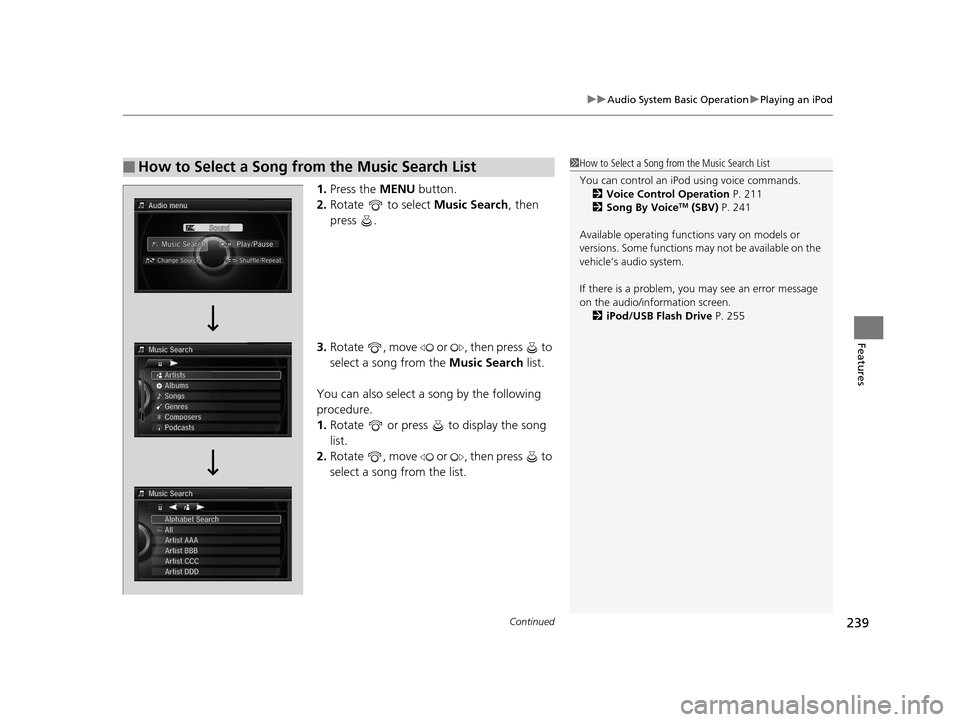
1. Press the MENU button.
2. Rotate to select Music Search, then
press .
3. Rotate , move or , then press to
select a song from the Music Search list.
You can also select a song by the following
procedure.
1. Rotate or press to display the song
list.
2. Rotate , move or , then press to
select a song from the list.
■How to Select a Song from the Music Search List1How to Select a Song from the Music Search List
You can control an iPod using voice commands.
2 Voice Control Operation P. 211
2 Song By Voice
TM (SBV) P. 241
Available operating functi ons vary on models or
versions. Some functions ma y not be available on the
vehicle’s audio system.
If there is a problem, you may see an error message
on the audio/information screen. 2 iPod/USB Flash Drive P. 255
17 ACURA RLX-31TY26300.book 239 ページ 2016年6月17日 金曜日 午前8時12分
Page 241 of 557
uuAudio System Basic Operation uPlaying an iPod
240
Features
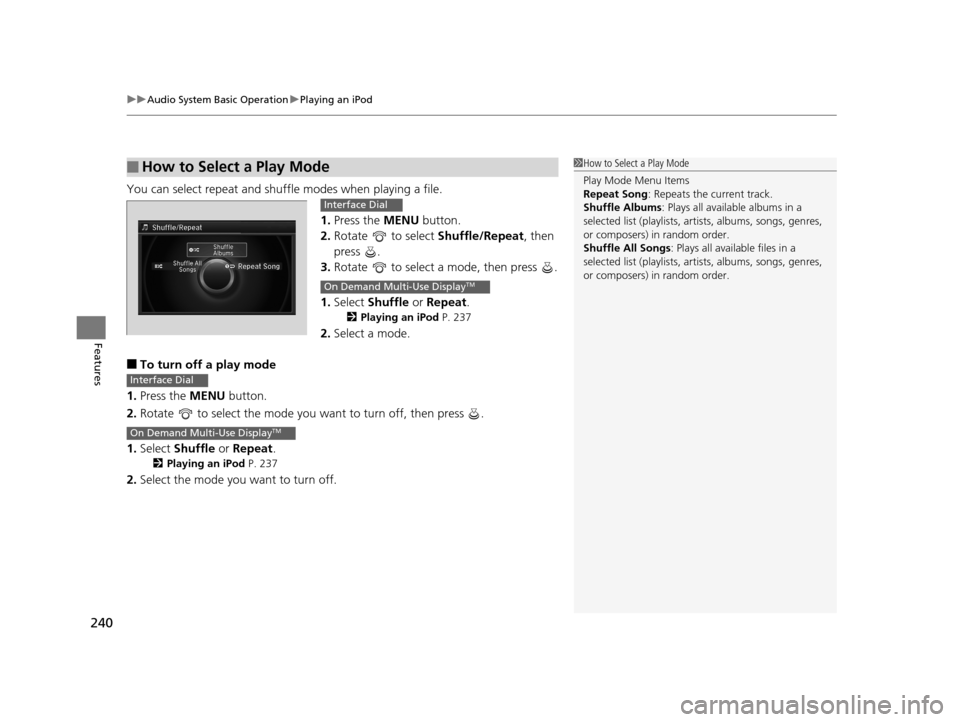
You can select repeat and shu ffle modes when playing a file.
1.Press the MENU button.
2. Rotate to select Shuffle/Repeat, then
press .
3. Rotate to select a mode, then press .
1. Select Shuffle or Repeat .
2Playing an iPod P. 237
2.Select a mode.
■To turn off a play mode
1. Press the MENU button.
2. Rotate to select the mode you want to turn off, then press .
1. Select Shuffle or Repeat .
2Playing an iPod P. 237
2.Select the mode you want to turn off.
■How to Select a Play Mode1How to Select a Play Mode
Play Mode Menu Items
Repeat Song : Repeats the current track.
Shuffle Albums : Plays all available albums in a
selected list (playlists, ar tists, albums, songs, genres,
or composers) in random order.
Shuffle All Songs : Plays all available files in a
selected list (playlists, ar tists, albums, songs, genres,
or composers) in random order.
Interface Dial
On Demand Multi-Use DisplayTM
Interface Dial
On Demand Multi-Use DisplayTM
17 ACURA RLX-31TY26300.book 240 ページ 2016年6月17日 金曜日 午前8時12分
Page 242 of 557
241
uuAudio System Basic Operation uSong By VoiceTM (SBV)
Continued
Features
Song By VoiceTM (SBV)
Use SBV to search for and play music from your HDD or iPod using voice commands.
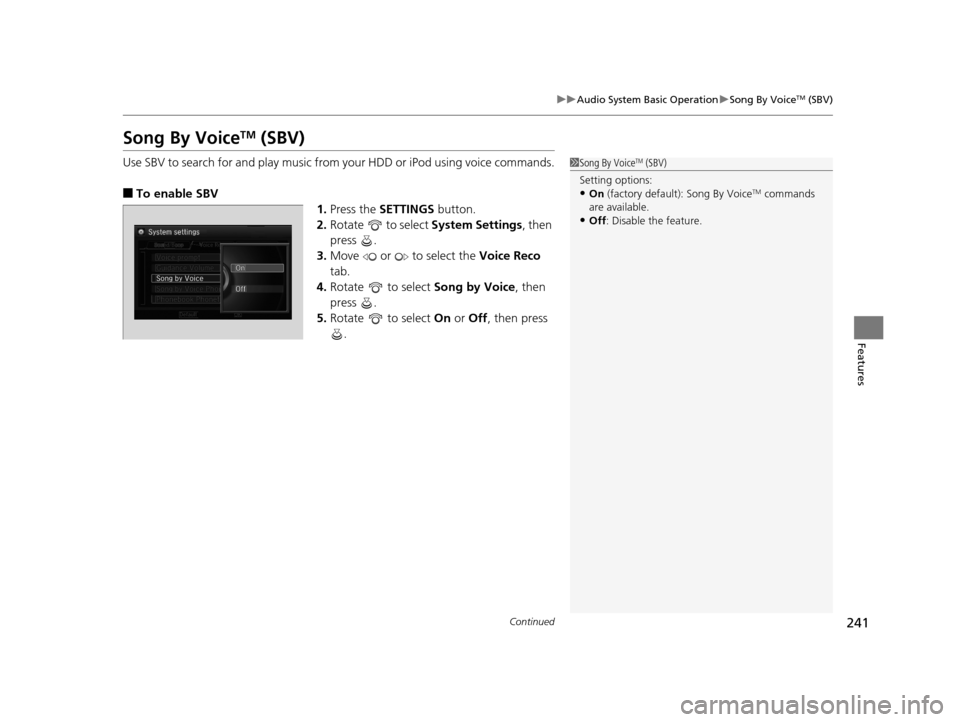
■To enable SBV
1.Press the SETTINGS button.
2. Rotate to select System Settings, then
press .
3. Move or to select the Voice Reco
tab.
4. Rotate to select Song by Voice, then
press .
5. Rotate to select On or Off , then press
.
1 Song By VoiceTM (SBV)
Setting options:
•On (factory default): Song By VoiceTM commands
are available.
•Off : Disable the feature.
17 ACURA RLX-31TY26300.book 241 ページ 2016年6月17日 金曜日 午前8時12分
Page 243 of 557
uuAudio System Basic Operation uSong By VoiceTM (SBV)
242
Features
■Searching for music using SBV
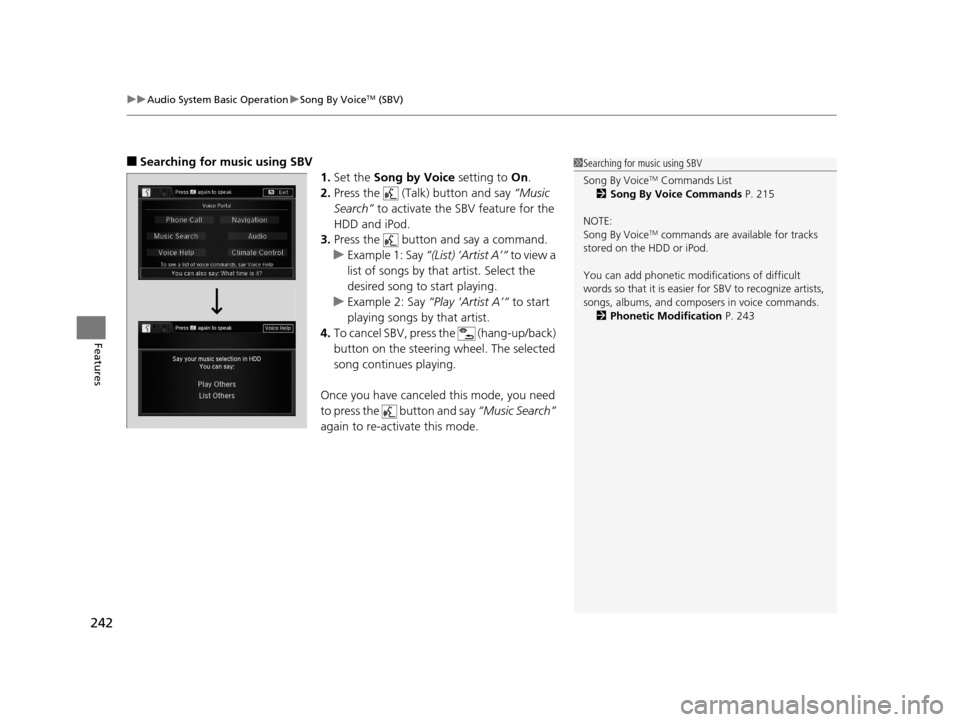
1.Set the Song by Voice setting to On.
2. Press the (Talk) button and say “Music
Search” to activate the SBV feature for the
HDD and iPod.
3. Press the button and say a command.
u Example 1: Say “(List) ‘Artist A’“ to view a
list of songs by that artist. Select the
desired song to start playing.
u Example 2: Say “Play ‘Artist A’“ to start
playing songs by that artist.
4. To cancel SBV, press the (hang-up/back)
button on the steering wheel. The selected
song continues playing.
Once you have canceled this mode, you need
to press the button and say “Music Search”
again to re-activate this mode.1 Searching for music using SBV
Song By Voice
TM Commands List
2 Song By Voice Commands P. 215
NOTE:
Song By Voice
TM commands are available for tracks
stored on the HDD or iPod.
You can add phonetic modi fications of difficult
words so that it is easier for SBV to recognize artists,
songs, albums, and composers in voice commands. 2 Phonetic Modification P. 243
17 ACURA RLX-31TY26300.book 242 ページ 2016年6月17日 金曜日 午前8時12分
Page 244 of 557
Continued243
uuAudio System Basic Operation uSong By VoiceTM (SBV)
Features
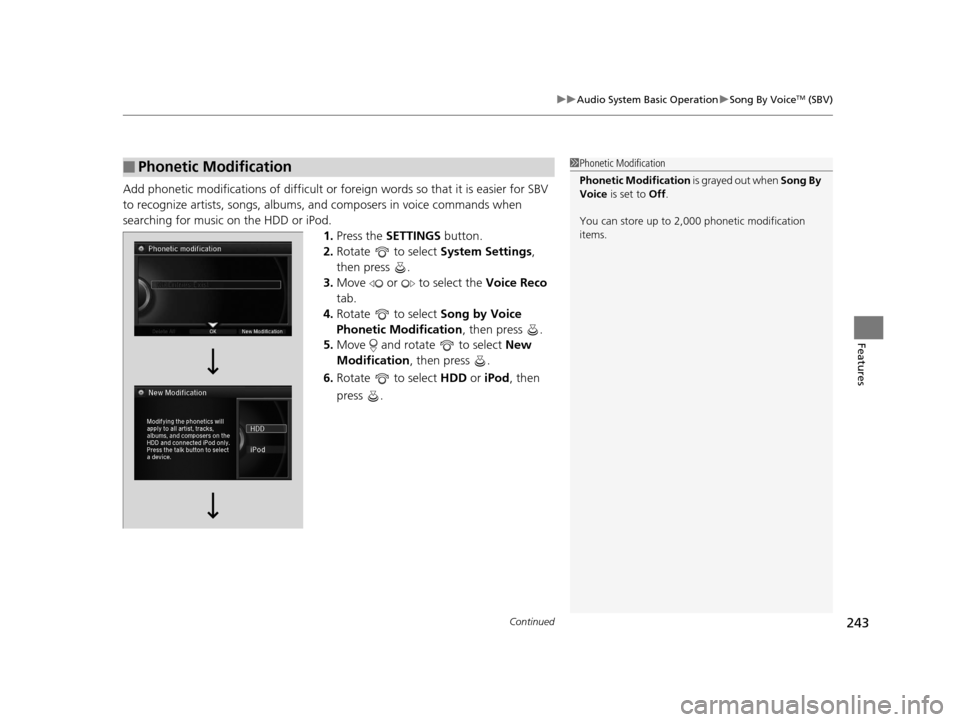
Add phonetic modifications of difficult or fo reign words so that it is easier for SBV
to recognize artists, songs, albums, and composers in voice commands when
searching for music on the HDD or iPod. 1.Press the SETTINGS button.
2. Rotate to select System Settings,
then press .
3. Move or to select the Voice Reco
tab.
4. Rotate to select Song by Voice
Phonetic Modification , then press .
5. Move and rotate to select New
Modification , then press .
6. Rotate to select HDD or iPod , then
press .
■Phonetic Modification1 Phonetic Modification
Phonetic Modification is grayed out when Song By
Voice is set to Off.
You can store up to 2, 000 phonetic modification
items.
17 ACURA RLX-31TY26300.book 243 ページ 2016年6月17日 金曜日 午前8時12分
Page 245 of 557
244
uuAudio System Basic Operation uSong By VoiceTM (SBV)
Features
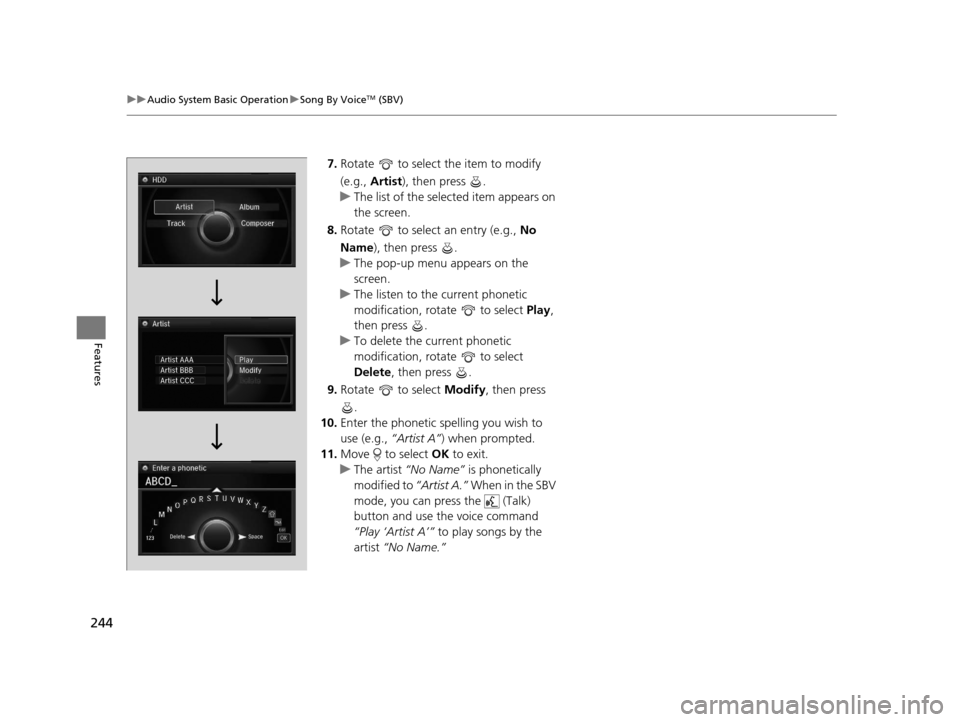
7. Rotate to select the item to modify
(e.g., Artist ), then press .
u The list of the selected item appears on
the screen.
8. Rotate to select an entry (e.g., No
Name ), then press .
u The pop-up menu appears on the
screen.
u The listen to the current phonetic
modification, rotate to select Play,
then press .
u To delete the current phonetic
modification, rotate to select
Delete , then press .
9. Rotate to select Modify, then press
.
10. Enter the phonetic spelling you wish to
use (e.g., “Artist A”) when prompted.
11. Move to select OK to exit.
u The artist “No Name” is phonetically
modified to “Artist A.” When in the SBV
mode, you can press the (Talk)
button and use the voice command
“Play ‘Artist A’” to play songs by the
artist “No Name.”
17 ACURA RLX-31TY26300.book 244 ページ 2016年6月17日 金曜日 午前8時12分
Page 246 of 557
245
uuAudio System Basic Operation uPlaying Internet Radio
Continued
Features
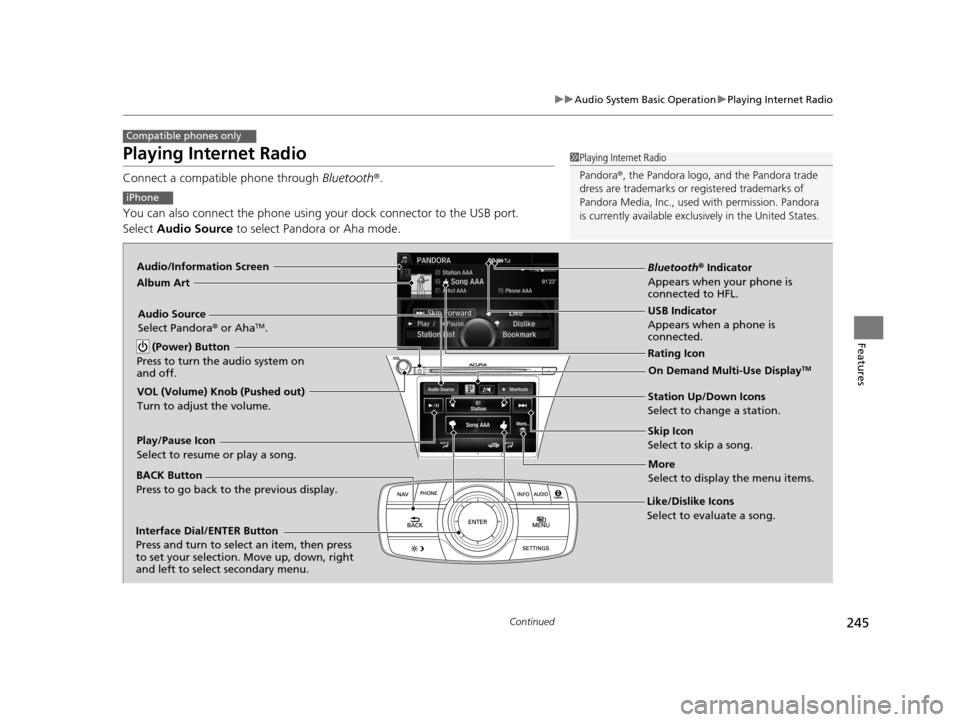
Playing Internet Radio
Connect a compatible phone through Bluetooth®.
You can also connect the phone using your dock connector to the USB port.
Select Audio Source to select Pandora or Aha mode.
Compatible phones only
1Playing Internet Radio
Pandora ®, the Pandora logo, and the Pandora trade
dress are trademarks or registered trademarks of
Pandora Media, Inc., used with permission. Pandora
is currently available exclusively in the United States.
iPhone
Audio/Information Screen
Album Art
USB Indicator
Appears when a phone is
connected.
Rating Icon
BACK Button
Press to go back to the previous display.
Skip Icon
Select to skip a song.
More
Select to display the menu items.
Station Up/Down Icons
Select to change a station.
Audio Source
Select Pandora
® or Aha
TM.
Play/Pause Icon
Select to resume or play a song.
Like/Dislike Icons
Select to evaluate a song.
(Power) Button
Press to turn the audio system on
and off.
Interface Dial/ENTER Button
Press and turn to select an item, then press
to set your selection. Move up, down, right
and left to select secondary menu.
On Demand Multi-Use DisplayTM
VOL (Volume) Knob (Pushed out)
Turn to adjust the volume.
Bluetooth ® Indicator
Appears when your phone is
connected to HFL.
17 ACURA RLX-31TY26300.book 245 ページ 2016年6月17日 金曜日 午前8時12分
Page 247 of 557
uuAudio System Basic Operation uPlaying Internet Radio
246
Features
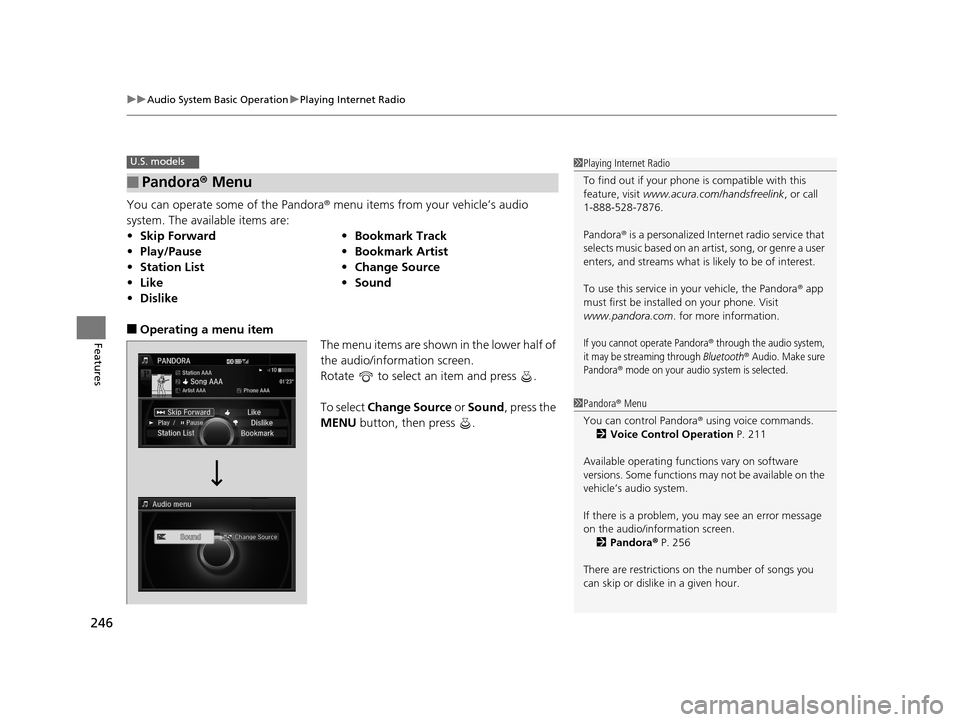
You can operate some of the Pandora® menu items from your vehicle’s audio
system. The available items are:
■Operating a menu item The menu items are shown in the lower half of
the audio/information screen.
Rotate to select an item and press .
To select Change Source or Sound , press the
MENU button, then press .
■Pandora® Menu
•Skip Forward •Bookmark Track
• Play/Pause •Bookmark Artist
• Station List •Change Source
• Like •Sound
• Dislike
U.S. models1Playing Internet Radio
To find out if your phone is compatible with this
feature, visit www.acura.com/handsfreelink , or call
1-888-528-7876.
Pandora ® is a personalized Internet radio service that
selects music based on an artist, song, or genre a user
enters, and streams what is likely to be of interest.
To use this service in your vehicle, the Pandora ® app
must first be installed on your phone. Visit
www.pandora.com . for more information.
If you cannot operate Pandora® through the audio system,
it may be streaming through Bluetooth® Audio. Make sure
Pandora
® mode on your audio system is selected.
1 Pandora ® Menu
You can control Pandora ® using voice commands.
2 Voice Control Operation P. 211
Available operating functi ons vary on software
versions. Some functions ma y not be available on the
vehicle’s audio system.
If there is a problem, you may see an error message
on the audio/information screen.
2 Pandora ® P. 256
There are restrictions on the number of songs you
can skip or dislike in a given hour.
17 ACURA RLX-31TY26300.book 246 ページ 2016年6月17日 金曜日 午前8時12分