wheel Acura RLX 2017 Workshop Manual
[x] Cancel search | Manufacturer: ACURA, Model Year: 2017, Model line: RLX, Model: Acura RLX 2017Pages: 557, PDF Size: 37.97 MB
Page 338 of 557
337
Driving
This chapter discusses driving, refueling, and information on items such as accessories.
Before Driving
Driving Preparation .......................... 338
Maximum Load Limit........................ 341
Towing a Trailer Towing Your Vehicle ........................ 343
When Driving
Starting the Engine .......................... 344
Precautions While Driving................. 349
Automatic Transmission ................... 350
Shifting ............................................ 351
SPORT Mode.................................... 355
Cruise Control
*................................ 356
Front Sensor Camera*...................... 359
Adaptive Cruise Control (ACC) with Low Speed Follow (LSF)
*........................ 361 Forward Collision Warning (FCW) .... 375
Lane Departure Warning (LDW) ....... 378
Road Departure Mitigation (RDM) System*... 382Lane Keeping Assist System (LKAS)*.... 386Vehicle Stability Assist (VSA®), aka Electronic
Stability Control (ESC), System ............... 393
Agile Handling Assist ....................... 395
Precision All-Wheel SteerTM (P-AWS ®)
System ........................................... 395
Blind Spot Information (BSI) System*.... 396Tire Pressure Monitoring System (TPMS) ... 398Tire Pressure Monitoring System (TPMS) -
Required Federal Explanation ............. 400
Braking Brake System ....................................... 402
Anti-lock Brake System (ABS) ............... 407 Brake Assist System .............................. 408
Collision Mitigation Braking SystemTM (CMBSTM)*.....409Parking Your Vehicle
When Stopped ..................................... 417
Parking Sensor System
*........................ 418
Cross Traffic Monitor*.......................... 422
Multi-View Rear Camera*..................... 426
Surround View Camera System*.......... 427
Refueling Fuel Information ................................... 437
How to Refuel ...................................... 438
Fuel Economy and CO
2 Emissions ......... 439
Improving Fuel Economy and Reducing CO2
Emissions............................................ 439
* Not available on all models
17 ACURA RLX-31TY26300.book 337 ページ 2016年6月17日 金曜日 午前8時12分
Page 339 of 557
338
Driving
Before Driving
Driving Preparation
Check the following items before you start driving.
• Make sure there are no obstructions on th e windows, door mirrors, exterior
lights, or other parts of the vehicle.
u Remove any frost, snow, or ice.
u Remove any snow on the roof, as this can slip down and obstruct your field of
vision while driving. If frozen solid , remove ice once it has softened.
u When removing ice from around the wheel s, be sure not to damage the wheel
or wheel components.
• Make sure the hood is securely closed.
u If the hood opens while driving, your front view will be blocked.
• Make sure the tires are in good condition.
u Check air pressures, and check for damage and excessive wear.
2Checking and Maintaining Tires P. 471
•Make sure there are no people or ob jects behind or around the vehicle.
u There are blind spots from the inside.
■Exterior Checks1Exterior Checks
NOTICE
When doors are frozen s hut, use warm water around
the door edges to melt any ice. Do not try to force
them open, as this can damage the rubber trim
around the doors. When done, wipe dry to avoid
further freezing.
Do not pour warm water into the key cylinder.
You will be unable to insert the key if the water
freezes in the hole.
Heat from the engine and exhaust can ignite
flammable material s left under the hood, causing a
fire. If you’ve parked y our vehicle for an extended
period, inspect and remove any debris that may have
collected, such as dried grass and leaves that have
fallen or have been carried in for use as a nest by a
small animal. Also check under the hood for leftover
flammable materials after you or someone else has
performed maintenance on your vehicle.
17 ACURA RLX-31TY26300.book 338 ページ 2016年6月17日 金曜日 午前8時12分
Page 340 of 557
Continued339
uuBefore Driving uDriving Preparation
Driving
• Store or secure all items on board properly.
u Carrying too much cargo, or improperly storing it, can affect your vehicle’s
handling, stability, sto pping distance, and tires, and make it unsafe.
2Maximum Load Limit P. 341
•Do not pile items higher than the seat height.
u They can block your view and may be thrown forward in the event of sudden
braking.
• Do not place anything in the front seat footwells. Make sure to secure the floor
mat.
u An object or unsecured floor mat can in terfere with your brake and accelerator
pedal operation while driving.
• If you have any animals on board, do not let them move around in the vehicle.
u They may interfere with driv ing and a crash could occur.
• Securely close and lock all doors and the trunk.
2 Locking/Unlocking the Doors from the Inside P. 124
•Adjust your seating position properly.
u Adjust the head restraint, too.
2Adjusting the Seats P. 156
2 Adjusting the Head Restraints P. 159
•Adjust the mirrors and steering wh eel properly for your driving.
u Adjust them while sitting in the proper driving position.
2 Adjusting the Mirrors P. 153
2 Adjusting the Steering Wheel P. 152
■Interior Checks1Interior Checks
The headlight aim is set by the factory, and does not
need to be adjusted. Howeve r, if you regularly carry
heavy items in the trunk ha ve the aiming readjusted
at a dealer or by a qualified technician.
17 ACURA RLX-31TY26300.book 339 ページ 2016年6月17日 金曜日 午前8時12分
Page 350 of 557
349
uuWhen Driving uPrecautions While Driving
Continued
Driving
Precautions While Driving
Avoid driving in deep water and on flooded roads. This can damage the engine,
driveline, or cause electrical component failure.
■In Rain1Precautions While Driving
NOTICE
Do not operate the shift lever while pressing the
accelerator pedal. You could damage the transmission.
NOTICE
The following can dama ge the under spoiler:
•Parking the vehicle by a parking block
•Parallel parking along the road shoulder•Driving toward the bottom of a hill
•Driving up or down to a different surface level
(such as a road shoulder)
•Driving on a rutted or bumpy road
•Driving on a road with potholes.
NOTICE
If you repeatedly turn the steering wheel at an
extremely low speed, or hold the steering wheel on
the full left or right position for a while, the electric
power steering (EPS) system heats up. The system
goes into a protective mode, and limits its
performance. The steering wheel becomes harder
and harder to operate. Once the system cools down,
the EPS system is restored.
Repeated operation under these conditions can
eventually damage the system.
If the power mode is set to ACCESSORY while
driving, the engine will shut down and all steering
and brake power assist functi ons will stop, making it
difficult to control the vehicle.
17 ACURA RLX-31TY26300.book 349 ページ 2016年6月17日 金曜日 午前8時12分
Page 354 of 557
353
uuWhen Driving uShifting
Continued
Driving
Use the paddle shifters to change between 1st and 6th gears without removing your
hands from the steering wheel. The transmiss ion will switch to the sequential shift
mode.
■When the shift lever is in (D:
The vehicle will go into the sequential shi ft mode momentarily, and the gear position
indicator will come on.
Once you start traveling at a constant speed, the sequential shift mode will
automatically switch off, and the gear position indicator will go off.
Hold the
(+ paddle shifter for two seconds to return to normal drive.
■When the shift lever is in (D with SPORT mode:
The vehicle will go into the sequential shift mode, and the M (sequential shift)
indicator and gear position indicator will come on. At speeds of 6 mph (10 km/h) or
less, the vehicle automatically shifts down into 1st gear. If you do not operate the
paddle shifters while in 1st gear, the tran smission automatically shifts up to 2nd
gear.
If the vehicle speed increases and the engi ne speed reaches near the tachometer’s
red zone, the transmission automatically shifts up to 6th.
You can cancel this mode by pressing the SPORT button, or pulling the
(+ paddle
shifter for a few seconds. When the sequenti al shift mode is canceled, the sequential
shift mode indicator and shift indicator go off.
■Sequential Shift Mode
17 ACURA RLX-31TY26300.book 353 ページ 2016年6月17日 金曜日 午前8時12分
Page 357 of 557
356
uuWhen Driving uCruise Control*
Driving
Cruise Control*
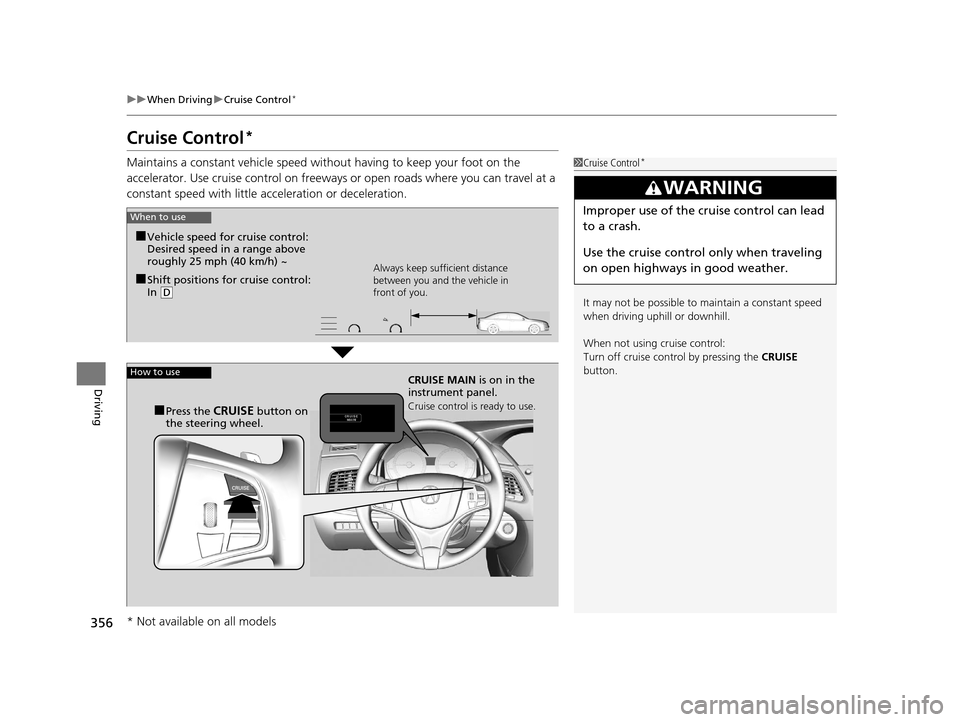
Maintains a constant vehicle speed without having to keep your foot on the
accelerator. Use cruise control on freeways or open roads where you can travel at a
constant speed with little acceleration or deceleration.1Cruise Control*
It may not be possible to maintain a constant speed
when driving uphill or downhill.
When not using cruise control:
Turn off cruise control by pressing the CRUISE
button.
3WARNING
Improper use of the cruise control can lead
to a crash.
Use the cruise control only when traveling
on open highways in good weather.When to use
■Shift positions for cruise control:
In ( D Always keep sufficient distance
between you and the vehicle in
front of you.
■Vehicle speed for cruise control:
Desired speed in a range above
roughly 25 mph (40 km/h) ~
How to useCRUISE MAIN
is on in the
instrument panel.
Cruise control is ready to use.■Press the CRUISE button on
the steering wheel.
* Not available on all models
17 ACURA RLX-31TY26300.book 356 ページ 2016年6月17日 金曜日 午前8時12分
Page 359 of 557
uuWhen Driving uCruise Control*
358
Driving
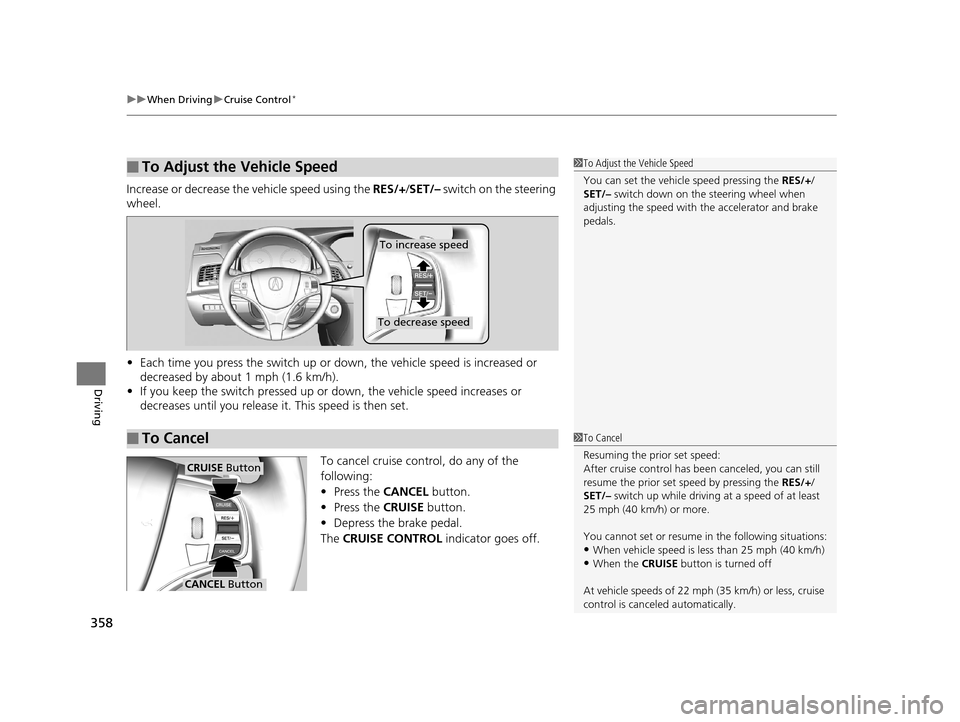
Increase or decrease the vehicle speed using the RES/+/SET/– switch on the steering
wheel.
• Each time you press the switch up or do wn, the vehicle speed is increased or
decreased by about 1 mph (1.6 km/h).
• If you keep the switch pressed up or down, the vehicle speed increases or
decreases until you release it . This speed is then set.
To cancel cruise cont rol, do any of the
following:
• Press the CANCEL button.
• Press the CRUISE button.
• Depress the brake pedal.
The CRUISE CONTROL indicator goes off.
■To Adjust the Vehicle Speed1To Adjust the Vehicle Speed
You can set the vehicle speed pressing the RES/+/
SET/– switch down on the steering wheel when
adjusting the speed with the accelerator and brake
pedals.
■To Cancel
To decrease speed
To increase speed
1 To Cancel
Resuming the prior set speed:
After cruise control has be en canceled, you can still
resume the prior set speed by pressing the RES/+/
SET/– switch up while driving at a speed of at least
25 mph (40 km/h) or more.
You cannot set or resume in the following situations:
•When vehicle speed is less than 25 mph (40 km/h)
•When the CRUISE button is turned off
At vehicle speeds of 22 m ph (35 km/h) or less, cruise
control is canceled automatically.
CRUISE Button
CANCEL Button
17 ACURA RLX-31TY26300.book 358 ページ 2016年6月17日 金曜日 午前8時12分
Page 363 of 557
uuWhen Driving uAdaptive Cruise Control (ACC) with Low Speed Follow (LSF)*
362
Driving
1Adaptive Cruise Control (ACC) with Low Speed Follow (LSF)*
When the MAIN button is pressed, ACC with LSF and
Lane Keeping Assist System (LKAS) are both turned
on or off.
ACC with LSF may not work properly under certain
conditions. 2 ACC with LSF Conditions and Limitations
P. 366
When not using ACC with LSF: Turn off adaptive
cruise by pressing the MAIN button. This also will
turn off the Lane Keeping Assist System (LKAS).
Do not use ACC with LSF under the following
conditions:
•On roads with heavy traf fic or while driving in
continuous stop and go traffic.
•On roads with sharp turns.
•On roads with steep downhill sections, as the set
vehicle speed can be exceeded by coasting. In such
cases, ACC with LSF will not apply the brakes to
maintain the set speed.
•On roads with toll collection facilities or other
objects between lanes of traffic, or in parking
areas, or faci lities with driv e through access.
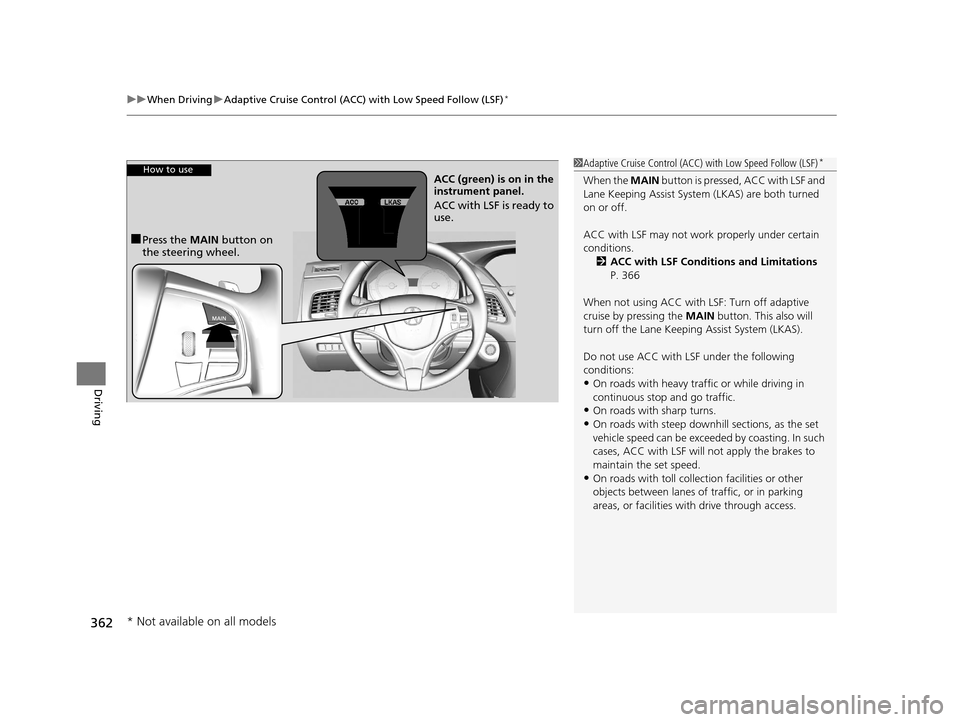
How to use
■Press the MAIN button on
the steering wheel. ACC (green) is on in the
instrument panel.
ACC with LSF is ready to
use.
* Not available on all models
17 ACURA RLX-31TY26300.book 362 ページ 2016年6月17日 金曜日 午前8時12分
Page 367 of 557
uuWhen Driving uAdaptive Cruise Control (ACC) with Low Speed Follow (LSF)*
366
Driving
The system may automatically shut off and the ACC indicator will come on under
certain conditions. Some examples of th ese conditions are listed below. Other
conditions may reduce some of the ACC functions.
2 Front Sensor Camera* P. 359
■Environmental conditions
• Driving in bad weather (rain, fog, snow, etc.).
■Roadway conditions
• Driving on a snowy or wet roadway (obscured lane marking, vehicle tracks,
reflected lights, road spray, high contrast).
■Vehicle conditions
• The outside of the windshie ld is blocked by dirt, mud, leaves, wet snow, etc.
• An abnormal tire or wheel condition (Wrong sized, varied size or construction,
improperly inflated, compact spare tire
*, etc.).
• The camera temperature gets too high.
• The parking brake is applied.
• When the front grille is dirty.
• When the front of the vehicle tilts up due to heavy cargo in the trunk or rear seats.
• When tire chains are installed.
■ACC with LSF Conditions and Limitations1ACC with LSF Conditions and Limitations
The radar sensor for ACC with LSF is shared with the
collision mitigation braking system
TM (CMBSTM).
2 Collision Mitigation Braking SystemTM
(CMBSTM)* P. 409
You can read about handling information for the
camera equipped with this system. 2 Front Sensor Camera
* P. 359
* Not available on all models
17 ACURA RLX-31TY26300.book 366 ページ 2016年6月17日 金曜日 午前8時12分
Page 369 of 557
uuWhen Driving uAdaptive Cruise Control (ACC) with Low Speed Follow (LSF)*
368
Driving
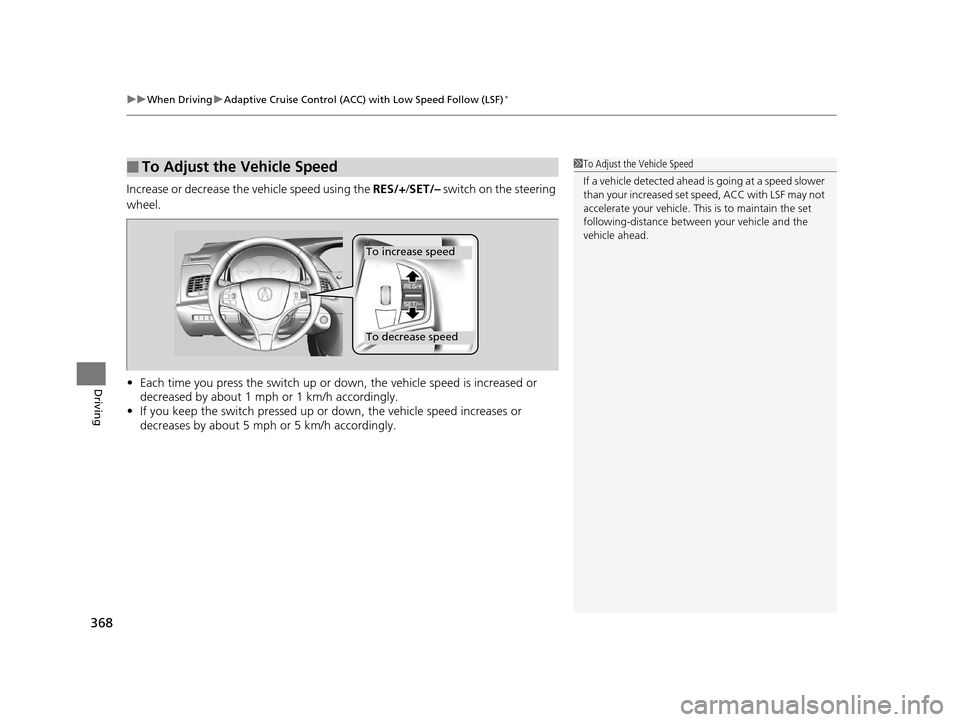
Increase or decrease the vehicle speed using the RES/+/SET/– switch on the steering
wheel.
• Each time you press the switch up or do wn, the vehicle speed is increased or
decreased by about 1 mph or 1 km/h accordingly.
• If you keep the switch pressed up or down, the vehicle speed increases or
decreases by about 5 mph or 5 km/h accordingly.
■To Adjust the Vehicle Speed1 To Adjust the Vehicle Speed
If a vehicle detected ahead is going at a speed slower
than your increased set speed, ACC with LSF may not
accelerate your vehicle. This is to maintain the set
following-distance betwee n your vehicle and the
vehicle ahead.
To increase speed
To decrease speed
17 ACURA RLX-31TY26300.book 368 ページ 2016年6月17日 金曜日 午前8時12分