check Acura RLX HYBRID 2019 Manual Online
[x] Cancel search | Manufacturer: ACURA, Model Year: 2019, Model line: RLX HYBRID, Model: Acura RLX HYBRID 2019Pages: 609, PDF Size: 47.44 MB
Page 474 of 609

Continued473
uuParking Your Vehicle uCross Traffic Monitor
Driving
The system activates when:
• The power mode is in ON.
• The Cross Traffic Monitor is turned on.
2 Cross Traffic Monitor On and Off P. 475
2 Customized Features P. 295
•The transmission is in (R.
• Your vehicle is moving at 3 mph (5 km/h) or
lower.
When a vehicle is detected approaching from a rear corner, Cross Traffic Monitor
alerts you with a buzzer and a displayed warning or accelerator pedal resistibility.
The system will not detect a vehicle that approaches from directly behind your
vehicle, nor will it provide alerts about a detected vehicle when it moves directly
behind your vehicle.
The system does not detect or provide alerts for a vehicle that is moving away from
your vehicle, and it may not detect or ale rt for pedestrians, bicycles, or stationary
objects.
■How the System Works1 Cross Traffic Monitor
Cross Traffic Monitor may not detect or may delay
alerting an approaching vehi cle, or may alert without
an approaching vehicle under the following
conditions:
•An obstacle, such as a nother vehicle and a wall,
near your vehicle’s rear bumper, is blocking the
radar sensor’s scope.
•Your vehicle is moving at the speed of about 3 mph
(5 km/h) or higher.
•A vehicle is approaching at the speed other than
between about 6 mph (10 km/h) and 16 mph (25
km/h).
•The system picks up external interference such as
other radar sensors from an other vehicle or strong
radio wave transmitted fr om a facility nearby.
•Either corner of the rear bumper is covered with
snow, ice, mud or dirt.
•When there is bad weather.
•Your vehicle is on an incline.
•Your vehicle is tilted due to a heavy load in the rear.•Your vehicle is reversing towards a wall, a pole, a
vehicle, and so on.
•The rear bumper or the sensors have been
improperly repaired or the rear bumper has been
deformed. Have your vehi cle checked by a dealer.
For proper operation, always keep the rear bumper
corner area clean.
Do not cover the rear bumper corner area with labels
or stickers of any kind.
Radar sensors:
Underneath the rear bumper
corners
19 ACURA RLX HYBRID CSS-31TY36500.book 473 ページ 2018年3月7日 水曜日 午後4時19分
Page 475 of 609

uuParking Your Vehicle uCross Traffic Monitor
474
Driving
An arrow icon appears on the side a vehicle is approaching on the audio/information
screen.
■When the System Detects a Vehicle1When the System Detects a Vehicle
If the on the lower right changes to in amber
when the transmission is in
(R, mud snow or ice, etc.
may have accumulated in th e vicinity of the sensor.
The system is temporarily canceled. Check the
bumper corners for any obs tructions, and thoroughly
clean the area if necessary.
If the comes on when the transmission is in
( R,
there may be a problem with the Cross Traffic
Monitor system. Do not use the system and have your
vehicle checked by a dealer.
If the display remains the same with the transmission
in
( R, there may be a problem with the rear camera
system and the Cross Traffic Monitor system.
Do not use the system and have your vehicle checked
by a dealer.
Rear Wide View Rear Normal View Arrow Icon
Arrow Icon
Models with surround view camera system
Rear Ground View
Models with multi-view rear camera
Wide View
Normal ViewTop Down View
19 ACURA RLX HYBRID CSS-31TY36500.book 474 ページ 2018年3月7日 水曜日 午後4時19分
Page 479 of 609
478
Driving
Surround View Camera System*
Is a four camera system that views areas commonly known as “blind spots” from
different angles, then displays the images on the audio/information screen. This
system can be used to:
• Check the right and left sides of the vehi cle while crossing at intersections with
poor visibility (fog, heavy rain, obstructed view, etc.).
2 Checking from the front wide view at intersections P. 486
•Check for obstacles in front of the ve hicle when parking or maneuvering in
confined areas.
2 Checking the sides of your vehicle P. 486
•Check for obstacles when you are moving in (R.
2 Checking for Obstacles at the Back of Your Vehicle P. 482
•Assist you when backing into or parallel parking the vehicle in a lined parking
space.
2 Reversing into a Parking Space Marked with Parking Lines P. 483
2 Parallel Parking into a Parking Space Marked with Parking Lines P. 484
1Surround View Camera System*
3WARNING
Failure to visually assess the area around
the vehicle (directly or by use of the
mirrors) may result in a crash causing
serious injury or death.
The areas shown in the surround view
camera system display are limited. The
display may not show all pedestrians or
other objects around your vehicle.
Do not solely rely only on the surround
view camera system display to assess
whether it is safe to move your vehicle.
3WARNING
Failure to pay proper attention to your
surroundings while driving may result in a
crash causing serious injury or death.
To help mitigate the ch ances of a collision,
only look at the surround view camera
system display when it is safe to do so.
* Not available on all models
19 ACURA RLX HYBRID CSS-31TY36500.book 478 ページ 2018年3月7日 水曜日 午後4時19分
Page 483 of 609
482
uuSurround View Camera System*uWhen Parking Your Vehicle
Driving
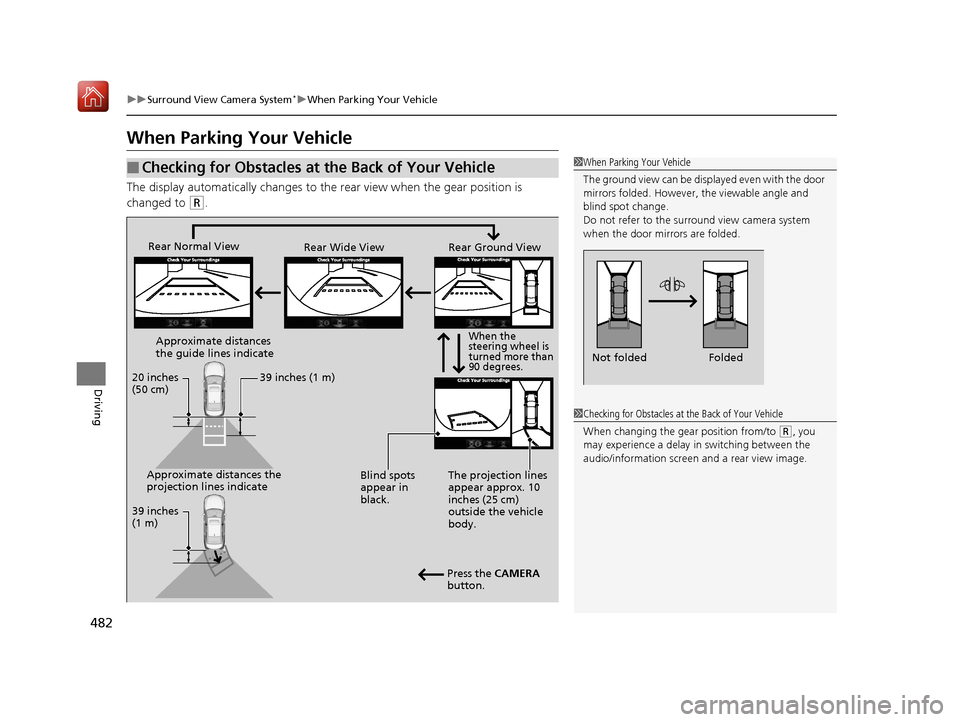
When Parking Your Vehicle
The display automatically changes to the rear view when the gear position is
changed to
(R.
■Checking for Obstacles at the Back of Your Vehicle1 When Parking Your Vehicle
The ground view can be disp layed even with the door
mirrors folded. However, the viewable angle and
blind spot change.
Do not refer to the surround view camera system
when the door mirrors are folded.
Folded
Not folded
1 Checking for Obstacles at the Back of Your Vehicle
When changing the gear position from/to
(R, you
may experience a delay in switching between the
audio/information screen and a rear view image.
Rear Wide View
Rear Normal View
Rear Ground View
When the
steering wheel is
turned more than
90 degrees.
The projection lines
appear approx. 10
inches (25 cm)
outside the vehicle
body.
Blind spots
appear in
black.
Press the CAMERA
button.
Approximate distances
the guide lines indicate
Approximate distances the
projection lines indicate 39 inches (1 m)
20 inches
(50 cm)
39 inches
(1 m)
19 ACURA RLX HYBRID CSS-31TY36500.book 482 ページ 2018年3月7日 水曜日 午後4時19分
Page 486 of 609
Continued485
uuSurround View Camera System*uWhen Parking Your Vehicle
Driving
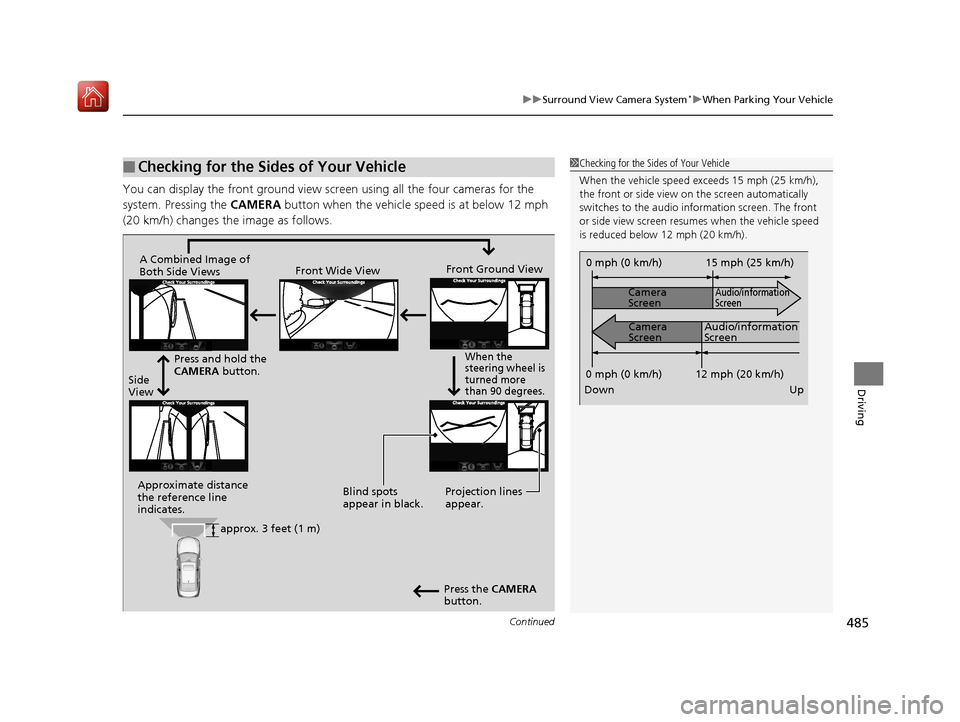
You can display the front ground view screen using all the four cameras for the
system. Pressing the CAMERA button when the vehicle speed is at below 12 mph
(20 km/h) changes th e image as follows.
■Checking for the Sides of Your Vehicle1Checking for the Sides of Your Vehicle
When the vehicle speed exceeds 15 mph (25 km/h),
the front or side view on the screen automatically
switches to the audio information screen. The front
or side view screen resumes when the vehicle speed
is reduced below 12 mph (20 km/h).
0 mph (0 km/h)
Down Up Camera
Screen
Camera
Screen
Audio/information
Screen
Audio/information
Screen 15 mph (25 km/h)
12 mph (20 km/h)
0 mph (0 km/h)
Side
View Front Wide View
Front Ground View
Press and hold the
CAMERA button.
A Combined Image of
Both Side Views
Approximate distance
the reference line
indicates. Blind spots
appear in black.
Projection lines
appear.
Press the CAMERA
button.
When the
steering wheel is
turned more
than 90 degrees.
approx. 3 feet (1 m)
19 ACURA RLX HYBRID CSS-31TY36500.book 485 ページ 2018年3月7日 水曜日 午後4時19分
Page 487 of 609
uuSurround View Camera System*uWhen Parking Your Vehicle
486
Driving
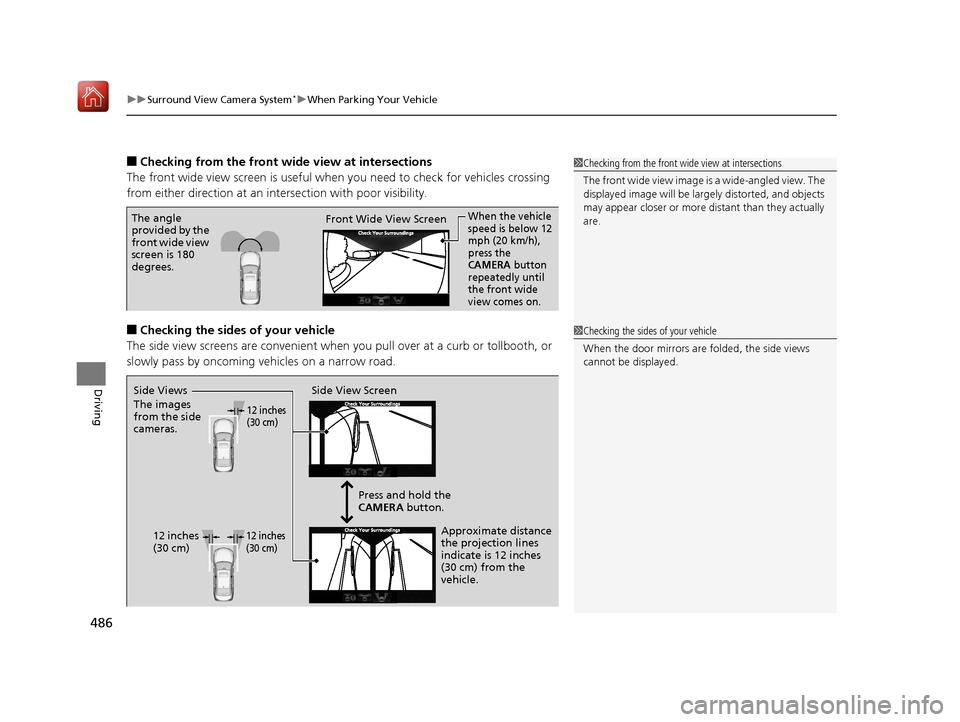
■Checking from the front wide view at intersections
The front wide view screen is useful when you need to check for vehicles crossing
from either direction at an inte rsection with poor visibility.
■Checking the sides of your vehicle
The side view screens are conv enient when you pull over at a curb or tollbooth, or
slowly pass by oncoming vehicles on a narrow road.
1 Checking from the front wide view at intersections
The front wide view image is a wide-angled view. The
displayed image will be larg ely distorted, and objects
may appear closer or more distant than they actually
are.
The angle
provided by the
front wide view
screen is 180
degrees. Front Wide View ScreenWhen the vehicle
speed is below 12
mph (20 km/h),
press the
CAMERA button
repeatedly until
the front wide
view comes on.
1 Checking the sides of your vehicle
When the door mirrors are folded, the side views
cannot be displayed.
Side View Screen
12 inches
(30 cm)
12 inches
(30 cm) Press and hold the
CAMERA
button.
Approximate distance
the projection lines
indicate is 12 inches
(30 cm) from the
vehicle.
Side Views
The images
from the side
cameras.12 inches
(30 cm)
19 ACURA RLX HYBRID CSS-31TY36500.book 486 ページ 2018年3月7日 水曜日 午後4時19分
Page 492 of 609
491
Maintenance
This chapter discusses basic maintenance.
Before Performing MaintenanceInspection and Maintenance ............ 492
Safety When Performing Maintenance .... 493Parts and Fluids Used in Maintenance Service ........................................... 494
Maintenance Minder
TM..................... 495
Maintenance Under the Hood
Maintenance Items Un der the Hood .... 501Opening the Hood ........................... 502
Engine Compartment Cover ............. 503
Recommended Engine Oil ................ 504
Oil Check ......................................... 505
Adding Engine Oil ............................ 506
Changing the Engine Oil and Oil Filter ..... 507Cooling System ................................ 509
Inverter Coolant ............................... 511
Transmission Fluid ............................ 512
Brake Fluid ....................................... 512
Refilling Window Washer Fluid......... 513
Replacing Light Bulbs ....................... 514
Checking and Maintaining Wiper Blades.... 517Checking and Maintaining Tires
Checking Tires ................................. 520
Tire and Loading Information Label .. 521
Tire Labeling .................................... 521
DOT Tire Quality Grading (U.S. Vehicles).. 523
Wear Indicators ............................... 525
Tire Service Life ................................ 525
Tire and Wheel Replacement ........... 526
Tire Rotation .................................... 527
Winter Tires ..................................... 528
12-Volt Battery ................................. 529
Remote Transmitter Care Replacing the Button Battery ........... 530
Climate Control System Maintenance.... 531CleaningInterior Care .................................... 532
Exterior Care.................................... 534
Accessories and Modifications ........ 537
19 ACURA RLX HYBRID CSS-31TY36500.book 491 ページ 2018年3月7日 水曜日 午後4時19分
Page 493 of 609
492
Maintenance
Before Performing Maintenance
Inspection and Maintenance
For your safety, perform all listed inspections and maintenance to keep your vehicle
in good condition. If you become aware of any abnormality (noise, smell, insufficient
brake fluid, oil residue on the ground, etc.), have your vehicle inspected by a dealer.
(Note, however, that service at a dealer is not mandatory to keep your warranties in
effect.) Refer to the separate maintena nce booklet for detailed maintenance and
inspection information.
■Daily inspections
Perform inspections before long distance trips, when washing the vehicle, or when
refueling.
■Periodic inspections
• Check the brake fluid level monthly.
2 Brake Fluid P. 512
•Check the tire pressure monthly. Examin e the tread for wear and foreign objects.
2Checking and Maintaining Tires P. 520
•Check the operation of the exterior lights monthly.
2 Replacing Light Bulbs P. 514
•Check the condition of the wiper bl ades at least every six months.
2Checking and Maintaining Wiper Blades P. 517
■Types of Inspection and Maintenance
1Inspection and Maintenance
Maintenance, replacement, or repair of
emissions control devices and systems may be
done by any automotive repair establishment or
individuals using parts that are “certified” to
EPA standards.
According to state and fede ral regulations, failure to
perform maintenance on the maintenance main
items marked with # will not void your emissions
warranties. However, all ma intenance services should
be performed in accordan ce with the intervals
indicated by the mult i-information display.
2 Maintenance Service Items P. 498
If you want to perform complex maintenance tasks
that require more skills a nd tools, you can purchase a
subscription to the Service Express website at
www.techinfo.honda.com .
2 Authorized Manuals P. 595
If you want to perform ma intenance yourself, make
sure that you have the necessary tools and skills first.
After performing ma intenance, update the records in
the separate maintenance booklet.
U.S. models
19 ACURA RLX HYBRID CSS-31TY36500.book 492 ページ 2018年3月7日 水曜日 午後4時19分
Page 500 of 609
499
uuMaintenance MinderTMuTo Use Maintenance MinderTM
Continued
Maintenance
*1: If a message Maintenance Due Now does not appear more than 12 months after the display is
reset, change the engine oil every year.
# : See information on maintenance and emissions warranty.
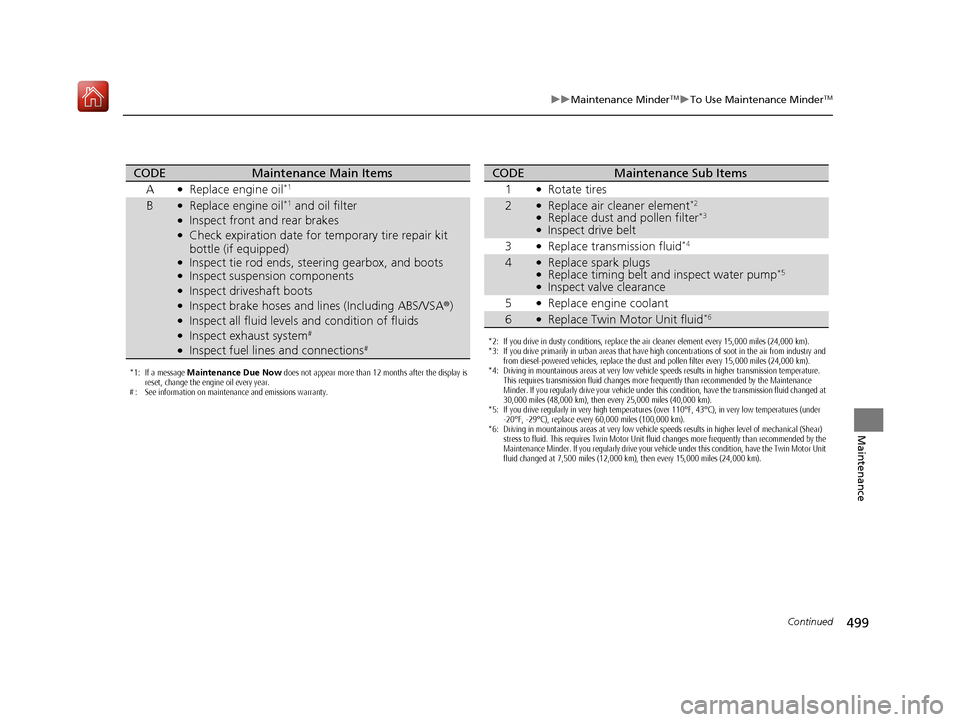
CODEMaintenance Main Items
A
●Replace engine oil*1
B●Replace engine oil*1 and oil filter●Inspect front and rear brakes●Check expiration date for temporary tire repair kit
bottle (if equipped)
●Inspect tie rod ends, st eering gearbox, and boots●Inspect suspension components●Inspect driveshaft boots●Inspect brake hoses and li nes (Including ABS/VSA®)●Inspect all fluid levels and condition of fluids●Inspect exhaust system#
●Inspect fuel lines and connections#*2: If you drive in dusty conditions, replace the air cleaner element every 15,000 miles (24,000 km).
*3: If you drive primarily in urban areas that have high concentrations of soot in the air from industry and
from diesel-powered vehicles, replace the dust and pollen filter every 15,000 miles (24,000 km).
*4: Driving in mountainous areas at very low vehicle speeds results in higher transmission temperature. This requires transmission fluid changes more frequently than recommended by the Maintenance
Minder. If you regularly drive your vehicle under this condition, have the transmission fluid changed at
30,000 miles (48,000 km), then every 25,000 miles (40,000 km).
*5: If you drive regularly in very high temperatures (over 110°F, 43°C), in very low temperatures (under -20°F, -29°C), replace every 60,000 miles (100,000 km).
*6: Driving in mountainous areas at very low vehicle speeds results in higher level of mechanical (Shear) stress to fluid. This requires Twin Motor Unit fluid changes more frequently than recommended by the
Maintenance Minder. If you regularly drive your vehicle under this condition, have the Twin Motor Unit
fluid changed at 7,500 miles (12,000 km), then every 15,000 miles (24,000 km).
CODEMaintenance Sub Items
1
●Rotate tires
2●Replace air cleaner element*2
●Replace dust and pollen filter*3
●Inspect drive belt
3
●Replace transmission fluid*4
4●Replace spark plugs●Replace timing belt and inspect water pump*5
●Inspect valve clearance
5
●Replace engine coolant
6●Replace Twin Motor Unit fluid*6
19 ACURA RLX HYBRID CSS-31TY36500.book 499 ページ 2018年3月7日 水曜日 午後4時19分
Page 503 of 609
502
uuMaintenance Under the Hood uOpening the Hood
Maintenance
Opening the Hood
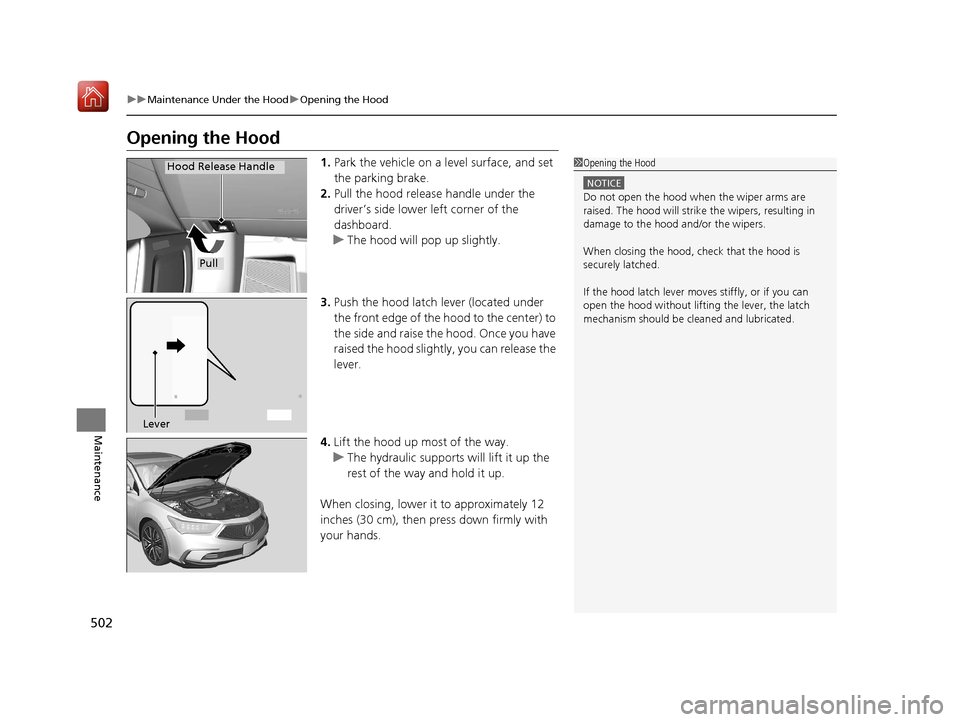
1. Park the vehicle on a level surface, and set
the parking brake.
2. Pull the hood release handle under the
driver’s side lower left corner of the
dashboard.
u The hood will pop up slightly.
3. Push the hood latch lever (located under
the front edge of the hood to the center) to
the side and raise the hood. Once you have
raised the hood slight ly, you can release the
lever.
4. Lift the hood up most of the way.
u The hydraulic supports will lift it up the
rest of the way and hold it up.
When closing, lower it to approximately 12
inches (30 cm), then pr ess down firmly with
your hands.1 Opening the Hood
NOTICE
Do not open the hood when the wiper arms are
raised. The hood will strike the wipers, resulting in
damage to the hood and/or the wipers.
When closing the hood, check that the hood is
securely latched.
If the hood latch lever moves stiffly, or if you can
open the hood without lifti ng the lever, the latch
mechanism should be cl eaned and lubricated.
Pull
Hood Release Handle
Lever
19 ACURA RLX HYBRID CSS-31TY36500.book 502 ページ 2018年3月7日 水曜日 午後4時19分