dashboard ACURA TL 1995 Service User Guide
[x] Cancel search | Manufacturer: ACURA, Model Year: 1995, Model line: TL, Model: ACURA TL 1995Pages: 1771, PDF Size: 62.49 MB
Page 951 of 1771
Description
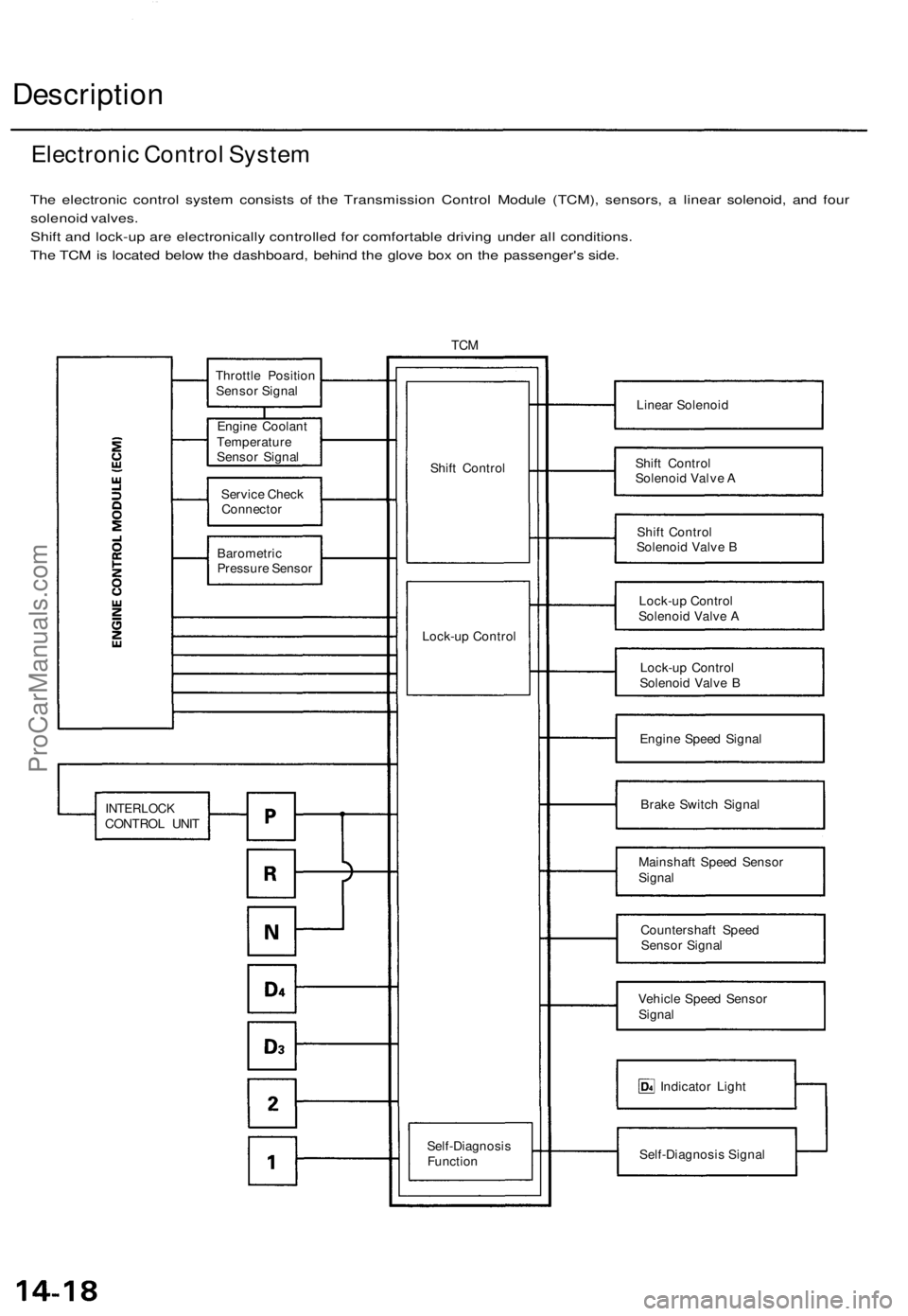
The electronic control system consists of the Transmission Control Module (TCM), sensors, a linear solenoid, and four
solenoid valves.
Shift and lock-up are electronically controlled for comfortable driving under all conditions.
The TCM is located below the dashboard, behind the glove box on the passenger's side.
TCM
Linear Solenoid
Shift Control
Solenoid Valve A
Shift Control
Solenoid Valve B
Lock-up Control
Solenoid Valve A
Lock-up Control
Solenoid Valve B
Engine Speed Signal
Brake Switch Signal
Mainshaft Speed Sensor
Signal
Countershaft Speed
Sensor Signal
Vehicle Speed Sensor
Signal
Indicator Light
Self-Diagnosis Signal
Electronic Control System
Shift Control
Lock-up Control
Throttle Position
Sensor Signal
Engine Coolant
Temperature
Sensor Signal
Service Check
Connector
Barometric
Pressure Sensor
INTERLOCK
CONTROL UNIT
Self-Diagnosis
FunctionProCarManuals.com
Page 977 of 1771
Troubleshooting Procedure s
(cont'd)
SRS component s ar e locate d in thi s area . Revie w th e SR S
componen t locations , precautions , an d procedure s in th e
SR S (sectio n 24 ) befor e performin g repair s o r service .
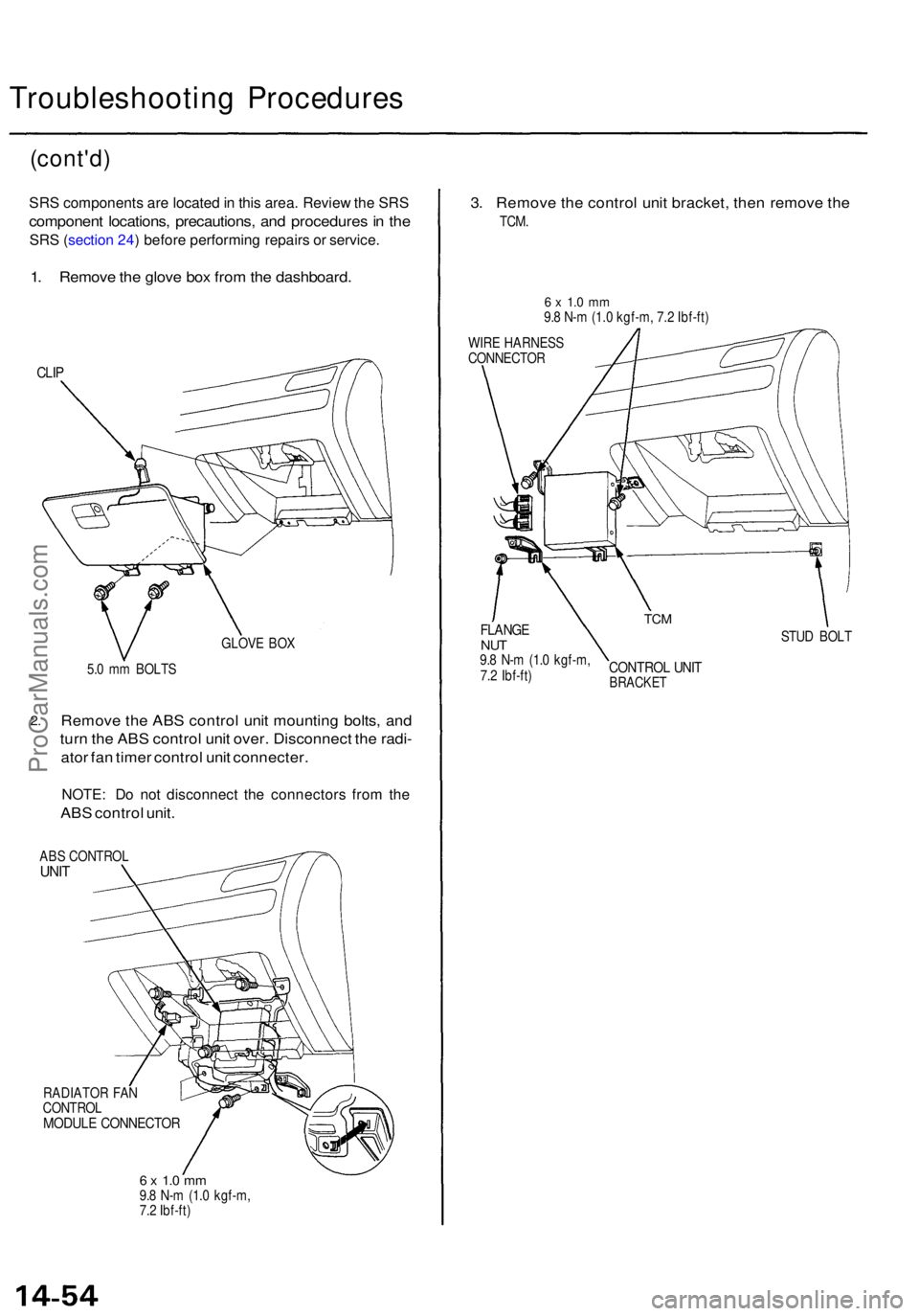
1. Remov e th e glov e bo x fro m th e dashboard .
CLIP
GLOV E BO X
5. 0 m m BOLT S
2.Remov e th e AB S contro l uni t mountin g bolts , an d
tur n th e AB S contro l uni t over . Disconnec t th e radi -
ato r fa n time r contro l uni t connecter .
NOTE: D o no t disconnec t th e connector s fro m th e
AB S contro l unit .
ABS CONTRO LUNIT
RADIATO R FA N
CONTRO L
MODULE CONNECTO R
6 x 1. 0 m m9.8 N- m (1. 0 kgf-m ,
7. 2 Ibf-ft )
3. Remov e th e contro l uni t bracket , the n remov e th e
TCM .
6 x 1. 0 m m9.8 N- m (1. 0 kgf-m , 7. 2 Ibf-ft )
WIR E HARNES S
CONNECTO R
STUD BOL T
CONTRO L UNI TBRACKE T
TCMFLANG ENUT9.8 N- m (1. 0 kgf-m ,
7. 2 Ibf-ft )
ProCarManuals.com
Page 986 of 1771
Transmission Contro l Modul e (TCM )
Replacemen t
SRS component s ar e locate d in thi s area . Revie w th e SR S
componen t locations , precautions , an d procedure s i n th e
SR S (sectio n 24 ) befor e performin g repair s o r service .
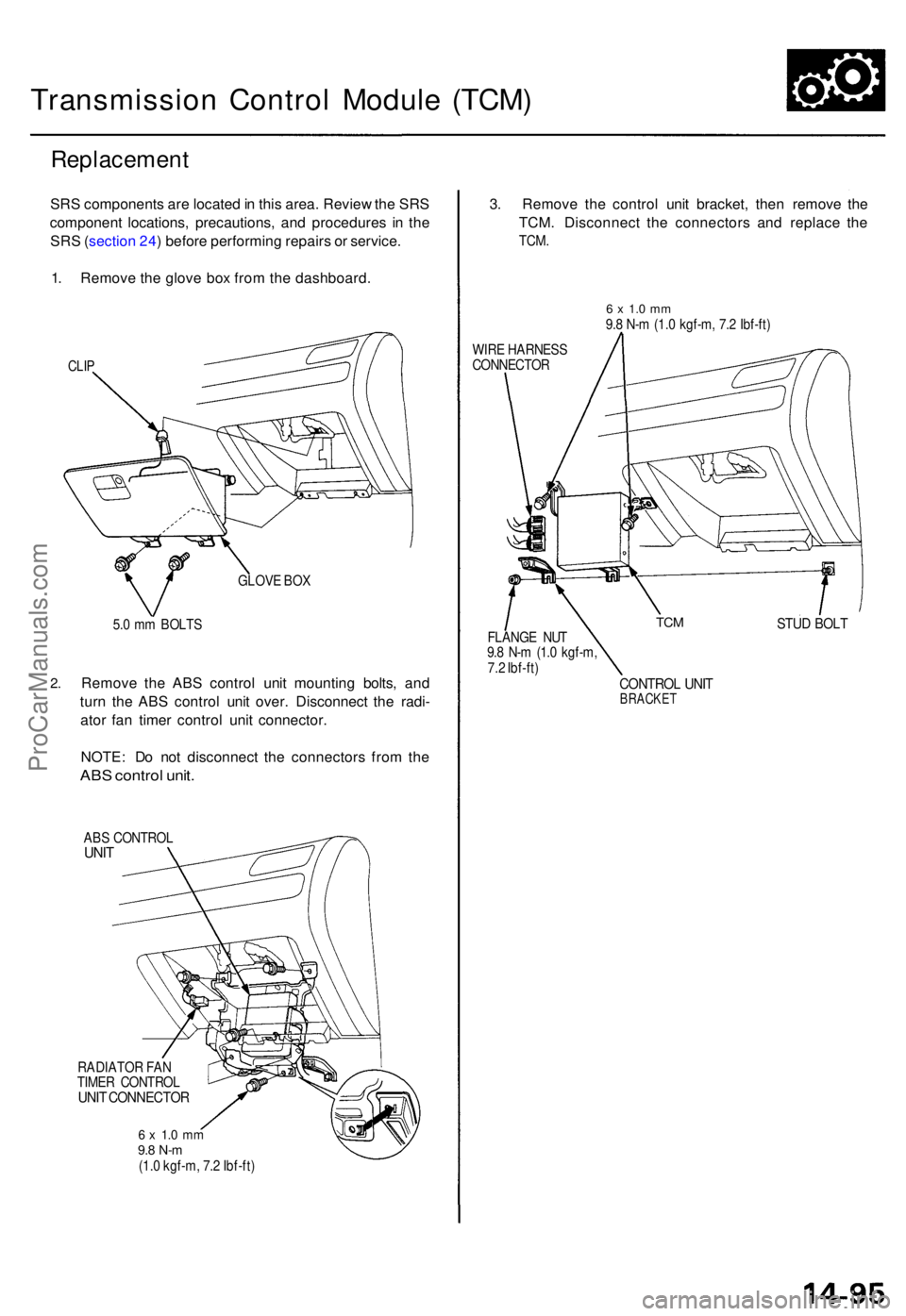
1 . Remov e th e glov e bo x fro m th e dashboard .
CLIP
GLOV E BO X
2.
5. 0 m m BOLT S
Remov e th e AB S contro l uni t mountin g bolts , an d
tur n th e AB S contro l uni t over . Disconnec t th e radi -
ato r fa n time r contro l uni t connector .
NOTE : D o no t disconnec t th e connector s fro m th e
AB S contro l unit .
ABS CONTRO LUNIT
RADIATO R FA N
TIME R CONTRO L
UNIT CONNECTO R
6 x 1. 0 m m9.8 N- m(1.0 kgf-m , 7. 2 Ibf-ft )
3. Remov e th e contro l uni t bracket , the n remov e th e
TCM . Disconnec t th e connector s an d replac e th e
TCM .
6 x 1. 0 m m9.8 N- m (1. 0 kgf-m , 7. 2 Ibf-ft )
WIR E HARNES S
CONNECTO R
STUD BOL TFLANG E NU T
9. 8 N- m (1. 0 kgf-m ,
7. 2 Ibf-ft )
CONTRO L UNI TBRACKE T
TCM
ProCarManuals.com
Page 1383 of 1771
Windshield
Removal (cont'd )
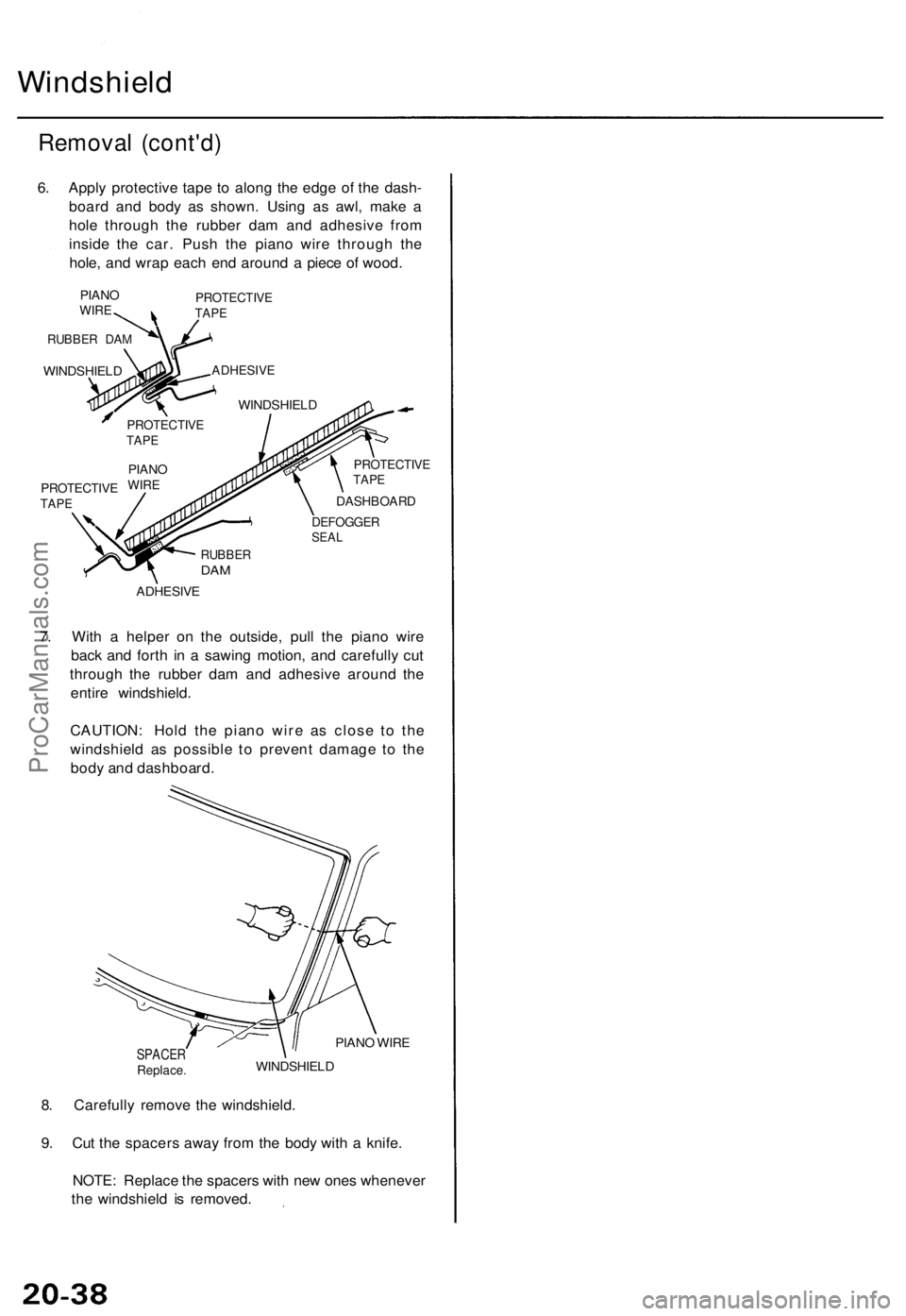
6. Appl y protectiv e tap e t o alon g th e edg e o f th e dash -
boar d an d bod y a s shown . Usin g a s awl , mak e a
hol e throug h th e rubbe r da m an d adhesiv e fro m
insid e th e car . Pus h th e pian o wir e throug h th e
hole , an d wra p eac h en d aroun d a piec e o f wood .
PIANOWIRE
RUBBE R DA M
WINDSHIEL D
PROTECTIV ETAPE
ADHESIV E
WINDSHIEL D
PROTECTIV ETAPE
PROTECTIV ETAPE
DASHBOAR D
DEFOGGERSEAL
RUBBE RDAM
ADHESIV E
7. Wit h a helpe r o n th e outside , pul l th e pian o wir e
bac k an d fort h i n a sawin g motion , an d carefull y cu t
throug h th e rubbe r da m an d adhesiv e aroun d th e
entir e windshield .
CAUTION : Hol d th e pian o wir e a s clos e t o th e
windshiel d a s possibl e t o preven t damag e t o th e
bod y an d dashboard .
SPACERReplace .
PIANO WIR E
WINDSHIEL D
8. Carefull y remov e th e windshield .
9 . Cu t th e spacer s awa y fro m th e bod y wit h a knife .
NOTE : Replac e th e spacer s wit h ne w one s wheneve r
th e windshiel d i s removed .
PROTECTIV ETAPE
PIAN OWIRE
ProCarManuals.com
Page 1416 of 1771
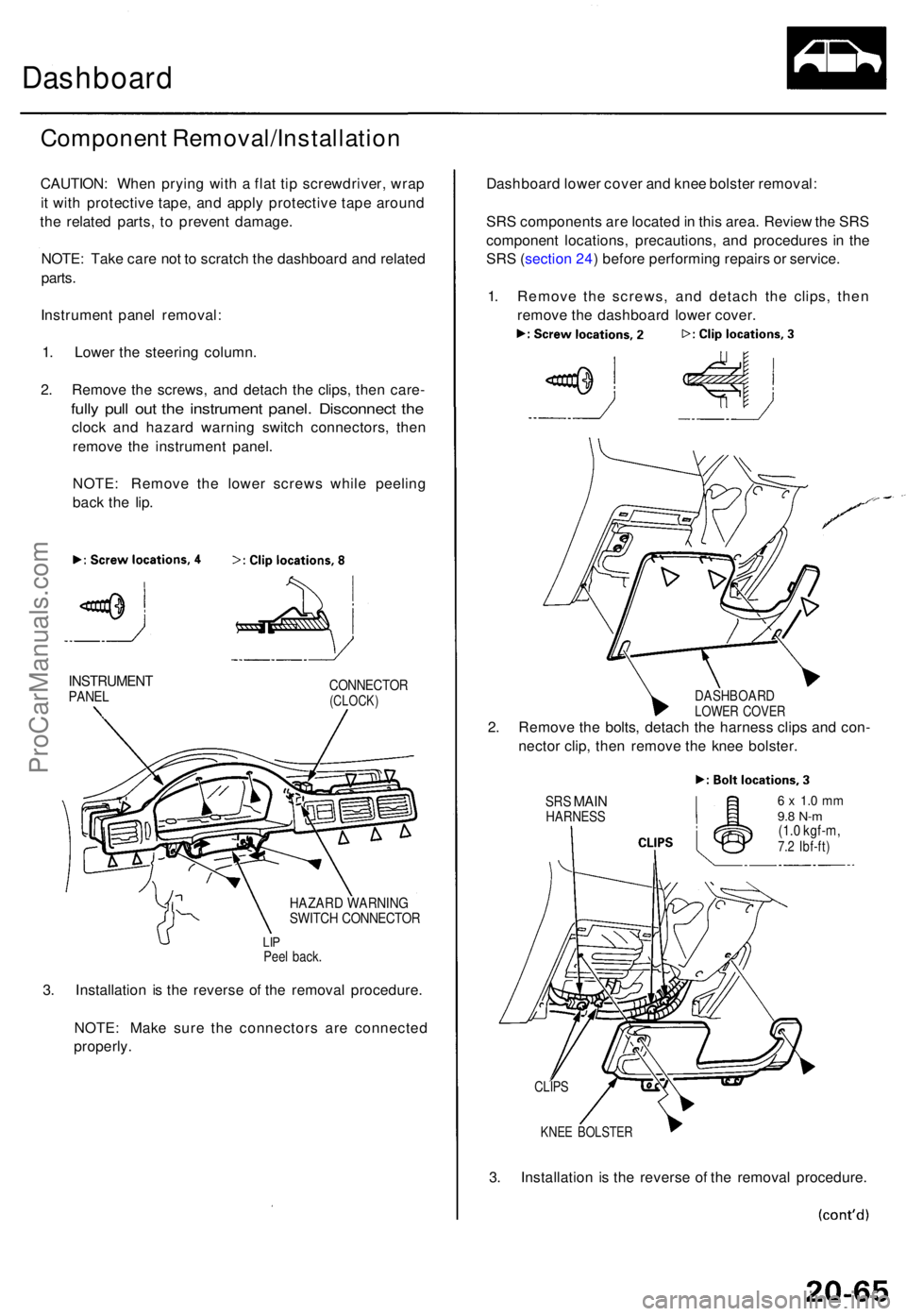
Dashboard
Componen t Removal/Installatio n
CAUTION: Whe n pryin g wit h a fla t ti p screwdriver , wra p
i t wit h protectiv e tape , an d appl y protectiv e tap e aroun d
th e relate d parts , t o preven t damage .
NOTE : Tak e car e no t t o scratc h th e dashboar d an d relate d
parts .
Instrumen t pane l removal :
1 . Lowe r th e steerin g column .
2 . Remov e th e screws , an d detac h th e clips , the n care -
fully pul l ou t th e instrumen t panel . Disconnec t th e
cloc k an d hazar d warnin g switc h connectors , the n
remov e th e instrumen t panel .
NOTE : Remov e th e lowe r screw s whil e peelin g
bac k th e lip .
INSTRUMEN TPANELCONNECTO R(CLOCK)
HAZARD WARNIN GSWITCH CONNECTO R
LIPPee l back .
3. Installatio n i s th e revers e o f th e remova l procedure .
NOTE : Mak e sur e th e connector s ar e connecte d
properly . Dashboar
d lowe r cove r an d kne e bolste r removal :
SR S component s ar e locate d in thi s area . Revie w th e SR S
componen t locations , precautions , an d procedure s i n th e
SR S (sectio n 24 ) befor e performin g repair s o r service .
1 . Remov e th e screws , an d detac h th e clips , the n
remov e th e dashboar d lowe r cover .
DASHBOAR DLOWER COVE R2. Remov e th e bolts , detac h th e harnes s clip s an d con -
necto r clip , the n remov e th e kne e bolster .
SRS MAI NHARNES S6 x 1. 0 m m9.8 N- m(1.0 kgf-m ,7.2 Ibf-ft )
KNEE BOLSTE R
3. Installatio n i s th e revers e o f th e remova l procedure .
CLIPS
ProCarManuals.com
Page 1417 of 1771
Dashboard
Component Removal/Installation (cont'd)
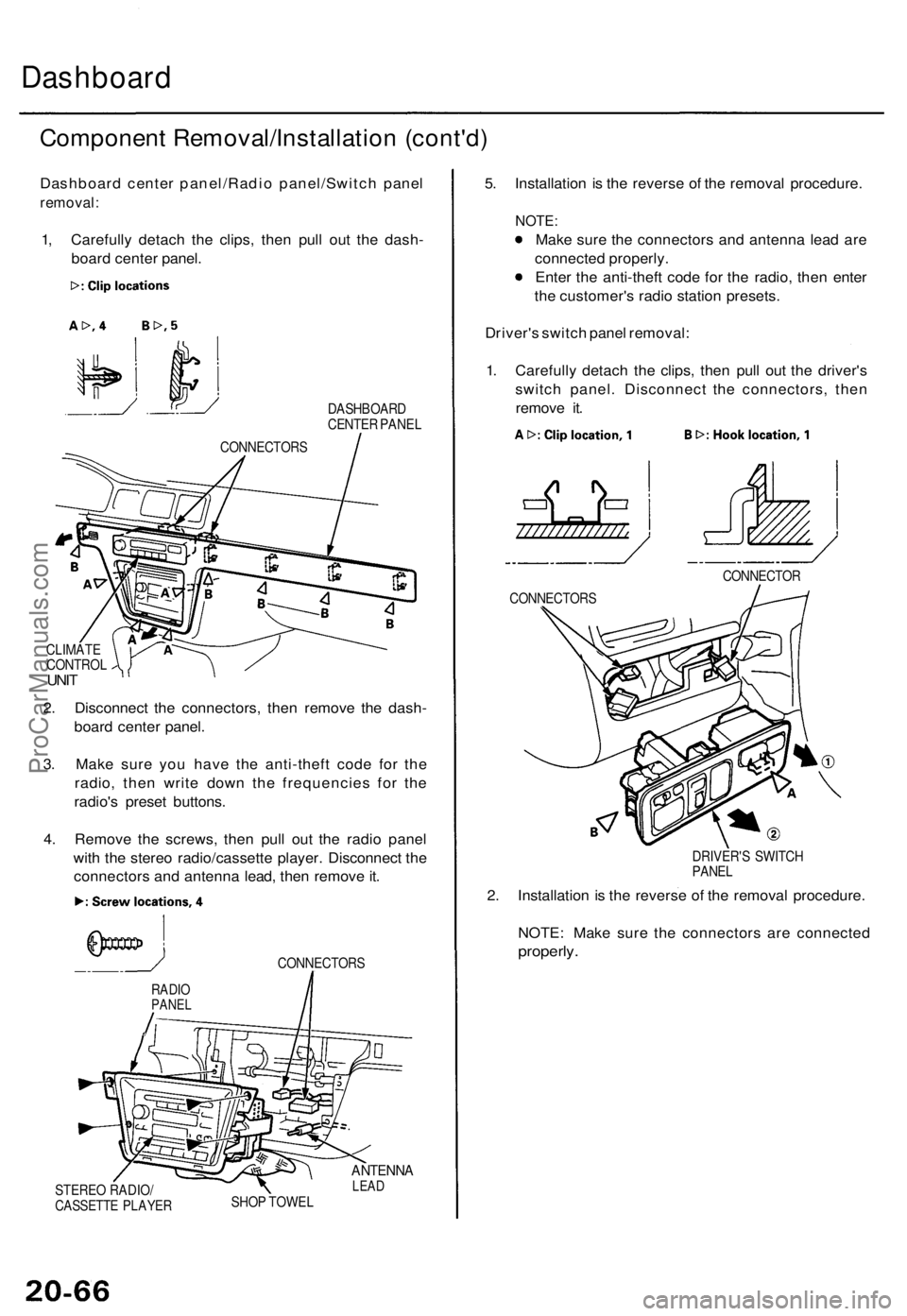
Dashboard center panel/Radio panel/Switch panel
removal:
1, Carefully detach the clips, then pull out the dash-
board center panel.
DASHBOARD
CENTER PANEL
CLIMATE
CONTROL
UNIT
2. Disconnect the connectors, then remove the dash-
board center panel.
3. Make sure you have the anti-theft code for the
radio, then write down the frequencies for the
radio's preset buttons.
4. Remove the screws, then pull out the radio panel
with the stereo radio/cassette player. Disconnect the
connectors and antenna lead, then remove it.
CONNECTORS
STEREO RADIO/
CASSETTE PLAYER
ANTENNA
LEAD
SHOP TOWEL
5. Installation is the reverse of the removal procedure.
NOTE:
Make sure the connectors and antenna lead are
connected properly.
Enter the anti-theft code for the radio, then enter
the customer's radio station presets.
Driver's switch panel removal:
1. Carefully detach the clips, then pull out the driver's
switch panel. Disconnect the connectors, then
remove it.
DRIVER'S SWITCH
PANEL
2. Installation is the reverse of the removal procedure.
NOTE: Make sure the connectors are connected
properly.
RADIO
PANEL
CONNECTOR
CONNECTORS
CONNECTORSProCarManuals.com
Page 1419 of 1771
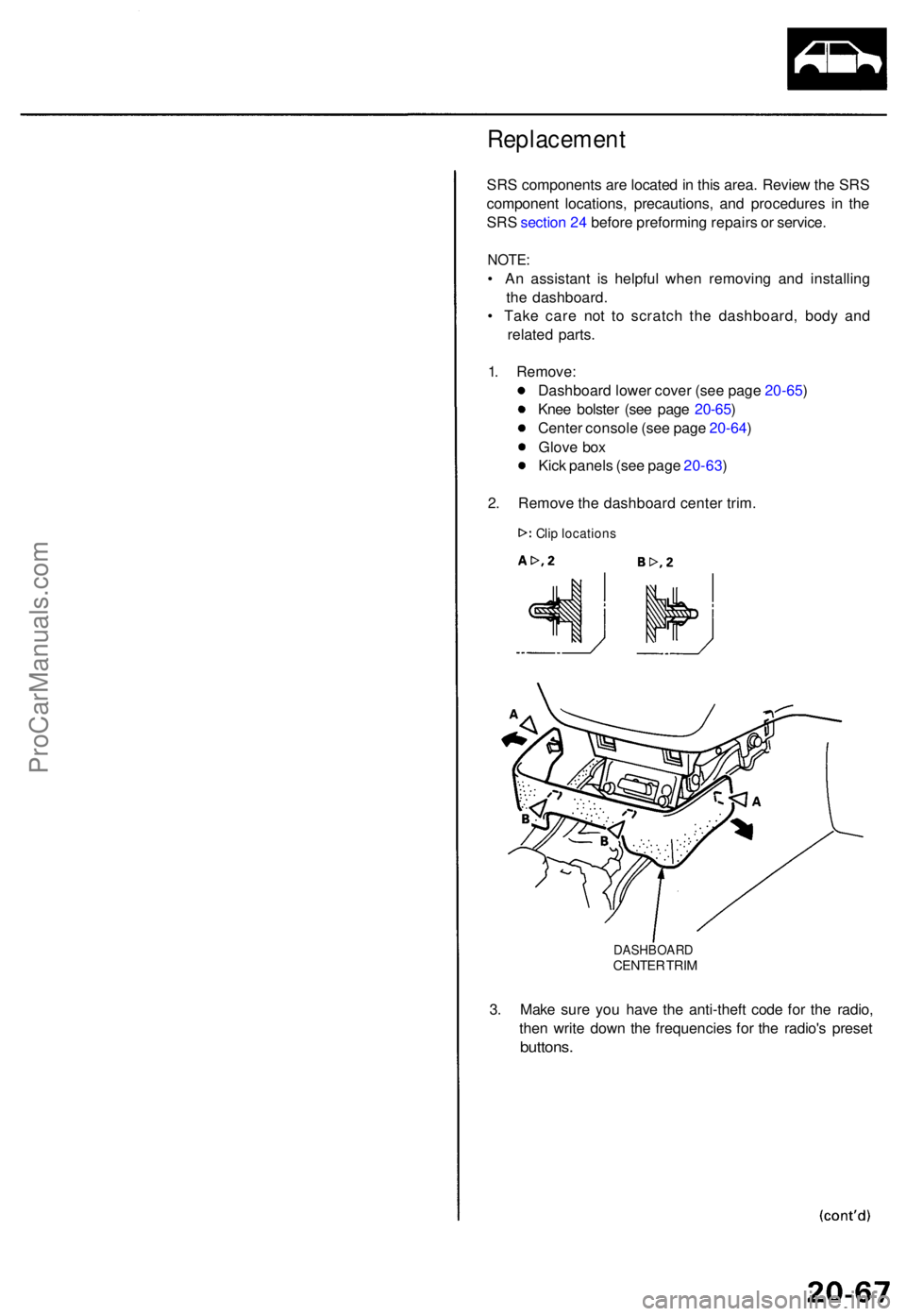
Replacement
SRS component s ar e locate d in thi s area . Revie w th e SR S
componen t locations , precautions , an d procedure s i n th e
SR S sectio n 24 befor e preformin g repair s o r service .
NOTE:
• A n assistan t i s helpfu l whe n removin g an d installin g
th e dashboard .
• Tak e car e no t t o scratc h th e dashboard , bod y an d
relate d parts .
1 . Remove :
Dashboar d lowe r cove r (se e pag e 20-65 )
Kne e bolste r (se e pag e 20-65 )
Cente r consol e (se e pag e 20-64 )
Glov e bo x
Kic k panel s (se e pag e 20-63 )
2 . Remov e th e dashboar d cente r trim .
DASHBOAR DCENTER TRI M
3. Mak e sur e yo u hav e th e anti-thef t cod e fo r th e radio ,
the n writ e dow n th e frequencie s fo r th e radio' s prese t
buttons .
Clip location s
ProCarManuals.com
Page 1420 of 1771
Dashboard
Replacemen t (cont'd )
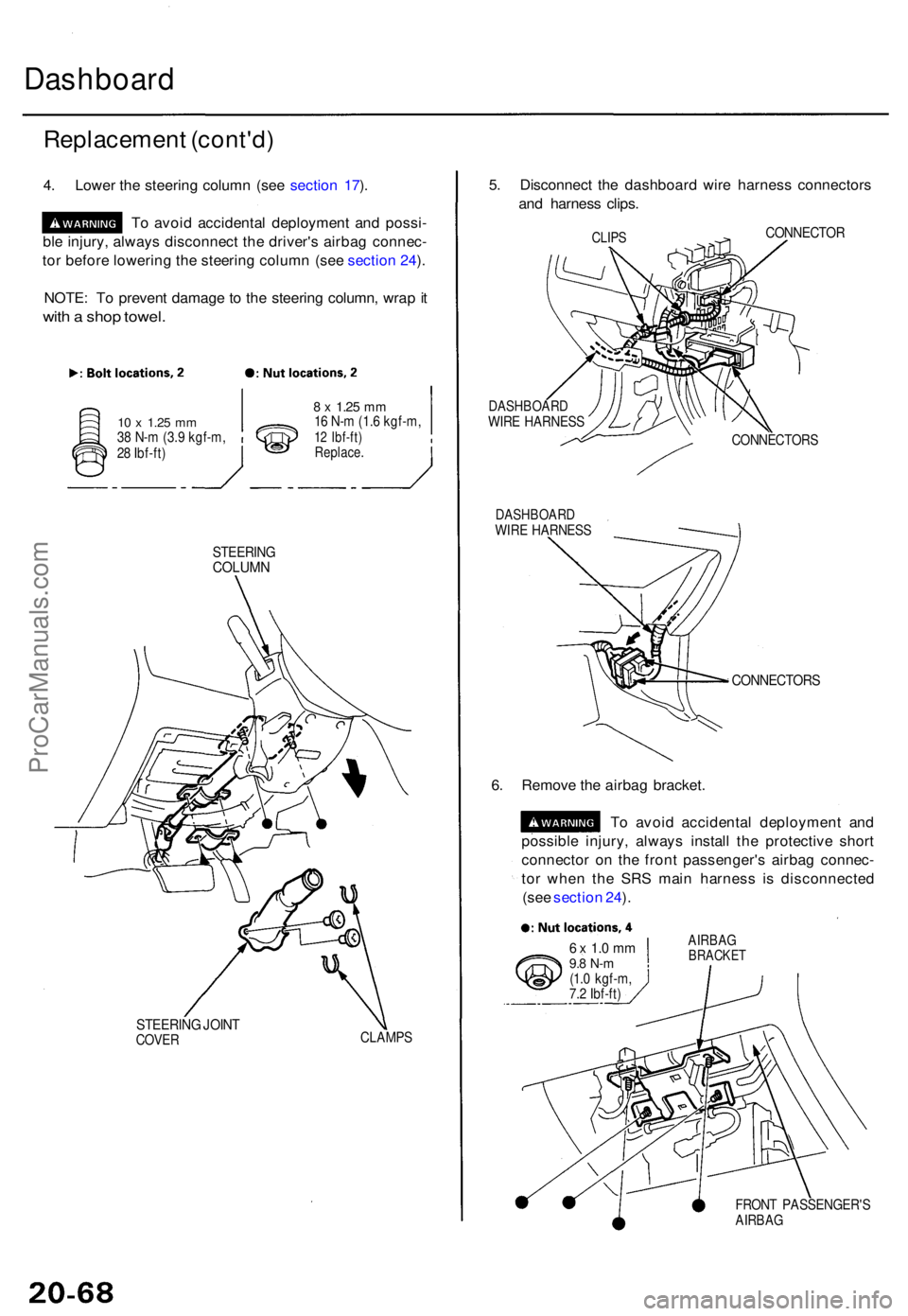
4. Lowe r th e steerin g colum n (se e sectio n 17 ).
T o avoi d accidenta l deploymen t an d possi -
bl e injury , alway s disconnec t th e driver' s airba g connec -
to r befor e lowerin g th e steerin g colum n (se e sectio n 24 ).
NOTE : T o preven t damag e t o th e steerin g column , wra p it
wit h a sho p towel.
10 x 1.2 5 mm38 N- m (3. 9 kgf-m ,
2 8 Ibf-ft )
8 x 1.2 5 mm16 N- m (1. 6 kgf-m ,12 Ibf-ft )Replace .
STEERIN GCOLUMN
STEERIN G JOIN TCOVE RCLAMP S
5. Disconnec t th e dashboar d wir e harnes s connector s
an d harnes s clips .
CLIPSCONNECTO R
DASHBOAR DWIRE HARNES S
DASHBOAR DWIRE HARNES S CONNECTOR
S
CONNECTORS
6. Remov e th e airba g bracket .
T o avoi d accidenta l deploymen t an d
possibl e injury , alway s instal l th e protectiv e shor t
connecto r o n th e fron t passenger' s airba g connec -
to r whe n th e SR S mai n harnes s i s disconnecte d
(se e sectio n 24 ).
6 x 1. 0 m m9.8 N- m(1.0 kgf-m ,
7. 2 Ibf-ft )
AIRBA GBRACKE T
FRONT PASSENGER' SAIRBAG
ProCarManuals.com
Page 1421 of 1771
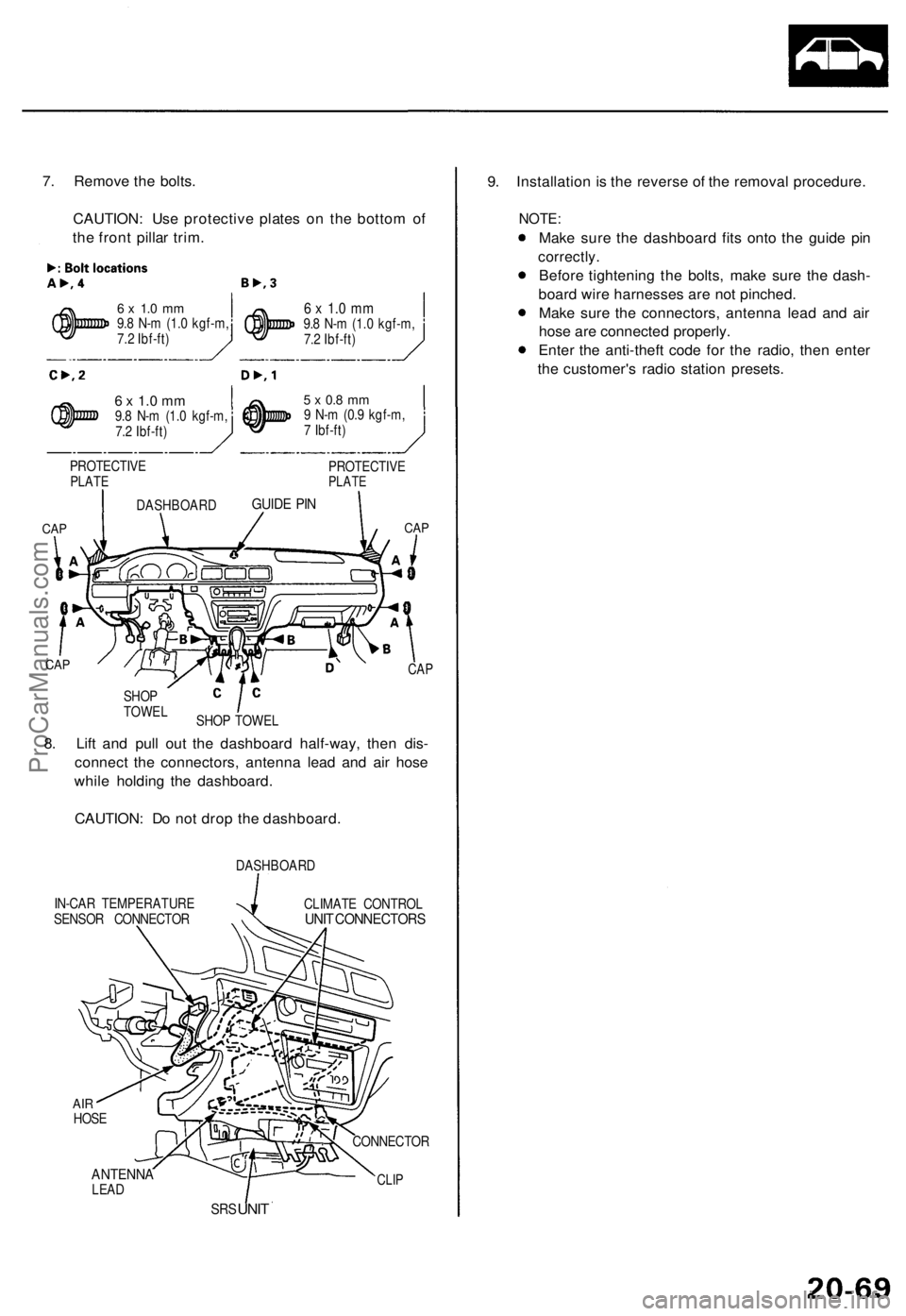
7. Remov e th e bolts .
CAUTION : Us e protectiv e plate s o n th e botto m o f
th e fron t pilla r trim .
6 x 1. 0 m m9.8 N- m (1. 0 kgf-m ,
7. 2 Ibf-ft )
6 x 1. 0 m m9.8 N- m (1. 0 kgf-m ,
7. 2 Ibf-ft )
6 x 1. 0 m m9.8 N- m (1. 0 kgf-m ,
7. 2 Ibf-ft )
PROTECTIV E
PLATE
CAP CA
P
IN-CA R TEMPERATUR E
SENSO R CONNECTO RDASHBOAR
D
CLIMAT E CONTRO LUNIT CONNECTOR S
ANTENNALEAD
SRS UNI T 9
. Installatio n i s th e revers e o f th e remova l procedure .
NOTE:
Make sur e th e dashboar d fit s ont o th e guid e pi n
correctly .
Before tightenin g th e bolts , mak e sur e th e dash -
boar d wir e harnesse s ar e no t pinched .
Mak e sur e th e connectors , antenn a lea d an d ai r
hos e ar e connecte d properly .
Ente r th e anti-thef t cod e fo r th e radio , the n ente r
th e customer' s radi o statio n presets .
CLIP
CONNECTO R
8. Lif t an d pul l ou t th e dashboar d half-way , the n dis -
connec t th e connectors , antenn a lea d an d ai r hos e
whil e holdin g th e dashboard .
CAUTION : D o no t dro p th e dashboard .
CAP
SHO P TOWE L
SHO
P
TOWE L
CAP
DASHBOAR DGUIDE PI N
5 x 0. 8 m m9 N- m (0. 9 kgf-m ,
7 Ibf-ft )
PROTECTIV E
PLATE
AIRHOS E
ProCarManuals.com
Page 1498 of 1771
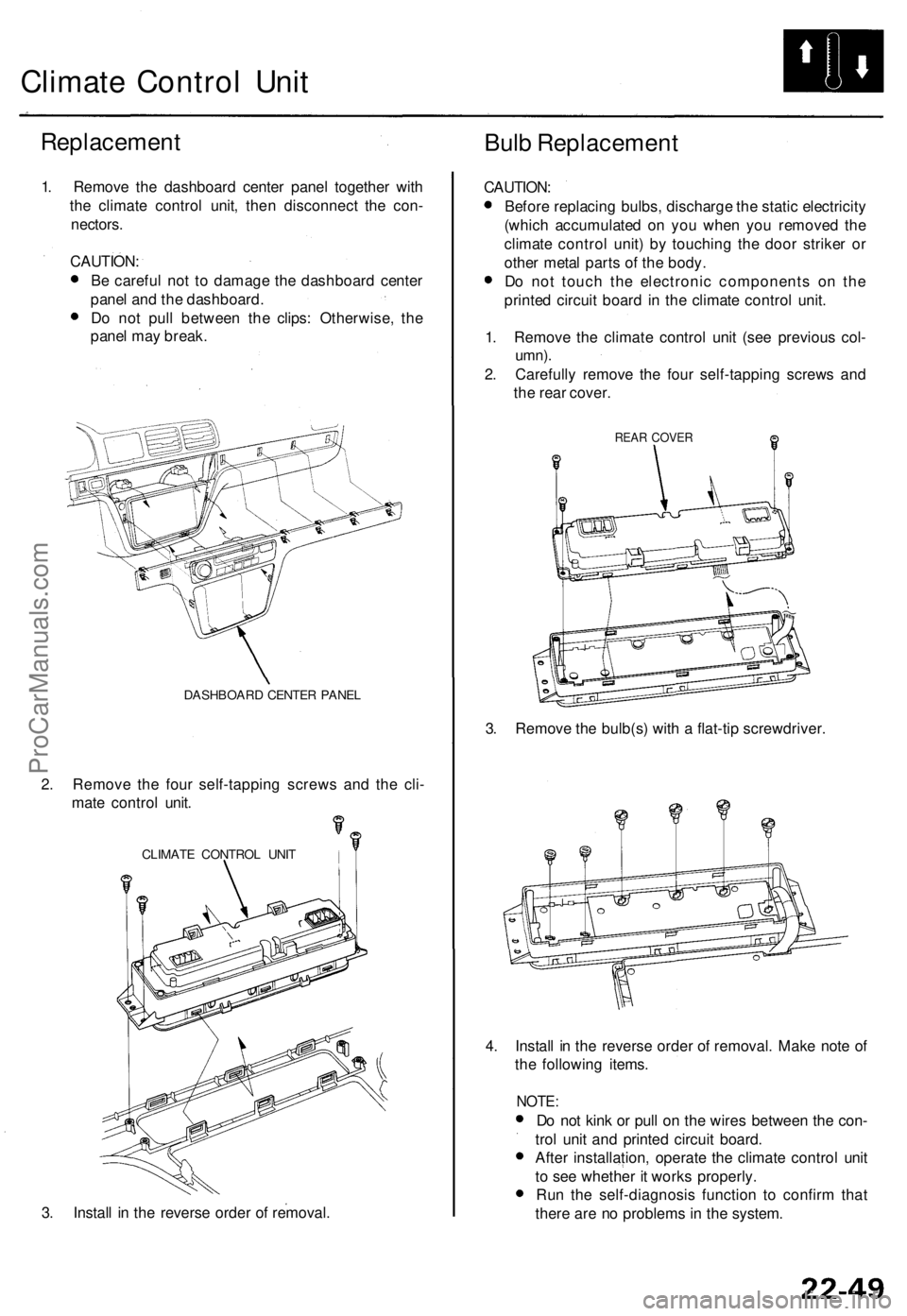
Climate Contro l Uni t
Replacemen t
Bulb Replacemen t
1. Remov e th e dashboar d cente r pane l togethe r wit h
th e climat e contro l unit , the n disconnec t th e con -
nectors .
CAUTION :
B e carefu l no t t o damag e th e dashboar d cente r
pane l an d th e dashboard .
D o no t pul l betwee n th e clips : Otherwise , th e
pane l ma y break .
DASHBOAR D CENTE R PANE L
2. Remov e th e fou r self-tappin g screw s an d th e cli -
mat e contro l unit .
CLIMAT E CONTRO L UNI T
3. Instal l i n th e revers e orde r o f removal . CAUTION
:
Befor e replacin g bulbs , discharg e th e stati c electricit y
(whic h accumulate d o n yo u whe n yo u remove d th e
climat e contro l unit ) b y touchin g th e doo r strike r o r
othe r meta l part s o f th e body .
D o no t touc h th e electroni c component s o n th e
printe d circui t boar d in th e climat e contro l unit .
1 . Remov e th e climat e contro l uni t (se e previou s col -
umn) .
2. Carefull y remov e th e fou r self-tappin g screw s an d
th e rea r cover .
REAR COVE R
3. Remov e th e bulb(s ) wit h a flat-ti p screwdriver .
4 . Instal l i n th e revers e orde r o f removal . Mak e not e o f
th e followin g items .
NOTE:
Do no t kin k o r pul l o n th e wire s betwee n th e con -
tro l uni t an d printe d circui t board .
Afte r installation , operat e th e climat e contro l uni t
t o se e whethe r i t work s properly .
Ru n th e self-diagnosi s functio n t o confir m tha t
ther e ar e n o problem s i n th e system .
ProCarManuals.com