ad blue Acura TL 2009 Navigation Manua
[x] Cancel search | Manufacturer: ACURA, Model Year: 2009, Model line: TL, Model: Acura TL 2009Pages: 172, PDF Size: 16.82 MB
Page 56 of 172
Driving to Your Destination
56 Navigation System
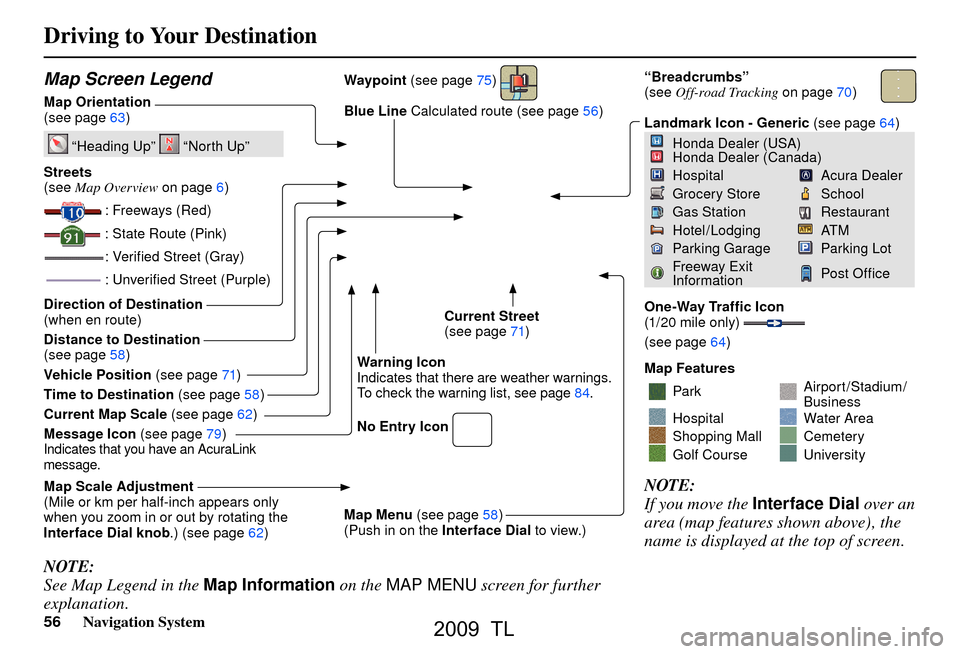
Map Screen Legend
Map Orientation
(see page 63 )
“Heading Up” “North Up”
Streets
(see Map Overview on page 6 )
: Freeways (Red)
: State Route (Pink)
: Veri ed Street (Gray)
: Unveri ed Street (Purple)
Direction of Destination
(when en route)
Distance to Destination
(see page 58
)
Vehicle Position (see page 71 )
Time to Destination (see page 58
)
Current Map Scale (see page 62
)
Message Icon (see page 79
)
Indicates that you have an AcuraLink
message.
Map Scale Adjustment
(Mile or km per half-inch appears only
when you zoom in or out by rotating the
Interface Dial knob .) (see page 62 ) Waypoint
(see page 75
)
Blue Line Calculated route (see page 56)
Current Street
(see page 71 )
Warning Icon
Indicates that there are weather warnings.
To check the warning list, see pag e 84 .
No Entry Icon
Map Menu (see page 58
)
(Push in on the Interface Dial to view.)
“Breadcrumbs”
(see Off-road Tracking on page 70 )
Landmark Icon - Generic (see page 64 )
Honda Dealer (USA)
Honda Dealer (Canada)
HospitalAcura Dealer
Grocery StoreSchool
Gas StationRestaurant
Hotel/LodgingAT M
Parking GarageParking Lot
Freeway Exit
InformationPost Of ce
One-Way Traf c Icon
(1/20 mile only)
(see page 64 )
Map Features
ParkAirport/Stadium/
Business
HospitalWater Area
Shopping MallCemetery
Golf CourseUniversity
NOTE:
If you move the Interface Dial over an
area (map features shown above), the
name is displayed at the top of screen.
NOTE:
See Map Legend in the Map Information on the MAP MENU screen for further
explanation.
2009 TL
Page 68 of 172
Driving to Your Destination
68 Navigation System
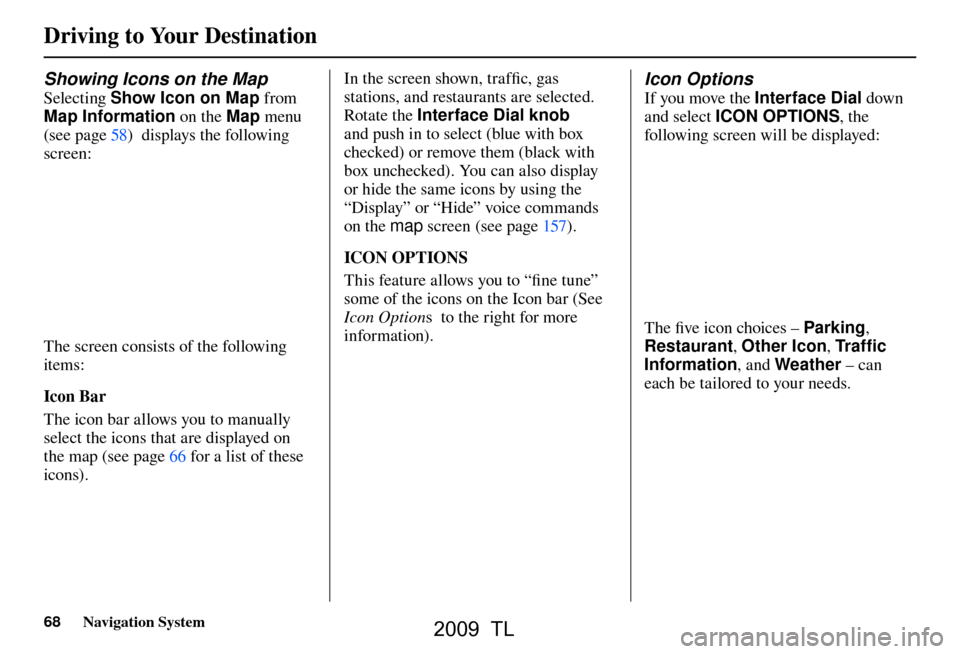
Showing Icons on the Map
Selecting Show Icon on Map from
Map Information on the Map menu
(see page 58 ) displays the following
screen:
The screen consists of the following
items:
Icon Bar
The icon bar allows you to manually
select the icons that are displayed on
the map (see pag e 66 for a list of these
icons). In the screen shown, traffi
c, gas
stations, and restaurants are selected.
Rotate the Interface Dial knob
and push in to select (blue with box
checked) or remove them (black with
box unchecked). You can also display
or hide the same icons by using the
“Display” or “Hide” voice commands
on the map screen (see page 157 ).
ICON OPTIONS
This feature allows you to “fi ne tune”
some of the icons on the Icon bar (See
Icon Option s to the right for more
information).
Icon Options
If you move the Interface Dial down
and select ICON OPTIONS , the
following screen will be displayed:
The fi ve icon choices – Parking ,
Restaurant , Other Icon , Tr a f c
Information , and Weather – can
each be tailored to your needs.
2009 TL
Page 69 of 172
Driving to Your Destination
Navigation System69
For instance, let’s assume that your
hospital is not displayed on the map,
and you want to make sure that your
settings are correct. You would do the
following:
• First, ensure that the Other Icon
button on the Ic
on Ba
r is selected.
• Second, select Other Icon and
verify that the hospital option is
on (blue with box checked). This
procedure is explained below.
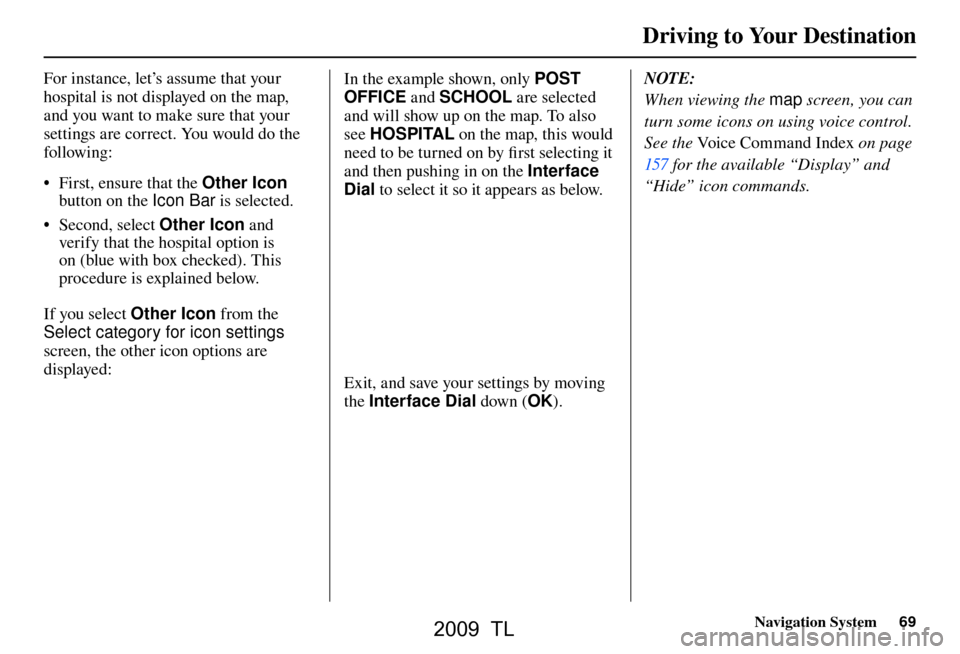
If you select Other Icon from the
Select category for icon settings
screen, the other icon options are
displayed:
In the example shown, only POST
OFFICE and SCHOOL are selected
and will show up on the map. To also
see HOSPITAL on the map, this would
need to be turned on by fi rst selecting it
and then pushing in on the Interface
Dial to select it so it appears as below.
Exit, and save your settings by moving
the Interface Dial down (OK). NOTE:
When viewing the
map screen, you can
turn some icons on using voice control.
See the Voice Command Index on page
157 for the available “Display” and
“Hide” icon commands.
2009 TL
Page 79 of 172
Driving to Your Destination
Navigation System79
AcuraLink Messages
AcuraLink enhances your ownership
experience by providing a direct
communication link between you
and Acura. AcuraLink messages are
displayed on the navigation screen.
Working through XM
® Satellite Radio,
AcuraLink works in conjunction with
your vehicle’s navigation, Bluetooth
®
HandsFreeLink® (HFL), and audio
systems to send and receive several
kinds of message. These include:
• Operating tips and information on your vehicle’s features.
• Important recall and safety information.
• Maintenance information to keep your vehicle in top condition.
• Diagnostic information to provide information about any problems with
your veh icle.
• Planned appointments with your Acura dealer. NOTE:
See your vehicle Owner’s manual for
more details on this feature.
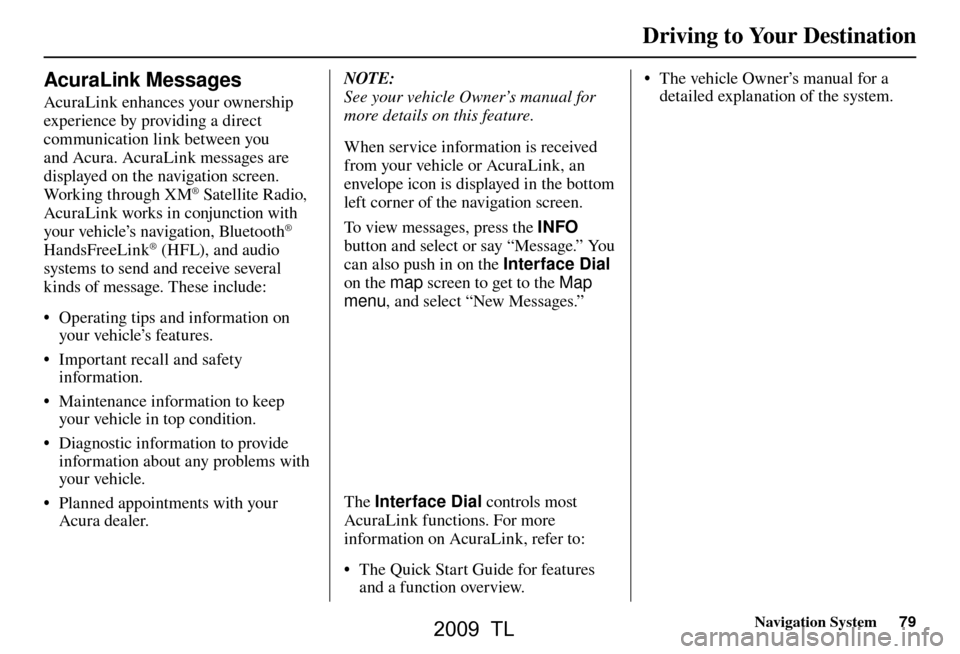
When service information is received
from your vehicle or AcuraLink, an
envelope icon is displayed in the bottom
left corner of the navigation screen.
To view messages, press the
INFO
button and select or say “Message.” You
can also push in on the Interface Dial
on the map screen to get to the Map
menu , and select “New Messages.”
The Interface Dial controls most
AcuraLink functions. For more
information on AcuraLink, refer to:
• The Quick Start Guide for features and a function overview. • The vehicle Owner’s manual for a
detailed explanation of the system.
2009 TL
Page 80 of 172
Information Features
80 Navigation System
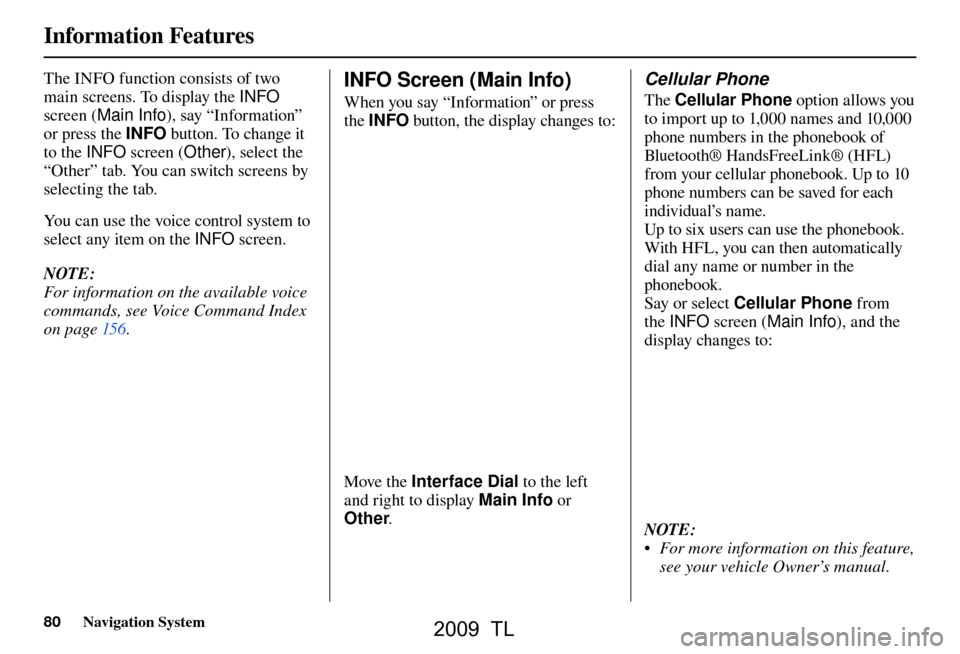
The INFO function consists of two
main screens. To display the INFO
screen ( Main Info ), say “Information”
or press the INFO button. To change it
to the INFO screen ( Other), select the
“Other” tab. You can switch screens by
selecting the tab.
You can use the voice control system to
select any item on the INFO screen.
NOTE:
For information on the available voice
commands, see Voice Command Index
on pag e 156 . INFO Screen (Main Info)
When you say “Information” or press
the INFO button, the display changes to:
Move the Interface Dial to the left
and right to display Main Info or
Other .
Cellular Phone
The Cellular Phone option allows you
to import up to 1,000 names and 10,000
phone numbers in the phonebook of
Bluetooth® Ha ndsFreeLin k® (H F L)
from your cellular phonebook. Up to 10
phone numbers can be saved for each
individual’s name.
Up to six users can use the phonebook.
With HFL, you can then automatically
dial any name or number in the
phonebook.
Say or select Cellular Phone from
the INFO screen ( Main Info ), and the
display changes to:
NOTE:
• For more information on this feature, see your vehicle Owner’s manual.
2009 TL
Page 90 of 172
Information Features
90 Navigation System
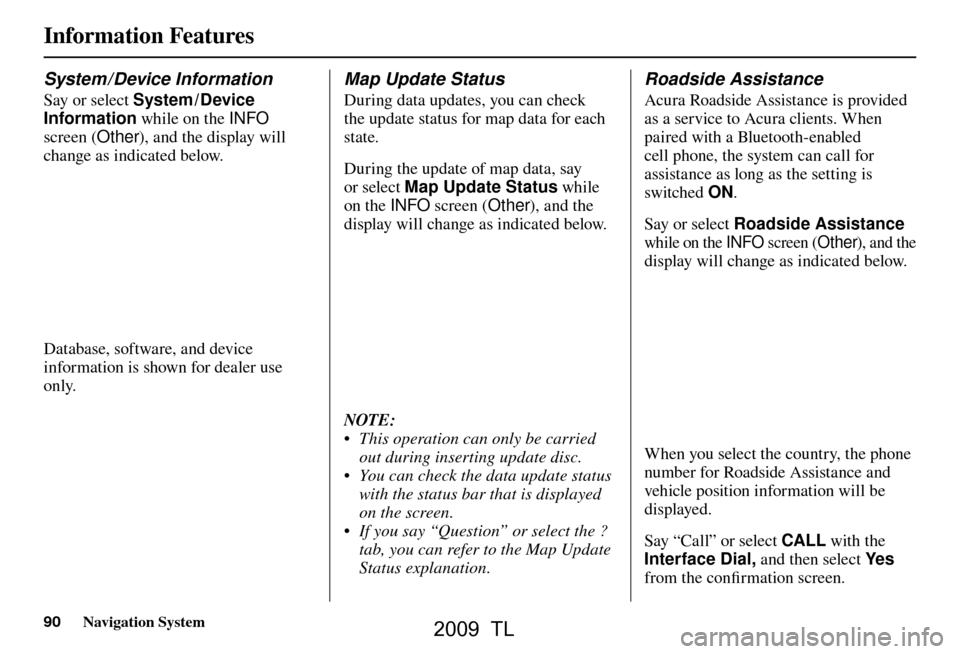
System / Device Information
Say or select System / Device
Information while on the INFO
screen ( Other), and the display will
change as indicated below.
Database, software, and device
information is shown for dealer use
only.
Map Update Status
During data updates, you can check
the update status for map data for each
state.
During the update of map data, say
or select Map Update Status while
on the INFO screen (Other), and the
display will change as indicated below.
NOTE:
• This operation can only be carried out during inserting update disc.
• You can check the data update status with the status bar that is displayed
on the screen.
• If you say “Question” or select the ? tab, you can refer to the Map Update
Status explanation.
Roadside Assistance
Acura Roadside Assistance is provided
as a service to Acura clients. When
paired with a Bluetooth-enabled
cell phone, the system can call for
assistance as long as the setting is
switched ON.
Say or select Roadside Assistance
while on the INFO screen ( Other), and the
display will change as indicated below.
When you select the country, the phone
number for Roadside Assistance and
vehicle position information will be
displayed.
Say “Call” or select CALL with the
Interface Dial, and then select Ye s
from the confi rmation screen.
2009 TL
Page 103 of 172

System Setup
Navigation System103
Unverifi ed Area Routing
Allows you to receive turn-by-turn map and voice guidance in unverifi ed areas when en route to a destination (see Map
Overview on page 6 ). The chart below illustrates the routing differences with this setting ON or OFF .
Unverifi ed Area Routing: OFF (factory default) Unverifi ed Area Routing: ON
Decision:
Why choose
ON or OFF? The driver wishes to navigate manually by using the
navigation map and choosing the streets that lead to the
destination. The driver understands that unverifi
ed roads
may not be accurate, and can contain errors in location,
naming, and address range. The driver chooses to let the navigation system suggest
possible routing. The driver understands that in some cases
guidance may not be appropriate. Unverifi
ed roads may not
be accurate, and can contain errors in location, naming, and
address range.
What you will
see... A blue dotted vector line is displayed on the map that
continually points to your destination. The driver should
stop and then use the map to select streets that lead to the
destination. A blue-pink dashed route line highlights suggested
unverifi
ed streets on the map while traveling to your
destination. This is in sharp contrast to the normal blue
route line displayed in verifi ed areas.
Cautionary
messages There are cautionary pop-up screens and voice
announcements, before and during the route. These serve as
reminders that you should obey all traffi
c restrictions. There are cautionary pop-up screens and voice
announcements, before and during the route. These serve as
reminders that you should exercise additional caution, and
obey all traffi
c restrictions.
Guidance
(map /voice) There is no turn-by-turn map or voice guidance.
Voice guidance commands end with the words “if possible.”
This is to remind the driver to verify all traffi c restrictions
before making a maneuver.
Directions list A direction list is typically not available. However,
depending on your route, directions are provided to help you
reach the fi
rst available verifi ed road. A direction list is provided showing street names and turn
symbols in pink.
2009 TL
Page 105 of 172

System Setup
Navigation System105
With Unveri ed Area Routing
OFF , before you enter an unverifi ed
street, a caution box appears on the
screen and a voice message is given.
This lets you know that you are about
to enter an unverifi ed area and that you
will be following a dotted “vector line”
that points to your destination.
With Unveri ed Area Routing ON ,
a caution box appears on the screen and
is read by the voice. In this case, you
will be presented with a dashed blue/
pink line instead of the regular blue
route line. This is your signal to pay
attention to posted traffi c restrictions.
You cannot assume that all guidance is
appropriate.
In both cases, when you actually enter
the unverifi ed street, a short caution
will remind you. You will see and hear
this short caution message whenever
you enter unverifi ed areas.
If you regularly enter and leave
unverifi ed roads for short amounts
of time, there may be cases where no
guidance is provided. Unveri
ed Area Routing “OFF” Unveri ed Area Routing “ON”
2009 TL
Page 106 of 172

System Setup
106 Navigation System
With Unveri ed Area Routing
OFF , you are presented with a blue
“vector line” that always points to the
destination. You must manually choose
streets from the map that will lead
to your destination. No guidance is
provided, and there are no directions to
the destination.
With Unveri ed Area Routing ON ,
a blue/pink route line is shown for
unverifi ed segments. Voice guidance
commands in unverifi ed areas always
end with “if possible.” This is your
signal that you should use additional
caution, and obey all traffi c restrictions.
The maneuver window “arrow” shows
any portions of unverifi ed turns in blue/
pink dashes.
These guidance maneuvers are only
a suggestion. You should always
confi rm that the maneuver is possible.
A directions list is also provided that
shows any unverifi ed roads in a blue
color, with pink arrows pointing to the
next maneuver. Unveri
ed Area Routing “OFF”
NOTE:
For the pop-up menu displayed when
pushing in on the Interface Dial from
the map screen, Voic e is grayed out.
With Unverifi ed Area Routing OFF, no
Direction List is provided.
If you select Directions in the
Guidance Menu on the Map Menu
screen, you will receive guidance by
Directions while you are driving. Unveri
ed Area Routing “ON”
2009 TL
Page 147 of 172
Frequently Asked Questions
Navigation System147
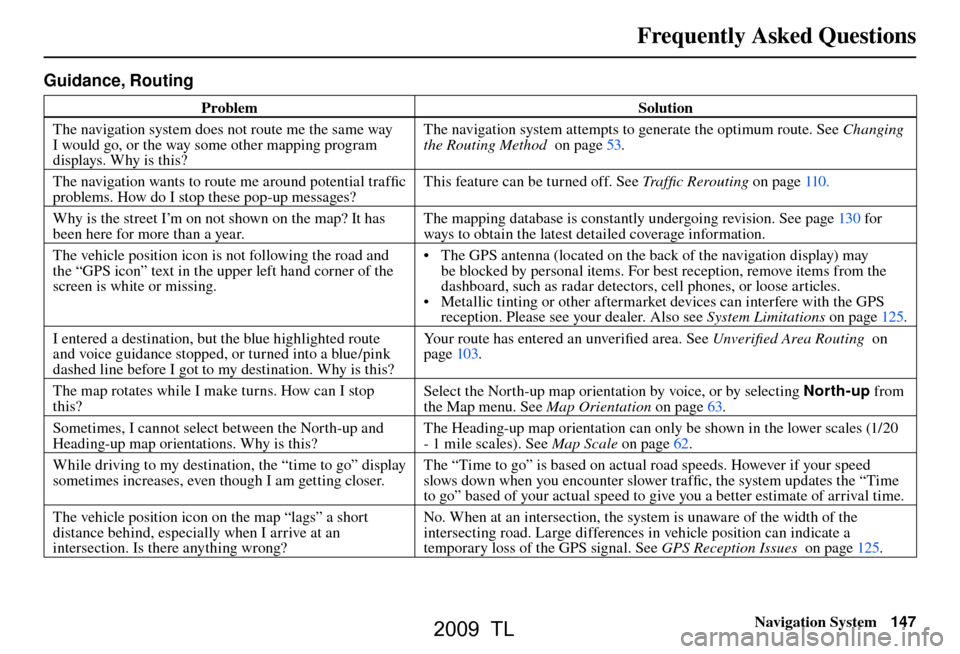
Guidance, Routing
Problem Solution
The navigation system does not route me the same way
I would go, or the way some other mapping program
displays. Why is this? The navigation system attempts to generate the optimum route. See
Changing
the Routing Method on page 53 .
The navigation wants to route me around potential traffi c
problems. How do I stop these pop-up messages? This feature can be turned off. See
Traffi c Rerouting on page 110 .
Why is the street I’m on not shown on the map? It has
been here for more than a year. The mapping database is constantly undergoing revision. See pag
e 130 for
ways to obtain the latest detailed coverage information.
The vehicle position icon is not following the road and
the “GPS icon” text in the upper left hand corner of the
screen is white or missing. • The GPS antenna (located on the back of the navigation display) may
be blocked by personal items. For best reception, remove items from the
dashboard, such as radar detectors, cell phones, or loose articles.
• Metallic tinting or other aftermarket devices can interfere with the GPS reception. Please see your dealer. Also see System Limitations on page 125 .
I entered a destination, but the blue highlighted route
and voice guidance stopped, or turned into a blue /pink
dashed line before I got to my destination. Why is this? Your route has entered an unverifi
ed area. See Unverifi ed Area Routing on
pag e 103 .
The map rotates while I make turns. How can I stop
this? Select the North-up map orientation by voice, or by selecting North-up
from
the Map menu. See Map Orientation on page 63 .
Sometimes, I cannot select between the North-up and
Heading-up map orientations. Why is this? The Heading-up map orientation can only be shown in the lower scales (1/20
- 1 mile scales). See
Map Scale on page 62 .
While driving to my destination, the “time to go” display
sometimes increases, even though I am getting closer. The “Time to go” is based on actual road speeds. However if your speed
slows down when you encounter slower traffi
c, the system updates the “Time
to go” based of your actual speed to give you a better estimate of arrival time.
The vehicle position icon on the map “lags” a short
distance behind, especially when I arrive at an
intersection. Is there anything wrong? No. When at an intersection, the system is unaware of the width of the
intersecting road. Large differences in vehicle position can indicate a
temporary loss of the GPS signal. See
GPS Reception Issues on page 125 .
2009 TL