automatic transmission Acura TL 2010 User Guide
[x] Cancel search | Manufacturer: ACURA, Model Year: 2010, Model line: TL, Model: Acura TL 2010Pages: 612, PDF Size: 15.02 MB
Page 182 of 612
CONT INUED
K eyless A ccess System
Inst rument s and Cont rols
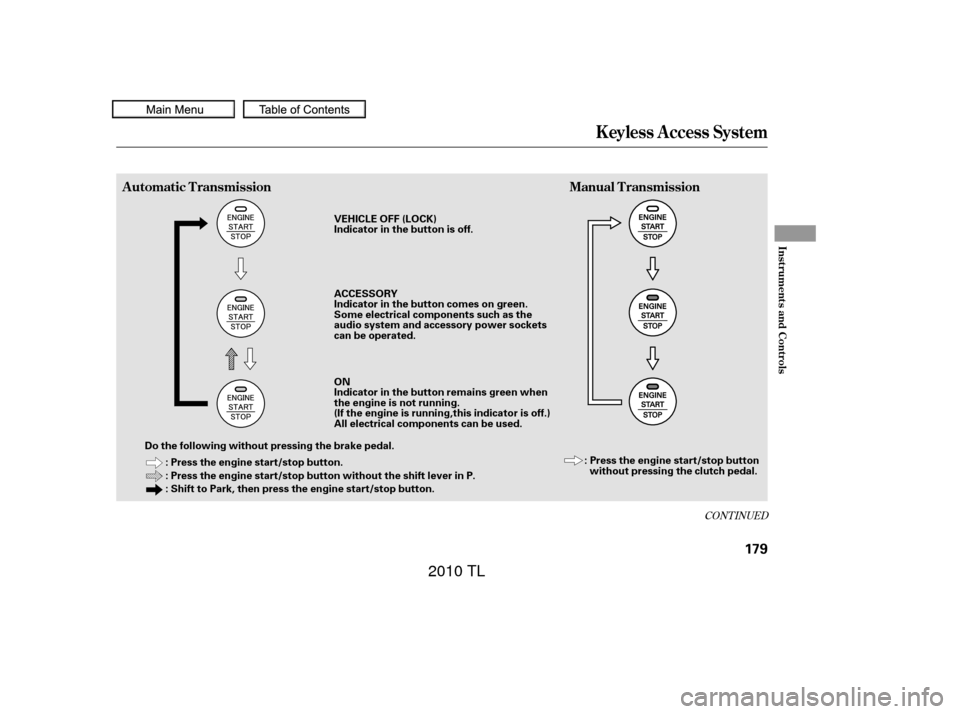
Automatic TransmissionManual Transmission
179
: Press the engine start/stop button.
: Press the engine start/stop button without the shift lever in P.
: Shift to Park, then press the engine start/stop button.
Do the following without pressing the brake pedal. VEHICLE OFF (LOCK)
Indicator in the button is off.
ACCESSORY
Indicator in the button comes on green.
Some electrical components such as the
audio system and accessory power sockets
can be operated.
ON
Indicator in the button remains green when
the engine is not running.
(If the engine is running,this indicator is off.)
All electrical components can be used.
: Press the engine start/stop buttonwithout pressing the clutch pedal.
09/07/29 17:12:56 31TK4610_184
2010 TL
Page 183 of 612

Automatic TransmissionManual Transmission
How the mode is switched depends
on if the shif t lever is in Park or not.Each time you press the engine
start/stop button without pressing
the clutch pedal, the power mode
switches between VEHICLE OFF
(LOCK), ACCESSORY, and ON
modes. To change the mode f rom
ON to ACCESSORY, or
ACCESSORY to VEHICLE OFF
(LOCK), press the engine start/stop
button twice. If the keyless access system
main switch in the glove box is of f ,
make sure to insert the keyless
access remote into the keyless
access slot to turn on your vehicle’s
power mode. For more inf ormation,
ref er to page .
To remove the keyless access
remote from the slot, make sure the
power mode is VEHICLE OFF
(LOCK).
With the shift lever in Park, the
power mode changes f rom ON to
VEHICLE OFF (LOCK) when you
push the engine start/stop button.
TochangethemodefromONto
ACCESSORY with the shift lever
position in Park, take your f oot of f
the brake and press the engine
start/stop button twice.
Tochangethemodefrom
ACCESSORY to VEHICLE OFF
(LOCK),shifttoPark,thenpress
the engine start/stop button twice. 189
K eyless A ccess System
180
NOTE:
09/07/29 17:13:05 31TK4610_185
2010 TL
Page 185 of 612

You can start the engine in any
power mode.
To start the engine:Depress the brake pedal and press
the engine start/stop button. Move the shift lever to Park (P). Af ter you unlock and open the
driver’s door, you will see the ‘‘TO
START ENGINE:’’ message on the
multi-inf ormation display. The ‘‘TO
TURN ACCESSORY ON:’’ message
will be shown af ter three seconds.
The display switches between the
‘‘TO START ENGINE:’’ and ‘‘TO
TURN ACCESSORY ON:’’ messages
every three seconds.
Apply the parking brake.
Press the clutch pedal down all the
way.
The engine does not start unless
the clutch pedal is pressed.
Press the engine start/stop button.
1.
2. 1.
2.
3.
Automatic Transmission
Manual Transmission
K eyless A ccess System
Starting the EngineStarting Guidance
182
ENGINE START/STOP BUTTON
BRAKE PEDAL
AUTOMATIC TRANSMISSION ENGINE START/STOP BUTTON
MANUAL TRANSMISSION CLUTCH PEDAL
M/TTO START ENGINE:
TO TURN
ACCESSORY ON:
A/T
09/07/29 17:13:34 31TK4610_187
2010 TL
Page 187 of 612

To turn the vehicle off when the
vehicle is completely stopped:Shif t to park (P).
Press the engine start/stop button
with your f oot on the brake pedal.
If the shift lever is in neutral, press
the engine start/stop button. If the shif t lever is in any gear
other than neutral, depress the
clutch pedal, then press the engine
start/stop button.
The engine stops and the power
mode switches f rom ON to
VEHICLE OFF (LOCK).
Bef ore leaving the vehicle, make
sure it is of f . You can verif y if the
power is of f by checking the engine
start/stop button LED indicator.
Make sure to press the brake pedal
or set the parking brake bef ore
turning of f the engine. If your f oot is
OFF on the clutch pedal in any gear
position, pressing the engine start/
stop button turns of f the engine, and
thevehiclemaymoveforwardor
backward. You can only place the vehicle in the
VEHICLE OFF (LOCK) mode if the
transmission is in Park. You will see
the ‘‘SHIFT TO PARK’’ message on
the multi-information display if you
press the engine start/stop button to
turn the vehicle of f with the shif t
lever in any other position except f or
P(Park).
1.
2.
Automatic Transmission
Manual Transmission On automatic transmission models
On manual transmission models
Stopping the Engine
K eyless A ccess System
Operat ion Guidance
184
SHIFT TO PARK
A/T model only
A/T model
09/07/29 17:13:55 31TK4610_189
2010 TL
Page 188 of 612

CONT INUED
If the power mode is in ACCESSORY,
you may see the ‘‘ACCESSORY
MODE’’ message on the multi-
inf ormation display.Af ter the driver’s door is opened, you
willseethe‘‘TOTURNVEHICLE
OFF:’’ message on the multi-
inf ormation display. Press the engine
start/stop button twice with your
f oot of f the brake pedal to change
the power mode f rom ACCESSORY
to VEHICLE OFF (LOCK).Press the engine start/stop button
twice with your f oot of f the brake
pedal (automatic transmission) or
the clutch pedal (manual
transmission) to change the power
mode to VEHICLE OFF (LOCK). If you open the driver’s door in the
ACCESSORY mode, a beeper will
sound. You will also see a
‘‘ACCESSORY MODE’’ or ‘‘TO
TURN VEHICLE OFF:’’ message on
the multi-information display.
Bef ore leaving the vehicle, make
sure it is in VEHICLE OFF (LOCK).
All models
K eyless A ccess System
Inst rument s and Cont rols
185
TO TURN VEHICLE OFF
ACCESSORY MODE
09/07/29 17:14:05 31TK4610_190
2010 TL
Page 189 of 612

The engine start/stop button may be
used to stop the engine due to an
emergency situation even while
driving. If you must stop the engine,
do either of the f ollowing operations:Press and hold the engine start/
stop button for three seconds.
Firmly press the engine start/stop
button three times.
Do not press the button while driving
unless it is absolutely necessary f or
the engine to be switched of f . If you are driving, the power mode
switches f rom ON to ACCESSORY
or VEHICLE OFF (LOCK)
whenever you perf orm either
procedure. However, the steering
wheel will NOT lock.
If you cannot stop the engine by
pressing the engine start/stop
button once when the vehicle is
stopped and the shif t lever is in Park
(automatic transmission), do either
emergency engine stop procedure.
In this case, the power mode will
change to VEHICLE OFF (LOCK),
however, the steering wheel may
NOT lock.
K eyless A ccess System
Emergency Engine St op
186
09/07/29 17:14:12 31TK4610_191
2010 TL
Page 195 of 612
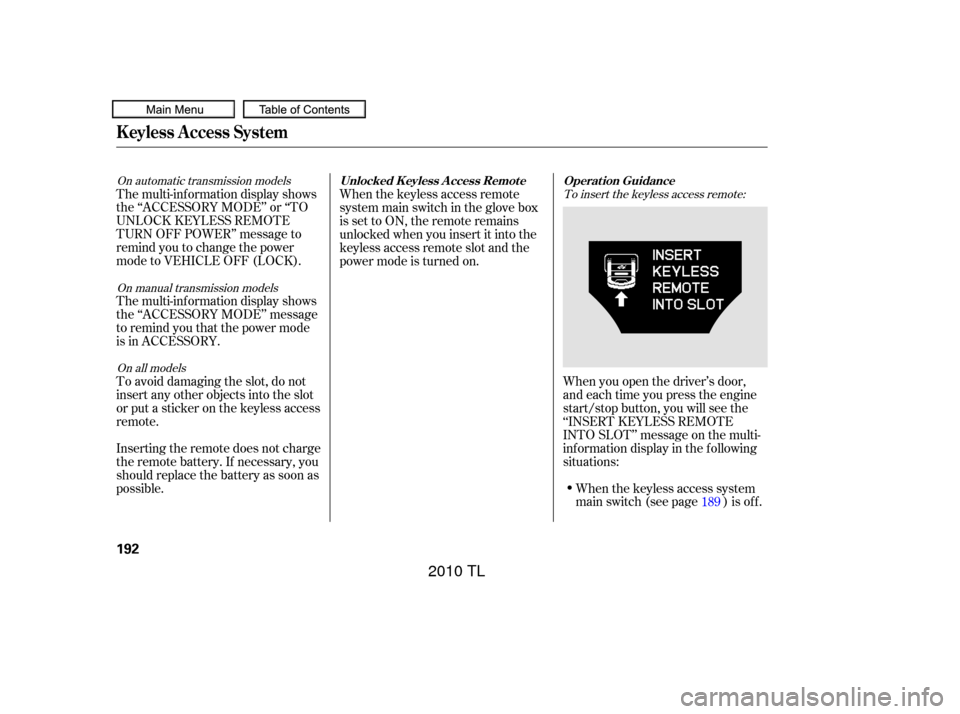
To insert the keyless access remote:
On all models
On automatic transmission models
On manual transmission models
When you open the driver’s door,
and each time you press the engine
start/stop button, you will see the
‘‘INSERT KEYLESS REMOTE
INTO SLOT’’ message on the multi-
inf ormation display in the f ollowing
situations:When the keyless access system
main switch (see page ) is of f .
The multi-inf ormation display shows
the ‘‘ACCESSORY MODE’’ or ‘‘TO
UNLOCK KEYLESS REMOTE
TURN OFF POWER’’ message to
remind you to change the power
mode to VEHICLE OFF (LOCK).
The multi-inf ormation display shows
the ‘‘ACCESSORY MODE’’ message
to remind you that the power mode
is in ACCESSORY.
To avoid damaging the slot, do not
insert any other objects into the slot
or put a sticker on the keyless access
remote.
Inserting the remote does not charge
the remote battery. If necessary, you
should replace the battery as soon as
possible.
When the keyless access remote
system main switch in the glove box
issettoON,theremoteremains
unlocked when you insert it into the
keyless access remote slot and the
power mode is turned on.
189
K eyless A ccess System
Operat ion Guidance
Unlocked K eyless A ccess Remot e
192
09/07/29 17:15:15 31TK4610_197
2010 TL
Page 196 of 612

CONT INUED
The message reminds you that the
keyless access remote is locked in
the keyless access remote slot, and
that the power mode is in the
ACCESSORY or ON position. To
remove the keyless access remote,
turn the power mode of f by pressing
the engine start/stop button twice
(in ACCESSORY mode) or once (in
ON mode) without pressing the
brake pedal.
When the keyless access remote
system main switch in the glove box
is set to ON, the multi-information
display will show the ‘‘TO UNLOCK
KEYLESS REMOTE TURN OFF
POWER’’ message af ter you shif t to
Park.
When the keyless access remote
is not in the vehicle.To unlock the keyless access remote:
On automatic transmission models
K eyless A ccess System
Inst rument s and Cont rols
193
09/07/29 17:15:23 31TK4610_198
2010 TL
Page 197 of 612

TheshiftlevermustbeinPark
bef ore you can press the engine
start/stop button twice without
pressing the brake pedal to set the
vehicle into the VEHICLE OFF
(LOCK) mode.
If the vehicle is lef t in the
ACCESSORY mode, the ‘‘TO TURN
VEHICLE OFF’’ message is shown
on the multi-information display
when you open the driver’s door. If
the vehicle is lef t in the VEHICLE
OFF (LOCK) mode with the keyless
access remote in the slot, the
‘‘REMOVE KEYLESS REMOTE
FROM SLOT’’ message is shown on
the multi-information display.
In ACCESSORY mode, the
‘‘ACCESSORY MODE’’ message will
be displayed a f ew seconds af ter the
‘‘TO UNLOCK KEYLESS REMOTE
TURN OFF POWER’’ message is
displayed.
To remove the keyless access remote: On automatic transmission models
K eyless A ccess System
194
09/07/29 17:15:30 31TK4610_199
2010 TL
Page 462 of 612

This section gives you tips on
starting the engine under various
conditions, and how to operate the
manual and automatic transmissions.
It also includes important
information on parking your vehicle,
the braking system, the Super
Handling-All Wheel Drive
(SH-AWD
) system, vehicle stability
assist (VSA
), aka electronic
stability control (ESC), system, and
the tire pressure monitoring system
(TPMS). ........................
Preparing to Drive .460
Starting the Engine (Models without Keyless .....................
Access System) .461
Starting the Engine (Models with Keyless .....................
Access System) .463
...................
Manual Transmission . 465
..............
Automatic Transmission . 468
Driving with the Paddle .......................................
Shif ters .473
Super Handling-All Wheel ...
Drive (SH-AWD
) System . 478
...........................................
Parking .480
.............................
Braking System .481
...............
Anti-lock Brakes (ABS) . 482
Vehicle Stability Assist (VSA
),
aka Electronic Stability ........
Control (ESC), System . 484
.....................
Hill Start Assist .486
Tire Pressure Monitoring ........................
System (TPMS) .488
...........................
Towing a Trailer .493
...................
Towing Your Vehicle . 493
Driving
Driving
459
TM
TM
09/07/29 18:17:35 31TK4610_464
2010 TL