speed Acura TLX 2015 Owners Manual
[x] Cancel search | Manufacturer: ACURA, Model Year: 2015, Model line: TLX, Model: Acura TLX 2015Pages: 545, PDF Size: 19.64 MB
Page 390 of 545
389
uuWhen Driving uBlind Spot Information (BSI) System
*
Continued
Driving
Blind Spot Information (BSI) System
*
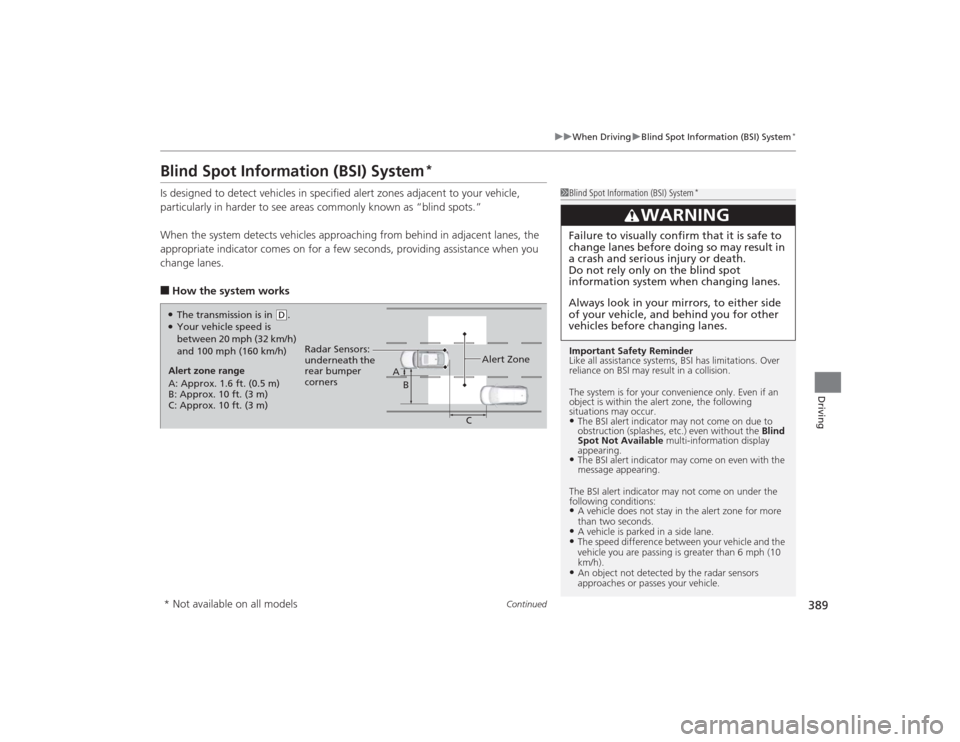
Is designed to detect vehicles in specified alert zones adjacent to your vehicle,
particularly in harder to see areas common ly known as “blind spots.”
When the system detects vehicles approaching from behind in adjacent lanes, the
appropriate indicator comes on for a few seconds, providing assistance when you
change lanes.■How the system works
1 Blind Spot Information (BSI) System
*
Important Safety Reminder
Like all assistance systems, BSI has limitations. Over
reliance on BSI may result in a collision.
The system is for your convenience only. Even if an
object is within the alert zone, the following
situations may occur.•The BSI alert indi cator may not come on due to
obstruction (splashes, etc.) even without the Blind
Spot Not Available multi-information display
appearing.•The BSI alert indicator may come on even with the
message appearing.
The BSI alert indicator may not come on under the
following conditions:•A vehicle does not stay in the alert zone for more
than two seconds.•A vehicle is parked in a side lane.•The speed difference between your vehicle and the
vehicle you are passing is greater than 6 mph (10
km/h).•An object not detected by the radar sensors
approaches or passes your vehicle.
3
WARNING
Failure to visually confirm that it is safe to
change lanes before doing so may result in
a crash and serious injury or death.
Do not rely only on the blind spot
information system when changing lanes.
Always look in your mirrors, to either side
of your vehicle, and behind you for other
vehicles before changing lanes.
●The transmission is in
( D.
●Your vehicle speed is
between 20 mph (32 km/h)
and 100 mph (160 km/h)
Alert zone range
A: Approx. 1.6 ft. (0.5 m)
B: Approx. 10 ft. (3 m)
C: Approx. 10 ft. (3 m) Radar Sensors:
underneath the
rear bumper
corners
Alert Zone
A
B
C
* Not available on all models
Page 391 of 545

uuWhen Driving uBlind Spot Information (BSI) System
*
390Driving
■When the system detects a vehicle
1Blind Spot Information (BSI) System
*
You can change the setting for BSI.
2 Customized Features P. 126, 259
BSI may be adversely affected when:•Objects (guard rails, poles, trees, etc,.) are
detected.•An object that does not reflect radio waves well,
such as a motorcycle, is in the alert zone.•Driving on a curved road.•A vehicle is moving from a far lane to the adjacent
lane.•The system picks up external electrical interference.•The rear bumper or the sensors have been improperly
repaired or the rear bumper has been deformed.•The orientation of the sensors has been changed.•In bad weather (Heavy rain, snow, and fog).
For a proper BSI use:•Always keep the rear bumper corner area clean.•Do not cover the rear bumper corner area with
labels or stickers of any kind.•Take your vehicle to a dealer if you need the rear
bumper corner area or the radar sensors to be
repaired, or the rear bumper corner area is strongly
impacted.
Comes on when:●A vehicle enters the alert zone from behind
to overtake you with a speed difference of
no more than 31 mph (50 km/h) from your
vehicle.●You pass a vehicle with a speed difference
of no more than 12 mph (20 km/h).
BSI Alert Indicator: Located near the outside
rearview mirror on both sides.
Blinks and a beeper sounds when:
You move the turn signal lever in the direction
of the detected vehicle. The beeper sounds
three times. Comes On
Blinks
* Not available on all models
Page 403 of 545
402
uuBraking uAnti-lock Brake System (ABS)
Driving
Anti-lock Brake System (ABS)Helps prevent the wheels from locking up, and help s you retain steering control by
pumping the brakes rapidly, much faster than you.
The electronic brake distribution (EBD) system, which is part of the ABS, also
balances the front-to-rear braking distribution according to vehicle loading.
You should never pump the brake pedal. Let the ABS work for you by always
keeping firm, steady pressure on the brake pedal. This is sometimes referred to as
“stomp and steer.”■ABS operation
The brake pedal may pulsate slightly when the ABS is working. Keep holding the
pedal firmly down. On dry pavement, you will need to press on the brake pedal very
hard before the ABS activates. However, you may feel the ABS activate immediately
if you are trying to stop on snow or ice.
When the vehicle speed goes under 6 mph (10 km/h), the ABS stops.■
ABS
1 Anti-lock Brake System (ABS)NOTICEThe ABS may not function correctly if you use an
incorrect tire type and size.
When the ABS indicator comes on while driving,
there may be a problem with the system.
While normal braking is not affected, there is a
possibility of the ABS not operating. Have your
vehicle checked by a dealer immediately.
The ABS does not reduce the time or distance it takes
to stop the vehicle. It only helps with steering control
during hard braking.
In the following cases, your vehicle may need more
stopping distance than a vehicle without the ABS:•When driving on rough road surfaces, including
when driving on uneven surfaces, such as gravel or
snow.•When tire chains are installed.
You may hear a motor sound coming from the
engine compartment while system checks are being
performed immediatel y after starting the engine or
while driving. This is normal.
Page 405 of 545

404
uuBraking uCollision Mitigation Braking System
TM (CMBS
TM)*
Driving
Collision Mitigation Braking System
TM
(CMBS
TM
)*
Can assist you when there is a possibility of your vehicle colliding with a vehicle or a
pedestrian detected in front of yours. The CMBS
TM is designed to alert you when a
potential collision is determined, as well as to reduce your vehicle speed to help
minimize collision severity when a collision is deemed unavoidable.
■How the system works
1 Collision Mitigation Braking System
TM (CMBS
TM)*
Important Safety Reminder
The CMBS
TM is designed to reduce the severity of an
unavoidable collision. It does not prevent collision nor
stop the vehicle automatically. It is still your
responsibility to operate the brake pedal and steering
wheel appropriately according to the driving
conditions.
The CMBSTM may not activate or may not detect a
vehicle in front of your vehicle under certain
conditions: 2 CMBSTM Conditions and Limitations P. 408
You can read about handling information for the
camera equipped with this system. 2 Front Sensor Camera
* P. 351
The system starts monitoring the roadway ahead when your vehicle speed is about
3 mph (5 km/h) and there is a vehicle in front of you. The radar sensor is
in the front grille.
The CMBS
TM activates when:
●The speed difference between your vehicle and a vehicle or pedestrian
detected in front of you becomes about 3 mph (5 km/h) and over with a chance
of a collision.●Your vehicle speed is about 62 mph (100 km/h) or less and there is a chance of a
collision with an oncoming detected vehicle or a pedestrian in front of you. The camera is
located behind the
rearview mirror.When to use* Not available on all models
Page 410 of 545
409
uuBraking uCollision Mitigation Braking System
TM (CMBS
TM)*
Continued
Driving
■Vehicle conditions
• Headlight lenses are dirty or the headlights are not properly adjusted.
• The outside of the windshield is blocked by dirt, mud, leaves, wet snow, etc.
• The inside of the windshield is fogged.
• An abnormal tire or wheel condition (wrong sized, varied size or construction,
improperly inflated, compact spare tire
*, etc.).
• The vehicle is tilted due to a heavy load or suspension modifications.
• The camera temperature gets too hot.
• Driving with the parking brake applied.
• When the radar sensor in the front grille gets dirty.
■Detection limitations
• A vehicle or pedestrian suddenly crosses in front of you.
• The distance between your vehicle and the vehicle or pedestrian ahead of you is
too short.
• A vehicle cuts in front of you at a slow speed, and it brakes suddenly.
• When you accelerate rapidly and approach the vehicle or pedestrian ahead of you
at high speed.
• The vehicle ahead of you is a motorcycle, bicycle, mobility scooter or other small
vehicle.
• When there are animals in front of your vehicle.
• When you drive on a curved, winding or undulating road that makes it difficult for
the sensor to properly detect a vehicle in front of you.
• The speed difference between your vehicle and a vehicle in front of you is
significantly large.
• An oncoming vehicle suddenly comes in front of you.
• You vehicle abruptly crosses over in front of an oncoming vehicle.
• When driving through a narrow iron bridge.* Not available on all models
Page 411 of 545

uuBraking uCollision Mitigation Braking System
TM (CMBS
TM)*
410Driving
The CMBS
TM may activate even when you are aware of a vehicle ahead of you, or
when there is no vehicle ahead. Some examples of this are:
■When Passing
Your vehicle approaches another vehicle ahead of you and you change lanes to pass.■At an intersection
Your vehicle approaches or passes another vehicle that is making a left or right turn.■On a curve
When driving through curves, your vehicle comes to a point where an oncoming
vehicle is right in front of you.■Through a low bridge at high speed
You drive under a low or narrow bridge at high speed.■Speed bumps, road work sites, train trac ks, roadside objects, etc.
You drive over speed bumps, steel road plates, etc., or your vehicle approaches train
tracks or roadside objects [such as a traffic sign and guard rail] on a curve or, when
parking, stationary vehicles and walls.■
With Little Chance of a Collision
1 Collision Mitigation Braking System
TM (CMBS
TM)*
For the CMBS
TM to work properly:
Always keep the rada r sensor cover clean.
Never use chemical solvents or polishing powder for
cleaning the sensor cover. Clean it with water or a
mild detergent.
Do not put a sticker on the emblem or replace the
emblem.
If you need the radar sensor to be repaired, or
removed, or the radar sensor cover is strongly
impacted, turn off the system by pressing the
CMBS
TM off button and take your vehicle to a dealer.
* Not available on all models
Page 414 of 545

413
uuParking Your Vehicle uParking Sensor System
*
Continued
Driving
■Parking sensor system on and off
With the power mode in ON, press the
parking sensor system button to turn the
system on or off. The indicator in the button
comes on and the beeper sounds when the
system is on.
The rear center and corner sensors start to
detect an obstacle when the transmission is in
(R
, and the vehicle speed is less than 5 mph
(8 km/h).
The front corner sensors start to detect an
obstacle when the transmission is not in
(P
,
and the vehicle speed is less than 5 mph (8
km/h).
Page 418 of 545

Continued
417
uuParking Your Vehicle uCross Traffic Monitor
*
Driving
The system activates when:
• The power mode is in ON.
• The Cross Traffic Monitor system is turned
on.
2 Cross Traffic Monitor On and Off P. 418
2 Customized Features P. 259
•The transmission is in
(R
.
• Your vehicle is moving at 3 mph (5 km/h) or
lower.
When a vehicle is detected approaching from a rear corner, Cross Traffic Monitor
alerts you with a buzzer and a displayed warning.
The system will not detect a vehicle that approaches from directly behind your
vehicle, nor will it provide alerts about a detected vehicle when it moves directly
behind your vehicle.
The system does not detect or provide alerts for a vehicle that is moving away from
your vehicle, and it may not detect or alert for pedestrians, bicycles, or stationary
objects.
■
How the System Works
1 Cross Traffic Monitor
*
Cross Traffic Monitor may not detect an approaching
vehicle, or may delay alerting you under the following
conditions:•A vehicle, which is parked adjacent to your vehicle,
is blocking the radar sensor’s scope.•Your vehicle is moving at the speed of about 3 mph
(5 km/h) or higher.•A vehicle is approaching at the speed other than
between about 6 and 16 mph (10 and 25 km/h).•The system picks up external interference such as
other radar sensors from another vehicle or strong
radio wave transmitted from a facility nearby.•Either corner of the rear bumper is covered with
snow, ice, mud or dirt.•When there is bad weather.•Your vehicle is on an incline.•Your vehicle is tilted due to a heavy load in the rear.•The rear bumper or the sensors have been
improperly repaired or the rear bumper has been
deformed. Have a vehicl e checked by a dealer.
For proper operation, always keep the rear bumper
corner area clean.
Do not cover the rear bumper corner area with labels
or stickers of any kind.
Radar sensors:
Underneath the rear bumper
corners* Not available on all models
Page 433 of 545
432
uuMaintenance Minder
TMuTo Use Maintenance Minder
TM
Maintenance
■
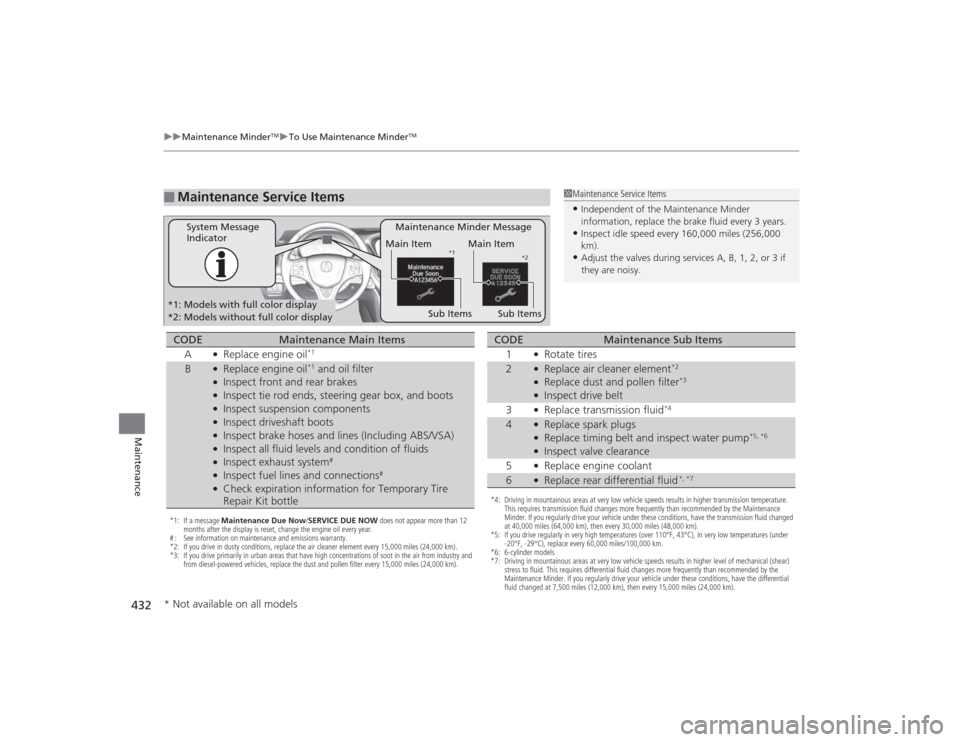
Maintenance Service Items
1Maintenance Service Items•Independent of the Maintenance Minder
information, replace the brake fluid every 3 years.•Inspect idle speed every 160,000 miles (256,000
km).•Adjust the valves during services A, B, 1, 2, or 3 if
they are noisy.
Maintenance Minder Message
System Message
Indicator
Main Item
Sub Items
Main ItemSub Items
*1 *2
*1: Models with full color display
*2: Models without full color display*1: If a message Maintenance Due Now/SERVICE DUE NOW does not appear more than 12
months after the display is reset, change the engine oil every year.
# : See information on maintenance and emissions warranty.
*2: If you drive in dusty conditions, replace the air cleaner element every 15,000 miles (24,000 km).
*3: If you drive primarily in urban areas that have high concentrations of soot in the air from industry and from diesel-powered vehicles, replace the dust and pollen filter every 15,000 miles (24,000 km).CODE
Maintenance Main Items
A
●Replace engine oil
*1
B
●Replace engine oil
*1 and oil filter
●Inspect front and rear brakes●Inspect tie rod ends, steering gear box, and boots●Inspect suspension components●Inspect driveshaft boots●Inspect brake hoses and lines (Including ABS/VSA)●Inspect all fluid levels and condition of fluids●Inspect exhaust system
#
●Inspect fuel lines and connections
#
●Check expiration information for Temporary Tire
Repair Kit bottle
*4: Driving in mountainous areas at very low vehicle speeds results in higher transmission temperature. This requires transmission fluid changes more frequently than recommended by the Maintenance
Minder. If you regularly drive your vehicle under these conditions, have the transmission fluid changed
at 40,000 miles (64,000 km), then every 30,000 miles (48,000 km).
*5: If you drive regularly in very high temperatures (over 110°F, 43°C), in very low temperatures (under -20°F, -29°C), replace every 60,000 miles/100,000 km.
*6: 6-cylinder models
*7: Driving in mountainous areas at very low vehicle speeds results in higher level of mechanical (shear) stress to fluid. This requires differential fluid changes more frequently than recommended by the
Maintenance Minder. If you regularly drive your vehicle under these conditions, have the differential
fluid changed at 7,500 miles (12,000 km), then every 15,000 miles (24,000 km).CODE
Maintenance Sub Items
1
●Rotate tires
2
●Replace air cleaner element
*2
●Replace dust and pollen filter
*3
●Inspect drive belt
3●Replace transmission fluid
*4
4
●Replace spark plugs●Replace timing belt and inspect water pump
*5, *6
●Inspect valve clearance
5●Replace engine coolant
6
●Replace rear differential fluid
*, *7
* Not available on all models
Page 458 of 545

457
uuChecking and Maintaining Tires uTire and Loading Information Label
Continued
Maintenance
Tire and Loading Information LabelThe label attached to the driver’s doorjamb provides necessary tire and loading
information.Tire Labeling
The tires that came on your vehicle have a
number of markings. Those you should be
aware of are described below.
Whenever tires are replaced, they should be replaced with tires of the same size.
1 Tire and Loading Information Label
The tire and loading information label attached to the
driver’s doorjamb contains:aThe number of people your vehicle can carry.bThe total weight your vehicle can carry. Do not
exceed this weight.cThe original tire sizes for front, rear, and spare, if
equipped.dThe proper cold tire pressure for front, rear, and
spare, if equipped.
Label
ExampleExample
Tire Size
Tire
Identification
Number (TIN)
Maximum
Tire Load
Maximum
Tire Pressure
Tire Size■
Tire Sizes
1 Tire Sizes
Following is an example of tire size with an
explanation of what each component means.
225/50R18 95H
225: Tire width in millimeters.
50: Aspect ratio (the tire’s section height as a
percentage of its width).
R: Tire construction code (R indicates radial).
18: Rim diameter in inches.
95: Load index (a numerical code associated with the
maximum load the tire can carry).
H: Speed symbol (an alphabetical code indicating the
maximum speed rating).