parking Acura TLX 2015 Owner's Guide
[x] Cancel search | Manufacturer: ACURA, Model Year: 2015, Model line: TLX, Model: Acura TLX 2015Pages: 545, PDF Size: 19.64 MB
Page 316 of 545
315
Driving
This chapter discusses driving, refueling, and information on items such as accessories.
Before Driving................................... 316
Towing a Trailer ................................ 321
When Driving
Starting the Engine .......................... 322
Precautions While Driving................. 329
Automatic Transmission
*................. 330
Dual Clutch Transmission*............... 330
Shifting ............................................ 331
Shifting ............................................ 338
Auto Idle Stop
*................................ 342
Integrated Dynamics System (IDS)..... 346
Models with electronic gear selectorModels with shift lever
Cruise Control
*............................... 348
Front Sensor Camera
*..................... 351
Adaptive Cruise Control (ACC) with Low Speed Follow (LSF)
*....................... 352
Forward Collision Warning (FCW) with Pedestrian Detection*.................... 365
Lane Departure Warning (LDW)
*..... 371
Road Departure Mitigation (RDM) System
*... 375
Lane Keeping Assist System (LKAS)
*.. 380
Vehicle Stability Assist (VSA
®), aka Electronic
Stability Control (ESC), System ............... 386
Agile Handling Assist System............ 388
Precision All Wheel Steer System
*.... 388
Blind Spot Information (BSI) System
*.... 389
Super Handling-All Wheel Drive
TM (SH-
AWD® )
*......................................... 391
Tire Pressure Monitoring System (TPMS) ... 392Tire Pressure Monitoring System (TPMS) -
Required Federal Explanation ......... 394
Braking .............................................. 396
Parking Your Vehicle ........................ 411
Multi-View Rear Camera .................. 419
Refueling ........................................... 420
Fuel Economy .................................... 422
Accessories and Modifications ........ 423
* Not available on all models
Page 323 of 545
322Driving
When DrivingStarting the Engine
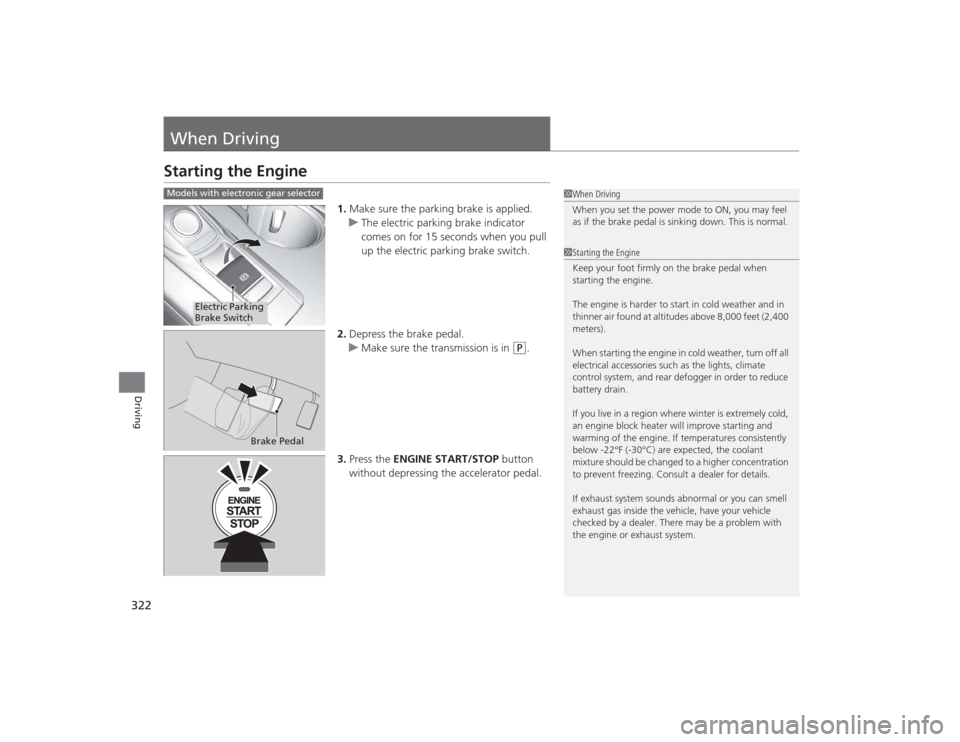
1.Make sure the parking brake is applied.
u The electric parking brake indicator
comes on for 15 seconds when you pull
up the electric parking brake switch.
2. Depress the brake pedal.
u Make sure the transmission is in
(P
.
3. Press the ENGINE START/STOP button
without depressing the accelerator pedal.
1 When Driving
When you set the power mode to ON, you may feel
as if the brake pedal is sinking down. This is normal.1Starting the Engine
Keep your foot firmly on the brake pedal when
starting the engine.
The engine is harder to start in cold weather and in
thinner air found at altitudes above 8,000 feet (2,400
meters).
When starting the engine in cold weather, turn off all
electrical accessories such as the lights, climate
control system, and rear defogger in order to reduce
battery drain.
If you live in a region where winter is extremely cold,
an engine block heater will improve starting and
warming of the engine. If temperatures consistently
below -22°F (-30°C) are expected, the coolant
mixture should be changed to a higher concentration
to prevent freezing. Consult a dealer for details.
If exhaust system sounds abnormal or you can smell
exhaust gas inside the vehicle, have your vehicle
checked by a dealer. There may be a problem with
the engine or exhaust system.
Models with electronic gear selector
Electric Parking
Brake Switch
Brake Pedal
Page 324 of 545
Continued
323
uuWhen Driving uStarting the Engine
Driving
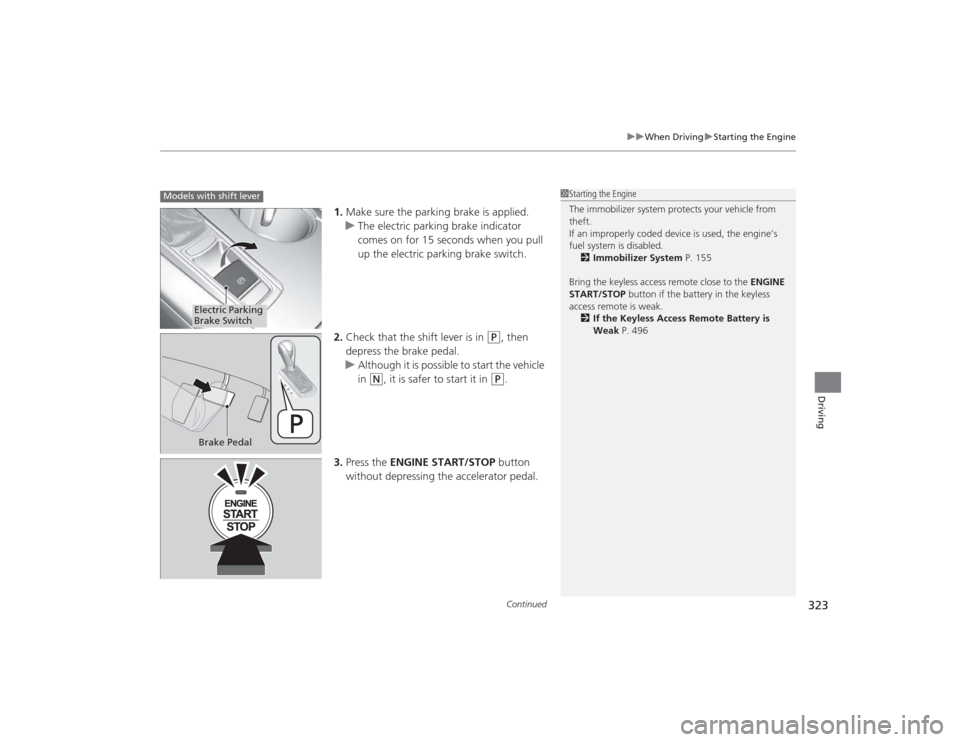
1. Make sure the parking brake is applied.
u The electric parking brake indicator
comes on for 15 seconds when you pull
up the electric parking brake switch.
2. Check that the shift lever is in
(P
, then
depress the brake pedal.
u Although it is possible to start the vehicle
in
(N
, it is safer to start it in
(P
.
3. Press the ENGINE START/STOP button
without depressing the accelerator pedal.
1 Starting the Engine
The immobilizer system protects your vehicle from
theft.
If an improperly coded device is used, the engine’s
fuel system is disabled.
2 Immobilizer System P. 155
Bring the keyless access remote close to the ENGINE
START/STOP button if the battery in the keyless
access remote is weak. 2 If the Keyless Access Remote Battery is
Weak P. 496
Models with shift lever
Electric Parking
Brake SwitchBrake Pedal
Page 328 of 545

Continued
327
uuWhen Driving uStarting the Engine
Driving
1. While depressing the brake pedal, press the ENGINE START/STOP button.
2. Change the gear position to
(D
. Select
(R
when reversing.
3. With the parking brake applied, release the brake pedal and gently depress the
accelerator pedal.
u Make sure the electric parking brake indicator goes off.
4. Gradually release the brake pedal and gently depress the accelerator pedal to pull
away.
■
Starting to Drive
1Starting to Drive
You can also release the parking brake by pressing
the electric parking brake switch while depressing the
brake pedal.
When facing downhill, you can start your vehicle
more smoothly by manually releasing it with the
electric parking brake switch than by releasing it with
the accelerator pedal.
The engine stops when the gear position is changed
from
(P before the ENGINE START/STOP button is
pressed. Follow the step 1 when starting to drive.
When the engine was sta rted using the two-way
keyless access remote
*
When the engine was started using the two-way keyless access remote
*
When the engine was started in any case* Not available on all models
Page 329 of 545
uuWhen Driving uStarting the Engine
328Driving
■Hill Start Assist System
Hill start assist keeps the brake engaged briefly to help prevent the vehicle from
rolling on inclines as you move your foot from the brake pedal to the accelerator.
Change the gear position to
(D
when facing uphill, or
(R
when facing downhill,
then release the brake pedal.
1 Hill Start Assist System
Hill start assist may not prevent the vehicle from
rolling downhill on a very steep or slippery slope, and
does not operate on small inclines.
Hill start assist is not a replacement for the parking
brake.
Page 330 of 545
329
uuWhen Driving uPrecautions While Driving
Continued
Driving
Precautions While DrivingAvoid driving in deep water and on flooded roads. This can damage the engine,
driveline, or cause electrical component failure.■
In Rain
1Precautions While DrivingNOTICEDo not change the gear position while pressing the
accelerator pedal. You could damage the
transmission.NOTICEThe following can damage the under spoiler:•Parking the vehicle by a parking block•Parallel parking along the road shoulder•Driving toward the bottom of a hill•Driving up or down to a different surface level
(such as a road shoulder)•Driving on a rutted or bumpy road•Driving on a road with potholes.NOTICEIf you repeatedly turn the steering wheel at an
extremely low speed, or hold the steering wheel on
the full left or right position for a while, the electric
power steering (EPS) system heats up. The system
goes into a protective mode, and limits its
performance. The steering wheel becomes harder
and harder to operate. Once the system cools down,
the EPS system is restored.
Repeated operation under these conditions can
eventually damage the system.
If the power mode is set to ACCESSORY or VEHICLE
OFF (LOCK) while driving, the engine will shut down
and all steering and brake power assist functions will
stop, making it difficult to control the vehicle.
Page 332 of 545
331
uuWhen Driving uShifting
Continued
Driving
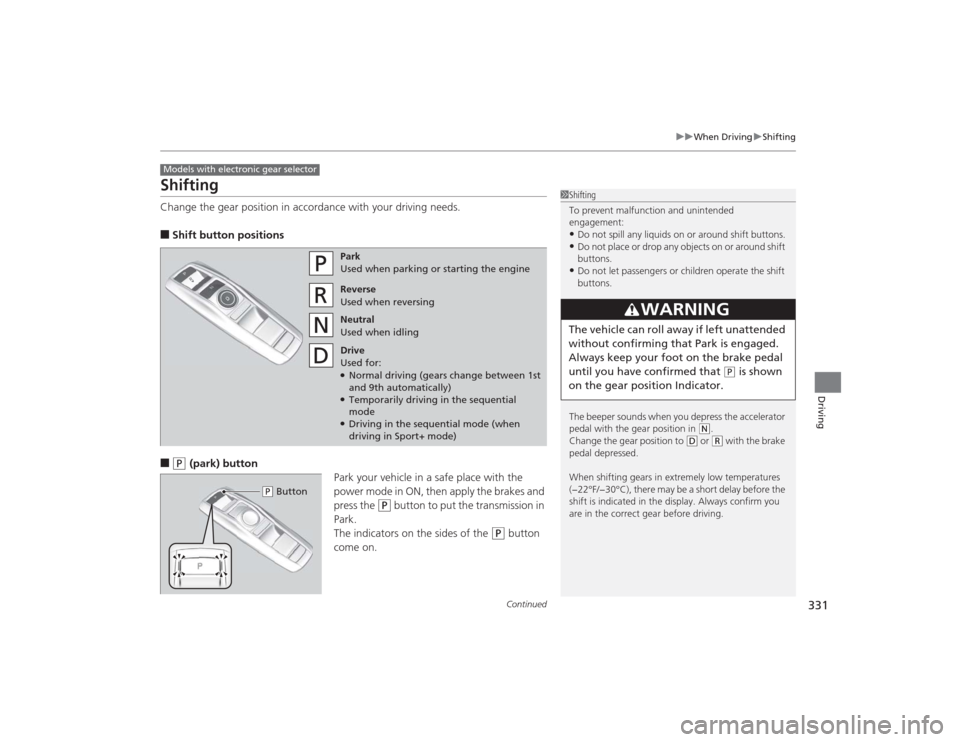
ShiftingChange the gear position in accordance with your driving needs.■Shift button positions■
(P
(park) button
Park your vehicle in a safe place with the
power mode in ON, then apply the brakes and
press the
(P
button to put the transmission in
Park.
The indicators on the sides of the
(P
button
come on.
Models with electronic gear selector
1 Shifting
To prevent malfunction and unintended
engagement:•Do not spill any liquids on or around shift buttons.•Do not place or drop any objects on or around shift
buttons.•Do not let passengers or children operate the shift
buttons.
The beeper sounds when you depress the accelerator
pedal with the gear position in
( N.
Change the gear position to
( D or
(R with the brake
pedal depressed.
When shifting gears in extremely low temperatures
(−22°F/−30°C), there may be a short delay before the
shift is indicated in the display. Always confirm you
are in the correct gear before driving.
3
WARNING
The vehicle can roll away if left unattended
without confirming that Park is engaged.
Always keep your foot on the brake pedal
until you have confirmed that
( P is shown
on the gear position Indicator.
Park
Used when parking or starting the engine
Reverse
Used when reversing
Neutral
Used when idling
Drive
Used for:●Normal driving (gears change between 1st
and 9th automatically)●Temporarily driving in the sequential
mode●Driving in the sequential mode (when
driving in Sport+ mode)
( P Button
Page 339 of 545
338
uuWhen Driving uShifting
Driving
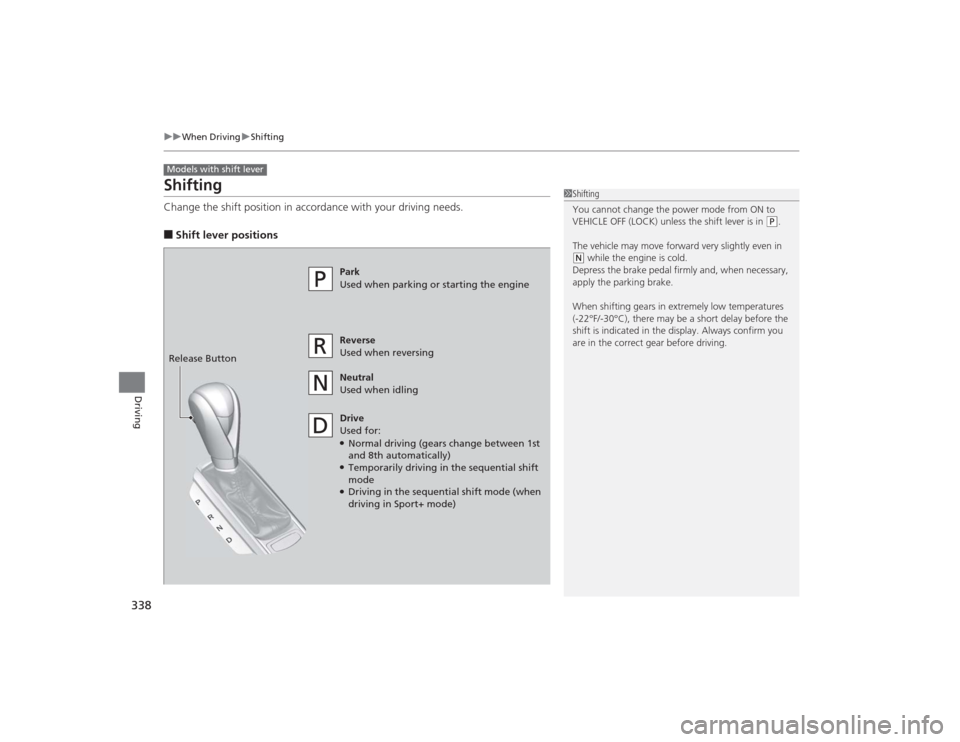
ShiftingChange the shift position in accordance with your driving needs.■Shift lever positionsModels with shift lever
1Shifting
You cannot change the power mode from ON to
VEHICLE OFF (LOCK) unless the shift lever is in
(P.
The vehicle may move forward very slightly even in
( N while the engine is cold.
Depress the brake pedal firmly and, when necessary,
apply the parking brake.
When shifting gears in extremely low temperatures
(-22°F/-30°C), there may be a short delay before the
shift is indicated in the display. Always confirm you
are in the correct gear before driving.
Park
Used when parking or starting the engine
Reverse
Used when reversing
Neutral
Used when idling
Drive
Used for:●Normal driving (gears change between 1st
and 8th automatically)●Temporarily driving in the sequential shift
mode●Driving in the sequential shift mode (when
driving in Sport+ mode)
Release Button
Page 358 of 545
357
uuWhen Driving uAdaptive Cruise Control (ACC) with Low Speed Follow (LSF)
*
Continued
Driving
The system may automatically shut off and the ACC indicator will come on under
certain conditions. Some examples of these conditions are listed below. Other
conditions may reduce some of the ACC functions.2 Front Sensor Camera
* P. 351
■Environmental conditions
• Driving in bad weather (rain, fog, snow, etc.).■Roadway conditions
• Driving on a snowy or wet roadway (obscured lane marking, vehicle tracks,
reflected lights, road spray, high contrast).■Vehicle conditions
• The outside of the windshield is blocked by dirt, mud, leaves, wet snow, etc.
• An abnormal tire or wheel condition (Wrong sized, varied size or construction,
improperly inflated, compact spare tire
*, etc.).
• The camera temperature gets too hot.
• The parking brake is applied.
■
ACC with LSF Conditions and Limitations* Not available on all models
Page 364 of 545
Continued
363
uuWhen Driving uAdaptive Cruise Control (ACC) with Low Speed Follow (LSF)
*
Driving
■Automatic cancellation
The beeper sounds and a message appears on the multi-information display when
ACC with LSF is automatically canceled. Any of these conditions may cause the ACC
with LSF to automatically cancel:
• Bad weather (rain, fog, snow, etc.)
• When the radar sensor in the front grille gets dirty.
• The vehicle ahead of you cannot be detected.
• An abnormal tire condition is detected, or the tires are skidding.
• Driving on a mountainous road, or driving off road for extended periods.
• Abrupt steering wheel movement.
• When the ABS, VSA ® or CMBS
TM is activated.
• When the ABS or VSA ® system indicator comes on.
• When the vehicle is stopped on a very steep slope.
• When you manually apply the parking brake.
• When the detected vehicle within the ACC with LSF range is too close to your
vehicle.
• The camera behind the rearview mirror, or the area around the camera, including
the windshield, gets dirty.
The ACC with LSF automatic cancellation can be also triggered by the following
causes. In these cases, the parking brake will be automatically applied.
• The driver’s seat belt is unfastened when the vehicle is stationary.
• The vehicle stops for more than 10 minutes.
• The engine is turned off.
1Automatic cancellation
Even though ACC with LSF has been automatically
canceled, you can still resume the prior set speed.
Wait until the condition that caused ACC with LSF to
cancel improves, then press the RES/+/SET/– switch
up.