parking Acura TLX 2015 Service Manual
[x] Cancel search | Manufacturer: ACURA, Model Year: 2015, Model line: TLX, Model: Acura TLX 2015Pages: 545, PDF Size: 19.64 MB
Page 415 of 545

414
uuParking Your Vehicle uParking Sensor System
*
Driving
■When the distance between your vehicle and obstacles behind becomes shorter
*1: At this stage, only the center sensors detect obstacles.
Length of the
intermittent beep
Distance between the Bumper and Obstacle
Indicator
Audio/information screen
Corner Sensors
Center Sensors
Moderate
—
Rear: About 43-24 in (110-60 cm)
Blinks in Yellow
*1
Short
About 24-18 in (60-45 cm)
About 24-18 in (60-45 cm)
Blinks in Amber
Very short
About 18-14 in
(45-35 cm)
About 18-14 in (45-35 cm)
Continuous
About 14 in
(35 cm) or less
About 14 in
(35 cm) or less
Blinks in Red
Indicators light where the
sensor detects an obstacle.
Page 416 of 545

415
uuParking Your Vehicle uParking Sensor System
*
Driving
1. Make sure that the parking sensor system is not activated. Set the power mode to
VEHICLE OFF (LOCK).
2. Press and hold the parking sensor system button, and set the power mode to ON.
3. Keep pressing the button for 10 seconds. Release the button when the indicator
in the button flashes.
4. Press the button again. The indicator in the button goes off.
u The beeper sounds twice. The rear sensors are now turned off.
To turn the rear sensors on again, follow the above procedure. The beeper sounds
three times when the rear sensors come back on.■
Turning off All Rear Sensors
1 Turning off All Rear Sensors
When you set the gear position to
(R, the indicator
in the parking sensor system button blinks as a
reminder that the rear sensors have been turned off.
Page 417 of 545

416
uuParking Your Vehicle uCross Traffic Monitor
*
Driving
Cross Traffic Monitor
*
Monitors the rear corner areas using the radar sensors when reversing, and alerts
you if a vehicle approaching from a rear corner is detected.
The system is convenient when you are backing out of a parking space.
1Cross Traffic Monitor
*
3
CAUTION
Cross Traffic Monitor cannot detect all
approaching vehicles and may not detect
an approaching vehicle at all.
Failure to visually confirm that it is safe to
back up the vehicle before doing so may
result in a collision.
Do not solely rely on the system when
reversing; always also use your mirrors, and
look behind and to the sides of your vehicle
before reversing.
* Not available on all models
Page 418 of 545

Continued
417
uuParking Your Vehicle uCross Traffic Monitor
*
Driving
The system activates when:
• The power mode is in ON.
• The Cross Traffic Monitor system is turned
on.
2 Cross Traffic Monitor On and Off P. 418
2 Customized Features P. 259
•The transmission is in
(R
.
• Your vehicle is moving at 3 mph (5 km/h) or
lower.
When a vehicle is detected approaching from a rear corner, Cross Traffic Monitor
alerts you with a buzzer and a displayed warning.
The system will not detect a vehicle that approaches from directly behind your
vehicle, nor will it provide alerts about a detected vehicle when it moves directly
behind your vehicle.
The system does not detect or provide alerts for a vehicle that is moving away from
your vehicle, and it may not detect or alert for pedestrians, bicycles, or stationary
objects.
■
How the System Works
1 Cross Traffic Monitor
*
Cross Traffic Monitor may not detect an approaching
vehicle, or may delay alerting you under the following
conditions:•A vehicle, which is parked adjacent to your vehicle,
is blocking the radar sensor’s scope.•Your vehicle is moving at the speed of about 3 mph
(5 km/h) or higher.•A vehicle is approaching at the speed other than
between about 6 and 16 mph (10 and 25 km/h).•The system picks up external interference such as
other radar sensors from another vehicle or strong
radio wave transmitted from a facility nearby.•Either corner of the rear bumper is covered with
snow, ice, mud or dirt.•When there is bad weather.•Your vehicle is on an incline.•Your vehicle is tilted due to a heavy load in the rear.•The rear bumper or the sensors have been
improperly repaired or the rear bumper has been
deformed. Have a vehicl e checked by a dealer.
For proper operation, always keep the rear bumper
corner area clean.
Do not cover the rear bumper corner area with labels
or stickers of any kind.
Radar sensors:
Underneath the rear bumper
corners* Not available on all models
Page 419 of 545

uuParking Your Vehicle uCross Traffic Monitor
*
418Driving
An arrow icon appears on the side a vehicle is approaching on the audio/information
screen.
You can switch on and off the system using
the audio/information screen.
2Customized Features P. 259
■
When the System Detects a Vehicle
1When the System Detects a Vehicle
If the on the lower right changes to when the
transmission is in
(R, mud snow or ice may have
accumulated in the vicinity of the sensor. Check the
bumper corners for any obstructions, and thoroughly
clean the area if necessary.
If the comes on when the transmission is in
( R,
there may be a problem with the Cross Traffic
Monitor system. Do not use the system and have your
vehicle checked by a dealer.
■
Cross Traffic Monitor On and Off
Rear Wide View Rear Normal View
Arrow Icon
Icon
Page 428 of 545

427
uuBefore Performing Maintenance uSafety When Performing Maintenance
Maintenance
Safety When Performing MaintenanceSome of the most important safety precautions are given here.
However, we cannot warn you of every conc eivable hazard that can arise in
performing maintenance. Only you can decide whether or not you should perform
a given task.
• To reduce the possibility of fire or explosion, keep cigarettes, sparks, and flames
away from the battery and all fuel related parts.
• Never leave rags, towels, or other flammable objects under the hood.
u Heat from the engine and exhaust can ignite them causing a fire.
• To clean parts, use a commercially available degreaser or parts cleaner, not
gasoline.
• Wear eye protection and protective clothing when working with the battery or
compressed air.
• Engine exhaust contains carbon monoxide, which is poisonous and can kill you.
u Operate the engine only when there is sufficient ventilation.
• The vehicle must be in a stationary condition.
u Make sure your vehicle is parked on level ground, the parking brake is set, and
the engine is off.
• Be aware that hot parts can burn you.
u Make sure to let the engine and exhaust system cool thoroughly before
touching vehicle parts.
• Be aware that moving parts can injure you.
u Do not start the engine unless instructed, and keep your hands and limbs away
from moving parts.
u Do not open the hood while the Auto Idle Stop function
* is activated.
■
Maintenance Safety
■
Vehicle Safety
1Safety When Performing Maintenance
3
WARNING
Improperly maintaining this vehicle or
failing to correct a problem before driving
can cause a crash in which you can be
seriously hurt or killed.
Always follow the inspection and
maintenance recommendations according
to the schedules in this owner’s manual.
3
WARNING
Failure to properly follow maintenance
instructions and precautions can cause you
to be seriously hurt or killed.
Always follow th e procedures and
precautions in this owner’s manual.
* Not available on all models
Page 437 of 545
436
uuMaintenance Under the Hood uOpening the Hood
Maintenance
Opening the Hood
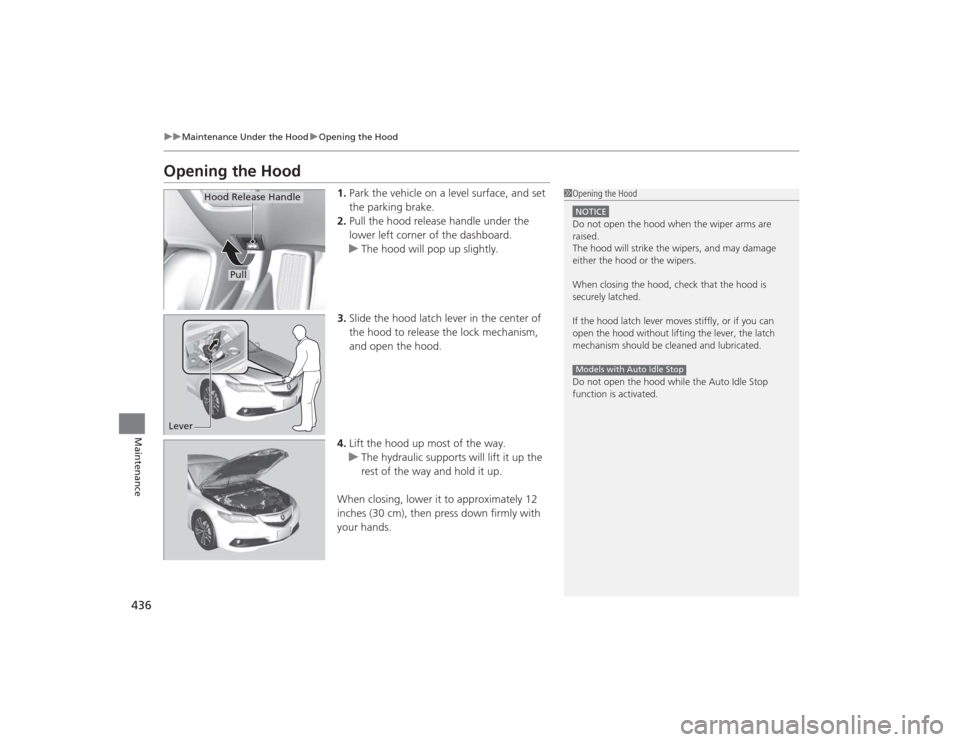
1. Park the vehicle on a level surface, and set
the parking brake.
2. Pull the hood release handle under the
lower left corner of the dashboard.
u The hood will pop up slightly.
3. Slide the hood latch lever in the center of
the hood to release the lock mechanism,
and open the hood.
4. Lift the hood up most of the way.
u The hydraulic supports will lift it up the
rest of the way and hold it up.
When closing, lower it to approximately 12
inches (30 cm), then press down firmly with
your hands.
1 Opening the HoodNOTICEDo not open the hood when the wiper arms are
raised.
The hood will strike the wipers, and may damage
either the hood or the wipers.
When closing the hood, check that the hood is
securely latched.
If the hood latch lever moves stiffly, or if you can
open the hood without lifting the lever, the latch
mechanism should be cleaned and lubricated.
Do not open the hood while the Auto Idle Stop
function is activated.Models with Auto Idle Stop
Pull
Hood Release Handle
Lever
Page 448 of 545
447Maintenance
Replacing Light BulbsHeadlight BulbsHeadlight bulbs are LED type. Have an authorized Acura dealer inspect and replace
the light assembly.Fog Light Bulbs
*
Fog light bulbs are LED type. Have an authorized Acura dealer inspect and replace
the light assembly.Front Side Marker/Parking Light BulbsFront side marker/parking light bulbs are LED type. Have an authorized Acura dealer
inspect and replace the light assembly.Side Turn Signal/Emergency Indicator Light BulbsDoor mirrors have the side turn lights. Have an authorized Acura dealer inspect and
replace the light assembly.
1 Headlight Bulbs
The headlight aim is set by the factory, and does not
need to be adjusted. However, if you regularly carry
heavy items in the trunk, have the aiming readjusted
at a dealer or by a qualified technician.
* Not available on all models
Page 476 of 545

475
Handling the Unexpected
This chapter explains how to handle unexpected troubles.
Tools
Types of Tools .................................. 476
If a Tire Goes Flat Temporarily Repairing a Flat Tire....... 477
Changing a Flat Tire ......................... 489
Engine Does Not Start Checking the Engine ........................ 495
If the Keyless Access Remote Battery is Weak ............................................. 496
Emergency Engine Stop ................... 497
Jump Starting .................................... 498
Shift Lever Does Not Move .............. 502Overheating
How to Handle Overheating............. 503
Indicator, Coming On/Blinking
If the Low Oil Pressure Indicator Comes On .. 505If the Charging System Indicator Comes On ................................................. 505
If the Malfunction Indicator Lamp Comes On or Blinks ................................... 506If the Brake System Indicator (Red) Comes On .. 506If the Electric Power Steering (EPS) System Indicator Comes On ........................... 507
If the Electric Parking Brake System Indicator Comes On ....................... 507 If the Low Tire Pressure/TPMS Indicator
Comes On or Blinks ....................... 508
If the Transmission Indicator Blinks along with the Warning Message.............. 509
Fuses Fuse Locations ................................. 510
Inspecting and Changing Fuses ........ 514
Emergency Towing ........................... 515
When You Cannot Unlock the Fuel Fill Door ................................................. 516
When You Cannot Open the Trunk ..... 517RefuelingRefueling From a Portable Fuel Container ... 518
Page 478 of 545
477
Continued
Handling the Unexpected
If a Tire Goes FlatTemporarily Repairing a Flat TireIf the tire has a large cut or is otherwise severely damaged, you will need to have the
vehicle towed. If the tire only has a small puncture, from a nail for instance, you can
use the temporary tire repair kit so that you can drive to the nearest service station
for a more permanent repair.
If a tire goes flat while driving, grasp the steering wheel firmly, and brake gradually
to reduce speed. Then stop in a safe place.
1.Park the vehicle on a firm, level, and non-slippery surface and apply the parking
brake.
2. Change the gear position to
(P
.
3. Turn on the hazard warning lights and set the power mode to VEHICLE OFF
(LOCK).
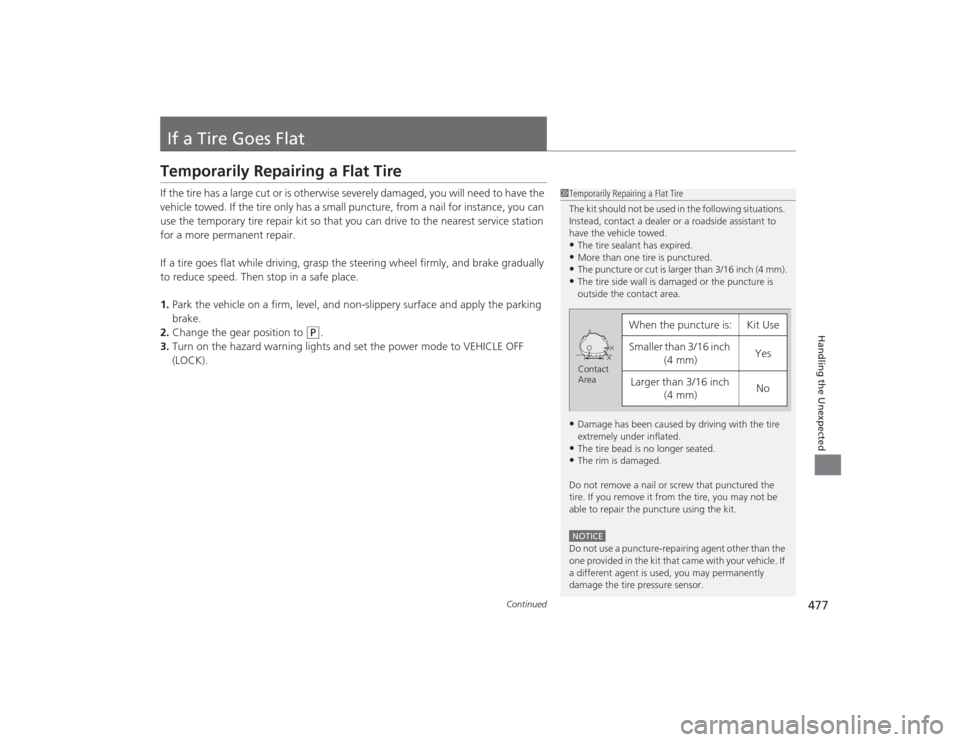
1Temporarily Repairing a Flat Tire
The kit should not be used in the following situations.
Instead, contact a dealer or a roadside assistant to
have the vehicle towed.•The tire sealant has expired.•More than one tire is punctured.•The puncture or cut is larger than 3/16 inch (4 mm).•The tire side wall is damaged or the puncture is
outside the contact area.•Damage has been caused by driving with the tire
extremely under inflated.•The tire bead is no longer seated.•The rim is damaged.
Do not remove a nail or screw that punctured the
tire. If you remove it from the tire, you may not be
able to repair the puncture using the kit.NOTICEDo not use a puncture-repairing agent other than the
one provided in the ki t that came with your vehicle. If
a different agent is us ed, you may permanently
damage the tire pressure sensor.
When the puncture is:
Kit Use
Smaller than 3/16 inch (4 mm)
Yes
Larger than 3/16 inch (4 mm)
No
Contact
Area