service Acura TLX 2017 User Guide
[x] Cancel search | Manufacturer: ACURA, Model Year: 2017, Model line: TLX, Model: Acura TLX 2017Pages: 75, PDF Size: 10.99 MB
Page 58 of 75

108 || 109
HANDLING THE UNEXPECTED
HANDLING THE UNEXPECTED
Replacing the Flat Tire
1.
R
emove the wheel nuts and flat tire.
2.
Mount the
compact spare tire. Replace the
wheel nuts, and lightly tighten them.
3.
Lower
the vehicle and remove the jack. Tighten
the wheel nuts in the order indicated in the
image. Go around, tightening the nuts, two to
three times in this order. Do not over tighten the
wheel nuts.
Storing the Flat Tire
1.
R
emove the center cap, and place the flat tire
face down in the spare tire well.
2.
R
emove the spacer cone from the wing bolt, flip
it over, and insert it back on to the bolt. Secure
the flat tire with the wing bolt.
3.
R
eturn the jack and wheel nut wrench to the
tool case. Store the case in the trunk, and close
the trunk.
Loose items can fly around the interior in a crash and can seriously injure the
occupants.
Store the wheel, jack, and tools securely before driving.
WARNING
Wing bolt
Spacer cone
Center cap
Setting Up the Jack
1.
Place
the jack under the jacking point closest to
the tire to be changed.
2.
Turn
the end bracket clockwise (as shown in
the image) until the top of the jack contacts
the jacking point. Make sure that the jacking
point tab is resting in the jack notch. Do not
overextend the jack.
3.
Raise
the vehicle, using the jack handle bar and
the jack handle, until the tire is off the ground.
The following instructions must be followed to use the jack safely:
•
Do not use
the jack with people or luggage in the vehicle.
•
Use
the jack provided in your vehicle. Other jacks may not support the weight
(“load”) or fit the jacking point.
•
Do not use
while the engine is running.
•
Use
only where the ground is firm and level.
•
Use
only at the jacking points.
•
Do not get in
the vehicle while using the jack.
•
Do
not put anything on top of or underneath the jack.
The vehicle can easily roll off the jack, seriously injuring anyone underneath.
Follow the directions for changing a tire exactly, and never get under the
vehicle when it is supported only by the jack.
WARNING
Do not use the jack if it doesn’t work properly. Call your dealer or a professional
towing service.
NOTICE
Jack
handle bar
Wheel nut wrench
as jack handle
Jacking points
Page 61 of 75
114 || 115
MAINTENANCE
MAINTENANCE
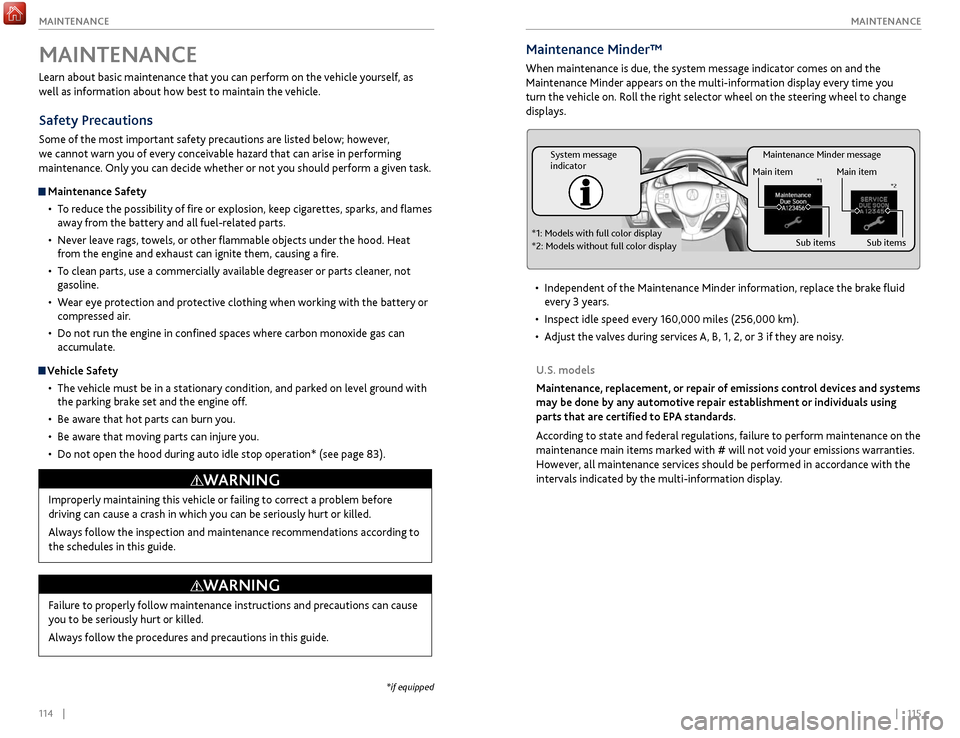
Maintenance Minder message
System message
indicator
Main item
Sub items
Main item
Sub item s*1
*2
*1: Models with full color display
*2: Models without full color display
Maintenance Minder™
When maintenance is due, the system message indicator comes on and the
Maintenance Minder appears on the multi-information display every time you
turn the vehicle on. Roll the right selector wheel on the steering wheel to change
displays.
•
Independent
of the Maintenance Minder information, replace the brake fluid
every 3 years.
•
Inspect idle speed ev
ery 160,000 miles (256,000 km).
•
A
djust the valves during services A, B, 1, 2, or 3 if they are noisy.
U.S. models
Maintenance, replacement, or repair of emissions control devices and systems
may be done by any automotive repair establishment or individuals using
parts that are certified to EPA standards.
According to state and federal regulations, failure to perform maintenance on the
maintenance main items marked with # will not void your emissions warranties.
However, all maintenance services should be performed in accordance with the
intervals indicated by the multi-information display.
Learn about basic maintenance that you can perform on the vehicle yourself, as
well as information about how best to maintain the vehicle.
Safety Precautions
Some of the most important safety precautions are listed below; however,
we cannot warn you of every conceivable hazard that can arise in performing
maintenance. Only you can decide whether or not you should perform a given task.
Maintenance Safety
•
T
o reduce the possibility of fire or explosion, keep cigarettes, sparks, and flames
away from the battery and all fuel-related parts.
•
Nev
er leave rags, towels, or other flammable objects under the hood. Heat
from the engine and exhaust can ignite them, causing a fire.
•
T
o clean parts, use a commercially available degreaser or parts cleaner, not
gasoline.
•
W
ear eye protection and protective clothing when working with the battery or
compressed air.
•
Do not run
the engine in confined spaces where carbon monoxide gas can
accumulate.
Vehicle Safety
•
The
vehicle must be in a stationary condition, and parked on level ground with
the parking brake set and the engine off.
•
Be awar
e that hot parts can burn you.
•
Be awar
e that moving parts can injure you.
•
Do not
open the hood during auto idle stop operation* (see page 83).
MAINTENANCE
Improperly maintaining this vehicle or failing to correct a problem before
driving can cause a crash in which you can be seriously hurt or killed.
Always follow the inspection and maintenance recommendations according to
the schedules in this guide.
WARNING
Failure to properly follow maintenance instructions and precautions can cause
you to be seriously hurt or killed.
Always follow the procedures and precautions in this guide.
WARNING
*if equipped
Page 62 of 75
116 || 117
MAINTENANCE
MAINTENANCE
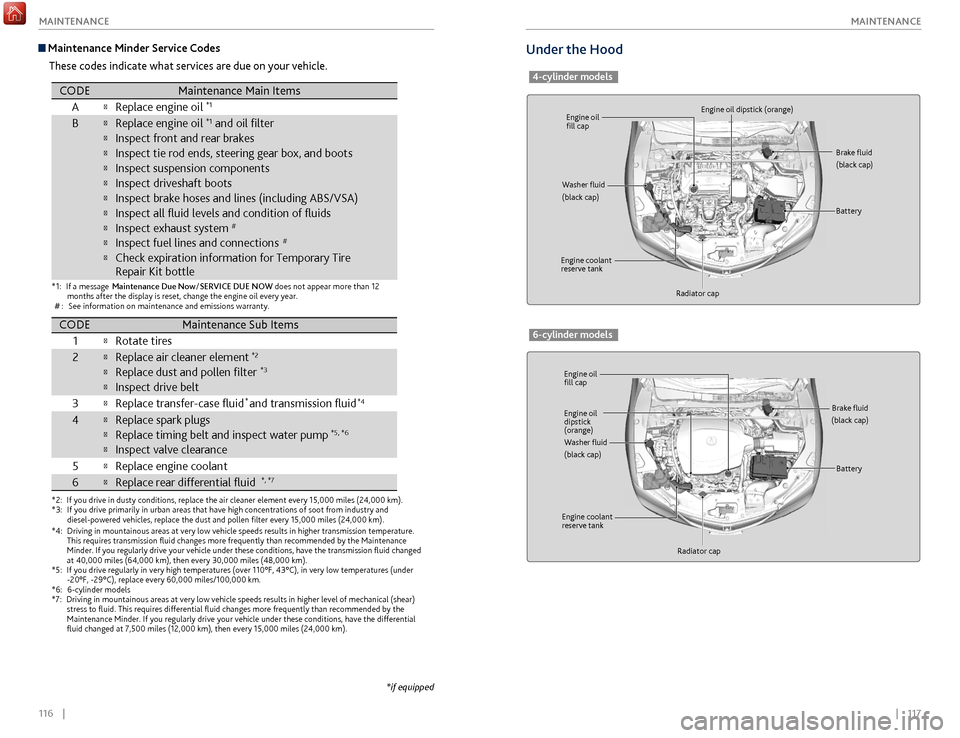
Under the Hood
4-cylinder models
Engine oil
fill cap
Engine oil
fill cap Engine oil dipstick (orange)
Engine oil
dipstick
(orange)
Washer fluid
(black cap)
Washer fluid
(black cap) Brake fluid
(black cap)
Brake fluid
(black cap)
Engine coolant
reserve tank
Engine coolant
reserve tank Radiator cap
Radiator cap Battery
Battery
6-cylinder models
Maintenance Minder Service Codes
These codes indicate what services are due on your vehicle.
*1:If a message Maintenance Due No w/SERVICE DUE NOW does not appear more than 12
months after the display is reset, change the engine oil every year.
#: See information on maintenance and emissions warranty.
*2:If you drive in dusty conditions, replace the air cleaner element every 1\
5,000 miles (24,000 km).*3:If you drive primarily in urban areas that have high concentrations of so\
ot from industry and
diesel-powered vehicles, replace the dust and pollen lter every 15,0\
00 miles (24,000 km).
CODEMaintenance Main Items
AReplace engine oi l*1
BReplace engine oil*1 and oil lter
Inspect front and rear brakes
Inspect tie rod ends, steering gear box, and boot s
Inspect suspension components
Inspect driveshaft boots
Inspect brake hoses and lines (including ABS/VSA)
Inspect all uid levels and condition of uids
Inspect exhaust system#
Inspect fuel lines and connections#
Check expiration information for Temporary Tire
Repair Kit bottle
*4:Driving in mountainous areas at very low vehicle speeds results in highe\
r transmission temperature.
This requires transmission uid changes more frequently than recommen\
ded by the Maintenance
Minder. If you regularly drive your vehicle under these conditions, have the transmission uid
changed at 40,000 miles (64,000 km), then every 30,000 miles (48,000 km).*5:If you drive regularly in very high temperatures (over 110°F, 43°\
C), in very low temperatures (under -20°F, -29°C), replace every 60,000 miles/100,000 km.
*6:6-cylinder models*7:Driving in mountainous areas at very low vehicle speeds results in highe\
r level of mechanical (shear) stress to uid. This requires differential uid changes more frequ\
ently than recommended by the
Maintenance Minder. If you regularly drive your vehicle under these cond\
itions, have the differential
uid changed at 7,500 miles (12,000 km), then every 15,000 miles (\
24,000 km).
CODEMaintenance Sub Item s
1
Rotate tires
2Replace air cleaner element*2
Replace dust and pollen lter*3
Inspect drive belt
3
Replace transfer-case uid and transmission uid*4
4Replace spark plugs
Replace timing belt and inspect water pump*5, *6
Inspect valve clearance
5
Replace engine coolan t
6Replace rear differential ui d*, *7
*
*if equipped
Page 64 of 75
120 || 121
MAINTENANCE
MAINTENANCE
Engine Coolant
Park the vehicle on level ground. Check the reserve tank and the coolant level in the
radiator. Use Acura Long Life Antifreeze/Coolant Type 2.
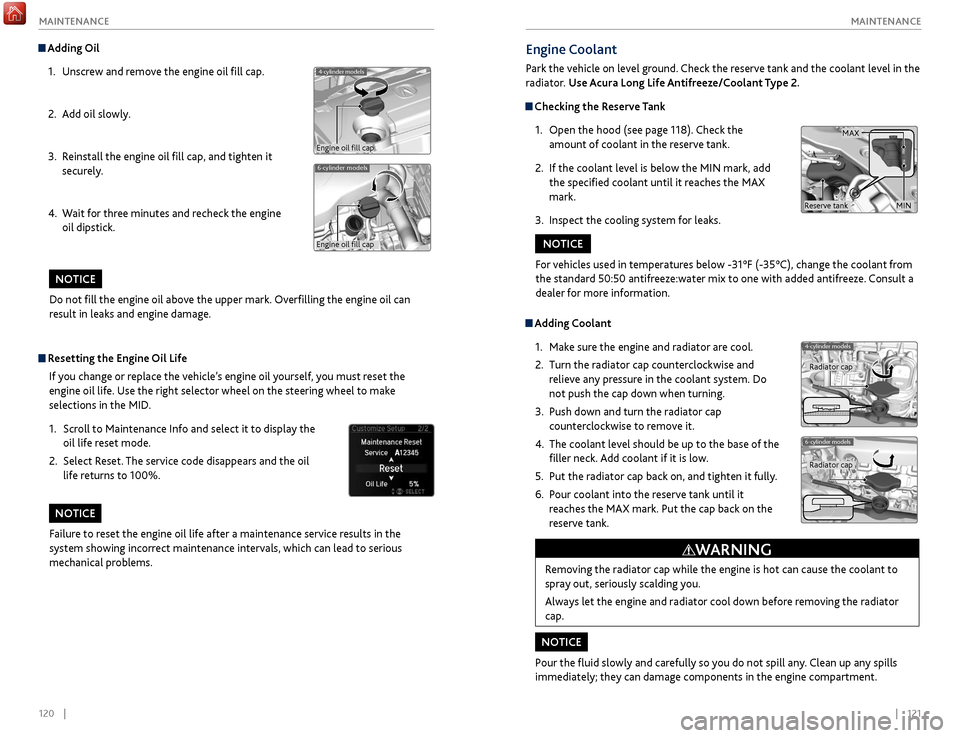
Checking the Reserve Tank
1.
Open
the hood (see page 118). Check the
amount of coolant in the reserve tank.
2.
If
the coolant level is below the MIN mark, add
the specified coolant until it reaches the MAX
mark.
3.
Inspect
the cooling system for leaks.
Adding Coolant1.
Mak
e sure the engine and radiator are cool.
2.
Turn
the radiator cap counterclockwise and
relieve any pressure in the coolant system. Do
not push the cap down when turning.
3.
Push down
and turn the radiator cap
counterclockwise to remove it.
4.
The coolant lev
el should be up to the base of the
filler neck. Add coolant if it is low.
5.
Put
the radiator cap back on, and tighten it fully.
6.
P
our coolant into the reserve tank until it
reaches the MAX mark. Put the cap back on the
reserve tank.
Removing the radiator cap while the engine is hot can cause the coolant to
spray out, seriously scalding you.
Always let the engine and radiator cool down before removing the radiator
cap.
WARNING
For vehicles used in temperatures below -31°F (-35°C), change the coolant from
the standard 50:50 antifreeze:water mix to one with added antifreeze. Consult a
dealer for more information.
NOTICE
Pour the fluid slowly and carefully so you do not spill any. Clean up any spills
immediately; they can damage components in the engine compartment.
NOTICE
4-cylinder models
6-cylinder models
Radiator cap
Radiator cap
MAX
MINReserve tank
Do not fill the engine oil above the upper mark. Overfilling the engine oil can
result in leaks and engine damage.
NOTICE
Adding Oil 1.
Unscr
ew and remove the engine oil fill cap.
2.
A
dd oil slowly.
3.
R
einstall the engine oil fill cap, and tighten it
securely.
4.
W
ait for three minutes and recheck the engine
oil dipstick.
6-cylinder models
4-cylinder models
Engine oil fill cap
Engine oil fill cap
Resetting the Engine Oil Life
If you change or replace the vehicle’s engine oil yourself, you must reset the
engine oil life. Use the right selector wheel on the steering wheel to make
selections in the MID.
1.
Scr
oll to Maintenance Info and select it to display the
oil life reset mode.
2.
Select R
eset. The service code disappears and the oil
life returns to 100%.
Failure to reset the engine oil life after a maintenance service results in the
system showing incorrect maintenance intervals, which can lead to serious
mechanical problems.
NOTICE
Page 67 of 75
126 || 127
MAINTENANCE
MAINTENANCE
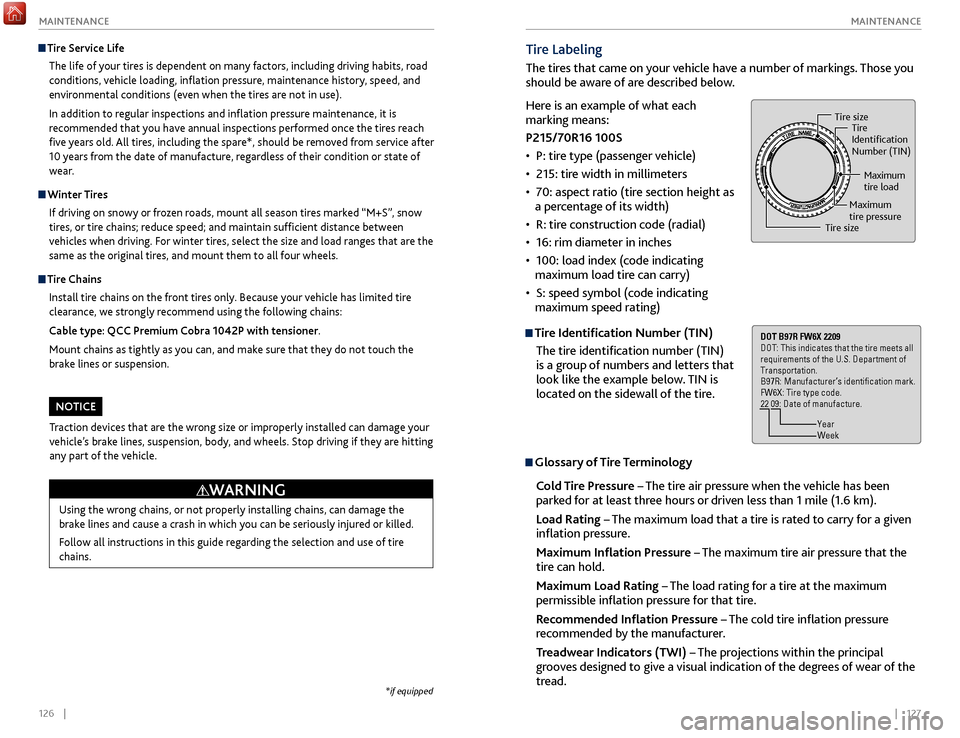
Tire Labeling
The tires that came on your vehicle have a number of markings. Those you
should be aware of are described below.
Tire Identification Number (TIN)
The tire identification number (TIN)
is a group of numbers and letters that
look like the example below. TIN is
located on the sidewall of the tire.
Glossary of Tire Terminology
Cold Tire Pressure – The tire air pressure when the vehicle has been
parked for at least three hours or driven less than 1 mile (1.6 km).
Load Rating – The maximum load that a tire is rated to carry for a given
inflation pressure.
Maximum Inflation Pressure – The maximum tire air pressure that the
tire can hold.
Maximum Load Rating – The load rating for a tire at the maximum
permissible inflation pressure for that tire.
Recommended Inflation Pressure – The cold tire inflation pressure
recommended by the manufacturer.
Treadwear Indicators (TWI) – The projections within the principal
grooves designed to give a visual indication of the degrees of wear of the
tread.
Tire size Tire
Identication
Number (TIN)
Maximum
tire load
Maximum
tire pressure
Tire size
DOT B97R FW6X 2209
DOT: This indicates that the tire meets all
requirements of the U.S. Department of
Transportation.
B97R: Manufacturer’s identication mark.
FW6X: Tire type code.
22 09: Date of manufacture.
Year
Week
Here is an example of what each
marking means:
P215/70R16 100S
•
P: tir
e type (passenger vehicle)
•
215:
tire width in millimeters
•
7
0: aspect ratio (tire section height as
a percentage of its width)
•
R:
tire construction code (radial)
•
16: rim
diameter in inches
•
100: load index (code indicating
maximum load
tire can carry)
•
S: speed symbol (code indicating
maximum speed rating)
Tire Service Life
The life of your tires is dependent on many factors, including driving habits, road
conditions, vehicle loading, inflation pressure, maintenance history, speed, and
environmental conditions (even when the tires are not in use).
In addition to regular inspections and inflation pressure maintenance, it is
recommended that you have annual inspections performed once the tires reach
five years old. All tires, including the spare*, should be removed from service after
10 years from the date of manufacture, regardless of their condition or state of
wear.
Winter Tires
If driving on snowy or frozen roads, mount all season tires marked “M+S”, snow
tires, or tire chains; reduce speed; and maintain sufficient distance between
vehicles when driving. For winter tires, select the size and load ranges that are the
same as the original tires, and mount them to all four wheels.
Tire Chains
Install tire chains on the front tires only. Because your vehicle has limited tire
clearance, we strongly recommend using the following chains:
Cable type: QCC Premium Cobra 1042P with tensioner.
Mount chains as tightly as you can, and make sure that they do not touch the
brake lines or suspension.
Using the wrong chains, or not properly installing chains, can damage the
brake lines and cause a crash in which you can be seriously injured or killed.
Follow all instructions in this guide regarding the selection and use of tire
chains.
WARNING
Traction devices that are the wrong size or improperly installed can damage your
vehicle’s brake lines, suspension, body, and wheels. Stop driving if they are hitting
any part of the vehicle.
NOTICE
*if equipped
Page 68 of 75

128 || 129
MAINTENANCE
MAINTENANCE
Temperature
The temperature grades are A (the highest), B, and C, representing the tire’s
resistance to the generation of heat and its ability to dissipate heat when
tested under controlled conditions on a specified indoor laboratory test wheel.
Sustained high temperature can cause the material of the tire to degenerate and
reduce tire life, and excessive temperature can lead to sudden tire failure. The
grade C corresponds to a level of performance which all passenger car tires must
meet under the Federal Motor Vehicle Safety Standard No. 109. Grades B and
A represent higher levels of performance on the laboratory test wheel than the
minimum required by law.
WARNING: The temperature grade for this tire is established for a tire that
is properly inflated and not overloaded. Excessive speed, underinflation, or
excessive loading, either separately or in combination, can cause heat buildup
and possible tire failure.DOT Tire Quality Grading
The tires on your vehicle meet all U.S. Federal Safety Requirements. All tires are
also graded for treadwear, traction, and temperature performance according to
Department of Transportation (DOT) standards. The following explains these
gradings.
Uniform Tire Quality Grading
Quality grades can be found where applicable on the tire sidewall between tread
shoulder and maximum section width.
For example:
Treadwear 200
Traction AA
Temperature A
All passenger car tires must conform to Federal Safety Requirements in addition
to these grades.
Treadwear The treadwear grade is a comparative rating based on the wear rate of the tire
when tested under controlled conditions on a specified government test course.
For example, a tire graded 150 would wear one and one-half (1 1/2) times as
well on the government course as a tire graded 100. The relative performance of
tires depends upon the actual conditions of their use, however, and may depart
significantly from the norm due to variations in driving habits, service practices,
and differences in road characteristics and climate.
TractionThe traction grades, from highest to lowest, are AA, A, B, and C. Those grades
represent the tire’s ability to stop on wet pavement as measured under controlled
conditions on specified government test surfaces of asphalt and concrete. A tire
marked C may have poor traction performance.
WARNING: The traction grade assigned to this tire is based on straight-ahead
braking traction tests, and does not include acceleration, cornering, hydroplaning,
or peak traction characteristics.
Page 71 of 75

134 || 135
C LIENT I NFORMATION
C
LIENT I NFORMATION
Acura Total Luxury Care
Roadside Assistance
Your Acura TLC Roadside Assistance representative is here to help you 24 hours a
day, 7 days a week by calling (800) 594-8500 (U.S.) or (800) 565-7587 (Canada).
Under your 4-year/50,000-mile (80,000-km) warranty, the following benefits are
available:
•
T
owing services — full cost of towing to the closest Acura dealer
•
R
oadside assistance — jump starting, fuel delivery, lockout, and flat tire
•
T
rip planning — detailed trip routing, emergency services, and more
Warranty Coverages
Below is a brief summary of the warranties covering your new vehicle.
New Vehicle Limited Warranty: Covers your new vehicle, except for the emissions
control system and accessories, against defects in materials and workmanship.
Emissions Control Systems Defects Warranty and Emissions Performance
Warranty: Covers your vehicle’s emissions control systems. Time, mileage, and
coverage are conditional.
Seat Belt Limited Warranty: Covers seat belts that fail to function properly.
Rust Perforation Limited Warranty: Covers all exterior body panels that rust
through from the inside.
Accessory Limited Warranty: Covers Acura accessories.
Replacement Parts Limited Warranty: Covers all Acura replacement parts against
defects in materials and workmanship.
Replacement Battery Limited Warranty: Provides prorated coverage for a
replacement battery purchased from an Acura dealer.
Replacement Muffler Lifetime Limited Warranty: Covers a replacement muffler
for the duration of the ownership.
Restrictions and exclusions apply to all these warranties. See the Owner
Information CD or visit owners.acura.com (U.S.) or www.myacura.ca (Canada)
for complete descriptions of each warranty, including time, mileage, and other
conditional limitations.
Your vehicle’s original tires are covered by their manufacturer. Tire warranty
information can be found on the Owner Information CD or owners.acura.com (U.S.)
or www.myacura.ca (Canada).
Q: Is my phone compatible with Bluetooth features?
A:
Visit www.acura.com/handsfreelink (U.S) or www.handsfreelink.ca (Canada) to
check phone compatibility for Bluetooth® Audio, Bluetooth® HandsFreeLink®, and
SMS text messaging.
Q: Every time I press the Talk button, the system gives me voice prompts. Can I turn
these off?*
A: Press the SETTINGS button. Use the interface dial to select System Settings then
Voice Prompt. Select Off.Contact Us
Acura dealer personnel are trained professionals. They should be able to answer
all your questions. If you encounter a problem that your dealership does not solve
to your satisfaction, please discuss it with the dealership’s service manager or
general manager. If you are dissatisfied with the decision made by the dealership’s
management, contact Acura Client Relations/Services.
U.S. owners
American Honda Motor Co., Inc.
Acura Client Relations
1919 Torrance Blvd.
Mail Stop 500-2N-7E
Torrance, CA 90501-2746
Tel: (800) 382-2238
In Puerto Rico and
the U.S. Virgin Islands
Bella International
P.O. Box 190816
San Juan, PR 00919-0816
Tel: (787) 620-7546
When you call or write, please give us the following information:
• Vehicle Identification Number
• Date of purchase
• Odometer reading of your vehicle
• Your name, address, and telephone number
• A detailed description of the problem
• Name of the dealer who sold the vehicle to you Canadian owners
Honda Canada, Inc.
Acura Client Services
180 Honda Blvd.
Markham, ON
L6C 0H9
Tel: (888) 922-8729
Fax: (877) 939-0909
E-mail: [email protected]
*if equipped
EPA Contact Information
An owner may obtain further
information concerning emission
warranties or report violations of the
terms of the emission warranties by
contacting:
U.S. Environmental Protection Agency
Office of Transportation and Air Quality
Compliance Division,
Light-Duty Vehicles Group
Attn: Warranty Complaints
2000 Traverwood Drive
Ann Arbor, MI 48105
Email: [email protected]
Page 74 of 75
140 || 141
INDEX
INDEX
Parking Sensor System ......................................... 94
P assenger Airbag Off Indicator .............................11
Phone
........................................................................\
58
Phonebook
.............................................................. 60
Phone Commands
................................................ 136
Place Name..............................................................69
Power Door Mirrors................................................39
Power Mode............................................................. 76
Power Moonroof
..................................................... 31
Power Window
....................................................... 30
Power Window Lock
............................................. 30
Precision All Wheel Steer System indicator
......23
Rain-Sensing Wipers
............................................. 34
Readiness Codes
...................................................130
Rear Camera
............................................................ 95
Refueling
.................................................................. 97
Remote Battery Strength
......................................99
Remote Engine Start
.............................................. 75
Remote Transmitter
............................................... 27
Reporting Safety Defects
......................................21
Reserve Tank
.......................................................... 121
Reverse Tilt Door Mirrors
......................................39
Road Departure Mitigation indicator
.................23
Road Departure Mitigation (RDM) System
.......92
Roadside Assistance
............................................. 135
Routing
..................................................................... 70
Safety Information
................................................... 3
Carbon Monoxide Gas
..........................................4
Child Safety ........................................................... 14
Reporting Safety Defects
...................................21
Safety Label Locations
........................................20
Safety Messages
.................................................... 3
Seat Belts
................................................................... 5
Adjusting the Shoulder Anchor
...........................7
Fastening a Seat Belt
............................................. 7
Lap/Shoulder Seat Belts
.......................................5
Proper Use of Seat Belts
.......................................5
Seat Belt Inspection
.............................................. 6
Seat belt reminder indicator
.............................24
Seat Heaters and
Ventilation
..............................43
Seats
........................................................................\
.. 35
Front Seats
............................................................ 35
Head Restraints
.................................................... 36
Sequential Mode
................................................... 80
Sequential Shift Mode
........................................... 78
Service Codes
........................................................ 116
Setting
..................................................................... 40
Setting the Clock
................................................... 40
Shifting
..................................................................... 77
Electronic Gear Selector
.....................................79
Sequential Mode
.......................................... 80, 94
Sequential Shift Mode
........................................78
Shift Lever
............................................................. 77
Shift Lever
................................................................ 77
Shift Lever Does Not Move
..................................99Shoulder Anchor
.......................................................7
Side Airbags ...............................................................9
Side Curtain Airbags
.................................................9
Siri Eyes Free
............................................................55
SiriusXM Radio
.......................................................48
SiriusXM Radio Commands
................................1
37
SMS Text Messaging
..............................................62
Song By Voice Commands
..................................1
37
Sound
........................................................................\
45
Specifications
........................................................131
Engine and Fuel
..................................................131
Fluids
....................................................................131
Light Bulbs........................................................... 131
Tires
......................................................................131
Vehicle
.................................................................131
Speed Dial
.........................................................60, 61
SPORT mode indicator
..........................................25
SRS indicator
....................................................10, 23
Steering Wheel ....................................................... 38
Steering Wheel and Nearby Controls
...................1
Steering Wheel Controls
................................45
, 65
Street Address
........................................................68
Super Handling-All Wheel Drive (SH-AWD)
...94
Supplemental Restraint System indicator.........23
System Guidance Volume ..................................... 67
System message indicator
....................................24
Tire Chains
.............................................................126
Tire Information
....................................................124
DOT Tire Quality Grading
................................128
Tir
e and Loading Information Label ...............125
Tire and Wheel Replacement
..........................125
Tire Labeling........................................................ 127
Tire Service Life
..................................................126
Tire Terminology
................................................127
Wear Indicators
..................................................124
Tire Pressure Monitoring System indicator
.......23
Tire Pressure Monitoring System (TPMS)
.......104
Tires
........................................................................\
.131
TPMS indicator
........................................................23
Traffic
........................................................................\
71
Troubleshooting
....................................................133
Trunk
........................................................................\
.28
Trunk Release Button
.............................................29
Turn Signal
...............................................................33
Turn signal indicator
..............................................25
Under the Hood
....................................................117
Unlocking the Doors
..............................................28
USB Commands
....................................................137
USB Flash Drive
.......................................................50
USB Port
..................................................................44
Vehicle Controls ...................................................... 27
Vehicle Stability Assist system indicator
...........23
Vehicle Stability Assist (VSA)
..............................84
Visual Index
................................................................1
Voice Command Index
........................................136
Frequently Asked Questions
.............................. 133
F
ront Airbags (SRS)
.................................................. 8
Front Door Inner Handle
....................................... 29
Front Seats
............................................................... 35
Fuel Information
.............................................. 83, 97
Fuse Locations
....................................................... 110
Changing Fuses
.................................................. 113
Driver’s Side Interior Fuse Boxes..................... 112
Engine Compartment Fuse Boxes
.................. 110
Garage Opener ........................................................ 41
Hard Disc Drive (HDD) Audio
.............................. 52
Har
d Disc Drive (HDD) Commands
.................. 137
Headlight Washers
................................................ 34
Headlight-Wiper Integration
............................... 33
Head R
estraints
...................................................... 36
Heated Steering Wheel
........................................ 38
Heated Windshield
Button
.................................. 34
High beams indicator
............................................ 25
Home Address
........................................................ 68
HomeLink
................................................................. 41
Immobilizer indicator
............................................ 24
Instrument P anel .................................................... 22
Condition Indicators
........................................... 24
Malfunction Indicators
.......................................22
On/Off Indicators
................................................ 25
Integrated Dynamics System (IDS)
...................84
Interior Lights
.......................................................... 32
Intermittent Wipers
............................................... 33
iPod........................................................................\
....50
iPod Commands
.................................................... 137
Jump Starting
....................................................... 100
Keyless Access System
.......................................... 28
K
eyless Access system indicator .........................23
Lane Departure Warning indicator......................23
Lane Departure Warning (LDW)
.........................89
Lane Keeping Assist System indicator
................23
Lane Keeping Assist System (LKAS)
...................90
Lap/Shoulder Seat Belts
..........................................5
LATCH-Compatible Child Seat
............................17
LDW indicator
......................................................... 23
Light Bulbs
............................................................. 131
Lights
........................................................................\
. 32
Brightness Control
............................................... 32
Exterior Lights
...................................................... 32
Interior Lights
....................................................... 32
Lights indicator
....................................................... 25
LINK button
............................................................ 64
LKAS indicator
.................................................. 23, 25
Locking the Doors
.................................................. 28
Lock Tab
.................................................................... 29
Low fuel indicator
................................................... 24
Low oil pressure indicator
.....................................22
Low tire pressure indicator
...................................24Maintenance
..........................................................
114
Battery .................................................................
122
Brake Fluid ...........................................................
122
Engine Coolant ...................................................
121
Engine Oil ............................................................
119
Maintenance Minder .........................................
115
Opening the Hood ............................................. 118
Safety Precautions............................................. 114 Service Codes .....................................................
116
Under the Hood .................................................
117
Window Washer Fluid
.......................................
122
Wiper Blades
.......................................................
123
Maintenance Minder ............................................
115
Making a Call ...........................................................
59
Malfunction indicator lamp
.................................
22
Malfunction Indicators
..........................................
22
Map Legend .............................................................
70
Master Door Lock Switch ......................................
29
Maximum Load Limit .............................................
73
Mirrors ......................................................................
39
Automatic Dimming Rearview Mirror .............39
Power Door Mirrors .............................................39
Reverse Tilt Door Mirrors
...................................39
Moonroof
.................................................................31
Multi-Information Display
....................................26
Multi-View Rear Camera
.......................................95
Navigation
...............................................................65
AcuraLink Real-Time Traffic
...............................71
Detour
....................................................................71
Display and Controls
...........................................66
Entering a Destination
.......................................68
Find Nearest Place
...............................................69
Home Address
.....................................................68
Map Legend
..........................................................70
ODMD Shortcuts
.................................................69
Place Name
...........................................................69
Routing
..................................................................70
Steering Wheel Controls
....................................65
Str
eet Address .....................................................68
System Guidance Volume
..................................67
T
alk Button Tips ...................................................65
Traffic
.....................................................................71
Voice Prompt
........................................................67
Navigation Commands
.......................................136
On-Demand Multi-Use Display (ODMD)
........46
One-Touch Turn Signal
..........................................33
On/Off Indicators
...................................................25
Opening the Hood
...............................................118
Opening the Trunk
..................................................28
Operator Assistance
.............................................64
Overheating
...........................................................102
Pairing a Phone
.......................................................58
Pandora
....................................................................53
Pandora® Commands
..........................................137
Parking Brake
...........................................................81