steering Acura TLX 2017 Owner's Manual
[x] Cancel search | Manufacturer: ACURA, Model Year: 2017, Model line: TLX, Model: Acura TLX 2017Pages: 75, PDF Size: 10.99 MB
Page 51 of 75

94 || 95
DRIVING
DRIVING
Multi-View Rear Camera
When you shift into Reverse (R), a real-time image of the area behind your vehicle
is shown in the display, along with helpful parking guidelines.
The rear camera view is restricted. You cannot see the corner ends of the bumper or what is underneath
the bumper. Its unique lens also makes objects appear closer or farther than they actually are.
Visually confirm that it is safe to drive before backing up. Certain conditions (such as weather, lighting,
and high temperatures) may also restrict the rear view. Do not rely on the rearview display, which does
not give you all information about conditions at the rear of your vehicle.
Wide view Normal view Top down view
Changing Guidelines
1.
Pr
ess the SETTINGS button.
2.
Select Camera
Settings.
3.
Select
Rear Camera.
4.
Select one of the options.
Fixed Guideline: Guidelines appear when you
shift into Reverse. Select On or Off.
Dynamic Guideline: Guidelines move as you turn
the steering wheel. Select On or Off.
5.
Pr
ess the BACK button to exit the menu.
Press the
interface dial
to toggle
between
views.
Parking Sensor System*
When the system senses an object when you are parking or backing up, an indicator
appears on the upper display and a series of beeps will sound. As you get closer to
the object, the beep rate increases.
Turning the System On or OffPress the parking sensor button. A green indicator
light appears on the button when the system is on.
*if equipped
Display indicators
Parking sensor button
Do not continuously spin the front tires of your vehicle. Continuously spinning
the front tires can cause damage to the transmission and SH-AWD unit.
If the SH-AWD light blinks while driving, it indicates the differential temperature
is too high. If this happens, pull to the side of the road when it is safe, shift to
park, and idle the engine until the indicator goes out.
NOTICE
Super Handling-All Wheel Drive (SH-AWD)*
Controls and transfers varying amounts of engine torque to each wheel depending
on driving conditions.
SH-AWD helps enhance stability in driving situations involving slippery surfaces,
such as on wet, icy, or snowy roads. The system does not help enhance braking. It is
still your responsibility to drive safely when you steer, accelerate, and apply brakes.
Leave sufficient distance in front of you when braking on slippery surfaces.
Page 55 of 75

102 || 103
HANDLING THE UNEXPECTED
HANDLING THE UNEXPECTED
Emergency Engine Stop
The ENGINE START/STOP button may be used to stop the engine due to an
emergency situation even while driving. If you must stop the engine, choose one of
the following operations:
•
Pr
ess and hold the ENGINE START/STOP button for
two seconds, or
•
Firml
y press the ENGINE START/STOP button two
times.
The steering wheel will not lock. The power mode changes to ACCESSORY, unless
the shift lever is in Park, in which case the power mode changes to VEHICLE OFF.
Because turning off the engine also disables the power assist the engine provides to
the steering and braking systems, it will require significantly more physical effort
and time to steer and slow the vehicle. Downshift gears and use both feet on the
brake pedal, if necessary, to slow the vehicle and stop immediately in a safe place.
Do not press the button while driving unless it is absolutely necessary for the
engine to be switched off.
Emergency Towing
Call a professional towing service if you need to tow your vehicle.
All models
Flat bed equipment: The operator loads your vehicle on the back of a truck. This is
the best way to transport your vehicle.
2WD models
Wheel lift equipment: The tow truck uses two pivoting arms that go under the front
tires and lift them off the ground. The rear tires remain on the ground. This is an
acceptable way to tow your vehicle.
NOTICE
Trying to lift or tow your vehicle by the bumpers will cause serious damage. The
bumpers are not designed to support the vehicle’s weight.
Improper towing such as towing behind a motorhome or other motor vehicle can
damage the transmission.
NOTICE
Overheating
Signs your engine is overheating: •
The
temperature gauge needle is at the H mark
•
The engine suddenl
y loses power
•
Steam
or spray comes out from under the hood
•
The message
Engine Temperature Too Hot appears on the display.
1.
Immediatel
y park the vehicle in a safe place. Turn
off all accessories and turn on the hazard warning
lights.
2.
If no steam
or spray is present: Keep the
engine running and open the hood (see page
118).
If steam or spray is present: Turn off the engine
and wait until it subsides. Then, open the hood
(see page 118).
3.
Check that the
cooling fan is operating and stop the engine once the
temperature gauge needle goes down. If the cooling fan is not operating,
immediately stop the engine.
4.
Once
the engine has cooled down, inspect the coolant level and check the
cooling system components for leaks. If the coolant level in the reserve tank
is low, add coolant until it reaches the MAX mark. If there is no coolant in the
reserve tank, make sure the radiator is cool, then cover the radiator cap with a
heavy cloth and open the cap. If necessary, add coolant up to the base of the
filler neck, and put the cap back on.
Once the engine has cooled sufficiently, restart it and check the temperature
gauge. If the temperature needle has gone down, resume driving. If it has not gone
down, contact a dealer for repairs.
Reserve tank MAX
MIN
Steam and spray from an overheated engine can seriously scald you.
Do not open the hood if steam is coming out.
WARNING
Removing the radiator cap while the engine is hot can cause the coolant to
spray out, seriously scalding you.
Always let the engine and radiator cool down before removing the radiator
cap.
WARNING
Continuing to drive with the temperature gauge needle at the H mark may
damage the engine.
NOTICE
Page 57 of 75
106 || 107
HANDLING THE UNEXPECTED
HANDLING THE UNEXPECTED
Handling a Flat Tire
If a tire goes flat while driving, grasp the steering wheel firmly and brake gradually
to reduce speed. Stop in a safe place. After repairing or changing the flat as
appropriate, go to a dealer as soon as possible to have the damaged tire repaired or
replaced.
Tire Repair Kit*
If a tire has a small puncture, you can use the tire repair kit to temporarily repair it.
The puncture must be smaller than 3/16-inch (4 mm) and not in the tire sidewall.
Go to a dealer to have the full-size tire permanently repaired or replaced.
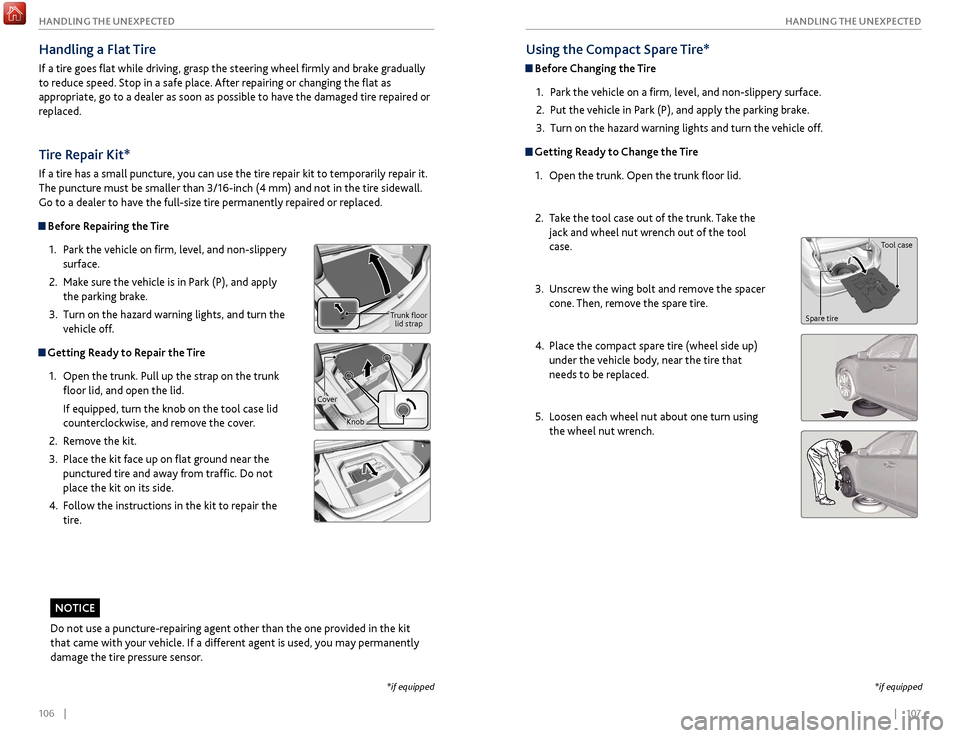
Before Repairing the Tire
1.
P
ark the vehicle on firm, level, and non-slippery
surface.
2.
Mak
e sure the vehicle is in Park (P), and apply
the parking brake.
3.
Turn on the
hazard warning lights, and turn the
vehicle off.
Getting Ready to Repair the Tire
1.
Open the trunk.
Pull up the strap on the trunk
floor lid, and open the lid.
If equipped, turn the knob on the tool case lid
counterclockwise, and remove the cover.
2.
R
emove the kit.
3.
Place
the kit face up on flat ground near the
punctured tire and away from traffic. Do not
place the kit on its side.
4.
F
ollow the instructions in the kit to repair the
tire.
Using the Compact Spare Tire*
Before Changing the Tire
1.
P
ark the vehicle on a firm, level, and non-slippery surface.
2.
Put
the vehicle in Park (P), and apply the parking brake.
3.
Turn on the
hazard warning lights and turn the vehicle off.
Getting Ready to Change the Tire1.
Open the trunk.
Open the trunk floor lid.
2.
T
ake the tool case out of the trunk. Take the
jack and wheel nut wrench out of the tool
case.
3.
Unscr
ew the wing bolt and remove the spacer
cone. Then, remove the spare tire.
4.
Place
the compact spare tire (wheel side up)
under the vehicle body, near the tire that
needs to be replaced.
5.
Loosen each
wheel nut about one turn using
the wheel nut wrench.
*if equipped
Tool case
Spare tire
*if equipped
Do not use a puncture-repairing agent other than the one provided in the kit
that came with your vehicle. If a different agent is used, you may permanently
damage the tire pressure sensor.
NOTICE
Trunk floor lid strap
Cover Knob
Page 60 of 75
112 || 113
HANDLING THE UNEXPECTED
HANDLING THE UNEXPECTED
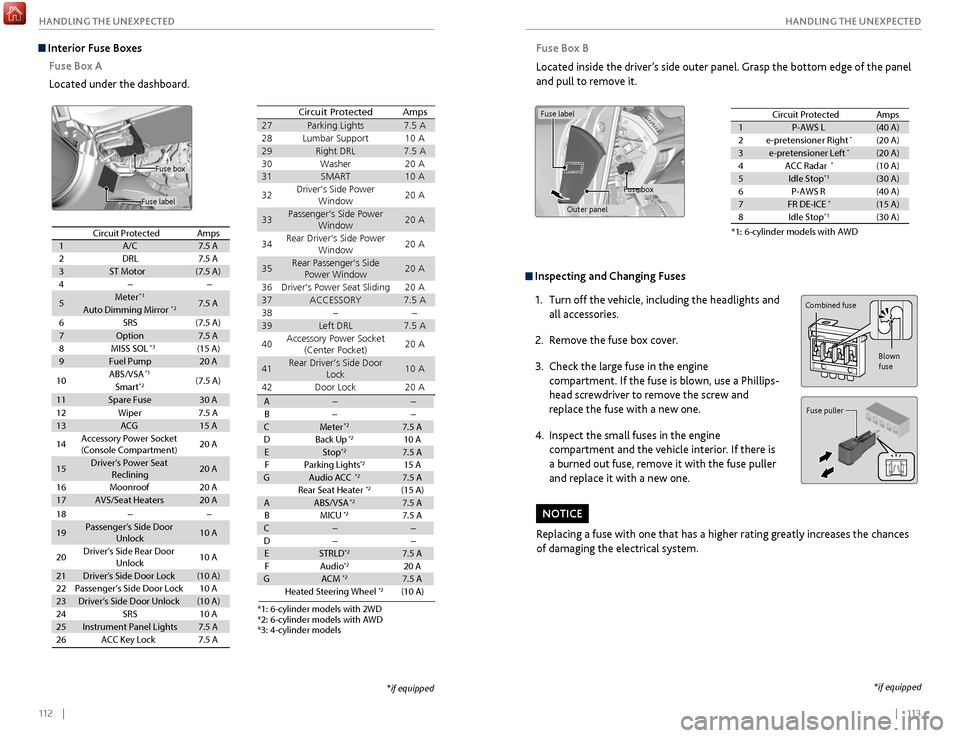
Inspecting and Changing Fuses
1.
Turn off the
vehicle, including the headlights and
all accessories.
2.
R
emove the fuse box cover.
3.
Check
the large fuse in the engine
compartment. If the fuse is blown, use a Phillips-
head screwdriver to remove the screw and
replace the fuse with a new one.
4.
Inspect
the small fuses in the engine
compartment and the vehicle interior. If there is
a burned out fuse, remove it with the fuse puller
and replace it with a new one.
Replacing a fuse with one that has a higher rating greatly increases the chances
of damaging the electrical system.
NOTICE
Combined fuse
Blown
fuse
Fuse puller
Fuse Box B
Located inside the driver’s side outer panel. Grasp the bottom edge of the panel
and pull to remove it.
Circuit protected and fuse rating
Circuit ProtectedAmps1P-AWS L(40 A)2e-pretensioner Right*(20 A)3e-pretensioner Left*(20 A)4ACC Radar*(10 A)5Idle Stop*1(30 A)6P-AWS R(40 A)7FR DE-ICE*(15 A)8Idle Stop*1(30 A)
*1: 6-cylinder models with AW D
Fuse label
Fuse box
Outer panel
*if equipped
Interior Fuse Boxes Fuse Box A
Located under the dashboard.
Fuse label
Fuse box
Circuit ProtectedAmps1A/C7.5 A2DRL7.5 A3ST Motor(7.5 A)4
5Meter*17.5 AAuto Dimming Mirror*2
6SRS(7.5 A)
7Option7.5 A8MISS SOL(15 A)9Fuel Pump20 A
10ABS/VSA*1(7.5 A)Smart*2
11Spare Fuse30 A
18
19Passenger’s Side Door
Unlock10 A
20Driver’s Side Rear Door
Unlock10 A
21Driver’s Side Door Lock(10 A)22Passenger’s Side Door Lock10 A23Driver’s Side Door Unlock(10 A)24SRS10 A25Instrument Panel Lights7.5 A26ACC Key Lock7.5 A
12Wiper7.5 A13ACG15 A
14Accessory Power Socket
(Console Compartment)20 A
15Driver’s Power Seat
Reclinin g20 A
16Moonroo f20 A17AVS/Seat Heaters20 A
*3
Circuit ProtectedAmps
27Parking Light s7.5 A28Lumbar Support10 A29Right DR L7.5 A30Washer20 A31SMART10 A
32Driver’s Side Power
Window20 A
33Passenger’s Side Power
Window20 A
34Rear Driver’s Side Power
Window20 A
35Rear Passenger’s Side
Power Window20 A
36Driver’s Power Seat Sliding20 A37ACCESSORY7.5 A3839Left DRL7.5 A
40Accessory Power Socket
(Center Pocket)20 A
41Rear Driver’s Side Door
Lock10 A
42Door Loc k20 A
AB CMeter*27.5 A
DB ack Up*210 AEStop*27.5 A
FP arking Lights*215 AGAudio ACC*27.5 A
Rear Seat Heater*2(15 A)AABS/VSA*27.5 A
BM ICU*27.5 AC
D
ESTRLD*27.5 A
FA udio*220 AGACM*27.5 A
Heated Steering Wheel*2(10 A)
*3: 4 -cylinder model s
*1: 6-cylinder models with 2W D*2: 6-cylinder models with AW D
*if equipped
Page 61 of 75
114 || 115
MAINTENANCE
MAINTENANCE
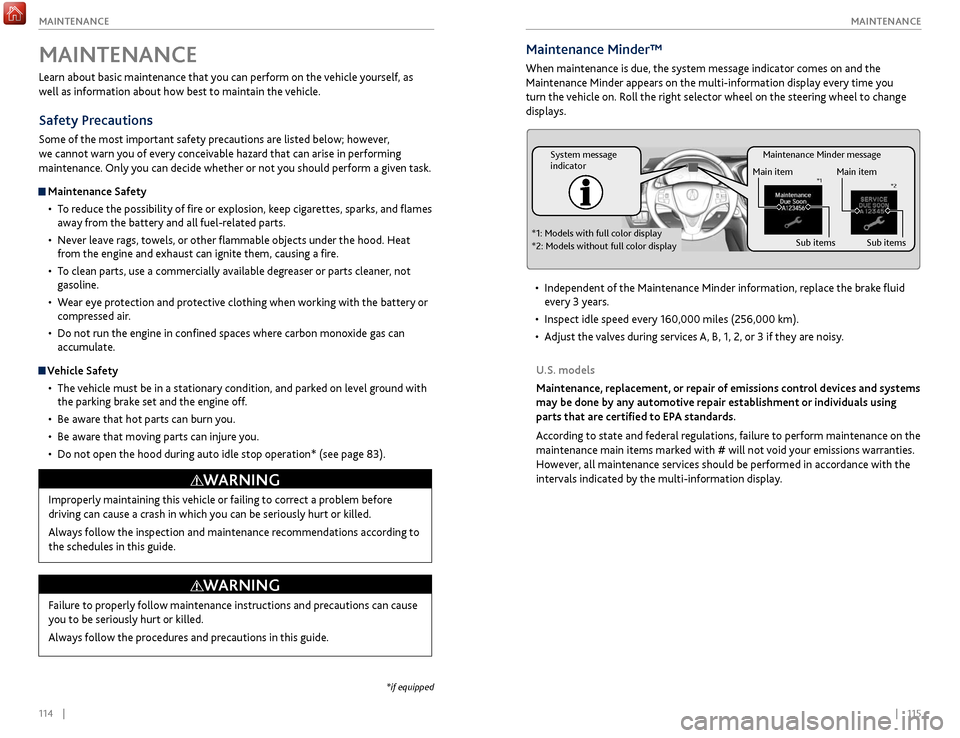
Maintenance Minder message
System message
indicator
Main item
Sub items
Main item
Sub item s*1
*2
*1: Models with full color display
*2: Models without full color display
Maintenance Minder™
When maintenance is due, the system message indicator comes on and the
Maintenance Minder appears on the multi-information display every time you
turn the vehicle on. Roll the right selector wheel on the steering wheel to change
displays.
•
Independent
of the Maintenance Minder information, replace the brake fluid
every 3 years.
•
Inspect idle speed ev
ery 160,000 miles (256,000 km).
•
A
djust the valves during services A, B, 1, 2, or 3 if they are noisy.
U.S. models
Maintenance, replacement, or repair of emissions control devices and systems
may be done by any automotive repair establishment or individuals using
parts that are certified to EPA standards.
According to state and federal regulations, failure to perform maintenance on the
maintenance main items marked with # will not void your emissions warranties.
However, all maintenance services should be performed in accordance with the
intervals indicated by the multi-information display.
Learn about basic maintenance that you can perform on the vehicle yourself, as
well as information about how best to maintain the vehicle.
Safety Precautions
Some of the most important safety precautions are listed below; however,
we cannot warn you of every conceivable hazard that can arise in performing
maintenance. Only you can decide whether or not you should perform a given task.
Maintenance Safety
•
T
o reduce the possibility of fire or explosion, keep cigarettes, sparks, and flames
away from the battery and all fuel-related parts.
•
Nev
er leave rags, towels, or other flammable objects under the hood. Heat
from the engine and exhaust can ignite them, causing a fire.
•
T
o clean parts, use a commercially available degreaser or parts cleaner, not
gasoline.
•
W
ear eye protection and protective clothing when working with the battery or
compressed air.
•
Do not run
the engine in confined spaces where carbon monoxide gas can
accumulate.
Vehicle Safety
•
The
vehicle must be in a stationary condition, and parked on level ground with
the parking brake set and the engine off.
•
Be awar
e that hot parts can burn you.
•
Be awar
e that moving parts can injure you.
•
Do not
open the hood during auto idle stop operation* (see page 83).
MAINTENANCE
Improperly maintaining this vehicle or failing to correct a problem before
driving can cause a crash in which you can be seriously hurt or killed.
Always follow the inspection and maintenance recommendations according to
the schedules in this guide.
WARNING
Failure to properly follow maintenance instructions and precautions can cause
you to be seriously hurt or killed.
Always follow the procedures and precautions in this guide.
WARNING
*if equipped
Page 62 of 75
116 || 117
MAINTENANCE
MAINTENANCE
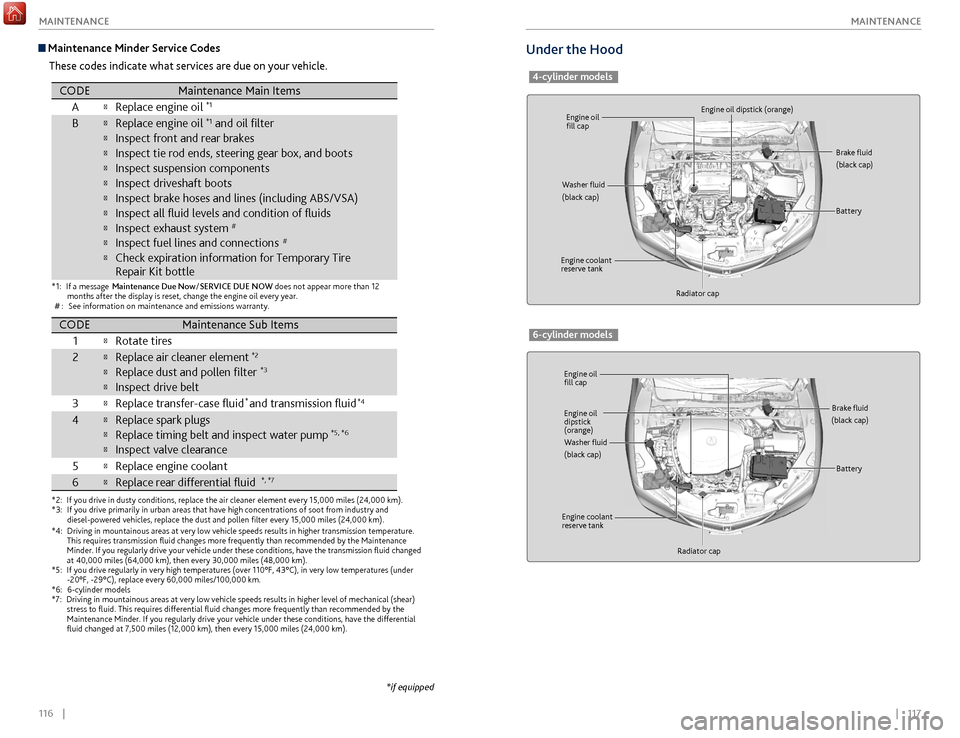
Under the Hood
4-cylinder models
Engine oil
fill cap
Engine oil
fill cap Engine oil dipstick (orange)
Engine oil
dipstick
(orange)
Washer fluid
(black cap)
Washer fluid
(black cap) Brake fluid
(black cap)
Brake fluid
(black cap)
Engine coolant
reserve tank
Engine coolant
reserve tank Radiator cap
Radiator cap Battery
Battery
6-cylinder models
Maintenance Minder Service Codes
These codes indicate what services are due on your vehicle.
*1:If a message Maintenance Due No w/SERVICE DUE NOW does not appear more than 12
months after the display is reset, change the engine oil every year.
#: See information on maintenance and emissions warranty.
*2:If you drive in dusty conditions, replace the air cleaner element every 1\
5,000 miles (24,000 km).*3:If you drive primarily in urban areas that have high concentrations of so\
ot from industry and
diesel-powered vehicles, replace the dust and pollen lter every 15,0\
00 miles (24,000 km).
CODEMaintenance Main Items
AReplace engine oi l*1
BReplace engine oil*1 and oil lter
Inspect front and rear brakes
Inspect tie rod ends, steering gear box, and boot s
Inspect suspension components
Inspect driveshaft boots
Inspect brake hoses and lines (including ABS/VSA)
Inspect all uid levels and condition of uids
Inspect exhaust system#
Inspect fuel lines and connections#
Check expiration information for Temporary Tire
Repair Kit bottle
*4:Driving in mountainous areas at very low vehicle speeds results in highe\
r transmission temperature.
This requires transmission uid changes more frequently than recommen\
ded by the Maintenance
Minder. If you regularly drive your vehicle under these conditions, have the transmission uid
changed at 40,000 miles (64,000 km), then every 30,000 miles (48,000 km).*5:If you drive regularly in very high temperatures (over 110°F, 43°\
C), in very low temperatures (under -20°F, -29°C), replace every 60,000 miles/100,000 km.
*6:6-cylinder models*7:Driving in mountainous areas at very low vehicle speeds results in highe\
r level of mechanical (shear) stress to uid. This requires differential uid changes more frequ\
ently than recommended by the
Maintenance Minder. If you regularly drive your vehicle under these cond\
itions, have the differential
uid changed at 7,500 miles (12,000 km), then every 15,000 miles (\
24,000 km).
CODEMaintenance Sub Item s
1
Rotate tires
2Replace air cleaner element*2
Replace dust and pollen lter*3
Inspect drive belt
3
Replace transfer-case uid and transmission uid*4
4Replace spark plugs
Replace timing belt and inspect water pump*5, *6
Inspect valve clearance
5
Replace engine coolan t
6Replace rear differential ui d*, *7
*
*if equipped
Page 64 of 75
120 || 121
MAINTENANCE
MAINTENANCE
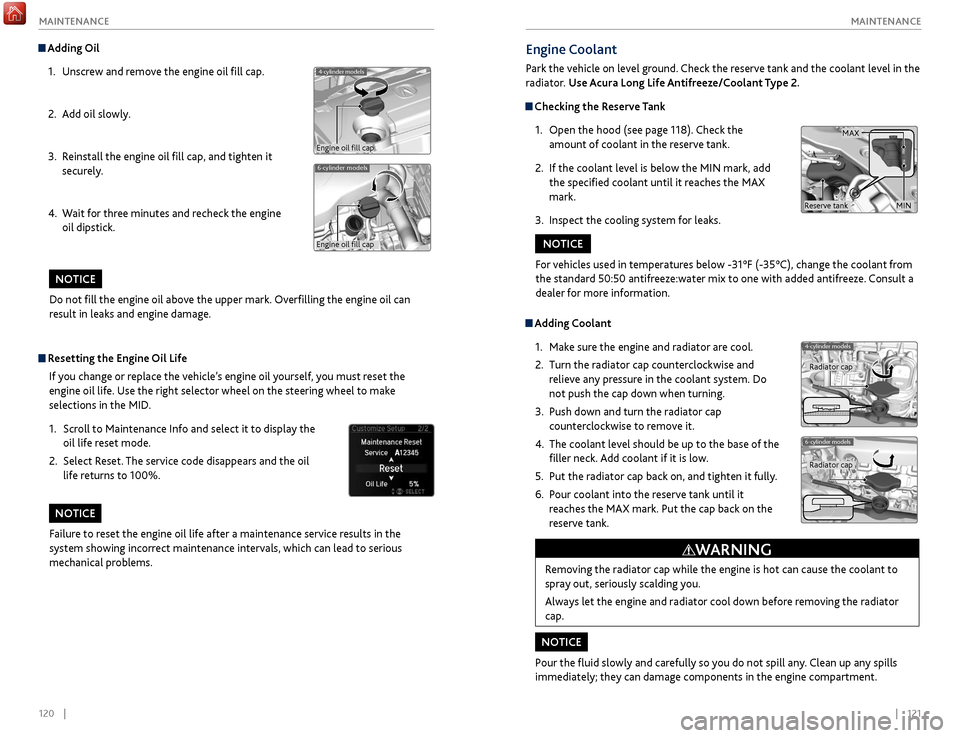
Engine Coolant
Park the vehicle on level ground. Check the reserve tank and the coolant level in the
radiator. Use Acura Long Life Antifreeze/Coolant Type 2.
Checking the Reserve Tank
1.
Open
the hood (see page 118). Check the
amount of coolant in the reserve tank.
2.
If
the coolant level is below the MIN mark, add
the specified coolant until it reaches the MAX
mark.
3.
Inspect
the cooling system for leaks.
Adding Coolant1.
Mak
e sure the engine and radiator are cool.
2.
Turn
the radiator cap counterclockwise and
relieve any pressure in the coolant system. Do
not push the cap down when turning.
3.
Push down
and turn the radiator cap
counterclockwise to remove it.
4.
The coolant lev
el should be up to the base of the
filler neck. Add coolant if it is low.
5.
Put
the radiator cap back on, and tighten it fully.
6.
P
our coolant into the reserve tank until it
reaches the MAX mark. Put the cap back on the
reserve tank.
Removing the radiator cap while the engine is hot can cause the coolant to
spray out, seriously scalding you.
Always let the engine and radiator cool down before removing the radiator
cap.
WARNING
For vehicles used in temperatures below -31°F (-35°C), change the coolant from
the standard 50:50 antifreeze:water mix to one with added antifreeze. Consult a
dealer for more information.
NOTICE
Pour the fluid slowly and carefully so you do not spill any. Clean up any spills
immediately; they can damage components in the engine compartment.
NOTICE
4-cylinder models
6-cylinder models
Radiator cap
Radiator cap
MAX
MINReserve tank
Do not fill the engine oil above the upper mark. Overfilling the engine oil can
result in leaks and engine damage.
NOTICE
Adding Oil 1.
Unscr
ew and remove the engine oil fill cap.
2.
A
dd oil slowly.
3.
R
einstall the engine oil fill cap, and tighten it
securely.
4.
W
ait for three minutes and recheck the engine
oil dipstick.
6-cylinder models
4-cylinder models
Engine oil fill cap
Engine oil fill cap
Resetting the Engine Oil Life
If you change or replace the vehicle’s engine oil yourself, you must reset the
engine oil life. Use the right selector wheel on the steering wheel to make
selections in the MID.
1.
Scr
oll to Maintenance Info and select it to display the
oil life reset mode.
2.
Select R
eset. The service code disappears and the oil
life returns to 100%.
Failure to reset the engine oil life after a maintenance service results in the
system showing incorrect maintenance intervals, which can lead to serious
mechanical problems.
NOTICE
Page 73 of 75
138 || 139
INDEX
INDEX
Changing Fuses ..................................................... 113
Char ging system indicator....................................22
Childproof Door Locks
........................................... 29
Child Safety
............................................................. 14
Child Seat
................................................................. 16
Adding Security with a Tether
...........................19
Installing a Child Seat
.........................................18
LATCH-Compatible Child Seat .......................... 17
Selecting a Child Seat
.........................................16
Client Information................................................133
Climate Control Commands
..............................136
Climate C
ontrol System
........................................42
Seat Heaters and
Ventilation
...........................43
Clock
........................................................................\
40
CMBS indicator
....................................................... 23
CMBS off indicator
................................................. 25
Collision Mitigation Braking System indicator
.23
Collision Mitigation Braking System™
..............91
Compact Disc (CD)
............................................... 49
Compact Disc Commands
..................................1
37
Condition Indicators
.............................................. 24
Contact Us
............................................................. 134
Cruise Control
......................................................... 85
Cruise control indicators
.......................................25
Customized Features
............................................ 40
Dashboard and Ceiling Controls
............................2
Detour
....................................................................... 71
Dialing a Number
................................................... 59
Door Operation
...................................................... 29
Doors........................................................................\
.28 Childproof Door Locks
........................................29
Front Door Inner Handle
....................................29
Lock Tab
................................................................. 29
Master Door Lock Switch
...................................29
DOT Tire Quality Grading
...................................128
T
emperature ....................................................... 129
Traction
................................................................ 128
Treadwear
............................................................ 128
Uniform Tire Quality Grading
.........................128
Driv
er’s Knee Airbag ................................................. 8Driving
......................................................................72
Adaptive Cruise Control (ACC)
with Low
Speed Follow (LSF)
..........................86
Auto
Idle Stop .....................................................83
Blind Spot Information (BSI)
.............................93
Braking
...................................................................81
Collision Mitigation Braking System................ 91
Cruise Control
......................................................85
Forward Collision Warning (FCW)
with Pedestrian Detection
................................88
Integrated Dynamics
System (IDS) .................84
Lane Departure Warning (LDW)
......................89
Lane Keeping Assist System (LKAS)
................90
Maximum Load Limit
..........................................73
Multi-View Rear Camera
....................................95
P
arking Sensor System
......................................94
P
ower Mode ..........................................................76
Remote Engine Start
...........................................75
R
oad Departure Mitigation (RDM) ...................92
Shifting................................................................... 77
Super Handling-All Wheel Drive (SH-AWD)
.94
Vehicle Stability Assist (VSA®)
........................84
Driving Position Memory System
.......................37
ECON mode indicator
...........................................25
Electric Parking Brake
............................................81
Electric parking brake indicator
...........................24
Electric parking brak
e system indicator .............23
Electric Power Steering indicator
........................23
Electr
onic Gear Selector........................................ 79
E-Mail
........................................................................\
62
Emergency Assistance
..........................................64
Emergency Engine Stop
......................................103
Emergency Towing
...............................................103
Engine and Fuel
.....................................................131
Engine Compartment Fuse Boxes
.....................110
Engine Coolant
......................................................121
Engine Oil
...............................................................119
Engine Oil Life
.......................................................120
Engine Start/Stop Button
.....................................76
EPS indicator
...........................................................23
Exterior Lights
.........................................................32
Fastening a Seat Belt
...............................................7
FCW indicator
.........................................................23
FCW off indicator
...................................................25
Find Nearest Place
.................................................69
Flat Tire
...................................................................106
Floor Mats
................................................................37
Fluids
.......................................................................131
FM/AM Radio
..........................................................47
FM/AM Radio Commands
..................................1
37
Fog lights indicator
................................................25
Foot Brake
................................................................81
Forward Collision Warning (FCW)
with Pedestrian Detection
...................................88
Forward Collision Warning indicator
..................23INDEX
ABS (Anti-lock Brake System) indicator ............23
A CC indicator ................................................... 23, 25
AcuraLink
.................................................................. 63
ASSIST button
..................................................... 64
Emergency Assistance
.......................................64
LINK button
......................................................... 64
Messages
............................................................... 63
Operator Assistance
........................................... 64
Security Features
................................................ 64
Subscription Features
........................................64
AcuraLink featuring Aha
........................................54
A
curaLink Real-Time Traffic ..................................71
Acura Total Luxury Care Roadside Assistance
135
A
daptive Cruise Control (ACC) ...........................86
Adaptive Cruise Control (ACC)
with Low
Speed Follow (LSF)
.............................86
A
dvanced Airbags ..................................................... 8
Aha
........................................................................\
.... 54
Aha Radio Commands
......................................... 137
Airbag Care
.............................................................. 13
Airbags
........................................................................\
8
Advanced Airbags
.................................................. 8
Airbag Care ............................................................ 13
Airbag System Components
..............................12
Airbag System Indicators
...................................10
Driver’s Knee Airbag
.............................................. 8
Front Airbags (SRS) ................................................ 8
Important Facts About Your Airbags
................10
Side Airbags
............................................................ 9
Side Curtain Airbags
.............................................. 9
Airbag System Components
.................................12
Airbag S
ystem Indicators ......................................10
Passenger Airbag Off Indicator
..........................11
SRS Indicator
........................................................ 10
Anti-Lock Brake System (ABS)
.............................81
Anti-lock Brak
e System indicator
........................23
ASSIST button
........................................................ 64
Audio Commands
................................................. 137Audio Operation
....................................................44
Aha
........................................................................\
.. 54
Auxiliary Input Jack ............................................. 44
Bluetooth Audio
................................................... 51
Compact Disc (CD)
............................................ 49
FM/AM Radio
........................................................ 47
Hard Disc Drive (HDD) Audio
........................... 52
iP
od
........................................................................\
. 50
On-Demand Multi-Use Display (ODMD)
...... 46
Pandora
.................................................................. 53
SiriusXM Radio
.................................................... 48
Sound
..................................................................... 45
Steering Wheel Controls
.................................... 45
USB Flash Driv
e
.................................................... 50
USB Port
............................................................... 44
Auto Idle Stop
........................................................ 83
Automatic Brake Hold
........................................... 82
Automatic brake hold indicator
.......................... 25
Automatic Dimming R
earview Mirror
................ 39
Automatic Rain-Sensing Wipers ......................... 34
Auto Park Mode
...................................................... 79
Auxiliary Input Jack
............................................... 44
Battery
.................................................................... 122
Blind Spot Information (BSI) System
................. 93
Blind Spot Information system indicator
.......... 23
Bluetooth Audio
..................................................... 51
Bluetooth Audio Commands
............................. 1
37
Bluetooth Handsfreelink
....................................... 56
Call History
........................................................... 61
Dialing a Number
................................................ 59
Displays and Controls
......................................... 56
E-Mail
..................................................................... 62
Making a Call
........................................................ 59
On-Demand Multi-Use Display (ODMD)
....... 57
Pairing a Phone.....................................................58
Phonebook
........................................................... 60
Siri Eyes Free
......................................................... 55
SMS Text Messaging
............................................ 62
Speed Dial
...................................................... 60, 61
Talk Button Tips
................................................... 57
Brake Fluid
............................................................. 122
Brake Hold
............................................................... 82
Brake system indicator
................................... 22, 23
Braking
...................................................................... 81
Brightness Control .................................................. 32
BSI indicator
............................................................ 23
BSI off indicator
...................................................... 25
Call History
.............................................................. 61
Carbon Monoxide Gas
............................................. 4
Car Wash Mode
..................................................... 80
Change a Setting
................................................... 40
Changing a Flat Tire
............................................. 107
Page 74 of 75
140 || 141
INDEX
INDEX
Parking Sensor System ......................................... 94
P assenger Airbag Off Indicator .............................11
Phone
........................................................................\
58
Phonebook
.............................................................. 60
Phone Commands
................................................ 136
Place Name..............................................................69
Power Door Mirrors................................................39
Power Mode............................................................. 76
Power Moonroof
..................................................... 31
Power Window
....................................................... 30
Power Window Lock
............................................. 30
Precision All Wheel Steer System indicator
......23
Rain-Sensing Wipers
............................................. 34
Readiness Codes
...................................................130
Rear Camera
............................................................ 95
Refueling
.................................................................. 97
Remote Battery Strength
......................................99
Remote Engine Start
.............................................. 75
Remote Transmitter
............................................... 27
Reporting Safety Defects
......................................21
Reserve Tank
.......................................................... 121
Reverse Tilt Door Mirrors
......................................39
Road Departure Mitigation indicator
.................23
Road Departure Mitigation (RDM) System
.......92
Roadside Assistance
............................................. 135
Routing
..................................................................... 70
Safety Information
................................................... 3
Carbon Monoxide Gas
..........................................4
Child Safety ........................................................... 14
Reporting Safety Defects
...................................21
Safety Label Locations
........................................20
Safety Messages
.................................................... 3
Seat Belts
................................................................... 5
Adjusting the Shoulder Anchor
...........................7
Fastening a Seat Belt
............................................. 7
Lap/Shoulder Seat Belts
.......................................5
Proper Use of Seat Belts
.......................................5
Seat Belt Inspection
.............................................. 6
Seat belt reminder indicator
.............................24
Seat Heaters and
Ventilation
..............................43
Seats
........................................................................\
.. 35
Front Seats
............................................................ 35
Head Restraints
.................................................... 36
Sequential Mode
................................................... 80
Sequential Shift Mode
........................................... 78
Service Codes
........................................................ 116
Setting
..................................................................... 40
Setting the Clock
................................................... 40
Shifting
..................................................................... 77
Electronic Gear Selector
.....................................79
Sequential Mode
.......................................... 80, 94
Sequential Shift Mode
........................................78
Shift Lever
............................................................. 77
Shift Lever
................................................................ 77
Shift Lever Does Not Move
..................................99Shoulder Anchor
.......................................................7
Side Airbags ...............................................................9
Side Curtain Airbags
.................................................9
Siri Eyes Free
............................................................55
SiriusXM Radio
.......................................................48
SiriusXM Radio Commands
................................1
37
SMS Text Messaging
..............................................62
Song By Voice Commands
..................................1
37
Sound
........................................................................\
45
Specifications
........................................................131
Engine and Fuel
..................................................131
Fluids
....................................................................131
Light Bulbs........................................................... 131
Tires
......................................................................131
Vehicle
.................................................................131
Speed Dial
.........................................................60, 61
SPORT mode indicator
..........................................25
SRS indicator
....................................................10, 23
Steering Wheel ....................................................... 38
Steering Wheel and Nearby Controls
...................1
Steering Wheel Controls
................................45
, 65
Street Address
........................................................68
Super Handling-All Wheel Drive (SH-AWD)
...94
Supplemental Restraint System indicator.........23
System Guidance Volume ..................................... 67
System message indicator
....................................24
Tire Chains
.............................................................126
Tire Information
....................................................124
DOT Tire Quality Grading
................................128
Tir
e and Loading Information Label ...............125
Tire and Wheel Replacement
..........................125
Tire Labeling........................................................ 127
Tire Service Life
..................................................126
Tire Terminology
................................................127
Wear Indicators
..................................................124
Tire Pressure Monitoring System indicator
.......23
Tire Pressure Monitoring System (TPMS)
.......104
Tires
........................................................................\
.131
TPMS indicator
........................................................23
Traffic
........................................................................\
71
Troubleshooting
....................................................133
Trunk
........................................................................\
.28
Trunk Release Button
.............................................29
Turn Signal
...............................................................33
Turn signal indicator
..............................................25
Under the Hood
....................................................117
Unlocking the Doors
..............................................28
USB Commands
....................................................137
USB Flash Drive
.......................................................50
USB Port
..................................................................44
Vehicle Controls ...................................................... 27
Vehicle Stability Assist system indicator
...........23
Vehicle Stability Assist (VSA)
..............................84
Visual Index
................................................................1
Voice Command Index
........................................136
Frequently Asked Questions
.............................. 133
F
ront Airbags (SRS)
.................................................. 8
Front Door Inner Handle
....................................... 29
Front Seats
............................................................... 35
Fuel Information
.............................................. 83, 97
Fuse Locations
....................................................... 110
Changing Fuses
.................................................. 113
Driver’s Side Interior Fuse Boxes..................... 112
Engine Compartment Fuse Boxes
.................. 110
Garage Opener ........................................................ 41
Hard Disc Drive (HDD) Audio
.............................. 52
Har
d Disc Drive (HDD) Commands
.................. 137
Headlight Washers
................................................ 34
Headlight-Wiper Integration
............................... 33
Head R
estraints
...................................................... 36
Heated Steering Wheel
........................................ 38
Heated Windshield
Button
.................................. 34
High beams indicator
............................................ 25
Home Address
........................................................ 68
HomeLink
................................................................. 41
Immobilizer indicator
............................................ 24
Instrument P anel .................................................... 22
Condition Indicators
........................................... 24
Malfunction Indicators
.......................................22
On/Off Indicators
................................................ 25
Integrated Dynamics System (IDS)
...................84
Interior Lights
.......................................................... 32
Intermittent Wipers
............................................... 33
iPod........................................................................\
....50
iPod Commands
.................................................... 137
Jump Starting
....................................................... 100
Keyless Access System
.......................................... 28
K
eyless Access system indicator .........................23
Lane Departure Warning indicator......................23
Lane Departure Warning (LDW)
.........................89
Lane Keeping Assist System indicator
................23
Lane Keeping Assist System (LKAS)
...................90
Lap/Shoulder Seat Belts
..........................................5
LATCH-Compatible Child Seat
............................17
LDW indicator
......................................................... 23
Light Bulbs
............................................................. 131
Lights
........................................................................\
. 32
Brightness Control
............................................... 32
Exterior Lights
...................................................... 32
Interior Lights
....................................................... 32
Lights indicator
....................................................... 25
LINK button
............................................................ 64
LKAS indicator
.................................................. 23, 25
Locking the Doors
.................................................. 28
Lock Tab
.................................................................... 29
Low fuel indicator
................................................... 24
Low oil pressure indicator
.....................................22
Low tire pressure indicator
...................................24Maintenance
..........................................................
114
Battery .................................................................
122
Brake Fluid ...........................................................
122
Engine Coolant ...................................................
121
Engine Oil ............................................................
119
Maintenance Minder .........................................
115
Opening the Hood ............................................. 118
Safety Precautions............................................. 114 Service Codes .....................................................
116
Under the Hood .................................................
117
Window Washer Fluid
.......................................
122
Wiper Blades
.......................................................
123
Maintenance Minder ............................................
115
Making a Call ...........................................................
59
Malfunction indicator lamp
.................................
22
Malfunction Indicators
..........................................
22
Map Legend .............................................................
70
Master Door Lock Switch ......................................
29
Maximum Load Limit .............................................
73
Mirrors ......................................................................
39
Automatic Dimming Rearview Mirror .............39
Power Door Mirrors .............................................39
Reverse Tilt Door Mirrors
...................................39
Moonroof
.................................................................31
Multi-Information Display
....................................26
Multi-View Rear Camera
.......................................95
Navigation
...............................................................65
AcuraLink Real-Time Traffic
...............................71
Detour
....................................................................71
Display and Controls
...........................................66
Entering a Destination
.......................................68
Find Nearest Place
...............................................69
Home Address
.....................................................68
Map Legend
..........................................................70
ODMD Shortcuts
.................................................69
Place Name
...........................................................69
Routing
..................................................................70
Steering Wheel Controls
....................................65
Str
eet Address .....................................................68
System Guidance Volume
..................................67
T
alk Button Tips ...................................................65
Traffic
.....................................................................71
Voice Prompt
........................................................67
Navigation Commands
.......................................136
On-Demand Multi-Use Display (ODMD)
........46
One-Touch Turn Signal
..........................................33
On/Off Indicators
...................................................25
Opening the Hood
...............................................118
Opening the Trunk
..................................................28
Operator Assistance
.............................................64
Overheating
...........................................................102
Pairing a Phone
.......................................................58
Pandora
....................................................................53
Pandora® Commands
..........................................137
Parking Brake
...........................................................81