change time Acura TLX 2017 Owner's Guide
[x] Cancel search | Manufacturer: ACURA, Model Year: 2017, Model line: TLX, Model: Acura TLX 2017Pages: 553, PDF Size: 33.77 MB
Page 395 of 553
uuWhen Driving uBlind spot information (BSI) System*
394
Driving
■When the system detects a vehicle1Blind spot inform ation (BSI) System*
You can change the setting for BSI.
2 Customized Features P. 126, 257
BSI may be adversel y affected when:
•Objects (guard rails, poles, trees, etc,.) are
detected.
•An object that does not re flect radio waves well,
such as a motorcycle, is in the alert zone.
•Driving on a curved road.
•A vehicle is moving from a far lane to the adjacent
lane.
•The system picks up external electrical interference.
•The rear bumper or the sens ors have been improperly
repaired or the rear bu mper has been deformed.
•The orientation of the sensors has been changed.
•In bad weather (Heavy rain, snow, and fog).
For a proper BSI use:
•Always keep the rear bumper corner area clean.
•Do not cover the rear bumper corner area with
labels or sticke rs of any kind.
•Take your vehicle to a dealer if you need the rear
bumper corner area or th e radar sensors to be
repaired, or the rear bumper corner area is strongly
impacted.
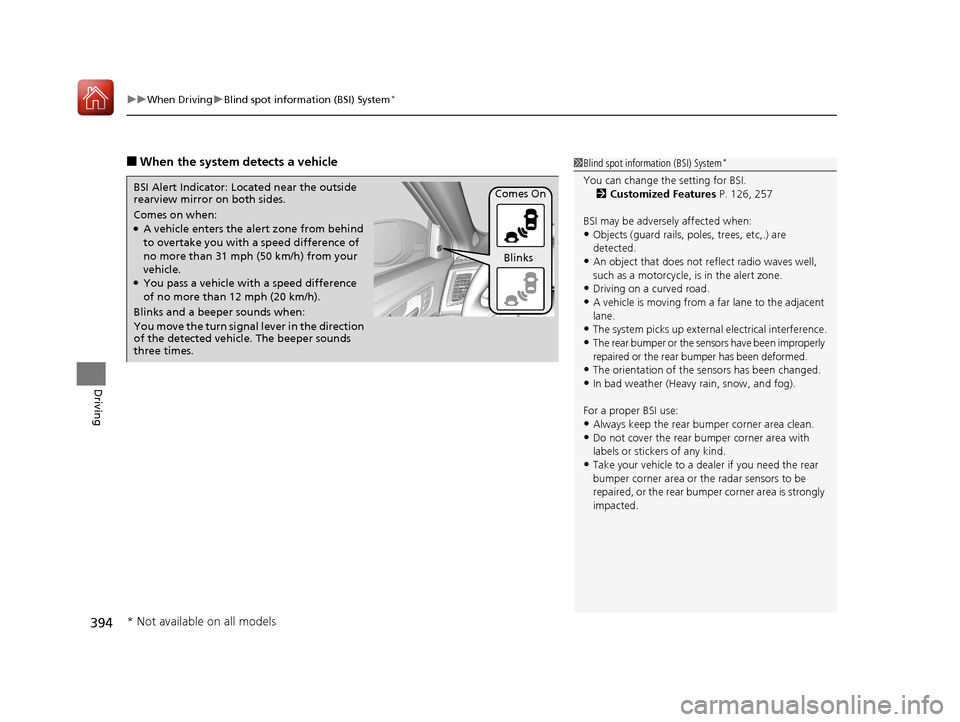
Comes on when:●A vehicle enters the ale rt zone from behind
to overtake you with a speed difference of
no more than 31 mph (50 km/h) from your
vehicle.
●You pass a vehicle with a speed difference
of no more than 12 mph (20 km/h).
BSI Alert Indicator: Located near the outside
rearview mirror on both sides.
Blinks and a beeper sounds when:
You move the turn signal
lever in the direction
of the detected vehicle. The beeper sounds
three times. Comes On
Blinks
* Not available on all models
17 ACURA TLX-31TZ36200.book 394 ページ 2016年6月10日 金曜日 午後6時39分
Page 427 of 553
426
Driving
Multi-View Rear Camera
About Your Multi-View Rear Camera
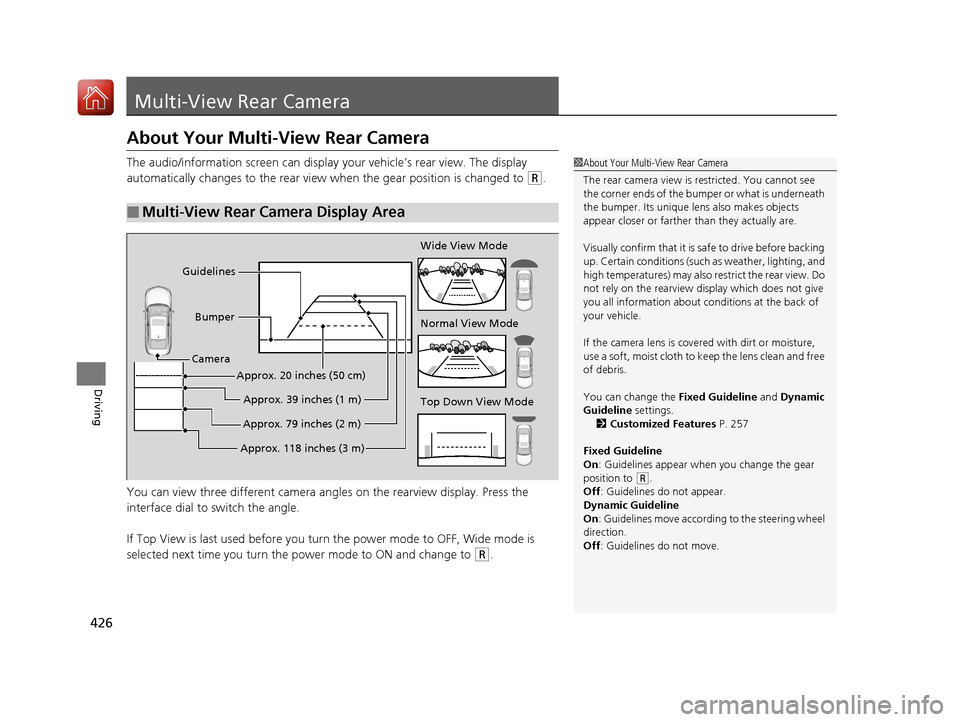
The audio/information screen can display your vehicle’s rear view. The display
automatically changes to th e rear view when the gear position is changed to
(R.
You can view three different camera angl es on the rearview display. Press the
interface dial to switch the angle.
If Top View is last used before you turn the power mode to OFF, Wide mode is
selected next time you turn the power mode to ON and change to
(R.
■Multi-View Rear Camera Display Area
1 About Your Multi-View Rear Camera
The rear camera view is restricted. You cannot see
the corner ends of the bum per or what is underneath
the bumper. Its unique le ns also makes objects
appear closer or farther than they actually are.
Visually confirm that it is safe to drive before backing
up. Certain conditions (such as weather, lighting, and
high temperatures) may also re strict the rear view. Do
not rely on the rearview display which does not give
you all information about conditions at the back of
your vehicle.
If the camera lens is cove red with dirt or moisture,
use a soft, moist cloth to keep the lens clean and free
of debris.
You can change the Fixed Guideline and Dynamic
Guideline settings. 2 Customized Features P. 257
Fixed Guideline
On : Guidelines appear when you change the gear
position to
( R.
Off : Guidelines do not appear.
Dynamic Guideline
On : Guidelines move according to the steering wheel
direction.
Off : Guidelines do not move.
Top Down View Mode Normal View Mode Wide View Mode
Guidelines
Bumper
Camera
Approx. 118 inches (3 m)Approx. 79 inches (2 m)Approx. 39 inches (1 m)
Approx. 20 inches (50 cm)
17 ACURA TLX-31TZ36200.book 426 ページ 2016年6月10日 金曜日 午後6時39分
Page 436 of 553
435
Maintenance
Maintenance MinderTM
If the engine oil life is less than 15%, you will see the Maintenance Minder messages
appear the multi-information display every time you set the power mode to ON. The
messages notify you when to change the engi ne oil, or when to bring your vehicle
to a dealer for indicated maintenance services.
17 ACURA TLX-31TZ36200.book 435 ページ 2016年6月10日 金曜日 午後6時39分
Page 507 of 553
506
uuEngine Does Not Start uEmergency Engine Stop
Handling the Unexpected
Emergency Engine Stop
The ENGINE START/STOP button may be used to st op the engine due to an
emergency situation even while driving. If you must stop the engine, do either of the
following operations:
• Press and hold the ENGINE START/STOP button for about two seconds.
• Firmly press the ENGINE START/STOP button twice.
The steering wheel will not lock. However, because turning off the engine disables
the power assist the engine provides to the steering and braking systems, it will
require significantly more physical effort an d time to steer and slow the vehicle. Use
both feet on the brake pedal to slow down the vehicle and stop immediately in a
safe place.
The power mode is in ACCESSORY when the engine is stopped.
To change the mode to VEHICLE OF F, change the gear position to
(P after the
vehicle comes to a complete stop.
1 Emergency Engine Stop
Do not press the button while driving unless it is
absolutely necessary for th e engine to be switched
off.
17 ACURA TLX-31TZ36200.book 506 ページ 2016年6月10日 金曜日 午後6時39分
Page 518 of 553
517
uuIndicator, Comin g On/BlinkinguIf the Electric Parking Brake System Indicator Comes On
Handling the Unexpected
If the Electric Parking Brake System Indicator Comes
On
■Reasons for the indicator to come on
Comes on if there is a problem wi th the electric parking brake system.
■What to do when the indicator comes on
Avoid using the parking brake and immediately get your vehicle
inspected at a dealer.
■What to do when th e electric parking brake indicator comes on
or blinks at the same time
Release the parking brake.
2 Parking Brake P. 400
•If the electric parking brake indicato r remains on or blinks even after
releasing the parking brake, immedi ately stop the vehicle in a safe
place and call a dealer.
u Prevent your vehicle does move, change the gear position to
(P.
• If only the electric parking brake indicator goes off, immediately get
your vehicle inspected at a dealer.
1 If the Electric Parking Brake System Indicator Comes On
If you apply parking brak e, it may not release.
If the electric parking bra ke indicator also turns on,
the parking brake is still applied.
When the electric parking br ake indicator blinks at
the same time as the electric parking brake system
indicator, the system must be checked. The parking
brake may not operate under these conditions.
17 ACURA TLX-31TZ36200.book 517 ページ 2016年6月10日 金曜日 午後6時39分