key Acura TLX 2017 Owner's Guide
[x] Cancel search | Manufacturer: ACURA, Model Year: 2017, Model line: TLX, Model: Acura TLX 2017Pages: 553, PDF Size: 33.77 MB
Page 189 of 553
188
uuInterior Lights/Interior Convenience Items uInterior Convenience Items
Controls
Interior Convenience Items
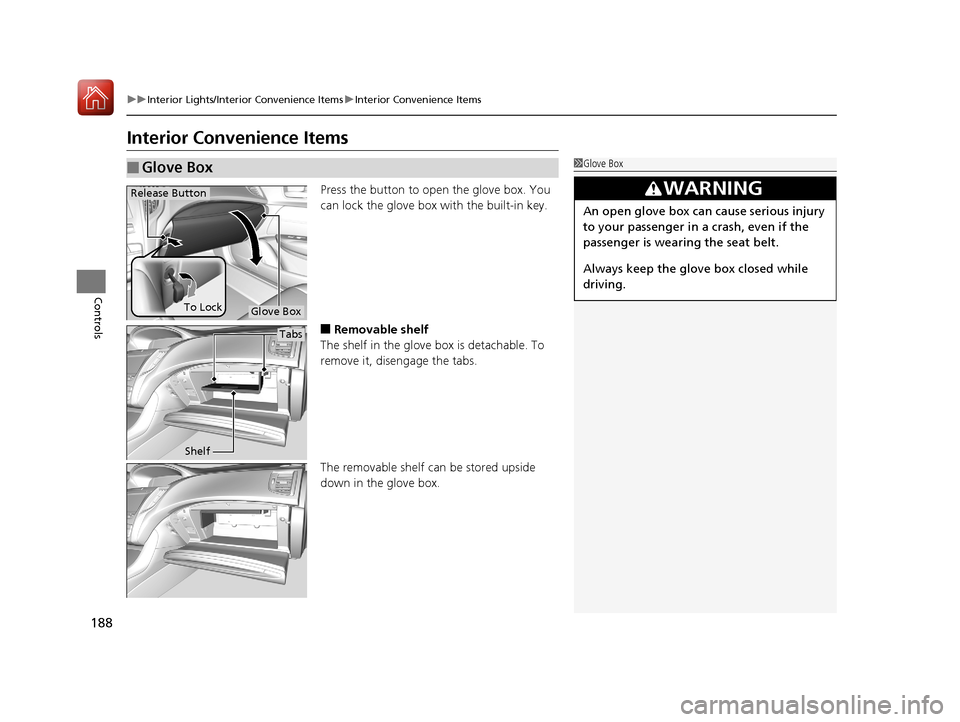
Press the button to open the glove box. You
can lock the glove box with the built-in key.
■Removable shelf
The shelf in the glove box is detachable. To
remove it, disengage the tabs.
The removable shelf can be stored upside
down in the glove box.
■Glove Box1 Glove Box
3WARNING
An open glove box can cause serious injury
to your passenger in a crash, even if the
passenger is wearing the seat belt.
Always keep the glove box closed while
driving.
Glove Box
Release Button
To Lock
Tabs
Shelf
17 ACURA TLX-31TZ36200.book 188 ページ 2016年6月10日 金曜日 午後6時39分
Page 216 of 553

Continued215
uuAudio System Basic Operation uOn Demand Multi-Use DisplayTM
Features
■Phone
You can preset five speed dial entries, and make a call from one of the preset
numbers, or call history when the phone is paired and connected to the vehicle‘s
Bluetooth ® HandsFreeLink ® (HFL) system.
2 Phone Setup P. 285
To preset a speed dial:
1.Select Shortcuts .
2. Select Phone.
3. Select Speed Dial .
4. Select Edit or No Entry .
u If you select No Entry, go to step 6.
5. Select Add.
u Five presets appear. Select a No Entry
preset or an existing preset.
u The screen changes to a list of previously
stored speed dial entries.
6. Select a number you want to store as a
shortcut.
To make a call from a speed dial entry:
1. Select Shortcuts .
2. Select Phone.
3. Select Speed Dial .
4. Select a preset number.
u Dialing starts automatically.
1Phone
Dial icon
You can make a call using the keyboard on the On
Demand Multi-Use Display
TM to input numbers.
2 To make a call using a phone number
P. 301
17 ACURA TLX-31TZ36200.book 215 ページ 2016年6月10日 金曜日 午後6時39分
Page 219 of 553
uuAudio System Basic Operation uOn Demand Multi-Use DisplayTM
218
Features
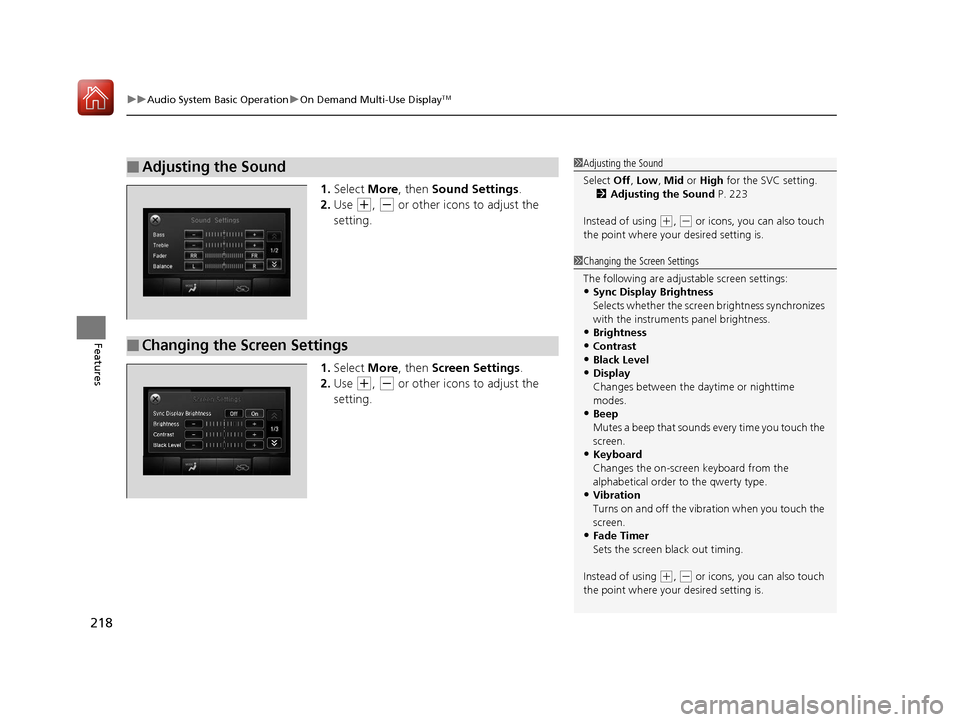
1. Select More, then Sound Settings.
2. Use
(+, (- or other icons to adjust the
setting.
1. Select More, then Screen Settings .
2. Use
(+, (- or other icons to adjust the
setting.
■Adjusting the Sound1 Adjusting the Sound
Select Off, Low , Mid or High for the SVC setting.
2 Adjusting the Sound P. 223
Instead of using
( +, (- or icons, you can also touch
the point where your desired setting is.
■Changing the Screen Settings
1Changing the Screen Settings
The following are adjustable screen settings:
•Sync Display Brightness
Selects whether the screen brightness synchronizes
with the instruments panel brightness.
•Brightness
•Contrast
•Black Level
•Display
Changes between the da ytime or nighttime
modes.
•Beep
Mutes a beep that sounds every time you touch the
screen.
•Keyboard
Changes the on-screen keyboard from the
alphabetical order to the qwerty type.
•Vibration
Turns on and off the vibration when you touch the
screen.
•Fade Timer
Sets the screen black out timing.
Instead of using
( +, (- or icons, you can also touch
the point where your desired setting is.
17 ACURA TLX-31TZ36200.book 218 ページ 2016年6月10日 金曜日 午後6時39分
Page 260 of 553
259
uuCustomized Features u
Continued
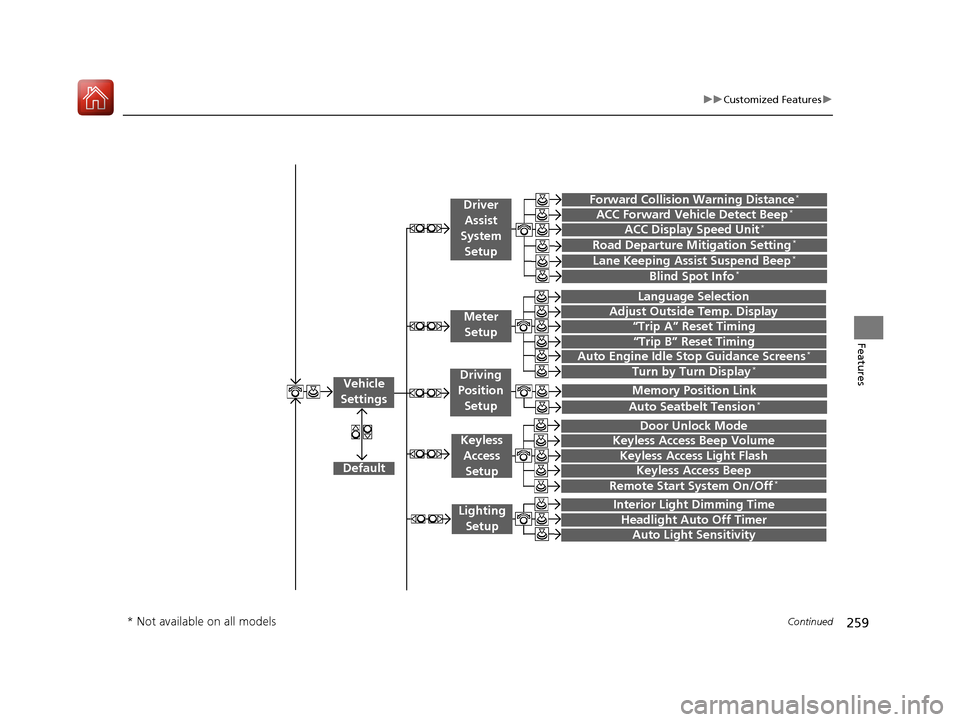
Features“Trip A” Reset Timing
“Trip B” Reset Timing
Language Selection
Adjust Outside Temp. Display
Forward Collision Warning Distance*
ACC Forward Vehicle Detect Beep*
Turn by Turn Display*
Default
Door Unlock Mode
Keyless Access Light Flash
Interior Light Dimming Time
Headlight Auto Off Timer
Auto Light Sensitivity
Vehicle
Settings
Meter Setup
Driver Assist
System
Setup
Keyless Access
Setup
Lighting Setup
Keyless Access Beep
Lane Keeping Assist Suspend Beep*
Blind Spot Info*
Auto Seatbelt Tension*
Driving
Position Setup
Road Departure Mitigation Setting*ACC Display Speed Unit*
Remote Start System On/Off*
Memory Position Link
Keyless Access Beep Volume
Auto Engine Idle Stop Guidance Screens*
* Not available on all models
17 ACURA TLX-31TZ36200.book 259 ページ 2016年6月10日 金曜日 午後6時39分
Page 261 of 553
260
uuCustomized Features u
Features
Default
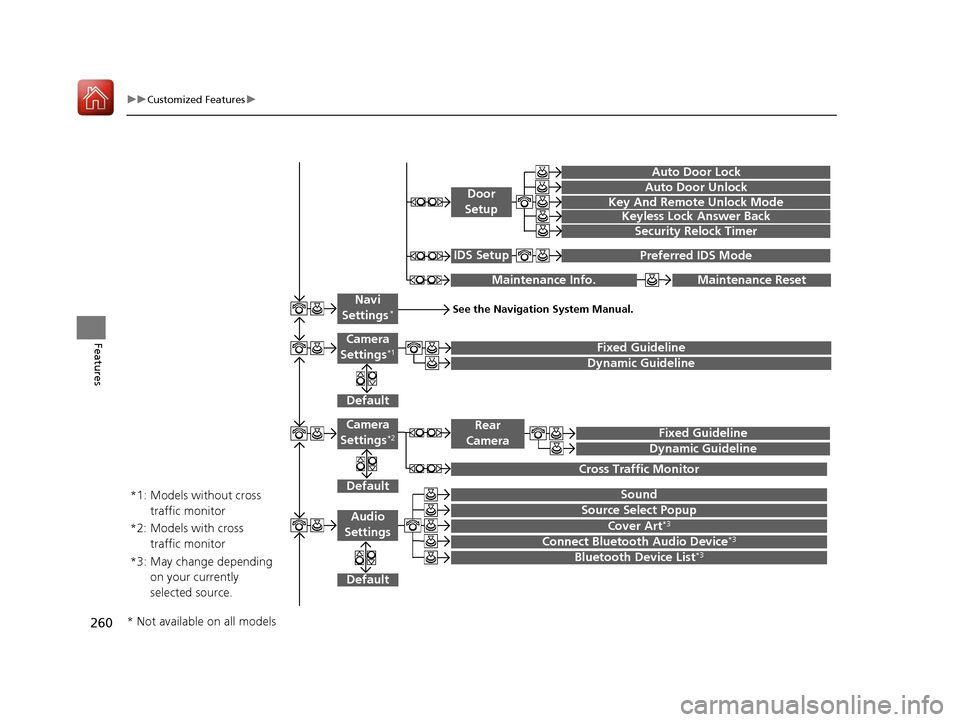
Fixed Guideline
Dynamic Guideline
Default
Sound
Source Select PopupAudio
Settings
Maintenance ResetMaintenance Info.
Preferred IDS ModeIDS Setup
Camera
Settings*1
Default
Camera
Settings*2Fixed Guideline
Dynamic Guideline
Rear
Camera
Cross Traffic Monitor
*1: Models without cross traffic monitor
*2: Models with cross traffic monitor
See the Navigation System Manual.Navi
Settings*
Key And Remote Unlock Mode
Keyless Lock Answer Back
Security Relock Timer
Auto Door Lock
Auto Door Unlock
Door
Setup
Cover Art*3
Connect Bluetooth Audio Device*3
Bluetooth Device List*3*3: May change depending on your currently
selected source.
* Not available on all models
17 ACURA TLX-31TZ36200.book 260 ページ 2016年6月10日 金曜日 午後6時39分
Page 268 of 553
267
uuCustomized Features u
Continued
Features
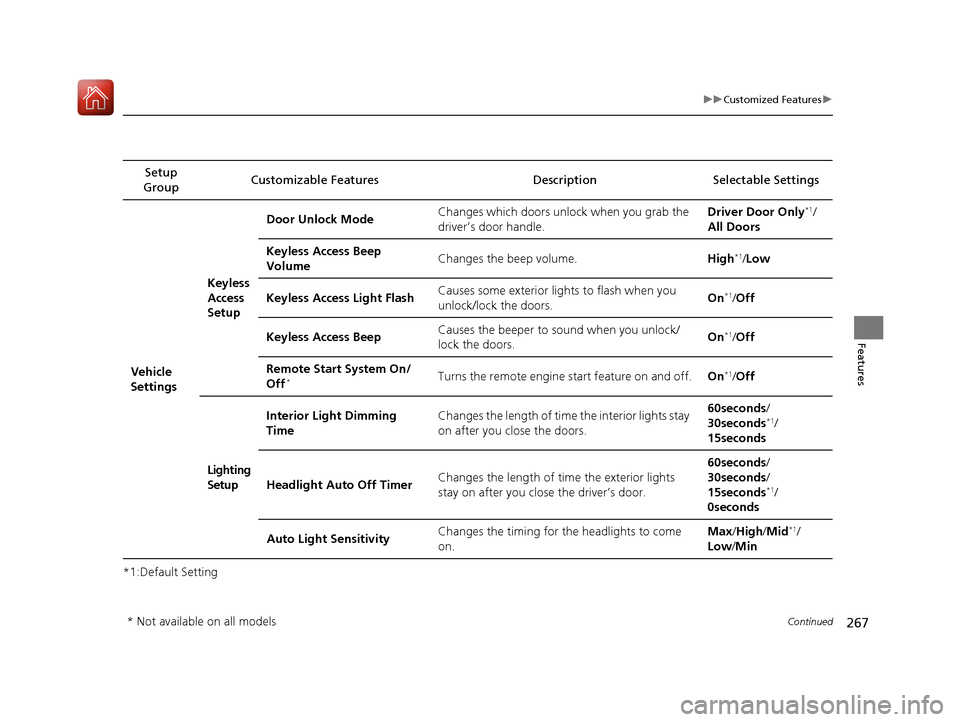
*1:Default SettingSetup
Group Customizable Features Description Selectable Settings
Vehicle
SettingsKeyless
Access
Setup
Door Unlock Mode
Changes which doors unlock when you grab the
driver’s door handle. Driver Door Only
*1/
All Doors
Keyless Access Beep
Volume Changes the beep volume.
High
*1/Low
Keyless Access Light Flash Causes some exterior lights to flash when you
unlock/lock the doors. On
*1/
Off
Keyless Access Beep Causes the beeper to
sound when you unlock/
lock the doors. On
*1/
Off
Remote Start System On/
Off
*Turns the remote engine start feature on and off. On*1/Off
Lighting
Setup Interior Light Dimming
Time
Changes the length of time the interior lights stay
on after you close the doors. 60seconds
/
30seconds
*1/
15seconds
Headlight Auto Off Timer Changes the length of time the exterior lights
stay on after you close the driver’s door. 60seconds
/
30seconds /
15seconds
*1/
0seconds
Auto Light Sensitivity Changes the timing for the headlights to come
on. Max
/High /Mid
*1/
Low /Min
* Not available on all models
17 ACURA TLX-31TZ36200.book 267 ページ 2016年6月10日 金曜日 午後6時39分
Page 269 of 553
268
uuCustomized Features u
Features
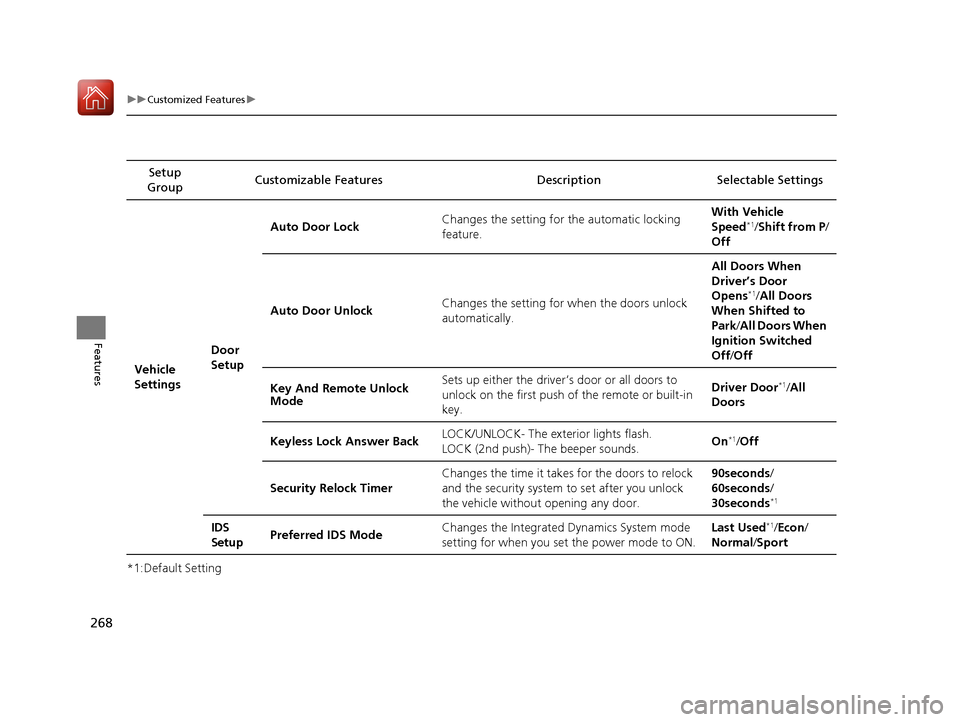
*1:Default SettingSetup
Group Customizable Features Descri
ption Selectable Settings
Vehicle
Settings Door
SetupAuto Door Lock
Changes the setting for the automatic locking
feature. With Vehicle
Speed
*1/
Shift from P/
Off
Auto Door Unlock Changes the setting for when the doors unlock
automatically. All Doors When
Driver’s Door
Opens
*1/
All Doors
When Shifted to
Park /All Doors When
Ignition Switched
Off /Off
Key And Remote Unlock
Mode Sets up either the driver
’s door or all doors to
unlock on the first push of the remote or built-in
key. Driver Door
*1/
All
Doors
Keyless Lock Answer Back LOCK/UNLOCK- The exterior lights flash.
LOCK (2nd push)- The beeper sounds.
On
*1/
Off
Security Relock Timer Changes the time it takes for the doors to relock
and the security system to set after you unlock
the vehicle without opening any door. 90seconds/
60seconds/
30seconds
*1
IDS
Setup
Preferred IDS Mode Changes the Integrated
Dynamics System mode
setting for when you set the power mode to ON. Last Used*1/
Econ /
Normal /Sport
17 ACURA TLX-31TZ36200.book 268 ページ 2016年6月10日 金曜日 午後6時39分
Page 301 of 553
uuBluetooth ® HandsFreeLink ®u HFL Menus
300
Features
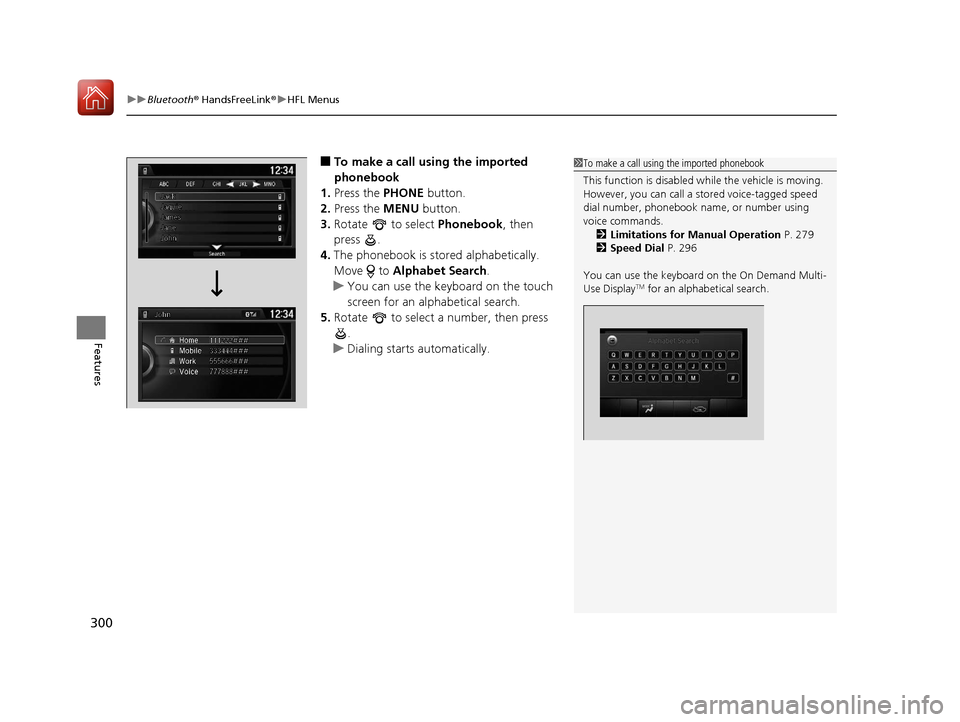
■To make a call using the imported
phonebook
1. Press the PHONE button.
2. Press the MENU button.
3. Rotate to select Phonebook, then
press .
4. The phonebook is stored alphabetically.
Move to Alphabet Search .
u You can use the keyboard on the touch
screen for an alphabetical search.
5. Rotate to select a number, then press
.
u Dialing starts automatically.1To make a call using the imported phonebook
This function is disabled while the vehicle is moving.
However, you can call a stored voice-tagged speed
dial number, phonebook name, or number using
voice commands. 2 Limitations for Manual Operation P. 279
2 Speed Dial P. 296
You can use the keyboard on the On Demand Multi-
Use Display
TM for an alphabetical search.
17 ACURA TLX-31TZ36200.book 300 ページ 2016年6月10日 金曜日 午後6時39分
Page 302 of 553
Continued301
uuBluetooth ® HandsFreeLink ®u HFL Menus
Features
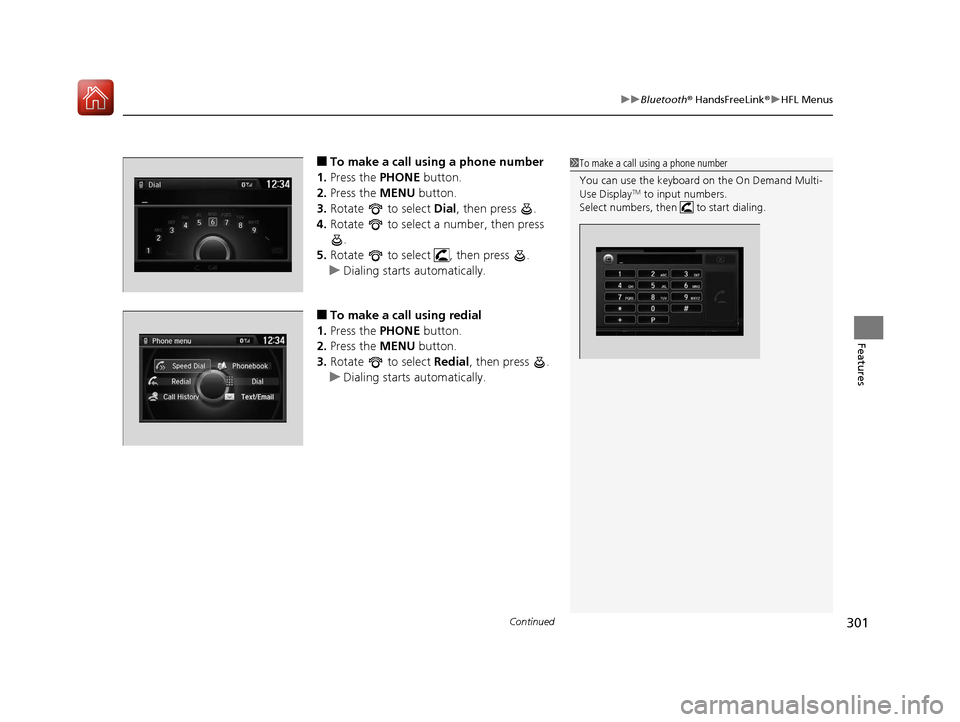
■To make a call using a phone number
1. Press the PHONE button.
2. Press the MENU button.
3. Rotate to select Dial, then press .
4. Rotate to select a number, then press
.
5. Rotate to select , then press .
u Dialing starts automatically.
■To make a call using redial
1. Press the PHONE button.
2. Press the MENU button.
3. Rotate to select Redial, then press .
u Dialing starts automatically.
1To make a call using a phone number
You can use the keyboard on the On Demand Multi-
Use Display
TM to input numbers.
Select numbers, then to start dialing.
17 ACURA TLX-31TZ36200.book 301 ページ 2016年6月10日 金曜日 午後6時39分
Page 317 of 553
316
Driving
Before Driving
Driving Preparation
Check the following items before you start driving.
• Make sure there are no obstructions on th e windows, door mirrors, exterior
lights, or other parts of the vehicle.
u Remove any frost, snow, or ice.
u Remove any snow on the roof, as this can slip down and obstruct your field of
vision while driving. If frozen solid , remove ice once it has softened.
u When removing ice from around the wheel s, be sure not to damage the wheel
or wheel components.
• Make sure the hood is securely closed.
u If the hood opens while driving, your front view will be blocked.
• Make sure the tires are in good condition.
u Check air pressures, and check for damage and excessive wear.
2Checking and Maintaining Tires P. 462
•Make sure there are no people or ob jects behind or around the vehicle.
u There are blind spots from the inside.
■Exterior Checks1Exterior Checks
NOTICE
When doors are frozen s hut, use warm water around
the door edges to melt any ice. Do not try to force
them open, as this can damage the rubber trim
around the doors. When done, wipe dry to avoid
further freezing.
Do not pour warm water into the key cylinder.
You will be unable to insert the key if the water
freezes in the hole.
Heat from the engine and exhaust can ignite
flammable material s left under the hood, causing a
fire. If you’ve parked y our vehicle for an extended
period, inspect and remove any debris that may have
collected, such as dried grass and leaves that have
fallen or have been carried in for use as a nest by a
small animal. Also check under the hood for leftover
flammable materials after you or someone else has
performed maintenance on your vehicle.
17 ACURA TLX-31TZ36200.book 316 ページ 2016年6月10日 金曜日 午後6時39分