charging Acura TLX 2017 Owner's Manual
[x] Cancel search | Manufacturer: ACURA, Model Year: 2017, Model line: TLX, Model: Acura TLX 2017Pages: 553, PDF Size: 33.77 MB
Page 12 of 553
11
Quick Reference Guide
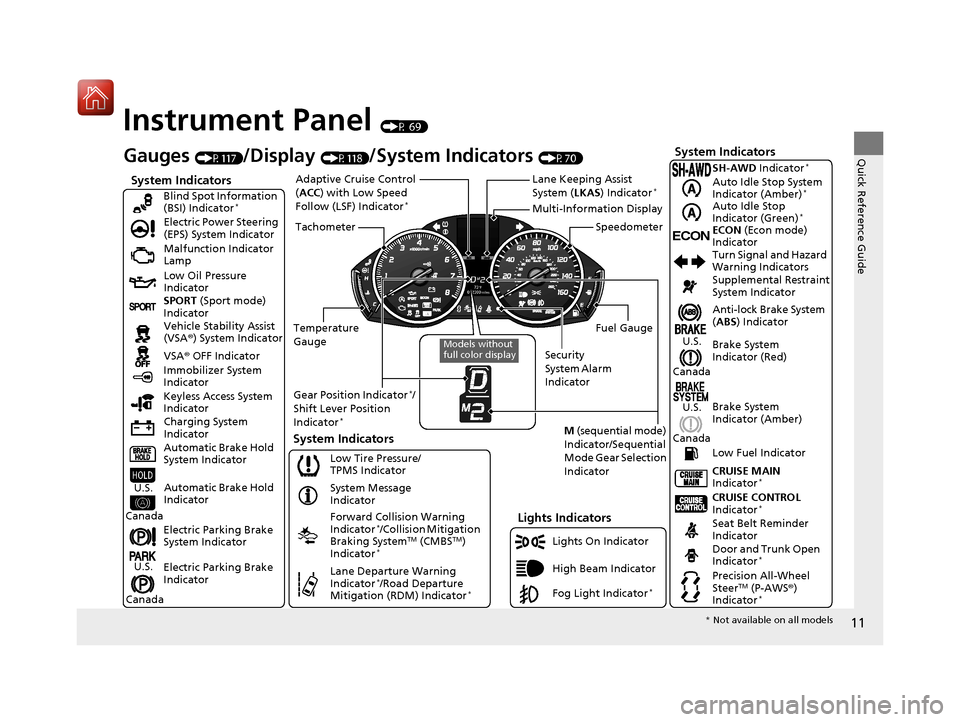
Instrument Panel (P 69)
System Indicators
Malfunction Indicator
Lamp
Low Oil Pressure
Indicator
Charging System
Indicator Vehicle Stability Assist
(VSA®) System Indicator
VSA ® OFF Indicator
Electric Power Steering
(EPS) System Indicator
Lights Indicators
Lights On Indicator
High Beam Indicator
Immobilizer System
Indicator
System Indicators
System Message
Indicator
Gauges (P117)/Display (P118)/System Indicators (P70)
Low Tire Pressure/
TPMS Indicator
Keyless Access System
Indicator
Electric Parking Brake
System Indicator
Electric Parking Brake
Indicator Automatic Brake Hold
System Indicator SPORT
(Sport mode)
Indicator Blind Spot Information
(BSI) Indicator
*
Forward Collision Warning
Indicator*/Collision Mitigation
Braking SystemTM (CMBSTM)
Indicator*
Lane Departure Warning
Indicator*/Road Departure
Mitigation (RDM) Indicator*
Automatic Brake Hold
IndicatorU.S.
Canada
U.S.
Canada
Fog Light Indicator*
Temperature
Gauge Security
System Alarm
IndicatorFuel Gauge
Tachometer
Multi-Information Display
Speedometer
Gear Position Indicator
*/
Shift Lever Position
Indicator
*M (sequential mode)
Indicator/Sequential
Mode Gear Selection
IndicatorSystem Indicators
Lane Keeping Assist
System ( LKAS) Indicator*Adaptive Cruise Control
(ACC ) with Low Speed
Follow (LSF) Indicator
*
Models without
full color display
Anti-lock Brake System
( ABS ) Indicator
Seat Belt Reminder
Indicator CRUISE CONTROL
Indicator
*
Brake System
Indicator (Red) Supplemental Restraint
System Indicator
CRUISE MAIN
Indicator
*
Low Fuel Indicator Turn Signal and Hazard
Warning Indicators
Brake System
Indicator (Amber)
U.S.
Canada
U.S.
Canada
Door and Trunk Open
Indicator*
Precision All-Wheel
SteerTM (P-AWS ®)
Indicator*
ECONECON (Econ mode)
Indicator SH-AWD Indicator
*
Auto Idle Stop System
Indicator (Amber)*
Auto Idle Stop
Indicator (Green)*
* Not available on all models
17 ACURA TLX-31TZ36200.book 11 ページ 2016年6月10日 金曜日 午後6時39分
Page 75 of 553
74
uuIndicators u
Instrument Panel
*1:On the left: Models with full color display
On the right: Models wi thout full color display
IndicatorNameOn/BlinkingExplanationMessage*1
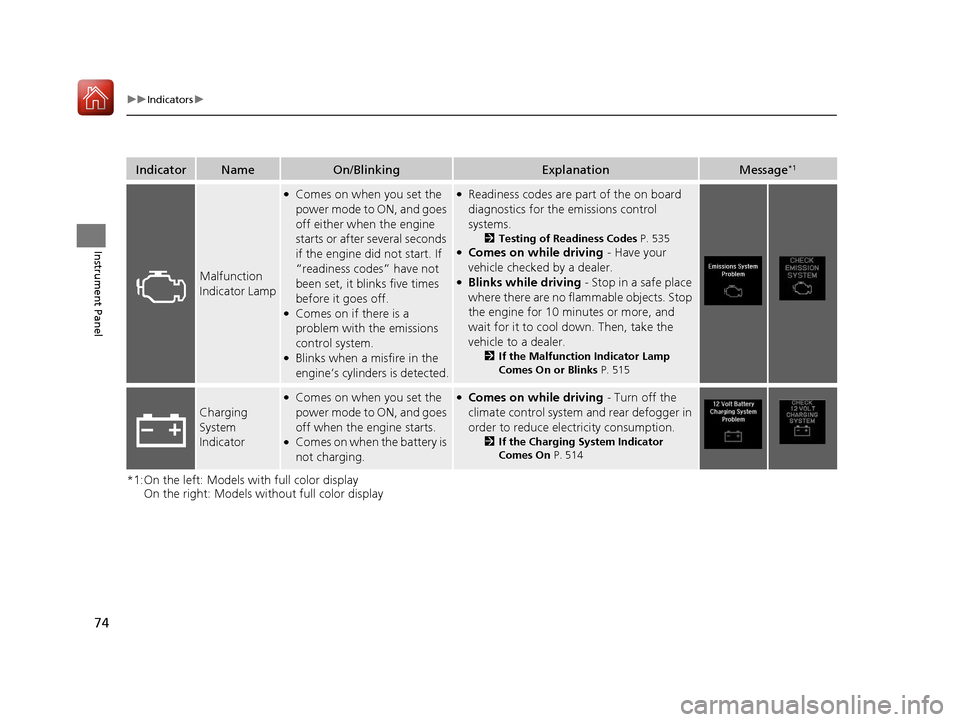
Malfunction
Indicator Lamp
●Comes on when you set the
power mode to ON, and goes
off either when the engine
starts or after several seconds
if the engine did not start. If
“readiness codes” have not
been set, it blinks five times
before it goes off.
●Comes on if there is a
problem with the emissions
control system.
●Blinks when a misfire in the
engine’s cylinders is detected.
●Readiness codes are part of the on board
diagnostics for the emissions control
systems.
2Testing of Readiness Codes P. 535●Comes on while driving - Have your
vehicle checked by a dealer.
●Blinks while driving - Stop in a safe place
where there are no flammable objects. Stop
the engine for 10 minutes or more, and
wait for it to cool down. Then, take the
vehicle to a dealer.
2 If the Malfunction Indicator Lamp
Comes On or Blinks P. 515
Charging
System
Indicator
●Comes on when you set the
power mode to ON, and goes
off when the engine starts.
●Comes on when the battery is
not charging.
●Comes on while driving - Turn off the
climate control system and rear defogger in
order to reduce electricity consumption.
2 If the Charging System Indicator
Comes On P. 514
17 ACURA TLX-31TZ36200.book 74 ページ 2016年6月10日 金曜日 午後6時39分
Page 97 of 553
96
uuIndicators uMulti-Information Display Warn ing and Information Messages
Instrument Panel
*1:On the left: Models with full color display
On the right: Models wi thout full color display
Message*1ConditionExplanation
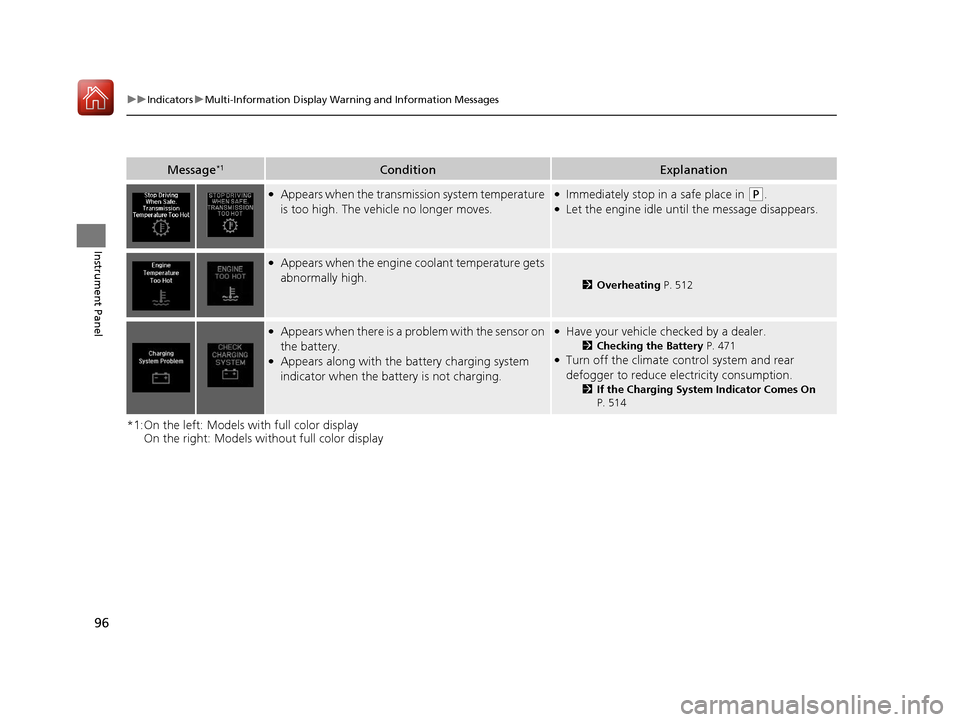
●Appears when the transmission system temperature
is too high. The vehicle no longer moves.●Immediately stop in a safe place in (P.●Let the engine idle until the message disappears.
●Appears when the engine coolant temperature gets
abnormally high.
2Overheating P. 512
●Appears when there is a pr oblem with the sensor on
the battery.
●Appears along with the battery charging system
indicator when the batte ry is not charging.
●Have your vehicle checked by a dealer.
2Checking the Battery P. 471●Turn off the climate control system and rear
defogger to reduce electricity consumption.
2If the Charging System Indicator Comes On
P. 514
17 ACURA TLX-31TZ36200.book 96 ページ 2016年6月10日 金曜日 午後6時39分
Page 116 of 553
115
uuIndicators uMulti-Information Display Warning and Information Messages
Continued
Instrument Panel
MessageConditionExplanation
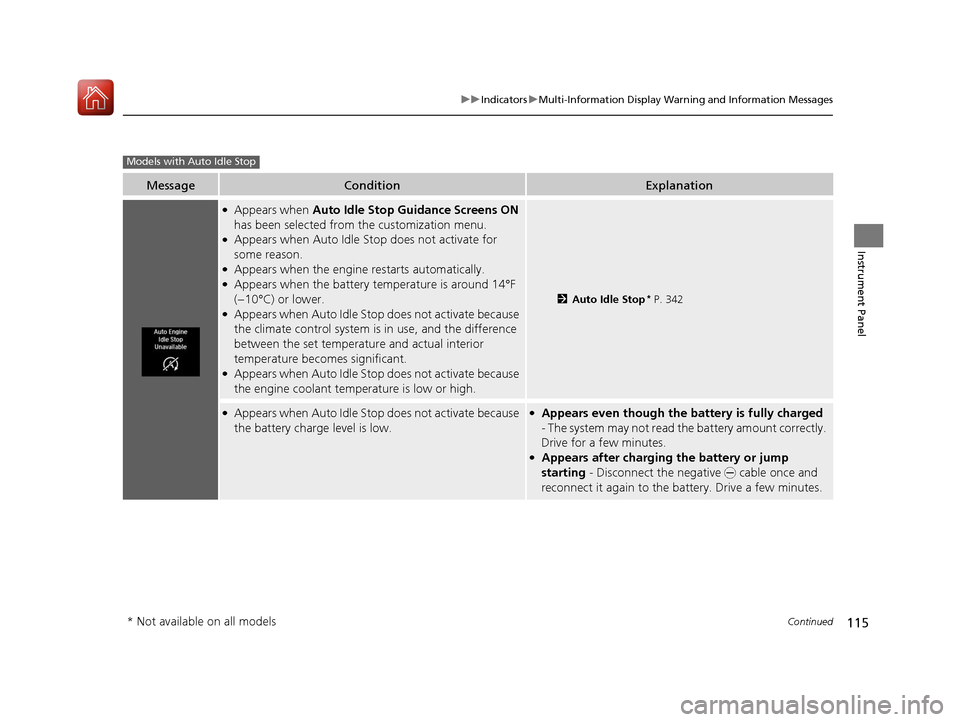
●Appears when Auto Idle Stop Guidance Screens ON
has been selected from the customization menu.
●Appears when Auto Idle St op does not activate for
some reason.
●Appears when the engine restarts automatically.●Appears when the battery temperature is around 14°F
(−10°C) or lower.
●Appears when Auto Idle Stop does not activate because
the climate control system is in use, and the difference
between the set temperature and actual interior
temperature becomes significant.
●Appears when Auto Idle Stop does not activate because
the engine coolant temperature is low or high.
2 Auto Idle Stop* P. 342
●Appears when Auto Idle Stop does not activate because
the battery charge level is low.●Appears even though the ba ttery is fully charged
- The system may not read the battery amount correctly.
Drive for a few minutes.
●Appears after charging the battery or jump
starting - Disconnect the negative - cable once and
reconnect it again to the ba ttery. Drive a few minutes.
Models with Auto Idle Stop
* Not available on all models
17 ACURA TLX-31TZ36200.book 115 ページ 2016年6月10日 金曜日 午後6時39分
Page 472 of 553
471
Maintenance
Battery
Checking the Battery
The condition of the battery is monitored by a sensor located on the negative
terminal of the battery. If there is a probl em with this sensor, the multi-information
display will display a warning message. If this happens, have you vehicle inspected
by a dealer.
Check the battery termin als for corrosion monthly.
If your vehicle’s battery is disconnected or goes dead:
• The audio system is disabled.
2 Reactivating the audio system P. 210
•The clock resets.
2 Clock P. 138
•The navigation system* is disabled.
2 Refer to the Navigation System Manual
Charging the Battery*
Disconnect both battery cables to prevent damaging your vehicle’s electrical system.
Always disconnect the negative (–) cable first, and reconnect it last.
1Battery
WARNING: Battery post, terminals,
and related accessories contain lead
and lead compounds.
Wash your hands after handling.
When you find corrosion, cl ean the battery terminals
by applying a baking powder and water solution.
Clean the terminals with a damp towel. Cloth/towel
dry the battery. Coat the terminals with grease to
help prevent future corrosion.
When replacing the battery, the replacement must be
of the same specifications.
Consult a dealer for more information.
3WARNING
The battery gives off explosive hydrogen
gas during normal operation.
A spark or flame can cause the battery to
explode with enough force to kill or
seriously hurt you.
When conducting any battery
maintenance, wear prot ective clothing and
a face shield, or have a skilled technician do
it.
* Not available on all models
17 ACURA TLX-31TZ36200.book 471 ページ 2016年6月10日 金曜日 午後6時39分
Page 473 of 553
472
uuBattery uCharging the AGM Battery*
Maintenance
Charging the AGM Battery*
AGM labeled batteries like those installed in your vehicle require a compatible
charger to be properly charged. Damage to the battery can result if the battery is
charged improperly or with the wrong equi pment. For more information on how to
charge your vehicle’s AGM battery, consult a dealer.1Battery
The battery installed in this vehicle is specifically
designed for a model with Auto Idle Stop. Using a
battery other than this specified type may shorten the
battery life, and prevent Auto Idle Stop from
activating. If you need to replace the battery, make
sure to select the specified type. Ask a dealer for
more details.
* Not available on all models
17 ACURA TLX-31TZ36200.book 472 ページ 2016年6月10日 金曜日 午後6時39分
Page 484 of 553
483
Handling the Unexpected
This chapter explains how to handle unexpected troubles.
ToolsTypes of Tools .................................. 484
If a Tire Goes Flat Temporarily Repairi ng a Flat Tire....... 485
Changing a Flat Tire ......................... 497
Engine Does Not Start Checking the Engine ........................ 504
If the Keyless Access Remote Battery is Weak ............................................. 505
Emergency Engine Stop ................... 506
Jump Starting .................................... 507
Shift Lever Does Not Move .............. 511Overheating
How to Handle Overheating............. 512
Indicator, Coming On/Blinking
If the Low Oil Pressure Indicator Comes On .. 514If the Charging System Indicator Comes On ................................................. 514
If the Malfunction Indicator Lamp Comes On or Blinks ................................... 515
If the Brake System Indicator (Red) Comes On .. 515If the Electric Power Steering (EPS) System Indicator Comes On ........................... 516
If the Electric Parking Brake System Indicator Comes On ....................... 517 If the Low Tire Pressure/TPMS Indicator
Comes On or Blinks ....................... 518
If the Transmission Indicator Blinks along with the Warning Message.............. 519
Fuses Fuse Locations ................................. 520
Inspecting and Changing Fuses ........ 524
Emergency Towing ........................... 525
When You Cannot Unlock the Fuel Fill Door ................................................. 526When You Cannot Open the Trunk ..... 527RefuelingRefueling From a Portable Fuel Container ... 528
17 ACURA TLX-31TZ36200.book 483 ページ 2016年6月10日 金曜日 午後6時39分
Page 509 of 553
508
uuJump Starting u
Handling the Unexpected
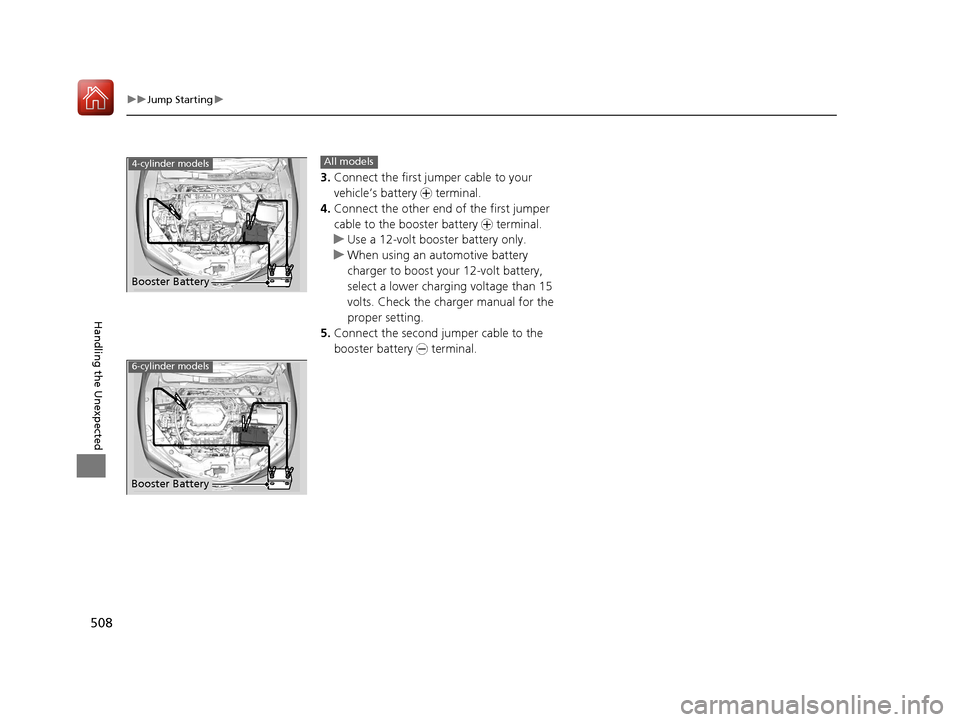
3.Connect the first jump er cable to your
vehicle’s battery + terminal.
4. Connect the other end of the first jumper
cable to the booster battery + terminal.
u Use a 12-volt booster battery only.
u When using an automotive battery
charger to boost your 12-volt battery,
select a lower charging voltage than 15
volts. Check the charger manual for the
proper setting.
5. Connect the second jumper cable to the
booster battery - terminal.
Booster Battery
4-cylinder modelsAll models
6-cylinder models
Booster Battery
17 ACURA TLX-31TZ36200.book 508 ページ 2016年6月10日 金曜日 午後6時39分
Page 515 of 553
514
Handling the Unexpected
Indicator, Coming On/Blinking
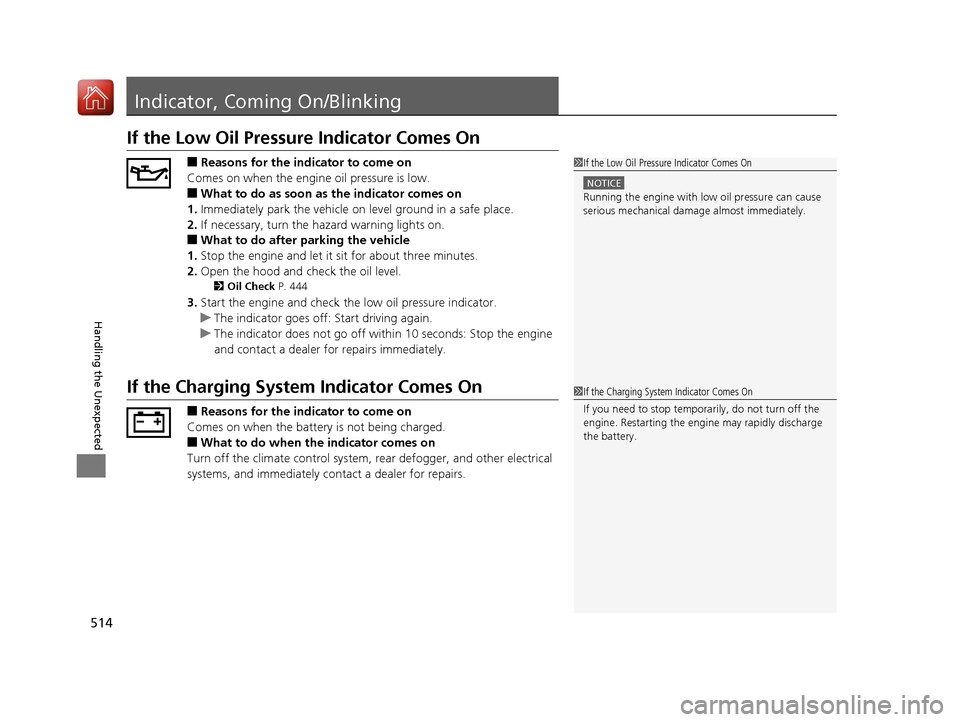
If the Low Oil Pressure Indicator Comes On
■Reasons for the indicator to come on
Comes on when the engine oil pressure is low.
■What to do as soon as the indicator comes on
1. Immediately park the vehicle on level ground in a safe place.
2. If necessary, turn the ha zard warning lights on.
■What to do after parking the vehicle
1. Stop the engine and let it sit for about three minutes.
2. Open the hood and check the oil level.
2 Oil Check P. 444
3.Start the engine and check the low oil pressure indicator.
u The indicator goes off: Start driving again.
u The indicator does not go off within 10 seconds: Stop the engine
and contact a dealer for repairs immediately.
If the Charging System Indicator Comes On
■Reasons for the indicator to come on
Comes on when the battery is not being charged.
■What to do when the indicator comes on
Turn off the climate con trol system, rear defogger, and other electrical
systems, and immediately contact a dealer for repairs.
1 If the Low Oil Pressure Indicator Comes On
NOTICE
Running the engine with low oil pressure can cause
serious mechanical damage almost immediately.
1If the Charging System Indicator Comes On
If you need to stop temporarily, do not turn off the
engine. Restarting the engi ne may rapidly discharge
the battery.
17 ACURA TLX-31TZ36200.book 514 ページ 2016年6月10日 金曜日 午後6時39分
Page 543 of 553
Index
542
Index
Index
A
AAC.................................................... 232, 242
ABS (Anti-lock Brake System) ................... 406
Accessories and Modifications ................. 481
Accessory Power Sockets .......................... 192
Adaptive Cruise Control (ACC) with Low Speed Follow (LSF) .................... 89, 353
Additives
Coolant ................................................... 449
Engine Oil ................................................ 443
Washer .................................................... 452
Additives, Engine Oil ................................ 443
Adjusting Armrest ................................................... 185
Front Seats .............................................. 179
Head Restraints........................................ 181
Mirrors .................................................... 177
Steering Wheel ........................................ 176
Temperature ............................................ 123
Agile Handling Assist ................................ 392
Aha
TM Menu .............................................. 241
AhaTM Radio .............................................. 252
Air Conditioning System (Climate Control System) .................................................... 198
Changing the Mode ................................ 201
Defrosting the Windshield and Windows ............................................... 205
Dust and Pollen Filter ............................... 475
Sensors .................................................... 206
Synchronized Mode ................................. 202
Using Automatic Climate Control ............ 198 Air Pressure
....................................... 463, 531
Airbags ........................................................ 39
Advanced Airbags ..................................... 45
Airbag Care............................................... 53
Driver’s Knee Airbag.................................. 46
Event Data Recorder .................................... 0
Front Airbags (SRS) .................................... 42
Indicator.............................................. 51, 80
Passenger Airbag Off Indicator .................. 52
Sensors ..................................................... 39
Side Airbags .............................................. 48
Side Curtain Airbags.................................. 50
AM/FM Radio ............................................ 225
Anti-lock Brake System (ABS) .................. 406
Indicator.................................................... 79
Armrest ..................................................... 185
Audio Remote Controls ........................... 211
Audio System ............................................ 208
Adjusting the Sound................................ 223
Auxiliary Input Jack.................................. 209
Error Messages ........................................ 248
General Information ................................ 253
Internet Radio ......................................... 239
iPhone............................................. 239, 256
iPod ........................................................ 235
MP3/WMA/AAC .............................. 232, 242
Reactivating ............................................ 210
Recommended CDs ................................. 254
Recommended Devices............................ 256
Remote Controls ..................................... 211
Security Code .......................................... 210 Shortcuts ................................................ 214
Theft Protection ...................................... 210
USB Flash Drives...................................... 256
USB Port ................................................. 209
Audio/Information Screen ....................... 219
Authorized Manuals ................................ 539
Auto Door Locking/Unlocking ................ 151
Customize ...................................... 132, 268
Auto Idle Stop .......................................... 342
OFF Button ............................................. 342
Auto Idle Stop Indicator (Green) .............. 92
Auto Idle Stop System Indicator (Amber) ..................................................... 92
Automatic Brake Hold ............................. 404
Indicator ........................................... 72, 404
Automatic Brake Hold System Indicator ........................................... 72, 404
Automatic Lighting .................................. 166
Automatic Transmission .......................... 330
Creeping................................................. 330
Kickdown ............................................... 330
Operating the Shift Button ................ 18, 332
Shifting ................................................... 331
Auxiliary Input Jack ................................. 209
Average Fuel Economy ............................ 123
Average Speed ......................................... 124
B
Battery
Charging (Battery)........................... 471, 472
17 ACURA TLX-31TZ36200.book 542 ページ 2016年6月10日 金曜日 午後6時39分