interior lights Acura TLX 2017 Owner's Manual
[x] Cancel search | Manufacturer: ACURA, Model Year: 2017, Model line: TLX, Model: Acura TLX 2017Pages: 553, PDF Size: 33.77 MB
Page 4 of 553
Contents
Child Safety P. 54Exhaust Gas Hazard P. 66Safety Labels P. 67
Opening and Closing the Trunk P. 152 Security System P. 155 Opening and Closing the Windows P. 158
Operating the Switches Around the Steering Wheel P. 161 Adjusting the Mirrors P. 177
Interior Lights/Interior Convenience It ems P. 186 Climate Control System P. 198
Audio Error Messages P. 248General Information on the Audio System P. 253
Bluetooth® HandsFreeLink ® P. 278 Compass* P. 312
When Driving P. 322 Braking P. 400Parking Your Vehicle P. 417
Fuel Economy and CO
2 Emissions P. 430
Maintenance Under the Hood P. 440 Replacing Light Bulbs P. 453
Checking and Maintaining Tires P. 462 Battery P. 471 Remote Transmitter Care P. 473
Cleaning P. 476 Accessories and Modifications P. 481
Engine Does Not Start P. 504 Jump Starting P. 507 Shift Lever Does Not Move P. 511
Fuses P. 520 Emergency Towing P. 525 When You Cannot Unlock the Fuel Fill Door P. 526
Refueling P. 528
Devices that Emit Radio Waves P. 533 Reporting Safety Defects P. 534
Authorized Manuals P. 539 Client Service Information P. 540
Quick Reference GuideP. 4
Safe DrivingP. 27
Instrument PanelP. 69
ControlsP. 137
FeaturesP. 207
DrivingP. 315
MaintenanceP. 431
Handling the UnexpectedP. 483
InformationP. 529
IndexP. 542
17 ACURA TLX-31TZ36200.book 3 ページ 2016年6月10日 金曜日 午後6時39分
Page 133 of 553
132
uuGauges and Multi-Information Display uMulti-Information Display
Instrument Panel
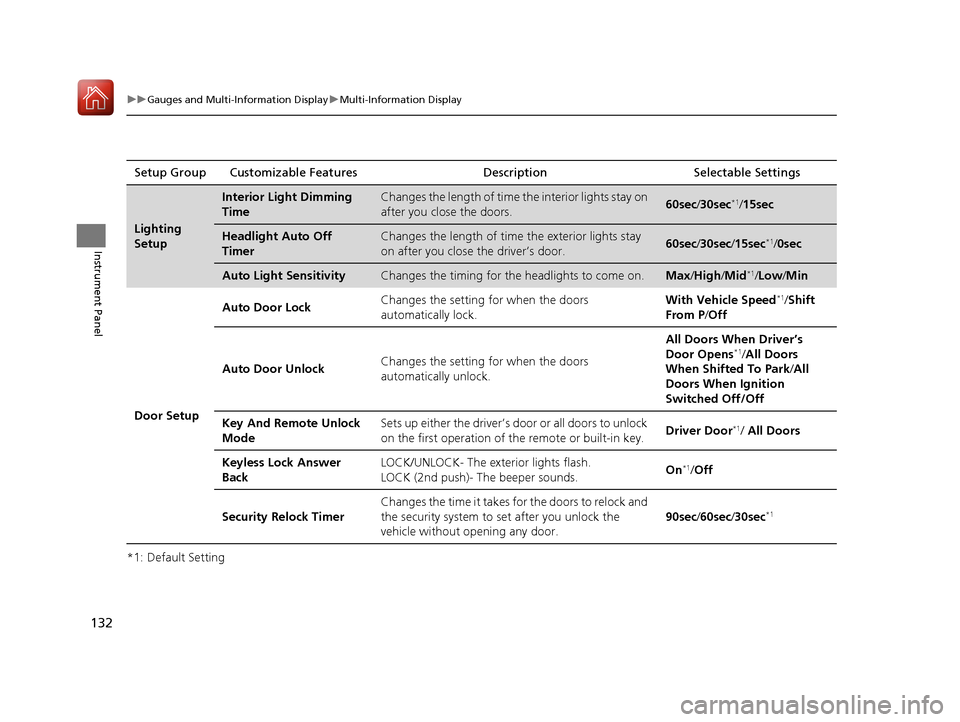
*1: Default SettingSetup Group Customizable Features Description Selectable Settings
Lighting
Setup
Interior Light Dimming
TimeChanges the length of time
the interior lights stay on
after you close the doors.60sec /30sec*1/15sec
Headlight Auto Off
TimerChanges the length of time the exterior lights stay
on after you close the driver’s door.60sec /30sec /15sec*1/ 0sec
Auto Light SensitivityChanges the timing for the headlights to come on.Max/High /Mid*1/Low/ Min
Door Setup Auto Door Lock
Changes the setting for when the doors
automatically lock. With Vehicle Speed
*1/
Shift
From P /Off
Auto Door Unlock Changes the setting for when the doors
automatically unlock. All Doors When Driver’s
Door Opens
*1/
All Doors
When Shifted To Park /All
Doors When Ignition
Switched Off/Off
Key And Remote Unlock
Mode Sets up either the driver’s door or all doors to unlock
on the first operation of the remote or built-in key.
Driver Door
*1/ All Doors
Keyless Lock Answer
Back LOCK/UNLOCK- The exte
rior lights flash.
LOCK (2nd push)- The beeper sounds. On
*1/
Off
Security Relock Timer Changes the time it takes for the doors to relock and
the security system to set after you unlock the
vehicle without opening any door.
90sec
/60sec /30sec
*1
17 ACURA TLX-31TZ36200.book 132 ページ 2016年6月10日 金曜日 午後6時39分
Page 138 of 553
137
Controls
This chapter explains how to operate the various controls necessary for driving.
Clock.................................................. 138
Locking and Unlocking the Doors
Key Types and Functions .................. 139
Low Keyless Access Remote Signal Strength ......................................... 141
Locking/Unlocking the Doors from the Outside .......................................... 142
Locking/Unlocking the Doors from the
Inside ............................................. 148
Childproof Door Locks ..................... 150
Auto Door Locking/Unlocking .......... 151
Opening and Closing the Trunk ....... 152
Security System ................................ 155
Immobilizer System .......................... 155 Security System Alarm...................... 155Opening and Closing the Windows
.... 158Opening and Closing the Moonroof....... 160Operating the Switches Around the
Steering Wheel
ENGINE START/STOP Button............. 161
Turn Signals ..................................... 164
Light Switches.................................. 165
Fog Lights
*...................................... 168
Daytime Running Lights ................... 168
Wipers and Washers ........................ 169
Brightness Control ........................... 172
Rear Defogger/Heated Door Mirror Button........................................ 173
Driving Position Memory System ...... 174
Adjusting the Steering Wheel .......... 176
Adjusting the Mirrors ....................... 177
Interior Rearview Mirror ................... 177
Power Door Mirrors ......................... 178
Adjusting the Seats .......................... 179
Front Seats ...................................... 179
Interior Lights/Interior Convenience
Items ................................................ 186
Interior Lights .................................. 186
Interior Convenience Items .............. 188
Climate Control System ................... 198
Using Automatic Climate Control .... 198
Automatic Climate Control Sensors......206
* Not available on all models
17 ACURA TLX-31TZ36200.book 137 ページ 2016年6月10日 金曜日 午後6時39分
Page 143 of 553
142
uuLocking and Unlocking the Doors uLocking/Unlocking the Doors from the Outside
Controls
Locking/Unlocking the Doors from the Outside
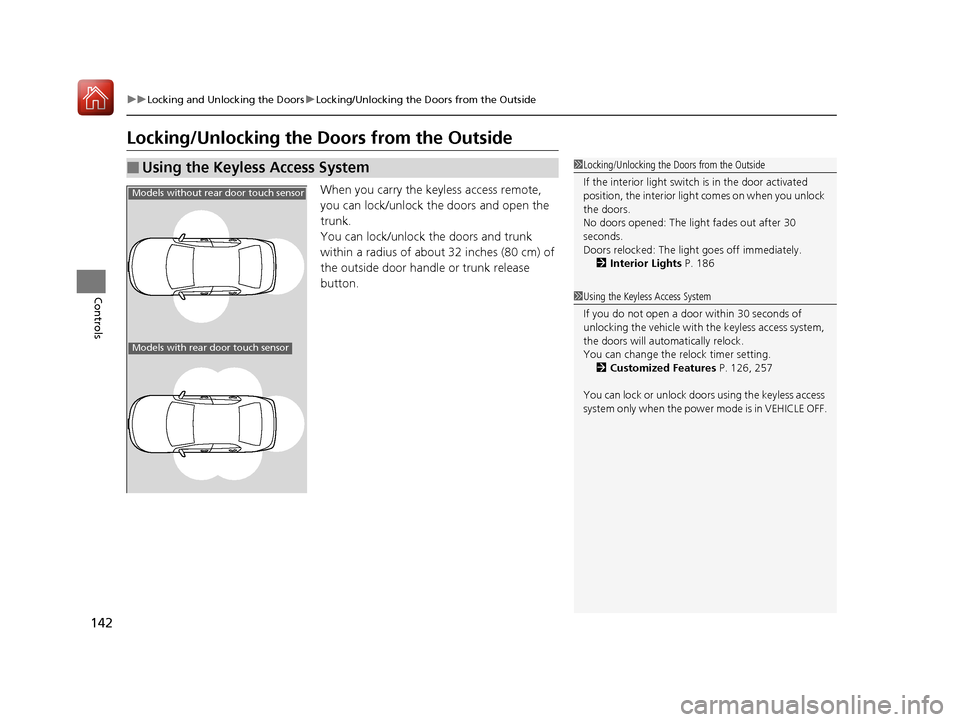
When you carry the keyless access remote,
you can lock/unlock the doors and open the
trunk.
You can lock/unlock the doors and trunk
within a radius of about 32 inches (80 cm) of
the outside door handle or trunk release
button.
■Using the Keyless Access System1Locking/Unlocking the Doors from the Outside
If the interior light switch is in the door activated
position, the interior light comes on when you unlock
the doors.
No doors opened: The li ght fades out after 30
seconds.
Doors relocked: The light goes off immediately.
2 Interior Lights P. 186
Models without rear door touch sensor
Models with rear door touch sensor
1Using the Keyless Access System
If you do not open a door within 30 seconds of
unlocking the vehicle with the keyless access system,
the doors will automatically relock.
You can change the relock timer setting.
2 Customized Features P. 126, 257
You can lock or unlock doors using the keyless access
system only when the power mode is in VEHICLE OFF.
17 ACURA TLX-31TZ36200.book 142 ページ 2016年6月10日 金曜日 午後6時39分
Page 178 of 553
177
Controls
Adjusting the Mirrors
Interior Rearview Mirror
Adjust the angle of the rearview mirror when you are sitting in the correct driving
position.
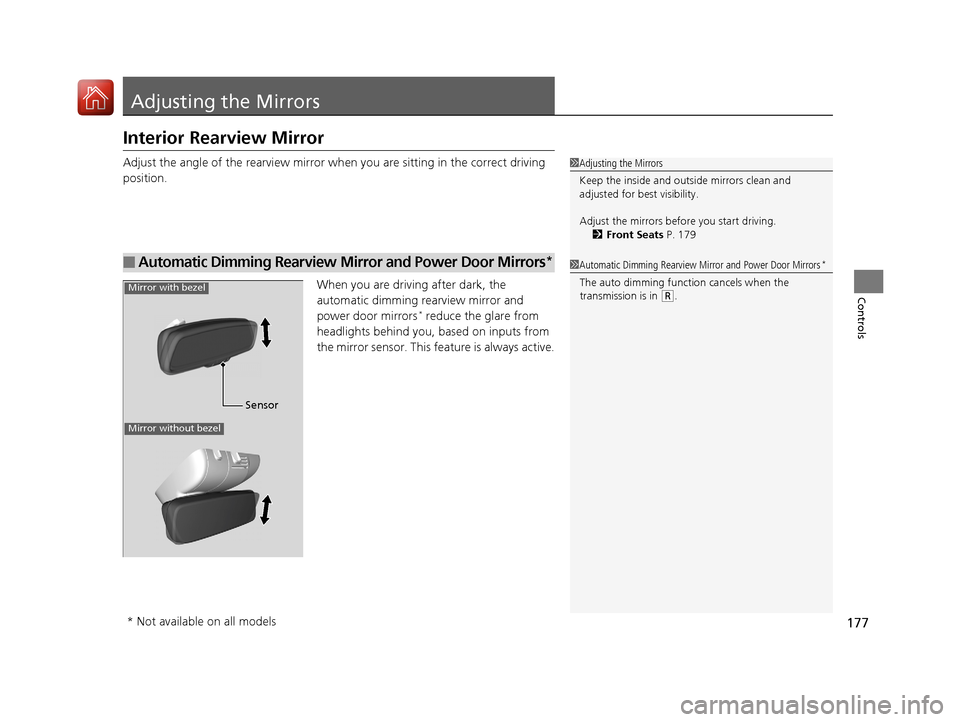
When you are driving after dark, the
automatic dimming rearview mirror and
power door mirrors
* reduce the glare from
headlights behind you, based on inputs from
the mirror sensor. This feature is always active.
■Automatic Dimming Rearview Mirror and Power Door Mirrors*
1 Adjusting the Mirrors
Keep the inside and out side mirrors clean and
adjusted for best visibility.
Adjust the mirrors befo re you start driving.
2 Front Seats P. 179
1Automatic Dimming Rearview Mirror and Power Door Mirrors*
The auto dimming function cancels when the
transmission is in (R.
Sensor
Mirror with bezel
Mirror without bezel
* Not available on all models
17 ACURA TLX-31TZ36200.book 177 ページ 2016年6月10日 金曜日 午後6時39分
Page 187 of 553
186
Controls
Interior Lights/Interior Convenience Items
Interior Lights
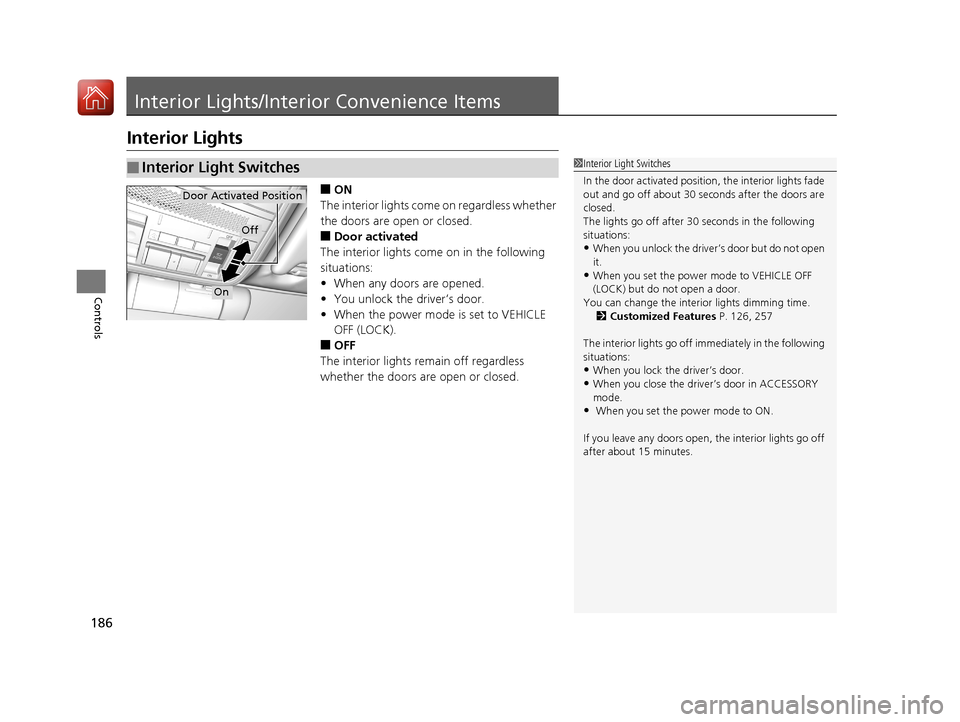
■ON
The interior lights come on regardless whether
the doors are open or closed.
■Door activated
The interior lights come on in the following
situations:
• When any doors are opened.
• You unlock the driver’s door.
• When the power mode is set to VEHICLE
OFF (LOCK).
■OFF
The interior lights remain off regardless
whether the doors are open or closed.
■Interior Light Switches1 Interior Light Switches
In the door activated position, the interior lights fade
out and go off about 30 se conds after the doors are
closed.
The lights go off after 30 seconds in the following
situations:
•When you unlock the driver’s door but do not open
it.
•When you set the power mode to VEHICLE OFF
(LOCK) but do not open a door.
You can change the interi or lights dimming time.
2 Customized Features P. 126, 257
The interior lights go off i mmediately in the following
situations:
•When you lock the driver’s door.
•When you close the driver’s door in ACCESSORY
mode.
• When you set the power mode to ON.
If you leave any doors open, the interior lights go off
after about 15 minutes.
Door Activated Position
Off
On
17 ACURA TLX-31TZ36200.book 186 ページ 2016年6月10日 金曜日 午後6時39分
Page 188 of 553
187
uuInterior Lights/Interior Convenience Items uInterior Lights
Controls
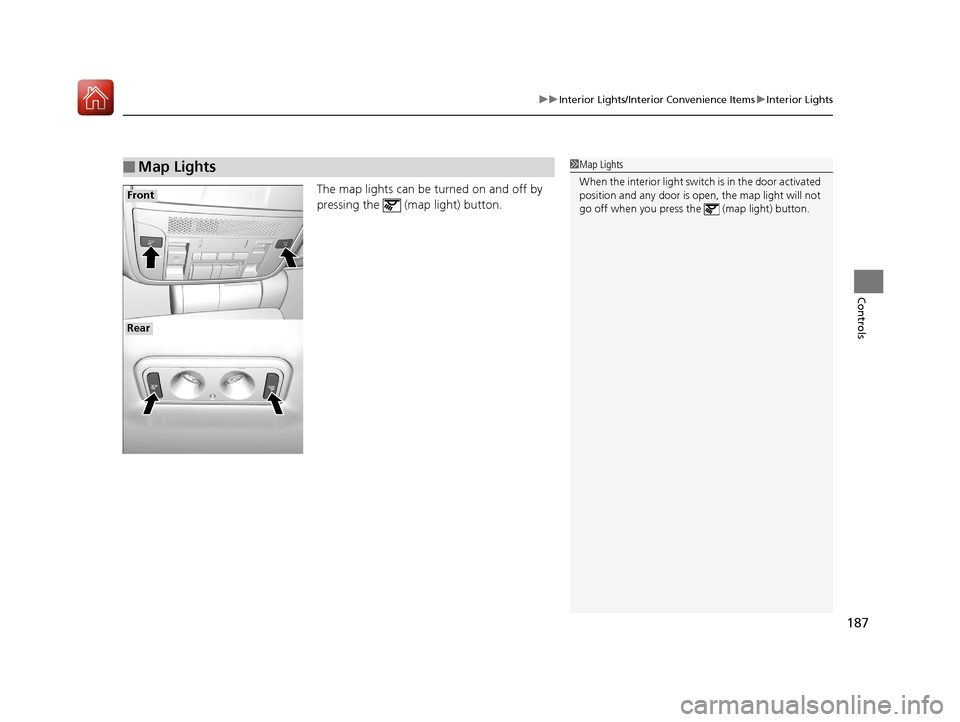
The map lights can be turned on and off by
pressing the (map light) button.
■Map Lights1Map Lights
When the interior light swit ch is in the door activated
position and any door is open, the map light will not
go off when you press th e (map light) button.
Front
Rear
17 ACURA TLX-31TZ36200.book 187 ページ 2016年6月10日 金曜日 午後6時39分
Page 189 of 553
188
uuInterior Lights/Interior Convenience Items uInterior Convenience Items
Controls
Interior Convenience Items
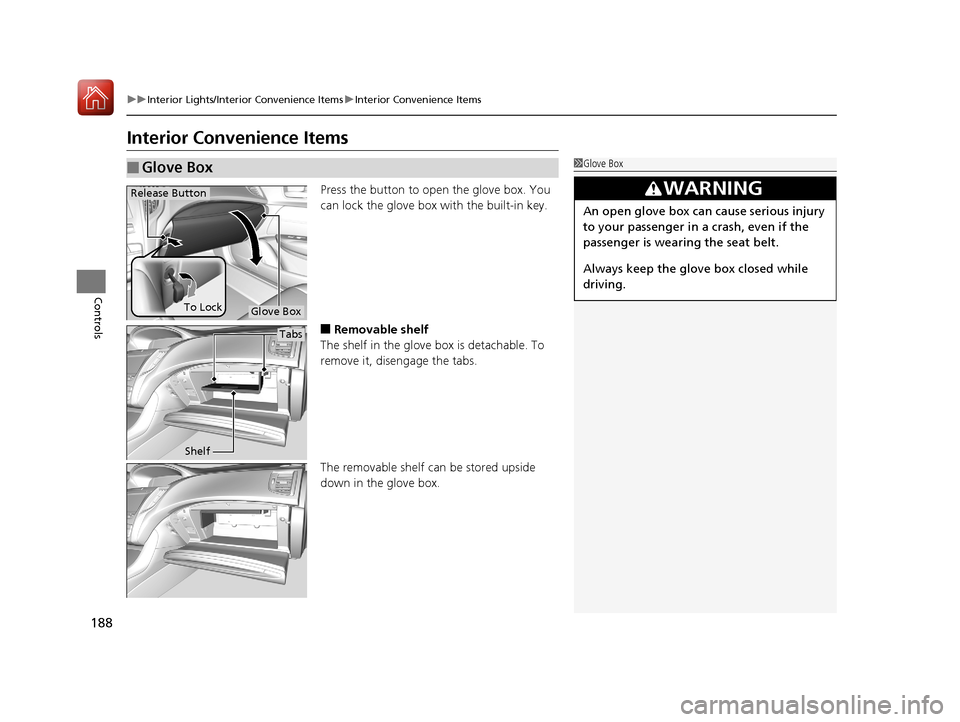
Press the button to open the glove box. You
can lock the glove box with the built-in key.
■Removable shelf
The shelf in the glove box is detachable. To
remove it, disengage the tabs.
The removable shelf can be stored upside
down in the glove box.
■Glove Box1 Glove Box
3WARNING
An open glove box can cause serious injury
to your passenger in a crash, even if the
passenger is wearing the seat belt.
Always keep the glove box closed while
driving.
Glove Box
Release Button
To Lock
Tabs
Shelf
17 ACURA TLX-31TZ36200.book 188 ページ 2016年6月10日 金曜日 午後6時39分
Page 190 of 553
Continued189
uuInterior Lights/Interior Convenience Items uInterior Convenience Items
Controls
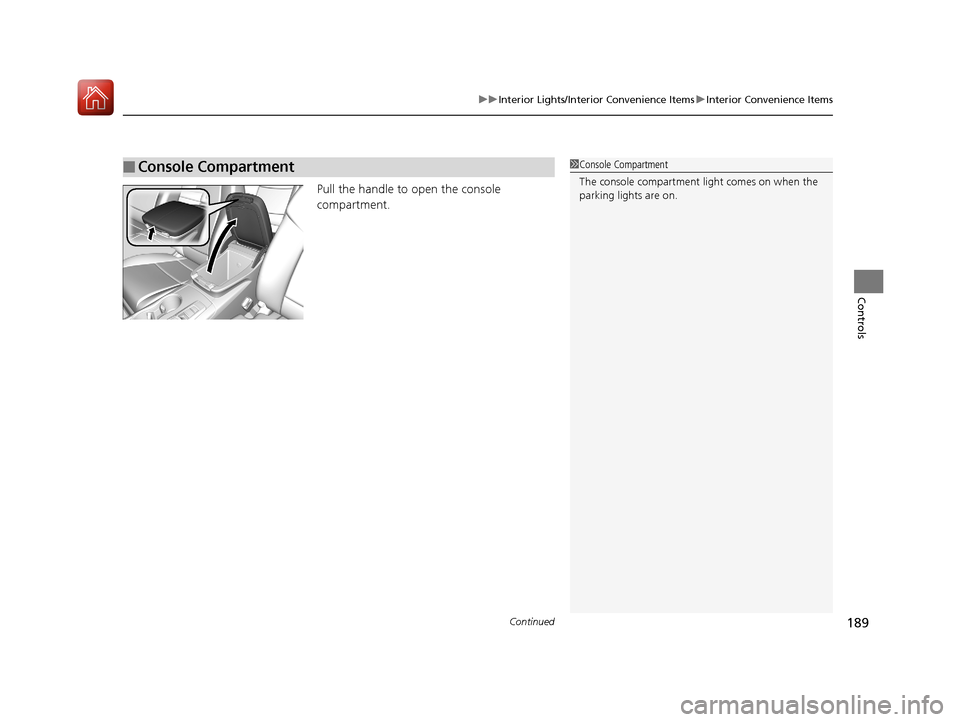
Pull the handle to open the console
compartment.
■Console Compartment1Console Compartment
The console compartment light comes on when the
parking lights are on.
17 ACURA TLX-31TZ36200.book 189 ページ 2016年6月10日 金曜日 午後6時39分
Page 191 of 553
190
uuInterior Lights/Interior Convenience Items uInterior Convenience Items
Controls
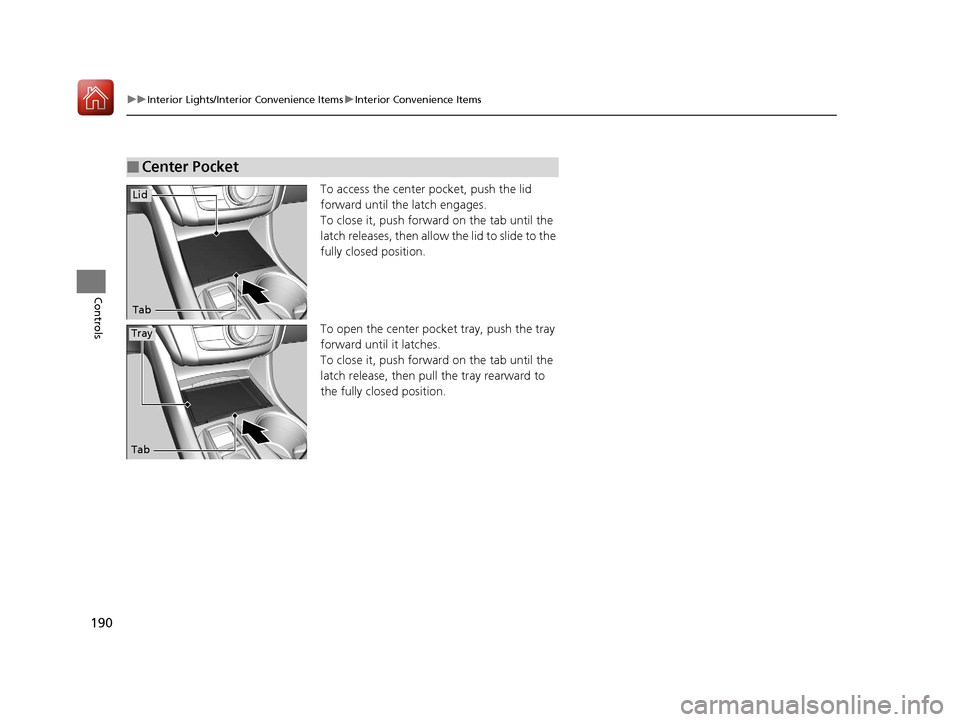
To access the center pocket, push the lid
forward until the latch engages.
To close it, push forward on the tab until the
latch releases, then allow the lid to slide to the
fully closed position.
To open the center pocket tray, push the tray
forward until it latches.
To close it, push forward on the tab until the
latch release, then pull the tray rearward to
the fully closed position.
■Center Pocket
Tab
Lid
Tab
Tray
17 ACURA TLX-31TZ36200.book 190 ページ 2016年6月10日 金曜日 午後6時39分