AC system Acura TLX 2018 Owner's Manual
[x] Cancel search | Manufacturer: ACURA, Model Year: 2018, Model line: TLX, Model: Acura TLX 2018Pages: 589, PDF Size: 35.45 MB
Page 199 of 589

uuInterior Lights/Interior Convenience Items uInterior Convenience Items
198
Controls
1Wireless Charger*
In the following cases, ch arging may stop or not start:•The device is already fully charged.
•The temperature of the device is extremely high
while charging.
•You are at a place that emits strong
electromagnetic waves or noises, such as TV
station, electric power plant, or gas station.
A device may not charge if the size or shape of its
chargeable side is not appropriate for use with the
charging area.
Not all devices are compatible with the system.
During the charging phase, it is normal for the
charging area and de vice to heat up.
Charging may be briefl y interrupted when:
•All the doors or the trunk are closed
- to avoid interference with the proper functioning
of the keyless access system.
•The position of the device is altered.
•The radio is scanning for AM stations.
Do not charge more than one device at a time on a
charging area.
* Not available on all models
18 ACURA TLX-31TZ36300.book 198 ページ 2017年2月21日 火曜日 午後2時32分
Page 203 of 589
uuInterior Lights/Interior Convenience Items uInterior Convenience Items
202
Controls
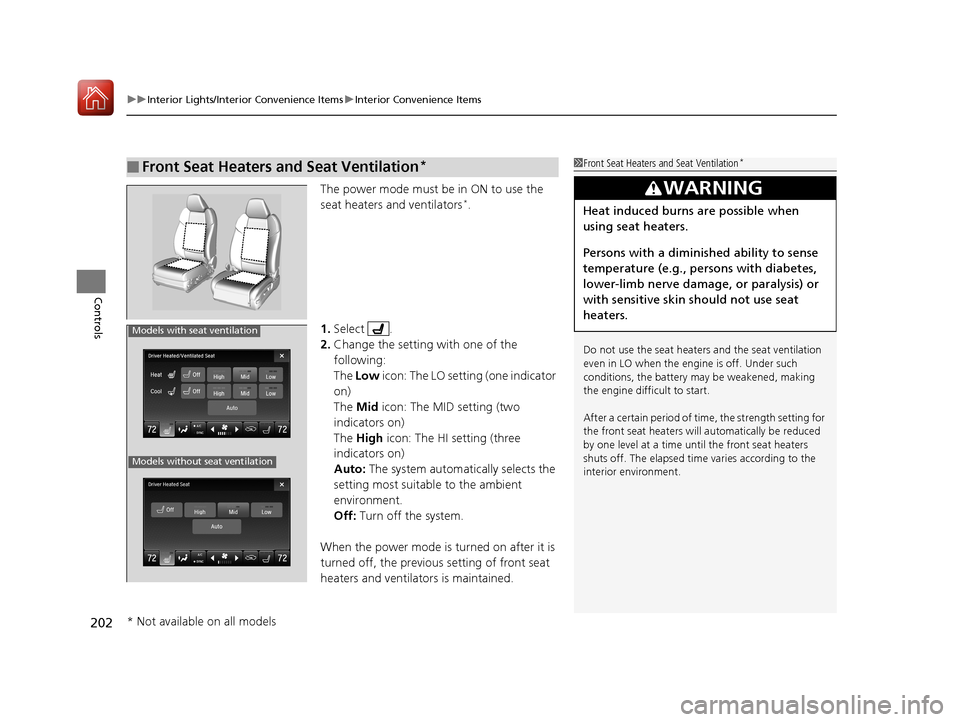
The power mode must be in ON to use the
seat heaters and ventilators*.
1. Select .
2. Change the setting with one of the
following:
The Low icon: The LO setting (one indicator
on)
The Mid icon: The MID setting (two
indicators on)
The High icon: The HI setting (three
indicators on)
Auto: The system automatically selects the
setting most suitable to the ambient
environment.
Off: Turn off the system.
When the power mode is turned on after it is
turned off, the previous setting of front seat
heaters and ventilators is maintained.
■Front Seat Heaters and Seat Ventilation*1 Front Seat Heaters and Seat Ventilation*
Do not use the seat heater s and the seat ventilation
even in LO when the engine is off. Under such
conditions, the battery ma y be weakened, making
the engine difficult to start.
After a certain period of time, the strength setting for
the front seat heaters will automatically be reduced
by one level at a time unt il the front seat heaters
shuts off. The elapsed time varies according to the
interior environment.
3WARNING
Heat induced burns are possible when
using seat heaters.
Persons with a diminished ability to sense
temperature (e.g., persons with diabetes,
lower-limb nerve damage, or paralysis) or
with sensitive skin should not use seat
heaters.
Models without seat ventilation
Models with seat ventilation
* Not available on all models
18 ACURA TLX-31TZ36300.book 202 ページ 2017年2月21日 火曜日 午後2時32分
Page 205 of 589
204
Controls
Climate Control System
Using Automatic Climate Control
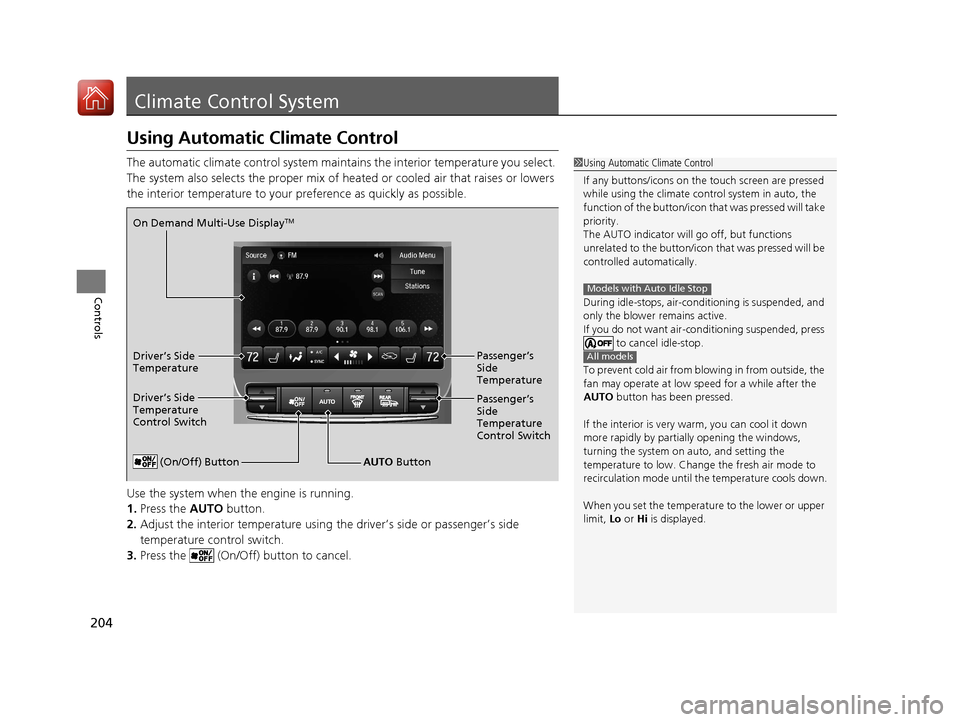
The automatic climate control system maintains the interior temperature you select.
The system also selects the proper mix of heated or cooled air that raises or lowers
the interior temperature to your pr eference as quickly as possible.
Use the system when the engine is running.
1. Press the AUTO button.
2. Adjust the interior temperature using the driver’s side or passenger’s side
temperature control switch.
3. Press the (On/Off) button to cancel.1Using Automatic Climate Control
If any buttons/icons on the touch screen are pressed
while using the climate control system in auto, the
function of the button/icon th at was pressed will take
priority.
The AUTO indicator will go off, but functions
unrelated to the button/icon that was pressed will be
controlled automatically.
During idle-stops, air-conditioning is suspended, and
only the blower remains active.
If you do not want air-cond itioning suspended, press
to cancel idle-stop.
To prevent cold air from bl owing in from outside, the
fan may operate at low speed for a while after the
AUTO button has been pressed.
If the interior is very warm, you can cool it down
more rapidly by partial ly opening the windows,
turning the system on auto, and setting the
temperature to low. Change the fresh air mode to
recirculation mode until the temperature cools down.
When you set the temperat ure to the lower or upper
limit, Lo or Hi is displayed.
Models with Auto Idle Stop
All models
(On/Off) ButtonAUTO Button
On Demand Multi-Use Display
TM
Driver’s Side
Temperature
Control Switch
Passenger’s
Side
Temperature
Control Switch Passenger’s
Side
Temperature
Driver’s Side
Temperature
18 ACURA TLX-31TZ36300.book 204 ページ 2017年2月21日 火曜日 午後2時32分
Page 206 of 589
Continued205
uuClimate Control System uUsing Automatic Climate Control
Controls
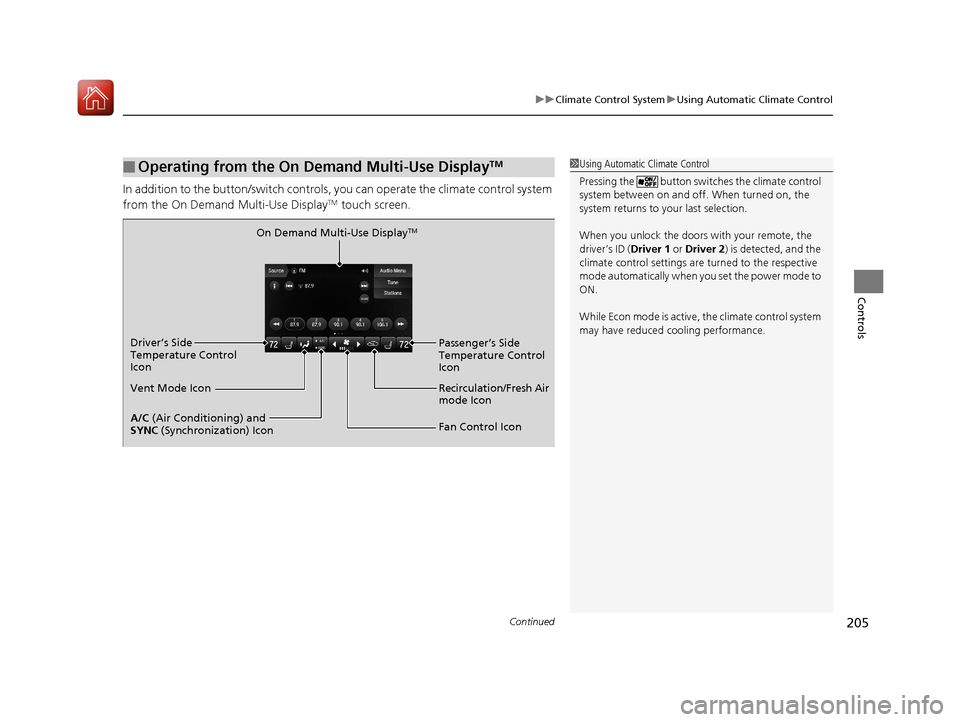
In addition to the button/sw itch controls, you can operate the climate control system
from the On Demand Multi-Use DisplayTM touch screen.
■Operating from the On Demand Multi-Use DisplayTM1 Using Automatic Climate Control
Pressing the button switch es the climate control
system between on and off. When turned on, the
system returns to your last selection.
When you unlock the doors with your remote, the
driver’s ID ( Driver 1 or Driver 2) is detected, and the
climate control settings are turned to the respective
mode automatically when you set the power mode to
ON.
While Econ mode is active, the climate control system
may have reduced c ooling performance.
On Demand Multi-Use DisplayTM
A/C (Air Conditioning) and
SYNC (Synchronization) Icon
Vent Mode Icon Driver’s Side
Temperature Control
Icon
Recirculation/Fresh Air
mode Icon
Fan Control Icon Passenger’s Side
Temperature Control
Icon
18 ACURA TLX-31TZ36300.book 205 ページ 2017年2月21日 火曜日 午後2時32分
Page 207 of 589

uuClimate Control System uUsing Automatic Climate Control
206
Controls
1. Select the driver’s or passenger’s side
temperature control icon.
2. Change the temperature setting from the
following:
Temperature bar : Select a point where your
desired temperature setting is.
Farther to the left is for a lower, and to the
right for a higher setting.
(+/(-: To raise or lower the temperature
setting one degree at a time.
While you select and hold
(+/(-, the
temperature decreases or increases.
Max Cool : To rapidly cool down the interior.
u The AUTO indicator goes off. The setting
returns to the previo usly selected value
when you select it again.
Max Heat : To rapidly warm up the interior.
u The AUTO indicator goes off. The setting
returns to the previo usly selected value
when you select it again.
■Changing the Interior Temperature Setting1 Using Automatic Climate Control
If you select the Max Cool or Max Heat during Auto
Idle Stop, the engine restarts automatically.
Models with Auto Idle StopThe side you selected.
Temperature Bar
18 ACURA TLX-31TZ36300.book 206 ページ 2017年2月21日 火曜日 午後2時32分
Page 208 of 589

Continued207
uuClimate Control System uUsing Automatic Climate Control
Controls
■Switching the vent mode
Select a desired vent mode icon, or Mode
Auto: The system automatically selects the
vent mode most suitable to the ambient
environment.
Vent mode
: Dashboard vents and back of the center
console
: Dashboard and floor vents, and back of
the center console : Floor vents
: Floor and defroster vents
■A/C on and off
1.Select A/C.
2. Select On or Off .
1Switching the vent mode
While the climate control system is in auto, Mode
Auto is highlighted.
18 ACURA TLX-31TZ36300.book 207 ページ 2017年2月21日 火曜日 午後2時32分
Page 209 of 589

uuClimate Control System uUsing Automatic Climate Control
208
Controls
■SYNC on and off
1.Select SYNC.
2. Select On for synchronization mode, and
Off for dual mode.
u When in synchronization mode, the
passenger’s side temperature becomes
the same as the driver’s side settings.
3. Adjust the temperature from the driver’s
side.
■Changing the fan speed
1.Select .
u When the left or right side of the
is selected, the fan speed level goes up or
down one level at a time.
2. Change the fan speed with one of the
following:
The fan speed level indicators: Select your
desired speed level. The smaller indicator is
for a slower speed, an d the larger for a
faster speed.
(+/(-: To go up or down one level at a
time.
Fan Auto : The system automatically selects
the fan speed most suitable to the ambient
environment.
1 SYNC on and off
When the system is not in SYNC mode, the driver’s
side temperature and th e front passenger’s side
temperature can be set separately.
You can also turn off SYNC mode by changing the
front passenger’s si de temperature.
1Changing the fan speed
While the climate control system is in auto, Fan Auto
is highlighted.
Fan Speed Level Indicators
18 ACURA TLX-31TZ36300.book 208 ページ 2017年2月21日 火曜日 午後2時32分
Page 210 of 589
Continued209
uuClimate Control System uUsing Automatic Climate Control
Controls
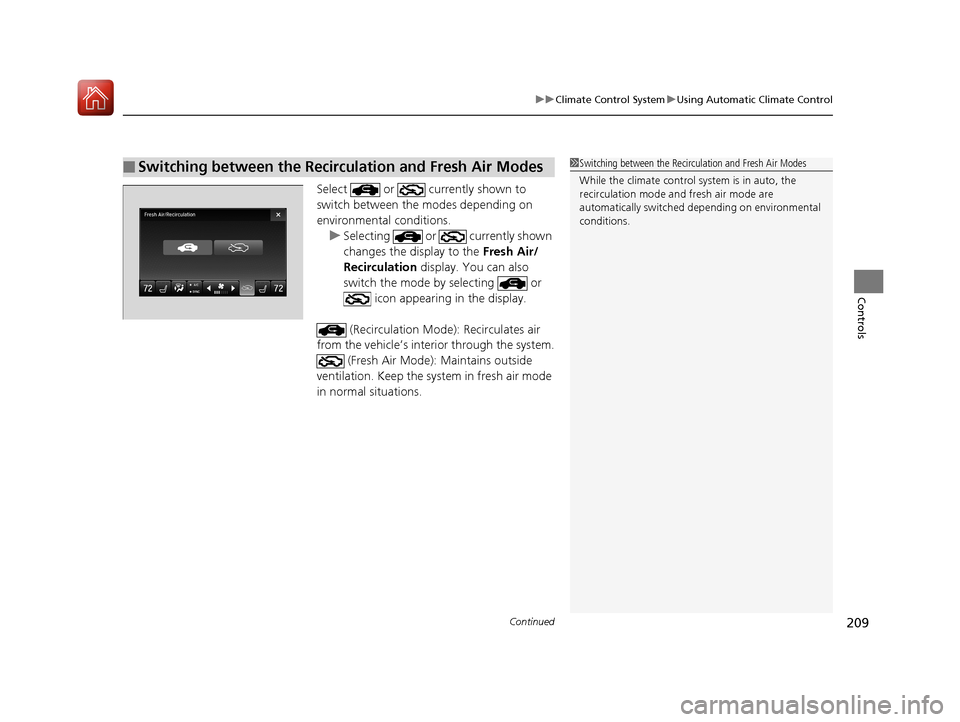
Select or currently shown to
switch between the modes depending on
environmental conditions.
u Selecting or currently shown
changes the display to the Fresh Air/
Recirculation display. You can also
switch the mode by selecting or icon appearing in the display.
(Recirculation Mode ): Recirculates air
from the vehicle’s interior through the system.
(Fresh Air Mode): Maintains outside
ventilation. Keep the system in fresh air mode
in normal situations.
■Switching between the Recirculation and Fresh Air Modes1 Switching between the Recirculation and Fresh Air Modes
While the climate control system is in auto, the
recirculation m ode and fresh air mode are
automatically switched de pending on environmental
conditions.
18 ACURA TLX-31TZ36300.book 209 ページ 2017年2月21日 火曜日 午後2時32分
Page 211 of 589
uuClimate Control System uUsing Automatic Climate Control
210
Controls
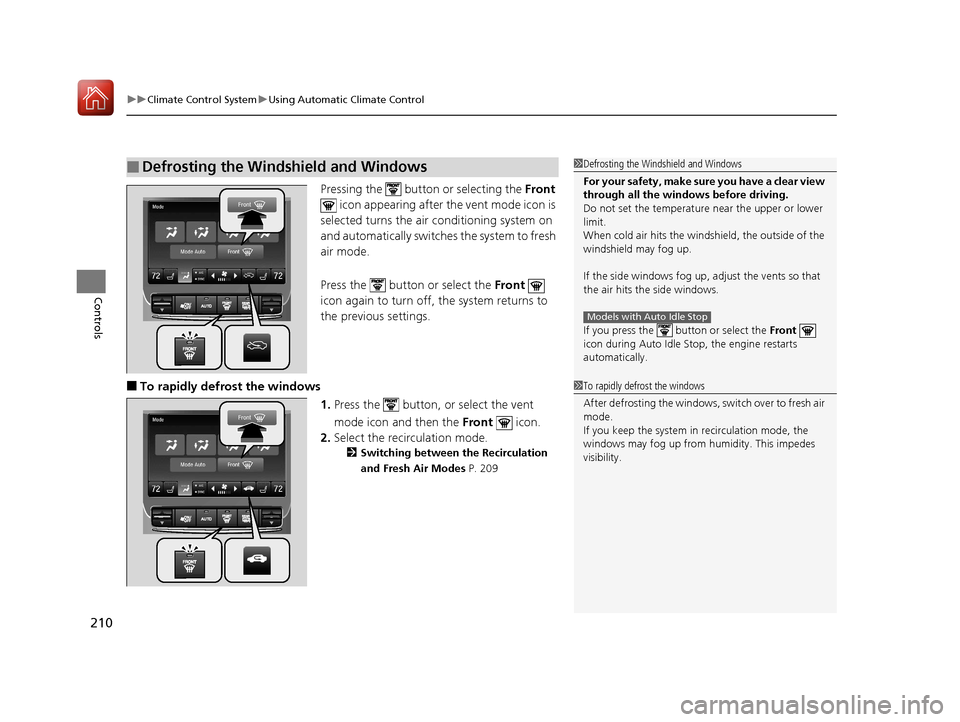
Pressing the button or selecting the Front
icon appearing after the vent mode icon is
selected turns the air conditioning system on
and automatically switches the system to fresh
air mode.
Press the button or select the Front
icon again to turn off, the system returns to
the previous settings.
■To rapidly defrost the windows
1.Press the button, or select the vent
mode icon and then the Front icon.
2. Select the recirculation mode.
2 Switching between the Recirculation
and Fresh Air Modes P. 209
■Defrosting the Windshield and Windows1Defrosting the Windshield and Windows
For your safety, make sure you have a clear view
through all the windows before driving.
Do not set the temperatur e near the upper or lower
limit.
When cold air hits the windshield, the outside of the
windshield may fog up.
If the side windows fog up, adjust the vents so that
the air hits th e side windows.
If you press the but ton or select the Front
icon during Auto Idle Stop, the engine restarts
automatically.
Models with Auto Idle Stop
1 To rapidly defrost the windows
After defrosting the windows, switch over to fresh air
mode.
If you keep the system in recirculation mode, the
windows may fog up from humidity. This impedes
visibility.
18 ACURA TLX-31TZ36300.book 210 ページ 2017年2月21日 火曜日 午後2時32分
Page 212 of 589
211
uuClimate Control System uAutomatic Climate Control Sensors
Controls
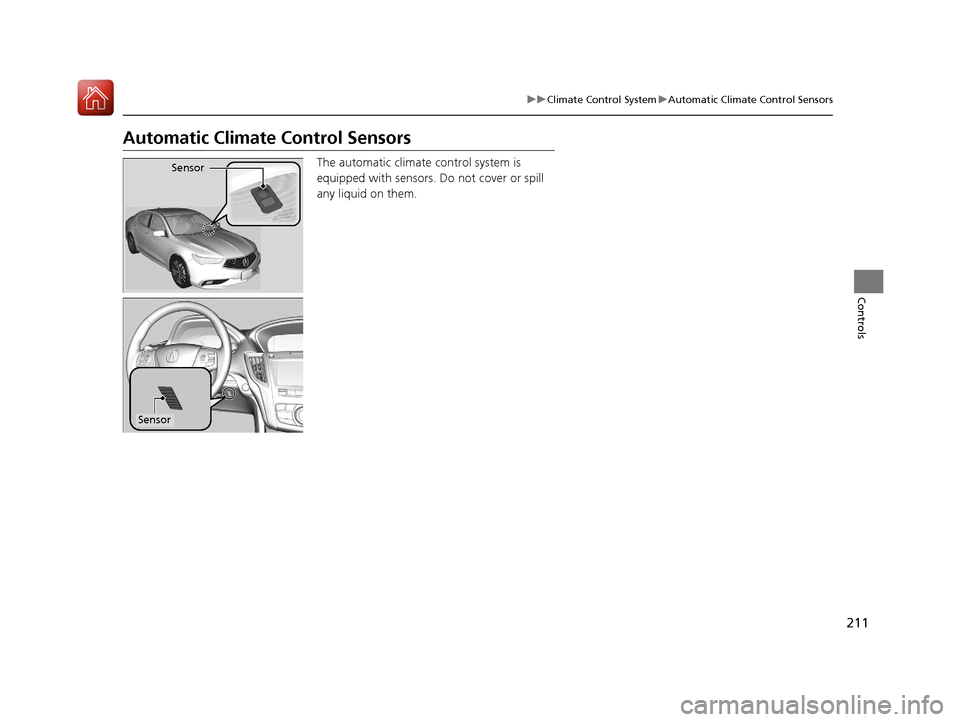
Automatic Climate Control Sensors
The automatic climate control system is
equipped with sensors. Do not cover or spill
any liquid on them.Sensor
Sensor
18 ACURA TLX-31TZ36300.book 211 ページ 2017年2月21日 火曜日 午後2時32分