radar Acura TLX 2018 User Guide
[x] Cancel search | Manufacturer: ACURA, Model Year: 2018, Model line: TLX, Model: Acura TLX 2018Pages: 589, PDF Size: 35.45 MB
Page 440 of 589
439
uuBraking uCollision Mitigation Braking SystemTM (CMBSTM)
Continued
Driving
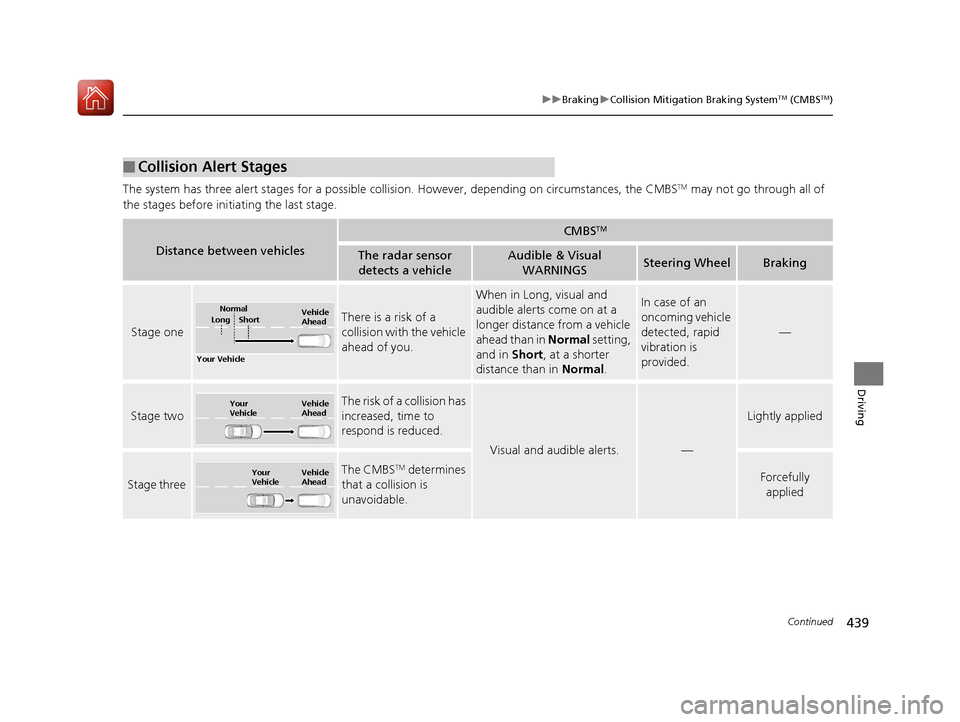
The system has three alert stages for a possible collis ion. However, depending on circumstances, the CMBSTM may not go through all of
the stages before initiating the last stage.
■Collision Alert Stages
Distance between vehicles
CMBSTM
The radar sensor detects a vehicleAudible & Visual WARNINGSSteering WheelBraking
Stage one
There is a risk of a
collision with the vehicle
ahead of you.
When in Long, visual and
audible alerts come on at a
longer distance from a vehicle
ahead than in Normal setting,
and in Short, at a shorter
distance than in Normal.In case of an
oncoming vehicle
detected, rapid
vibration is
provided.
—
Stage two
The risk of a collision has
increased, time to
respond is reduced.
Visual and audible alerts.—
Lightly applied
Stage three
The CMBSTM determines
that a collision is
unavoidable.Forcefully applied
Your Vehicle Vehicle
Ahead
Normal
Short
Long
Your
Vehicle Vehicle
Ahead
Your
VehicleVehicle
Ahead
18 ACURA TLX-31TZ36300.book 439 ページ 2017年2月21日 火曜日 午後2時32分
Page 442 of 589
Continued441
uuBraking uCollision Mitigation Braking SystemTM (CMBSTM)
Driving
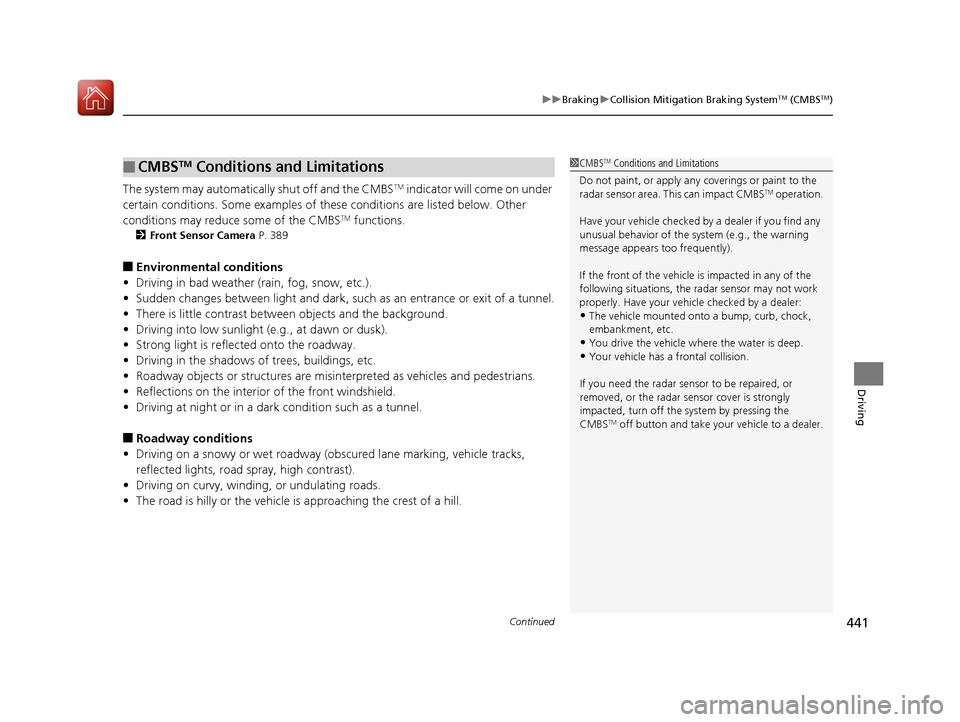
The system may automatically shut off and the CMBSTM indicator will come on under
certain conditions. Some examples of thes e conditions are listed below. Other
conditions may reduce some of the CMBS
TM functions.
2 Front Sensor Camera P. 389
■Environmental conditions
• Driving in bad weather (rain, fog, snow, etc.).
• Sudden changes between light and dark, such as an entrance or exit of a tunnel.
• There is little contrast between objects and the background.
• Driving into low sunlight (e.g., at dawn or dusk).
• Strong light is reflec ted onto the roadway.
• Driving in the shadows of trees, buildings, etc.
• Roadway objects or structures are misinterpreted as vehicles and pedestrians.
• Reflections on the interior of the front windshield.
• Driving at night or in a dark condition such as a tunnel.
■Roadway conditions
• Driving on a snowy or wet roadway (obs cured lane marking, vehicle tracks,
reflected lights, road spray, high contrast).
• Driving on curvy, winding, or undulating roads.
• The road is hilly or the vehicle is approaching the crest of a hill.
■CMBSTM Conditions and Limitations1CMBSTM Conditions and Limitations
Do not paint, or apply any coverings or paint to the
radar sensor area. This can impact CMBS
TM operation.
Have your vehicle checked by a dealer if you find any
unusual behavior of the system (e.g., the warning
message appears too frequently).
If the front of the vehicle is impacted in any of the
following situations, the ra dar sensor may not work
properly. Have your vehi cle checked by a dealer:
•The vehicle mounted onto a bump, curb, chock,
embankment, etc.
•You drive the vehicle where the water is deep.•Your vehicle has a frontal collision.
If you need the radar sensor to be repaired, or
removed, or the radar se nsor cover is strongly
impacted, turn off the system by pressing the
CMBS
TM off button and take your vehicle to a dealer.
18 ACURA TLX-31TZ36300.book 441 ページ 2017年2月21日 火曜日 午後2時32分
Page 443 of 589
442
uuBraking uCollision Mitigation Braking SystemTM (CMBSTM)
Driving
■Vehicle conditions
• Headlight lenses are dirty or the headlights are not properly adjusted.
• The outside of the windshie ld is blocked by dirt, mud, leaves, wet snow, etc.
• The inside of the windshield is fogged.
• An abnormal tire or wheel condition (wrong sized, varied size or construction,
improperly inflated, compact spare tire
*, etc.).
• When tire chains are installed.
• The vehicle is tilted due to a heav y load or suspension modifications.
• The camera temperature gets too high.
• Driving with the parking brake applied.
• When the radar sensor in the front grille gets dirty.
* Not available on all models
18 ACURA TLX-31TZ36300.book 442 ページ 2017年2月21日 火曜日 午後2時32分
Page 446 of 589
445
uuBraking uCollision Mitigation Braking SystemTM (CMBSTM)
Driving
The CMBSTM may activate even when you are aware of a vehicle ahead of you, or
when there is no vehicle ahead. Some examples of this are:
■When Passing
Your vehicle approaches another vehicle ah ead of you and you change lanes to pass.
■At an intersection
Your vehicle approaches or passes another ve hicle that is making a left or right turn.
■On a curve
When driving through curves, your vehicle comes to a point where an oncoming
vehicle is right in front of you.
■Through a low bridge at high speed
You drive under a low or na rrow bridge at high speed.
■Speed bumps, road work sites, train tracks, roadside objects, etc.
You drive over speed bumps, steel road plates, etc., or yo ur vehicle approaches train
tracks or roadside objects [such as a traffi c sign and guard rail] on a curve or, when
parking, stationary vehicles and walls.
■With Little Chance of a Collision1 Collision Mitigation Braking SystemTM (CMBSTM)
For the CMBS
TM to work properly:
Always keep the radar sensor cover clean.
Never use chemical solvents or polishing powder for
cleaning the sensor cover. Clean it with water or a
mild detergent.
18 ACURA TLX-31TZ36300.book 445 ページ 2017年2月21日 火曜日 午後2時32分
Page 453 of 589

452
uuParking Your Vehicle uCross Traffic Monitor*
Driving
Cross Traffic Monitor*
Monitors the rear corner areas using the radar sensors when reversing, and alerts
you if a vehicle approaching fro m a rear corner is detected.
The system is convenient when you are backing out of a parking space.1 Cross Traffic Monitor*
3CAUTION
Cross Traffic Monitor cannot detect all
approaching vehicles and may not detect
an approaching vehicle at all.
Failure to visually confirm that it is safe to
back up the vehicle before doing so may
result in a collision.
Do not solely rely on the system when
reversing; always also use your mirrors, and
look behind and to the sides of your vehicle
before reversing.
* Not available on all models
18 ACURA TLX-31TZ36300.book 452 ページ 2017年2月21日 火曜日 午後2時32分
Page 454 of 589

Continued453
uuParking Your Vehicle uCross Traffic Monitor*
Driving
The system activates when:
• The power mode is in ON.
• The Cross Traffic Monitor is turned on.
2 Cross Traffic Monitor On and Off P. 456
2 Customized Features P. 292
•The transmission is in (R.
• Your vehicle is moving at 3 mph (5 km/h) or
lower.
When a vehicle is detected approaching from a rear corner, Cross Traffic Monitor
alerts you with a buzzer and a displayed warning.
The system will not detect a vehicle that approaches from directly behind your
vehicle, nor will it provide alerts about a detected vehicle when it moves directly
behind your vehicle.
The system does not detect or provide alerts for a vehicle that is moving away from
your vehicle, and it may not detect or ale rt for pedestrians, bicycles, or stationary
objects.
■How the System Works1 Cross Traffic Monitor*
Cross Traffic Monitor may not detect or may delay
alerting an approaching vehi cle, or may alert without
an approaching vehicle under the following
conditions:
•An obstacle, such as a nother vehicle and a wall,
near your vehicle’s rear bumper, is blocking the
radar sensor’s scope.
•Your vehicle is moving at the speed of about 3 mph
(5 km/h) or higher.
•A vehicle is approaching at the speed other than
between about 6 mph (10 km/h) and 16 mph (25
km/h).
•The system picks up external interference such as
other radar sensors from an other vehicle or strong
radio wave transmitted fr om a facility nearby.
•Either corner of the rear bumper is covered with
snow, ice, mud or dirt.
•When there is bad weather.
•Your vehicle is on an incline.
•Your vehicle is tilted due to a heavy load in the rear.•Your vehicle is reversing towards a wall, a pole, a
vehicle, and so on.
•The rear bumper or the sensors have been
improperly repaired or the rear bumper has been
deformed. Have your vehi cle checked by a dealer.
Radar sensors:
Underneath the rear bumper
corners
* Not available on all models
18 ACURA TLX-31TZ36300.book 453 ページ 2017年2月21日 火曜日 午後2時32分
Page 559 of 589
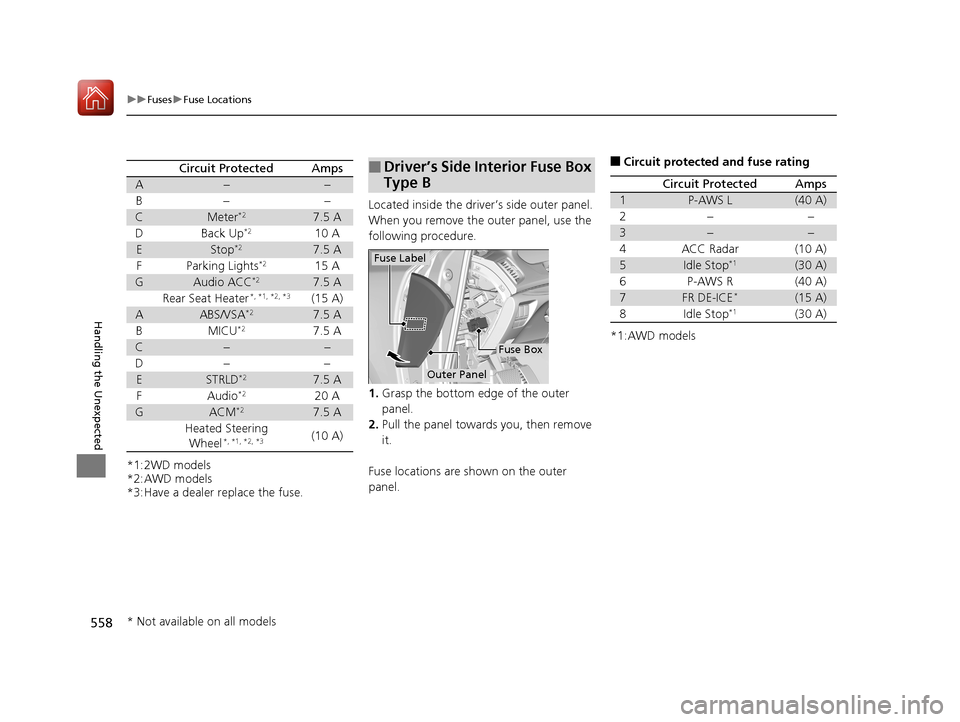
558
uuFuses uFuse Locations
Handling the Unexpected
*1:2WD models
*2:AWD models
*3:Have a dealer replace the fuse.
Circuit ProtectedAmps
A−−
B− −
CMeter*27.5 A
D Back Up*210 A
EStop*27.5 A
F Parking Lights*215 A
GAudio ACC*27.5 A
Rear Seat Heater*, *1, *2, *3(15 A)
AABS/VSA*27.5 A
BMICU*27.5 A
C−−
D− −
ESTRLD*27.5 A
F Audio*220 A
GACM*27.5 A
Heated Steering Wheel
*, *1, *2, *3(10 A)
Located inside the driver’s side outer panel.
When you remove the outer panel, use the
following procedure.
1. Grasp the bottom edge of the outer
panel.
2. Pull the panel towards you, then remove
it.
Fuse locations are shown on the outer
panel.
■Driver’s Side Interior Fuse Box
Type B
Outer Panel
Fuse Box
Fuse Label
■Circuit protected and fuse rating
*1:AWD models
Circuit ProtectedAmps
1P-AWS L(40 A)
2−−
3−−
4ACC Radar(10 A)
5Idle Stop*1(30 A)
6P-AWS R(40 A)
7FR DE-ICE*(15 A)
8Idle Stop*1(30 A)
* Not available on all models
18 ACURA TLX-31TZ36300.book 558 ページ 2017年2月21日 火曜日 午後2時32分