radar Acura TLX 2018 Owner's Manual
[x] Cancel search | Manufacturer: ACURA, Model Year: 2018, Model line: TLX, Model: Acura TLX 2018Pages: 589, PDF Size: 35.45 MB
Page 23 of 589
22
Quick Reference Guide
AcuraWatchTM
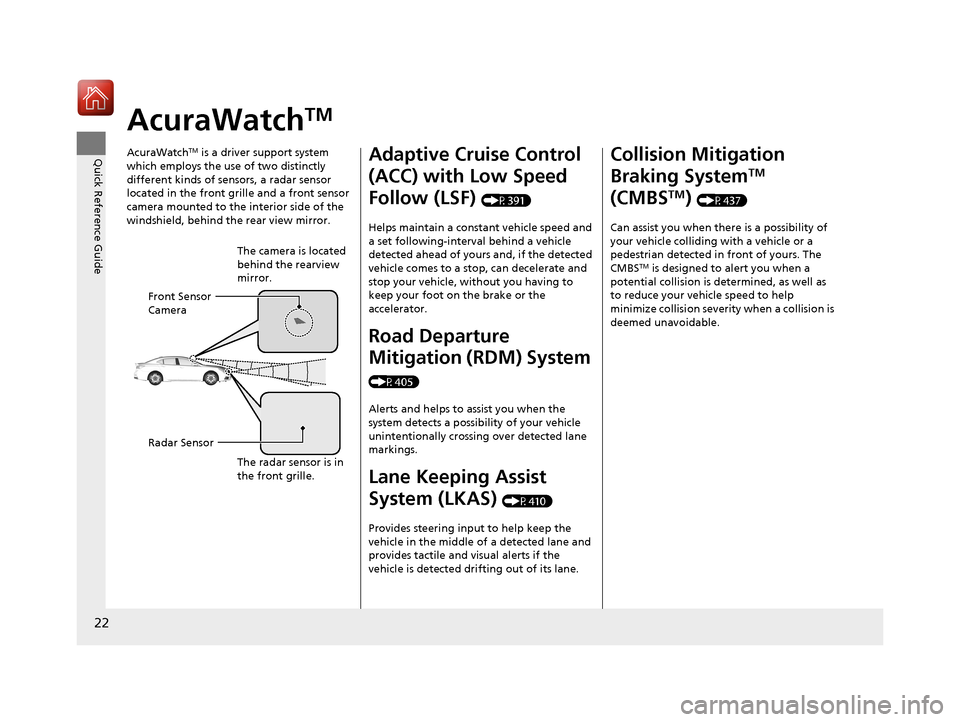
AcuraWatchTM is a driver support system
which employs the use of two distinctly
different kinds of sensors, a radar sensor
located in the front grille and a front sensor
camera mounted to the interior side of the
windshield, behind the rear view mirror.
The camera is located
behind the rearview
mirror.
Front Sensor
Camera
Radar Sensor
The radar sensor is in
the front grille.
Adaptive Cruise Control
(ACC) with Low Speed
Follow (LSF)
(P391)
Helps maintain a constant vehicle speed and
a set following-interval behind a vehicle
detected ahead of yours and, if the detected
vehicle comes to a stop, can decelerate and
stop your vehicle, wi thout you having to
keep your foot on the brake or the
accelerator.
Road Departure
Mitigation (RDM) System
(P405)
Alerts and helps to assist you when the
system detects a possibility of your vehicle
unintentionally crossing over detected lane
markings.
Lane Keeping Assist
System (LKAS)
(P410)
Provides steering input to help keep the
vehicle in the middle of a detected lane and
provides tactile and visual alerts if the
vehicle is detected drifting out of its lane.
Collision Mitigation
Braking System
TM
(CMBS
TM) (P437)
Can assist you when there is a possibility of
your vehicle colliding with a vehicle or a
pedestrian detected in front of yours. The
CMBS
TM is designed to alert you when a
potential collision is determined, as well as
to reduce your vehicle speed to help
minimize collision severity when a collision is
deemed unavoidable.
18 ACURA TLX-31TZ36300.book 22 ページ 2017年2月21日 火曜日 午後2時32分
Page 87 of 589
86
uuIndicators u
Instrument Panel
IndicatorNameOn/BlinkingExplanationMessage
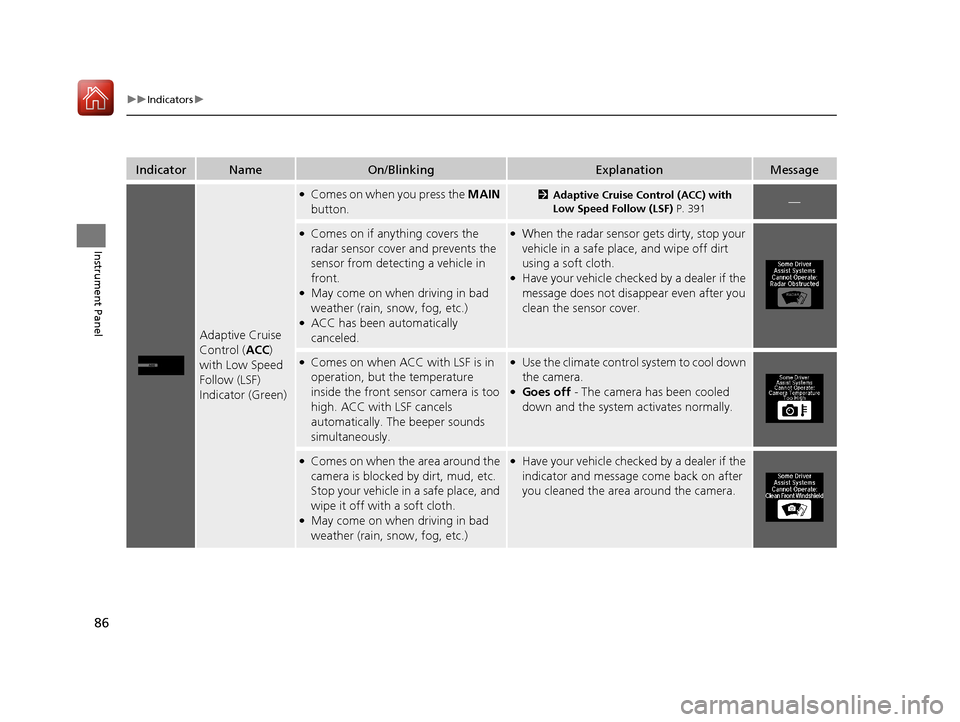
Adaptive Cruise
Control (ACC )
with Low Speed
Follow (LSF)
Indicator (Green)
●Comes on when you press the MAIN
button.2 Adaptive Cruise Control (ACC) with
Low Speed Follow (LSF) P. 391—
●Comes on if anything covers the
radar sensor cover and prevents the
sensor from detecting a vehicle in
front.
●May come on when driving in bad
weather (rain, snow, fog, etc.)
●ACC has been automatically
canceled.
●When the radar sensor gets dirty, stop your
vehicle in a safe place, and wipe off dirt
using a soft cloth.
●Have your vehicle checked by a dealer if the
message does not disappear even after you
clean the sensor cover.
●Comes on when ACC with LSF is in
operation, but the temperature
inside the front sensor camera is too
high. ACC with LSF cancels
automatically. The beeper sounds
simultaneously.●Use the climate control system to cool down
the camera.
●Goes off - The camera has been cooled
down and the system activates normally.
●Comes on when the area around the
camera is blocked by dirt, mud, etc.
Stop your vehicle in a safe place, and
wipe it off with a soft cloth.
●May come on when driving in bad
weather (rain, snow, fog, etc.)
●Have your vehicle checked by a dealer if the
indicator and message come back on after
you cleaned the area around the camera.
18 ACURA TLX-31TZ36300.book 86 ページ 2017年2月21日 火曜日 午後2時32分
Page 92 of 589

91
uuIndicators u
Instrument Panel
IndicatorNameOn/BlinkingExplanationMessage
Collision
Mitigation
Braking System
TM
(CMBSTM)
Indicator
●Comes on when the CMBSTM system
shuts itself off.●Stays on - The area around the camera is
blocked by dirt, mud, etc. Stop your vehicle
in a safe place, and wipe it off with a soft
cloth.
2 Front Sensor Camera P. 389
●When the radar sensor gets dirty, stop your
vehicle in a safe place, and wipe off dirt
using a soft cloth.
●Have your vehicle checked by a dealer if the
message does not disappear even after you
clean the sensor cover.
2Collision Mitigation Braking SystemTM
(CMBSTM) P. 437
●Stays on - The temperature inside the
camera is too high. Us e the climate control
system to cool down the camera. The
system activates wh en the temperature
inside the camera cools down.
2 Front Sensor Camera P. 389
18 ACURA TLX-31TZ36300.book 91 ページ 2017年2月21日 火曜日 午後2時32分
Page 392 of 589
391
uuWhen Driving uAdaptive Cruise Control (ACC) with Low Speed Follow (LSF)
Continued
Driving
Adaptive Cruise Control (ACC) with Low Speed
Follow (LSF)
Helps maintain a constant vehicle speed an d a set following-interval behind a vehicle
detected ahead of yours and, if the detect ed vehicle comes to a stop, can decelerate
and stop your ve hicle, without yo u having to keep your foot on the brake or the
accelerator.
When ACC with LSF slows your vehicle by applying the brakes, your vehicle’s brake
lights will illuminate.
1 Adaptive Cruise Control (ACC) with Low Speed Follow (LSF)
Important Reminder
As with any system, there are limits to ACC with LSF.
Use the brake pedal whenever necessary, and always
keep a safe interval between your vehicle and other
vehicles.
3WARNING
Improper use of ACC wi th LSF can lead to a
crash.
Use ACC with LSF only when driving on
expressways or freeways and in good
weather conditions.
3WARNING
ACC with LSF has limited braking capability
and may not stop your vehicle in time to
avoid a collision with a vehicle that quickly
stops in front of you.
Always be prepared to apply the brake
pedal if the conditions require.
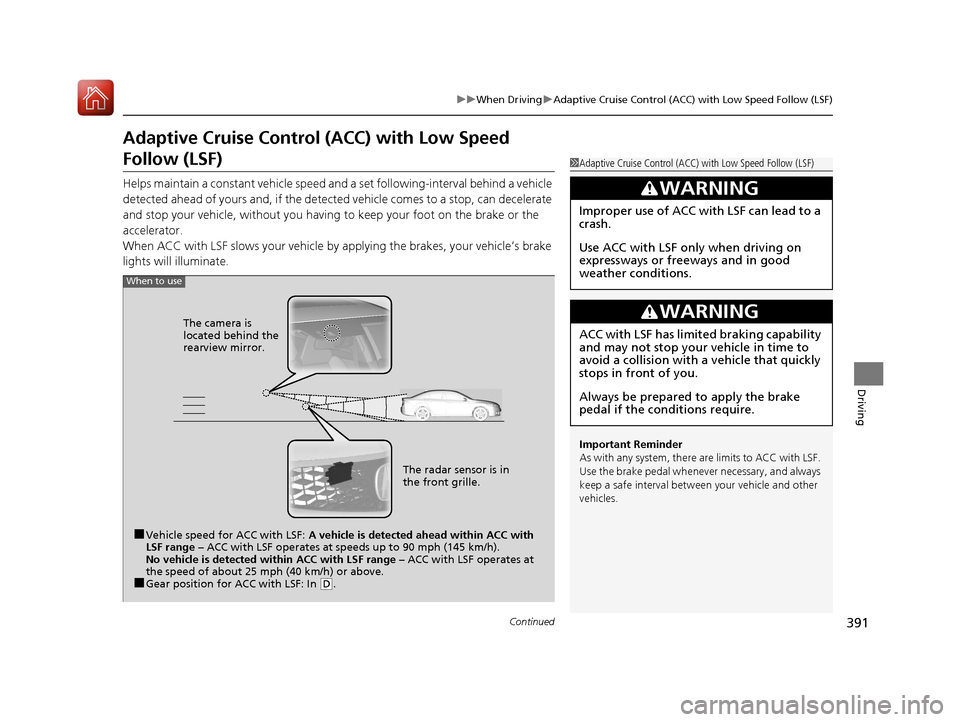
When to use
■Vehicle speed for ACC with LSF: A vehicle is detected ahead within ACC with
LSF range – ACC with LSF operates at speeds up to 90 mph (145 km/h).
No vehicle is detected within ACC with LSF range – ACC with LSF operates at
the speed of about 25 mph (40 km/h) or above.
■Gear position for ACC with LSF: In ( D. The radar sensor is in
the front grille.
The camera is
located behind the
rearview mirror.
18 ACURA TLX-31TZ36300.book 391 ページ 2017年2月21日 火曜日 午後2時32分
Page 397 of 589
uuWhen Driving uAdaptive Cruise Control (ACC) with Low Speed Follow (LSF)
396
Driving
The system may automatically shut off and the ACC indicator will come on under
certain conditions. Some examples of th ese conditions are listed below. Other
conditions may reduce some of the ACC functions.
2 Front Sensor Camera P. 389
■Environmental conditions
Driving in bad weather (r ain, fog, snow, etc.).
■Roadway conditions
Driving on a snowy or wet roadway (obscure d lane marking, vehicle tracks, reflected
lights, road spray, high contrast).
■Vehicle conditions
• The outside of the windshie ld is blocked by dirt, mud, leaves, wet snow, etc.
• An abnormal tire or wheel condition (Wrong sized, varied size or construction,
improperly inflated, compact spare tire
*, etc.).
• The camera temperature gets too high.
• The parking brake is applied.
• When the front grille is dirty.
• The vehicle is tilted due to a heav y load or suspension modifications.
• When tire chains are installed.
■ACC with LSF Conditions and Limitations1ACC with LSF Conditions and Limitations
The radar sensor for ACC with LSF is shared with the
Collision Mitigati on Braking System
TM (CMBSTM).
2 Collision Mitigation Braking SystemTM
(CMBSTM) P. 437
You can read about handling information for the
camera equipped with this system. 2 Front Sensor Camera P. 389
Always keep the radar sensor cover clean.
Never use chemical solvents or polishing powder for
cleaning the sensor cover. Clean it with water or a
mild detergent.
Do not put a sticker on the radar sensor cover or
replace the radar sensor cover.
If you need the radar sensor to be repaired, or
removed, or the radar se nsor cover is strongly
impacted, turn off the system by pressing the MAIN
button and take your vehicle to a dealer.
Have your vehicle checked by a dealer if you find any
unusual behavior of the system (e.g., the warning
message appears too frequently).
* Not available on all models
18 ACURA TLX-31TZ36300.book 396 ページ 2017年2月21日 火曜日 午後2時32分
Page 403 of 589
uuWhen Driving uAdaptive Cruise Control (ACC) with Low Speed Follow (LSF)
402
Driving
■Automatic cancellation
The beeper sounds and a message appears on the multi-information display when
ACC with LSF is automatically canceled. An y of these conditions may cause the ACC
with LSF to automatically cancel:
• Bad weather (rain, fog, snow, etc.)
• When the radar sensor in the front grille gets dirty.
• The vehicle ahead of you cannot be detected.
• An abnormal tire condition is detected, or the tires are skidding.
• Driving on a mountainous road, or driving off road for extended periods.
• Abrupt steering wheel movement.
• When the ABS, VSA ® or CMBS
TM is activated.
• When the ABS or VSA ® system indicator comes on.
• When the vehicle is stopped on a very steep slope.
• When you manually apply the parking brake.
• When the detected vehicle within the ACC with LSF range is too close to your
vehicle.
• The camera behind the rearview mirror, or the area around the camera, including
the windshield, gets dirty.
The ACC with LSF automatic cancellation can be also triggered by the following
causes. In these cases, the parking brake will be automatically applied.
• The driver’s seat belt is unfastened when the vehicl e is stationary.
• The vehicle stops for mo re than 10 minutes.
• The engine is turned off.
1Automatic cancellation
Even though ACC with LSF has been automatically
canceled, you can still resu me the prior set speed.
Wait until the condition that caused ACC with LSF to
cancel improves, then press the RES/+/SET/– switch
up or down.
18 ACURA TLX-31TZ36300.book 402 ページ 2017年2月21日 火曜日 午後2時32分
Page 422 of 589
421
uuWhen Driving uBlind spot information (BSI) System*
Continued
Driving
Blind spot informa tion (BSI) System*
Is designed to detect vehicles in specified alert zones adjacent to your vehicle,
particularly in harder to see areas commonly known as “blind spots.”
When the system detects vehicles approach ing from behind in adjacent lanes, the
appropriate indicator comes on for a few seconds, providing assistance when you
change lanes.
■How the system works
1 Blind spot inform ation (BSI) System*
Important Safety Reminder
Like all assistance systems, BSI has limitations. Over
reliance on BSI may re sult in a collision.
The system is for your convenience only. Even if an
object is within the alert zone, the following
situations may occur.
•The BSI alert indicator may not come on due to
obstruction (splashes, et c.) even without the Blind
Spot Info Not Available multi-information
display appearing.
•The BSI alert indicator may come on even with the
message appearing.
3WARNING
Failure to visually confirm that it is safe to
change lanes before doing so may result in
a crash and serious injury or death.
Do not rely only on the blind spot
information system wh en changing lanes.
Always look in your mirrors, to either side
of your vehicle, and behind you for other
vehicles before changing lanes.
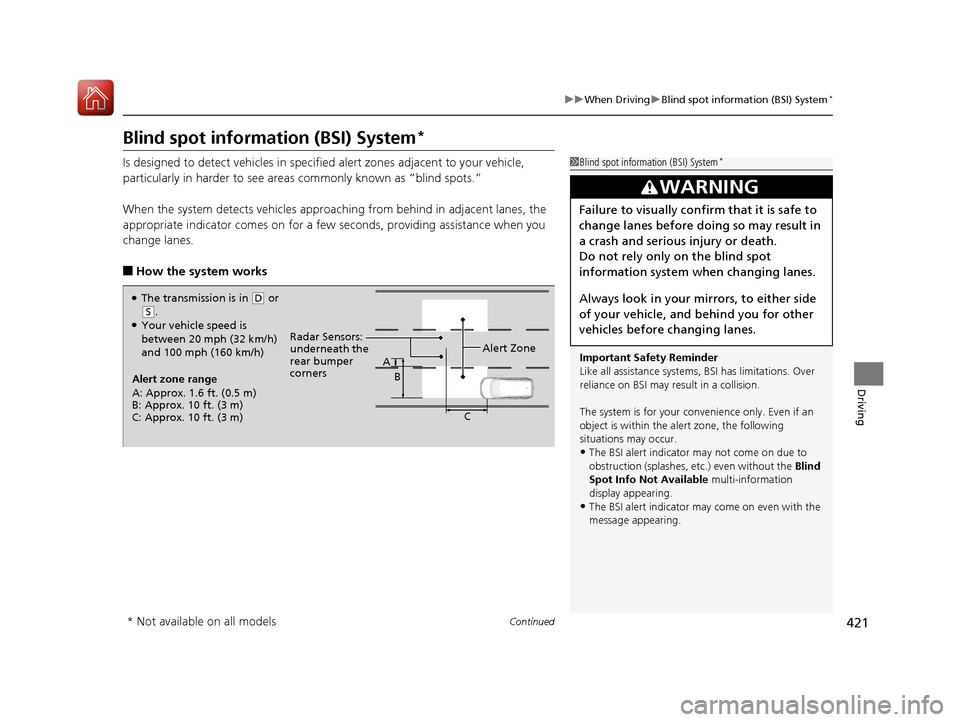
●The transmission is in ( D or
(S.●Your vehicle speed is
between 20 mph (32 km/h)
and 100 mph (160 km/h)
Alert zone range
A: Approx. 1.6 ft. (0.5 m)
B: Approx. 10 ft. (3 m)
C: Approx. 10 ft. (3 m) Radar Sensors:
underneath the
rear bumper
corners
Alert Zone
A
B
C
* Not available on all models
18 ACURA TLX-31TZ36300.book 421 ページ 2017年2月21日 火曜日 午後2時32分
Page 423 of 589
uuWhen Driving uBlind spot information (BSI) System*
422
Driving
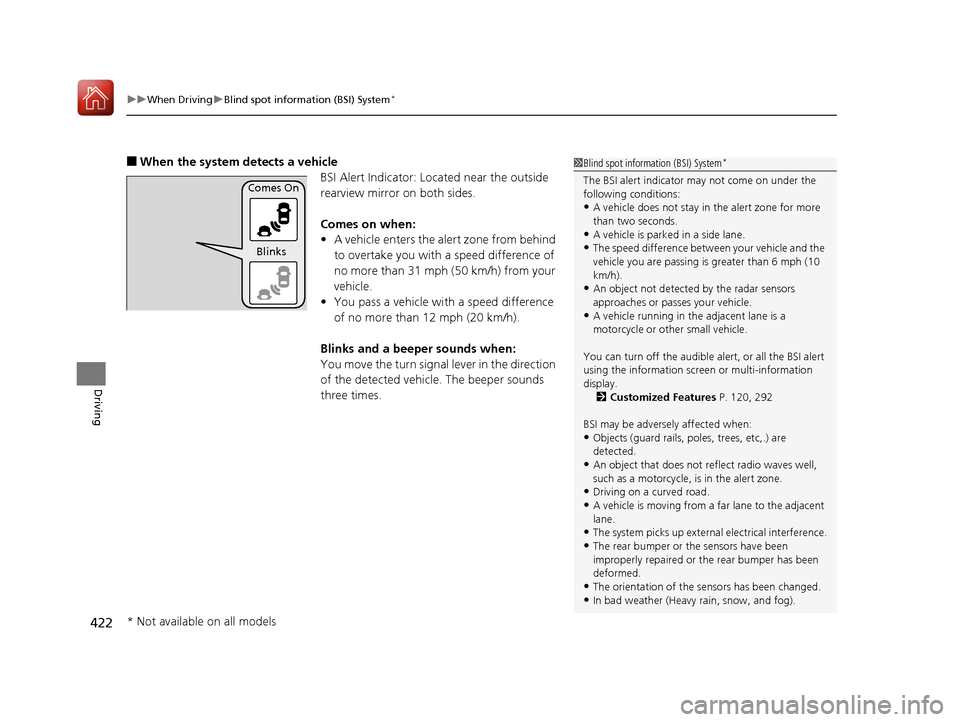
■When the system detects a vehicle
BSI Alert Indicator: Located near the outside
rearview mirror on both sides.
Comes on when:
•A vehicle enters the alert zone from behind
to overtake you with a speed difference of
no more than 31 mph (50 km/h) from your
vehicle.
• You pass a vehicle with a speed difference
of no more than 12 mph (20 km/h).
Blinks and a beeper sounds when:
You move the turn signal lever in the direction
of the detected vehicle. The beeper sounds
three times.1 Blind spot inform ation (BSI) System*
The BSI alert indicator may not come on under the
following conditions:
•A vehicle does not stay in the alert zone for more
than two seconds.
•A vehicle is parked in a side lane.
•The speed difference betw een your vehicle and the
vehicle you are passing is greater than 6 mph (10
km/h).
•An object not detected by the radar sensors
approaches or passes your vehicle.
•A vehicle running in the adjacent lane is a
motorcycle or other small vehicle.
You can turn off the audible alert, or all the BSI alert
using the information screen or multi-information
display. 2 Customized Features P. 120, 292
BSI may be adversel y affected when:
•Objects (guard rails, poles, trees, etc,.) are
detected.
•An object that does not re flect radio waves well,
such as a motorcycle, is in the alert zone.
•Driving on a curved road.
•A vehicle is moving from a far lane to the adjacent
lane.
•The system picks up external electrical interference.
•The rear bumper or the sensors have been
improperly repaired or the rear bumper has been
deformed.
•The orientation of the sensors has been changed.
•In bad weather (Heavy rain, snow, and fog).
Comes On
Blinks
* Not available on all models
18 ACURA TLX-31TZ36300.book 422 ページ 2017年2月21日 火曜日 午後2時32分
Page 424 of 589
423
uuWhen Driving uBlind spot information (BSI) System*
Driving
1Blind spot inform ation (BSI) System*
For a proper BSI use:•Always keep the rear bumper corner area clean.
•Do not cover the rear bumper corner area with
labels or stickers of any kind.
•Take your vehicle to a dealer if you need the rear
bumper corner area or th e radar sensors to be
repaired, or the rear bumper corner area is strongly
impacted.
The system does not operate when in
( R.
* Not available on all models
18 ACURA TLX-31TZ36300.book 423 ページ 2017年2月21日 火曜日 午後2時32分
Page 438 of 589
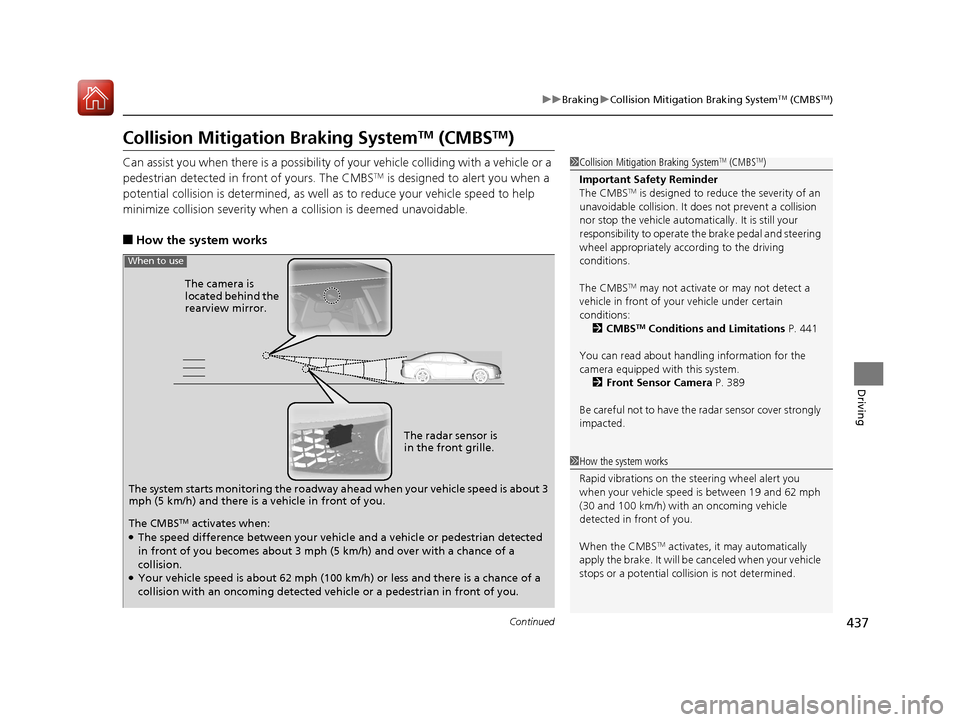
437
uuBraking uCollision Mitigation Braking SystemTM (CMBSTM)
Continued
Driving
Collision Mitigation Braking SystemTM (CMBSTM)
Can assist you when there is a possibility of your vehicle colliding with a vehicle or a
pedestrian detected in front of yours. The CMBSTM is designed to alert you when a
potential collision is determined, as well as to reduce your vehicle speed to help
minimize collision severity when a collision is deemed unavoidable.
■How the system works
1 Collision Mitigation Braking SystemTM (CMBSTM)
Important Safety Reminder
The CMBS
TM is designed to reduce the severity of an
unavoidable collision. It do es not prevent a collision
nor stop the vehicle automati cally. It is still your
responsibility to operate the brake pedal and steering
wheel appropriately acco rding to the driving
conditions.
The CMBS
TM may not activate or may not detect a
vehicle in front of y our vehicle under certain
conditions: 2 CMBS
TM Conditions and Limitations P. 441
You can read about handling information for the
camera equipped with this system. 2 Front Sensor Camera P. 389
Be careful not to have the radar sensor cover strongly
impacted.
The system starts monitoring the roadway ahead when your vehicle speed is about 3
mph (5 km/h) and there is a vehicle in front of you. The radar sensor is
in the front grille.
The camera is
located behind the
rearview mirror.
When to use
The CMBSTM activates when:●The speed difference between your vehicl
e and a vehicle or pedestrian detected
in front of you becomes about 3 mph (5 km/h) and over with a chance of a
collision.
●Your vehicle speed is about 62 mph (100 km/h) or less and there is a chance of a
collision with an oncoming detected ve hicle or a pedestrian in front of you.
1How the system works
Rapid vibrations on the steering wheel alert you
when your vehicle speed is between 19 and 62 mph
(30 and 100 km/h) with an oncoming vehicle
detected in front of you.
When the CMBS
TM activates, it may automatically
apply the brake. It will be canceled when your vehicle
stops or a potential coll ision is not determined.
18 ACURA TLX-31TZ36300.book 437 ページ 2017年2月21日 火曜日 午後2時32分