charging Acura TLX 2019 User Guide
[x] Cancel search | Manufacturer: ACURA, Model Year: 2019, Model line: TLX, Model: Acura TLX 2019Pages: 591, PDF Size: 34.5 MB
Page 285 of 591
283
uuGeneral Information on the Audio System uHonda App License Agreement
Continued
Features
E. Information Collection and Storage
1. Information Collection, Use, Transmission a nd Storage of Data. Consent to Use of Data:
You agree that HONDA and PROVIDERS may
collect and use your information gathered in any manner as part of product support services related to the SOFTWARE or related services.
HONDA may share such information with third parties, including, without limitation, PR OVIDERS, third party software and service s
suppliers, their affiliates and/or their designated agents, solely to improve their products or to provide services or technolo gies to you.
HONDA, third party software and systems supplie rs, their affiliates and/or their designated agent may disclose this information to others,
but not in a form that pe rsonally identifies you.
2. Information Storage.
Depending on the type of multimedia system you have in your VEHICLE, certain information may be stored for ease
of use of the SOFTWARE including, without limitation, search history, location history in certain applications, previous and sa ved
destinations, map locations within certain applications, and device numbers and contact information.
(a) Vehicle Health Information.
Your VEHICLE may remotely transmit information re garding the status and health of your VEHICLE
(“VEHICLE INFORMATION”) to HO NDA without notification to you. VEHICLE INFO RMATION may contain VEHICLE maintenance and
malfunction status that is derived from VEHICLE diagnostic data and includes, but is not limited to, status of powered doors and windows,
battery life data, battery charging data, VE HICLE speed, coolant temperature, air comp ressor revolution, output power, warning codes,
diagnostic trouble codes, fuel injection volume, and engine rota tions per minute. VEHICLE HEALTH INFORMATION may be used by HON DA
for research and development, to deliver HONDA SERVICES and informat ion to you, and to contact you, and is retained only for a period
of time necessary to fulfill these goals.
(b) VEHICLE Geolocation Data (non-navigation/map based).
If you opt-in to geolocation-based SERVICES, your vehicle’s geolocation data
(latitude and longitude) will be automatically sent from your VEHICLE to HONDA and PROVIDERS.
(c) You understand that the inputting or uploading of information to your VEHICLE’s multimedia system or the SOFTWARE or SERVIC ES is
at your own risk and that HONDA is not responsible for unauthori zed access to or use of any personal or other information. All information
uploaded to the SOFTWARE and SERVICES may be stored on your VEHICLES’s multimedia system and you understand that the security and
safety of your VEHICLE’s multimedia system is your sole responsibility.
19 ACURA TLX-31TZ36400.book 283 ページ 2018年2月16日 金曜日 午後12時22分
Page 297 of 591
295
uuCustomized Features u
Continued
Features
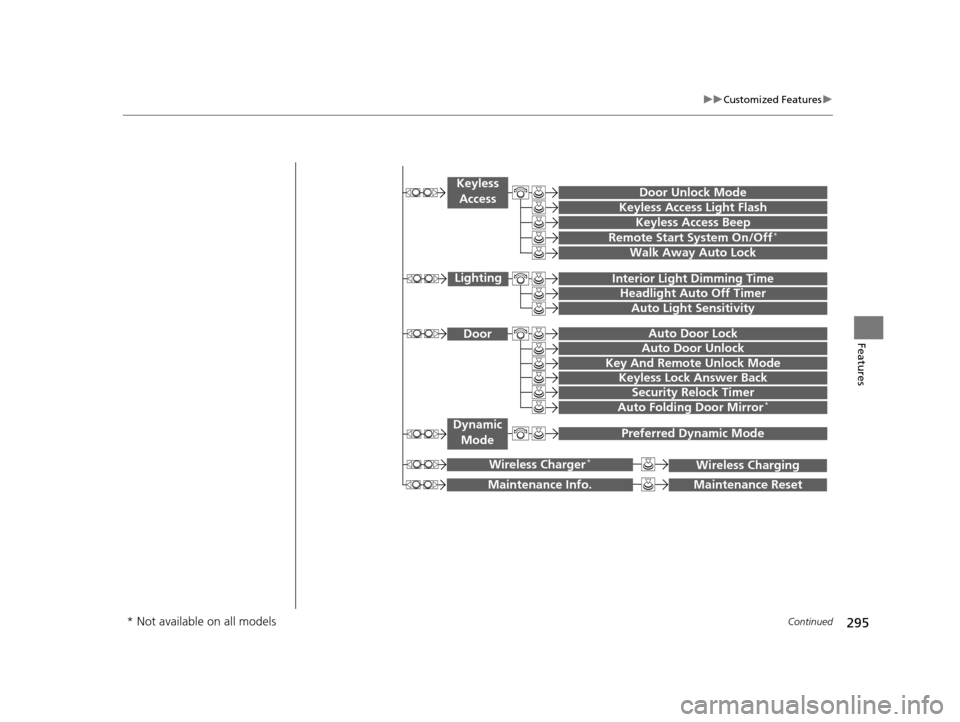
Maintenance ResetMaintenance Info.
Preferred Dynamic ModeDynamic
Mode
Key And Remote Unlock Mode
Keyless Lock Answer Back
Security Relock Timer
Auto Door Lock
Auto Door Unlock Door
Wireless ChargingWireless Charger*
Auto Folding Door Mirror*
Door Unlock Mode
Keyless Access Beep
Interior Light Dimming Time
Headlight Auto Off Timer
Auto Light Sensitivity
Remote Start System On/Off*
Walk Away Auto Lock
Lighting
Keyless
Access
Keyless Access Light Flash
* Not available on all models
19 ACURA TLX-31TZ36400.book 295 ページ 2018年2月16日 金曜日 午後12時22分
Page 307 of 591
305
uuCustomized Features u
Continued
Features*1:Default SettingSetup
Group Customizable Features Description Selectable Settings
Vehicle
Settings
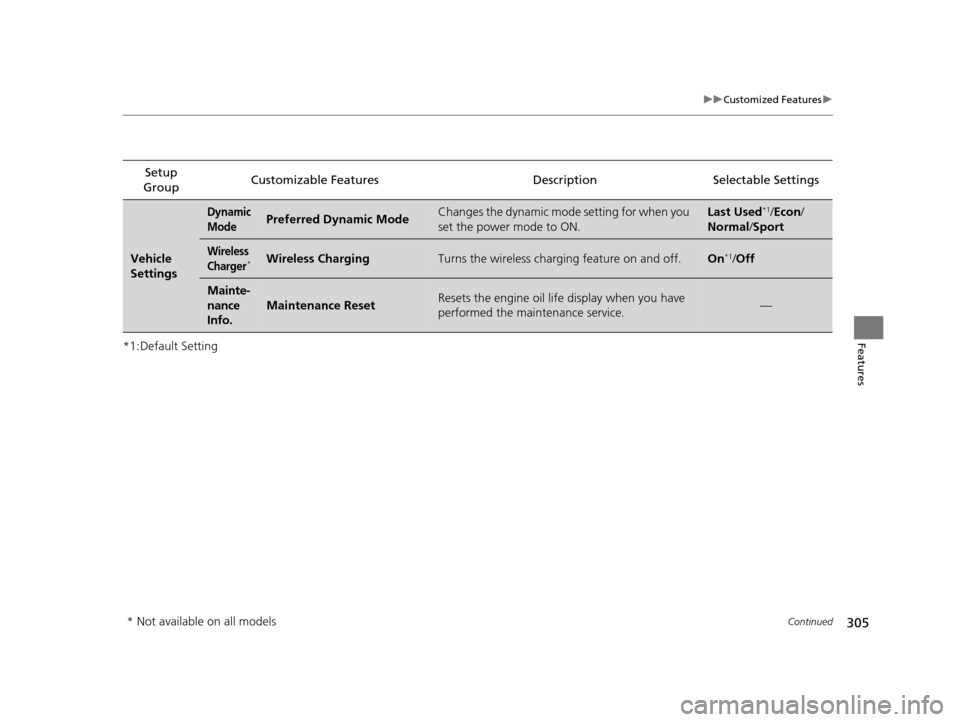
Dynamic
ModePreferred Dynamic ModeChanges the dynamic mode setting for when you
set the power mode to ON.Last Used*1/
Econ /
Normal /Sport
Wireless
Charger*Wireless ChargingTurns the wireless charging feature on and off.On*1/Off
Mainte-
nance
Info.
Maintenance ResetResets the engine oil life display when you have
performed the maintenance service.—
* Not available on all models
19 ACURA TLX-31TZ36400.book 305 ページ 2018年2月16日 金曜日 午後12時22分
Page 376 of 591
![Acura TLX 2019 User Guide uuWhen Driving uShifting
374
Driving
■If you want to keep the transmission in (N position [car wash mode]
With the engine running:
1. Press and hold the brake pedal.
2. Select
(N, then release the](/img/32/11121/w960_11121-375.png "Acura TLX 2019 User Guide uuWhen Driving uShifting
374
Driving
■If you want to keep the transmission in (N position [car wash mode]
With the engine running:
1. Press and hold the brake pedal.
2. Select
(N, then release the")
uuWhen Driving uShifting
374
Driving
■If you want to keep the transmission in (N position [car wash mode]
With the engine running:
1. Press and hold the brake pedal.
2. Select
(N, then release the button to display (N (Neutral) hold mode on the
multi-information display.
3. Press and hold
(N again for two seconds.
u This puts the vehicle in car wash mode which must be used when your vehicle
is pulled through a conveyor type automatic car wash where you or an
attendant do not remain in the vehicle.
If the ENGINE START/STOP button is pressed
after car wash mode has been activated, the
power mode will change to ACCESSORY and
a message will be displayed on the multi-
information display.u The gear position remains in
(N with the
power mode in ACCESSORY for 15
minutes, then, it automatically changes
to
(P and the power mode changes to
OFF.
u Manually changing to
(P cancels
ACCESSORY mode. The
(P indicator
comes on and the power mode changes
to OFF. You must always shift to
(P
when car wash mode is no longer
needed.
1 If you want to keep the transmission in (N position [car wash
mode]
To keep the vehicle in
(N position, you can also
follow this procedure:
While the power mode is on, select
(N, and then
within five seconds, press the ENGINE START/STOP
button.
The transmission may not stay in
( N position while
the following indicators ar e on or when the message
below appears:
•Malfunction indicator lamp
•Transmission system indicator
•Charging system indicator•The Charging System Problem message on the
multi-information display.
19 ACURA TLX-31TZ36400.book 374 ページ 2018年2月16日 金曜日 午後12時22分
Page 505 of 591
503
uuBattery uCharging the Battery*
Maintenance
Charging the Battery*
Disconnect both battery cables to prevent damaging your vehicle’s electrical system.
Always disconnect the negative (–) cable first, and reconnect it last.
Charging the AGM Battery*
AGM labeled batteries like those installed in your vehicle require a compatible
charger to be properly charged. Damage to the battery can result if the battery is
charged improperly or with the wrong equi pment. For more information on how to
charge your vehicle’s AGM battery, consult a dealer.
1 Battery
The battery installed in this vehicle is specifically
designed for a model with Auto Idle Stop. Using a
battery other than this specified type may shorten the
battery life, and prevent Auto Idle Stop from
activating. If you need to replace the battery, make
sure to select the specified type. Ask a dealer for
more details.
Models with Auto Idle Stop
* Not available on all models
19 ACURA TLX-31TZ36400.book 503 ページ 2018年2月16日 金曜日 午後12時22分
Page 517 of 591
515
Handling the Unexpected
This chapter explains how to handle unexpected troubles.
ToolsTypes of Tools .................................. 516
If a Tire Goes Flat Temporarily Repairi ng a Flat Tire....... 517
Changing a Flat Tire ......................... 530
Engine Does Not Start Checking the Engine ........................ 537
If the Keyless Access Remote Battery is Weak ............................................. 538
Emergency Engine Stop ................... 539
Jump Starting .................................... 540
Shift Lever Does Not Move .............. 544Overheating
How to Handle Overheating............. 545
Indicator, Coming On/Blinking
If the Low Oil Pressure Indicator Comes On .. 547If the Charging System Indicator Comes On ................................................. 547
If the Malfunction Indicator Lamp Comes On or Blinks ..................................... 548
If the Brake System Indicator (Red) Comes On .. 548If the Electric Power Steering (EPS) System Indicator Comes On ........................... 549
If the Electric Parking Brake System Indicator Comes On ....................... 550 If the Low Tire Pressure/TPMS Indicator
Comes On or Blinks ....................... 551
If the Transmission System Indicator Blinks along with the Warning Message ...... 552
Fuses Fuse Locations ................................. 553
Inspecting and Changing Fuses ........ 557
Emergency Towing ........................... 558
When You Cannot Unlock the Fuel Fill Door ................................................. 559When You Cannot Open the Trunk ..... 560RefuelingRefueling From a Portable Fuel Container ... 561
19 ACURA TLX-31TZ36400.book 515 ページ 2018年2月16日 金曜日 午後12時22分
Page 543 of 591
541
uuJump Starting u
Continued
Handling the Unexpected
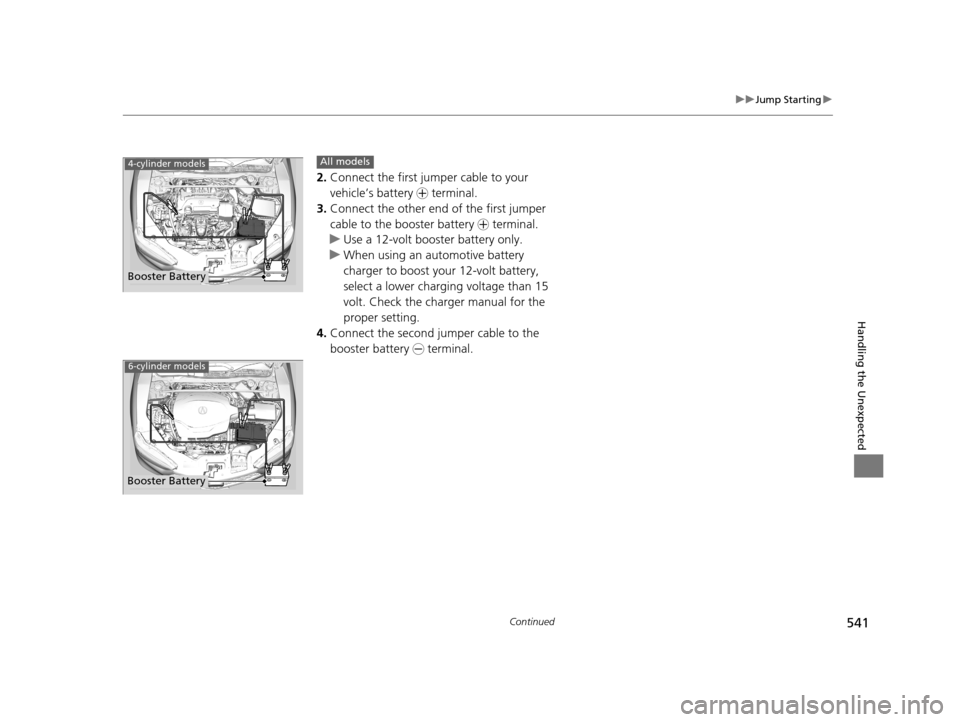
2.Connect the first jumper cable to your
vehicle’s battery + terminal.
3. Connect the other end of the first jumper
cable to the booster battery + terminal.
u Use a 12-volt booster battery only.
u When using an automotive battery
charger to boost your 12-volt battery,
select a lower charging voltage than 15
volt. Check the charger manual for the
proper setting.
4. Connect the second jumper cable to the
booster battery - terminal.
4-cylinder models
Booster Battery
All models
6-cylinder models
Booster Battery
19 ACURA TLX-31TZ36400.book 541 ページ 2018年2月16日 金曜日 午後12時22分
Page 549 of 591

547
Handling the Unexpected
Indicator, Coming On/Blinking
If the Low Oil Pressure Indicator Comes On
■Reasons for the indicator to come on
Comes on when the engine oil pressure is low.
■What to do as soon as the indicator comes on
1. Immediately park the vehicle on level ground in a safe place.
2. If necessary, turn the hazard warning lights on.
■What to do after parking the vehicle
1. Stop the engine and let it sit for approximately three minutes.
2. Open the hood and check the oil level.
2 Oil Check P. 476
3.Start the engine and check th e low oil pressure indicator.
u The indicator goes off: Start driving again.
u The indicator does not go off within 10 seconds: Immediately stop
the engine and contact a dealer for repairs.
If the Charging System Indicator Comes On
■Reasons for the indicator to come on
Comes on when the battery is not being charged.
■What to do when th e indicator comes on
Turn off the climate control system, rear defogger, and other electrical
systems, and immediately co ntact a dealer for repairs.
1If the Low Oil Pressure Indicator Comes On
NOTICE
Running the engine with low oil pressure can cause
serious mechanical damage almost immediately.
1If the Charging System Indicator Comes On
If you need to stop temporarily, do not turn off the
engine. Restarting the engi ne may rapidly discharge
the battery.
19 ACURA TLX-31TZ36400.book 547 ページ 2018年2月16日 金曜日 午後12時22分
Page 580 of 591
578
Index
B
BatteryCharging (Battery) ................................... 503
Charging System Indicator ................. 75, 547
Jump Starting .......................................... 540
Maintenance (Checking the Battery) ........ 502
Belts (Seat) .................................................. 34
Beverage Holders ...................................... 195
Blind spot information (BSI) System ........ 420
Bluetooth ® Audio ..................................... 255
Bluetooth ® HandsFreeLink ®..................... 317
Booster Seats (For Children) ....................... 68
Brake System ............................................. 428
Anti-lock Brake System (ABS) ................... 434
Automatic Brake Hold.............................. 432
Brake Assist System ................................. 435
Fluid ........................................................ 485
Foot Brake ............................................... 431
Parking Brake .......................................... 428
Brake System (Amber) Indicator .................................................... 72
Brake System (Red)
Indicator ............................................ 72, 548
Brightness Control (Instrument Panel) .... 172
BSI (Blind spot information) System ........ 420
Built-in Key ................................................ 134
Bulb Replacement ..................................... 486
Back-Up Lights......................................... 489
Brake/Taillights ........................................ 488
Brake/Taillights and Rear Side Marker
Lights..................................................... 488 Fog Lights ............................................... 486
Front Side Marker/Parking Lights ............. 486
Headlights ............................................... 486
High-Mount Brake Light .......................... 490
Puddle Lights........................................... 490
Rear License Plate Lights .......................... 490
Rear Turn Signal Lights ............................ 487
Side Turn Signal/Emergency Indicator
Lights .................................................... 486
Bulb Specifications ................................... 564
C
Carbon Monoxide Gas ............................... 69
Carrying Cargo ................................. 357, 359
CD Player ................................................... 244
Center Pocket ........................................... 194
Certification Label .................................... 566
Changing Bulbs ........................................ 486
Charging System Indicator ................. 75, 547
Child Safety ................................................. 56
Childproof Door Locks............................. 147
Child Seat .................................................... 56
Booster Seats ............................................ 68
Child Seat for Infants................................. 58
Child Seat for Small Children ..................... 59
Installing a Child Seat with a Lap/Shoulder
Seat Belt .................................................. 63
Larger Children ......................................... 67
Rear-facing Child Seat ............................... 58
Selecting a Child Seat ................................ 60 Using a Tether .......................................... 65
Childproof Door Locks ............................. 147
Cleaning the Exterior ............................... 509
Cleaning the Interior ............................... 507
Client Service Information ....................... 575
Climate Control System ........................... 205
Changing the Mode................................ 208
Defrosting the Windshield and
Windows .............................................. 211
Dust and Pollen Filter .............................. 506
Sensors ................................................... 212
Synchronized Mode ................................ 209
Using Automatic Climate Control............ 205
Clock ......................................................... 132
CMBSTM (Collision Mitigation Braking
SystemTM) ................................................ 436
Coat Hooks ............................................... 200
Collision Mitigation Braking System
TM
(CMBSTM) ................................................. 436
Compact Spare Tire (Optional) ....... 530, 565
Compass .................................................... 352
Console Compartment ............................. 193
Controls .................................................... 131
Coolant (Engine) ...................................... 482
Adding to the Radiator ........................... 483
Adding to the Reserve Tank .................... 482
Overheating ............................................ 545
Creeping (Automatic Transmission) ........ 370
Creeping (Dual Clutch Transmission) ...... 370
Cross Traffic Monitor ............................... 451
Cup Holders .............................................. 195
19 ACURA TLX-31TZ36400.book 578 ページ 2018年2月16日 金曜日 午後12時22分
Page 583 of 591
581
Index
Illumination Control................................ 172
Immobilizer System .................................. 152
Indicator ................................................... 83
Indicators .................................................... 72
Adaptive Cruise Control (ACC)
with Low Speed Follow (LSF) ..... 85, 86, 390
Anti-lock Brake System (ABS) .................... 79
Auto High-Beam ....................................... 82
Auto Idle Stop (Green) .............................. 89
Auto Idle Stop System (Amber) ................. 89
Automatic Brake Hold ....................... 74, 432
Automatic Brake Hold System ........... 74, 432
Blind spot information (BSI) ....................... 88
Brake System (Amber) ............................... 72
Brake System (Red) ........................... 72, 548
Charging System............................... 75, 547
Collision Mitigati on Braking System
TM
(CMBSTM) .......................................... 90, 91
Door and Trunk Open ............................... 33
ECON (Econ mode) ................................... 85
Electric Parking Brake ................................ 73
Electric Parking Brake System ............ 73, 550
Electric Power Steering (EPS) System ............................................ 79, 549
Fog Lights ................................................. 82
Gear Position ............................................ 75
High Beam ................................................ 82
Immobilizer System ................................... 83
Keyless Access System............................... 83
Lane Keeping Assist System (LKAS) ... 87, 411
Lights On .................................................. 82 Low Fuel .................................................... 78
Low Oil Pressure ................................ 74, 547
Low Tire Pressure/TPMS ............. 81, 424, 426
M (sequential mode)
Indicator/Sequential
Mode Gear Selection ............................... 78
Malfunction Indicator Lamp ............... 75, 548
Precision All-Wheel Steer
TM (P-AWS ®)
System..................................................... 85
Road Departure Mitigation (RDM) .............. 84
Seat Belt Reminder .............................. 35, 78
Security System Alarm ............................... 83
Shift Lever Position .................................... 75
SPORT (Sport mode) .................................. 85
Super Handling-All Wheel Drive
TM
(SH-AWD® ) .............................................. 88
Supplemental Restraint System ............ 53, 79
System Message ........................................ 81
Transmission System ............................ 76, 77
Turn Signal ................................................ 82
Vehicle Stability Assist ® (VSA ®)
System............................................. 80, 417
VSA ® OFF .......................................... 80, 418
Information ............................................... 563
Information Screen ................................... 223
Instant Fuel Economy ............................... 118
Instrument Panel ........................................ 71
Brightness Control ................................... 172
Integrated Dynamics System .................... 387
Dynamic Mode Button ............................. 387
Interface Dial ............................................ 219
Interior Lights ........................................... 189 Interior Rearview Mirror
.......................... 177
Internet Radio .......................................... 250
iPhone ............................................... 250, 276
iPod ................................................... 247, 276
J
Jack (Wheel Nut Wrench) ........................ 533
Jump Starting ........................................... 540
K
Key Number Tag ....................................... 135
Keyless Access System .............................. 136
Keyless Lockout Prevention ..................... 143
Keys ........................................................... 133
Lockout Prevention.................................. 143
Number Tag ............................................ 135
Rear Door Won’t Open............................ 147
Remote Transmitter ................................. 141
Two-way Keyless Access Remote ..... 144, 365
Types and Functions ................................ 133
Kickdown (Automatic Transmission) ....... 370
Kickdown (Dual Clutch Transmission) ..... 370
L
Lane Keeping Assist System (LKAS)......... 409
Language (HFL) ........................................ 318
LATCH (Child Seats) .................................... 61
Legal Information on Apple CarPlay/
Android Auto .......................................... 289
19 ACURA TLX-31TZ36400.book 581 ページ 2018年2月16日 金曜日 午後12時22分