two Acura TLX 2019 Owner's Guide
[x] Cancel search | Manufacturer: ACURA, Model Year: 2019, Model line: TLX, Model: Acura TLX 2019Pages: 591, PDF Size: 34.5 MB
Page 367 of 591
Continued365
uuWhen Driving uStarting the Engine
Driving
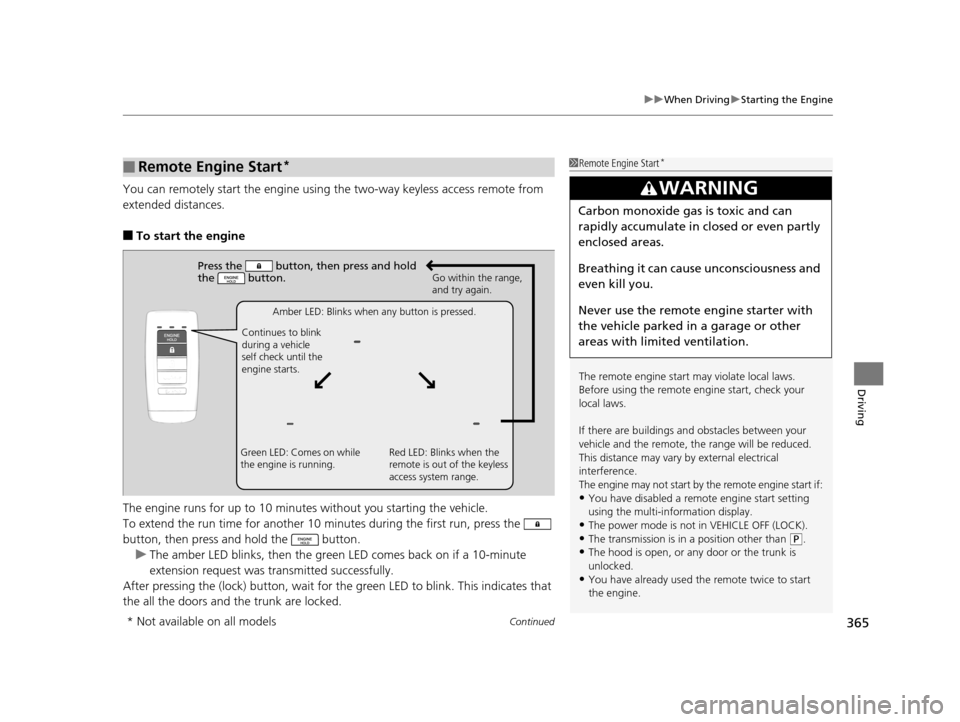
You can remotely start the engine usin g the two-way keyless access remote from
extended distances.
■To start the engine
The engine runs for up to 10 minu tes without you starting the vehicle.
To extend the run time for another 10 mi nutes during the first run, press the
button, then press an d hold the button.
u The amber LED blinks, then the green LED comes back on if a 10-minute
extension request was transmitted successfully.
After pressing the (lock) button, wait for th e green LED to blink. This indicates that
the all the doors and the trunk are locked.
■Remote Engine Start*1 Remote Engine Start*
The remote engine start may violate local laws.
Before using the remote e ngine start, check your
local laws.
If there are buildings an d obstacles between your
vehicle and the remote, th e range will be reduced.
This distance may vary by external electrical
interference.
The engine may not start by the remote engine start if:
•You have disabled a remote engine start setting
using the multi-information display.
•The power mode is not in VEHICLE OFF (LOCK).
•The transmission is in a position other than ( P.•The hood is open, or any door or the trunk is
unlocked.
•You have already used the remote twice to start
the engine.
3WARNING
Carbon monoxide ga s is toxic and can
rapidly accumulate in closed or even partly
enclosed areas.
Breathing it can cause unconsciousness and
even kill you.
Never use the remote engine starter with
the vehicle parked in a garage or other
areas with limited ventilation.
Press the button, th en press and hold
the button.
Amber LED: Blinks when any button is pressed.
Continues to blink
during a vehicle
self check until the
engine starts. Go within the range,
and try again.
Green LED: Comes on while
the engine is running. Red LED: Blinks when the
remote is out of the keyless
access system range.
* Not available on all models
19 ACURA TLX-31TZ36400.book 365 ページ 2018年2月16日 金曜日 午後12時22分
Page 369 of 591
Continued367
uuWhen Driving uStarting the Engine
Driving
1. Depress the brake pedal and press the ENGINE START/STOP button
simultaneously.
2. Keeping your right foot on the br ake pedal, put the transmission into
(D. Select
(R when reversing.
3. With the parking brake applied, release the brake pedal and gently depress the
accelerator pedal.
u Make sure the electric parki ng brake indicator goes off.
2Parking Brake P. 428
2 If the Transmission System Indicator Blinks along with the Warning
Message P. 552
■Starting to Drive1Starting to Drive
You can also release the parking brake by pressing
the electric parking brake sw itch while depressing the
brake pedal.
When facing downhill, you can start your vehicle
more smoothly by manually releasing it with the
electric parking brake switch than by releasing it with
the accelerator pedal.
The engine stops when the gear position is changed
from
( P before the ENGINE START/STOP button is
pressed. Follow the step 1 when starting to drive.
When the engine was started using the two-way
keyless access remote*
When the engine was started using the two-way keyless access remote*
When the engine was started in any case
* Not available on all models
19 ACURA TLX-31TZ36400.book 367 ページ 2018年2月16日 金曜日 午後12時22分
Page 376 of 591
![Acura TLX 2019 Owners Guide uuWhen Driving uShifting
374
Driving
■If you want to keep the transmission in (N position [car wash mode]
With the engine running:
1. Press and hold the brake pedal.
2. Select
(N, then release the](/img/32/11121/w960_11121-375.png "Acura TLX 2019 Owners Guide uuWhen Driving uShifting
374
Driving
■If you want to keep the transmission in (N position [car wash mode]
With the engine running:
1. Press and hold the brake pedal.
2. Select
(N, then release the")
uuWhen Driving uShifting
374
Driving
■If you want to keep the transmission in (N position [car wash mode]
With the engine running:
1. Press and hold the brake pedal.
2. Select
(N, then release the button to display (N (Neutral) hold mode on the
multi-information display.
3. Press and hold
(N again for two seconds.
u This puts the vehicle in car wash mode which must be used when your vehicle
is pulled through a conveyor type automatic car wash where you or an
attendant do not remain in the vehicle.
If the ENGINE START/STOP button is pressed
after car wash mode has been activated, the
power mode will change to ACCESSORY and
a message will be displayed on the multi-
information display.u The gear position remains in
(N with the
power mode in ACCESSORY for 15
minutes, then, it automatically changes
to
(P and the power mode changes to
OFF.
u Manually changing to
(P cancels
ACCESSORY mode. The
(P indicator
comes on and the power mode changes
to OFF. You must always shift to
(P
when car wash mode is no longer
needed.
1 If you want to keep the transmission in (N position [car wash
mode]
To keep the vehicle in
(N position, you can also
follow this procedure:
While the power mode is on, select
(N, and then
within five seconds, press the ENGINE START/STOP
button.
The transmission may not stay in
( N position while
the following indicators ar e on or when the message
below appears:
•Malfunction indicator lamp
•Transmission system indicator
•Charging system indicator•The Charging System Problem message on the
multi-information display.
19 ACURA TLX-31TZ36400.book 374 ページ 2018年2月16日 金曜日 午後12時22分
Page 378 of 591
376
uuWhen Driving uShifting
Driving
Use the paddle shifters to change between 1st and 9th gears without releasing your
hands from the steering wheel. The transmiss ion will switch to the sequential mode.
■When the transmission is in (D:
The vehicle will go into the sequential mode momentarily, and the sequential mode
gear selection indicator will come on.
When the vehicle goes into the sequential mode by
(- paddle shifter and the lower
gear is available, the trans mission properly selects single or double gear change.
Once you start traveling at a constant sp eed, the sequential mode will automatically
switch off, and the sequential mode gear selection indicator will go off.
Hold the
(+ paddle shifter for two seconds or push the (D button to return to
normal drive.
■When the transmission is in (D with Sport+ mode:
The vehicle will go into the sequential mode, and the M (sequential mode) indicator
and sequential mode gear selection indicator will come on.
If the vehicle speed increases and the engi ne speed reaches near the tachometer’s
red zone, the transmission automatica lly shifts up to the next gear.
You can cancel this mode by pressing Dynamic Mode button to select other than
Sport+ mode or push the
(D button to return to normal drive Sport+ mode. When
the sequential mode is canceled, the sequential mode indicator and sequential
mode gear selection i ndicator will turn off.
■Sequential Mode
19 ACURA TLX-31TZ36400.book 376 ページ 2018年2月16日 金曜日 午後12時22分
Page 382 of 591
380
uuWhen Driving uShifting
Driving
Use the paddle shifters to change between 1st and 8th gears without releasing your
hands from the steering wheel. The transmissio n will switch to the sequential shift
mode.
■When the shift lever is in (D:
The vehicle will go into the sequential shift mode mo mentarily, and the sequential
mode gear selection indicator will come on.
Once you start traveling at a constant speed, the sequential shift mode will
automatically switch off, and the sequentia l mode gear selection indicator will go
off.
Hold the
(+ paddle shifter for two seconds to return to normal drive.
■When the shift lever is in (D with Sport+ mode:
The vehicle goes into sequential shift mode and the M (sequential shift) indicator
comes on. At speeds of 2 mph (4 km/h) or less, the vehicle automatically shifts down
into 1st gear.
If you are in 1st through 6th gears and do not operate the paddle shifters as engine
speed increases approaches the tach ometer red zone, the transmission
automatically shifts up to the next gear.
You can cancel Sport+ mode by either:
• Pressing the Dynamic Mode button.
• Or holding the
(+ paddle shifter for two seconds.
When the mode is canceled the sequential mode and sequential mode gear
indicators will turn off.
■Sequential Shift Mode
19 ACURA TLX-31TZ36400.book 380 ページ 2018年2月16日 金曜日 午後12時22分
Page 401 of 591
399
uuWhen Driving uAdaptive Cruise Control (ACC) with Low Speed Follow (LSF)
Continued
Driving
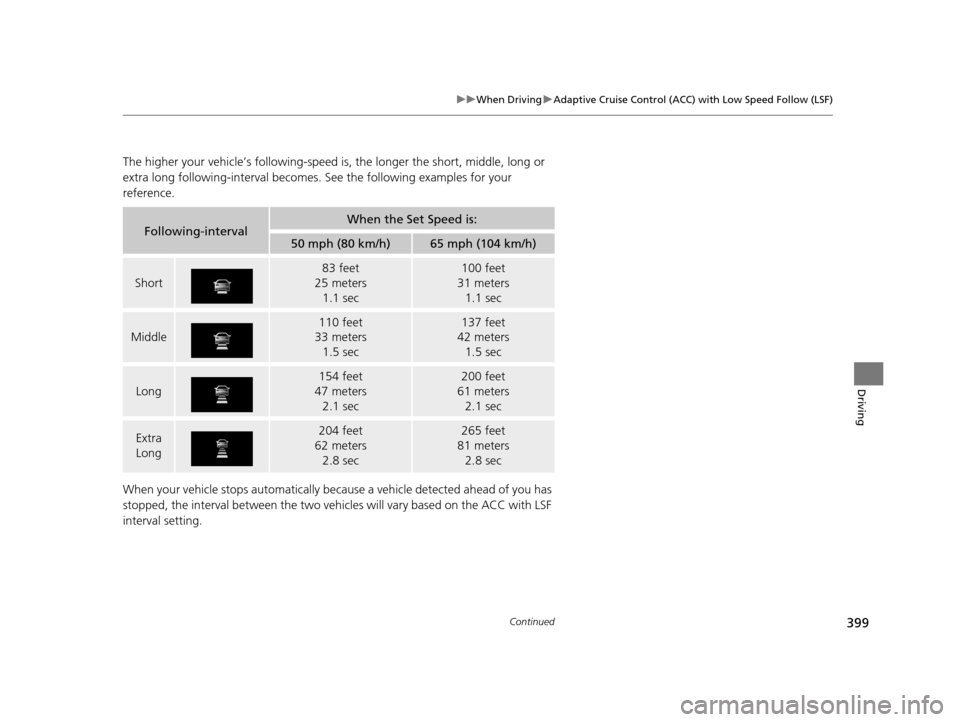
The higher your vehicle’s following-speed is , the longer the short, middle, long or
extra long following-interval becomes. See the following examples for your
reference.
When your vehicle stops automatically beca use a vehicle detected ahead of you has
stopped, the interval between the two vehicles will vary based on the ACC with LSF
interval setting.
Following-intervalWhen the Set Speed is:
50 mph (80 km/h)65 mph (104 km/h)
Short
83 feet
25 meters 1.1 sec100 feet
31 meters 1.1 sec
Middle
110 feet
33 meters
1.5 sec137 feet
42 meters
1.5 sec
Long
154 feet
47 meters 2.1 sec200 feet
61 meters 2.1 sec
Extra
Long204 feet
62 meters 2.8 sec265 feet
81 meters 2.8 sec
19 ACURA TLX-31TZ36400.book 399 ページ 2018年2月16日 金曜日 午後12時22分
Page 404 of 591
uuWhen Driving uAdaptive Cruise Control (ACC) with Low Speed Follow (LSF)
402
Driving
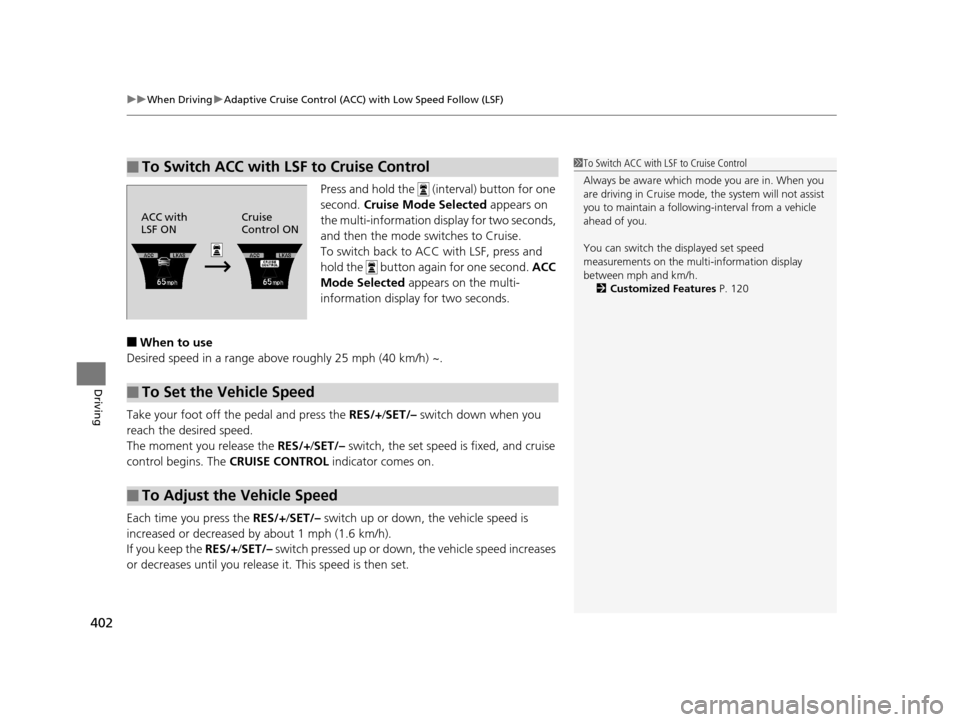
Press and hold the (interval) button for one
second. Cruise Mode Selected appears on
the multi-information di splay for two seconds,
and then the mode switches to Cruise.
To switch back to ACC with LSF, press and
hold the button again for one second. ACC
Mode Selected appears on the multi-
information display for two seconds.
■When to use
Desired speed in a range above roughly 25 mph (40 km/h) ~.
Take your foot off the pedal and press the RES/+ /SET/– switch down when you
reach the desired speed.
The moment you release the RES/+/SET/– switch, the set speed is fixed, and cruise
control begins. The CRUISE CONTROL indicator comes on.
Each time you press the RES/+/SET/– switch up or down, the vehicle speed is
increased or decreased by about 1 mph (1.6 km/h).
If you keep the RES/+/SET/– switch pressed up or down, the vehicle speed increases
or decreases until you release it. This speed is then set.
■To Switch ACC with LSF to Cruise Control1To Switch ACC with LSF to Cruise Control
Always be aware which mode you are in. When you
are driving in Cruise mode, the system will not assist
you to maintain a following-interval from a vehicle
ahead of you.
You can switch the displayed set speed
measurements on the mult i-information display
between mph and km/h.
2 Customized Features P. 120
ACC with
LSF ONCruise
Control ON
■To Set the Vehicle Speed
■To Adjust the Vehicle Speed
19 ACURA TLX-31TZ36400.book 402 ページ 2018年2月16日 金曜日 午後12時22分
Page 422 of 591

420
uuWhen Driving uBlind spot information (BSI) System*
Driving
Blind spot information (BSI) System*
Is designed to detect vehicles in specified alert zones adjacent to your vehicle,
particularly in harder to see areas commonly known as “blind spots.”
When the system detects vehi cles approaching from behind in adjacent lanes, the
appropriate indicator comes on for a few se conds, providing assistance when you
change lanes.
■How the system works
1 Blind spot inform ation (BSI) System*
Important Safety Reminder
Like all assistance systems, BSI has limitations. Over
reliance on BSI may result in a collision.
The BSI alert indicator may not come on under the
following conditions:
•A vehicle does not stay in the alert zone for more
than two seconds.
•A vehicle is parked in a side lane.•The speed difference betw een your vehicle and the
vehicle you are passing is greater than 6 mph (10
km/h).
•An object not detected by the radar sensors
approaches or passes your vehicle.
•A vehicle running in the adjacent lane is a
motorcycle or other small vehicle.
3WARNING
Failure to visually confirm that it is safe to
change lanes before doing so may result in
a crash and serious injury or death.
Do not rely only on the blind spot
information system wh en changing lanes.
Always look in your mi rrors, to either side
of your vehicle, and behind you for other
vehicles before changing lanes.
●The transmission is in ( D or
(S.●Your vehicle speed is
between 20 mph (32 km/h)
and 100 mph (160 km/h)
Alert zone range
A: Approx. 1.6 ft. (0.5 m)
B: Approx. 10 ft. (3 m)
C: Approx. 10 ft. (3 m) Radar Sensors:
underneath the
rear bumper
corners
Alert Zone
A
B
C
* Not available on all models
19 ACURA TLX-31TZ36400.book 420 ページ 2018年2月16日 金曜日 午後12時22分
Page 425 of 591
423
uuWhen Driving uSuper Handling-All Wheel DriveTM (SH-AWD ®)*
Driving
Super Handling-All Wheel DriveTM (SH-AWD ®)*
The system controls and trans fers varying amounts of engine torque to each wheel
in accordance with the driving conditions.
SH-AWD ® helps to enhance driving stability, and lets you handle situations like
slippery surfaces, such as on wet, icy, or snowy roads, better than when driving with
two wheel drive. However, the system does not help to enhance braking. Be
precautious about the following:
• It is still your responsibility to drive sa fely when you steer, accelerate, and apply
brakes.
• Leave a sufficient margin when braking on slippery surfaces.1Super Handling-All Wheel DriveTM (SH-AWD ®)*
The SH-AWD ® system may not function properly if
tire type and size are mixed.
Make sure to use the same size and type of tire, and
the air pressures as specified. 2 Tire and Wheel Replacement P. 499
Do not continuously spin the front tires of your
vehicle. Continuously spinning the front tires can
cause damage to the transmission and SH-AWD ®
unit.
If the SH-AWD indicator blinks while driving, it
indicates the differential te mperature is too high. If
this happens, pull to the side of the road when it is
safe, change the gear position to
( P, and idle the
engine until the indicator goes out.
* Not available on all models
19 ACURA TLX-31TZ36400.book 423 ページ 2018年2月16日 金曜日 午後12時22分
Page 427 of 591

425
uuWhen Driving uTire Pressure Monitoring System (TPMS) with Tire Fill Assist
Driving
To select the tire pressure monitor, set the power
mode to ON, and roll the right selector wheel
until you see the tire pressure screen.
The pressure for each tire is displayed in PSI
(U.S.) or kPa (Canada).
Tire Pressures Low is displayed when a tire
has significantly low pressure. The specific tire
is displayed on the screen.
■Tire Pressure Monitor1 Tire Pressure Monitor
The pressure displayed on the multi-information
display can be slightly different from the actual
pressure as measured by a gauge. If there is a
significant di fference between the two values, or if
the low tire pressure/TPMS indicator and the message
on the multi-information di splay do not go off after
you have inflated the tire to the specified pressure,
have the system checked by a dealer.
Tire Pressure Monitor Problem may appear if you
drive with the compact spare tire
*, or there is a
problem with the TPMS.
* Not available on all models
19 ACURA TLX-31TZ36400.book 425 ページ 2018年2月16日 金曜日 午後12時22分