ECO mode Acura TLX 2019 Manual PDF
[x] Cancel search | Manufacturer: ACURA, Model Year: 2019, Model line: TLX, Model: Acura TLX 2019Pages: 591, PDF Size: 34.5 MB
Page 247 of 591
Continued245
uuAudio System Basic Operation uPlaying a CD
Features
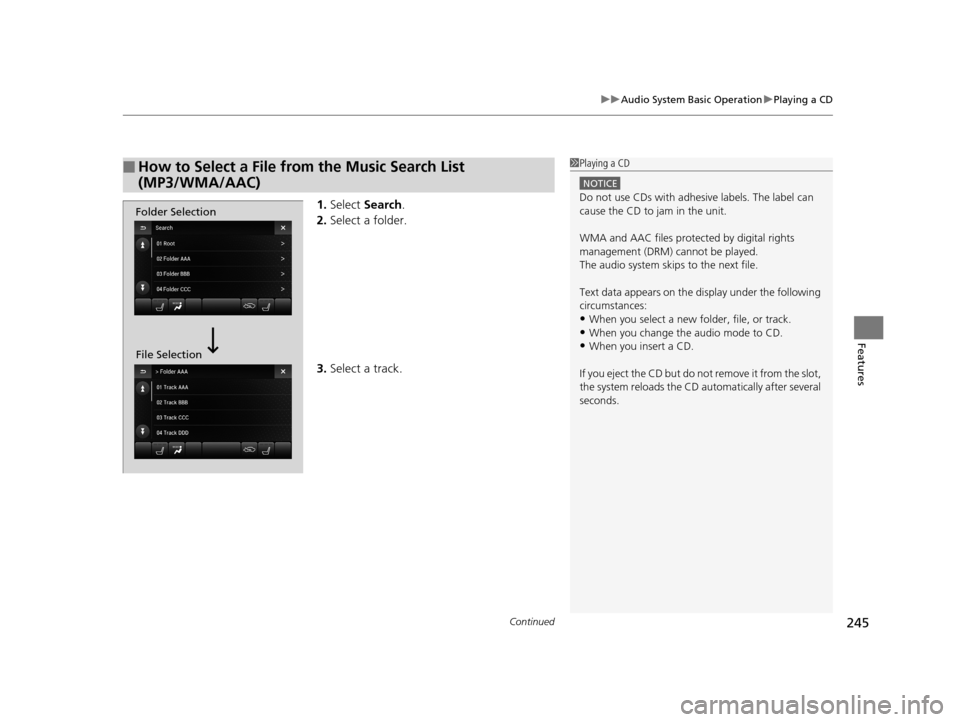
1. Select Search .
2. Select a folder.
3. Select a track.
■How to Select a File from the Music Search List
(MP3/WMA/AAC)1Playing a CD
NOTICE
Do not use CDs with adhesive labels. The label can
cause the CD to jam in the unit.
WMA and AAC files protected by digital rights
management (DRM) cannot be played.
The audio system skips to the next file.
Text data appears on the di splay under the following
circumstances:
•When you select a new folder, file, or track.•When you change the audio mode to CD.
•When you insert a CD.
If you eject the CD but do not remove it from the slot,
the system reloads the CD automatically after several
seconds.
Folder Selection
File Selection
19 ACURA TLX-31TZ36400.book 245 ページ 2018年2月16日 金曜日 午後12時22分
Page 248 of 591
uuAudio System Basic Operation uPlaying a CD
246
Features
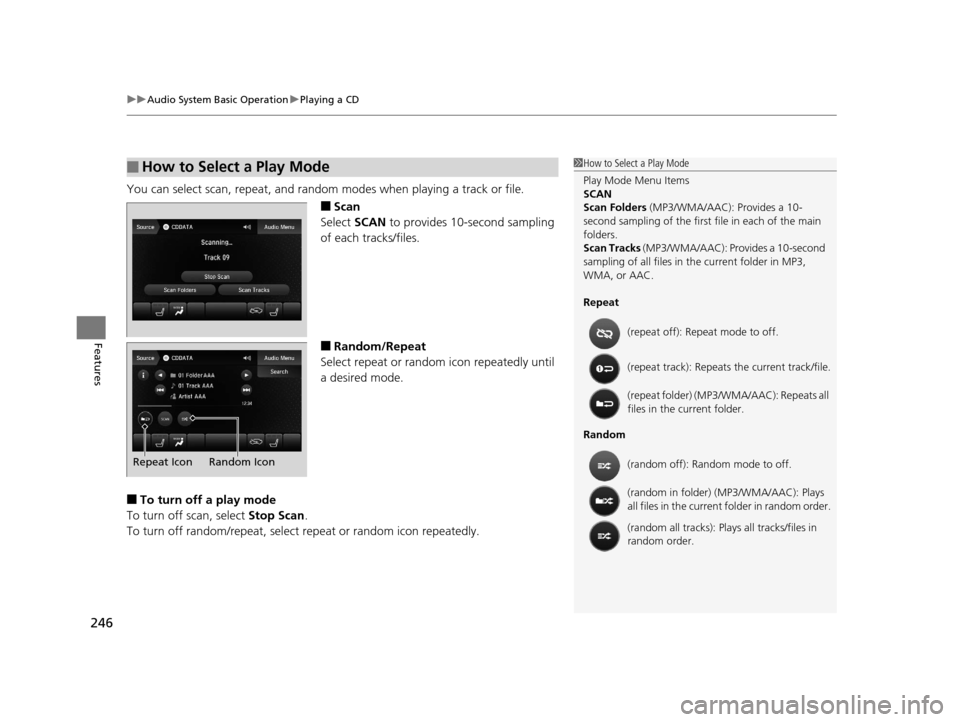
You can select scan, repeat, and random modes when playing a track or file.
■Scan
Select SCAN to provides 10-second sampling
of each tracks/files.
■Random/Repeat
Select repeat or random icon repeatedly until
a desired mode.
■To turn off a play mode
To turn off scan, select Stop Scan.
To turn off random/repeat, select repeat or random icon repeatedly.
■How to Select a Play Mode1How to Select a Play Mode
Play Mode Menu Items
SCAN
Scan Folders (MP3/WMA/AAC): Provides a 10-
second sampling of the first f ile in each of the main
folders.
Scan Tracks (MP3/WMA/AAC): Provides a 10-second
sampling of all files in the current folder in MP3,
WMA, or AAC.
Repeat
Random (repeat off): Repe
at mode to off.
(repeat track): Repeats the current track/file.
(repeat folder) (MP3/WMA/AAC): Repeats all
files in the current folder.
(random off): Random mode to off.
(random in folder) (MP3/WMA/AAC): Plays
all files in the current folder in random order.
(random all tracks): Play s all tracks/files in
random order.
Random Icon
Repeat Icon
19 ACURA TLX-31TZ36400.book 246 ページ 2018年2月16日 金曜日 午後12時22分
Page 254 of 591
252
uuAudio System Basic Operation uPlaying a USB Flash Drive
Features
Playing a USB Flash Drive
Your audio system reads and plays sound files on a USB flash drive in either MP3,
WMA, or AAC*1 format.
Connect your USB flash drive to the USB port, then select the USB mode.
2USB Port P. 215
*1:Only AAC format files recorded with iTunes are playable on this unit.
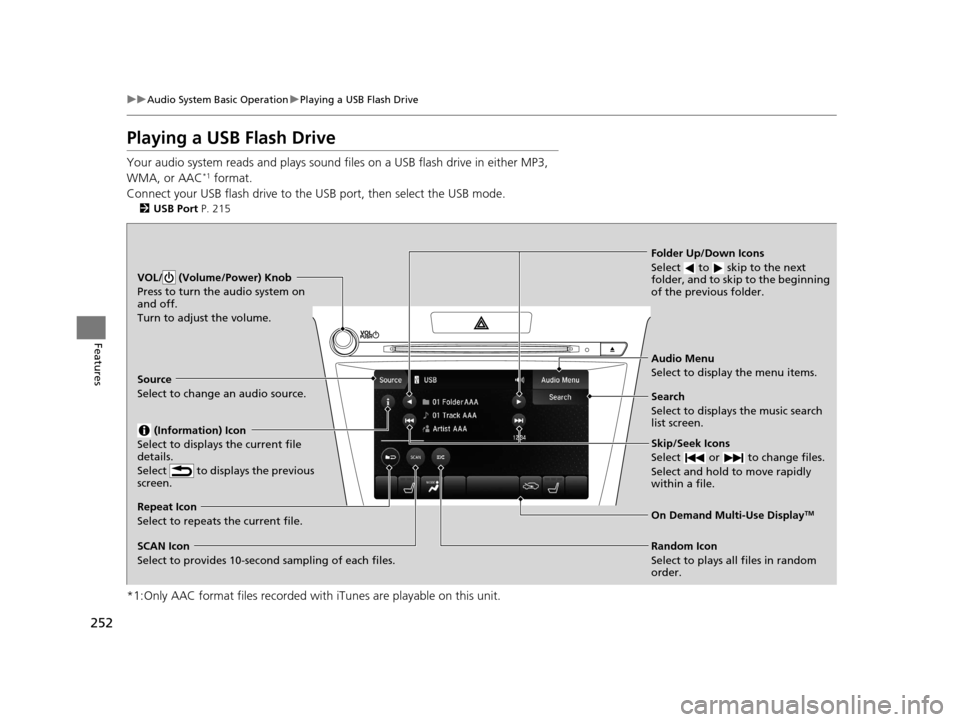
VOL/ (Volume/Power) Knob
Press to turn the audio system on
and off.
Turn to adjust the volume.
Skip/Seek Icons
Select or to change files.
Select and hold to move rapidly
within a file.
Audio Menu
Select to display the menu items.
Source
Select to change an audio source.
(Information) Icon
Select to displays the current file
details.
Select to displays the previous
screen.
Search
Select to displays the music search
list screen.
Folder Up/Down Icons
Select to skip to the next
folder, and to skip to the beginning
of the previous folder.
On Demand Multi-Use DisplayTMRepeat Icon
Select to repeats the current file.
SCAN Icon
Select to provides 10-second sampling of each files. Random Icon
Select to plays all files in random
order.
19 ACURA TLX-31TZ36400.book 252 ページ 2018年2月16日 金曜日 午後12時22分
Page 256 of 591
uuAudio System Basic Operation uPlaying a USB Flash Drive
254
Features
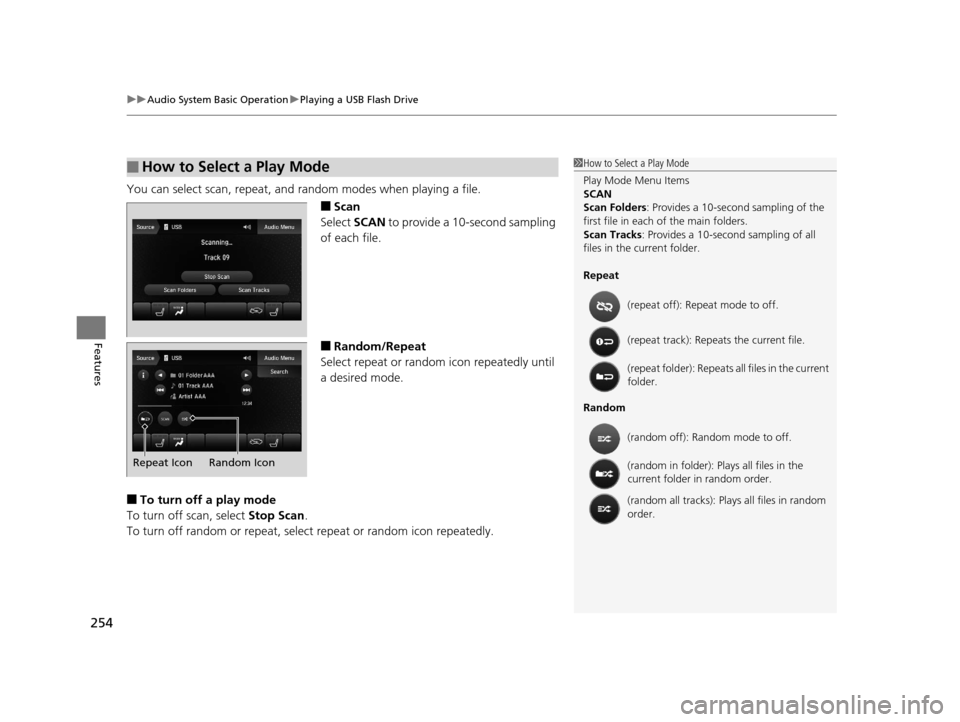
You can select scan, repeat, and random modes when playing a file.
■Scan
Select SCAN to provide a 10-second sampling
of each file.
■Random/Repeat
Select repeat or random icon repeatedly until
a desired mode.
■To turn off a play mode
To turn off scan, select Stop Scan.
To turn off random or repeat, sele ct repeat or random icon repeatedly.
■How to Select a Play Mode1How to Select a Play Mode
Play Mode Menu Items
SCAN
Scan Folders : Provides a 10-second sampling of the
first file in each of the main folders.
Scan Tracks : Provides a 10-second sampling of all
files in the current folder.
Repeat
Random (repeat off): Repe
at mode to off.
(repeat track): Repeats the current file.
(repeat folder): Repeats all files in the current
folder.
(random off): Random mode to off.
(random in folder): Plays all files in the
current folder in random order.
(random all tracks): Play s all files in random
order.
Random Icon
Repeat Icon
19 ACURA TLX-31TZ36400.book 254 ページ 2018年2月16日 金曜日 午後12時22分
Page 258 of 591

uuAudio System Basic Operation uPlaying Bluetooth ® Audio
256
Features
1. Make sure that your phone is paired and
connected to HFL.
2. Select the Bluetooth® Audio mode.
If the phone is not recognized, another HFL-
compatible phone, which is not compatible
for Bluetooth ® Audio, may already be
connected.
■To pause or resume a file
Select the play icon or pause icon.
1.Select Browse .
2. Select a search category (e.g., Albums).
3. Select an item.
u The selection begins playing.
■To Play Bluetooth® Audio Files1To Play Bluetooth ® Audio Files
To play the audio files, y ou may need to operate your
phone. If so, follow the phone maker’s operating
instructions.
The pause function may no t be available on some
phones.
Switching to another mode pauses the music playing
from your phone. This functi on may not be available
on some phones.
Play Icon Pause Icon
■Searching for Music1 Searching for Music
Depending on the Bluetooth® device you connect,
some or all of the list s may not be displayed.
19 ACURA TLX-31TZ36400.book 256 ページ 2018年2月16日 金曜日 午後12時22分
Page 272 of 591
270
uuAudio Error Messages uPandora ®
Features
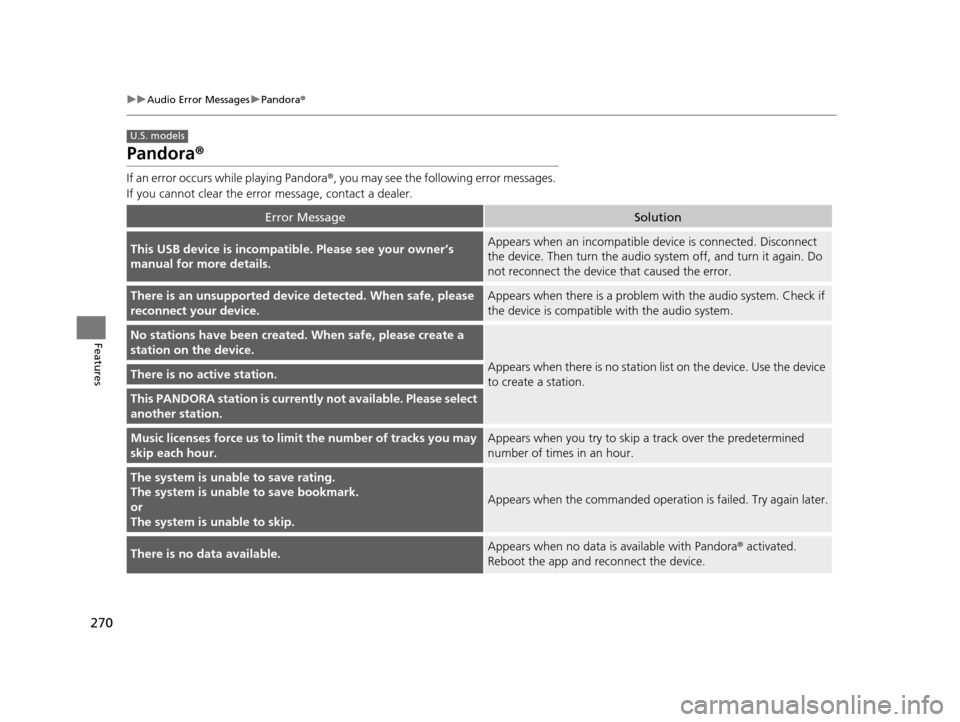
Pandora ®
If an error occurs while playing Pandora ®, you may see the following error messages.
If you cannot clear the error message, contact a dealer.
Error MessageSolution
This USB device is incompatible. Please see your owner’s
manual for more details.Appears when an incompatible device is connected. Disconnect
the device. Then turn the audio system off, and turn it again. Do
not reconnect the device that caused the error.
There is an unsupported device detected. When safe, please
reconnect your device.Appears when there is a problem with the audio system. Check if
the device is compatible with the audio system.
No stations have been created. When safe, please create a
station on the device.
Appears when there is no station lis t on the device. Use the device
to create a station.There is no active station.
This PANDORA station is currently not available. Please select
another station.
Music licenses force us to limi t the number of tracks you may
skip each hour.Appears when you try to skip a track over the predetermined
number of times in an hour.
The system is unable to save rating.
The system is unable to save bookmark.
or
The system is unable to skip.
Appears when the commanded operation is failed. Try again later.
There is no data available.Appears when no data is available with Pandora® activated.
Reboot the app and reconnect the device.
U.S. models
19 ACURA TLX-31TZ36400.book 270 ページ 2018年2月16日 金曜日 午後12時22分
Page 274 of 591

272
uuAudio Error Messages uApple CarPlay/Android Auto
Features
Apple CarPlay/Android Auto
If an error occurs while us ing the Apple CarPlay or Android Auto, you may see the
following error messages. If you cannot clear the error message, contact a dealer.
Error MessageSolution
A charging error has occurred with the connected device.
When safe, please check the compatibility of the device and
USB cable. Please see your ow ner's manual for more details.
This USB device is incompatible. Please see your owner's
manual for more details.
Appears when an incompatible device is connected. Disconnect
the device. Then turn the audio system off, and turn it again. Do
not reconnect the device that caused the error.
Unable to start Appl e CarPlay. When safe, please confirm the
USB connection.Appears when Apple CarPlay or Android Auto fails to recognize
your device.
Check if your device is compatible with Apple CarPlay or Android
Auto, or the latest version of the app is installed on your device.
Unable to start Andr oid Auto. When safe, please confirm the
USB connection.
Unable to start Apple CarPlay. When safe, please try again.Appears when Apple CarPlay or Android Auto fails to recognize
your device.
Reconnect your device and try again.
Unable to start Android Auto. When safe, please try again.
Unable to start Apple CarPlay with your device. Your device is
connected in digital audio mode.Appears when your connected device is incompatible with Apple
CarPlay.
Check if your device is comp atible with Apple CarPlay.
Information Screen
On Demand Multi-Use DisplayTM
19 ACURA TLX-31TZ36400.book 272 ページ 2018年2月16日 金曜日 午後12時22分
Page 278 of 591
276
uuGeneral Information on the Audio System uCompatible iPod, iPhone, and USB Flash Drives
Features
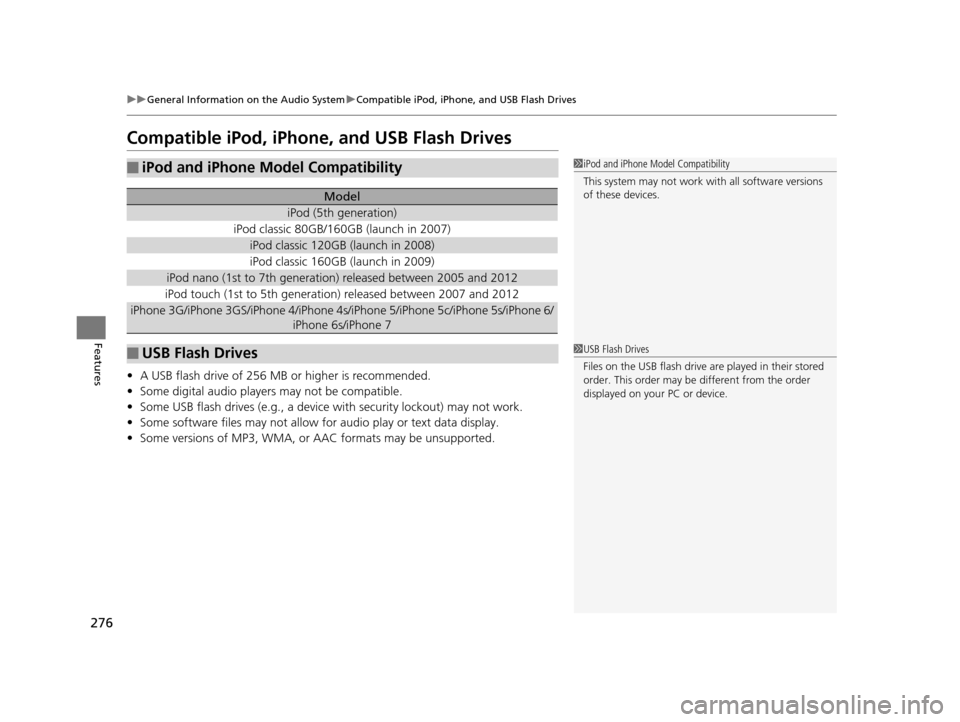
Compatible iPod, iPhone, and USB Flash Drives
• A USB flash drive of 256 MB or higher is recommended.
• Some digital audio players may not be compatible.
• Some USB flash drives (e.g., a device with security lockout) may not work.
• Some software files may not allow for audio play or text data display.
• Some versions of MP3, WMA, or AAC formats may be unsupported.
■iPod and iPhone Model Compatibility
Model
iPod (5th generation)
iPod classic 80GB/160GB (launch in 2007)
iPod classic 120GB (launch in 2008)
iPod classic 160GB (launch in 2009)
iPod nano (1st to 7th generation) released between 2005 and 2012
iPod touch (1st to 5th generation) released between 2007 and 2012
iPhone 3G/iPhone 3GS/iPhone 4/iPhone 4s/i Phone 5/iPhone 5c/iPhone 5s/iPhone 6/
iPhone 6s/iPhone 7
■USB Flash Drives
1 iPod and iPhone Model Compatibility
This system may not work with all software versions
of these devices.
1USB Flash Drives
Files on the USB flash drive are played in their stored
order. This order may be different from the order
displayed on your PC or device.
19 ACURA TLX-31TZ36400.book 276 ページ 2018年2月16日 金曜日 午後12時22分
Page 298 of 591
296
uuCustomized Features u
Features
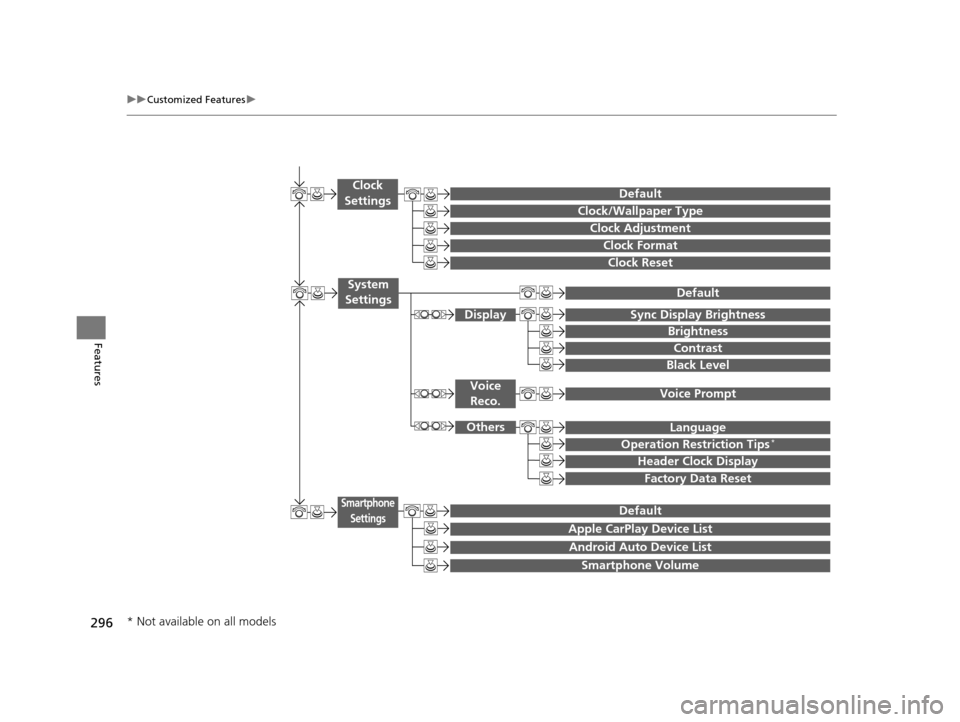
Clock Reset
Clock/Wallpaper Type
Clock Adjustment
Clock
Settings
Clock Format
Default
Voice Prompt
Brightness
Contrast
Black Level
Default
Display
System
Settings
Voice Reco.
Sync Display Brightness
Factory Data Reset
Header Clock Display
Language
Operation Restriction Tips*
Others
Default
Apple CarPlay Device List
Android Auto Device List
Smartphone
Settings
Smartphone Volume
* Not available on all models
19 ACURA TLX-31TZ36400.book 296 ページ 2018年2月16日 金曜日 午後12時22分
Page 303 of 591
301
uuCustomized Features u
Continued
Features
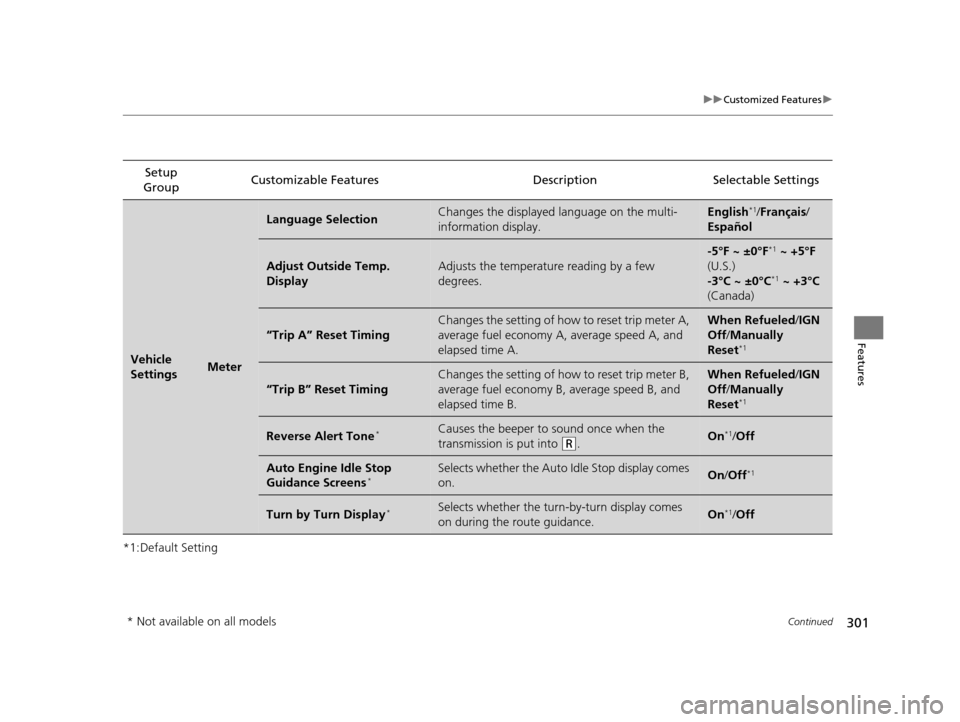
*1:Default SettingSetup
Group Customizable Features Description Selectable Settings
Vehicle
SettingsMeter
Language SelectionChanges the displayed language on the multi-
information display.English*1/
Français /
Español
Adjust Outside Temp.
DisplayAdjusts the temperature reading by a few
degrees.
-5°F ~ ±0°F*1 ~ +5°F
(U.S.)
-3°C ~ ±0°C
*1 ~ +3°C
(Canada)
“Trip A” Reset Timing
Changes the setting of how to reset trip meter A,
average fuel economy A, average speed A, and
elapsed time A.When Refueled /IGN
Off /Manually
Reset
*1
“Trip B” Reset Timing
Changes the setting of how to reset trip meter B,
average fuel economy B, average speed B, and
elapsed time B.When Refueled /IGN
Off /Manually
Reset
*1
Reverse Alert Tone*Causes the beeper to sound once when the
transmission is put into
(R.On*1/ Off
Auto Engine Idle Stop
Guidance Screens*Selects whether the Auto Idle Stop display comes
on.On /Off*1
Turn by Turn Display*Selects whether the turn-by-turn display comes
on during the route guidance.On*1/Off
* Not available on all models
19 ACURA TLX-31TZ36400.book 301 ページ 2018年2月16日 金曜日 午後12時22分