lock ACURA TLX 2022 Owners Manual
[x] Cancel search | Manufacturer: ACURA, Model Year: 2022, Model line: TLX, Model: ACURA TLX 2022Pages: 656, PDF Size: 26.43 MB
Page 569 of 656

567
uuBattery uCharging the AGM Battery
Maintenance
Charging the AGM Battery
AGM labeled batteries like those installed in your vehicle require a compatible
charger to be properly charged. Damage to the battery can result if the battery is
charged improperly or with the wrong equi pment. For more information on how to
charge your vehicle’s AGM battery, consult a dealer.1 Battery
The vehicle stability assist
TM (VSA ®) system, vehicle
stability assistTM (VSA ®) OFF, adaptive cruise control
(ACC) with low speed follow, and safety support may
come on in amber along with a message in the multi-
information display when y ou set the power mode to
ON after re-connecting a battery.
Drive a short distance at more than 12 mph (20
km/h).
Each indicator should go off. If any do not, have your
vehicle checked by a dealer.
3WARNING
• Failure to use and correctly install a
battery and Battery Stopper (foam block)
specifically designed for this vehicle could
cause a hydrogen gas leak inside the
vehicle, resulting in a fire or explosion
that may cause injury or death.
• Only install a 12V AGM battery designed
for use in this vehicle.
• Contact your Acura dealer for more
information.
22 ACURA TLX-31TGV6100.book 567 \b
Page 574 of 656
uuCleaning uInterior Care
572
Maintenance
Wipe using a glass cleaner.
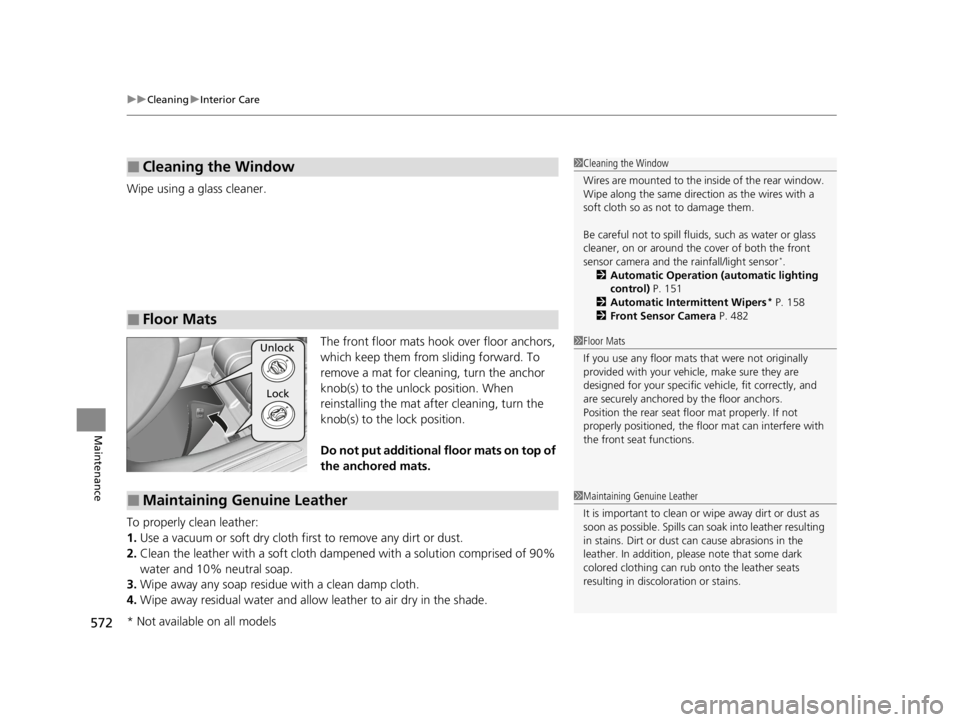
The front floor mats hook over floor anchors,
which keep them from sliding forward. To
remove a mat for cleaning, turn the anchor
knob(s) to the unlock position. When
reinstalling the mat after cleaning, turn the
knob(s) to the lock position.
Do not put additional floor mats on top of
the anchored mats.
To properly clean leather:
1. Use a vacuum or soft dry cloth first to remove any dirt or dust.
2. Clean the leather with a soft cloth dampen ed with a solution comprised of 90%
water and 10% neutral soap.
3. Wipe away any soap residu e with a clean damp cloth.
4. Wipe away residual water and allow leather to air dry in the shade.
■Cleaning the Window
■Floor Mats
1Cleaning the Window
Wires are mounted to the in side of the rear window.
Wipe along the same direct ion as the wires with a
soft cloth so as not to damage them.
Be careful not to spill fluids, such as water or glass
cleaner, on or around the co ver of both the front
sensor camera and the rainfall/light sensor
*.
2 Automatic Operation (automatic lighting
control) P. 151
2 Automatic Intermittent Wipers
* P. 158
2 Front Sensor Camera P. 482
1Floor Mats
If you use any floor mats that were not originally
provided with your vehicle, make sure they are
designed for your specific ve hicle, fit correctly, and
are securely anchored by the floor anchors.
Position the rear seat fl oor mat properly. If not
properly positioned, the fl oor mat can interfere with
the front seat functions.Unlock
Lock
■Maintaining Genuine Leather1 Maintaining Genuine Leather
It is important to clean or wipe away dirt or dust as
soon as possible. Spills can soak into leather resulting
in stains. Dirt or dust ca n cause abrasions in the
leather. In addition, pl ease note that some dark
colored clothing can rub onto the leather seats
resulting in discol oration or stains.
* Not available on all models
22 ACURA TLX-31TGV6100.book 572 \b
Page 581 of 656

579
Handling the Unexpected
This chapter explains how to handle unexpected troubles.
Tools.................................................. 580
If a Tire Goes Flat
Temporarily Repairi ng a Flat Tire....... 581
Changing a Flat Tire ......................... 596
Engine Does Not Start
Checking the Engine ........................ 603
If the Keyless Remote Battery is Weak.. 604Emergency Engine Stop ................... 605
If the Battery Is Dead Jump Starting Procedure .................. 606
Overheating ...................................... 609
Indicator, Coming On/Blinking If the Engine Oil Pr essure Low Warning
Appears ......................................... 612 If the Charging System Indicator Comes
On ................................................. 613
If the Slow Down! Reduced Stopping Power Warning Appears ................ 613
If the Malfunction Indicator Lamp Comes
On or Blinks ..................................... 614
If the Brake System Indicator (Red) Comes On or Blinks ....................................... 615
If the Electric Power Steering (EPS) System Indicator Comes On ........................... 616
If the Brake System Indicator (Red) Comes On
or Blinks at the Same Time When the Brake
System Indicator (Amber) Comes On .. 617 If the Low Tire Pressure/TPMS Indicator
Comes On or Blinks ....................... 618
If the Transmission System Indicator Blinks along with the Warning Message ...... 619
Fuses .................................................. 620
Emergency Towing ........................... 627If You Cannot Unlock the Fuel Fill Door.. 628If You Cannot Open the Trunk ........ 629
Refueling
Refueling From a Portable Fuel Container ................................... 630
22 ACURA TLX-31TGV6100.book 579 \b
Page 583 of 656

581Continued
Handling the Unexpected
If a Tire Goes Flat
Temporarily Repairing a Flat Tire
If the tire has a large cut or is otherwise severely damaged, you will need to have the
vehicle towed. If the tire only has a small puncture, from a nail for instance, you can
use the temporary tire repair kit so that you can drive to the nearest service station
for a more permanent repair.
If a tire goes flat while driving, grasp the steering wheel firmly, and brake gradually
to reduce speed. Then, stop in a safe place.
1. Park the vehicle on a firm, level, non-slippery surface and apply the parking brake.
2. Put the transmission into
(P.
3. Turn on the hazard warning lights an d set the power mode to VEHICLE OFF
(LOCK).
1 Temporarily Repairing a Flat Tire
The kit should not be used in the following situations.
Instead, contact a dealer or roadside assistance to
have the vehicle towed.
•The tire sealant has expired.
•More than one tire is punctured.•The puncture or cut is larger than 3/16 inch (4.8 mm).
•The tire side wall is damaged or the puncture is
outside the contact area.
•Damage has been caused by driving with the tire
extremely under inflated.
•The tire bead is no longer seated.
•The rim is damaged.
Do not remove a nail or screw that punctured the
tire. If you remove it from the tire, you may not be
able to repair the puncture using the kit.
NOTICE
Do not use a puncture-repairing agent other than the
one provided in the kit that came with your vehicle. If
a different agent is used, you may permanently
damage the tire pressure sensor.
When the puncture isYUse Kit
Smaller than 3/16 inch (4.8 mm)Yes
Larger than 3/16 inch (4.8 mm)No
Contact
Area
22 ACURA TLX-31TGV6100.book 581 \b
Page 598 of 656

596
uuIf a Tire Goes Flat uChanging a Flat Tire
Handling the Unexpected
Changing a Flat Tire
If a tire goes flat while driving, grasp the steering wheel firmly, and brake gradually
to reduce speed. Then, stop in a safe place. Replace the flat tire with a compact
spare tire. Go to a dealer as soon as possibl e to have the full-size tire repaired or
replaced.
1. Park the vehicle on a firm, level, non-slippery surface and apply the parking brake.
2. Put the transmission into
(P.
3. Turn on the hazard warning lights an d set the power mode to VEHICLE OFF
(LOCK).
Models with optional spare tire
1 Changing a Flat Tire
Follow compact spare precautions:
Periodically check the tire pressure of the compact
spare. It should be set to the specified pressure.
Specified Pressure: 60 psi (420 kPa, 4.2 kgf/cm
2)
When driving with the compact spare tire, keep the
vehicle speed under 50 mph (80 km/h). Replace with
a full-size tire as soon as possible.
The compact spare tire and wheel in your vehicle are
specifically for this model. Do not use them with
another vehicle. Do not us e another type of compact
spare tire or wheel with your vehicle.
Do not mount tire chains on a compact spare tire.
If a chain-mounted front tire goes flat, remove one of
the full-size rear tires and replace it with the compact
spare tire. Remove the flat front tire and replace it
with the full-size tire that was removed from the rear.
Mount the tire chains on the front tire.
Do not use a puncture-repairing agent other than the
Tire Repair Ki t provided with your vehicle, as some
tire repair agents can caus e damage to the pressure
sensors.
NOTICE
Do not use the jack if it doesn
Page 599 of 656

597
uuIf a Tire Goes Flat uChanging a Flat Tire
Continued
Handling the Unexpected
1. Open the trunk floor lid.
2 Getting Ready to Temporarily Repair
the Flat Tire P. 582
2.Take the wheel nut wrench out of the tool
case.
3. Unscrew the wing bolt and remove the tool
case. Then, remove the compact spare tire.
4. Take the jack out of the trunk.
u Turn the jack’s end bracket to loosen it,
then remove it.
5. Place a wheel block or rock in front and rear
of the wheel diagonal to the flat tire.
■Getting Ready to Replace the Flat Tire
Tool CaseSpare Tire
Wing Bolt
Jack
Wheel
Blocks
The tire to be replaced.
22 ACURA TLX-31TGV6100.book 597 \b
Page 607 of 656

605
uuEngine Does Not StartuEmergency Engine Stop
Handling the Unexpected
Emergency Engine Stop
The ENGINE START/STOP button may be used to stop the engine due to an
emergency situation even while driving. If you must stop the engine, do either of the
following operations:
• Press and hold the ENGINE START/STOP button for about two seconds.
• Firmly press the ENGINE START/STOP button three times.
The steering wheel will not lock. However, because turning off the engine disables
the power assist the engine provides to the steering and braking systems, it will
require significantly more physical effort an d time to steer and slow the vehicle. Use
both feet on the brake pedal to slow down the vehicle and stop immediately in a
safe place.
The gear position automatically changes to
(P after the vehicle comes to a complete
stop. Then, the power mode changes to VEHICLE OFF.
1 Emergency Engine Stop
Do not press the ENGINE START/STOP button while
driving unless it is absolute ly necessary for the engine
to be turned off.
If you press the ENGINE START/STOP button while
driving, the beeper sounds.
22 ACURA TLX-31TGV6100.book 605 \b
Page 622 of 656
620
Handling the Unexpected
Fuses
Fuse Locations
If any electrical devices are not working, set
the power mode to VEHICLE OFF (LOCK)
and check to see if any applicable fuse is
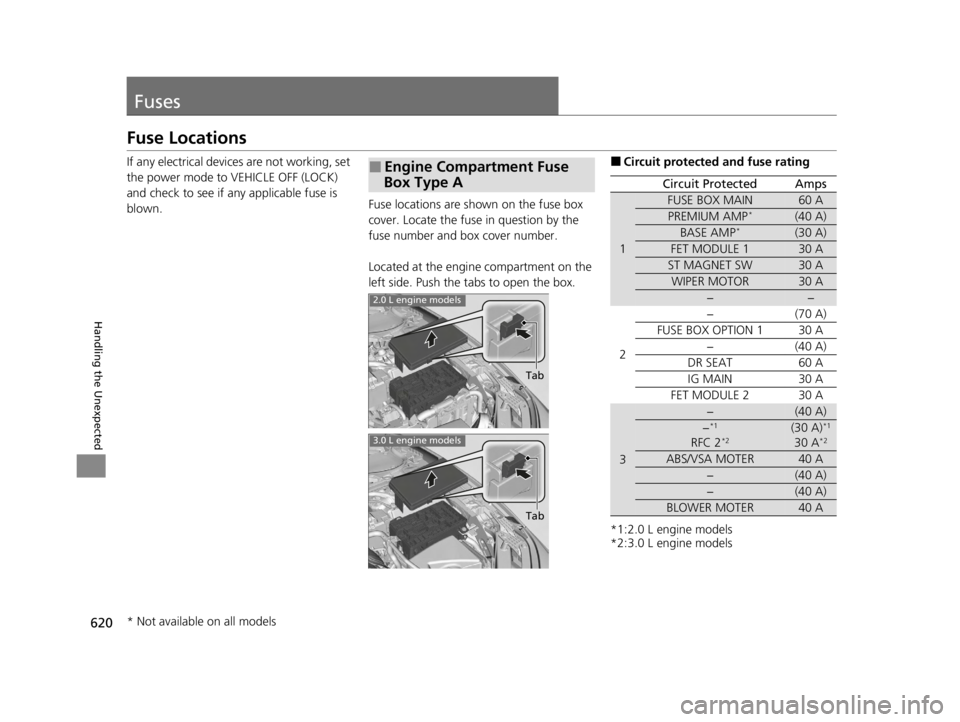
blown. Fuse locations are sh
own on the fuse box
cover. Locate the fuse in question by the
fuse number and box cover number.
Located at the engine compartment on the
left side. Push the tabs to open the box.■Engine Compartment Fuse
Box Type A
Tab
2.0 L engine models
3.0 L engine models
Tab
■Circuit protected and fuse rating
*1:2.0 L engine models
*2:3.0 L engine models
Circuit ProtectedAmps
1
FUSE BOX MAIN60 A
PREMIUM AMP*(40 A)
BASE AMP*(30 A)
FET MODULE 130 A
ST MAGNET SW30 A
WIPER MOTOR30 A
−−
2
−(70 A)
FUSE BOX OPTION 130 A
−(40 A)
DR SEAT60 A
IG MAIN30 A
FET MODULE 230 A
3
−(40 A)
−*1
RFC 2*2(30 A)*1
30 A*2
ABS/VSA MOTER40 A
−(40 A)
−(40 A)
BLOWER MOTER40 A
* Not available on all models
22 ACURA TLX-31TGV6100.book 620 \b
Page 625 of 656

623
uuFuses uFuse Locations
Continued
Handling the Unexpected
Located under the dashboard.
Fuse locations are shown on the label on
the under panel.
Locate the fuse in question by the fuse
number and label number.
■Circuit protected and fuse rating
■Driver’s Side Interior Fuse Box
Fuse Label
Fuse Box
Circuit ProtectedAmps
1−−
2L SIDE DOOR UNLOCK10 A
3R SIDE DOOR UNLOCK10 A
4ACC10 A
5−−
6SRS10 A
7−−
8R H/L HI10 A
9SMART10 A
10POWER DISTRIBUTION
MODULE10 A
11L SIDE DOOR LOCK10 A
12DR DOOR LOCK(10 A)
13R SIDE DOOR LOCK10 A
14A/C10 A
15DRL10 A
16CTR ACC SOCKET20 A
17HAZARD10 A
18L H/L HI10 A
19HORN15 A
20IMG10 A
21DR DOOR UNLOCK(10 A)
22−−
23−−
24−−
25−−
26−−
27−−
28−−
29FUSE BOX ENGINE COMPARTMENT20 A
30−−
Circuit ProtectedAmps
31−−
32RADIO15 A
33−−
34−−
35ACG10 A
36METER10 A
37OPTION10 A
38MOONROOF20 A
39−−
40−−
41−−
42HEATED STEERING WHEEL*(10 A)
43−−
44−−
45TCU10 A
46SRS10 A
47−−
48SBW10 A
49DOOR LOCK20 A
50FRONT ACC SOCKET20 A
51REAR R P/W20 A
52RR L P/W20 A
53AS P/W20 A
54DRIVER P/W20 A
55−−
Circuit ProtectedAmps
* Not available on all models
22 ACURA TLX-31TGV6100.book 623 \b
Page 628 of 656

626
uuFuses uInspecting and Changing Fuses
Handling the Unexpected
Inspecting and Changing Fuses
1. Set the power mode to VEHICLE OFF
(LOCK). Turn headlight s and all accessories
off.
2. Remove the fuse box cover.
3. Check the large fuse in the engine
compartment.
u If the fuse is blown, use a Phillips-head
screwdriver to remo ve the screw and
replace it with a new one.
4. Inspect the small fuses in the engine
compartment and the vehicle interior.
u If there is a blown fuse, remove it with
the fuse puller and replace it with a new
one.
5. Check the fuses on the battery in the trunk
room.
u If the fuse is blown, have it replaced by a
dealer.1Inspecting and Changing Fuses
NOTICE
Replacing a fuse with on e that has a higher rating
greatly increases the chances of damaging the
electrical system.
Use the charts to locate the fuse in question and
confirm the specified amperage on the fuse label. 2 Fuse Locations P. 620
Replace fuse with a spare fuse of the same specified
amperage.
There is a fuse puller on the back of the engine
compartment fuse box cover type A.
Combined Fuse Blown Fuse
Fuse Puller
Blown Fuse
22 ACURA TLX-31TGV6100.book 626 \b