lock ACURA TLX 2022 Owners Manual
[x] Cancel search | Manufacturer: ACURA, Model Year: 2022, Model line: TLX, Model: ACURA TLX 2022Pages: 656, PDF Size: 26.43 MB
Page 503 of 656
Continued501
uuParking Your Vehicle uCross Traffic Monitor*
Driving
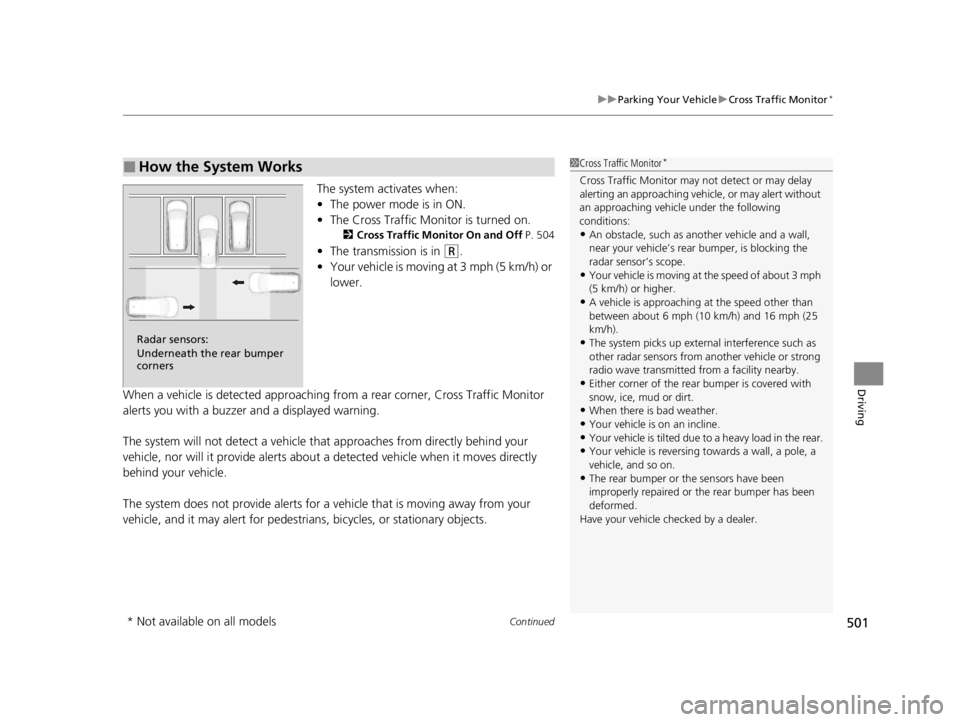
The system activates when:
• The power mode is in ON.
• The Cross Traffic Monitor is turned on.
2 Cross Traffic Monitor On and Off P. 504
•The transmission is in (R.
• Your vehicle is moving at 3 mph (5 km/h) or
lower.
When a vehicle is detected approaching from a rear corner, Cross Traffic Monitor
alerts you with a buzzer and a displayed warning.
The system will not detect a vehicle that approaches from directly behind your
vehicle, nor will it provide alerts about a detected vehicle when it moves directly
behind your vehicle.
The system does not provide alerts for a vehicle that is moving away from your
vehicle, and it may alert for pedestrians, bicycles, or stationary objects.
■How the System Works1 Cross Traffic Monitor*
Cross Traffic Monitor may not detect or may delay
alerting an approach ing vehicle, or may alert without
an approaching vehicle under the following
conditions:
•An obstacle, such as a nother vehicle and a wall,
near your vehicle’s rear bumper, is blocking the
radar sensor’s scope.
•Your vehicle is moving at the speed of about 3 mph
(5 km/h) or higher.
•A vehicle is approaching at the speed other than
between about 6 mph (10 km/h) and 16 mph (25
km/h).
•The system picks up external interference such as
other radar sensors from an other vehicle or strong
radio wave transmitted fr om a facility nearby.
•Either corner of the rear bumper is covered with
snow, ice, mud or dirt.
•When there is bad weather.
•Your vehicle is on an incline.
•Your vehicle is tilted due to a heavy load in the rear.•Your vehicle is reversing towards a wall, a pole, a
vehicle, and so on.
•The rear bumper or the sensors have been
improperly repaired or the rear bumper has been
deformed.
Have your vehicle checked by a dealer.
Radar sensors:
Underneath the rear bumper
corners
* Not available on all models
22 ACURA TLX-31TGV6100.book 501 \b
Page 518 of 656
516
uuRefueling uHow to Refuel
Driving
How to Refuel
Your fuel tank is not equipped with a fuel filler cap. You can insert the filler nozzle
directly into the filler neck. The tank seal s itself again when you pull out the filler
nozzle.
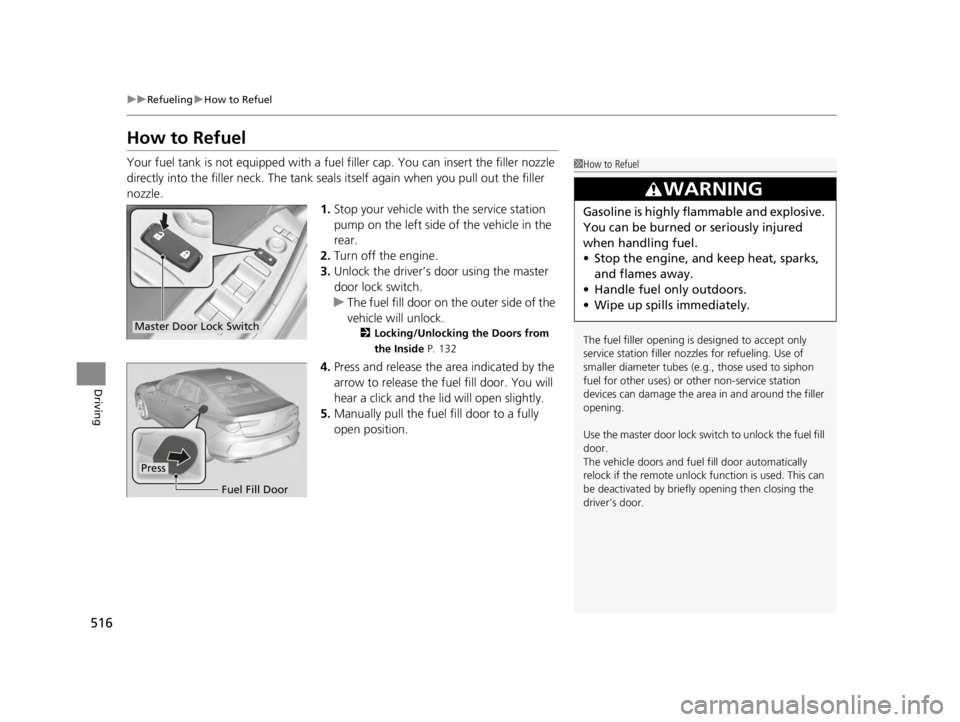
1.Stop your vehicle with the service station
pump on the left side of the vehicle in the
rear.
2. Turn off the engine.
3. Unlock the driver’s door using the master
door lock switch.
u The fuel fill door on the outer side of the
vehicle will unlock.
2 Locking/Unlocking the Doors from
the Inside P. 132
4.Press and release the area indicated by the
arrow to release the fu el fill door. You will
hear a click and the lid will open slightly.
5. Manually pull the fuel fill door to a fully
open position.
1How to Refuel
The fuel filler opening is designed to accept only
service station filler nozzles for refueling. Use of
smaller diamet er tubes (e.g., those used to siphon
fuel for other uses) or other non-service station
devices can damage the area in and around the filler
opening.
Use the master door lock switch to unlock the fuel fill
door.
The vehicle doors and fuel fill door automatically
relock if the remote unlock function is used. This can
be deactivated by briefl y opening then closing the
driver’s door.
3WARNING
Gasoline is highly flammable and explosive.
You can be burned or seriously injured
when handling fuel.
• Stop the engine, and keep heat, sparks,
and flames away.
• Handle fuel only outdoors.
• Wipe up spills immediately.
Master Door Lock Switch
Fuel Fill Door
Press
22 ACURA TLX-31TGV6100.book 516 \b
Page 537 of 656

535
uuMaintenance Under the Hood uEngine Compartment Cover
Maintenance
Engine Compartment Cover
The component parts in the engine co mpartment are protected by a cover.
You may need to remove the cover when you perform certain maintenance work.
Pull up on the engine compartment cover
carefully until all pins are removed from their
grommets.
Release the all holding c lips, and then push up
the engine compartment cover. u The holding clips shall remain attached
to the engine compartment cover.1Engine Compartment Cover (B)
To release:
Push down the center pin of the clip.
To lock:
Before returning cover to engine compartment, push
until the center pin is raised. In that state, return the
engine compartment cover and then push the center
pin until the pin is flat.
Holding clip
Push
Remove the cover.
Push until
the pin is
flat.
Push until
the pin is
raised. Return
the cover.
Engine Compartment Cover (A)Engine Compartment Cover (A)
Engine Compartment Cover (B)Engine Compartment Cover (B)
22 ACURA TLX-31TGV6100.book 535 \b
Page 542 of 656

540
uuMaintenance Under the Hood uChanging the Engine Oil and Oil Filter
Maintenance
Changing the Engine Oil and Oil Filter
You must change the engine oil and oil f ilter regularly in order to maintain the
engine’s lubrication. The engine may be damaged if they are not changed regularly.
Change the oil and filter in accordance with the maintenance message on the multi-
information display. 1.Run the engine until it reaches normal
operating temperature, and then turn the
engine off.
2. Open the hood and remove the engine oil
fill cap.
3. Remove the screws and bolt(s) on the
undercarriage by turning
counterclockwise and remove the under
cover.1Changing the Engine Oil and Oil Filter
NOTICE
You may damage the environment if you do not
dispose of the oil in a suitable way. If you are
changing the oil by yourself , appropriately dispose of
the used oil. Put the oil in a sealed container and take
it to a recycling center. Do not throw the oil away
into a garbage can or onto the ground.
You will need a special wrench to replace the oil
filter. You can buy this wrench from a dealerM
When installing the new oil filter, follow the
instructions supplied with the oil filter.
Reinstall the engine oil fill cap. Start the engine. If the
low oil pressure warning appears, turn off the
engine, and check your work.
Under Cover
Screws
Screws
Bolts
2.0 L engine models
3.0 L engine models
ScrewsBolt
ScrewsUnder Cover
22 ACURA TLX-31TGV6100.book 540 \b
Page 544 of 656

542
uuMaintenance Under the Hood uChanging the Engine Oil and Oil Filter
Maintenance
5. Remove the oil filter and dispose of the
remaining oil.
6. Check that the filter ga sket is not stuck to
the engine contact surface.
u If it is stuck, you must detach it.
7. Wipe away dirt and dust adhering to the
contact surface of the engine block, and
install a new oil filter.
u Apply a light coat of new engine oil to
the filter gasket.
8. Put a new washer on the drain bolt, then
reinstall the drain bolt.
u Tightening torque:
30 lbf∙ft (40 N∙m, 4.0 kgf∙m)
9. Pour the recommended engine oil into the
engine.
u Engine oil change capacity (including
filter):
5.0 US qt (4.8 L)
5.5 US qt (5.2 L)
10. Reinstall the engine oi l fill cap securely and
start the engine.
11. Run the engine for a few minutes, and
then check that there is no leak from the
drain bolt or oil filter.
Oil Filter
2.0 L engine models
3.0 L engine models
Oil Filter
2.0 L engine models
3.0 L engine models
22 ACURA TLX-31TGV6100.book 542 \b
Page 547 of 656

545
uuMaintenance Under the Hood uEngine Coolant
Maintenance
1. Make sure the engine and radiator are
cool.
2. Remove the engine compartment cover (A).
2 Engine Compartment Cover P. 535
3.Turn the radiator cap 1/8 turn counter-
clockwise and relieve any pressure in the
cooling system.
4. Turn the radiator cap counterclockwise to
remove it.
5. The coolant level should be up to the base
of the filler neck. Add coolant if it is low.
6. Put the radiator cap back on, and tighten it
fully.
■Radiator1Radiator
NOTICE
Pour the fluid slowly and ca refully so you do not spill
any. Clean up any spills immediately; they can
damage components in the engine compartment.Radiator Cap
22 ACURA TLX-31TGV6100.book 545 \b
Page 549 of 656

547
uuMaintenance Under the Hood uEngine Coolant
Maintenance
1. Make sure the engine and radiator are
cool.
2. Remove the engine compartment cover (B).
2 Engine Compartment Cover P. 535
3.Turn the reserve tank cap 1/8 turn counter-
clockwise and relieve any pressure in the
coolant system.
4. Push down and turn the reserve tank cap
counter-clockwise to remove it.
5. Pour coolant into the reserve tank until it
reaches the MAX mark.
6. Put the reserve tank cap back on, and
tighten it fully.
■Adding the Coolant1Engine Coolant
Do not add rust inhibitors or other additives to your
vehicle’s cooling system. Th ey may not be compatible
with the coolant or with the engine components.
1 Adding the Coolant
NOTICE
Pour the fluid slowly and ca refully so you do not spill
any. Clean up any spills immediately; they can
damage components in the engine compartment.Reserve
Tank Cap
MIN
MAX
22 ACURA TLX-31TGV6100.book 547 \b
Page 556 of 656

554
uuChecking and Maintaining Wiper Blades uChanging the Wiper Blade Rubber
Maintenance
7. Insert the flat side of the new wiper blade
onto the bottom part of the holder. Insert
the blade all the way.
8. Install the end of the wiper blade into the
cap.
9. Slide the holder onto th e wiper arm until it
locks.
10. Lower both wiper arms.
11. Set the power mode to ON and hold the
wiper switch in the MIST position until
both wiper arms return to the standard
position.
Cap Wiper
Blade
Holder
22 ACURA TLX-31TGV6100.book 554 \b
Page 567 of 656

Continued565
uuBattery uChecking the Battery
Maintenance
To access the battery terminals:
1. Pull up on the trunk floor lid strap until it is
completely open.
2. Remove the tool case.
2. Remove the tool case and spare tire.
2 Getting Ready to Replace the Flat Tire
P. 597
3. Remove the clips.
4. Flip the tab to unlock the cover.
5. Remove the battery cover.
1Battery
To remove the clip:
Insert a flat-tip screwdriver, lift and remove the center
pin to remove the clip.
To insert the clip:
Insert the clip with the center pin raised, and push
until it is flat.
Models with optional spare tire
Push until the pin
is flat.
Trunk Floor
Lid Strap
Models with temporary tire repair kit
Tool Case
Battery
Models with temporary tire repair kit
Models with optional spare tire
Tab
Battery Cover
BatteryClips
Models with optional spare tire
22 ACURA TLX-31TGV6100.book 565 \b
Page 568 of 656

uuBattery uChecking the Battery
566
Maintenance
If your vehicle’s battery is disconnected or goes dead:
• The audio system is disabled.
2 Reactivating the audio system P. 207
•The clock resets.
2 Clock P. 118
•The immobilizer system needs to be reset.
2 Immobilizer System Indicator P. 91
1Battery
The battery installed in this vehicle is specifically
designed for a model with Auto Idle Stop. Using a
battery other than this spec ified type may shorten the
battery life, and prevent Auto Idle Stop from
activating. If you need to replace the battery, make
sure to select the specified type and size. Ask a dealer
for more details.
Canadian models only
22 ACURA TLX-31TGV6100.book 566 \b