audio ACURA TLX 2022 User Guide
[x] Cancel search | Manufacturer: ACURA, Model Year: 2022, Model line: TLX, Model: ACURA TLX 2022Pages: 656, PDF Size: 26.43 MB
Page 127 of 656

Continued125
uuLocking and Unlocking the Doors uLocking/Unlocking the Doors from the Outside
Controls
■Unlocking the doors and trunk
Grab the driver’s door handle:u The driver’s door and fuel fill door
unlocks.
u Some exterior lights flash twice and the
beeper sounds twice.
Grab the front passenger’s or rear
* door
handle: u All doors and fuel fill door unlock.
u Some exterior lights flash twice and the
beeper sounds twice.
Press the trunk release button: u The trunk unlocks and opens.
u Some exterior lights flash twice and the
beeper sounds.
2 Using the Trunk Release Button P. 137
Trunk Release Button
1Using the Keyless Access System
The light flash, beep and door unlock mode settings
can be customized using the audio/information
screen.
2 Customized Features P. 302
When you go into the keyless access system working
range with all the doors locked, the puddle lights
come on for 30 seconds.
The lights do not come on if you have previously
stayed within the range for more than two minutes,
or the doors have been locked for a few days.
The feature activates agai n after you open and close
any door, then lock the doors.
Models with puddle lights
* Not available on all models
22 ACURA TLX-31TGV6100.book 125 \b
Page 128 of 656

uuLocking and Unlocking the Doors uLocking/Unlocking the Doors from the Outside
126
Controls
■Locking the doors and trunk (Walk
away auto lock ®)
When you walk away from the vehicle with all
doors closed while carrying the keyless
remote, the doors, fuel fill door and trunk will
automatically lock.
The auto lock function activates when all
doors are closed, and the keyless remote is
within about 5 feet (1.5 m) radius of the
outside door handle or trunk release button.
Exit vehicle while carrying keyless remote and
close door(s).
1. While within about 5 feet (1.5 m) radius of
the vehicle.
u The beeper sounds; the auto lock
function will be activated.
2. Carry the keyless remote beyond about 5
feet (1.5 m) from the vehicle and remain
outside this range fo r 2 or more seconds.
u Some exterior lights flash; the beeper
sounds; all doors, fuel fill door and trunk
will then lock.1Locking the doors and trunk (Walk away auto lock ®)
The auto lock function is set to OFF as the factory
default setting. The auto lo ck function can be set to
ON using the audio/information screen.
If you set the auto lock function to ON using the
audio/information screen, the setting change will
only apply to the remote transmitter that was used to
unlock the driver’s door prio r to the setting change.
2 Customized Features P. 302
After the auto lock function has been activated, when
you stay within the locking/unlocking operation range,
the indicator on the keyless remote will continue to
flash until the doors are locked.
When you stay beside the vehicle within the
operation range, the doors wi ll automatically lock
approximately 30 seconds after the auto lock
function activating beeper sounds.
When you open a door after the auto lock function
activating beeper sounds, the auto lock function will
be canceled.
Under the following circumstances, the auto lock
function will not activate:
•The keyless remote is inside the vehicle.
•The keyless remote is taken out of its operational
range before all the doors are closed. uThe beeper will not sound.
u The beeper will sound.
The activation range of
the auto lock function is
about 5 feet (1.5 m)
22 ACURA TLX-31TGV6100.book 126 \b
Page 135 of 656
Continued133
uuLocking and Unlocking the Doors uLocking/Unlocking the Doors from the Inside
Controls
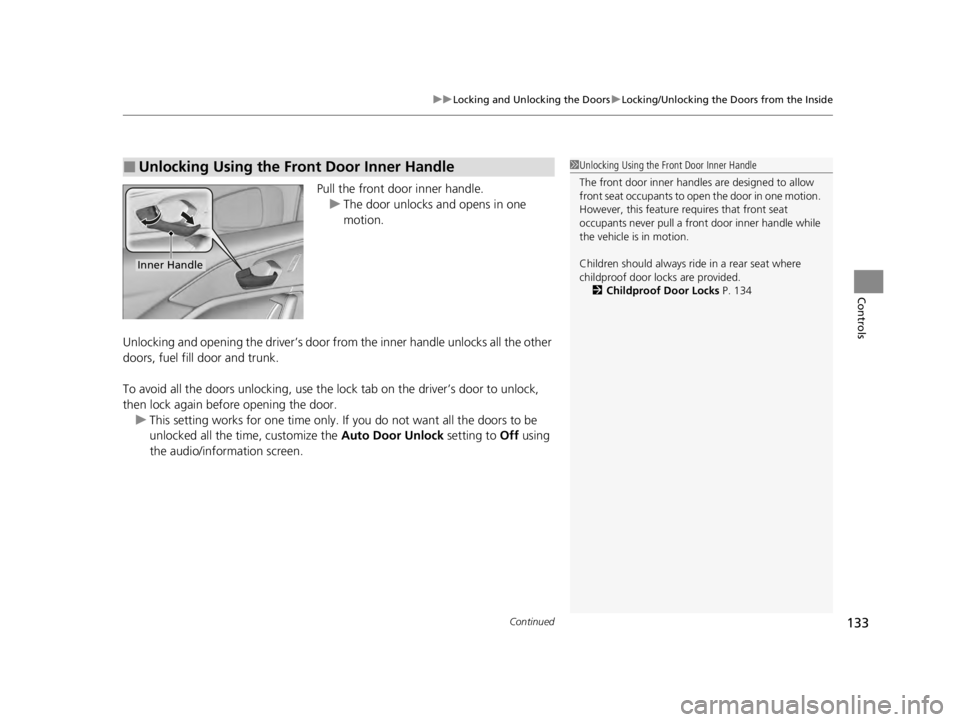
Pull the front door inner handle.
u The door unlocks and opens in one
motion.
Unlocking and opening the driver’s door from the inner handle unlocks all the other
doors, fuel fill door and trunk.
To avoid all the doors unlocking, use the lock tab on the driver’s door to unlock,
then lock again before opening the door. u This setting works for one time only. If you do not want all the doors to be
unlocked all the time, customize the Auto Door Unlock setting to Off using
the audio/information screen.
■Unlocking Using the Front Door Inner Handle1 Unlocking Using the Front Door Inner Handle
The front door inne r handles are designed to allow
front seat occupants to ope n the door in one motion.
However, this feature requires that front seat
occupants never pull a front door inner handle while
the vehicle is in motion.
Children should always ride in a rear seat where
childproof door locks are provided. 2 Childproof Door Locks P. 134
Inner Handle
22 ACURA TLX-31TGV6100.book 133 \b
Page 137 of 656
135
uuLocking and Unlocking the Doors uAuto Door Locking/Unlocking
Controls
Auto Door Locking/Unlocking
Your vehicle locks or unlocks all doors, fuel fill door and trunk automatically when a
certain condition is met.
■Drive lock mode
All doors, fuel fill door and trunk lock when the vehicle’s speed reaches about 10
mph (15 km/h).
■Driver’s door open mode
All doors, fuel fill door and trunk unlock when the driver’s door is opened.
■Auto Door Locking
■Auto Door Unlocking
1 Auto Door Locking/Unlocking
You can turn off or cha nge to another auto door
locking/unlocking sett ing using the audio/
information screen. 2 Customized Features P. 302
22 ACURA TLX-31TGV6100.book 135 \b
Page 141 of 656
139Continued
Controls
Security System
Immobilizer System
This system prevents a key that has not been preregistered from starting the engine.
Pay attention to the follo wing when pressing the ENGINE START/STOP button:
• Do not allow objects that emit strong radio waves near the ENGINE START/
STOP button.
• Make sure the key is not covered by or touching a metal object.
• Do not bring a key from another vehicle’s immobilizer system near the ENGINE
START/STOP button.
• Do not put the key near magnetic items. Electronic devices, such as televisions
and audio systems emit strong magnetic fields. Note that even a key chain can
become magnetic.
Security System Alarm
The security system alarm activates when the trunk, hood or doors are forcibly
opened. The alarm does not activate if the trunk or doors are opened with the key,
remote transmitter or keyless access system.
However, the alarm activates if a door is opened with the key and then the hood is
opened before the power mode is set to ON.
■When the security system alarm activates
The horn sounds intermittently and some exterior lights flash.
1Immobilizer System
NOTICE
Leaving the key in the vehicl e can result in theft or
accidental movement of the vehicleM
Always take the key with you whenever you leave the
vehicle unattendedM
Do not alter the system or add other devices to itM
Doing so may damage the system and make your
vehicle inoperableM
Apply and hold the brake pedal before turning the
vehicle on the first time after the battery has been
disconnectedM
Canadian models
1 Security System Alarm
Do not alter the system or add other devices to it.
Doing so may damage the system and make your
vehicle inoperable.
The security system alarm continues for a maximum
of two minutes until the security system alarm
deactivates.
22 ACURA TLX-31TGV6100.book 139 \b
Page 148 of 656

146
Controls
Operating the Switches Around the Steering Wheel
ENGINE START/STOP Button
■Changing the Power Mode1ENGINE START/STOP Button
ENGINE START/STOP Button Operating Range
You can start the engine when the keyless remote is
inside the vehicle.
The engine may also run if the keyless remote is close
to the door or window, even if it is outside the
vehicle.
ON mode:
The ENGINE START/STOP button is on (in red), if the
engine is running.
If the battery of the keyless remote is getting low, the
engine may not start when you press the ENGINE
START/STOP button. If the engi ne does not start,
refer to the following link.
2 If the Keyless Remote Battery is Weak
P. 604
Do not leave the power mode in ACCESSORY or ON
when you get out.
Operating RangeVEHICLE OFF (LOCK)
The button is off.
The power to all electrical components is turned off.
ACCESSORY
The button blinks (in red).
Operate the audio system and other accessories in this
position.
ON
The button blinks (in red).
All electrical components can be used.
Press the button.
22 ACURA TLX-31TGV6100.book 146 \b
Page 164 of 656

162
uuOperating the Switches Around the Steering Wheel uDriving Position Memory System
Controls
Driving Position Memory System
You can store two driver’s seat and outside mirrors position with the driving position
memory system.
When you unlock and open the driver’s door with a keyless remote, or keyless access
system, door mirrors adjust to one of the two preset positions and the seat adjusts
to retracted positions of one of the two preset positions automatically.
The seat will move to th e stored position when you set the power mode to
ACCESSORY.
• DRIVER 1 transmitter is linked to memory button 1.
• DRIVER 2 transmitter is linked to memory button 2.
The driver’s seat moves rearward depending
on the set seating position once you
•Stop the vehicle.
• Put the transmission in
(P.
• Turn the engine off.
• Open the driver’s door.
Once the power mode is in the ACCESSORY
position, the driver’s seat moves forward to
the DRIVER 1 or 2 preset position.
1 Driving Position Memory System
Using the audio/informati on screen, you can disable
the automatic seat adjustment function. 2 Customized Features P. 302
The driver’s seat easy exit feature can be turned ON/
OFF. 2 Customized Features P. 302
System Operation
The system will not operate if:
•Either memory button is pressed while the seat or
mirrors are in motion.
•The seat or mirrors positions are adjusted while in
operation.
•Either of the memorized positions is set fully to the
rear.
•The mode selector is pressed up or down while in
operation.
The system may not recognize a key if:
•The key is in close proximity to a cell phone or other
wireless device.
•Both keys are in the vehicle at the same time.
•The Driving Position Memory System is disabled in
customized features.
•Opening driver's door wi thout fully grabbing door
handle.
Models with mode selector
DRIVER 1 DRIVER 2
22 ACURA TLX-31TGV6100.book 162 \b
Page 172 of 656

uuSeats uFront Seats
170
Controls
Press the mode selector up or down to display seat adjustment information on the
audio/information screen, and then use the adjustment switch to adjust the lumbar
support, bolster support or thigh support.
■Seat Control Interface*1 Seat Control Interface*
The image of each adjustment mode displayed on the
audio/information screen:
Lumbar support
Bolster support
Thigh support
* Not available on all models
22 ACURA TLX-31TGV6100.book 170 \b
Page 205 of 656
203
Features
This chapter describes how to operate technology features.
Audio SystemAbout Your Audio System ................ 204
USB Ports ......................................... 205
Auxiliary Input Jack .......................... 206
Audio System Theft Protection ......... 207
Audio Remote Controls .................... 208
Audio System Basic Operation ........ 210
True Touchpad Interface .................. 211
Audio/Information Screen ................ 214
System Updates ............................... 227
Adjusting the Sound ........................ 233
Display Setup ................................... 234 Voice Control Operation .................. 235
Playing AM/FM Radio ....................... 238
Playing SiriusXM
® Radio ................... 242
Playing an iPod ................................ 255
Playing a USB Flash Drive ................. 258
Playing Bluetooth ® Audio................. 261
Wi-Fi Connection ............................. 264
AT&T Hotspot .................................. 266
Siri Eyes Free .................................... 267
Apple CarPlay .................................. 268
Android Auto................................... 272
Audio Error Messages ...................... 276 General Information on the Audio
System ............................................. 279
Customized Features ........................ 302
HomeLink ® Universal Transceiver ... 326
Bluetooth® HandsFreeLink® ............. 329
AcuraLink® ........................................ 358
22 ACURA TLX-31TGV6100.book 203 \b
Page 206 of 656
204
Features
Audio System
About Your Audio System
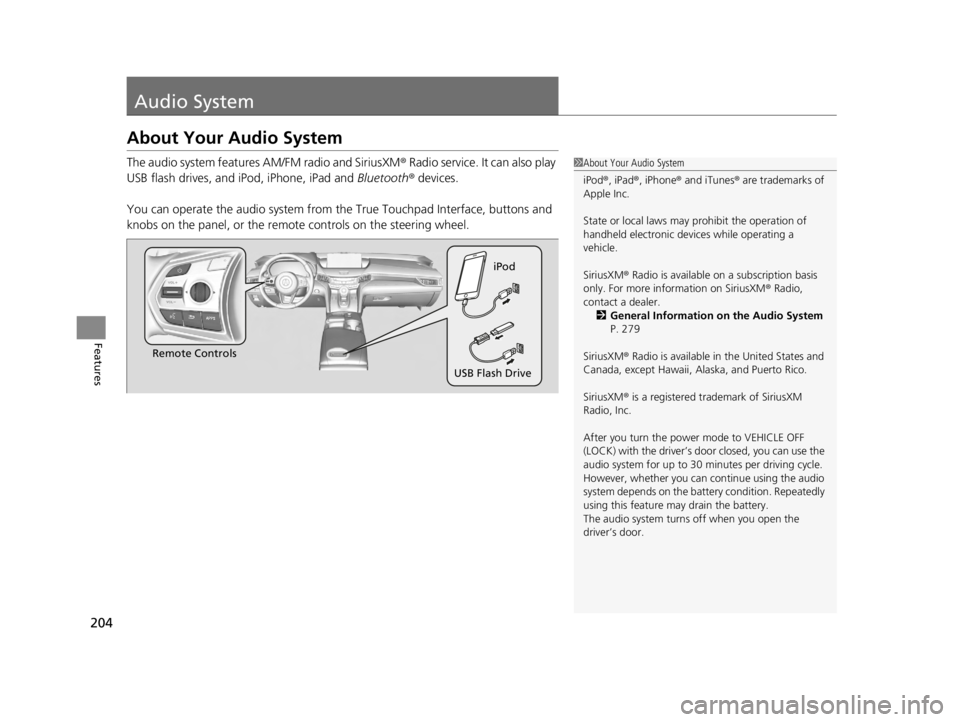
The audio system features AM/FM radio and SiriusXM® Radio service. It can also play
USB flash drives, and iPod, iPhone, iPad and Bluetooth® devices.
You can operate the audio system from the True Touchpad Interface, buttons and
knobs on the panel, or the remote controls on the steering wheel.1 About Your Audio System
iPod ®, iPad ®, iPhone ® and iTunes ® are trademarks of
Apple Inc.
State or local laws may pr ohibit the operation of
handheld electronic devices while operating a
vehicle.
SiriusXM ® Radio is available on a subscription basis
only. For more information on SiriusXM ® Radio,
contact a dealer. 2 General Information on the Audio System
P. 279
SiriusXM ® Radio is available in the United States and
Canada, except Ha waii, Alaska, and Puerto Rico.
SiriusXM ® is a registered trademark of SiriusXM
Radio, Inc.
After you turn the power mode to VEHICLE OFF
(LOCK) with the driver’s door closed, you can use the
audio system for up to 30 minutes per driving cycle.
However, whether you can continue using the audio
system depends on the batter y condition. Repeatedly
using this feature ma y drain the battery.
The audio system turns off when you open the
driver’s door.
Remote Controls iPod
USB Flash Drive
22 ACURA TLX-31TGV6100.book 204 \b