audio ACURA TLX 2022 Owner's Manual
[x] Cancel search | Manufacturer: ACURA, Model Year: 2022, Model line: TLX, Model: ACURA TLX 2022Pages: 656, PDF Size: 26.43 MB
Page 207 of 656
205
uuAudio System uUSB Ports
Features
USB Ports
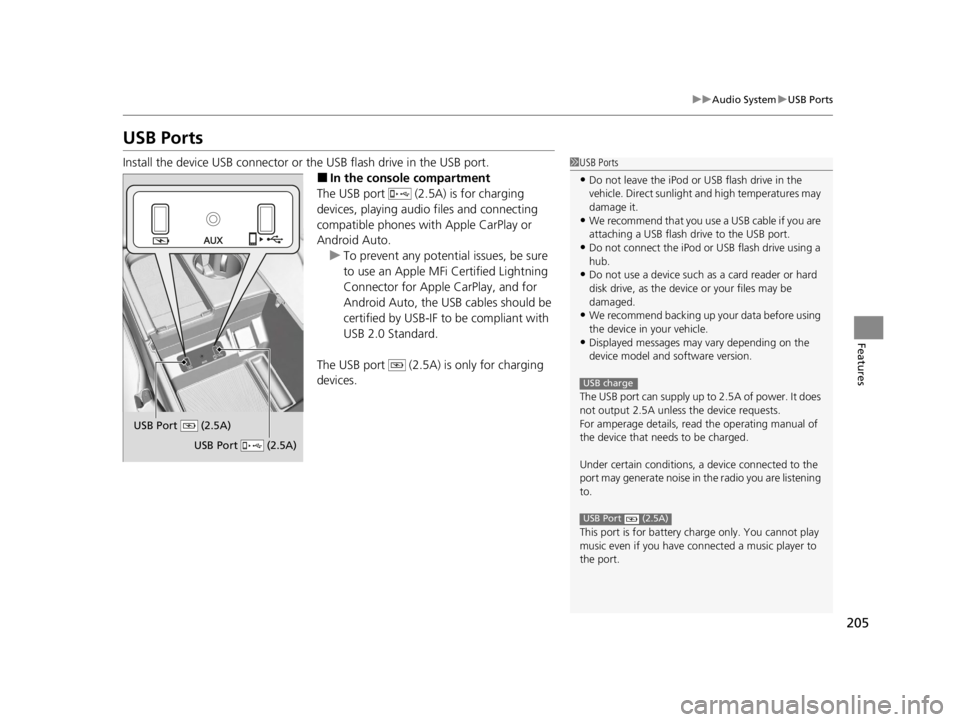
Install the device USB connector or the USB flash drive in the USB port.
■In the consol e compartment
The USB port (2.5A) is for charging
devices, playing audio files and connecting
compatible phones with Apple CarPlay or
Android Auto.
u To prevent any potenti al issues, be sure
to use an Apple MFi Certified Lightning
Connector for Apple CarPlay, and for
Android Auto, the USB cables should be
certified by USB-IF to be compliant with
USB 2.0 Standard.
The USB port (2.5A) is only for charging
devices.
1 USB Ports
•Do not leave the iPod or USB flash drive in the
vehicle. Direct sunlight and high temperatures may
damage it.
•We recommend that you us e a USB cable if you are
attaching a USB flash drive to the USB port.
•Do not connect the iPod or USB flash drive using a
hub.
•Do not use a device such as a card reader or hard
disk drive, as the device or your files may be
damaged.
•We recommend backing up yo ur data before using
the device in your vehicle.
•Displayed messages may vary depending on the
device model and software version.
The USB port can supply up to 2.5A of power. It does
not output 2.5A unless the device requests.
For amperage details, read the operating manual of
the device that ne eds to be charged.
Under certain condi tions, a device connected to the
port may generate noise in the radio you are listening
to.
This port is for battery charge only. You cannot play
music even if you have connected a music player to
the port.
USB charge
USB Port (2.5A)
USB Port (2.5A)
USB Port (2.5A)
22 ACURA TLX-31TGV6100.book 205 \b
Page 208 of 656
206
uuAudio System uAuxiliary Input Jack
Features
Auxiliary Input Jack
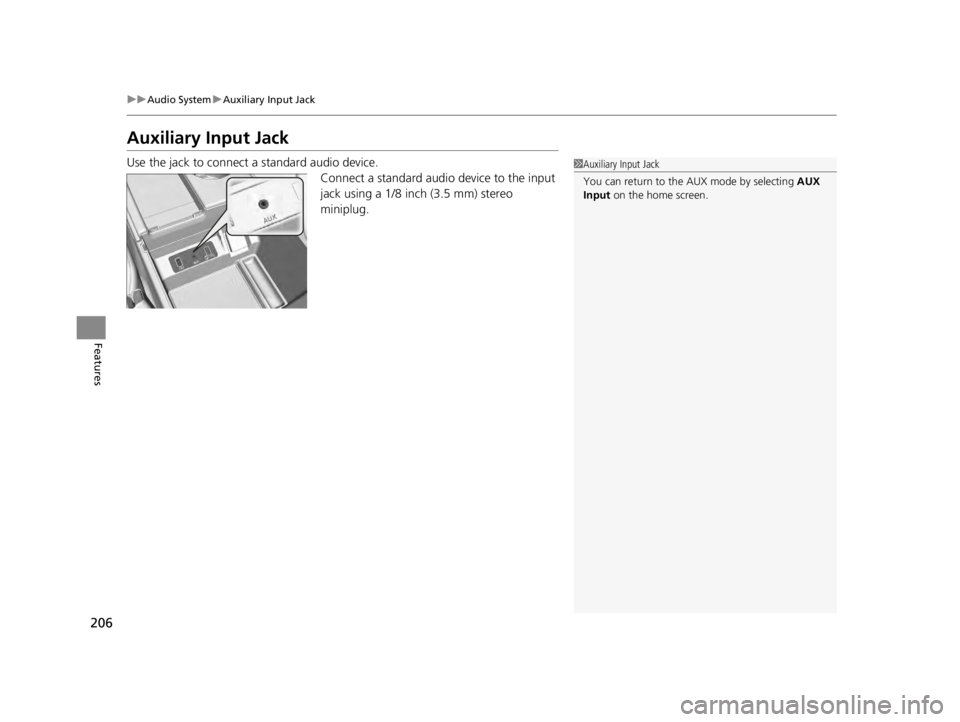
Use the jack to connect a standard audio device.
Connect a standard audio device to the input
jack using a 1/8 inch (3.5 mm) stereo
miniplug.1Auxiliary Input Jack
You can return to the AUX mode by selecting AUX
Input on the home screen.
22 ACURA TLX-31TGV6100.book 206 \b
Page 209 of 656

207
uuAudio System uAudio System Theft Protection
Features
Audio System Theft Protection
The audio system is disabled when it is disconnected from the power source, such as
when the battery is disconnected or goes dead. In certain conditions, the system
may display a code entry screen. If this occurs, reactivate the audio system.
■Reactivating the audio system
1. Set the power mode to ON.
2. Turn on the audio system.
3. Press and hold the audio system power knob for more than two seconds.
u The audio system is reac tivated when the audio co ntrol unit establishes a
connection with the vehicl e control unit. If the control unit fails to recognize
the audio unit, you must go to a dealer and have the audio unit checked.
22 ACURA TLX-31TGV6100.book 207 \b
Page 210 of 656
208
uuAudio System uAudio Remote Controls
Features
Audio Remote Controls
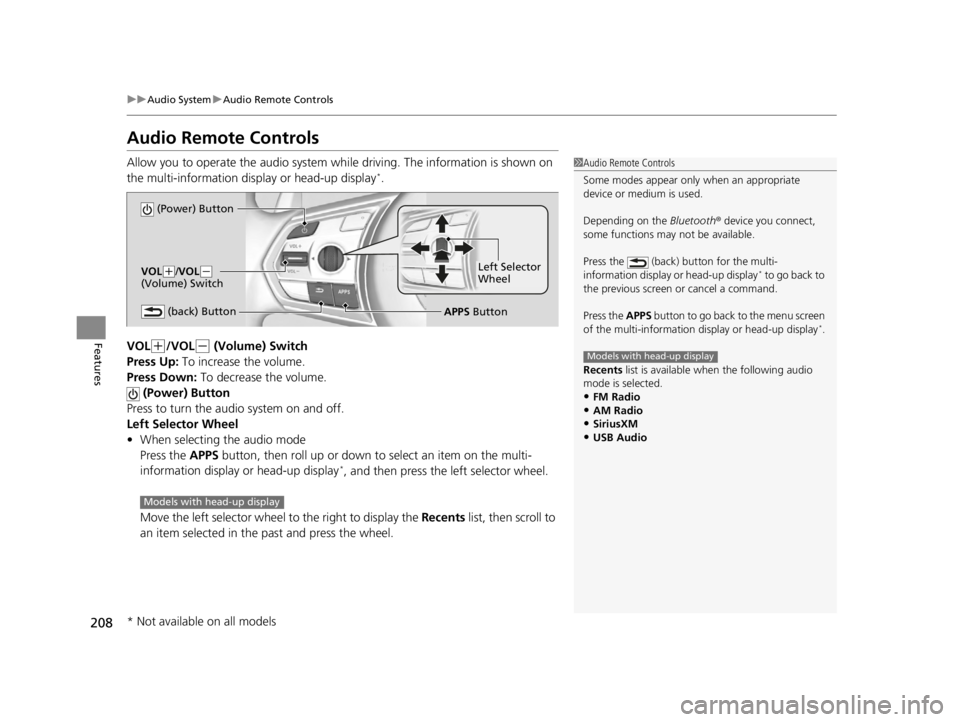
Allow you to operate the audio system wh ile driving. The information is shown on
the multi-information display or head-up display*.
VOL
(+/VOL(- (Volume) Switch
Press Up: To increase the volume.
Press Down: To decrease the volume.
(Power) Button
Press to turn the audio system on and off.
Left Selector Wheel
• When selecting the audio mode
Press the APPS button, then roll up or down to select an item on the multi-
information display or head-up display
*, and then press the left selector wheel.
Move the left selector wheel to the right to display the Recents list, then scroll to
an item selected in the past and press the wheel.
1 Audio Remote Controls
Some modes appear only when an appropriate
device or medium is used.
Depending on the Bluetooth® device you connect,
some functions may not be available.
Press the (back) button for the multi-
information display or head-up display
* to go back to
the previous screen or cancel a command.
Press the APPS button to go back to the menu screen
of the multi-information di splay or head-up display
*.
Recents list is available when the following audio
mode is selected.
•FM Radio
•AM Radio•SiriusXM
•USB Audio
Models with head-up display
(Power) Button
VOL( +/VOL(-
(Volume) Switch
(back) ButtonLeft Selector
Wheel
APPS Button
Models with head-up display
* Not available on all models
22 ACURA TLX-31TGV6100.book 208 \b
Page 211 of 656
209
uuAudio System uAudio Remote Controls
Features
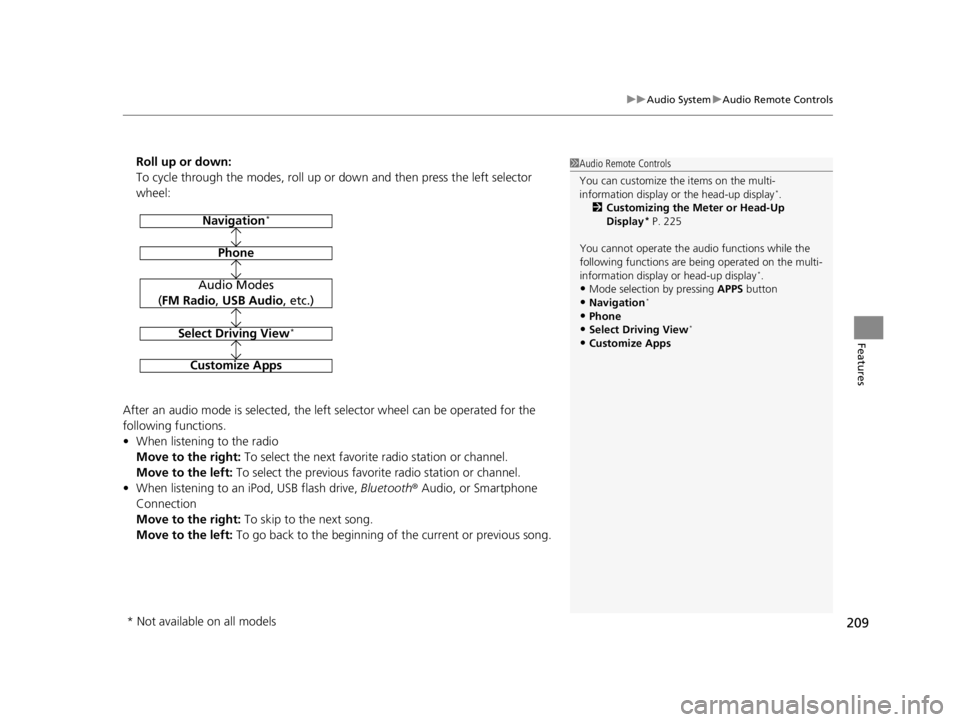
Roll up or down:
To cycle through the modes, roll up or down and then press the left selector
wheel:
After an audio mode is selected, the left selector wheel can be operated for the
following functions.
• When listening to the radio
Move to the right: To select the next favorite radio station or channel.
Move to the left: To select the previous favorite radio station or channel.
• When listening to an iPod, USB flash drive, Bluetooth® Audio, or Smartphone
Connection
Move to the right: To skip to the next song.
Move to the left: To go back to the beginning of the current or previous song.1Audio Remote Controls
You can customize the items on the multi-
information display or the head-up display
*.
2 Customizing the Meter or Head-Up
Display
* P. 225
You cannot operate the a udio functions while the
following functions are be ing operated on the multi-
information display or head-up display
*.•Mode selection by pressing APPS button
•Navigation*
•Phone
•Select Driving View*
•Customize Apps
Navigation*
Phone
Select Driving View*
Customize Apps
Audio Modes
(FM Radio , USB Audio , etc.)
* Not available on all models
22 ACURA TLX-31TGV6100.book 209 \b
Page 212 of 656
210
Features
Audio System Basic Operation
You can use the audio system for 30 minutes when the power mode is set to
VEHICLE OFF (LOCK) with the driver’s door closed. The system will then turn off
automatically.
If you want to keep using it, we reco mmend that you turn the power mode to
ACCESSORY or ON.
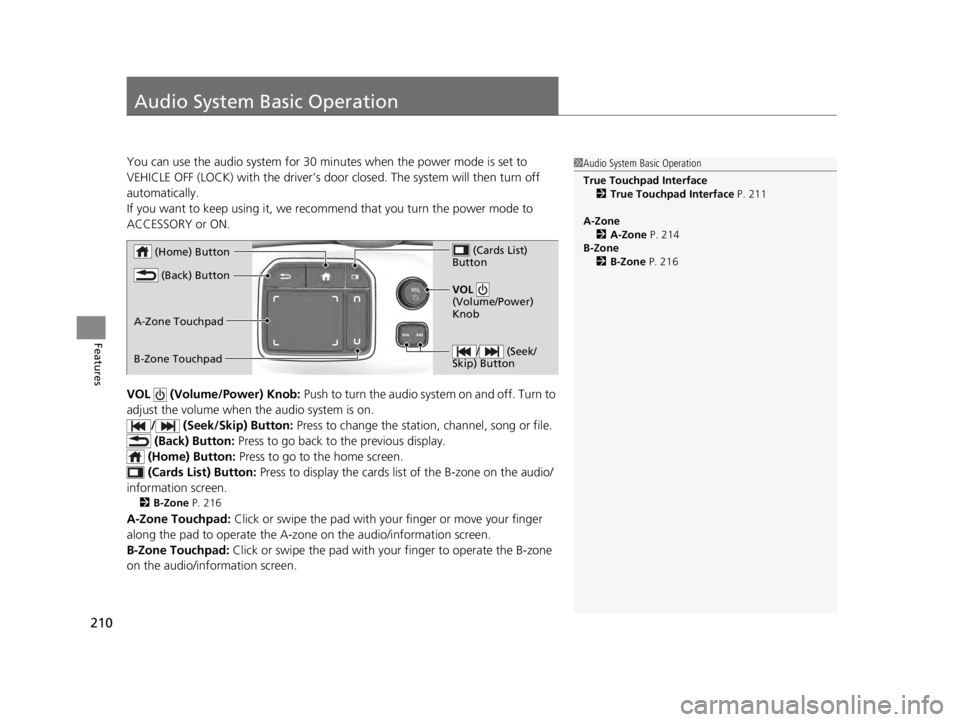
VOL (Volume/Power) Knob: Push to turn the audio system on and off. Turn to
adjust the volume when the audio system is on.
/ (Seek/Skip) Button: Press to change the station, channel, song or file.
(Back) Button: Press to go back to the previous display.
(Home) Button: Press to go to the home screen.
(Cards Li st) Button: Press to display the cards list of the B-zone on the audio/
information screen.
2 B-Zone P. 216
A-Zone Touchpad: Click or swipe the pad with your finger or move your finger
along the pad to operate the A-zone on the audio/information screen.
B-Zone Touchpad: Click or swipe the pad with your finger to operate the B-zone
on the audio/info rmation screen.
1Audio System Basic Operation
True Touchpad Interface
2 True Touchpad Interface P. 211
A-Zone 2 A-Zone P. 214
B-Zone 2 B-Zone P. 216
/ (Seek/
Skip) Button
VOL
(Volume/Power)
Knob
(Home) Button
(Back) Button
(Cards List)
Button
A-Zone Touchpad
B-Zone Touchpad
22 ACURA TLX-31TGV6100.book 210 \b
Page 213 of 656
211
uuAudio System Basic Operation uTrue Touchpad Interface
Continued
Features
True Touchpad Interface
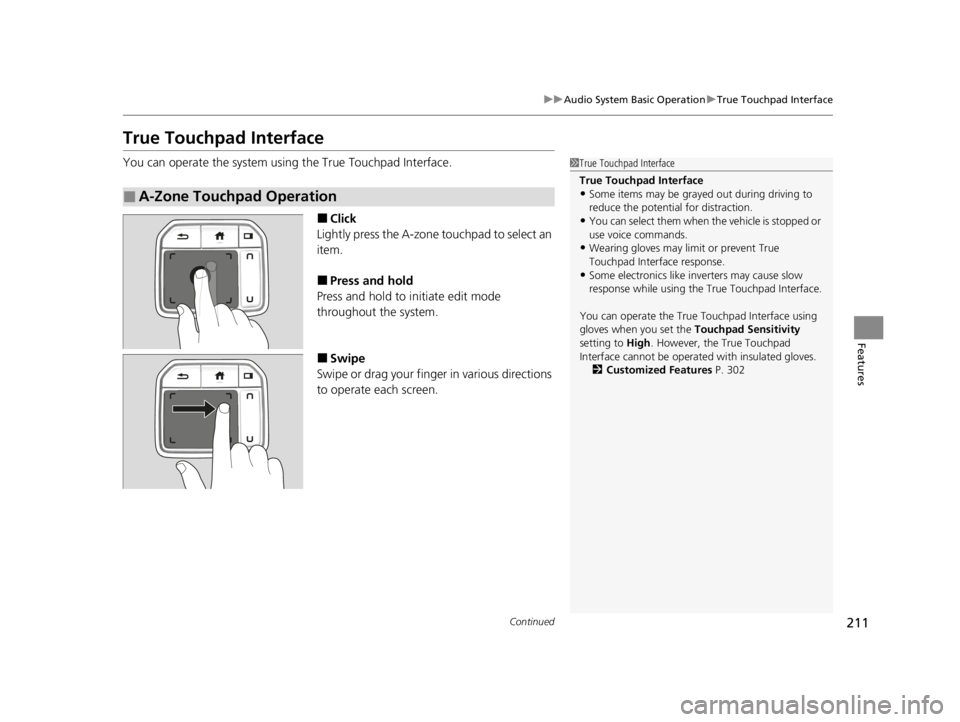
You can operate the system using the True Touchpad Interface.
■Click
Lightly press the A-zone touchpad to select an
item.
■Press and hold
Press and hold to in itiate edit mode
throughout the system.
■Swipe
Swipe or drag your finger in various directions
to operate each screen.
■A-Zone Touchpad Operation
1 True Touchpad Interface
True Touchpad Interface
•Some items may be grayed out during driving to
reduce the potential for distraction.
•You can select them when the vehicle is stopped or
use voice commands.
•Wearing gloves may li mit or prevent True
Touchpad Interfa ce response.
•Some electronics like inverters may cause slow
response while using the True Touchpad Interface.
You can operate the True Touchpad Interface using
gloves when you set the Touchpad Sensitivity
setting to High . However, the True Touchpad
Interface cannot be operated with insulated gloves.
2 Customized Features P. 302
22 ACURA TLX-31TGV6100.book 211 \b
Page 214 of 656
212
uuAudio System Basic Operation uTrue Touchpad Interface
Features
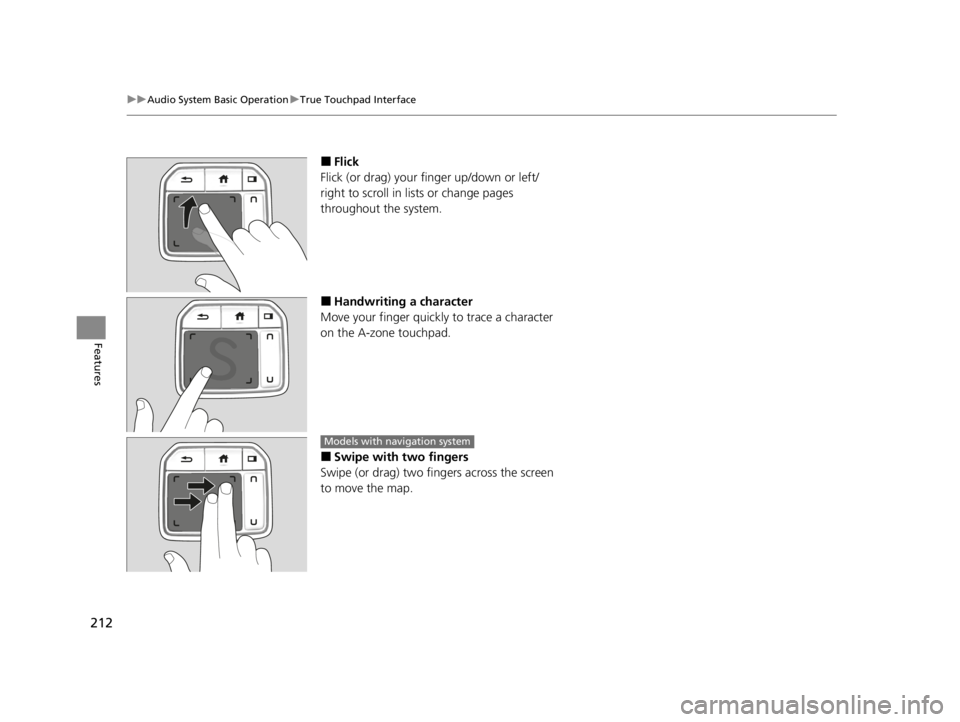
■Flick
Flick (or drag) your finger up/down or left/
right to scroll in lists or change pages
throughout the system.
■Handwriting a character
Move your finger quickl y to trace a character
on the A-zone touchpad.
■Swipe with two fingers
Swipe (or drag) two fing ers across the screen
to move the map.
Models with navigation system
22 ACURA TLX-31TGV6100.book 212 \b
Page 215 of 656
213
uuAudio System Basic Operation uTrue Touchpad Interface
Features
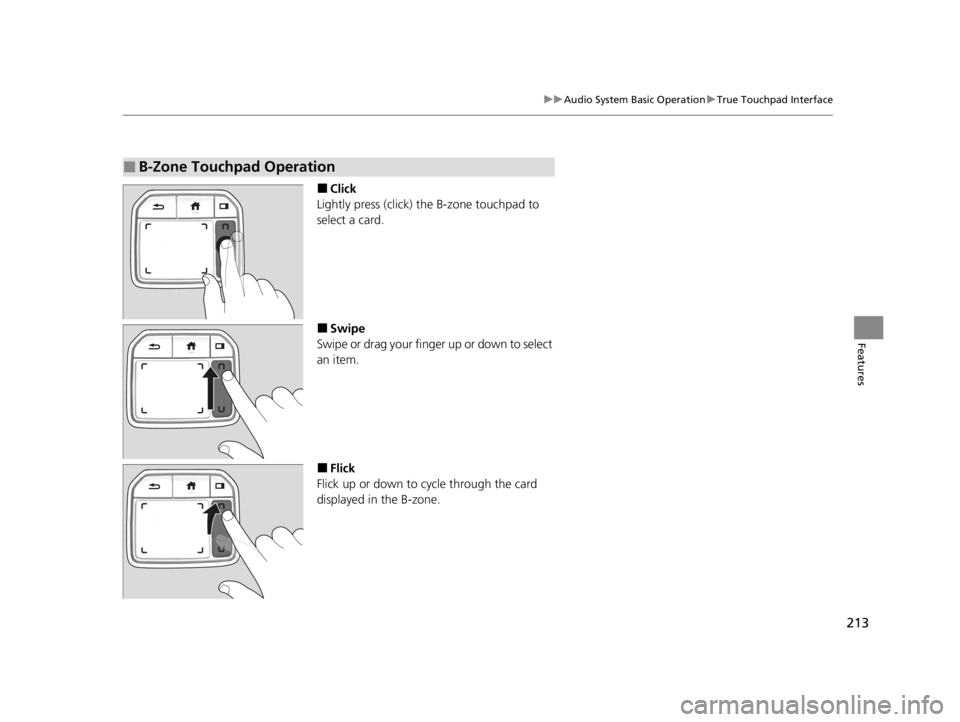
■Click
Lightly press (click) th e B-zone touchpad to
select a card.
■Swipe
Swipe or drag your finger up or down to select
an item.
■Flick
Flick up or down to cycle through the card
displayed in the B-zone.
■B-Zone Touchpad Operation
22 ACURA TLX-31TGV6100.book 213 \b
Page 216 of 656
214
uuAudio System Basic Operation uAudio/Information Screen
Features
Audio/Information Screen
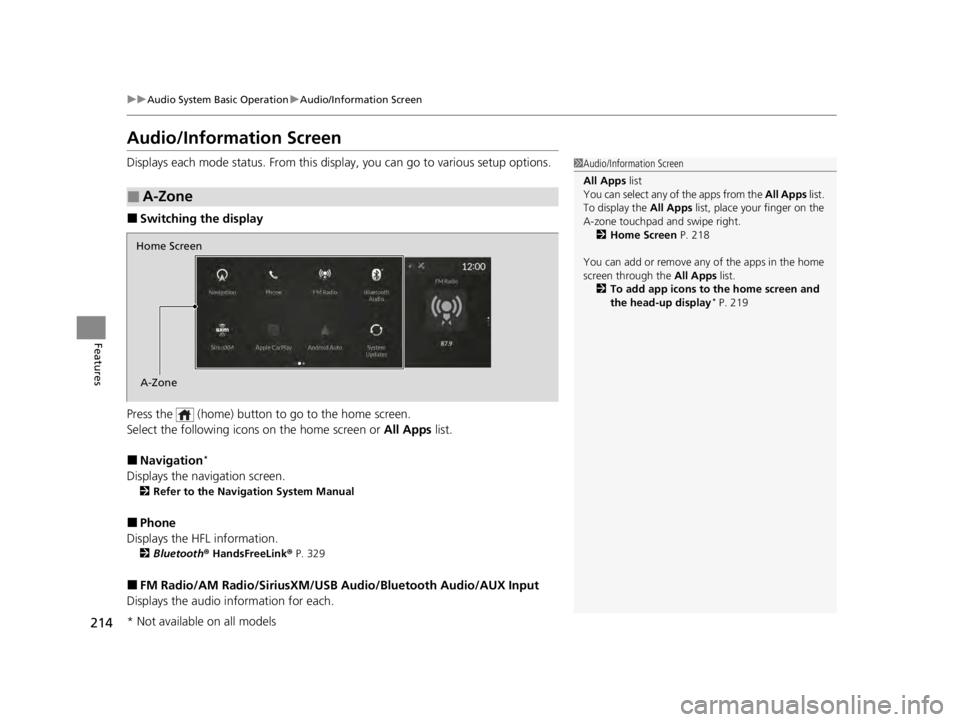
Displays each mode status. From this display, you can go to various setup options.
■Switching the display
Press the (home) button to go to the home screen.
Select the following icon s on the home screen or All Apps list.
■Navigation*
Displays the navigation screen.
2Refer to the Navigation System Manual
■Phone
Displays the HFL information.
2 Bluetooth ® HandsFreeLink ® P. 329
■FM Radio/AM Radio/SiriusXM/USB Audio/Bluetooth Audio/AUX Input
Displays the audio information for each.
■A-Zone
1Audio/Information Screen
All Apps list
You can select any of the apps from the All Apps list.
To display the All Apps list, place your finger on the
A-zone touchpad and swipe right. 2 Home Screen P. 218
You can add or remove any of the apps in the home
screen through the All Apps list.
2 To add app icons to the home screen and
the head-up display
* P. 219
Home Screen
A-Zone
* Not available on all models
22 ACURA TLX-31TGV6100.book 214 \b