lock ACURA TLX 2022 Repair Manual
[x] Cancel search | Manufacturer: ACURA, Model Year: 2022, Model line: TLX, Model: ACURA TLX 2022Pages: 656, PDF Size: 26.43 MB
Page 166 of 656

164
uuOperating the Switches Around the Steering Wheel uAdjusting the Steering Wheel
Controls
Adjusting the Steering Wheel
The steering wheel height and distance from your body can be adjusted so that you
can comfortably grip the steering wheel in an appropriate driving posture.
1.While the vehicle is stopped, push the
steering wheel adjustment lever down.
u The steering wheel adjustment lever is
under the steering column.
2. Move the steering wheel up or down, and
in or out.
u Make sure you can see the instrument
panel gauges and indicators.
3. Pull the steering wheel adjustment lever up
to lock the steerin g wheel in position.
u After adjusting the position, make sure
you have securely locked the steering
wheel in place by trying to move it up,
down, in, and out.1Adjusting the Steering Wheel
3WARNING
Adjusting the steering wheel position while
driving may cause you to lose control of the
vehicle and be seriously injured in a crash.
Adjust the steering wheel only when the
vehicle is stopped.To adjust
To lockLever
22 ACURA TLX-31TGV6100.book 164 \b
Page 169 of 656
167
uuMirrors uPower Door Mirrors
Controls
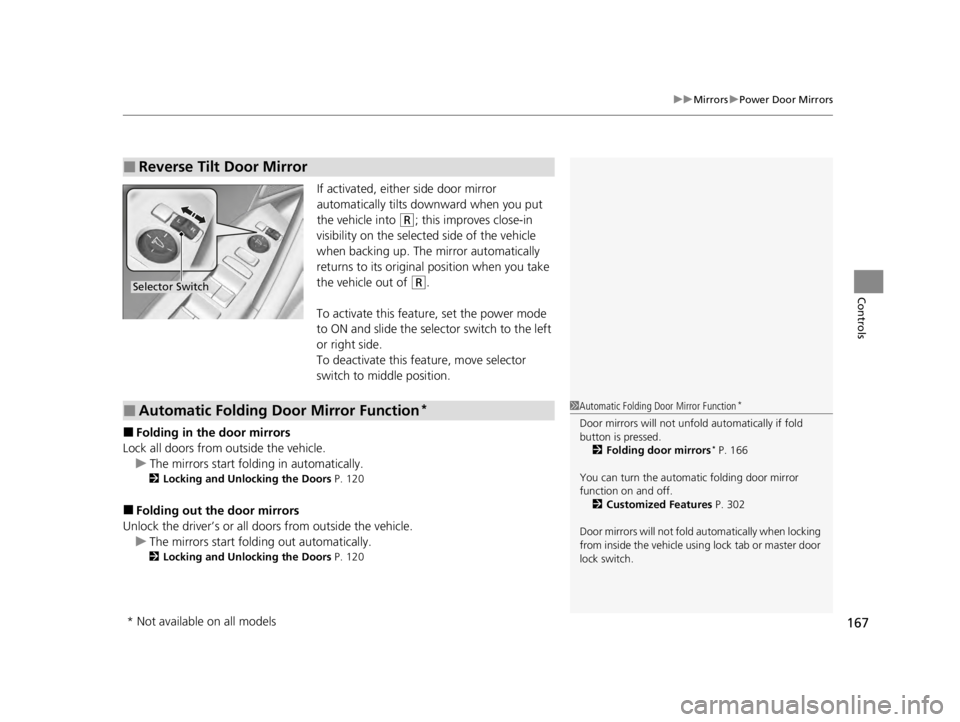
If activated, either side door mirror
automatically tilts do wnward when you put
the vehicle into
(R; this improves close-in
visibility on the selected side of the vehicle
when backing up. The mirror automatically
returns to its original position when you take
the vehicle out of
(R.
To activate this feature, set the power mode
to ON and slide the sele ctor switch to the left
or right side.
To deactivate this feature, move selector
switch to middle position.
■Folding in th e door mirrors
Lock all doors from outside the vehicle. u The mirrors start folding in automatically.
2 Locking and Unlocking the Doors P. 120
■Folding out the door mirrors
Unlock the driver’s or all doors from outside the vehicle.
u The mirrors start folding out automatically.
2 Locking and Unlocking the Doors P. 120
■Reverse Tilt Door Mirror
Selector Switch
■Automatic Folding Door Mirror Function*1Automatic Folding Door Mirror Function*
Door mirrors will not unfol d automatically if fold
button is pressed. 2 Folding door mirrors
* P. 166
You can turn the automa tic folding door mirror
function on and off. 2 Customized Features P. 302
Door mirrors will not fold automatically when locking
from inside the vehicle usi ng lock tab or master door
lock switch.
* Not available on all models
22 ACURA TLX-31TGV6100.book 167 \b
Page 178 of 656
uuSeats uHead Restraints
176
Controls
Head restraints can be removed for cleaning or repair.
To remove a head restraint:
Pull the restraint up as far as it will go. Then, push the release button and pull the
restraint up and out.
To reinstall a head restraint:
Insert the legs back in place, then adjust the head restraint to an appropriate height
while pressing the release button. Pull up on the restraint to make sure it is locked
in position.
■Removing and Reinstalling the Head Restraints1 Removing and Reinstalling the Head Restraints
3WARNING
Failure to reinstall, or correctly reinstall, the
head restraints can result in severe injury
during a crash.
Always replace the he ad restraints before
driving.
22 ACURA TLX-31TGV6100.book 176 \b
Page 180 of 656

178
uuSeats uRear Seats
Controls
Rear Seats
1. Pull the release lever in the trunk to release
the lock.
2. Fold the seat-back down.
If the rear head restraints get caught on the
front seat-backs, remove the head restraints.
2 Removing and Reinstalling the Head
Restraints P. 176
■Folding Down the Rear Seats1Folding Down the Rear Seats
The rear seat-backs can be folded down to
accommodate bulkier items in the trunk.
Never drive with a seat-back folded down and the
trunk lid open.
2 Exhaust Gas Hazard P. 75
To lock the seat-back upri ght, push it backwards until
it locks.
When returning the seat-back to its original position,
push it firmly back. Also, m ake sure all rear shoulder
belts are positioned in front of the seat-back, and the
center shoulder be lt is positioned in the guide.
Make sure that the folded seat-back does not press
against the front passenger seat, as this can cause the
weight sensors in the front passenger seat to work
improperly. 2 Passenger Airbag Off Indicator P. 58
Make sure all items in the trunk or items
extending through the opening into the rear
seats are properly secured. Loose items can fly
forward if you have to brake hard.
The front seat(s) must be far enough forward so they
do not interfere with the rear seats as they fold
down.
Release
Lever
22 ACURA TLX-31TGV6100.book 178 \b
Page 182 of 656

180
Controls
Interior Convenience Items
Interior Lights
■ON
The interior lights come on regardless of
whether the doors are open or closed.
■Door activated
The interior lights come on in the following
situations:
• When any doors are opened.
• You unlock the driver’s door.
• When the power mode is set to VEHICLE
OFF (LOCK).
■OFF
The interior lights remain off regardless of
whether the doors are open or closed.
■Interior Light Switches1 Interior Light Switches
In the door activated position, the interior lights fade
out and go off about 30 seconds after the doors are
closed.
The lights go off after about 30 seconds in the
following situations:
•When you unlock the driver’s door but do not open
it.
•When you set the power mode to VEHICLE OFF
(LOCK) but do not open a door.
You can change the interi or lights dimming time.
2 Customized Features P. 302
The interior lights go off im mediately in the following
situations:
•When you lock the driver’s door.•When you close the driver’s door in ACCESSORY
mode.
•When you set the power mode to ON.
To avoid draining the ba ttery, do not leave the
interior light on for an extended length of time when
the engine is off.
If you leave any of the doors open in VEHICLE OFF
(LOCK) mode, the interior lights go off after about 15
minutes.
Off
On
Door Activated Position
22 ACURA TLX-31TGV6100.book 180 \b
Page 184 of 656

182
uuInterior Convenience Items uStorage Items
Controls
Storage Items
Pull the handle to open the glove box. You
can lock the glove box with the built-in key.
■Glove Box1Glove Box
The glove box light comes on when the parking lights
are on.
3WARNING
An open glove box can cause serious injury
to your passenger in a crash, even if the
passenger is wearing the seat belt.
Always keep the glove box closed while
driving.
To Lock
Glove Box
Handle
22 ACURA TLX-31TGV6100.book 182 \b
Page 200 of 656

uuClimate Control System uUsing Automatic Climate Control
198
Controls
■Switching between the recirc ulation and fresh air modes
Press the (recirculation) button and switch the mode depending on
environmental conditions.
Recirculation mode (indicator on): Recirculates air from the vehicle’s interior through
the system.
Fresh air mode (indicator off): Maintains out side ventilation. Keep the system in
fresh air mode in normal situations.1 Using Automatic Climate Control
When you unlock the doors with your remote, the
driver’s ID (DRIVER 1 or DRIVER 2) is detected, and
the climate control settings are turned to the
respective mode automatically when you set the
power mode to ON.
22 ACURA TLX-31TGV6100.book 198 \b
Page 206 of 656
204
Features
Audio System
About Your Audio System
The audio system features AM/FM radio and SiriusXM® Radio service. It can also play
USB flash drives, and iPod, iPhone, iPad and Bluetooth® devices.
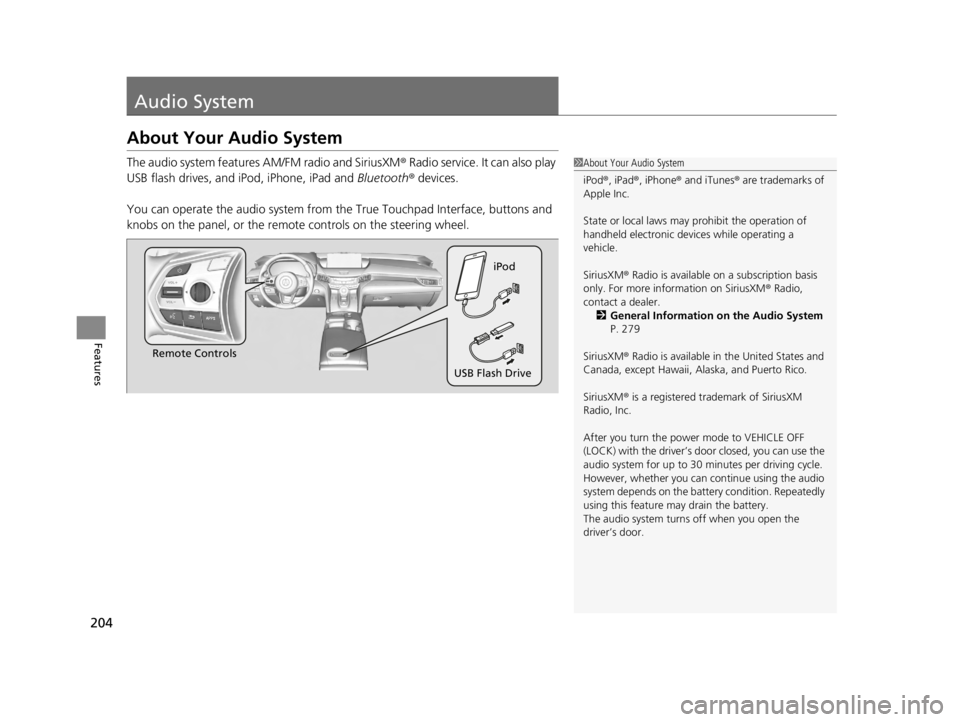
You can operate the audio system from the True Touchpad Interface, buttons and
knobs on the panel, or the remote controls on the steering wheel.1 About Your Audio System
iPod ®, iPad ®, iPhone ® and iTunes ® are trademarks of
Apple Inc.
State or local laws may pr ohibit the operation of
handheld electronic devices while operating a
vehicle.
SiriusXM ® Radio is available on a subscription basis
only. For more information on SiriusXM ® Radio,
contact a dealer. 2 General Information on the Audio System
P. 279
SiriusXM ® Radio is available in the United States and
Canada, except Ha waii, Alaska, and Puerto Rico.
SiriusXM ® is a registered trademark of SiriusXM
Radio, Inc.
After you turn the power mode to VEHICLE OFF
(LOCK) with the driver’s door closed, you can use the
audio system for up to 30 minutes per driving cycle.
However, whether you can continue using the audio
system depends on the batter y condition. Repeatedly
using this feature ma y drain the battery.
The audio system turns off when you open the
driver’s door.
Remote Controls iPod
USB Flash Drive
22 ACURA TLX-31TGV6100.book 204 \b
Page 212 of 656
210
Features
Audio System Basic Operation
You can use the audio system for 30 minutes when the power mode is set to
VEHICLE OFF (LOCK) with the driver’s door closed. The system will then turn off
automatically.
If you want to keep using it, we reco mmend that you turn the power mode to
ACCESSORY or ON.
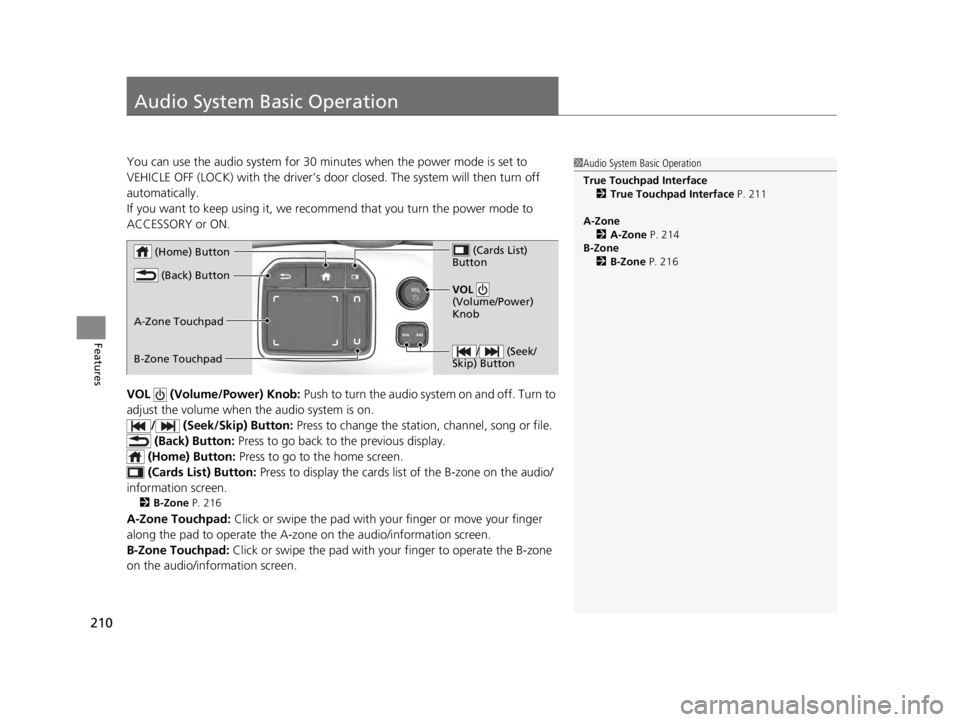
VOL (Volume/Power) Knob: Push to turn the audio system on and off. Turn to
adjust the volume when the audio system is on.
/ (Seek/Skip) Button: Press to change the station, channel, song or file.
(Back) Button: Press to go back to the previous display.
(Home) Button: Press to go to the home screen.
(Cards Li st) Button: Press to display the cards list of the B-zone on the audio/
information screen.
2 B-Zone P. 216
A-Zone Touchpad: Click or swipe the pad with your finger or move your finger
along the pad to operate the A-zone on the audio/information screen.
B-Zone Touchpad: Click or swipe the pad with your finger to operate the B-zone
on the audio/info rmation screen.
1Audio System Basic Operation
True Touchpad Interface
2 True Touchpad Interface P. 211
A-Zone 2 A-Zone P. 214
B-Zone 2 B-Zone P. 216
/ (Seek/
Skip) Button
VOL
(Volume/Power)
Knob
(Home) Button
(Back) Button
(Cards List)
Button
A-Zone Touchpad
B-Zone Touchpad
22 ACURA TLX-31TGV6100.book 210 \b
Page 218 of 656
uuAudio System Basic Operation uAudio/Information Screen
216
Features
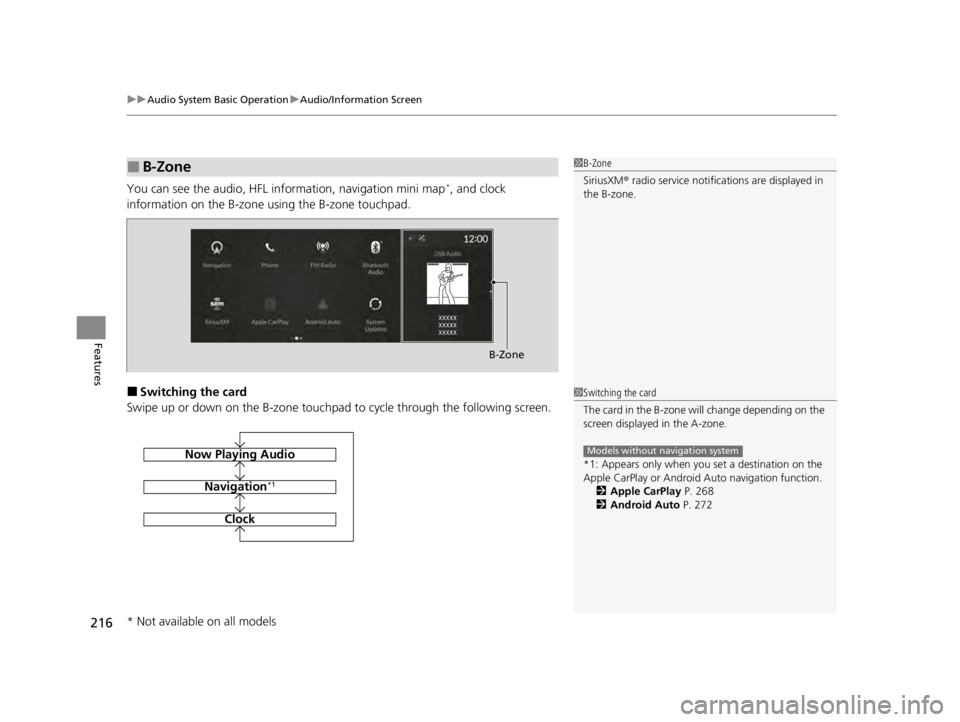
You can see the audio, HFL information, navigation mini map*, and clock
information on the B-zone using the B-zone touchpad.
■Switching the card
Swipe up or down on the B-zone touchpad to cycle through the following screen.
■B-Zone1 B-Zone
SiriusXM ® radio service notifications are displayed in
the B-zone.
B-Zone
1 Switching the card
The card in the B-zone wi ll change depending on the
screen displayed in the A-zone.
*1: Appears only when you set a destination on the
Apple CarPlay or Android Auto navigation function.
2 Apple CarPlay P. 268
2 Android Auto P. 272
Models without navigation systemNow Playing Audi–
Navigation*1
Clock
* Not available on all models
22 ACURA TLX-31TGV6100.book 216 \b