lock ACURA TLX 2023 Owners Manual
[x] Cancel search | Manufacturer: ACURA, Model Year: 2023, Model line: TLX, Model: ACURA TLX 2023Pages: 658, PDF Size: 21.27 MB
Page 549 of 658

547
uuMaintenance Under the Hood uEngine Coolant
Maintenance
1. Make sure the engine and radiator are
cool.
2. Remove the engine compartment cover (B).
2 Engine Compartment Cover P. 535
3.Turn the reserve tank cap 1/8 turn counter-
clockwise and relieve any pressure in the
coolant system.
4. Push down and turn the reserve tank cap
counter-clockwise to remove it.
5. Pour coolant into the reserve tank until it
reaches the MAX mark.
6. Put the reserve tank cap back on, and
tighten it fully.
■Adding the Coolant1Engine Coolant
Do not add rust inhibitors or other additives to your
vehicle’s cooling system. Th ey may not be compatible
with the coolant or with the engine components.
1 Adding the Coolant
NOTICE
Pour the fluid slowly and ca refully so you do not spill
any. Clean up any spills immediately; they can
damage components in the engine compartment.Reserve
Tank Cap
MIN
MAX
23 ACURA TLX-31TGV6200.book 547 ページ 2022年8月4日 木曜日 午後1時59分
Page 556 of 658

554
uuChecking and Maintaining Wiper Blades uChanging the Wiper Blade Rubber
Maintenance
7. Insert the flat side of the new wiper blade
onto the bottom part of the holder. Insert
the blade all the way.
8. Install the end of the wiper blade into the
cap.
9. Slide the holder onto th e wiper arm until it
locks.
10. Lower both wiper arms.
11. Set the power mode to ON and hold the
wiper switch in the MIST position until
both wiper arms return to the standard
position.
Cap Wiper
Blade
Holder
23 ACURA TLX-31TGV6200.book 554 ページ 2022年8月4日 木曜日 午後1時59分
Page 567 of 658

Continued565
uuBattery uChecking the Battery
Maintenance
To access the battery terminals:
1. Pull up on the trunk floor lid strap until it is
completely open.
2. Remove the tool case.
2. Remove the tool case and spare tire.
2 Getting Ready to Replace the Flat Tire
P. 599
3. Remove the clips.
4. Flip the tab to unlock the cover.
5. Remove the battery cover.
1Battery
To remove the clip:
Insert a flat-tip screwdriver, lift and remove the center
pin to remove the clip.
To insert the clip:
Insert the clip with the center pin raised, and push
until it is flat.
Models with optional spare tire
Push until the pin
is flat.
Trunk Floor
Lid Strap
Models with temporary tire repair kit
Tool Case
Battery
Models with temporary tire repair kit
Models with optional spare tire
Tab
Battery Cover
BatteryClips
Models with optional spare tire
23 ACURA TLX-31TGV6200.book 565 ページ 2022年8月4日 木曜日 午後1時59分
Page 568 of 658

uuBattery uChecking the Battery
566
Maintenance
If your vehicle’s battery is disconnected or goes dead:
• The audio system is disabled.
2 Reactivating the audio system P. 207
•The clock resets.
2 Clock P. 118
•The immobilizer system needs to be reset.
2 Immobilizer System Indicator P. 91
1Battery
The battery installed in this vehicle is specifically
designed for a model with Auto Idle Stop. Using a
battery other than this spec ified type may shorten the
battery life, and prevent Auto Idle Stop from
activating. If you need to replace the battery, make
sure to select the specified type and size. Ask a dealer
for more details.
Canadian models only
23 ACURA TLX-31TGV6200.book 566 ページ 2022年8月4日 木曜日 午後1時59分
Page 569 of 658

567
uuBattery uCharging the AGM Battery
Maintenance
Charging the AGM Battery
AGM labeled batteries like those installed in your vehicle require a compatible
charger to be properly charged. Damage to the battery can result if the battery is
charged improperly or with the wrong equi pment. For more information on how to
charge your vehicle’s AGM battery, consult a dealer.1 Battery
The vehicle stability assist
TM (VSA ®) system, vehicle
stability assistTM (VSA ®) OFF, adaptive cruise control
(ACC) with low speed follow, and safety support may
come on in amber along with a message in the multi-
information display when y ou set the power mode to
ON after re-connecting a battery.
Drive a short distance at more than 12 mph (20
km/h).
Each indicator should go off. If any do not, have your
vehicle checked by a dealer.
3WARNING
• Failure to use and correctly install a
battery and Battery Stopper (foam block)
specifically designed for this vehicle could
cause a hydrogen gas leak inside the
vehicle, resulting in a fire or explosion
that may cause injury or death.
• Only install a 12V AGM battery designed
for use in this vehicle.
• Contact your Acura dealer for more
information.
23 ACURA TLX-31TGV6200.book 567 ページ 2022年8月4日 木曜日 午後1時59分
Page 574 of 658
uuCleaning uInterior Care
572
Maintenance
Wipe using a glass cleaner.
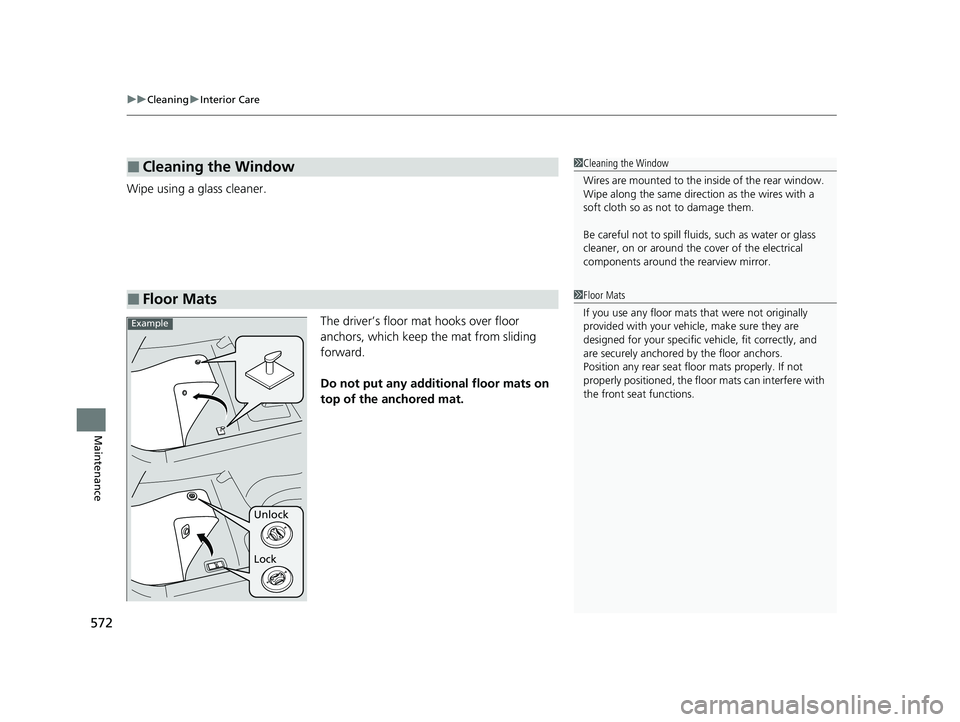
The driver’s floor mat hooks over floor
anchors, which keep the mat from sliding
forward.
Do not put any additional floor mats on
top of the anchored mat.
■Cleaning the Window
■Floor Mats
1 Cleaning the Window
Wires are mounted to the in side of the rear window.
Wipe along the same direct ion as the wires with a
soft cloth so as not to damage them.
Be careful not to spill flui ds, such as water or glass
cleaner, on or around the cover of the electrical
components around the rearview mirror.
1Floor Mats
If you use any floor mats that were not originally
provided with your vehicle, make sure they are
designed for your specific ve hicle, fit correctly, and
are securely anchored by the floor anchors.
Position any rear seat floor mats properly. If not
properly positioned, the floor mats can interfere with
the front seat functions.
Unlock
Lock
Example
23 ACURA TLX-31TGV6200.book 572 ページ 2022年8月4日 木曜日 午後1時59分
Page 576 of 658
574
uuCleaning uExterior Care
Maintenance
Exterior Care
Dust off the vehicle body after you drive. Re gularly inspect your vehicle for scratches
on painted surfaces. A scratch on a painted surface can result in body rust. If you
find a scratch, pr omptly repair it.
Wash the vehicle regularly. Wash more frequently when driving in the following
conditions:
• If driving on roads with road salt.
• If driving in coastal areas.
• If tar, soot, bird droppings, insects, or tree sap are stuck to painted surfaces.
• If driving in conditions that cause buildup of mud, snow, ice or other debris on the
left side inner fender vent.
■Washing the Vehicle
1 Washing the Vehicle
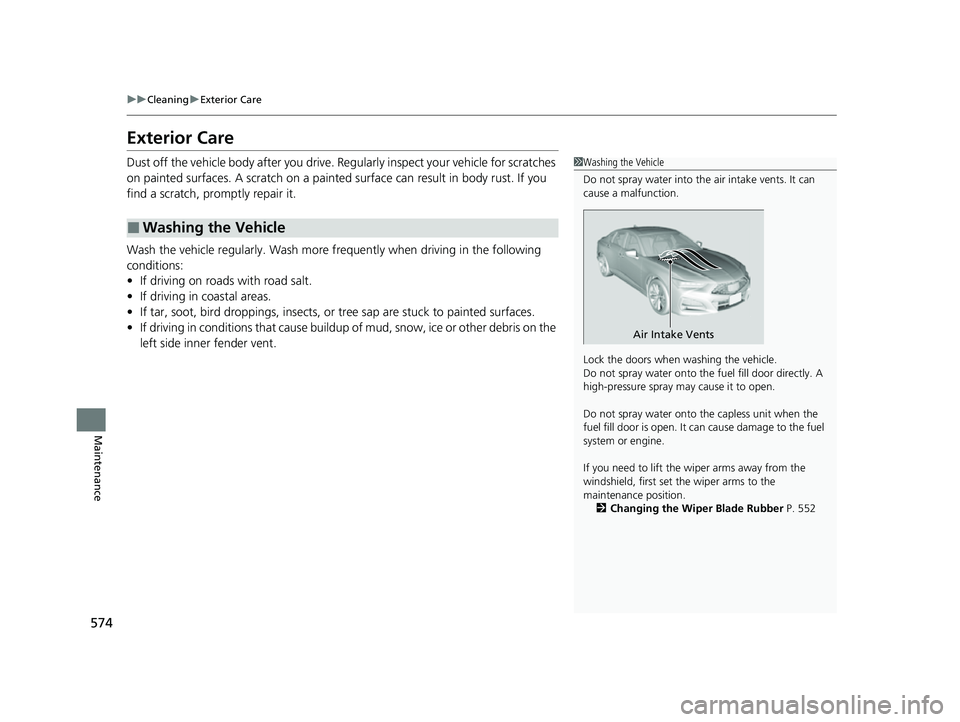
Do not spray water into the air intake vents. It can
cause a malfunction.
Lock the doors when washing the vehicle.
Do not spray water onto the fuel fill door directly. A
high-pressure spray ma y cause it to open.
Do not spray water onto the capless unit when the
fuel fill door is open. It ca n cause damage to the fuel
system or engine.
If you need to lift the wiper arms away from the
windshield, first set the wiper arms to the
maintenance position. 2 Changing the Wiper Blade Rubber P. 552
Air Intake Vents
23 ACURA TLX-31TGV6200.book 574 ページ 2022年8月4日 木曜日 午後1時59分
Page 583 of 658

581
Handling the Unexpected
This chapter explains how to handle unexpected troubles.
Tools.................................................. 582
If a Tire Goes Flat
Temporarily Repairi ng a Flat Tire....... 583
Changing a Flat Tire ......................... 598
Engine Does Not Start
Checking the Engine ........................ 605
If the Keyless Remote Battery is Weak.. 606Emergency Engine Stop ................... 607
If the Battery Is Dead Jump Starting Procedure .................. 608
Overheating ...................................... 611
Indicator, Coming On/Blinking If the Engine Oil Pr essure Low Warning
Appears ......................................... 614 If the Charging System Indicator Comes
On ................................................. 615
If the Slow Down! Reduced Stopping Power Warning Appears ................ 615
If the Malfunction Indicator Lamp Comes
On or Blinks ..................................... 616
If the Brake System Indicator (Red) Comes On or Blinks ....................................... 617
If the Electric Power Steering (EPS) System Indicator Comes On ........................... 618
If the Brake System Indicator (Red) Comes On
or Blinks at the Same Time When the Brake
System Indicator (Amber) Comes On .. 619 If the Low Tire Pressure/TPMS Indicator
Comes On or Blinks ....................... 620
If the Transmission System Indicator Blinks along with the Warning Message ...... 621
Fuses .................................................. 622
Emergency Towing ........................... 629If You Cannot Unlock the Fuel Fill Door.. 630If You Cannot Open the Trunk ........ 631
Refueling
Refueling From a Portable Fuel Container ................................... 632
23 ACURA TLX-31TGV6200.book 581 ページ 2022年8月4日 木曜日 午後1時59分
Page 601 of 658
599
uuIf a Tire Goes Flat uChanging a Flat Tire
Continued
Handling the Unexpected
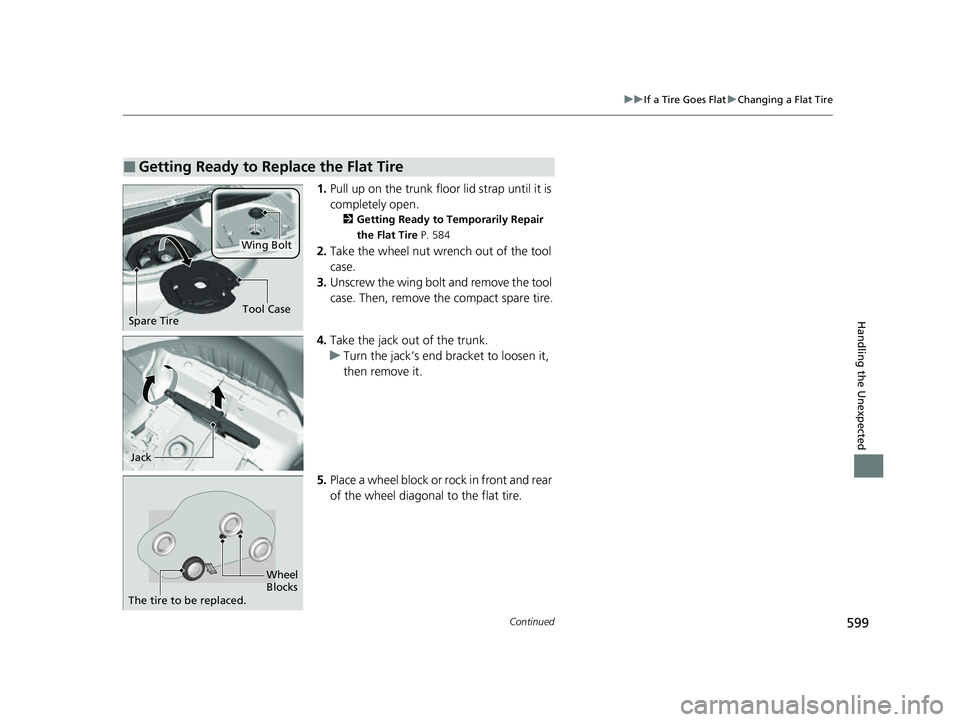
1. Pull up on the trunk floor lid strap until it is
completely open.
2 Getting Ready to Temporarily Repair
the Flat Tire P. 584
2.Take the wheel nut wrench out of the tool
case.
3. Unscrew the wing bolt and remove the tool
case. Then, remove the compact spare tire.
4. Take the jack out of the trunk.
u Turn the jack’s end bracket to loosen it,
then remove it.
5. Place a wheel block or rock in front and rear
of the wheel diagonal to the flat tire.
■Getting Ready to Replace the Flat Tire
Tool CaseSpare Tire
Wing Bolt
Jack
Wheel
Blocks
The tire to be replaced.
23 ACURA TLX-31TGV6200.book 599 ページ 2022年8月4日 木曜日 午後1時59分
Page 609 of 658

607
uuEngine Does Not StartuEmergency Engine Stop
Handling the Unexpected
Emergency Engine Stop
The ENGINE START/STOP button may be used to stop the engine due to an
emergency situation even while driving. If you must stop the engine, do either of the
following operations:
• Press and hold the ENGINE START/STOP button for about two seconds.
• Firmly press the ENGINE START/STOP button three times.
The steering wheel will not lock. However, because turning off the engine disables
the power assist the engine provides to the steering and braking systems, it will
require significantly more physical effort an d time to steer and slow the vehicle. Use
both feet on the brake pedal to slow down the vehicle and stop immediately in a
safe place.
The gear position automatically changes to
(P after the vehicle comes to a complete
stop. Then, the power mode changes to VEHICLE OFF.
1 Emergency Engine Stop
NOTICE
Do not press the ENGINE START/STOP button while
driving unless it is absolute ly necessary for the engine
to be turned off.
If you press the ENGINE START/STOP button while
driving, the beeper sounds.
23 ACURA TLX-31TGV6200.book 607 ページ 2022年8月4日 木曜日 午後1時59分