oil pressure Acura TSX 2014 Owner's Manual
[x] Cancel search | Manufacturer: ACURA, Model Year: 2014, Model line: TSX, Model: Acura TSX 2014Pages: 329, PDF Size: 15.95 MB
Page 9 of 329
8
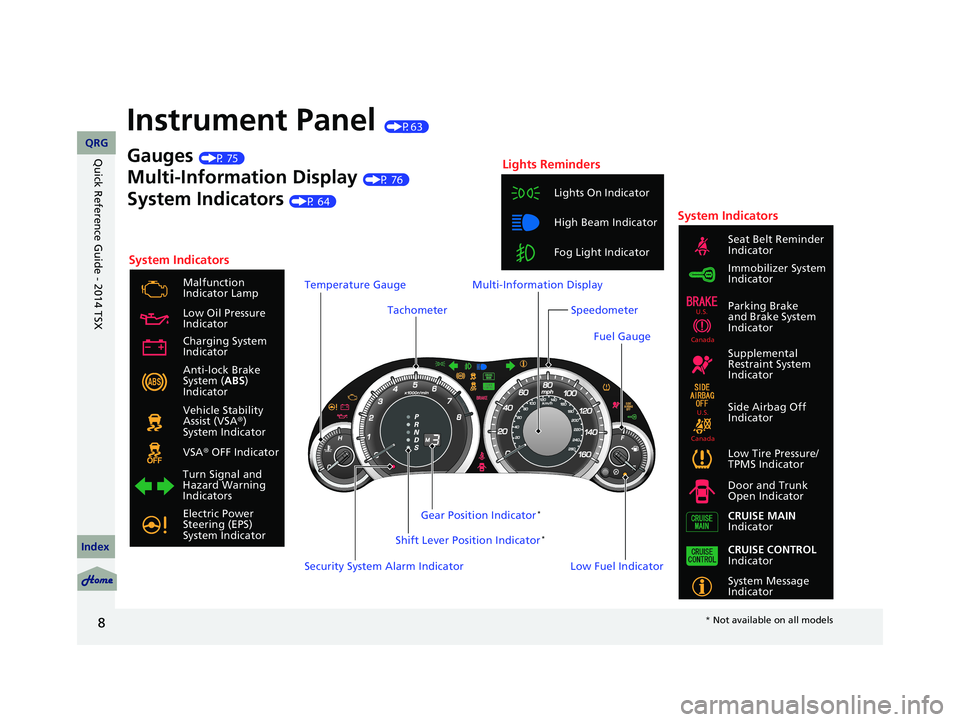
Instrument Panel (P63)
System Indicators
Malfunction
Indicator Lamp
Low Oil Pressure
Indicator
Anti-lock Brake
System ( ABS)
Indicator
Vehicle Stability
Assist (VSA ®)
System Indicator
VSA ® OFF Indicator
Low Tire Pressure/
TPMS Indicator
Electric Power
Steering (EPS)
System Indicator Lights On Indicator
High Beam Indicator
Fog Light Indicator
Immobilizer System
Indicator Seat Belt Reminder
Indicator
System Indicators
System Message
Indicator Parking Brake
and Brake System
Indicator
Supplemental
Restraint System
Indicator
Side Airbag Off
Indicator
Door and Trunk
Open Indicator
CRUISE MAIN
Indicator
Tachometer
Low Fuel Indicator
Security System Alarm Indicator Shift Lever Position Indicator
*
Gauges (P 75)
Multi-Information Display (P 76)
System Indicators (P 64)
Turn Signal and
Hazard Warning
Indicators Gear Position Indicator
*
Charging System
Indicator
CRUISE CONTROL
Indicator
Lights Reminders
Multi-Information Display
Speedometer
Fuel Gauge
Temperature Gauge
U.S.
Canada
U.S.
Canada
14 ACURA TSX 4D-31TL16500.book 8 ページ 2013年6月17日 月曜日 午前9時40分
QRG
Index
Quick Reference Guide - 2014 TSX
* Not available on all models
Page 16 of 329
15
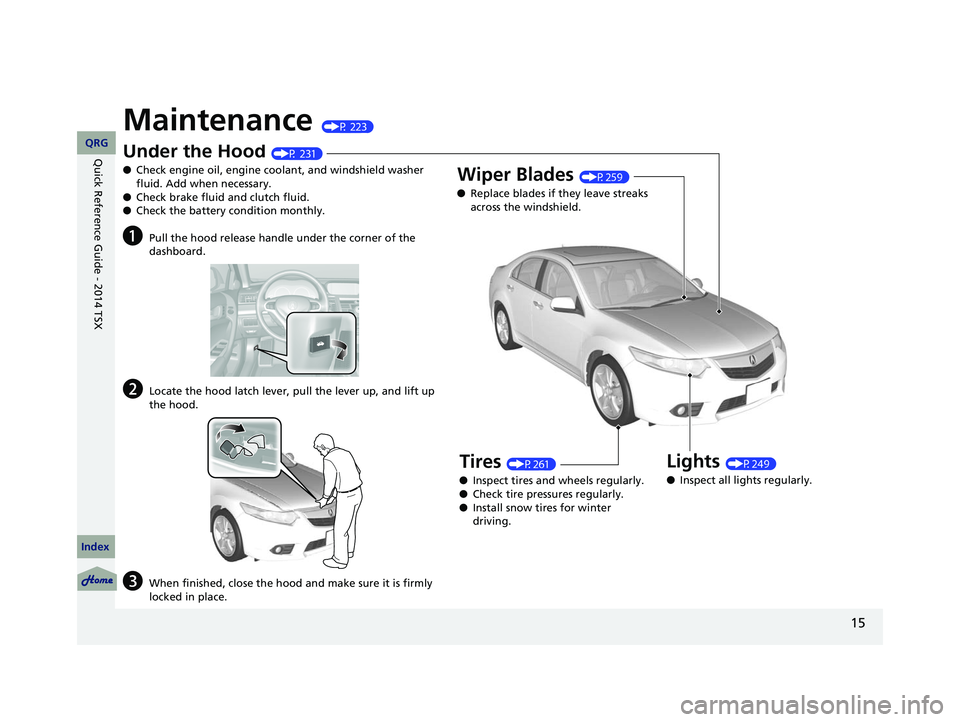
Maintenance (P 223)
Under the Hood (P 231)
● Check engine oil, engine coolant, and windshield washer
fluid. Add when necessary.
● Check brake fluid and clutch fluid.
● Check the battery condition monthly.
aPull the hood release handle under the corner of the
dashboard.
bLocate the hood latch lever, pull the lever up, and lift up
the hood.
cWhen finished, close the hood and make sure it is firmly
locked in place.
Lights (P249)
● Inspect all lights regularly.
Wiper Blades (P259)
● Replace blades if they leave streaks
across the windshield.
Tires (P261)
● Inspect tires and wheels regularly.
● Check tire pressures regularly.
● Install snow tires for winter
driving.
14 ACURA TSX 4D-31TL16500.book 15 ページ 2013年6月17日 月曜日 午前9時40分
QRG
Index
Quick Reference Guide - 2014 TSX
Page 65 of 329
64
Instrument Panel
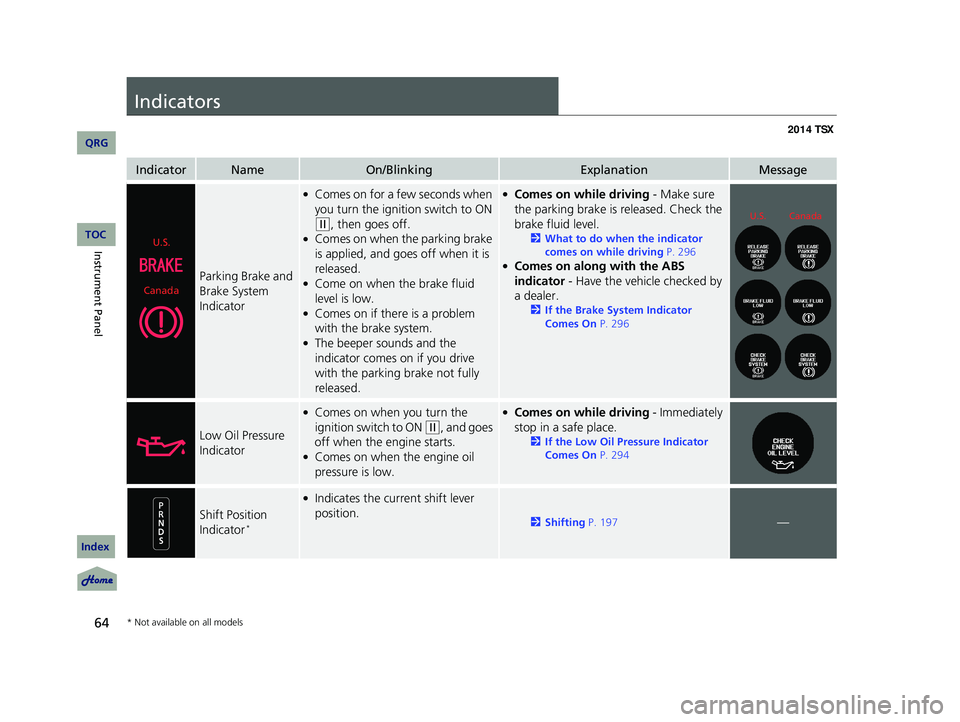
Indicators
IndicatorNameOn/BlinkingExplanationMessage
Parking Brake and
Brake System
Indicator
●Comes on for a few seconds when
you turn the ignition switch to ON
(w
, then goes off.●Comes on when the parking brake
is applied, and goes off when it is
released.
●Come on when the brake fluid
level is low.
●Comes on if there is a problem
with the brake system.
●The beeper sounds and the
indicator comes on if you drive
with the parking brake not fully
released.
●Comes on while driving - Make sure
the parking brake is released. Check the
brake fluid level.
2 What to do when the indicator
comes on while driving P. 296
●Comes on along with the ABS
indicator - Have the vehicle checked by
a dealer.
2 If the Brake System Indicator
Comes On P. 296
Low Oil Pressure
Indicator
●Comes on when you turn the
ignition switch to ON
(w
, and goes
off when the engine starts.
●Comes on when the engine oil
pressure is low.
●Comes on while driving - Immediately
stop in a safe place.
2 If the Low Oil Pressure Indicator
Comes On P. 294
Shift Position
Indicator *
●Indicates the current shift lever
position.
2 Shifting P. 197—
U.S.
Canada
U.S.Canada
* Not available on all models
14 ACURA TSX 4D-31TL16500.book 64 ページ 2013年6月17日 月曜日 午前9時40分
QRG
Index
TOC
Page 77 of 329
76
uu Gauges and Multi-Information Display u Multi-Information Display
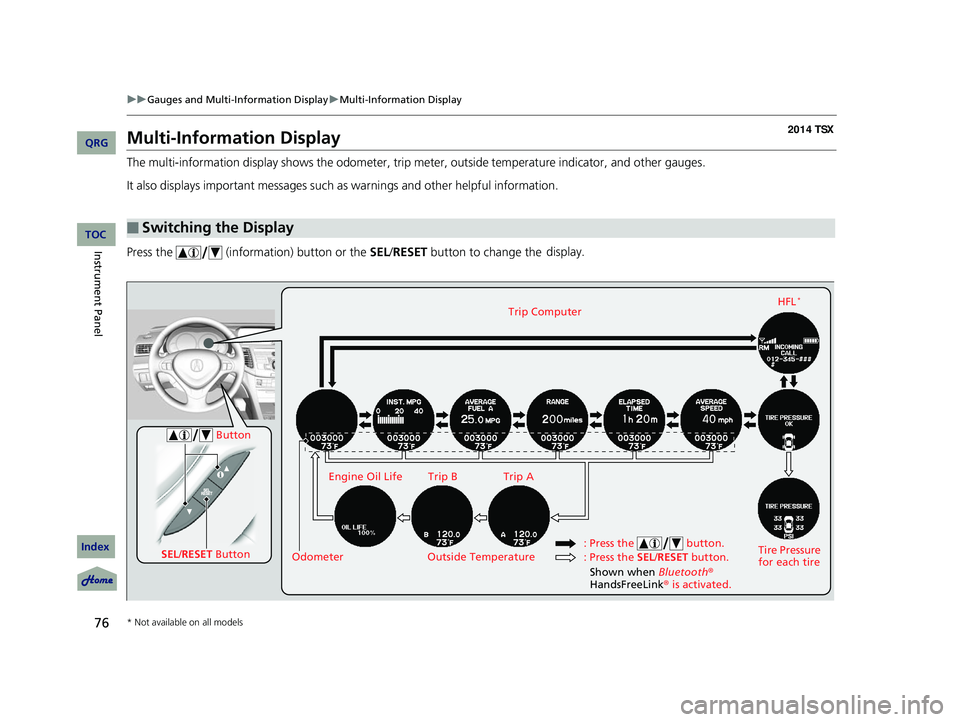
Multi-Information Display
The multi-information display shows the odometer, trip meter, outside temperature indicator, and other gauges.
It also displays important messages such as warnings and other helpful information.
Press the (information) button or the SEL/RESET button to change the display.
■Switching the Display
SEL
/RESET Button Tire Pressure
for each tireHFL
*Trip Computer
Trip B
Engine Oil Life Trip A
Outside Temperature
Odometer
Button
: Press the SEL/RESET button.
: Press the button.
Shown when Bluetooth
®
HandsFreeLink ® is activated.
* Not available on all models
14 ACURA TSX 4D-31TL16500.book 76 ページ 2013年6月17日 月曜日 午前9時40分
QRG
Index
Instrument PanelTOC
Page 80 of 329
Continued79
uu Gauges and Multi-Information Display u Multi-Information Display
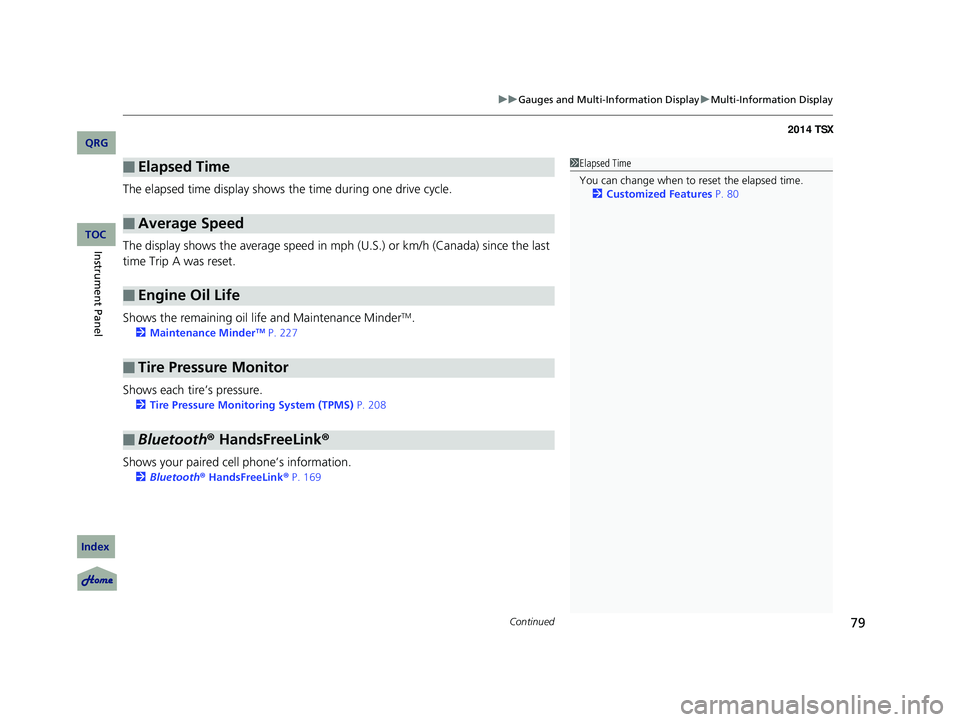
The elapsed time display shows the time during one drive cycle.
The display shows the average speed in mph (U.S.) or km/h (Canada) since the last
time Trip A was reset.
Shows the remaining oil life and Maintenance Minder
TM.
2 Maintenance MinderTM P. 227
Shows each tire’s pressure.
2 Tire Pressure Monitoring System (TPMS) P. 208
Shows your paired cell phone’s information.
2 Bluetooth ® HandsFreeLink ® P. 169
■Elapsed Time
■Average Speed
■Engine Oil Life
■Tire Pressure Monitor
■Bluetooth ® HandsFreeLink ®
1Elapsed Time
You can change when to reset the elapsed time.
2 Customized Features P. 80
14 ACURA TSX 4D-31TL16500.book 79 ページ 2013年6月17日 月曜日 午前9時40分
QRG
Index
Instrument PanelTOC
Page 221 of 329

220
Fuel Economy
Improving Fuel Economy
Fuel economy depends on several conditions, including driving conditions, your
driving habits, the condition of your vehicle, and loading. Depending on these and
other conditions, you may or may not achieve the rated fuel economy of this vehicle.
You can optimize your fuel economy with proper maintenance of your vehicle.
Always maintain your vehicle in accordance with the messages displayed on the
multi-information display.
• Use the recommended viscosity engine oil, displaying the API Certification Seal.
• Maintain the specified tire pressure.
• Do not load the vehicl e with excess cargo.
• Keep your vehicle clean. A buildup of snow or mud on your vehicle’s underside
adds weight and increases wind resistance.
■Maintenance and Fuel Economy
1Improving Fuel Economy
Direct calculation is the recommended method to
determine actual fuel consumed while driving.
In Canada, posted fuel economy numbers are
established following a simulated test. For more
information on how this test is performed, please visit
http://oee.nrcan.gc.ca/
Miles driven Gallons of
fuel Miles per
Gallon
100 LiterKilometers L per 100 km
14 ACURA TSX 4D-31TL16500.book 220 ページ 2013年6月17日 月曜日 午前9時40分
QRG
Index
DrivingTOC
Page 225 of 329
224
Maintenance
Before Performing Maintenance
Inspection and Maintenance
For your safety, perform all listed inspections and maintenance to keep your vehicle
in good condition. If you become aware of any abnormality (noise, smell, insufficient
brake fluid, oil residue on the ground, etc.), have your vehicle inspected by a dealer.
(Note, however, that service at a dealer is not mandatory to keep your warranties in
effect.) Refer to the separate maintena nce booklet for detailed maintenance and
inspection information.
■Daily inspections
Perform inspections before long distance trips, when washing the vehicle, or when
refueling.
■Periodic inspections
• Check the automatic transmi ssion fluid level monthly.
2Automatic Transmission Fluid P. 244
• Check the brake fluid level monthly.
2 Brake/Clutch Fluid P. 246
• Check the tire pressure monthly. Examin e the tread for wear and foreign objects.
2Checking and Maintaining Tires P. 261
•Check the operation of the exterior lights monthly.
2 Replacing Light Bulbs P. 249
• Check the condition of the wiper bl ades at least every six months.
2Checking and Maintaining Wiper Blades P. 259
■Types of Inspection and Maintenance
1Inspection and Maintenance
Maintenance, replacement, or repair of
emissions control devices and systems may be
done by any automotive repair establishment or
individuals using parts that are “certified” to
EPA standards.
According to state and fede ral regulations, failure to
perform maintenance on the maintenance main
items marked with # will not void your emissions
warranties. However, all maintenance services should
be performed in accordan ce with the intervals
indicated by the mult i-information display.
2 Maintenance Service Items P. 229
If you want to perform complex maintenance tasks
that require more skills and tools, purchase the
service manual. 2 Authorized Manuals P. 319
If you want to perform ma intenance yourself, make
sure that you have the necessary tools and skills first.
After performing ma intenance, update the records in
the separate maintenance booklet.
U.S. models
14 ACURA TSX 4D-31TL16500.book 224 ページ 2013年6月17日 月曜日 午前9時40分
QRG
Index
TOC
Page 242 of 329
241
uu Maintenance Under the Hood u Changing the Engine Oil and Oil Filter
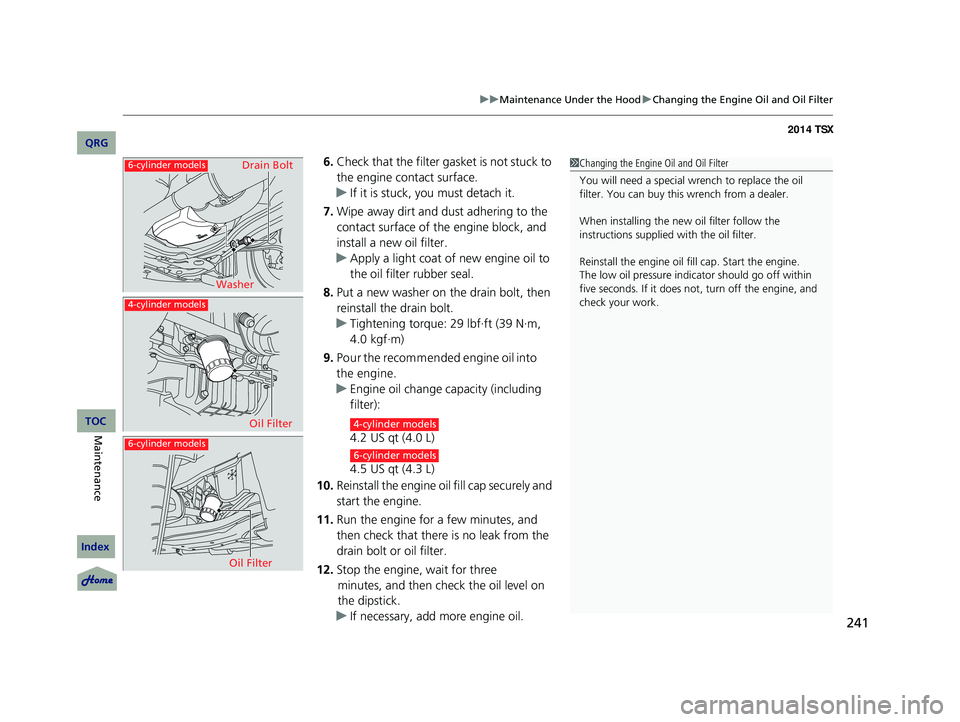
6. Check that the filter gasket is not stuck to
the engine contact surface.
u If it is stuck, you must detach it.
7. Wipe away dirt and dust adhering to the
contact surface of the engine block, and
install a new oil filter.
u Apply a light coat of new engine oil to
the oil filter rubber seal.
8. Put a new washer on the drain bolt, then
reinstall the drain bolt.
u Tightening torque: 29 lbf∙ft (39 N∙m,
4.0 kgf∙m)
9. Pour the recommended engine oil into
the engine.
u Engine oil change capacity (including
filter):
4.2 US qt (4.0 L)
4.5 US qt (4.3 L)
10. Reinstall the engine oil fill cap securely and
start the engine.
11. Run the engine for a few minutes, and
then check that there is no leak from the
drain bolt or oil filter.
12. Stop the engine, wait for three
minutes, and then check the oil level on
the dipstick.
u If necessary, add more engine oil.
1Changing the Engine Oil and Oil Filter
You will need a special wrench to replace the oil
filter. You can buy this wrench from a dealer.
When installing the new oil filter follow the
instructions supplied with the oil filter.
Reinstall the engine oil f ill cap. Start the engine.
The low oil pressure indi cator should go off within
five seconds. If it does not , turn off the engine, and
check your work.
6-cylinder models
6-cylinder models
4-cylinder models
Washer Drain Bolt
Oil Filter
Oil Filter4-cylinder models
6-cylinder models
14 ACURA TSX 4D-31TL16500.book 241 ページ 2013年6月17日 月曜日 午前9時40分
QRG
Index
MaintenanceTOC
Page 280 of 329

279
Handling the Unexpected
This chapter explains how to handle unexpected troubles.
Tools.................................................. 280
Types of Tools .................................. 280
If a Tire Goes Flat .............................. 281
Changing a Flat Tire ......................... 281
Engine Does Not Start Checking the Engine ........................ 287
Jump Starting ..........
.......................... 288
Shift Lever Does Not Move .............. 291
Overheating ...................................... 292
How to Handle Overheating ............. 292 Indicator, Coming On/Blinking
If the Low Oil Pressure Indicator Comes
On.................................................. 294
If the Charging System Indicator Comes
On ................................................. 294
If the Malfunction Indicator Lamp Comes On or Blinks ................................... 295
If the Brake System Indicator Comes On .. 296
If the Electric Power Steering (EPS) System
Indicator Comes On ............................ 296
If the Low Tire Pressure/TPMS Indicator Comes On or Blinks........................ 297 Fuses
Fuse Locations ................................. 298
Circuit Protected and Amps for Each Fuse........................................... . 300
Inspecting and Changing Fuses ........ 302
Emergency Towing ........................... 303
When You Cannot Unlock the Fuel Fill Door ................................................. 304
When You Cannot Open the Trunk .. 305
14 ACURA TSX 4D-31TL16500.book 279 ページ 2013年6月17日 月曜日 午前9時40分
QRG
Index2014 TSX
Page 295 of 329

294
Indicator, Coming On/Blinking
If the Low Oil Pressure Indicator Comes On
■Reasons for the indicator to come on
Comes on when the engine oil pressure is low.
■What to do as soon as the indicator comes on
1. Immediately park the vehicle on level ground in a safe place.
2. If necessary, turn the ha zard warning lights on.
■What to do after parking the vehicle
1. Stop the engine and let it sit for about three minutes.
2. Open the hood and check the oil level.
2 Oil Check P. 237
3. Start the engine and check the low oil pressure indicator.
u The light goes out: Start driving again.
u The light does not go out within 10 seconds: Stop the engine and
contact a dealer for repairs immediately.
If the Charging System Indicator Comes On
■Reasons for the indicator to come on
Comes on when the battery is not being charged.
■What to do when the indicator comes on
Turn off the climate con trol system, rear defogger, and other electrical
systems, and immediately contact a dealer for repairs.
1 If the Low Oil Pressure Indicator Comes On
NOTICE
Running the engine with low oil pressure can cause
serious mechanical damage almost immediately.
1If the Charging System Indicator Comes On
If you need to stop temporarily, do not turn off the
engine. Restarting the engi ne may rapidly discharge
the battery.
14 ACURA TSX 4D-31TL16500.book 294 ページ 2013年6月17日 月曜日 午前9時40分
QRG
Index
Handling the Unexpected
TOC