door lock ACURA ZDX 2010 User Guide
[x] Cancel search | Manufacturer: ACURA, Model Year: 2010, Model line: ZDX, Model: ACURA ZDX 2010Pages: 645, PDF Size: 17.13 MB
Page 68 of 645
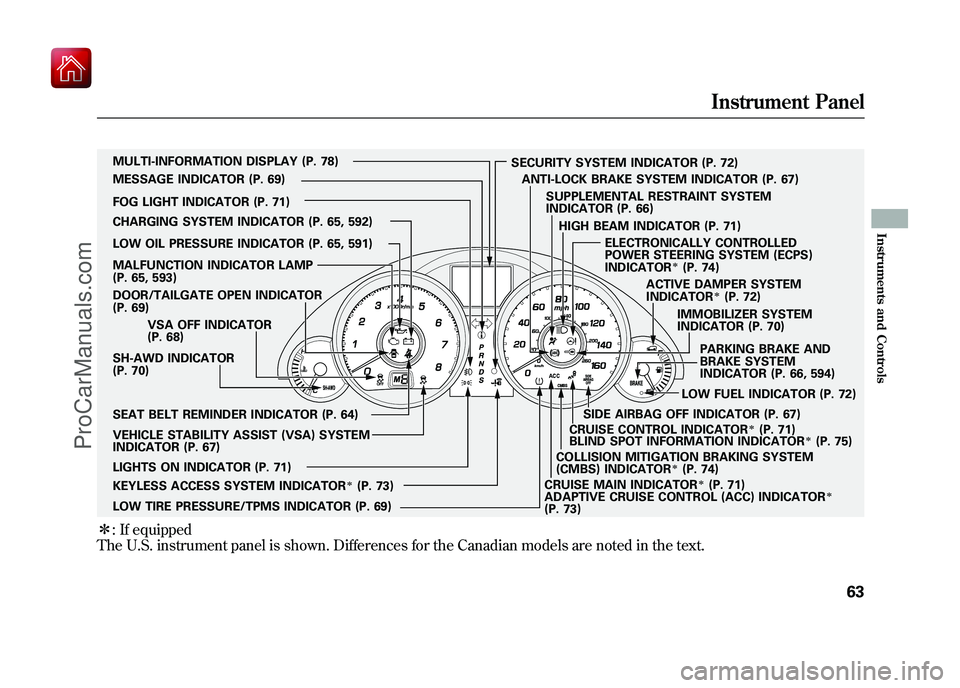
ꭧ: If equipped
The U.S. instrument panel is shown. Differences for the Canadian models are noted in the text.
SH-AWD INDICATOR
(P. 70) IMMOBILIZER SYSTEM
INDICATOR (P. 70)
CHARGING SYSTEM INDICATOR (P. 65, 592)
LOW OIL PRESSURE INDICATOR (P. 65, 591)
DOOR/TAILGATE OPEN INDICATOR
(P. 69)
CRUISE MAIN INDICATOR
ꭧ(P. 71)
SECURITY SYSTEM INDICATOR (P. 72)
PARKING BRAKE AND
BRAKE SYSTEM
INDICATOR (P. 66, 594)
VEHICLE STABILITY ASSIST (VSA) SYSTEM
INDICATOR (P. 67) VSA OFF INDICATOR
(P. 68)
CRUISE CONTROL INDICATOR
ꭧ(P. 71)
LOW FUEL INDICATOR (P. 72)
LOW TIRE PRESSURE/TPMS INDICATOR (P. 69) SUPPLEMENTAL RESTRAINT SYSTEM
INDICATOR (P. 66)
LIGHTS ON INDICATOR (P. 71) SEAT BELT REMINDER INDICATOR (P. 64) MULTI-INFORMATION DISPLAY (P. 78)
MESSAGE INDICATOR (P. 69)
FOG LIGHT INDICATOR (P. 71) ACTIVE DAMPER SYSTEM
INDICATOR
ꭧ(P. 72)
ANTI-LOCK BRAKE SYSTEM INDICATOR (P. 67)
MALFUNCTION INDICATOR LAMP
(P. 65, 593)
KEYLESS ACCESS SYSTEM INDICATOR
ꭧ(P. 73) HIGH BEAM INDICATOR (P. 71)
ELECTRONICALLY CONTROLLED
POWER STEERING SYSTEM (ECPS)
INDICATOR
ꭧ(P. 74)
ADAPTIVE CRUISE CONTROL (ACC) INDICATOR
ꭧ
(P. 73) BLIND SPOT INFORMATION INDICATOR
ꭧ(P. 75)
COLLISION MITIGATION BRAKING SYSTEM
(CMBS) INDICATOR
ꭧ(P. 74)
SIDE AIRBAG OFF INDICATOR (P. 67)
Instrument Panel
63
Instruments and Controls
09/10/28 17:15:37 10 ACURA ZDX KA KC New North America Own 50 31SZN600 enu
ProCarManuals.com
Page 76 of 645

Lights On Indicator
This indicator reminds you that the
exterior lights are on. It comes on
when the light switch is in either the
or
position. This indicator will
also come on when the light switch is
in AUTO and the lights turn on
automatically. If you turn the ignition
switch to the ACCESSORY (I) or the
LOCK (0) position without turning
off the light switch, this indicator will
remain on. A reminder chime will
also sound when you open the
driver's door.
Models equipped with the keyless
access system have an engine start/
stop button instead of an ignition
switch. VEHICLE OFF (LOCK)
mode is the equivalent of LOCK (0)
and ACCESSORY mode is the
equivalent of ACCESSORY (I). For
more information, see pages 194 and
196.
Fog Light Indicator
This indicator comes on when you
turn on the fog lights. For more
information, see page 141.High Beam Indicator
This indicator comes on with the
high beam headlights. For more
information, see page 139.
Cruise Main Indicator
On models without adaptive cruise control (ACC)This indicator comes on when you
turn on the cruise control system by
pressing the CRUISE button on the
steering wheel (see page 379).
Cruise Control Indicator
On models without adaptive cruisecontrol (ACC)This indicator comes on when you
set the cruise control. See page 379
for information on operating the
cruise control.
CONTINUED
Instrument Panel Indicators
71
Instruments and Controls
09/10/28 17:15:37 10 ACURA ZDX KA KC New North America Own 50 31SZN600 enu
ProCarManuals.com
Page 99 of 645

Customize Settings
You can customize some vehicle
control settings.
To change the settings, the ignition
switch must be in the ON (II)
position, and the vehicle must be
stopped with the transmission in
Park.
If you turn the ignition switch to the
ACCESSORY (I) or the LOCK (0)
position, or move the shift lever out
of Park, the display will change to the
normal screen.
Models equipped with the keyless
access system have an engine start/
stop button instead of an ignition
switch. VEHICLE OFF (LOCK)
mode is the equivalent of LOCK (0),
ACCESSORY mode is the equivalent
of ACCESSORY (I), and ON mode is
the equivalent of ON (II).
For more information, see pages 194
and 196.You can customize some vehicle
control settings for
‘‘DRIVER 1’’ and
‘‘ DRIVER 2’’ separately. If ‘‘DRIVER
1’’ or‘‘DRIVER 2’’ is not displayed,
customizing is not possible.
To have the driver's ID detected,
make sure your remote transmitter/
keyless access remote is linked to
the system and the driver's door is
unlocked with a corresponding
remote transmitter/keyless access
remote.
If you try to enter the customizing
mode while the vehicle is moving,
you will see a ‘‘MUST STOP AND
SHIFT TO PARK TO CHANGE
SETTINGS ’’message and you cannot
change the settings. See page 160 to link your remote
transmitter/keyless access remote to
your vehicle.
If the remote transmitter is not
linked,
‘‘CUSTOMIZING NOT
AVAILABLE UNTIL LINKED TO
REMOTE ’’will be displayed, and you
cannot customize the settings.
If you use the key to unlock the
driver's door, the system cannot
recognize either ‘‘DRIVER 1’’ or
‘‘ DRIVER 2. ’’Multi-Information Display9409/10/28 17:15:37 10 ACURA ZDX KA KC New North America Own 50 31SZN600 enu
ProCarManuals.com
Page 102 of 645
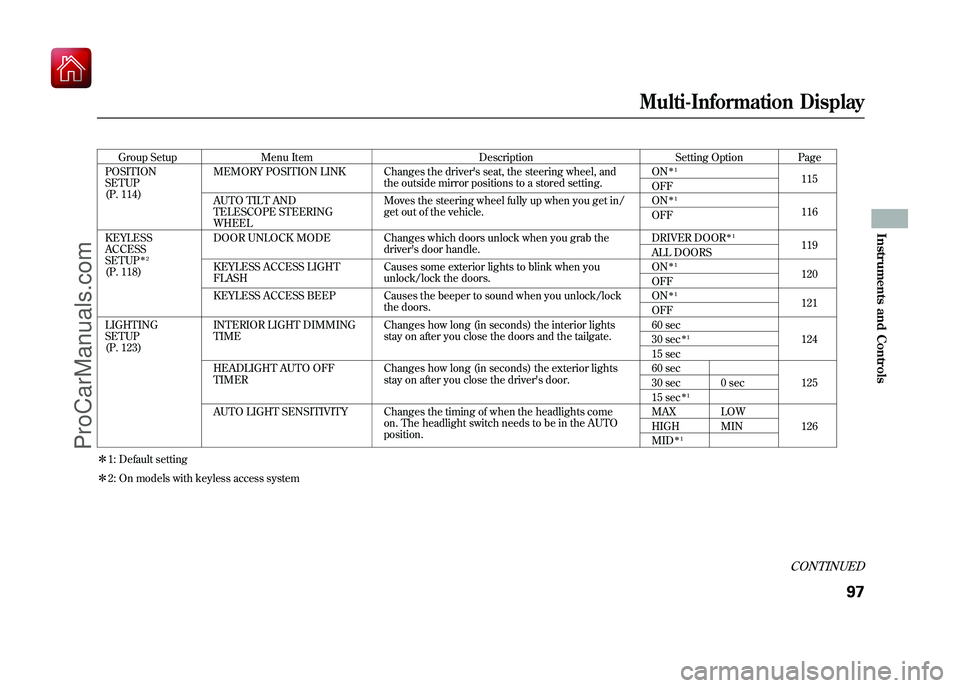
Group SetupMenu Item DescriptionSetting OptionPage
POSITION
SETUP
(P. 114) MEMORY POSITION LINK Changes the driver's seat, the steering wheel, and
the outside mirror positions to a stored setting. ON
ꭧ
1
115
OFF
AUTO TILT AND
TELESCOPE STEERING
WHEEL Moves the steering wheel fully up when you get in/
get out of the vehicle.
ON
ꭧ
1
116
OFF
KEYLESS
ACCESS
SETUP
ꭧ 2
(P. 118) DOOR UNLOCK MODE Changes which doors unlock when you grab the
driver's door handle. DRIVER DOOR
ꭧ
1
119
ALL DOORS
KEYLESS ACCESS LIGHT
FLASH Causes some exterior lights to blink when you
unlock/lock the doors. ON
ꭧ
1
120
OFF
KEYLESS ACCESS BEEP Causes the beeper to sound when you unlock/lock the doors. ON
ꭧ
1
121
OFF
LIGHTING
SETUP
(P. 123) INTERIOR LIGHT DIMMING
TIME
Changes how long (in seconds) the interior lights
stay on after you close the doors and the tailgate. 60 sec
124
30 sec
ꭧ 1
15 sec
HEADLIGHT AUTO OFF
TIMER Changes how long (in seconds) the exterior lights
stay on after you close the driver's door. 60 sec
125
30 sec 0 sec
15 sec
ꭧ 1
AUTO LIGHT SENSITIVITY Changes the timing of when the headlights come
on. The headlight switch needs to be in the AUTO
position. MAX LOW
126
HIGH MIN
MID
ꭧ 1
ꭧ 1: Default setting
ꭧ 2: On models with keyless access system
CONTINUED
Multi-Information Display
97
Instruments and Controls
09/10/28 17:15:37 10 ACURA ZDX KA KC New North America Own 50 31SZN600 enu
ProCarManuals.com
Page 103 of 645
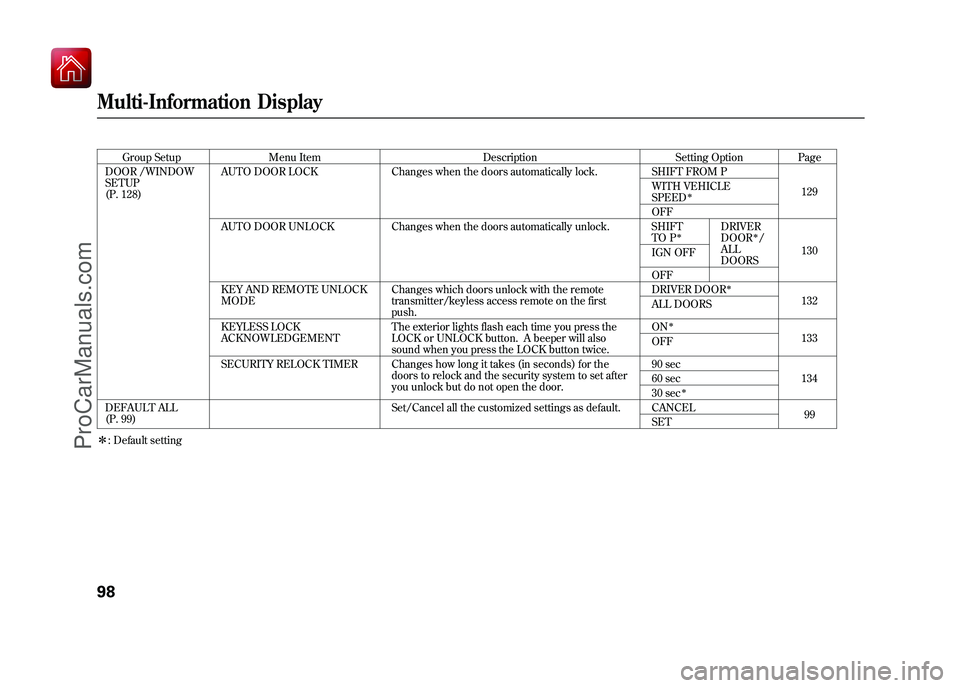
Group SetupMenu Item DescriptionSetting OptionPage
DOOR /WINDOW
SETUP
(P. 128) AUTO DOOR LOCK
Changes when the doors automatically lock. SHIFT FROM P
129
WITH VEHICLE
SPEED
ꭧ
OFF
AUTO DOOR UNLOCK Changes when the doors automatically unlock. SHIFT TO P
ꭧ
DRIVER
DOOR
ꭧ/
ALL
DOORS 130
IGN OFF
OFF
KEY AND REMOTE UNLOCK
MODE Changes which doors unlock with the remote
transmitter/keyless access remote on the first
push. DRIVER DOOR
ꭧ
132
ALL DOORS
KEYLESS LOCK
ACKNOWLEDGEMENT The exterior lights flash each time you press the
LOCK or UNLOCK button. A beeper will also
sound when you press the LOCK button twice. ON
ꭧ
133
OFF
SECURITY RELOCK TIMER Changes how long it takes (in seconds) for the doors to relock and the security system to set after
you unlock but do not open the door. 90 sec
134
60 sec
30 sec
ꭧ
DEFAULT ALL
(P. 99) Set/Cancel all the customized settings as default. CANCEL
99
SET
ꭧ : Default settingMulti-Information Display9809/10/28 17:15:37 10 ACURA ZDX KA KC New North America Own 50 31SZN600 enu
ProCarManuals.com
Page 123 of 645
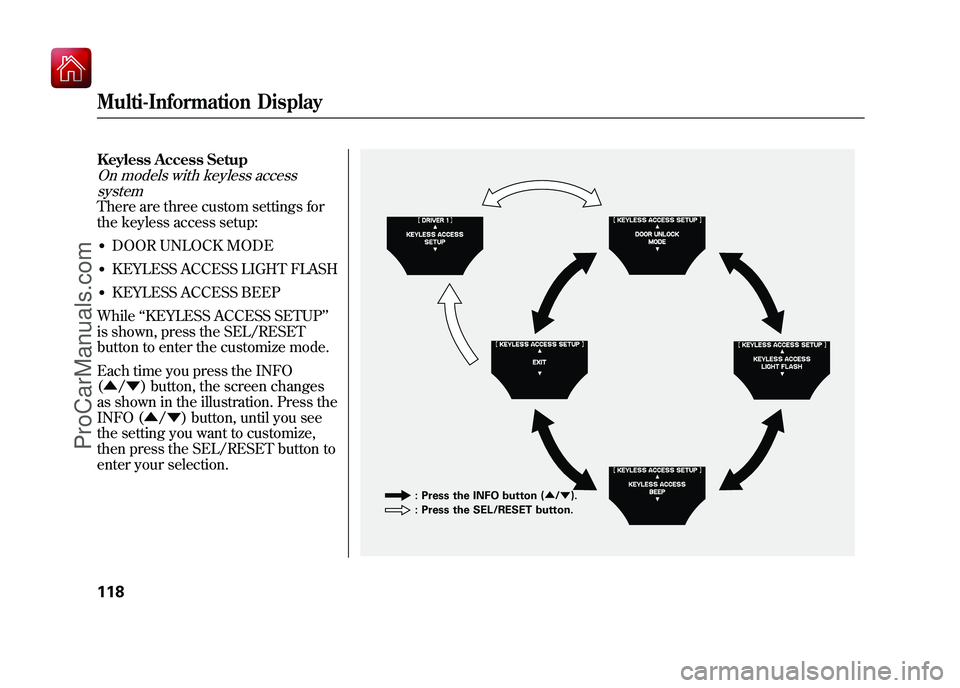
Keyless Access SetupOn models with keyless accesssystemThere are three custom settings for
the keyless access setup:●DOOR UNLOCK MODE●KEYLESS ACCESS LIGHT FLASH●KEYLESS ACCESS BEEP
While ‘‘KEYLESS ACCESS SETUP ’’
is shown, press the SEL/RESET
button to enter the customize mode.
Each time you press the INFO
(▲ /▼ ) button, the screen changes
as shown in the illustration. Press the
INFO (▲ /▼ ) button, until you see
the setting you want to customize,
then press the SEL/RESET button to
enter your selection.
: Press the INFO button ( ▲/▼ ).
: Press the SEL/RESET button.
Multi-Information Display11809/10/28 17:15:37 10 ACURA ZDX KA KC New North America Own 50 31SZN600 enu
ProCarManuals.com
Page 124 of 645
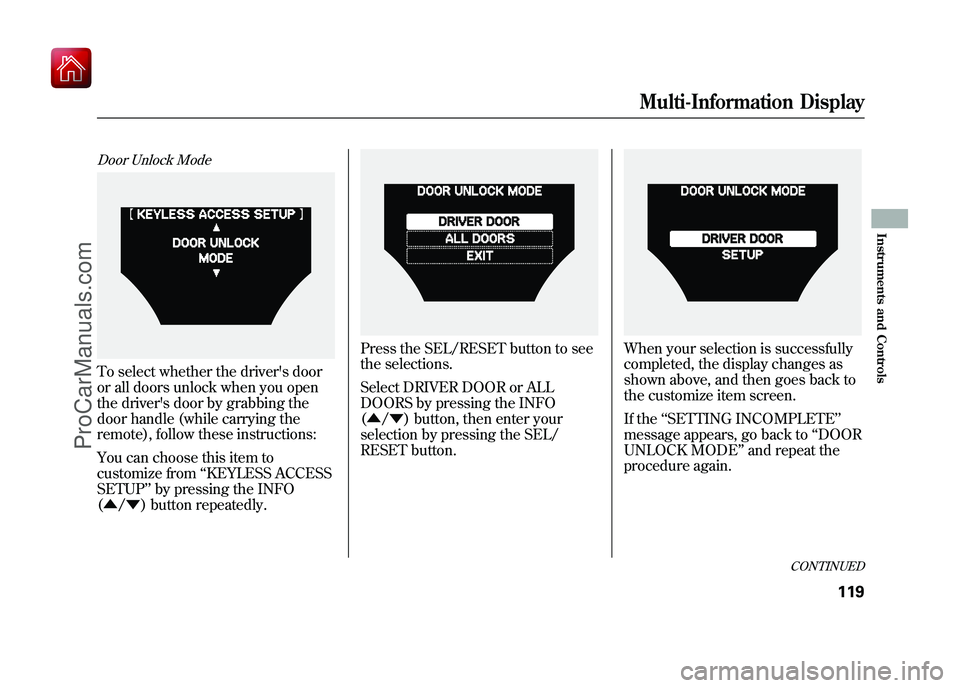
Door Unlock ModeTo select whether the driver's door
or all doors unlock when you open
the driver's door by grabbing the
door handle (while carrying the
remote), follow these instructions:
You can choose this item to
customize from‘‘KEYLESS ACCESS
SETUP ’’by pressing the INFO
(▲ /▼ ) button repeatedly.
Press the SEL/RESET button to see
the selections.
Select DRIVER DOOR or ALL
DOORS by pressing the INFO
(▲ /▼ ) button, then enter your
selection by pressing the SEL/
RESET button.
When your selection is successfully
completed, the display changes as
shown above, and then goes back to
the customize item screen.
If the ‘‘SETTING INCOMPLETE ’’
message appears, go back to ‘‘DOOR
UNLOCK MODE ’’and repeat the
procedure again.
CONTINUED
Multi-Information Display
119
Instruments and Controls
09/10/28 17:15:37 10 ACURA ZDX KA KC New North America Own 50 31SZN600 enu
ProCarManuals.com
Page 125 of 645
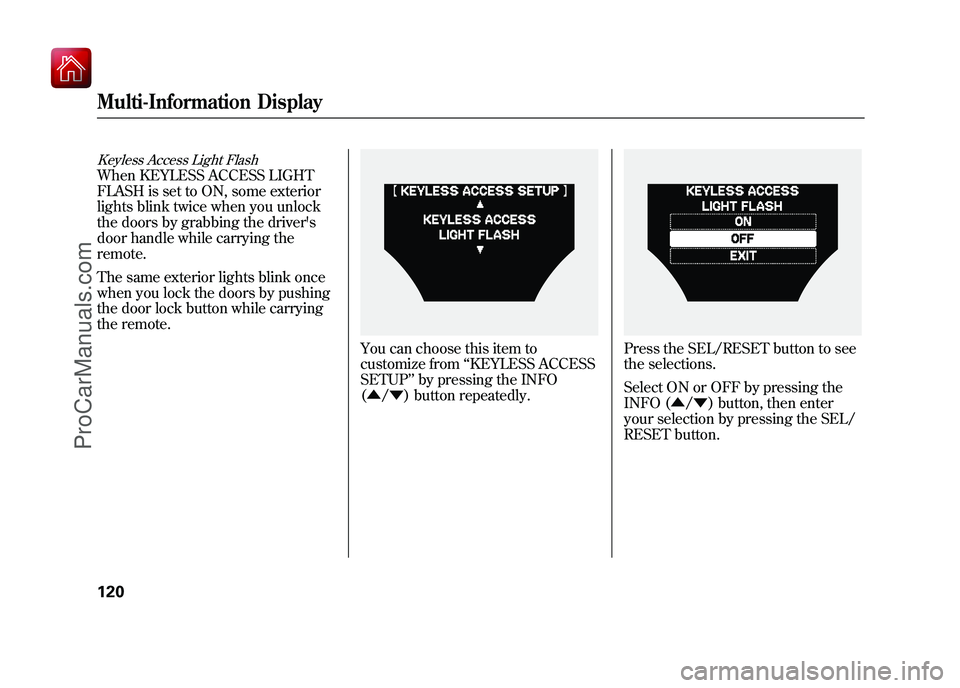
Keyless Access Light FlashWhen KEYLESS ACCESS LIGHT
FLASH is set to ON, some exterior
lights blink twice when you unlock
the doors by grabbing the driver's
door handle while carrying the
remote.
The same exterior lights blink once
when you lock the doors by pushing
the door lock button while carrying
the remote.
You can choose this item to
customize from‘‘KEYLESS ACCESS
SETUP ’’by pressing the INFO
(▲ /▼ ) button repeatedly.
Press the SEL/RESET button to see
the selections.
Select ON or OFF by pressing the
INFO (▲ /▼ ) button, then enter
your selection by pressing the SEL/
RESET button.
Multi-Information Display12009/10/28 17:15:37 10 ACURA ZDX KA KC New North America Own 50 31SZN600 enu
ProCarManuals.com
Page 126 of 645
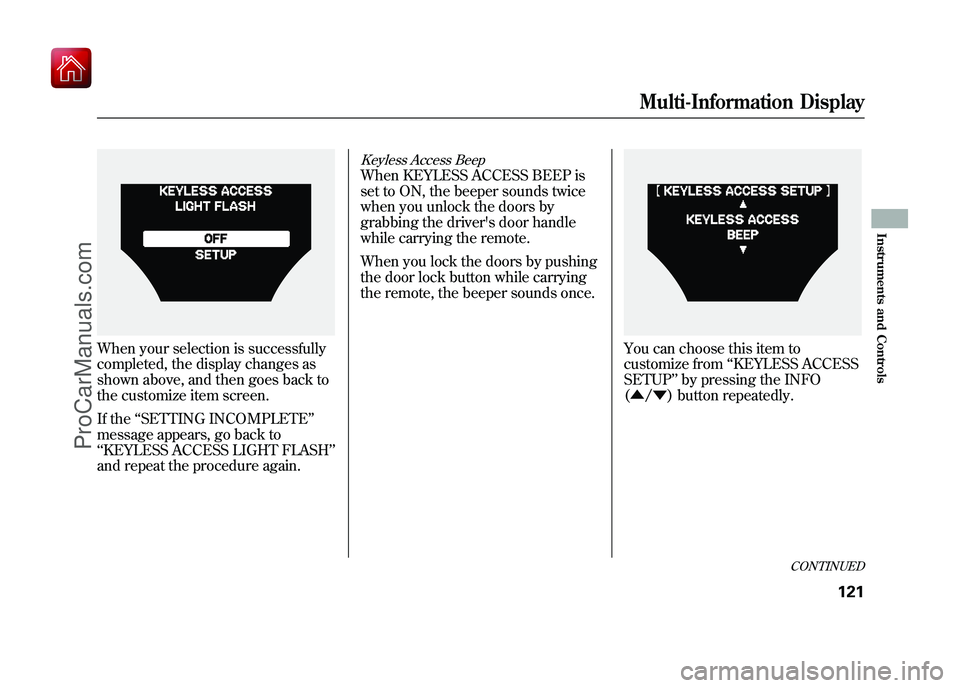
When your selection is successfully
completed, the display changes as
shown above, and then goes back to
the customize item screen.
If the‘‘SETTING INCOMPLETE ’’
message appears, go back to
‘‘ KEYLESS ACCESS LIGHT FLASH ’’
and repeat the procedure again.
Keyless Access BeepWhen KEYLESS ACCESS BEEP is
set to ON, the beeper sounds twice
when you unlock the doors by
grabbing the driver's door handle
while carrying the remote.
When you lock the doors by pushing
the door lock button while carrying
the remote, the beeper sounds once.
You can choose this item to
customize from ‘‘KEYLESS ACCESS
SETUP ’’by pressing the INFO
(▲ /▼ ) button repeatedly.
CONTINUED
Multi-Information Display
121
Instruments and Controls
09/10/28 17:15:37 10 ACURA ZDX KA KC New North America Own 50 31SZN600 enu
ProCarManuals.com
Page 133 of 645
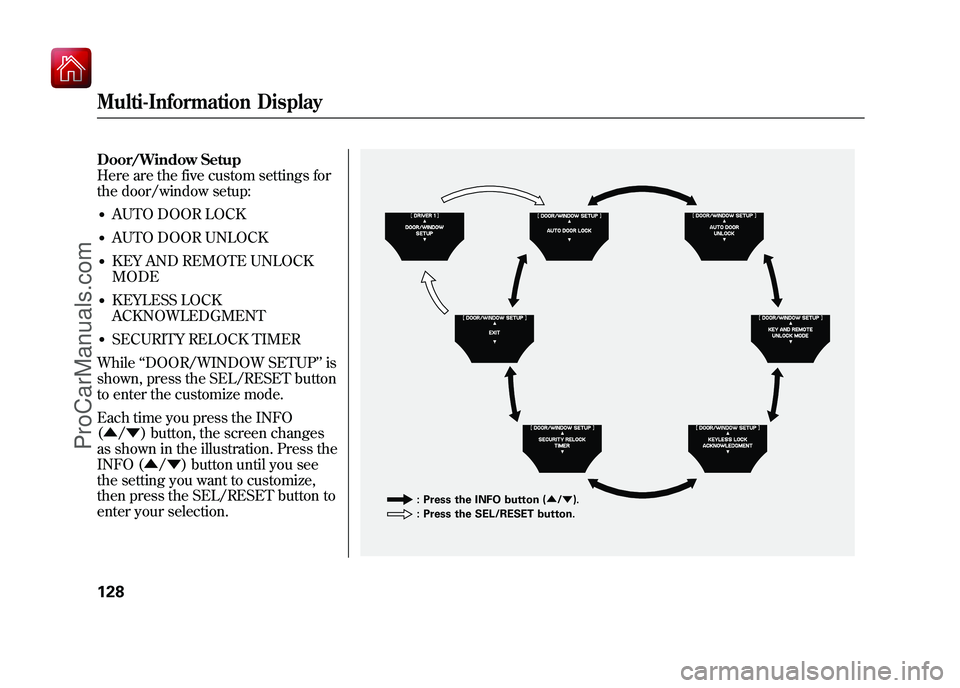
Door/Window Setup
Here are the five custom settings for
the door/window setup:●AUTO DOOR LOCK●AUTO DOOR UNLOCK●KEY AND REMOTE UNLOCK
MODE●KEYLESS LOCK
ACKNOWLEDGMENT●SECURITY RELOCK TIMER
While ‘‘DOOR/WINDOW SETUP ’’is
shown, press the SEL/RESET button
to enter the customize mode.
Each time you press the INFO
(▲ /▼ ) button, the screen changes
as shown in the illustration. Press the
INFO (▲ /▼ ) button until you see
the setting you want to customize,
then press the SEL/RESET button to
enter your selection.
: Press the INFO button ( ▲/▼ ).
: Press the SEL/RESET button.
Multi-Information Display12809/10/28 17:15:37 10 ACURA ZDX KA KC New North America Own 50 31SZN600 enu
ProCarManuals.com