AUX ACURA ZDX 2010 Owner's Manual
[x] Cancel search | Manufacturer: ACURA, Model Year: 2010, Model line: ZDX, Model: ACURA ZDX 2010Pages: 645, PDF Size: 17.13 MB
Page 354 of 645
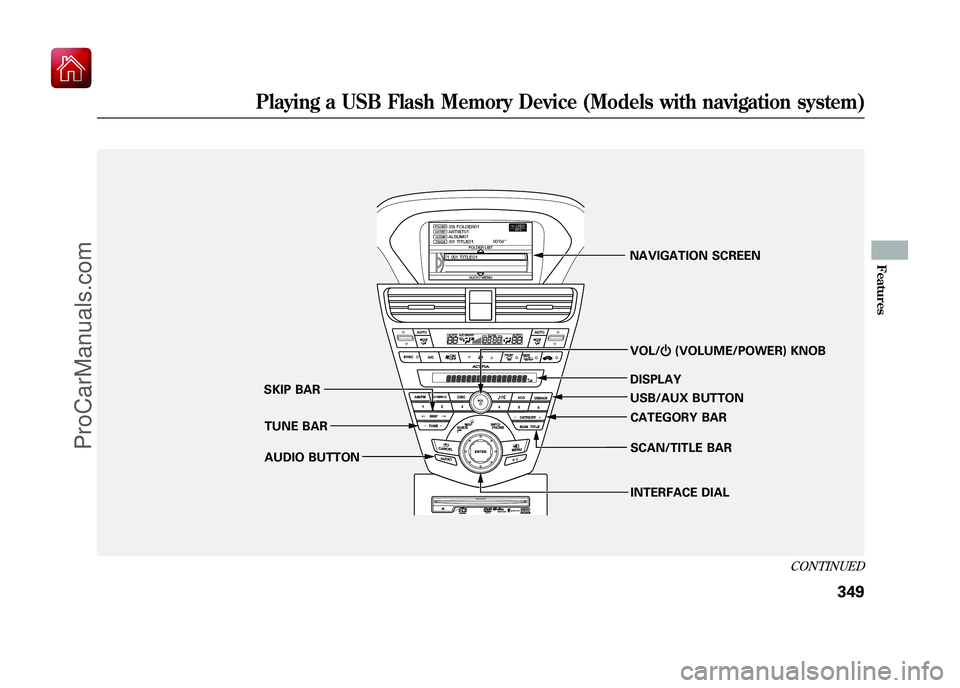
VOL/ꂻ(VOLUME/POWER) KNOB
TUNE BAR
SKIP BAR
AUDIO BUTTON NAVIGATION SCREEN
DISPLAY
USB/AUX BUTTONINTERFACE DIAL CATEGORY BAR
SCAN/TITLE BAR
CONTINUED
Playing a USB Flash Memory Device (Models with navigation system)
349
Features
09/10/28 17:15:37 10 ACURA ZDX KA KC New North America Own 50 31SZN600 enu
ProCarManuals.com
Page 355 of 645
To Play a USB Flash Memory
Device
This audio system can select and
play the audio files on a USB flash
memory device with the same
controls used for the disc player. To
play a USB flash memory device,
connect it to the USB adapter cable
in the console compartment, then
press the USB/AUX button until you
see‘‘USB’’ in the display. The power
mode must be ACCESSORY or ON.
Your vehicle has the engine start/
stop button instead of an ignition
switch. For more information to
select the power mode, see page 194. The audio system reads and plays
the audio files on the USB flash
memory device in MP3, WMA or
AAC
ꭧformats. The USB flash
memory device limit is up to 500
folders or up to 15000 files.
ꭧ : Only AAC format files recorded
with iTunes are playable on this
audio unit.
The recommended USB flash
memory devices are 256 MB or
higher, and formatted with the FAT
file system. Some digital audio
players may be compatible as well.
Some USB flash memory devices
(such as devices with security
lockout features, etc.) will not work
in this audio unit. NOTE:
●Do not use a device such as a card
reader or hard drive as it or your
files may be damaged.●Do not connect your USB flash
memory device using a hub.●Do not use an extension cable to
the USB adapter cable equipped
with your vehicle.●Do not keep a USB flash memory
device in the vehicle. Direct
sunlight and high heat will damage
it.●We recommend backing up your
data before playing a USB flash
memory device.●Some devices cannot be powered
or charged via the USB adapter, if
this is the case use the accessory
adapter to supply power to your
device.
Playing a USB Flash Memory Device (Models with navigation system)35009/10/28 17:15:37 10 ACURA ZDX KA KC New North America Own 50 31SZN600 enu
ProCarManuals.com
Page 356 of 645
●Depending on the type and
number of files, it may take some
time before they begin to play.●Depending on the software the
files were made with, it may not be
possible to play some files, or
display some text data.●Depending on the type of
encoding and writing software
used, there may be cases where
character information does not
display properly.●The order of files in USB playback
may be different from the order of
files displayed in PC or other
devices etc. Files are played in the
order stored in USB flash memory
device.Voice Control SystemYou can select the AUX mode by
using the voice control buttons, but
cannot operate the play mode
functions.Even if recorded in MP3, WMA or
AAC format, a file with unsupported
version cannot be played. If the
system finds it, the audio unit
displays UNSUPPORTED, and then
skips to the next file.
InWMA or AAC format, DRM (digital
rights management) files cannot be
played. If the system finds a DRM
file, the audio unit displays
UNPLAYABLE FILE, and then skips
to the next file.
Combining a low sampling f requency
with a low bitrate may result in
extremely degraded sound quality.
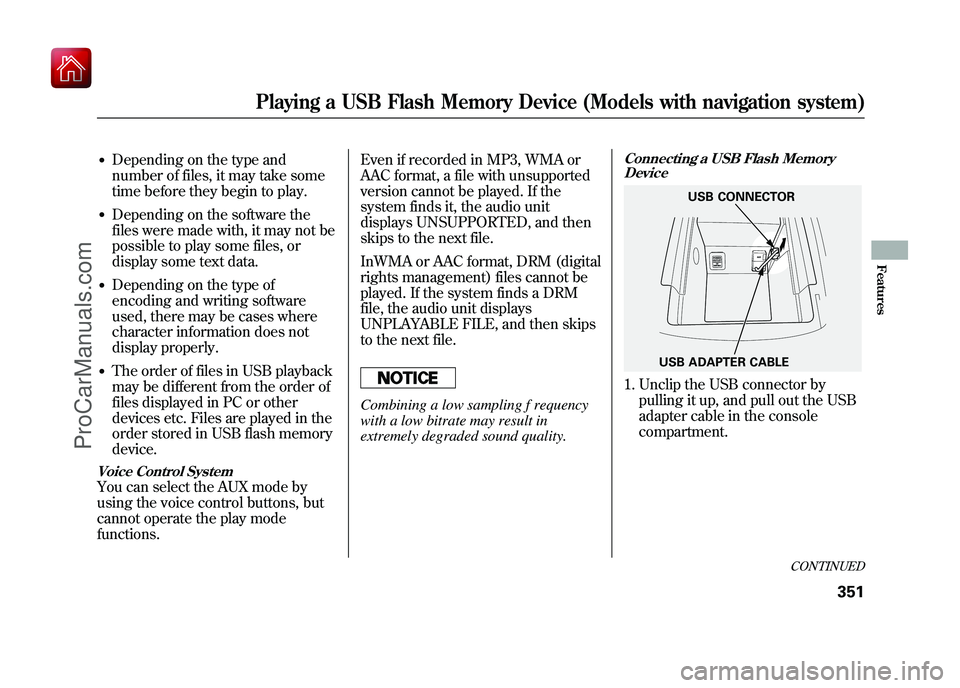
Connecting a USB Flash Memory
Device1. Unclip the USB connector by
pulling it up, and pull out the USB
adapter cable in the console
compartment.
USB ADAPTER CABLE USB CONNECTOR
CONTINUED
Playing a USB Flash Memory Device (Models with navigation system)
351
Features
09/10/28 17:15:37 10 ACURA ZDX KA KC New North America Own 50 31SZN600 enu
ProCarManuals.com
Page 363 of 645
To Stop Playing a USB Flash
Memory Device
To play the radio, press the AM/FM,
or
button. Press the DISC
button to switch to the disc mode.
Press the USB/AUX button to switch
the mode between the USB and
Bluetooth
ꭂAudio.
If you reconnect the same USB flash
memory device, the system will
begin playing where it left off.
Disconnecting a USB Flash Memory DeviceYou can disconnect the USB flash
memory device at any time even if
the USB mode is selected on the
audio system. Always follow the USB
flash memory device ’s instructions
when you remove it.
When you disconnect the USB flash
memory device while it is playing,
the display shows USB NO DATA,
and the audio screen(if selected)
shows NO DATA. USB Flash Memory Device Error
Messages
If you see an error message in the
display, see page 359.
Playing a USB Flash Memory Device (Models with navigation system)35809/10/28 17:15:37 10 ACURA ZDX KA KC New North America Own 50 31SZN600 enu
ProCarManuals.com
Page 365 of 645
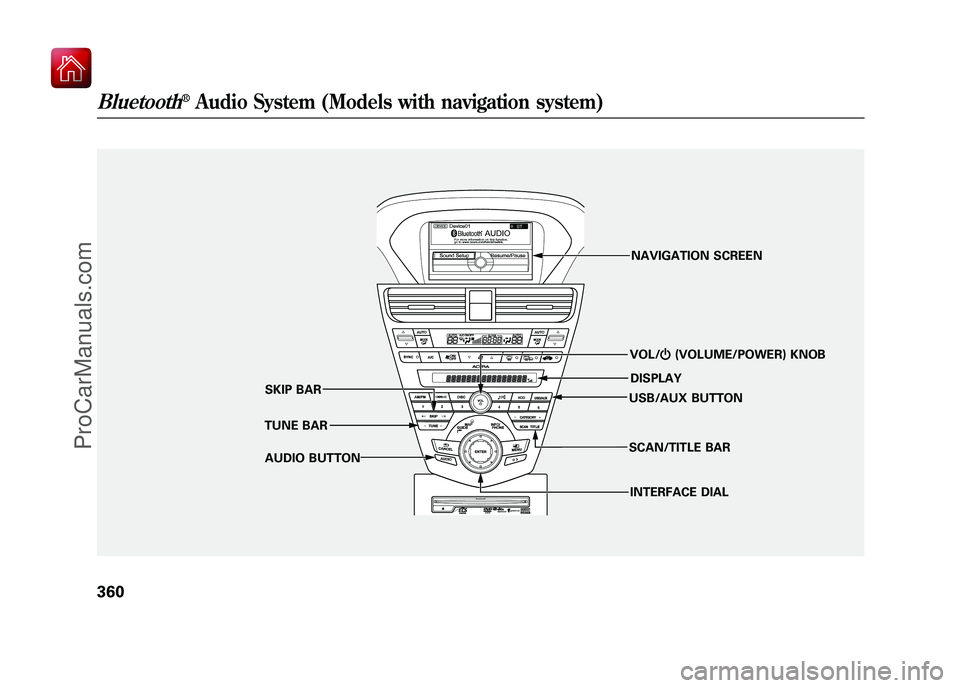
VOL/ꂻ(VOLUME/POWER) KNOB
TUNE BAR SKIP BAR
AUDIO BUTTON NAVIGATION SCREEN
DISPLAY
USB/AUX BUTTON
INTERFACE DIAL
SCAN/TITLE BAR
Bluetooth
®Audio System (Models with navigation system)
36009/10/28 17:15:37 10 ACURA ZDX KA KC New North America Own 50 31SZN600 enu
ProCarManuals.com
Page 366 of 645
Your vehicle is equipped with aBluetooth
®audio system, which
allows you to listen to streaming
audio from your Bluetooth audio
compatible phone. This function is
only available on Bluetooth Audio
Compatible phones that are paired
and linked to the vehicle's
Bluetooth
®HandsFreeLink
®(HFL)
system (see page 416).
Not all Bluetooth-enabled phones
with streaming audio capabilities are
compatible with the system. You can
find an approved phone by visiting
www.acura.com/handsfreelink,
or by
calling the HandsFreeLink
®
consumer support at 1-888-528-7876.
In Canada, visit
www.acura.ca,
or call
1-888-9-ACURA-9.
NOTE: In some states it may be
illegal to perform some data device
functions while driving. To Play
Bluetooth
®Audio Files
Make sure that your phone is paired
and linked to the HFL.
To begin to play the audio files, you
may need to operate your phone. If
so, follow the phone maker
’s
operating instructions. Press the USB/AUX button
ꭧwith
the power mode in ACCESSORY or
ON. When the phone is recognized,
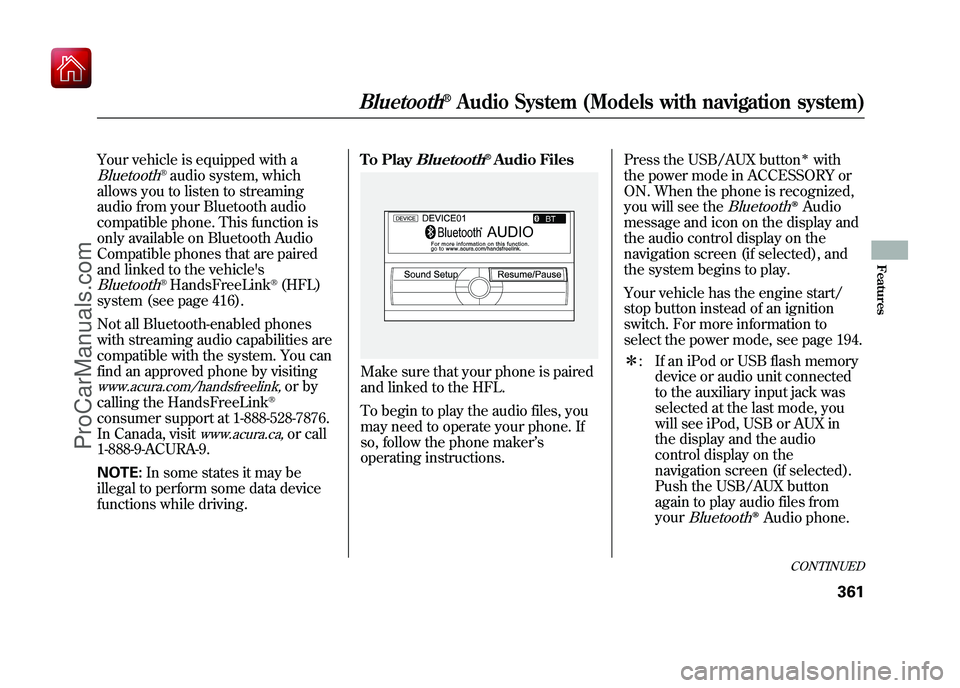
you will see the
Bluetooth
ꭂAudio
message and icon on the display and
the audio control display on the
navigation screen (if selected), and
the system begins to play.
Your vehicle has the engine start/
stop button instead of an ignition
switch. For more information to
select the power mode, see page 194.
ꭧ : If an iPod or USB flash memory
device or audio unit connected
to the auxiliary input jack was
selected at the last mode, you
will see iPod, USB or AUX in
the display and the audio
control display on the
navigation screen (if selected).
Push the USB/AUX button
again to play audio files from
your
Bluetooth
ꭂAudio phone.
CONTINUED
Bluetooth
®Audio System (Models with navigation system)
361
Features
09/10/28 17:15:37 10 ACURA ZDX KA KC New North America Own 50 31SZN600 enu
ProCarManuals.com
Page 367 of 645
Once a device is linked, the name of
the device will appear on the screen.
Pressing the TITLE side of the
SCAN/TITLE bar switches the
display between the
Bluetooth
®
Audio and the device name.
If more than one phone is paired to
the HFL system, there will be delay
before the system begins to play.In the following conditions, the
display shows
‘‘NO CONNECT ’’
message after pressing the TITLE
side of the SCAN/TITLE bar.
●The phone is not linked to HFL.●The phone is not turned on.●The phone is not in the vehicle.●Another HFL compatible phone,
which is not compatible forBluetooth
®Audio, is already
connected.
If your
Bluetooth
®Audio compatible
phone does not operate as described,
make sure it is an Acura approved
phone. To find out if your phone is
approved, go to
www.acura.com/
handsfreelink
(in Canada,
www.acura.
ca
), or call the HandsFreeLink
®
consumer support at 1-888-528-7876.
Voice Control SystemYou can select the AUX mode by
using the voice control buttons, but
cannot operate the play mode
functions.To skip a filePress the
side of the SKIP bar to
skip forward to the next file, and
press theside to skip backward
to the beginning of the current file.
Push theside again to skip to
the previous file.
The skip function may not be
available on some devices.
Bluetooth
®Audio System (Models with navigation system)
36209/10/28 17:15:37 10 ACURA ZDX KA KC New North America Own 50 31SZN600 enu
ProCarManuals.com
Page 376 of 645
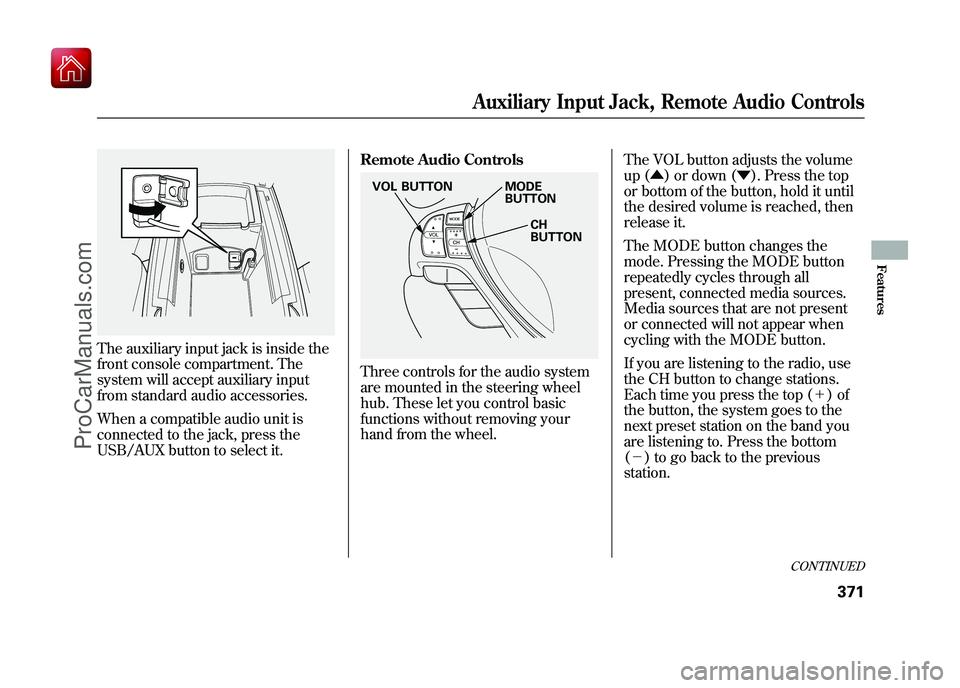
The auxiliary input jack is inside the
front console compartment. The
system will accept auxiliary input
from standard audio accessories.
When a compatible audio unit is
connected to the jack, press the
USB/AUX button to select it.Remote Audio Controls
Three controls for the audio system
are mounted in the steering wheel
hub. These let you control basic
functions without removing your
hand from the wheel.
The VOL button adjusts the volume
up (▲
) or down (▼ ). Press the top
or bottom of the button, hold it until
the desired volume is reached, then
release it.
The MODE button changes the
mode. Pressing the MODE button
repeatedly cycles through all
present, connected media sources.
Media sources that are not present
or connected will not appear when
cycling with the MODE button.
If you are listening to the radio, use
the CH button to change stations.
Each time you press the top (+ )of
the button, the system goes to the
next preset station on the band you
are listening to. Press the bottom
(- ) to go back to the previous
station.
MODE
BUTTON
CH
BUTTON
VOL BUTTON
CONTINUED
Auxiliary Input Jack, Remote Audio Controls
371
Features
09/10/28 17:15:37 10 ACURA ZDX KA KC New North America Own 50 31SZN600 enu
ProCarManuals.com
Page 530 of 645
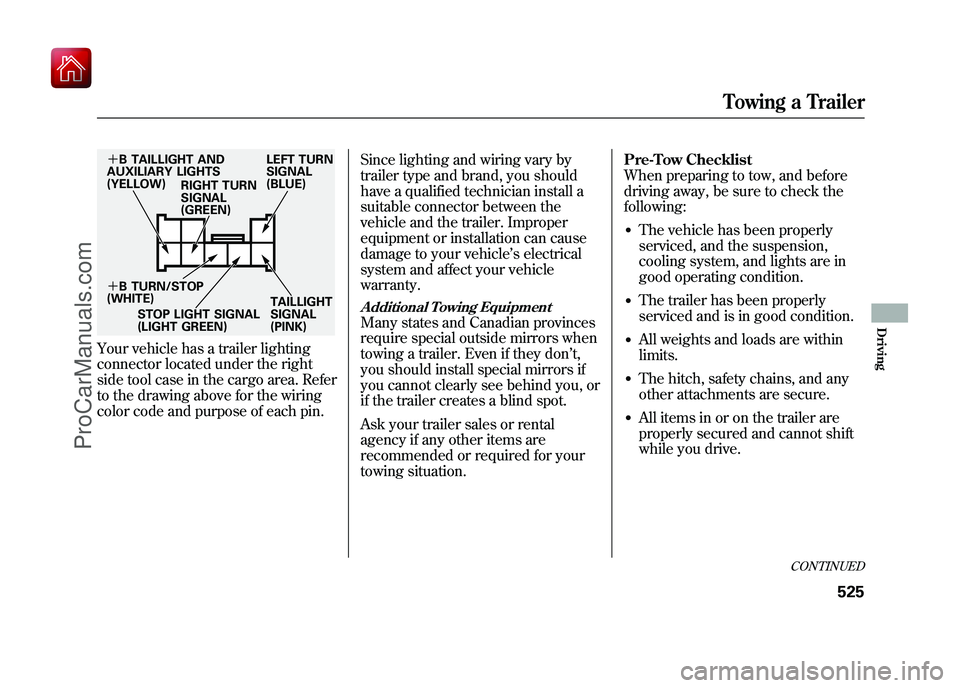
Your vehicle has a trailer lighting
connector located under the right
side tool case in the cargo area. Refer
to the drawing above for the wiring
color code and purpose of each pin.Since lighting and wiring vary by
trailer type and brand, you should
have a qualified technician install a
suitable connector between the
vehicle and the trailer. Improper
equipment or installation can cause
damage to your vehicle
’s electrical
system and affect your vehicle
warranty.
Additional Towing EquipmentMany states and Canadian provinces
require special outside mirrors when
towing a trailer. Even if they don ’t,
you should install special mirrors if
you cannot clearly see behind you, or
if the trailer creates a blind spot.
Ask your trailer sales or rental
agency if any other items are
recommended or required for your
towing situation. Pre-Tow Checklist
When preparing to tow, and before
driving away, be sure to check the
following:
●The vehicle has been properly
serviced, and the suspension,
cooling system, and lights are in
good operating condition.●The trailer has been properly
serviced and is in good condition.●All weights and loads are within
limits.●The hitch, safety chains, and any
other attachments are secure.●All items in or on the trailer are
properly secured and cannot shift
while you drive.
+
B TAILLIGHT AND
AUXILIARY LIGHTS
(YELLOW) RIGHT TURN
SIGNAL
(GREEN) LEFT TURN
SIGNAL
(BLUE)
+ B TURN/STOP
(WHITE)
STOP LIGHT SIGNAL
(LIGHT GREEN) TAILLIGHT
SIGNAL
(PINK)
CONTINUED
Towing a Trailer
525
Driving
09/10/28 17:15:37 10 ACURA ZDX KA KC New North America Own 50 31SZN600 enu
ProCarManuals.com
Page 632 of 645

A
Accessories andModifications
..........................
463
ACCESSORY (Ignition Key Position)
.................................
150
Accessory Power Sockets
..........
217
AcuraLink
®(U.S. models
only)
.......................................
435
Adaptive Cruise Control (ACC)
.....................................
382
Additives, Engine Oil
.................
546
Adjusting the Steering Wheel
....
145
Advanced Airbags
........................
30
Airbag (SRS)
..........................
10, 26
Air Conditioning System
............
220
Air Pressure, Tires
..............
567, 568
Alcohol in Gasoline
....................
454
Antifreeze
...................................
548
Anti-lock Brakes (ABS) Indicator
............................
67, 496
Operation
................................
496
Anti-theft, Audio System
.............
374
Anti-theft Steering Column Lock
.......................................
150 Audio System
......................
228, 277
Automatic Climate Control.........
221
Automatic Lighting Off Feature
...................................
142
Automatic Seat Belt Tensioners...
23
Automatic Speed Control
...........
379
Automatic Transmission
............
477
Capacity, Fluid
........................
608
Checking Fluid Level
..............
551
Driving with the Paddle Shifters
................................
482
Shifting
...................................
478
Shift Lever Position Indicators
............................
477
Shift Lever Positions
...............
478
Shift Lock Release
...................
480
Auxiliary Input Jack
...................
371
B
Battery Charging System Indicator
........................
65, 592
Jump Starting
..........................
587
Maintenance
...........................
573 Specifications
..........................
609
Before Driving
...........................
453
Belts, Seat
................................
9, 21
Beverage Holders
......................
213
Blind Spot Information System (BSI)
......................................
511
Bluetooth
®Audio
................
272, 360
Bluetooth
®HandsFreeLink
®
(Models with navigationsystem)
...............................
416
Bluetooth
®HandsFreeLink
®
(Models without navigation
system)
...............................
399
Booster Seats
...............................
55
Brakes Anti-lock Brakes (ABS)
...........
496
Break-in, New Linings
.............
454
Bulb Replacement
...................
558
Fluid
.......................................
553
Parking
...................................
176
System Design
........................
495
System Indicator
...............
66, 594
Wear Indicators
.......................
495
Braking System
..........................
495
Break-in, New Vehicle
................
454
CONTINUED
Index
I
INDEX
09/10/28 17:15:37 10 ACURA ZDX KA KC New North America Own 50 31SZN600 enu
ProCarManuals.com