ad blue ACURA ZDX 2010 Owner's Manual
[x] Cancel search | Manufacturer: ACURA, Model Year: 2010, Model line: ZDX, Model: ACURA ZDX 2010Pages: 645, PDF Size: 17.13 MB
Page 366 of 645
Your vehicle is equipped with aBluetooth
®audio system, which
allows you to listen to streaming
audio from your Bluetooth audio
compatible phone. This function is
only available on Bluetooth Audio
Compatible phones that are paired
and linked to the vehicle's
Bluetooth
®HandsFreeLink
®(HFL)
system (see page 416).
Not all Bluetooth-enabled phones
with streaming audio capabilities are
compatible with the system. You can
find an approved phone by visiting
www.acura.com/handsfreelink,
or by
calling the HandsFreeLink
®
consumer support at 1-888-528-7876.
In Canada, visit
www.acura.ca,
or call
1-888-9-ACURA-9.
NOTE: In some states it may be
illegal to perform some data device
functions while driving. To Play
Bluetooth
®Audio Files
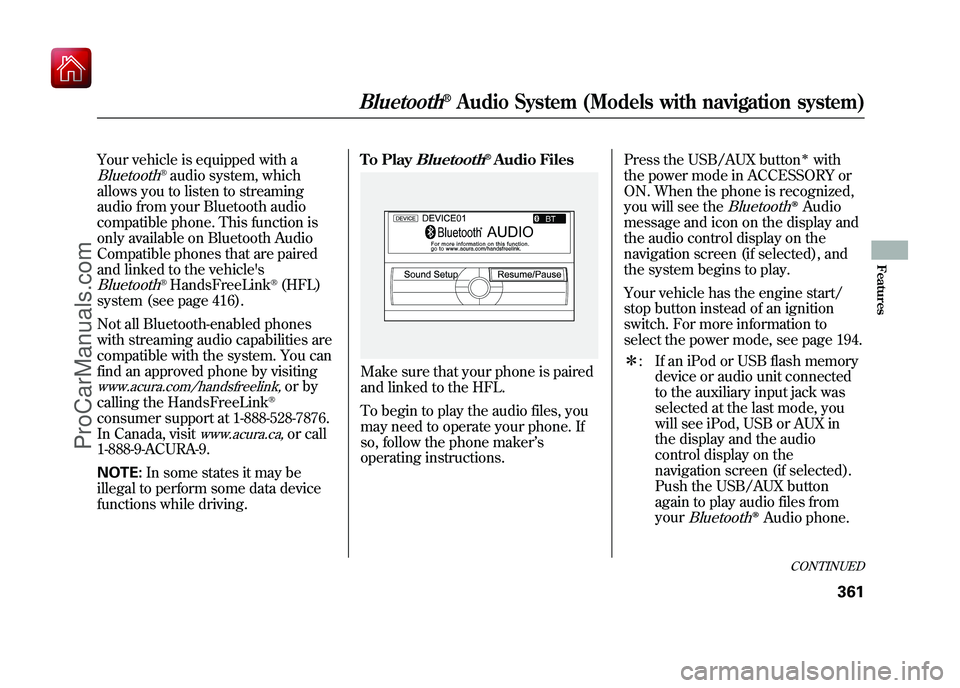
Make sure that your phone is paired
and linked to the HFL.
To begin to play the audio files, you
may need to operate your phone. If
so, follow the phone maker
’s
operating instructions. Press the USB/AUX button
ꭧwith
the power mode in ACCESSORY or
ON. When the phone is recognized,
you will see the
Bluetooth
ꭂAudio
message and icon on the display and
the audio control display on the
navigation screen (if selected), and
the system begins to play.
Your vehicle has the engine start/
stop button instead of an ignition
switch. For more information to
select the power mode, see page 194.
ꭧ : If an iPod or USB flash memory
device or audio unit connected
to the auxiliary input jack was
selected at the last mode, you
will see iPod, USB or AUX in
the display and the audio
control display on the
navigation screen (if selected).
Push the USB/AUX button
again to play audio files from
your
Bluetooth
ꭂAudio phone.
CONTINUED
Bluetooth
®Audio System (Models with navigation system)
361
Features
09/10/28 17:15:37 10 ACURA ZDX KA KC New North America Own 50 31SZN600 enu
ProCarManuals.com
Page 367 of 645
Once a device is linked, the name of
the device will appear on the screen.
Pressing the TITLE side of the
SCAN/TITLE bar switches the
display between the
Bluetooth
®
Audio and the device name.
If more than one phone is paired to
the HFL system, there will be delay
before the system begins to play.In the following conditions, the
display shows
‘‘NO CONNECT ’’
message after pressing the TITLE
side of the SCAN/TITLE bar.
●The phone is not linked to HFL.●The phone is not turned on.●The phone is not in the vehicle.●Another HFL compatible phone,
which is not compatible forBluetooth
®Audio, is already
connected.
If your
Bluetooth
®Audio compatible
phone does not operate as described,
make sure it is an Acura approved
phone. To find out if your phone is
approved, go to
www.acura.com/
handsfreelink
(in Canada,
www.acura.
ca
), or call the HandsFreeLink
®
consumer support at 1-888-528-7876.
Voice Control SystemYou can select the AUX mode by
using the voice control buttons, but
cannot operate the play mode
functions.To skip a filePress the
side of the SKIP bar to
skip forward to the next file, and
press theside to skip backward
to the beginning of the current file.
Push theside again to skip to
the previous file.
The skip function may not be
available on some devices.
Bluetooth
®Audio System (Models with navigation system)
36209/10/28 17:15:37 10 ACURA ZDX KA KC New North America Own 50 31SZN600 enu
ProCarManuals.com
Page 368 of 645
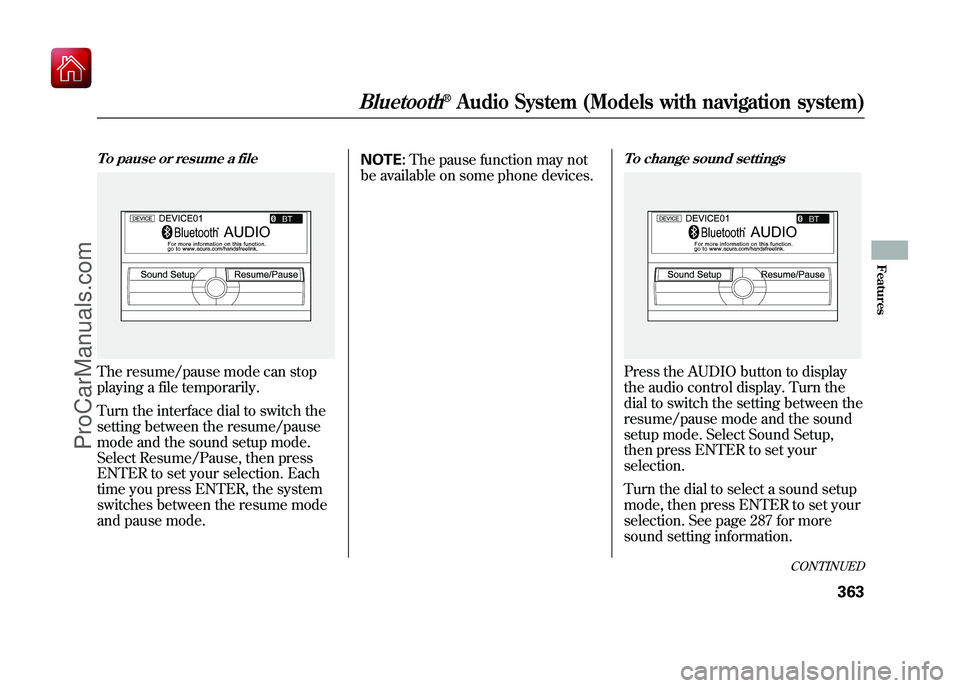
To pause or resume a fileThe resume/pause mode can stop
playing a file temporarily.
Turn the interface dial to switch the
setting between the resume/pause
mode and the sound setup mode.
Select Resume/Pause, then press
ENTER to set your selection. Each
time you press ENTER, the system
switches between the resume mode
and pause mode.NOTE:
The pause function may not
be available on some phone devices.
To change sound settingsPress the AUDIO button to display
the audio control display. Turn the
dial to switch the setting between the
resume/pause mode and the sound
setup mode. Select Sound Setup,
then press ENTER to set your
selection.
Turn the dial to select a sound setup
mode, then press ENTER to set your
selection. See page 287 for more
sound setting information.
CONTINUED
Bluetooth
®Audio System (Models with navigation system)
363
Features
09/10/28 17:15:37 10 ACURA ZDX KA KC New North America Own 50 31SZN600 enu
ProCarManuals.com
Page 369 of 645
To switch to HFL modeIf you receive a call when theBluetooth
®Audio is playing, press
the PICK-UP button on the steering
wheel. The screen and the display
switch to the HFL mode (see page
417).
After ending the call, press the
HANG-UP button to go back to the
Bluetooth
®Audio mode.
To turn off the Bluetooth
®Audio
mode
Select any other audio mode by
pressing a button; AM/FM,
or
DISC on the audio control panel, or
press the MODE button on the
steering wheel to select another
audio mode.
Switching to another mode pauses
the music playing from your phone.
As required by the FCC:
This device complies with Part 15 of theFCC rules. Operation is subject to the
following two conditions: (1) This devicemay not cause harmful interference, and(2) this device must accept any
interference received, includinginterference that may cause undesiredoperation.
Changes or modifications not expresslyapproved by the party responsible for
compliance could void the user'sauthority to operate the equipment.
This device complies with IndustryCanada Standard RSS-210.
Operation is subject to the following twoconditions: (1) this device may not causeinterference, and (2) this device must
accept any interference that may causeundesired operation of the device.
Bluetooth
®Audio System (Models with navigation system)
36409/10/28 17:15:37 10 ACURA ZDX KA KC New North America Own 50 31SZN600 enu
ProCarManuals.com
Page 404 of 645
Bluetooth
®HandsFreeLink
®(HFL)
allows you to place and receive
phone calls using voice commands,
without handling your cell phone.
To use HFL, you need a Bluetooth-
compatible cell phone. For a list of
compatible phones, pairing
procedures, and special feature
capabilities:
In the U.S., visit
www.acura.com/
handsfreelink
, or call (888) 528-7826.
In Canada, visit
www.acura.ca
, or call
(888) 9-ACURA-9. Using HFL
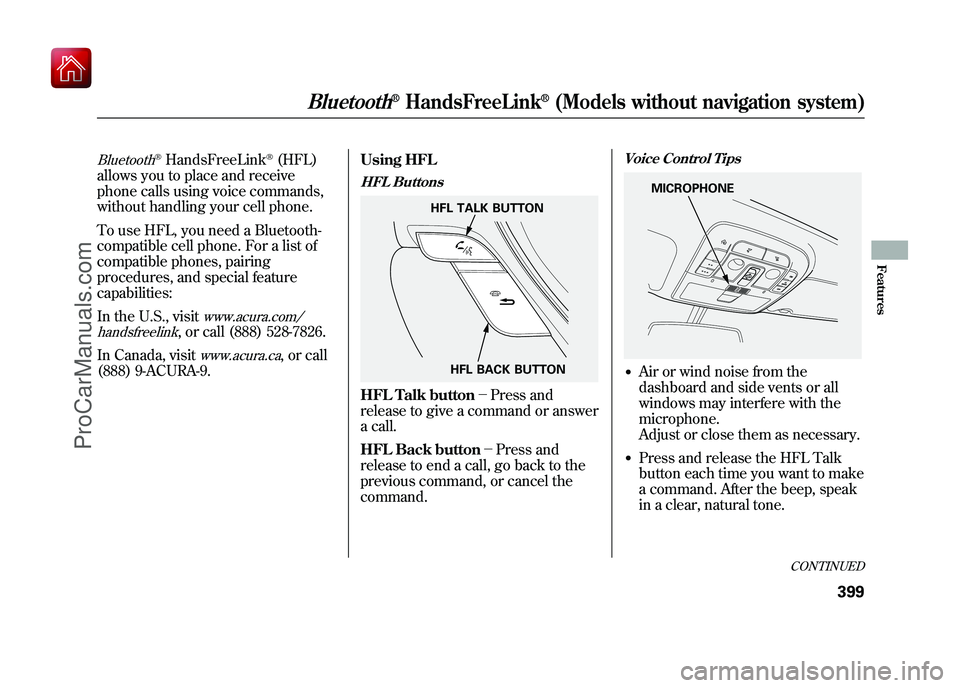
HFL ButtonsHFL Talk button-
Press and
release to give a command or answer
a call.
HFL Back button- Press and
release to end a call, go back to the
previous command, or cancel the
command.
Voice Control Tips●Air or wind noise from the
dashboard and side vents or all
windows may interfere with the
microphone.
Adjust or close them as necessary.●Press and release the HFL Talk
button each time you want to make
a command. After the beep, speak
in a clear, natural tone.
HFL TALK BUTTON
HFL BACK BUTTON
MICROPHONE
CONTINUED
Bluetooth
®HandsFreeLink
®(Models without navigation system)
399
Features
09/10/28 17:15:37 10 ACURA ZDX KA KC New North America Own 50 31SZN600 enu
ProCarManuals.com
Page 405 of 645
●Try to reduce all background
noise. If the microphone picks up
voices other than yours,
commands may be misinterpreted.●Many commands can be spoken
together. For example, you can say
‘‘Call 123-456-7890 ’’or ‘‘Dial
Peter. ’’●To change the volume level of
HFL, use the audio system volume
knob or the steering wheel volume
controls.
Help Features●To hear general HFL information,
including help on pairing a phone
or setting up the system, say
‘‘Tutorial. ’’●For help at any time, including a
list of available commands, say
‘‘Hands free help. ’’
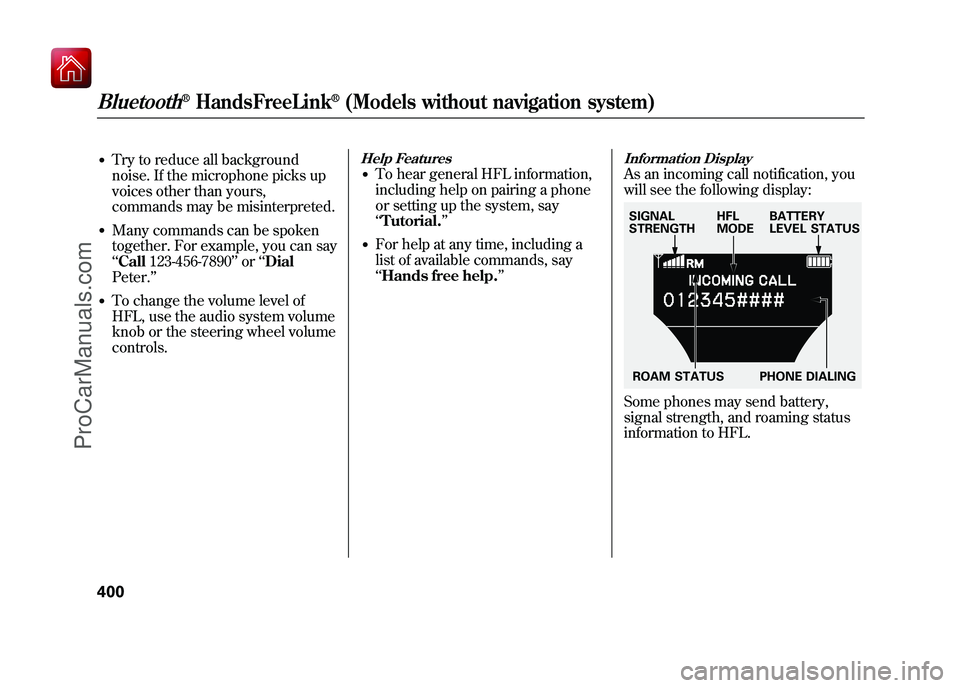
Information DisplayAs an incoming call notification, you
will see the following display:Some phones may send battery,
signal strength, and roaming status
information to HFL.SIGNAL
STRENGTHHFL
MODEBATTERY
LEVEL STATUS
ROAM STATUS PHONE DIALING
Bluetooth
®HandsFreeLink
®(Models without navigation system)
40009/10/28 17:15:37 10 ACURA ZDX KA KC New North America Own 50 31SZN600 enu
ProCarManuals.com
Page 406 of 645
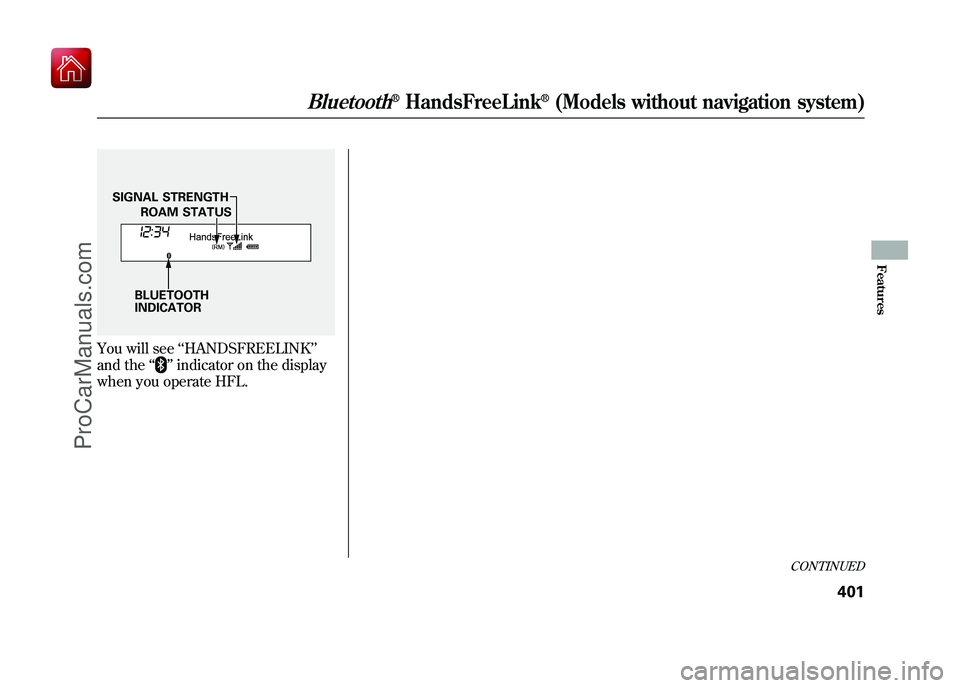
You will see‘‘HANDSFREELINK ’’
and the ‘‘
’’indicator on the display
when you operate HFL.
BLUETOOTH
INDICATOR ROAM STATUS
SIGNAL STRENGTH
CONTINUED
Bluetooth
®HandsFreeLink
®(Models without navigation system)
401
Features
09/10/28 17:15:37 10 ACURA ZDX KA KC New North America Own 50 31SZN600 enu
ProCarManuals.com
Page 407 of 645
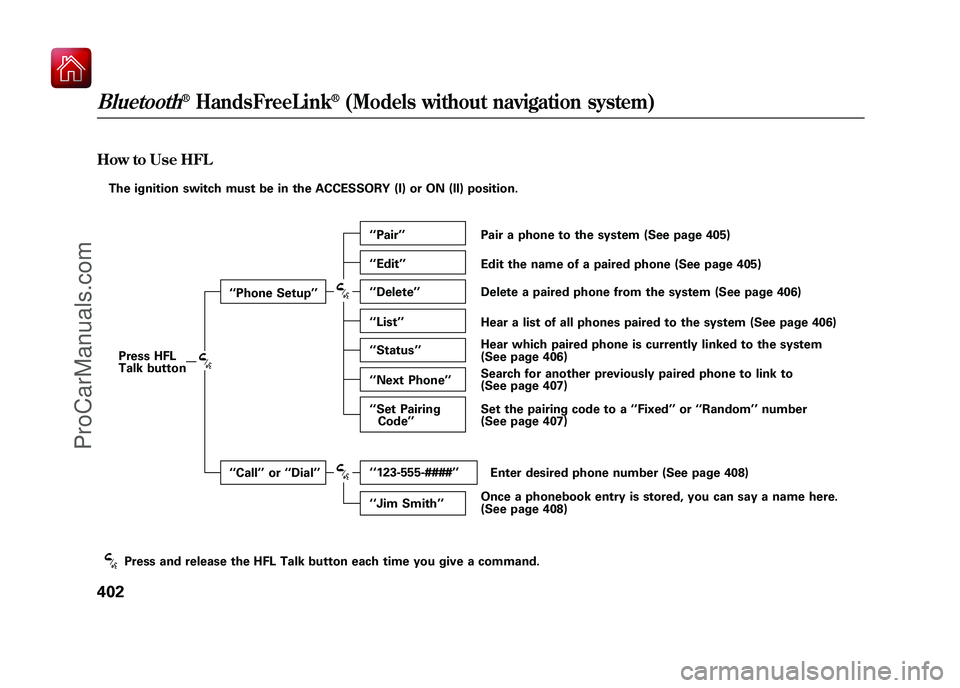
How to Use HFLThe ignition switch must be in the ACCESSORY (I) or ON (II) position.Press HFL
Talk button ‘‘
Phone Setup’’
‘‘ Call ’’or ‘‘Dial ’’ ‘‘
Pair ’’
‘‘ Edit ’’
‘‘ Delete ’’
‘‘ List ’’
‘‘ Status ’’
‘‘ Next Phone ’’
‘‘ Set Pairing
Code ’’
‘‘ 123-555-####’’
‘‘ Jim Smith ’’Pair a phone to the system (See page 405)
Edit the name of a paired phone (See page 405)
Delete a paired phone from the system (See page 406)
Hear a list of all phones paired to the system (See page 406)
Hear which paired phone is currently linked to the system
(See page 406)
Search for another previously paired phone to link to
(See page 407)
Set the pairing code to a ‘‘Fixed ’’or ‘‘Random ’’number
(See page 407)
Enter desired phone number (See page 408)
Once a phonebook entry is stored, you can say a name here.
(See page 408)
Press and release the HFL Talk button each time you give a command.Bluetooth
®HandsFreeLink
®(Models without navigation system)
40209/10/28 17:15:37 10 ACURA ZDX KA KC New North America Own 50 31SZN600 enu
ProCarManuals.com
Page 408 of 645
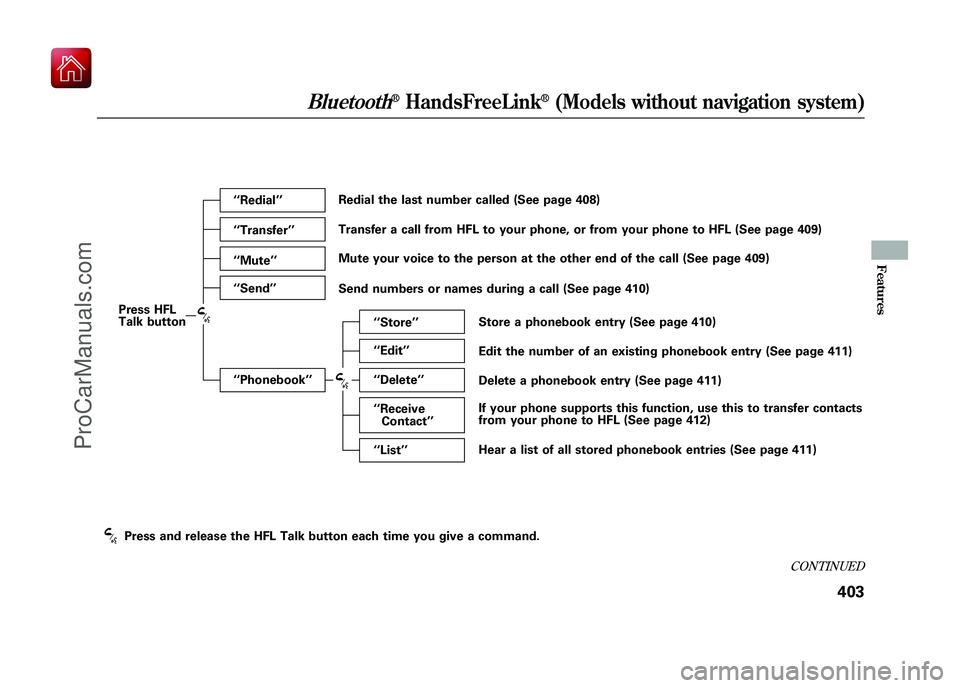
Press HFL
Talk button‘‘
Redial ’’
‘‘ Transfer ’’
‘‘ Mute ’’
‘‘ Send ’’
‘‘ Phonebook ’’ ‘‘
Store ’’
‘‘ Edit ’’
‘‘ Delete ’’
‘‘ Receive
Contact ’’
‘‘ List ’’
Redial the last number called (See page 408)
Transfer a call from HFL to your phone, or from your phone to HFL (See page 409)
Mute your voice to the person at the other end of the call (See page 409)
Send numbers or names during a call (See page 410)
Store a phonebook entry (See page 410)
Edit the number of an existing phonebook entry (See page 411)
Delete a phonebook entry (See page 411)
If your phone supports this function, use this to transfer contacts
from your phone to HFL (See page 412)
Hear a list of all stored phonebook entries (See page 411)
Press and release the HFL Talk button each time you give a command.
CONTINUED
Bluetooth
®HandsFreeLink
®(Models without navigation system)
403
Features
09/10/28 17:15:37 10 ACURA ZDX KA KC New North America Own 50 31SZN600 enu
ProCarManuals.com
Page 409 of 645
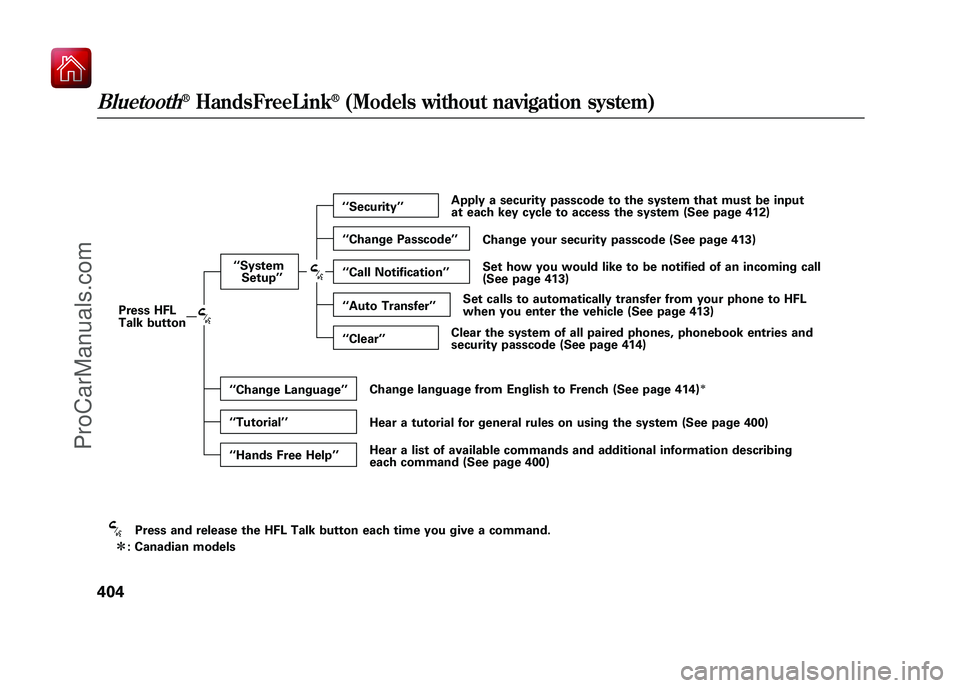
Press and release the HFL Talk button each time you give a command.
ꭧ : Canadian models
Press HFL
Talk button
‘‘
System
Setup ’’
‘‘ Change Language ’’
‘‘ Tutorial ’’
‘‘ Hands Free Help ’’‘‘
Security ’’
‘‘ Change Passcode ’’
‘‘ Call Notification ’’
‘‘ Auto Transfer’’
‘‘ Clear ’’ Apply a security passcode to the system that must be input
at each key cycle to access the system (See page 412)
Change your security passcode (See page 413)
Set how you would like to be notified of an incoming call
(See page 413)
Set calls to automatically transfer from your phone to HFL
when you enter the vehicle (See page 413)
Clear the system of all paired phones, phonebook entries and
security passcode (See page 414)
Change language from English to French (See page 414)
ꭧ
Hear a tutorial for general rules on using the system (See page 400)
Hear a list of available commands and additional information describing
each command (See page 400)
Bluetooth
®HandsFreeLink
®(Models without navigation system)
40409/10/28 17:15:37 10 ACURA ZDX KA KC New North America Own 50 31SZN600 enu
ProCarManuals.com