ad blue ACURA ZDX 2010 Repair Manual
[x] Cancel search | Manufacturer: ACURA, Model Year: 2010, Model line: ZDX, Model: ACURA ZDX 2010Pages: 645, PDF Size: 17.13 MB
Page 440 of 645
On models with navigation systemAcuraLink enhances your ownership
experience by providing a direct
communication link between your
vehicle and the Acura Server.
Working through the XM radio
satellite, AcuraLink works in
conjunction with the navigation
system,
Bluetooth
®HandsFreeLink
®
(HFL), and audio system in your
vehicle. It displays and receives
several kinds of messages, including:●Operating tips and information on
your vehicle's features.●Important recall and safety
information.●Maintenance information to keep
your vehicle in top condition.●Diagnostic information to provide
information about any problems
with your vehicle.Interface Dial
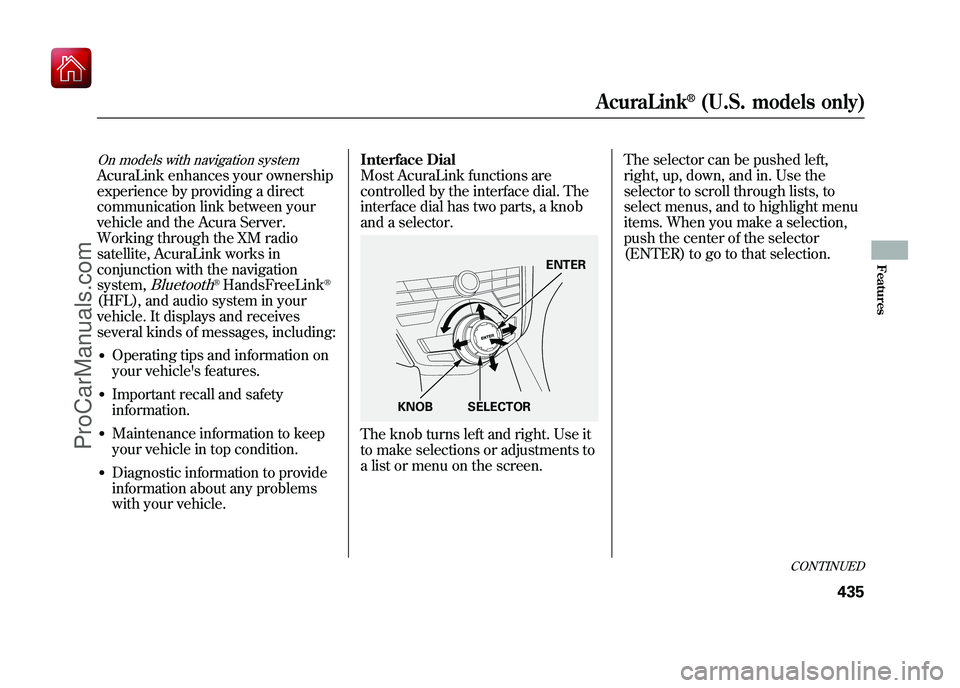
Most AcuraLink functions are
controlled by the interface dial. The
interface dial has two parts, a knob
and a selector.
The knob turns left and right. Use it
to make selections or adjustments to
a list or menu on the screen.
The selector can be pushed left,
right, up, down, and in. Use the
selector to scroll through lists, to
select menus, and to highlight menu
items. When you make a selection,
push the center of the selector
(ENTER) to go to that selection.
ENTER
KNOB SELECTOR
CONTINUED
AcuraLink
®(U.S. models only)
435
Features
09/10/28 17:15:37 10 ACURA ZDX KA KC New North America Own 50 31SZN600 enu
ProCarManuals.com
Page 443 of 645
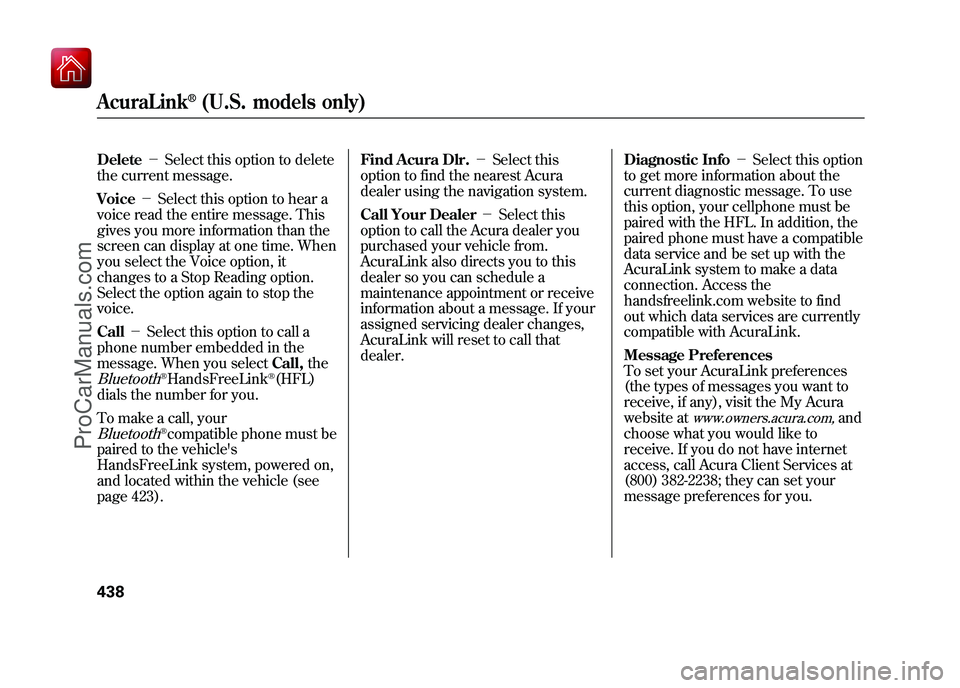
Delete-Select this option to delete
the current message.
Voice -Select this option to hear a
voice read the entire message. This
gives you more information than the
screen can display at one time. When
you select the Voice option, it
changes to a Stop Reading option.
Select the option again to stop the
voice.
Call -Select this option to call a
phone number embedded in the
message. When you select Call,theBluetooth
®HandsFreeLink
®(HFL)
dials the number for you.
To make a call, your
Bluetooth
®compatible phone must be
paired to the vehicle's
HandsFreeLink system, powered on,
and located within the vehicle (see
page 423). Find Acura Dlr.
-Select this
option to find the nearest Acura
dealer using the navigation system.
Call Your Dealer -Select this
option to call the Acura dealer you
purchased your vehicle from.
AcuraLink also directs you to this
dealer so you can schedule a
maintenance appointment or receive
information about a message. If your
assigned servicing dealer changes,
AcuraLink will reset to call that
dealer. Diagnostic Info
-Select this option
to get more information about the
current diagnostic message. To use
this option, your cellphone must be
paired with the HFL. In addition, the
paired phone must have a compatible
data service and be set up with the
AcuraLink system to make a data
connection. Access the
handsfreelink.com website to find
out which data services are currently
compatible with AcuraLink.
Message Preferences
To set your AcuraLink preferences
(the types of messages you want to
receive, if any), visit the My Acura
website at
www.owners.acura.com,
and
choose what you would like to
receive. If you do not have internet
access, call Acura Client Services at
(800) 382-2238; they can set your
message preferences for you.
AcuraLink
®(U.S. models only)
43809/10/28 17:15:37 10 ACURA ZDX KA KC New North America Own 50 31SZN600 enu
ProCarManuals.com
Page 446 of 645
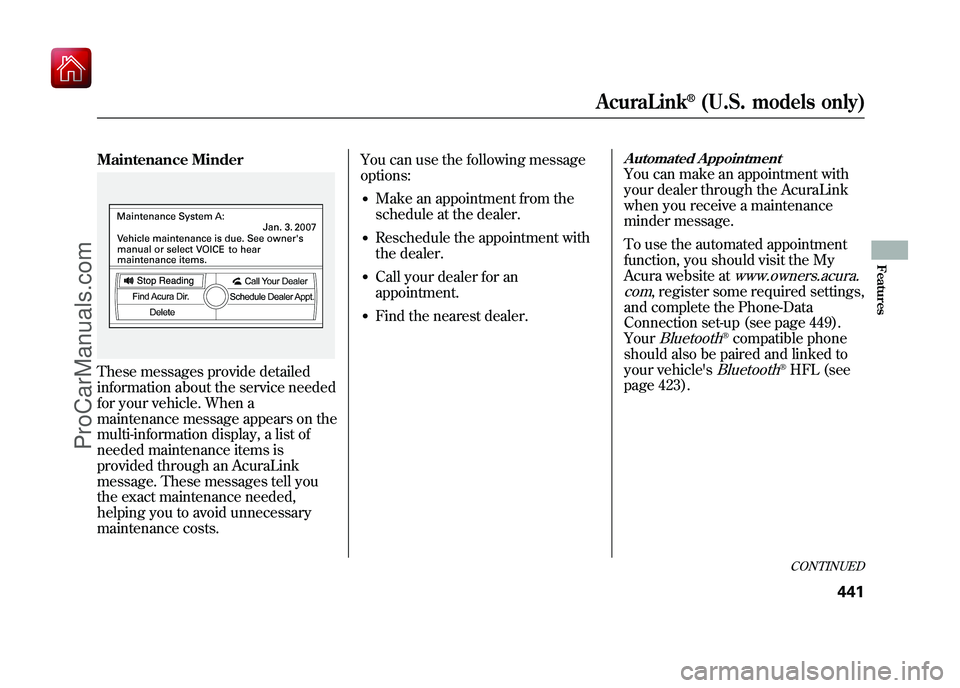
Maintenance MinderThese messages provide detailed
information about the service needed
for your vehicle. When a
maintenance message appears on the
multi-information display, a list of
needed maintenance items is
provided through an AcuraLink
message. These messages tell you
the exact maintenance needed,
helping you to avoid unnecessary
maintenance costs.You can use the following message
options:
●Make an appointment from the
schedule at the dealer.●Reschedule the appointment with
the dealer.●Call your dealer for an
appointment.●Find the nearest dealer.
Automated AppointmentYou can make an appointment with
your dealer through the AcuraLink
when you receive a maintenance
minder message.
To use the automated appointment
function, you should visit the My
Acura website at
www.owners.acura.
com
, register some required settings,
and complete the Phone-Data
Connection set-up (see page 449).
YourBluetooth
®compatible phone
should also be paired and linked to
your vehicle's
Bluetooth
®HFL (see
page 423).CONTINUED
AcuraLink
®(U.S. models only)
441
Features
09/10/28 17:15:37 10 ACURA ZDX KA KC New North America Own 50 31SZN600 enu
ProCarManuals.com
Page 454 of 645
New Message Notification-
Select on if you want to be notified of
new messages (envelope icon
appears on the navigation screen).
Select off if you do not want to be
notified of new messages (envelope
icon does not appear on the screen).
Messages can still be accessed using
the INFO menu. If you would like to
stop receiving messages, visit the My
Acura website atwww.owners.acura.com
to change your
messaging preferences.
Auto Reading -Select on to have
the system automatically read each
message to you. Select off to
manually select the Voice option
when you want a message read to
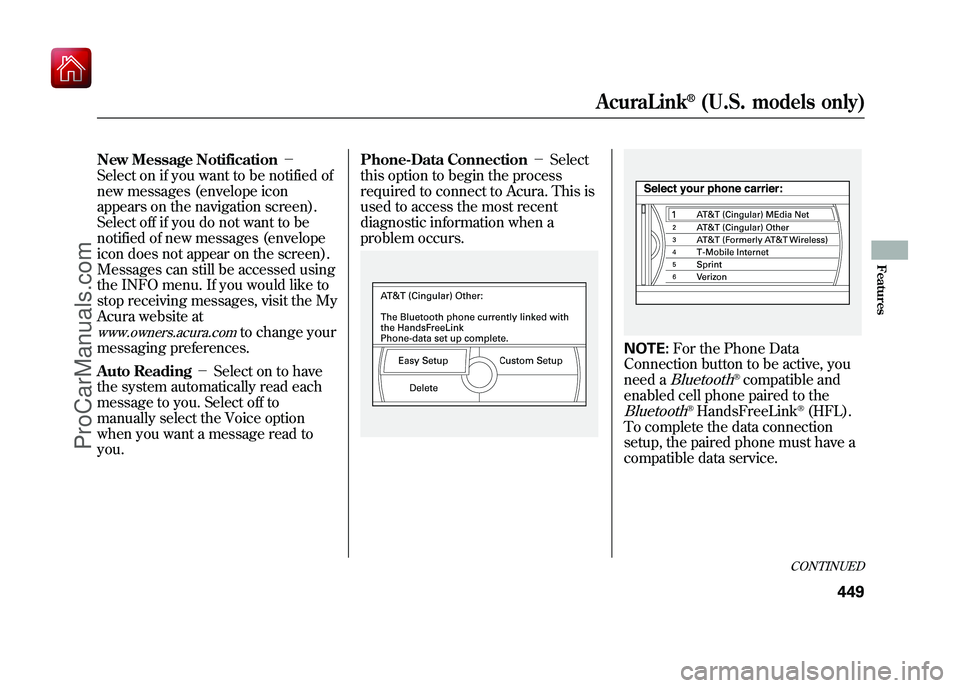
you. Phone-Data Connection
-Select
this option to begin the process
required to connect to Acura. This is
used to access the most recent
diagnostic information when a
problem occurs.
NOTE: For the Phone Data
Connection button to be active, you
need a
Bluetooth
®compatible and
enabled cell phone paired to the
Bluetooth
®HandsFreeLink
®(HFL).
To complete the data connection
setup, the paired phone must have a
compatible data service.
CONTINUED
AcuraLink
®(U.S. models only)
449
Features
09/10/28 17:15:37 10 ACURA ZDX KA KC New North America Own 50 31SZN600 enu
ProCarManuals.com
Page 455 of 645
To find more information onBluetooth
®compatible and enabled
cell phones, visit
www.acura.com/handsfreelink
or call
the Hands Free Link
®consumer
support at (888) 528-7876. Connect to the Acura Server
-
The default setting is Prompt. When
a diagnostic info message appears,
and you select the Check Now
option, the system will prompt you
before connecting to the Acura
server. If you do not wish to connect
at that time, select No at the Prompt,
and you will see the information from
the onboard database. The ‘‘Auto ’’
setting will remove the prompt when
you select the Check Now option and
will automatically connect to the
Acura server. This setting only
applies when you have a
Bluetooth
®
enabled phone that is paired with the
HFL and you have completed the
Phone-Data Connection setup.
As required by the FCC:
This device complies with Part 15 of theFCC rules. Operation is subject to the
following two conditions: (1) This devicemay not cause harmful interference, and(2) this device must accept any
interference received, includinginterference that may cause undesiredoperation.
Changes or modifications not expresslyapproved by the party responsible for
compliance could void the user'sauthority to operate the equipment.
AcuraLink
®(U.S. models only)
45009/10/28 17:15:37 10 ACURA ZDX KA KC New North America Own 50 31SZN600 enu
ProCarManuals.com
Page 530 of 645
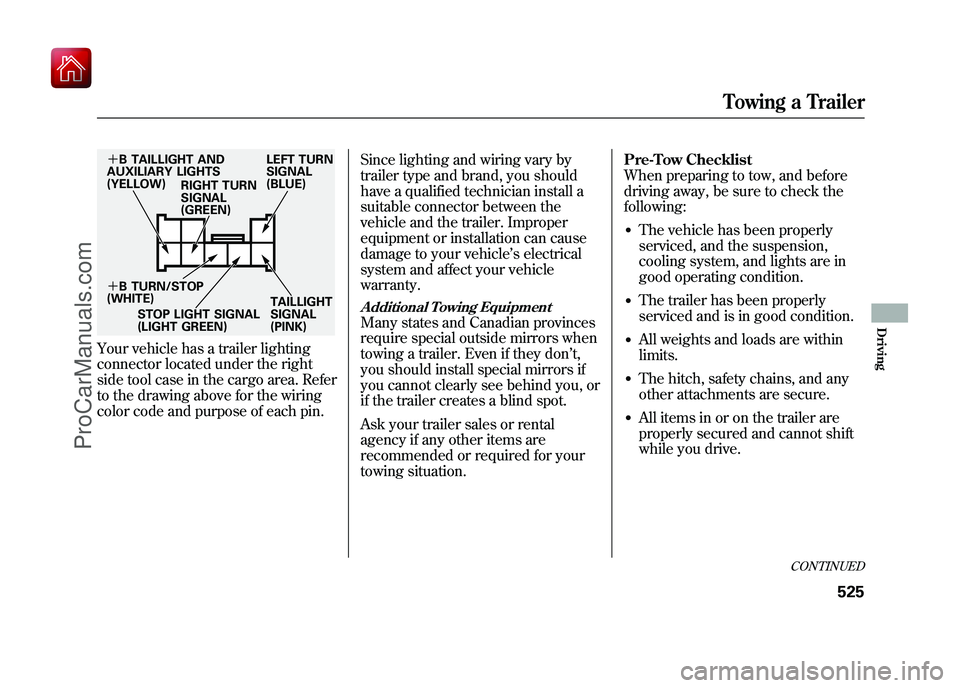
Your vehicle has a trailer lighting
connector located under the right
side tool case in the cargo area. Refer
to the drawing above for the wiring
color code and purpose of each pin.Since lighting and wiring vary by
trailer type and brand, you should
have a qualified technician install a
suitable connector between the
vehicle and the trailer. Improper
equipment or installation can cause
damage to your vehicle
’s electrical
system and affect your vehicle
warranty.
Additional Towing EquipmentMany states and Canadian provinces
require special outside mirrors when
towing a trailer. Even if they don ’t,
you should install special mirrors if
you cannot clearly see behind you, or
if the trailer creates a blind spot.
Ask your trailer sales or rental
agency if any other items are
recommended or required for your
towing situation. Pre-Tow Checklist
When preparing to tow, and before
driving away, be sure to check the
following:
●The vehicle has been properly
serviced, and the suspension,
cooling system, and lights are in
good operating condition.●The trailer has been properly
serviced and is in good condition.●All weights and loads are within
limits.●The hitch, safety chains, and any
other attachments are secure.●All items in or on the trailer are
properly secured and cannot shift
while you drive.
+
B TAILLIGHT AND
AUXILIARY LIGHTS
(YELLOW) RIGHT TURN
SIGNAL
(GREEN) LEFT TURN
SIGNAL
(BLUE)
+ B TURN/STOP
(WHITE)
STOP LIGHT SIGNAL
(LIGHT GREEN) TAILLIGHT
SIGNAL
(PINK)
CONTINUED
Towing a Trailer
525
Driving
09/10/28 17:15:37 10 ACURA ZDX KA KC New North America Own 50 31SZN600 enu
ProCarManuals.com
Page 548 of 645
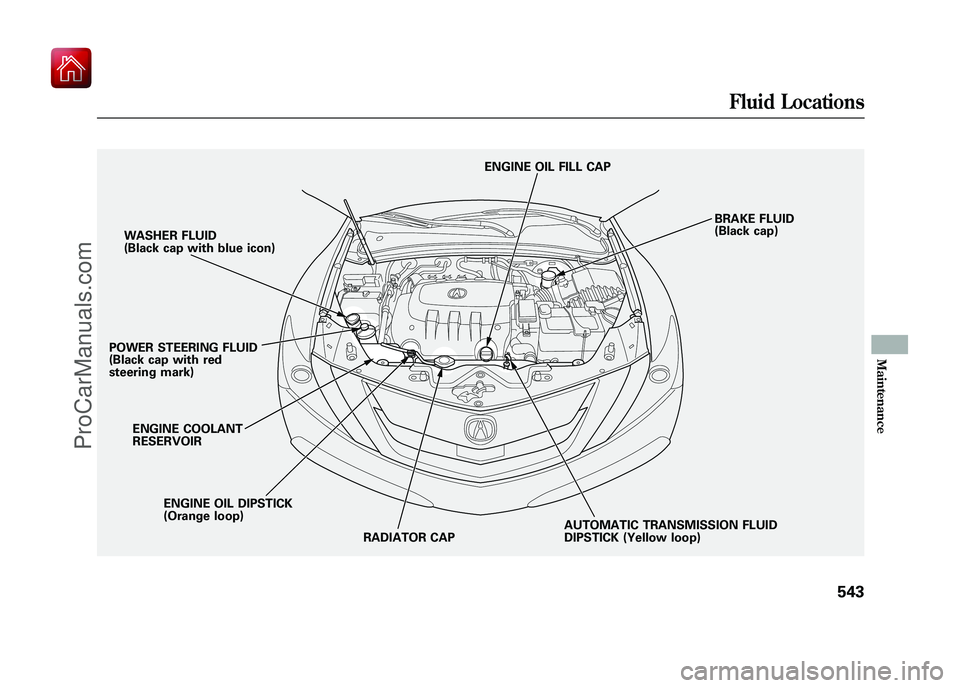
WASHER FLUID
(Black cap with blue icon)
POWER STEERING FLUID
(Black cap with red
steering mark)
ENGINE OIL DIPSTICK
(Orange loop)
ENGINE COOLANT
RESERVOIR
AUTOMATIC TRANSMISSION FLUID
DIPSTICK (Yellow loop)BRAKE FLUID
(Black cap)
RADIATOR CAP ENGINE OIL FILL CAP
Fluid Locations
543
Maintenance
09/10/28 17:15:37 10 ACURA ZDX KA KC New North America Own 50 31SZN600 enu
ProCarManuals.com
Page 632 of 645

A
Accessories andModifications
..........................
463
ACCESSORY (Ignition Key Position)
.................................
150
Accessory Power Sockets
..........
217
AcuraLink
®(U.S. models
only)
.......................................
435
Adaptive Cruise Control (ACC)
.....................................
382
Additives, Engine Oil
.................
546
Adjusting the Steering Wheel
....
145
Advanced Airbags
........................
30
Airbag (SRS)
..........................
10, 26
Air Conditioning System
............
220
Air Pressure, Tires
..............
567, 568
Alcohol in Gasoline
....................
454
Antifreeze
...................................
548
Anti-lock Brakes (ABS) Indicator
............................
67, 496
Operation
................................
496
Anti-theft, Audio System
.............
374
Anti-theft Steering Column Lock
.......................................
150 Audio System
......................
228, 277
Automatic Climate Control.........
221
Automatic Lighting Off Feature
...................................
142
Automatic Seat Belt Tensioners...
23
Automatic Speed Control
...........
379
Automatic Transmission
............
477
Capacity, Fluid
........................
608
Checking Fluid Level
..............
551
Driving with the Paddle Shifters
................................
482
Shifting
...................................
478
Shift Lever Position Indicators
............................
477
Shift Lever Positions
...............
478
Shift Lock Release
...................
480
Auxiliary Input Jack
...................
371
B
Battery Charging System Indicator
........................
65, 592
Jump Starting
..........................
587
Maintenance
...........................
573 Specifications
..........................
609
Before Driving
...........................
453
Belts, Seat
................................
9, 21
Beverage Holders
......................
213
Blind Spot Information System (BSI)
......................................
511
Bluetooth
®Audio
................
272, 360
Bluetooth
®HandsFreeLink
®
(Models with navigationsystem)
...............................
416
Bluetooth
®HandsFreeLink
®
(Models without navigation
system)
...............................
399
Booster Seats
...............................
55
Brakes Anti-lock Brakes (ABS)
...........
496
Break-in, New Linings
.............
454
Bulb Replacement
...................
558
Fluid
.......................................
553
Parking
...................................
176
System Design
........................
495
System Indicator
...............
66, 594
Wear Indicators
.......................
495
Braking System
..........................
495
Break-in, New Vehicle
................
454
CONTINUED
Index
I
INDEX
09/10/28 17:15:37 10 ACURA ZDX KA KC New North America Own 50 31SZN600 enu
ProCarManuals.com