battery ACURA ZDX 2010 Owner's Manual
[x] Cancel search | Manufacturer: ACURA, Model Year: 2010, Model line: ZDX, Model: ACURA ZDX 2010Pages: 645, PDF Size: 17.13 MB
Page 210 of 645
●The multi-information display
shows‘‘CHECK KEYLESS
STARTING SYSTEM. ’’
In this case, you should not shut off
your engine until you are in a safe
location or at your dealer, as your
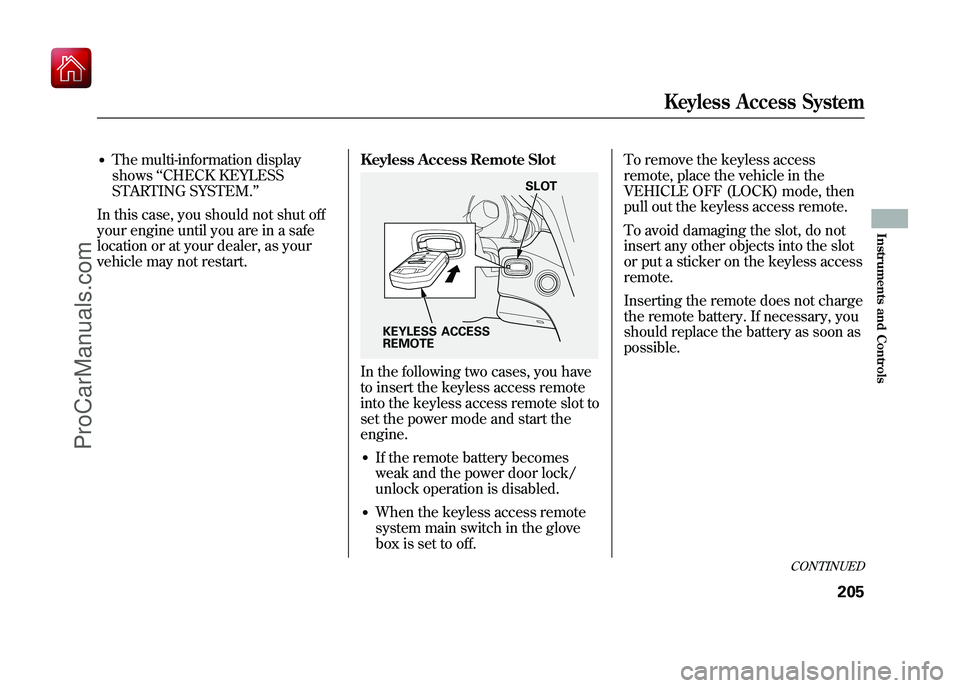
vehicle may not restart. Keyless Access Remote Slot
In the following two cases, you have
to insert the keyless access remote
into the keyless access remote slot to
set the power mode and start the
engine.●If the remote battery becomes
weak and the power door lock/
unlock operation is disabled.●When the keyless access remote
system main switch in the glove
box is set to off.To remove the keyless access
remote, place the vehicle in the
VEHICLE OFF (LOCK) mode, then
pull out the keyless access remote.
To avoid damaging the slot, do not
insert any other objects into the slot
or put a sticker on the keyless access
remote.
Inserting the remote does not charge
the remote battery. If necessary, you
should replace the battery as soon as
possible.KEYLESS ACCESS
REMOTE
SLOT
CONTINUED
Keyless Access System
205
Instruments and Controls
09/10/28 17:15:37 10 ACURA ZDX KA KC New North America Own 50 31SZN600 enu
ProCarManuals.com
Page 212 of 645
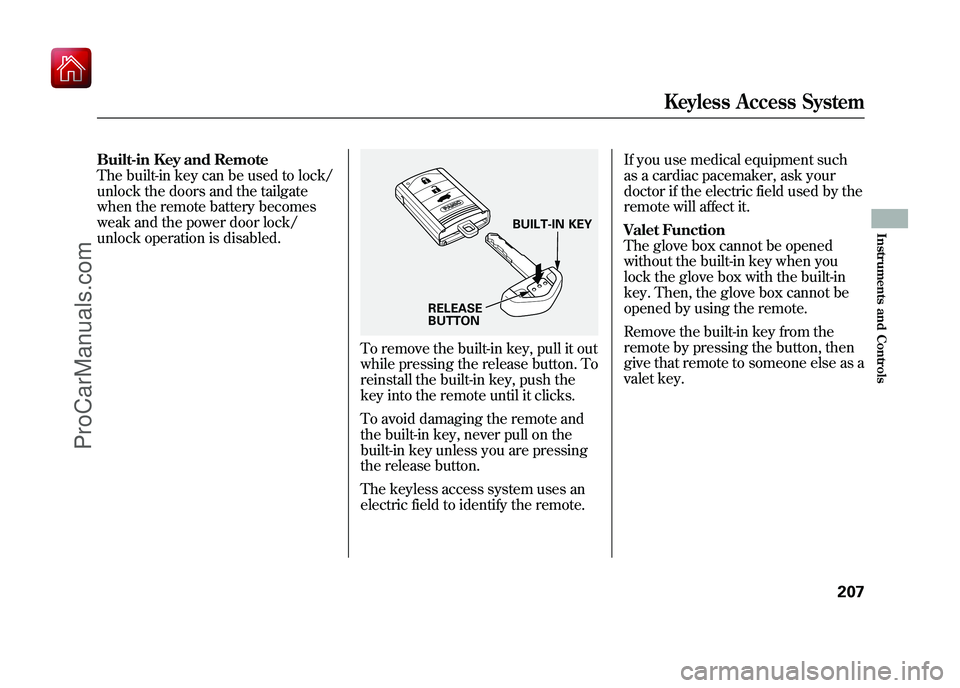
Built-in Key and Remote
The built-in key can be used to lock/
unlock the doors and the tailgate
when the remote battery becomes
weak and the power door lock/
unlock operation is disabled.
To remove the built-in key, pull it out
while pressing the release button. To
reinstall the built-in key, push the
key into the remote until it clicks.
To avoid damaging the remote and
the built-in key, never pull on the
built-in key unless you are pressing
the release button.
The keyless access system uses an
electric field to identify the remote.If you use medical equipment such
as a cardiac pacemaker, ask your
doctor if the electric field used by the
remote will affect it.
Valet Function
The glove box cannot be opened
without the built-in key when you
lock the glove box with the built-in
key. Then, the glove box cannot be
opened by using the remote.
Remove the built-in key from the
remote by pressing the button, then
give that remote to someone else as a
valet key.
BUILT-IN KEY
RELEASE
BUTTON
Keyless Access System
207
Instruments and Controls
09/10/28 17:15:37 10 ACURA ZDX KA KC New North America Own 50 31SZN600 enu
ProCarManuals.com
Page 379 of 645
Your vehicle's audio system may
disable itself if it is disconnected
from electrical power for any reason.
To make it work again, you must
enter a specific five-digit code with
the preset buttons. Because there are
hundreds of number combinations
possible from the five digits, making
the system work without knowing
the exact code is nearly impossible.
You should have received a card that
lists your audio system code number
and serial number. It is best to store
this card in a safe place at home. In
addition, you should write the audio
system's serial number in this
owner's manual.
If you lose the card, you must obtain
the code number from your dealer.
To do this, you will need the audio
system's serial number.NOTE:
In the U.S., if you have a My
Acura account, you can retrieve the
anti-theft code online.
If your vehicle's battery is
disconnected or goes dead, the audio
system will disable itself. If this
happens, you will see ‘‘ENTER
CODE ’’in the frequency display (on
the display on models with
navigation system) the next time you
turn on the system. Use the preset
buttons to enter the five-digit code.
The code is located on the radio code
card included in your owner's
manual kit. When it is entered
correctly, the radio will start playing.
If you make a mistake entering the
code, do not start over; complete the
five-digit sequence, then enter the
correct code. You have 10 tries to
enter the correct code. If you are
unsuccessful in 10 attempts, you
must then leave the system on for 1
hour before trying again. The system will retain your AM and
FM presets even if power is
disconnected.Radio Theft Protection37409/10/28 17:15:37 10 ACURA ZDX KA KC New North America Own 50 31SZN600 enu
ProCarManuals.com
Page 405 of 645
●Try to reduce all background
noise. If the microphone picks up
voices other than yours,
commands may be misinterpreted.●Many commands can be spoken
together. For example, you can say
‘‘Call 123-456-7890 ’’or ‘‘Dial
Peter. ’’●To change the volume level of
HFL, use the audio system volume
knob or the steering wheel volume
controls.
Help Features●To hear general HFL information,
including help on pairing a phone
or setting up the system, say
‘‘Tutorial. ’’●For help at any time, including a
list of available commands, say
‘‘Hands free help. ’’
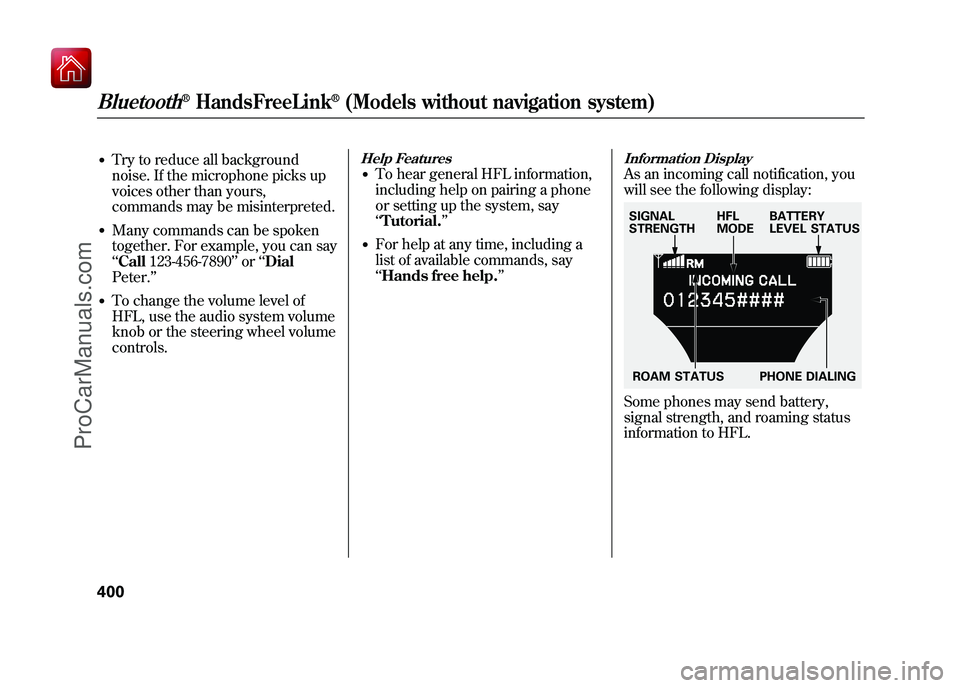
Information DisplayAs an incoming call notification, you
will see the following display:Some phones may send battery,
signal strength, and roaming status
information to HFL.SIGNAL
STRENGTHHFL
MODEBATTERY
LEVEL STATUS
ROAM STATUS PHONE DIALING
Bluetooth
®HandsFreeLink
®(Models without navigation system)
40009/10/28 17:15:37 10 ACURA ZDX KA KC New North America Own 50 31SZN600 enu
ProCarManuals.com
Page 410 of 645
To Use HFL, you need to pair your
Bluetooth-compatible cell phone to
the system.
Phone Setup
This command group is available for
paired cell phones.Phone pairing tips●You cannot pair your phone while
the vehicle is moving.●Your phone must be in discovery
or search mode to pair. Refer to
your phone's manual.●Up to six phones can be paired.●Your phone's battery may drain
faster when it is paired to HFL.●If after three minutes your phone
is not ready to pair or a phone is
not found, the system will time out
and return to idle.
To pair a cell phone:1. Press and release the HFL Talkbutton. If you are pairing a phone
for the first time, HFL will give you
information about the pairing
process. If it is not the first phone
you are pairing, say ‘‘Phone
setup ’’and say ‘‘Pair. ’’
2. Follow the HFL prompts and put your phone in discovery or search
mode. HFL will give you a 4-digit
pairing code and begin searching
for your phone.
3. When your phone finds a Bluetooth device, select HFL from
the options and enter the 4-digit
code from the previous step.
4. Follow the HFL prompts and name the newly paired phone.
To rename a paired phone:Press and release the HFL Talk
button before a command.
1. Say ‘‘Phone setup. ’’
2. Say ‘‘Edit’’ after the prompts.
3. If there is more than one phone paired to the system, HFL will ask
you which phone's name you want
to change. Follow the HFL
prompts and rename the phone.
CONTINUED
Bluetooth
®HandsFreeLink
®(Models without navigation system)
405
Features
09/10/28 17:15:37 10 ACURA ZDX KA KC New North America Own 50 31SZN600 enu
ProCarManuals.com
Page 412 of 645
To change from the currentlylinked phone to another pairedphone:Press and release the HFL Talk
button before a command.
1. Say ‘‘Phone setup. ’’
2. Say ‘‘Next phone ’’after the
prompts.
3. HFL disconnects the linked phone and searches for another paired
phone.
4. Once another phone is found, it is linked to the system. HFL will
inform you which phone is now
linked.
If no other phones are found or
paired, HFL will inform you that the
original phone is linked again.
To change the pairing code setting:Press and release the HFL Talk
button before a command.
1. Say ‘‘Phone setup. ’’
2. Say ‘‘Set pairing code ’’after the
prompts.
3. If you want HFL to create a random code each time you pair a
phone, say ‘‘Random. ’’If you want
to choose your own 4-digit code to
be used each time, say ‘‘Fixed ’’
and follow the HFL prompts. Making a Call
You can make calls using a name in
the HFL phone book or any phone
number. You can also redial the last
number called.
Bluetooth is the wireless technology
that links your phone to HFL. HFL
uses a Class 2 Bluetooth, which
means the maximum range between
your phone and vehicle is 30 feet (10
meters).
During a call, HFL allows you to talk
up to 30 minutes after you remove
the key from the ignition switch.
However, this may weaken the
vehicle's battery.
CONTINUED
Bluetooth
®HandsFreeLink
®(Models without navigation system)
407
Features
09/10/28 17:15:37 10 ACURA ZDX KA KC New North America Own 50 31SZN600 enu
ProCarManuals.com
Page 423 of 645
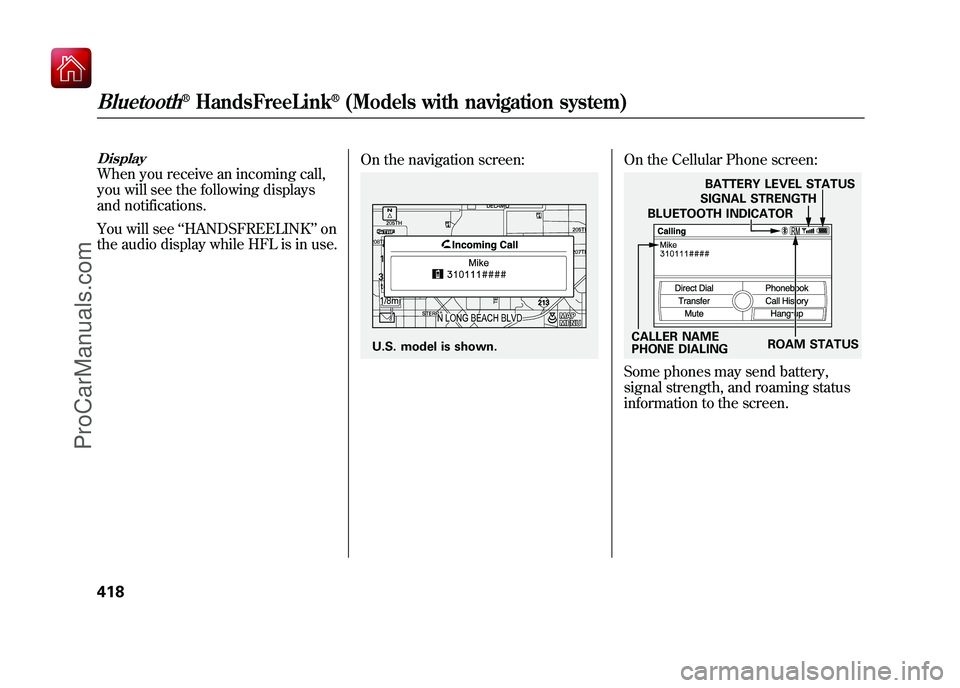
DisplayWhen you receive an incoming call,
you will see the following displays
and notifications.
You will see‘‘HANDSFREELINK ’’on
the audio display while HFL is in use. On the navigation screen:
On the Cellular Phone screen:Some phones may send battery,
signal strength, and roaming status
information to the screen.
U.S. model is shown.
CALLER NAME
PHONE DIALINGBLUETOOTH INDICATOR
SIGNAL STRENGTH
BATTERY LEVEL STATUS
ROAM STATUS
Bluetooth
®HandsFreeLink
®(Models with navigation system)
41809/10/28 17:15:37 10 ACURA ZDX KA KC New North America Own 50 31SZN600 enu
ProCarManuals.com
Page 428 of 645
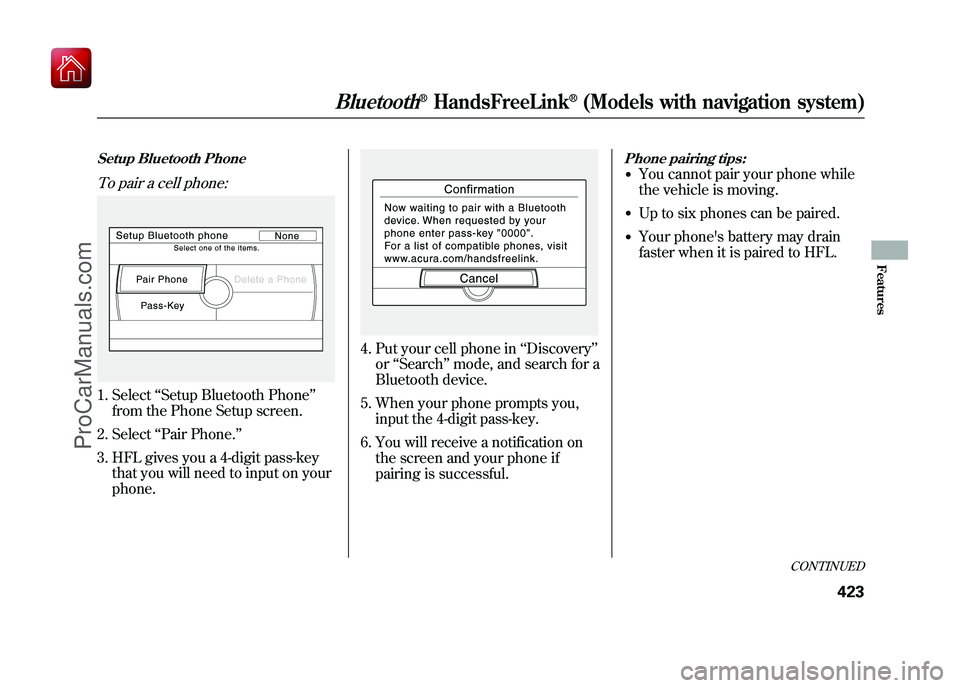
Setup Bluetooth PhoneTo pair a cell phone:1. Select‘‘Setup Bluetooth Phone ’’
from the Phone Setup screen.
2. Select ‘‘Pair Phone. ’’
3. HFL gives you a 4-digit pass-key that you will need to input on your
phone.
4. Put your cell phone in ‘‘Discovery ’’
or ‘‘Search ’’mode, and search for a
Bluetooth device.
5. When your phone prompts you, input the 4-digit pass-key.
6. You will receive a notification on the screen and your phone if
pairing is successful.
Phone pairing tips:●You cannot pair your phone while
the vehicle is moving.●Up to six phones can be paired.●Your phone's battery may drain
faster when it is paired to HFL.
CONTINUED
Bluetooth
®HandsFreeLink
®(Models with navigation system)
423
Features
09/10/28 17:15:37 10 ACURA ZDX KA KC New North America Own 50 31SZN600 enu
ProCarManuals.com
Page 435 of 645
To delete a speed dial number:1. Select‘‘Edit Speed Dial ’’from the
Phone Setup screen.
2. Select ‘‘Delete Speed Dial.’’
3. Select the number you want to delete, and select ‘‘OK. ’’
Delete Imported PhonebookThis option deletes the entire
phonebook of the currently linked
cell phone. Follow the confirmation
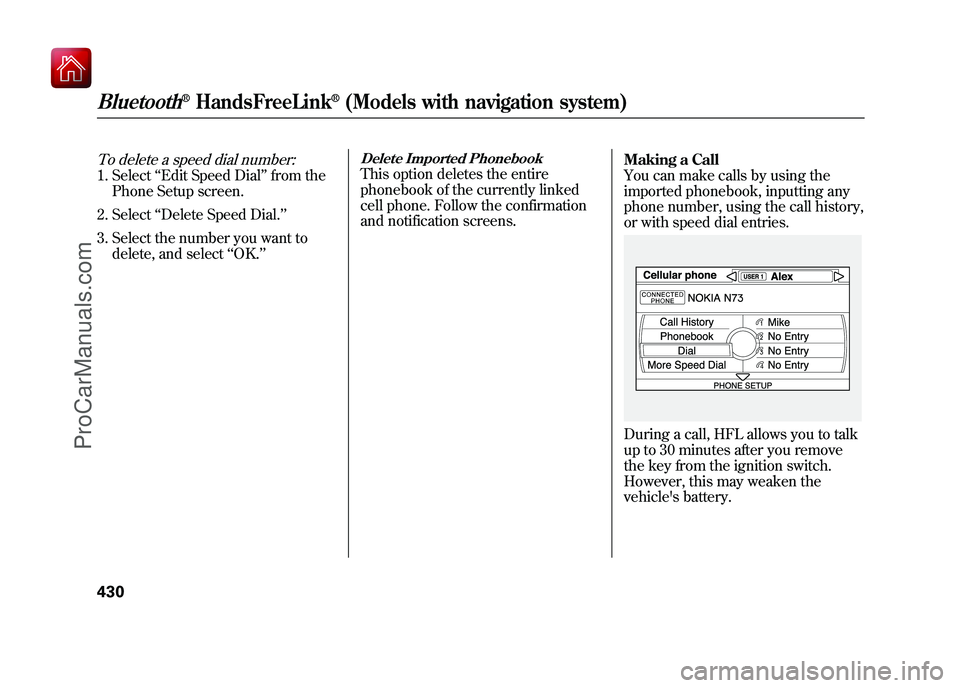
and notification screens. Making a Call
You can make calls by using the
imported phonebook, inputting any
phone number, using the call history,
or with speed dial entries.
During a call, HFL allows you to talk
up to 30 minutes after you remove
the key from the ignition switch.
However, this may weaken the
vehicle's battery.
Bluetooth
®HandsFreeLink
®(Models with navigation system)
43009/10/28 17:15:37 10 ACURA ZDX KA KC New North America Own 50 31SZN600 enu
ProCarManuals.com
Page 478 of 645
6. Check the adjustment of the insideand outside mirrors (see page
177).
7. Check the steering wheel adjustment (see page 145).
8. Make sure the doors and tailgate are securely closed and locked.
9. Fasten your seat belt. Check that your passengers have fastened
their seat belts (see page 16).
10. When you start the engine, check the gauges and indicators in the
instrument panel, and the
messages on the multi-information
display (see pages 63, 76 and 90). Starting the Engine
Your vehicle's starting system has an
auto control mode. When you turn
the ignition switch to the START (III)
position, this feature keeps the
engine's starter motor running until
the engine starts. Follow these
instructions to start the engine:
1. Apply the parking brake.
2. In cold weather, turn off all
electrical accessories to reduce the
drain on the battery.
3. Make sure the shift lever is in Park. Press on the brake pedal.
4. Without touching the accelerator pedal, turn the ignition switch to
the START (III) position, then
release the ignition switch. You do
not need to hold the ignition
switch in the START (III) position
to start the engine. The starter
motor can run for up to 9 seconds
to guarantee starting when the
outside temperature is very low. If you hold the ignition switch in
the START (III) position for more
than 7 seconds, the starter motor,
depending on the outside
temperature, runs for up to 25
seconds until the engine starts.
If the engine does not start, wait at
least 10 seconds before trying
again.
The immobilizer system protects your
vehicle from theft. If an improperly-
coded key (or other device) is used, the
engine's fuel system is disabled. For
more information, see page 149.
CONTINUED
Preparing to Drive, Starting the Engine (Models without Keyless Access System)
473
Driving
09/10/28 17:15:37 10 ACURA ZDX KA KC New North America Own 50 31SZN600 enu
ProCarManuals.com