instrument panel ACURA ZDX 2010 Owner's Manual
[x] Cancel search | Manufacturer: ACURA, Model Year: 2010, Model line: ZDX, Model: ACURA ZDX 2010Pages: 645, PDF Size: 17.13 MB
Page 77 of 645
Active Damper System
Indicator
On models with active dampersystemThis indicator normally comes on for
a few seconds when you select the
ON mode by operating the engine
start/stop button (see page 194). If
this indicator comes on at any other
time, there is a problem in the
system. In this case, your vehicle still
has the normal damper function, but
it will not have the active damper
function. You will also see a ‘‘CHECK
ADS SYSTEM ’’message on the
multi-information display. Have the
vehicle checked by your dealer as
soon as possible. For more
information, see page 521. Low Fuel Indicator
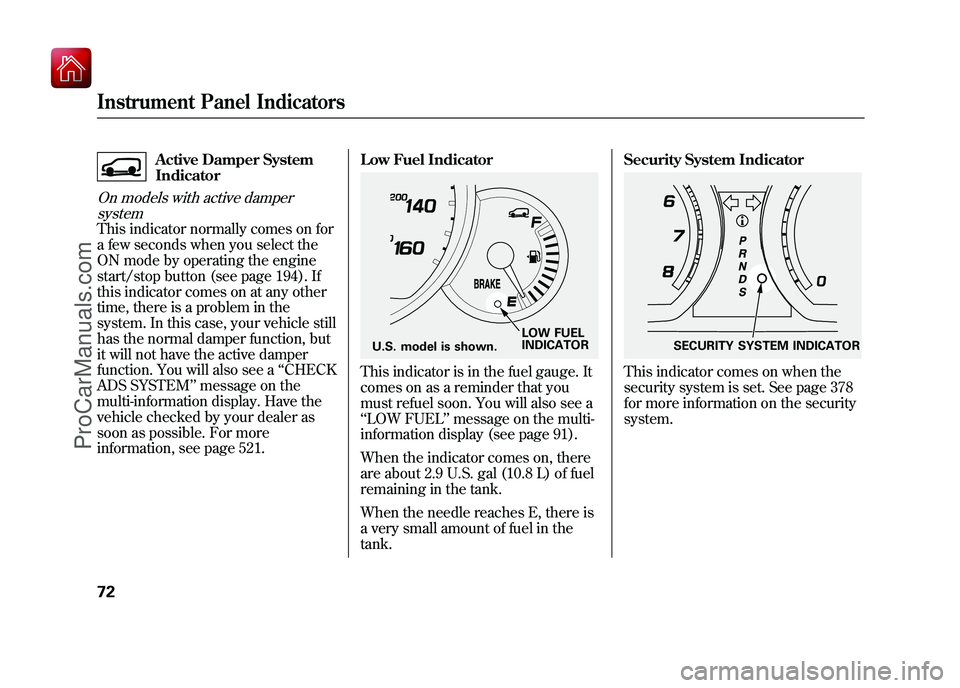
This indicator is in the fuel gauge. It
comes on as a reminder that you
must refuel soon. You will also see a
‘‘
LOW FUEL ’’message on the multi-
information display (see page 91).
When the indicator comes on, there
are about 2.9 U.S. gal (10.8 L) of fuel
remaining in the tank.
When the needle reaches E, there is
a very small amount of fuel in the
tank. Security System Indicator
This indicator comes on when the
security system is set. See page 378
for more information on the security
system.
LOW FUEL
INDICATOR
U.S. model is shown.
SECURITY SYSTEM INDICATOR
Instrument Panel Indicators7209/10/28 17:15:37 10 ACURA ZDX KA KC New North America Own 50 31SZN600 enu
ProCarManuals.com
Page 78 of 645

Adaptive Cruise Control
(ACC) Indicator (Amber)
On models with adaptive cruise control(ACC)This indicator normally comes on for
a few seconds when you select the
ON mode by operating the engine
start/stop button (see page 194).
When you push the MAIN button on
the steering wheel, this indicator
comes on green. You will also see
‘‘ ACC’’ on the multi-information
display.
If the indicator comes on orange,
there is a problem with the ACC
system. You will also see a ‘‘CHECK
ACC SYSTEM ’’message on the
multi-information display (see page
92). Take your vehicle to your dealer
to have it checked. For more
information, see page 382.
Keyless Access System
Indicator
On models with keyless access systemThis indicator normally comes on for
a few seconds when you select the
ON mode by operating the engine
start/stop button (see page 194). If it
comes on at any other time, it
indicates that there is a problem with
the system.
This indicator has two functions:
1. If this indicator comes on along with a ‘‘CHECK KEYLESS
ACCESS SYSTEM ’’message on
the multi-information display,
there is a problem with the keyless
access system. Have the vehicle
checked by your dealer as soon as
possible. For more information,
see page 204. 2. If this indicator comes on along
with a ‘‘CHECK KEYLESS
STARTING SYSTEM ’’message on
the multi-information display,
there is a problem with the keyless
starting system. In this case, your
vehicle may not restart. If you can
continue to drive safely, take the
vehicle to your dealer and have it
checked as soon as possible. For
more information, see page 204.
CONTINUED
Instrument Panel Indicators
73
Instruments and Controls
09/10/28 17:15:37 10 ACURA ZDX KA KC New North America Own 50 31SZN600 enu
ProCarManuals.com
Page 79 of 645

Electronically Controlled
Power Steering System
(ECPS) Indicator
On models with electronicallycontrolled power steering system(ECPS)This indicator normally comes on
when you select the ON mode by
operating the engine start/stop
button (see page 194) and goes off
after the engine starts. If it comes on
at any other time, there is a problem
with the power steering system. You
will also see a ‘‘CHECK POWER
STEERING SYSTEM ’’message on
the multi-information display (see
page 91). If this happens, stop the vehicle in a
safe place, and turn off the engine.
Reset the system by restarting the
engine, and watch this indicator. If it
does not go off or comes back on
again while driving, take the vehicle
to your dealer to have it checked.
With the indicator on, the ECPS is
turned off, which could make the
steering feel different.
Collision Mitigation
Braking System
™
(CMBS ™) Indicator
On models with collision mitigation
braking system ™(CMBS ™)This indicator normally comes on for
a few seconds when you select the
ON mode by operating the engine
start/stop button (see page 194). It
also comes on as a reminder that you
have turned off the collision
mitigation braking system ™
(CMBS ™).
The CMBS indicator also comes on if
dirt or other debris blocks the radar
sensor in the front grille. You will
also see a ‘‘CHECK CMBS RADAR
SENSOR ’’message on the multi-
information display. When you clean
the radar sensor, the indicator
should go off the next time you select
the ON mode by operating the
engine start/stop button.
Instrument Panel Indicators7409/10/28 17:15:37 10 ACURA ZDX KA KC New North America Own 50 31SZN600 enu
ProCarManuals.com
Page 80 of 645

If the indicator comes on at any other
time, there is a problem with the
CMBS. You will also see a‘‘CHECK
CMBS SYSTEM ’’message on the
multi-information display. If this
happens, take your vehicle to a
dealer, and have it checked. For
more information, see page 498.
When this indicator is on, the CMBS
is not working.
Blind Spot Information
System (BSI) Indicator
On models with blind spot information system (BSI)This indicator normally comes on for
a few seconds when you select the
ON mode by operating the engine
start/stop button (see page 194).
The BSI indicator also comes on if
the rear bumper becomes dirty while
driving. You will see a ‘‘BLIND SPOT
NOT AVAILABLE ’’message on the
multi-information display.
When you clean the rear bumper, the
indicator should go off after you
begin driving again.
When you turn the system on, the
indicator will turn off. If the indicator comes on at any other
time, there is a problem with BSI.
You will also see a
‘‘CHECK BLIND
SPOT SYSTEM ’’message on the
multi-information display. If this
happens, take your vehicle to a
dealer, and have it checked (for more
information, see page 518).
When this indicator is on, BSI is not
working.
Instrument Panel Indicators
75
Instruments and Controls
09/10/28 17:15:37 10 ACURA ZDX KA KC New North America Own 50 31SZN600 enu
ProCarManuals.com
Page 83 of 645
The multi-information display in the
instrument panel displays various
information and messages when the
ignition switch is in the ON (II)
position. Some of the messages help
you operate your vehicle more
comfortably. Others help to keep you
aware of the periodic maintenance
your vehicle needs for continued
trouble-free driving.
Models equipped with the keyless
access system have an engine start/
stop button instead of an ignition
switch. ON mode is the equivalent of
ON (II). See page 196 for ignition
switch and power mode comparison.
There are three types of messages:
normal display messages, engine oil
life and maintenance messages, and
system messages.You can select the displayed
language and also customize some
vehicle control settings to your liking
with the multi-information display
and the buttons on the steering
wheel (see page 79).
Normal Display Messages
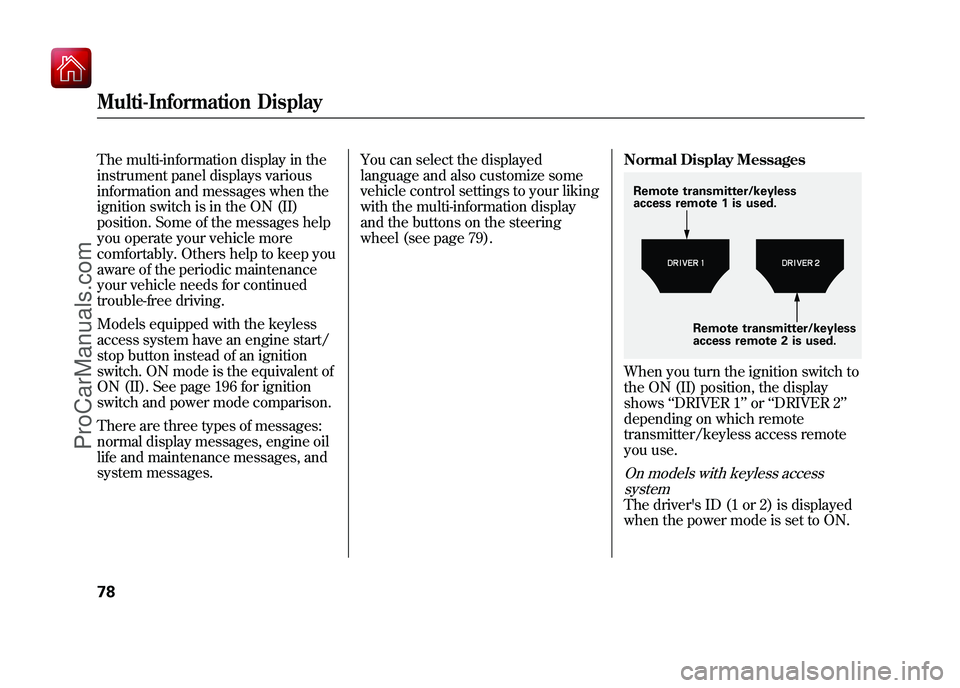
When you turn the ignition switch to
the ON (II) position, the display
shows
‘‘DRIVER 1’’ or‘‘DRIVER 2’’
depending on which remote
transmitter/keyless access remote
you use.On models with keyless access systemThe driver's ID (1 or 2) is displayed
when the power mode is set to ON.Remote transmitter/keyless
access remote 1 is used.
Remote transmitter/keyless
access remote 2 is used.
Multi-Information Display7809/10/28 17:15:37 10 ACURA ZDX KA KC New North America Own 50 31SZN600 enu
ProCarManuals.com
Page 94 of 645

System MessagesIf there is a problem with your
vehicle, for example, the engine oil
level is low or a door is not fully
closed, the multi-information display
will show you the problem. It does
this by interrupting the current
display with one or more messages.The system message(s) triggers the
appropriate indicator(s) on the
instrument panel, including the
system message indicator, to come
on. The system message indicator
does not go off until the problem(s)
is corrected.
You will also hear a beep when the
system message comes on for the
first time.
Most of the messages are displayed
for about 5 seconds, and then the
normal display returns. If there are
several system messages to be
shown, the display switches these
messages every 5 seconds.
To switch the message(s) before 5
seconds have elapsed, press the
INFO (▲
/▼ ) button on the steering
wheel.
Even if you press the INFO (▲ /▼ )
button, some messages stay on or
come on again at regular intervals
until the problem is corrected.
If the system message indicator
remains lit on the instrument panel,
you can see the corresponding
message(s) again by pressing the
INFO (▲ /▼ ) button repeatedly.
Here is a list of all messages:
SYSTEM MESSAGE INDICATOR
CONTINUED
Multi-Information Display
89
Instruments and Controls
09/10/28 17:15:37 10 ACURA ZDX KA KC New North America Own 50 31SZN600 enu
ProCarManuals.com
Page 141 of 645

ꭧ1: If equipped
ꭧ 2: To use the horn, press the center pad of the steering wheel.Vehicle with navigation system is shown. HEADLIGHT WASHER
BUTTON
ꭧ 1(P. 138)
MIRROR CONTROLS
(P. 178) HEADLIGHT/TURN SIGNAL/
FOG LIGHTS (P. 139/141)
STEERING WHEEL
ADJUSTMENTS (P. 145) CRUISE CONTROL
BUTTONS (P. 379)
REMOTE AUDIO CONTROL
BUTTONS (P. 371) WINDSHIELD
WIPERS/WASHERS
(P. 137)
INSTRUMENT PANEL
BRIGHTNESS (P. 144) PASSENGER AIRBAG
OFF INDICATOR (P. 36)
HAZARD WARNING
BUTTON (P. 143)
REAR WINDOW DEFOGGER/
HEATED MIRROR BUTTON
(P. 143/179)
ACCESSORY POWER
SOCKET (P. 217) FRONT SEAT HEATER
SWITCHES (P. 167)
ADAPTIVE CRUISE CONTROL (ACC)
BUTTONS
ꭧ
1(P. 382)
HORN
ꭧ 2
BLIND SPOT INFORMATION SYSTEM
(BSI) ALERT INDICATOR
ꭧ1(P. 514)
BLUETOOTH
HANDSFREELINK SYSTEM
VOICE CONTROL BUTTONS
(P. 399, 417)
COLLISION MITIGATION
BRAKING SYSTEM (CMBS)
OFF BUTTON
ꭧ 1(P. 502)
VEHICLE STABILITY
ASSIST (VSA) SYSTEM
OFF BUTTON (P. 509) BLIND SPOT INFORMATION
SYSTEM (BSI) OFF BUTTON
ꭧ1
(P. 517) IGNITION SWITCH
ꭧ
1
(P. 150)
MULTI-INFORMATION
DISPLAY BUTTONS (P. 79)KEYLESS ACCESS
REMOTE SLOT
ꭧ
1(P. 205)
FRONT SEAT HEATER
AND SEAT VENTILATION
SWITCHESꭧ
1(P. 168)
ENGINE START/STOP BUTTON
ꭧ
1
(P. 194)
PADDLE SHIFTERS
(P. 482)
INTEGRATED DYNAMICS
SYSTEM (IDS) SWITCH
ꭧ1
(P. 519)
Controls Near the Steering Wheel13609/10/28 17:15:37 10 ACURA ZDX KA KC New North America Own 50 31SZN600 enu
ProCarManuals.com
Page 144 of 645

1. Turn signal
2. Off
3. Parking and instrument panel
lights
4. AUTO
5. Headlights on
6. High beams
7. Flash high beams
8. Fog lights off
9. Fog lights onTurn Signal
-Push down on the
lever to signal a left turn and up to
signal a right turn. To signal a lane
change, push lightly on the lever,
and hold it. The lever will return to
center when you release it or
complete a turn.
Headlights On -Turning the
switch to the ‘‘
’’position turns on
the parking lights, taillights,
instrument panel lights, side-marker
lights, and rear license plate lights.
Turning the switch to the ‘‘
’’
position turns on the headlights. When the light switch is in either of
these positions, the lights on
indicator comes on as a reminder.
This indicator stays on if you leave
the lights on and turn the ignition
switch to the ACCESSORY (I) or
LOCK (0) position.
Models equipped with the keyless
access system have an engine start/
stop button instead of an ignition
switch. ACCESSORY mode is the
equivalent of ACCESSORY (I), and
ON mode is the equivalent of ON
(II). See page 196 for ignition switch
and power mode comparison.
If you leave the lights on with the key
removed from the ignition switch, or
with the power mode in VEHICLE
OFF (LOCK), you will hear a
reminder chime when you open the
driver's door.
CONTINUED
Turn Signal and Headlights
139
Instruments and Controls
09/10/28 17:15:37 10 ACURA ZDX KA KC New North America Own 50 31SZN600 enu
ProCarManuals.com
Page 147 of 645

If you see a‘‘CHECK DRL SYSTEM ’’
message on the multi-information
display, there is a problem with the
daytime running light system. Take
your vehicle to a dealer to have it
checked.
When the multi-information display
shows a ‘‘DRL OFF ’’message, the
daytime running lights are off. DRL
will turn on when the parking brake
is released. Automatic Lighting Off Feature
This feature turns off the headlights,
all other exterior lights, and the
instrument panel lights within 15
seconds after you remove the key
and close the driver's door.
To change the
‘‘HEADLIGHT AUTO
OFF TIMER ’’setting, see page 125.
The automatic lighting off feature
activates if you remove the key (or
the vehicle is in VEHICLE OFF
mode on models with keyless access
system), and open or close driver's
door with the headlight switch in the
‘‘
’’ or ‘‘
’’position, or the
lights turned on in the ‘‘AUTO ’’
position. If you turn the ignition switch to the
LOCK (0) position with the headlight
switch on, but do not open the door,
the lights turn off after 10 minutes (3
minutes, if the switch is in the
‘‘
AUTO ’’position).
The lights turn on again when you
unlock or open the driver's door.
If you unlock the door, but do not
open it within 15 seconds, the lights
go off. With the driver's door open,
you will hear a lights-on reminder
chime.
Models equipped with the keyless
access system have an engine start/
stop button instead of an ignition
switch. VEHICLE OFF (LOCK)
mode is the equivalent of LOCK (0).
See page 196 for ignition switch and
power mode comparison.
Turn Signal and Headlights14209/10/28 17:15:37 10 ACURA ZDX KA KC New North America Own 50 31SZN600 enu
ProCarManuals.com
Page 148 of 645
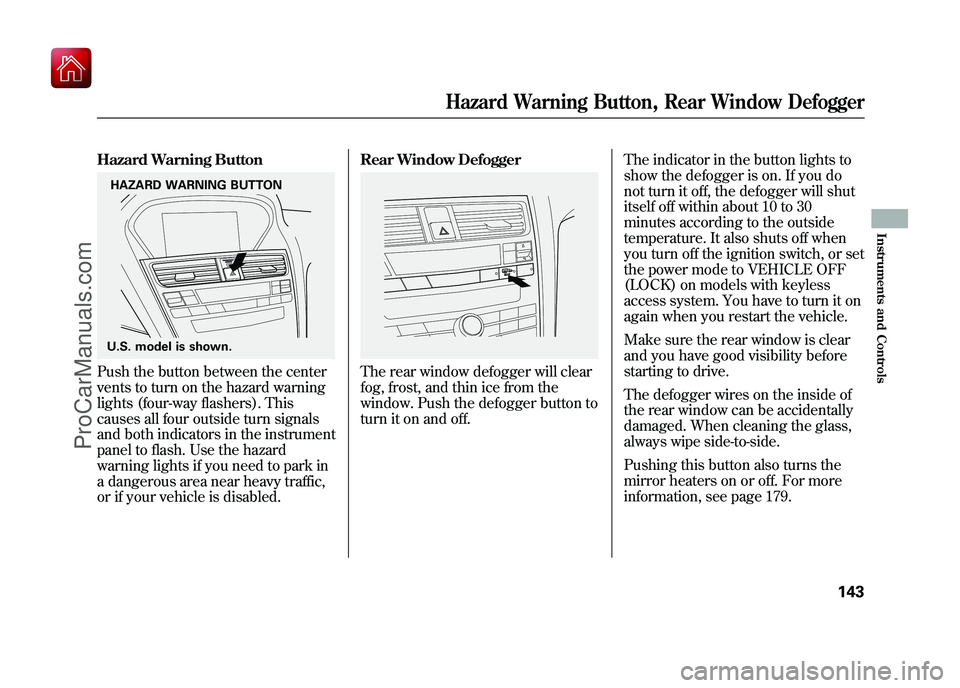
Hazard Warning ButtonPush the button between the center
vents to turn on the hazard warning
lights (four-way flashers). This
causes all four outside turn signals
and both indicators in the instrument
panel to flash. Use the hazard
warning lights if you need to park in
a dangerous area near heavy traffic,
or if your vehicle is disabled.Rear Window Defogger
The rear window defogger will clear
fog, frost, and thin ice from the
window. Push the defogger button to
turn it on and off.
The indicator in the button lights to
show the defogger is on. If you do
not turn it off, the defogger will shut
itself off within about 10 to 30
minutes according to the outside
temperature. It also shuts off when
you turn off the ignition switch, or set
the power mode to VEHICLE OFF
(LOCK) on models with keyless
access system. You have to turn it on
again when you restart the vehicle.
Make sure the rear window is clear
and you have good visibility before
starting to drive.
The defogger wires on the inside of
the rear window can be accidentally
damaged. When cleaning the glass,
always wipe side-to-side.
Pushing this button also turns the
mirror heaters on or off. For more
information, see page 179.
HAZARD WARNING BUTTON
U.S. model is shown.
Hazard Warning Button, Rear Window Defogger
143
Instruments and Controls
09/10/28 17:15:37 10 ACURA ZDX KA KC New North America Own 50 31SZN600 enu
ProCarManuals.com