instrument panel ACURA ZDX 2010 Workshop Manual
[x] Cancel search | Manufacturer: ACURA, Model Year: 2010, Model line: ZDX, Model: ACURA ZDX 2010Pages: 645, PDF Size: 17.13 MB
Page 497 of 645

Each tire pressure is shown in PSI
(U.S. models) or in kPa (Canadian
models).
Models equipped with the keyless
access system have an engine start/
stop button instead of an ignition
switch. ON mode is the equivalent of
ON (II). See page 196 for ignition
switch and power mode comparison.
Each tire has its own pressure
sensor. If the air pressure of a tire
becomes significantly low, the sensor
in that tire immediately sends a
signal that causes the low tire
pressure/TPMS indicator in the
instrument panel to come on. If this
happens, you will see which tire is
losing pressure on the multi-
information display along with a
‘‘CHECK TIRE PRESSURE ’’
message.
If any of the tires has low pressure,
the tire pressure monitor also shows
the above message and each tire
pressure to warn you about the low
tire pressure when you select the
display by pressing the INFO button
several times.
Canadian model
This shows that front left tire
is losing pressure.
U. S.
Canada
Tire Pressure Monitoring System (TPMS)49209/10/28 17:15:37 10 ACURA ZDX KA KC New North America Own 50 31SZN600 enu
ProCarManuals.com
Page 503 of 645
OverviewIf equippedThe collision mitigation braking
system™(CMBS ™) can assist you
when there is a possibility of your
vehicle hitting the vehicle in front of
you. It is designed to reduce the
speed of your vehicle before an
unavoidable collision occurs and, if
possible, to alert you to a potential
collision while there is time to
prevent it. Here is a brief description
of what the CMBS can do:●When your speed is above 10 mph
(16 km/h), the CMBS radar
sensor in the front grille can sense
a vehicle ahead of you. When your
vehicle gets too close to the
vehicle ahead of you, the system
may activate a warning beep,
causing automatic application of
the brakes, and causing the e-
pretensioners to tighten the front
seat belts (see page 24).
●The CMBS does not activate if the
speed difference between the two
vehicles is less than 10 mph (16
km/h). CMBS may also not
activate if you turn the steering
wheel to avoid the collision.
When the CMBS activates, the brake
lights also come on.
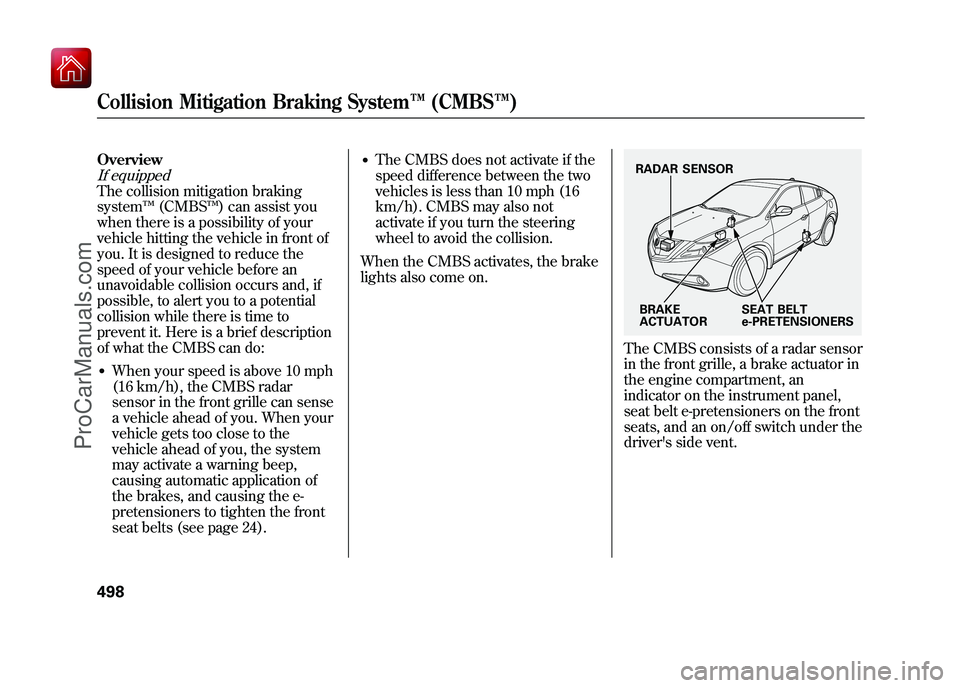
The CMBS consists of a radar sensor
in the front grille, a brake actuator in
the engine compartment, an
indicator on the instrument panel,
seat belt e-pretensioners on the front
seats, and an on/off switch under the
driver's side vent.RADAR SENSOR
BRAKE
ACTUATOR SEAT BELT
e-PRETENSIONERS
Collision Mitigation Braking System
™(CMBS™ )49809/10/28 17:15:37 10 ACURA ZDX KA KC New North America Own 50 31SZN600 enu
ProCarManuals.com
Page 504 of 645
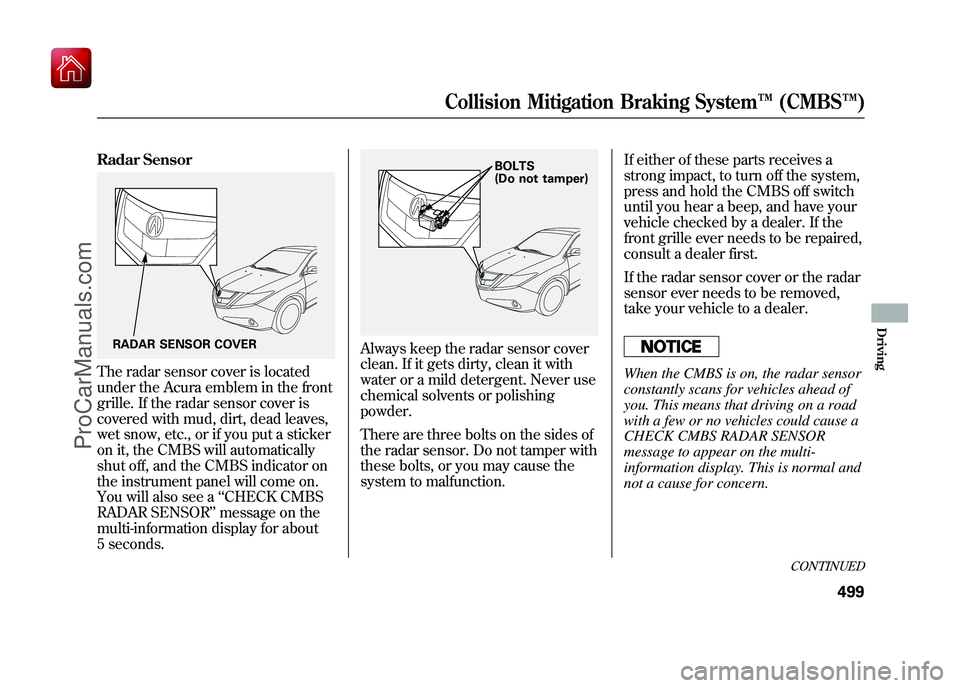
Radar SensorThe radar sensor cover is located
under the Acura emblem in the front
grille. If the radar sensor cover is
covered with mud, dirt, dead leaves,
wet snow, etc., or if you put a sticker
on it, the CMBS will automatically
shut off, and the CMBS indicator on
the instrument panel will come on.
You will also see a‘‘CHECK CMBS
RADAR SENSOR ’’message on the
multi-information display for about
5 seconds.
Always keep the radar sensor cover
clean. If it gets dirty, clean it with
water or a mild detergent. Never use
chemical solvents or polishing
powder.
There are three bolts on the sides of
the radar sensor. Do not tamper with
these bolts, or you may cause the
system to malfunction. If either of these parts receives a
strong impact, to turn off the system,
press and hold the CMBS off switch
until you hear a beep, and have your
vehicle checked by a dealer. If the
front grille ever needs to be repaired,
consult a dealer first.
If the radar sensor cover or the radar
sensor ever needs to be removed,
take your vehicle to a dealer.
When the CMBS is on, the radar sensor
constantly scans for vehicles ahead of
you. This means that driving on a road
with a few or no vehicles could cause a
CHECK CMBS RADAR SENSOR
message to appear on the multi-
information display. This is normal and
not a cause for concern.
RADAR SENSOR COVER
BOLTS
(Do not tamper)
CONTINUED
Collision Mitigation Braking System
™(CMBS™ )
499
Driving
09/10/28 17:15:37 10 ACURA ZDX KA KC New North America Own 50 31SZN600 enu
ProCarManuals.com
Page 507 of 645
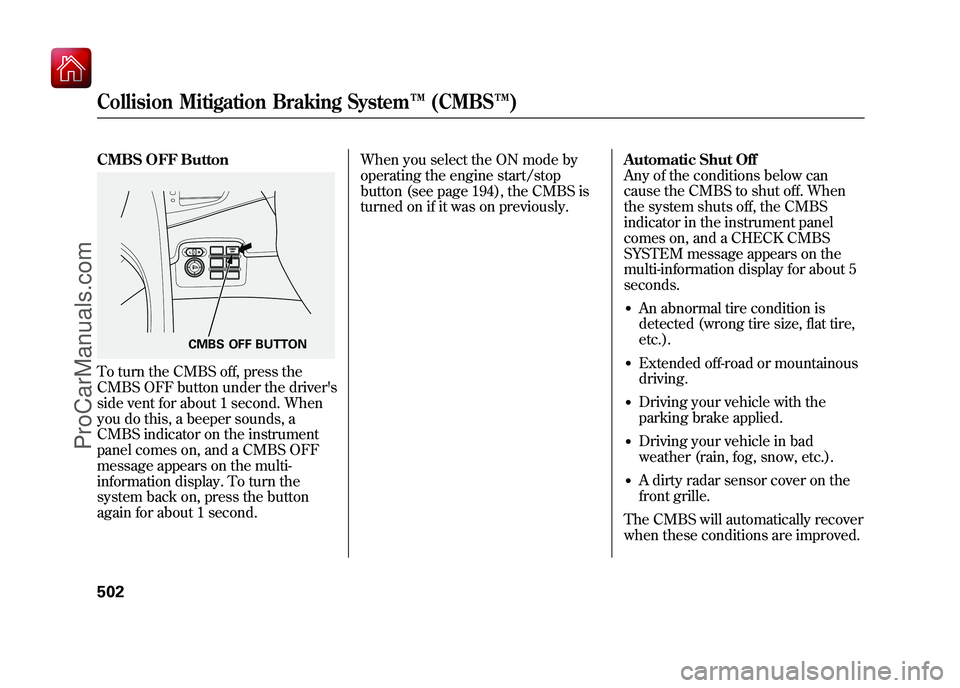
CMBS OFF ButtonTo turn the CMBS off, press the
CMBS OFF button under the driver's
side vent for about 1 second. When
you do this, a beeper sounds, a
CMBS indicator on the instrument
panel comes on, and a CMBS OFF
message appears on the multi-
information display. To turn the
system back on, press the button
again for about 1 second.When you select the ON mode by
operating the engine start/stop
button (see page 194), the CMBS is
turned on if it was on previously.
Automatic Shut Off
Any of the conditions below can
cause the CMBS to shut off. When
the system shuts off, the CMBS
indicator in the instrument panel
comes on, and a CHECK CMBS
SYSTEM message appears on the
multi-information display for about 5
seconds.
●An abnormal tire condition is
detected (wrong tire size, flat tire,
etc.).●Extended off-road or mountainous
driving.●Driving your vehicle with the
parking brake applied.●Driving your vehicle in bad
weather (rain, fog, snow, etc.).●A dirty radar sensor cover on the
front grille.
The CMBS will automatically recover
when these conditions are improved.
CMBS OFF BUTTON
Collision Mitigation Braking System ™(CMBS™ )50209/10/28 17:15:37 10 ACURA ZDX KA KC New North America Own 50 31SZN600 enu
ProCarManuals.com
Page 522 of 645
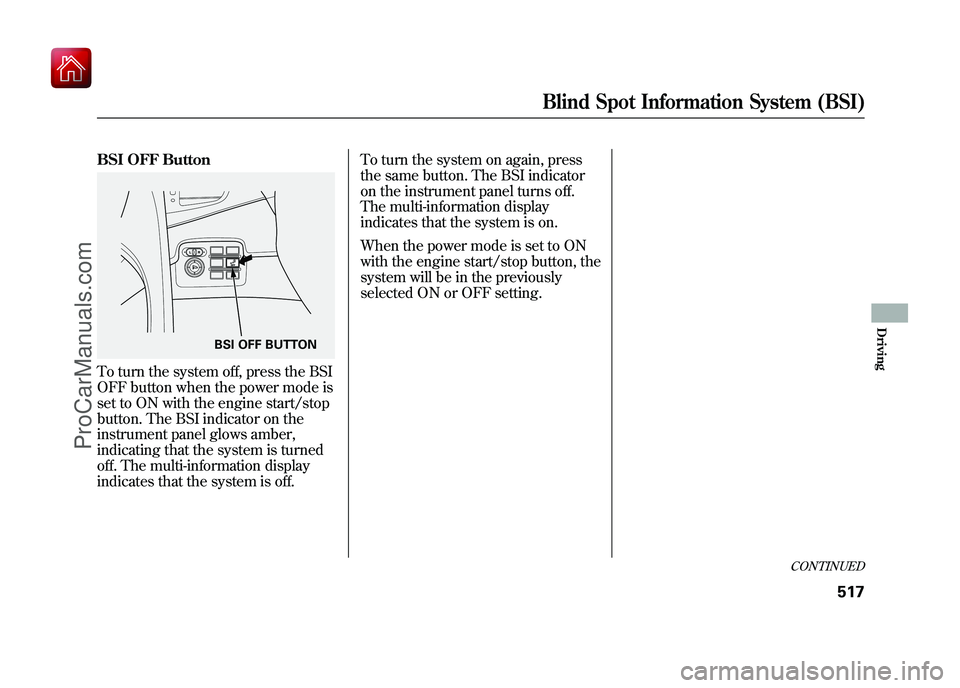
BSI OFF ButtonTo turn the system off, press the BSI
OFF button when the power mode is
set to ON with the engine start/stop
button. The BSI indicator on the
instrument panel glows amber,
indicating that the system is turned
off. The multi-information display
indicates that the system is off.To turn the system on again, press
the same button. The BSI indicator
on the instrument panel turns off.
The multi-information display
indicates that the system is on.
When the power mode is set to ON
with the engine start/stop button, the
system will be in the previously
selected ON or OFF setting.
BSI OFF BUTTON
CONTINUED
Blind Spot Information System (BSI)
517
Driving
09/10/28 17:15:37 10 ACURA ZDX KA KC New North America Own 50 31SZN600 enu
ProCarManuals.com
Page 523 of 645
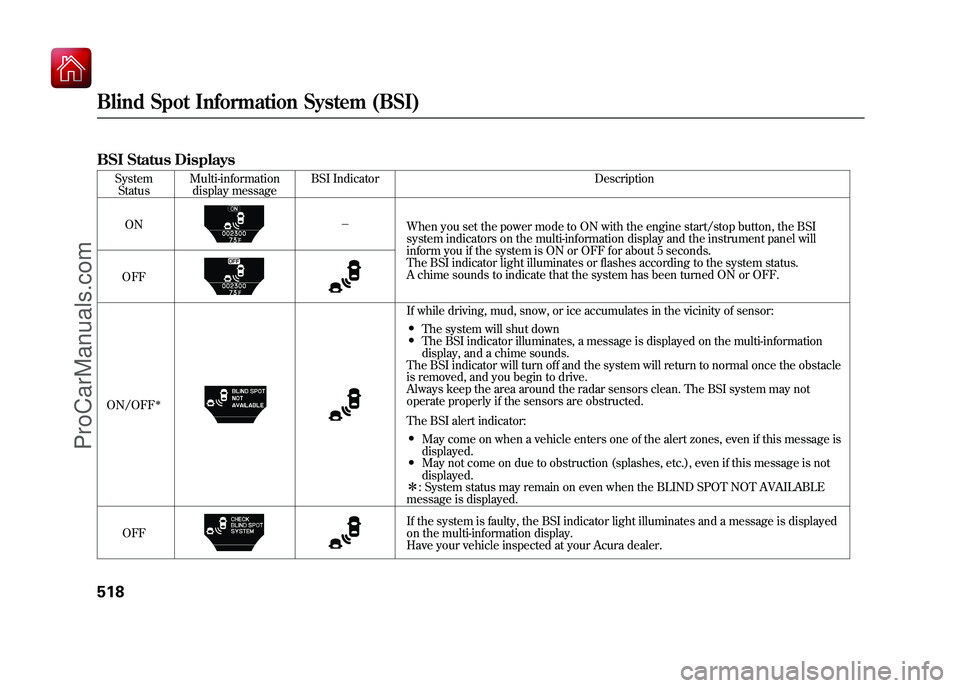
BSI Status Displays
SystemStatus Multi-information
display message BSI Indicator Description
ON -
When you set the power mode to ON with the engine start/stop button, the BSI
system indicators on the multi-information display and the instrument panel will
inform you if the system is ON or OFF for about 5 seconds.
The BSI indicator light illuminates or flashes according to the system status.
A chime sounds to indicate that the system has been turned ON or OFF.
OFF
ON/OFF
ꭧ
If while driving, mud, snow, or ice accumulates in the vicinity of sensor:●The system will shut down●The BSI indicator illuminates, a message is displayed on the multi-information
display, and a chime sounds.
The BSI indicator will turn off and the system will return to normal once the obstacle
is removed, and you begin to drive.
Always keep the area around the radar sensors clean. The BSI system may not
operate properly if the sensors are obstructed.
The BSI alert indicator:●May come on when a vehicle enters one of the alert zones, even if this message is
displayed.●May not come on due to obstruction (splashes, etc.), even if this message is not
displayed.
ꭧ : System status may remain on even when the BLIND SPOT NOT AVAILABLE
message is displayed.
OFF If the system is faulty, the BSI indicator light illuminates and a message is displayed
on the multi-information display.
Have your vehicle inspected at your Acura dealer.
Blind Spot Information System (BSI)51809/10/28 17:15:37 10 ACURA ZDX KA KC New North America Own 50 31SZN600 enu
ProCarManuals.com
Page 526 of 645
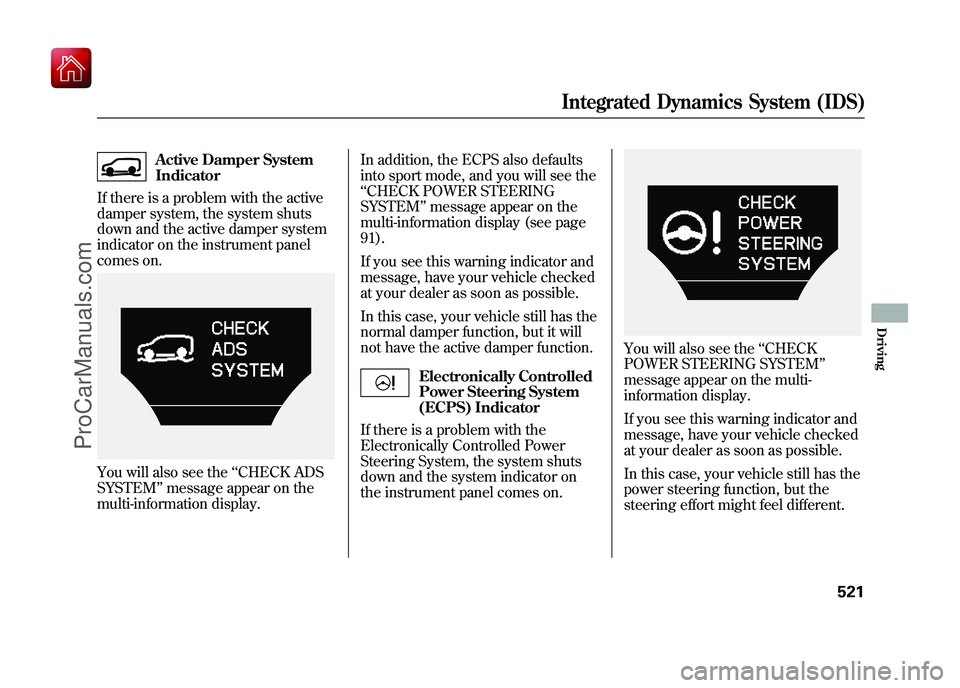
Active Damper System
Indicator
If there is a problem with the active
damper system, the system shuts
down and the active damper system
indicator on the instrument panel
comes on.
You will also see the ‘‘CHECK ADS
SYSTEM ’’message appear on the
multi-information display. In addition, the ECPS also defaults
into sport mode, and you will see the
‘‘
CHECK POWER STEERING
SYSTEM ’’message appear on the
multi-information display (see page
91).
If you see this warning indicator and
message, have your vehicle checked
at your dealer as soon as possible.
In this case, your vehicle still has the
normal damper function, but it will
not have the active damper function.
Electronically Controlled
Power Steering System
(ECPS) Indicator
If there is a problem with the
Electronically Controlled Power
Steering System, the system shuts
down and the system indicator on
the instrument panel comes on.
You will also see the ‘‘CHECK
POWER STEERING SYSTEM’’
message appear on the multi-
information display.
If you see this warning indicator and
message, have your vehicle checked
at your dealer as soon as possible.
In this case, your vehicle still has the
power steering function, but the
steering effort might feel different.
Integrated Dynamics System (IDS)
521
Driving
09/10/28 17:15:37 10 ACURA ZDX KA KC New North America Own 50 31SZN600 enu
ProCarManuals.com
Page 591 of 645

If the headlights dim noticeably or
go out when you try to start the
engine, either the battery is
discharged or the connections are
corroded. Check the condition of
the battery and terminal
connections (see page 573). You
can then try jump starting the
vehicle from a booster battery (see
page 587).
The Starter Operates Normally
In this case, the starter motor's speed
sounds normal, or even faster than
normal, when you turn the ignition
switch to the START (III) position or
on models with keyless access
system, press the engine start/stop
button to set START mode (see page
194), but the engine does not run.●Are you using a properly coded
key? An improperly coded key will
cause the immobilizer system
indicator in the instrument panel
to blink rapidly (see page 70).
On models with keyless access system●Do you have your keyless access
system remote with you? The
vehicle will not start without the
remote within operating range.
The vehicle will not start without
the remote within operating range
and with the keyless access main
switch in the glove box turned on.●Are you using the proper starting
procedure? Refer to Starting the
Engine on page 475.●Do you have fuel? Check the fuel
gauge; the warning indicator may
not be working.●There may be an electrical
problem, such as no power to the
fuel pump. Check all the fuses (see
page 596). If you find nothing wrong, you will
need a qualified technician to find the
problem. See
Emergency Towing on
page 602.
NOTE: If you are unable to stop the
engine normally while in the Park
position, see Emergency Engine
Stop on page 200.
If the Engine Won't Start58609/10/28 17:15:37 10 ACURA ZDX KA KC New North America Own 50 31SZN600 enu
ProCarManuals.com
Page 636 of 645
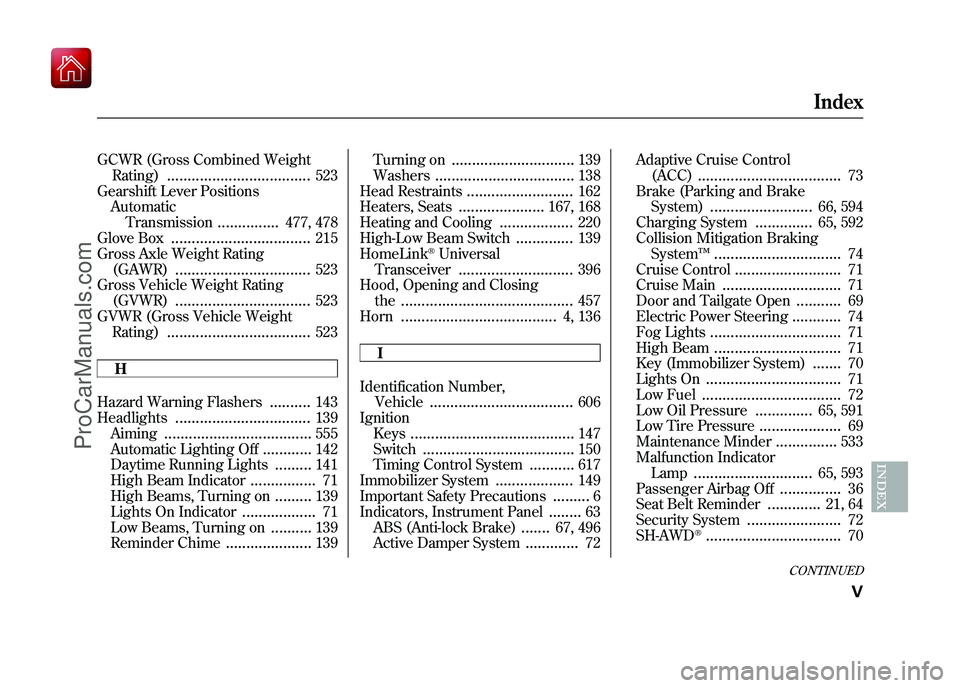
GCWR (Gross Combined WeightRating)
...................................
523
Gearshift Lever Positions Automatic
Transmission
...............
477, 478
Glove Box
..................................
215
Gross Axle Weight Rating (GAWR)
.................................
523
Gross Vehicle Weight Rating (GVWR)
.................................
523
GVWR (Gross Vehicle Weight Rating)
...................................
523
H
Hazard Warning Flashers
..........
143
Headlights
.................................
139
Aiming
....................................
555
Automatic Lighting Off
............
142
Daytime Running Lights
.........
141
High Beam Indicator
................
71
High Beams, Turning on
.........
139
Lights On Indicator
..................
71
Low Beams, Turning on
..........
139
Reminder Chime
.....................
139 Turning on
..............................
139
Washers
..................................
138
Head Restraints
..........................
162
Heaters, Seats
.....................
167, 168
Heating and Cooling
..................
220
High-Low Beam Switch
..............
139
HomeLink
®Universal
Transceiver
............................
396
Hood, Opening and Closing the
..........................................
457
Horn
......................................
4, 136
I
Identification Number, Vehicle
...................................
606
Ignition Keys
........................................
147
Switch
.....................................
150
Timing Control System
...........
617
Immobilizer System
...................
149
Important Safety Precautions
.........
6
Indicators, Instrument Panel
........
63
ABS (Anti-lock Brake)
.......
67, 496
Active Damper System
.............
72 Adaptive Cruise Control
(ACC)
...................................
73
Brake (Parking and Brake System)
.........................
66, 594
Charging System
..............
65, 592
Collision Mitigation Braking System ™
...............................
74
Cruise Control
..........................
71
Cruise Main
.............................
71
Door and Tailgate Open
...........
69
Electric Power Steering
............
74
Fog Lights
................................
71
High Beam
...............................
71
Key (Immobilizer System)
.......
70
Lights On
.................................
71
Low Fuel
..................................
72
Low Oil Pressure
..............
65, 591
Low Tire Pressure
....................
69
Maintenance Minder
...............
533
Malfunction Indicator Lamp
.............................
65, 593
Passenger Airbag Off
...............
36
Seat Belt Reminder
.............
21, 64
Security System
.......................
72
SH-AWD
®.................................
70
CONTINUED
Index
V
INDEX
09/10/28 17:15:37 10 ACURA ZDX KA KC New North America Own 50 31SZN600 enu
ProCarManuals.com
Page 637 of 645
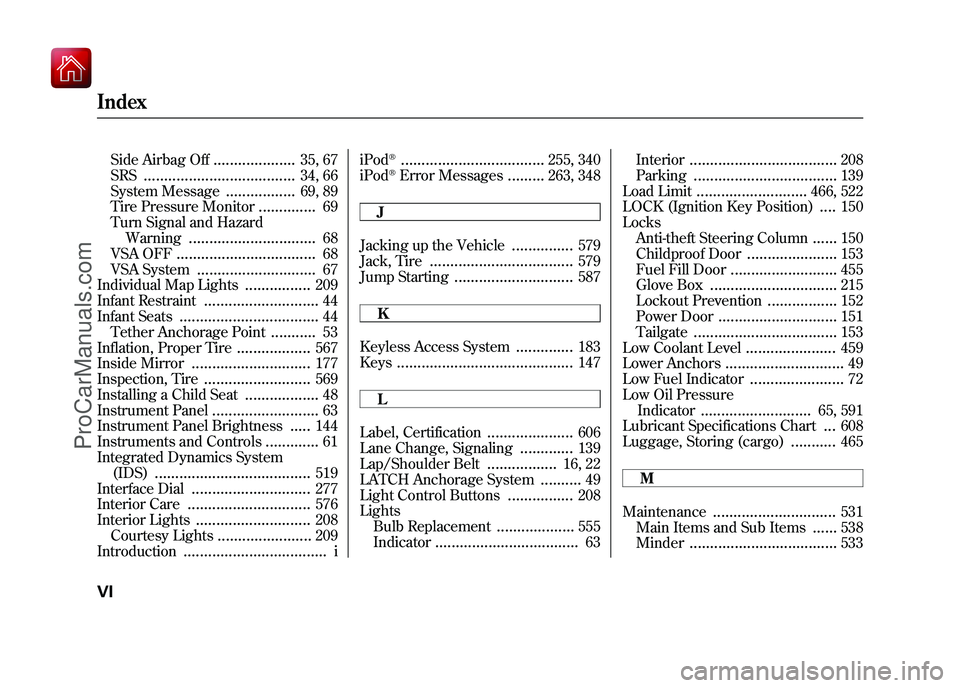
Side Airbag Off
....................
35, 67
SRS
.....................................
34, 66
System Message
.................
69, 89
Tire Pressure Monitor
..............
69
Turn Signal and Hazard Warning
...............................
68
VSA OFF
..................................
68
VSA System
.............................
67
Individual Map Lights
................
209
Infant Restraint
............................
44
Infant Seats
..................................
44
Tether Anchorage Point
...........
53
Inflation, Proper Tire
..................
567
Inside Mirror
.............................
177
Inspection, Tire
..........................
569
Installing a Child Seat
..................
48
Instrument Panel
..........................
63
Instrument Panel Brightness
.....
144
Instruments and Controls
.............
61
Integrated Dynamics System (IDS)
......................................
519
Interface Dial
.............................
277
Interior Care
..............................
576
Interior Lights
............................
208
Courtesy Lights
.......................
209
Introduction
...................................
i iPod
®...................................
255, 340
iPod
®Error Messages
.........
263, 348
J
Jacking up the Vehicle
...............
579
Jack, Tire
...................................
579
Jump Starting
.............................
587
K
Keyless Access System
..............
183
Keys
...........................................
147
L
Label, Certification
.....................
606
Lane Change, Signaling
.............
139
Lap/Shoulder Belt
.................
16, 22
LATCH Anchorage System
..........
49
Light Control Buttons
................
208
Lights Bulb Replacement
...................
555
Indicator
...................................
63 Interior
....................................
208
Parking
...................................
139
Load Limit
...........................
466, 522
LOCK (Ignition Key Position)....
150
Locks Anti-theft Steering Column
......
150
Childproof Door
......................
153
Fuel Fill Door
..........................
455
Glove Box
...............................
215
Lockout Prevention
.................
152
Power Door
.............................
151
Tailgate
...................................
153
Low Coolant Level
......................
459
Lower Anchors
.............................
49
Low Fuel Indicator
.......................
72
Low Oil Pressure Indicator
...........................
65, 591
Lubricant Specifications Chart...
608
Luggage, Storing (cargo)
...........
465
M
Maintenance
..............................
531
Main Items and Sub Items
......
538
Minder
....................................
533
IndexVI09/10/28 17:15:37 10 ACURA ZDX KA KC New North America Own 50 31SZN600 enu
ProCarManuals.com