mirror ACURA ZDX 2010 Owner's Manual
[x] Cancel search | Manufacturer: ACURA, Model Year: 2010, Model line: ZDX, Model: ACURA ZDX 2010Pages: 645, PDF Size: 17.13 MB
Page 229 of 645
Recirculation ButtonWhen the indicator in the button is
on, air from the vehicle's interior is
sent throughout the system again.
When the indicator is off, air is
brought in from the outside of the
vehicle (fresh air mode).
The outside air intakes for the
climate control system are at the
base of the windshield. Keep this
area clear of leaves and other debris.
The system should be left in fresh air
mode under almost all conditions.
Keeping the system in recirculation
mode, particularly with the A/C off,
can cause the windows to fog up.
Switch to recirculation mode when
driving through dusty or smoky
conditions, then return to fresh air
mode.
Rear Window Defogger ButtonThis button turns the rear window
defogger off and on (see page 143).
Pushing this button also turns the
power mirror heaters on and off.
Mode ControlThe driver’s side mode and the
passenger ’s side mode can be
selected separately. Use the
appropriate mode control button to
select the vents the air flows from.
Some air will flow from the
dashboard vents in all modes.
Air flows from the center and
corner vents in the dashboard.Airflow is divided between the
vents in the dashboard and the floor
vents.Air flows from the floor vents.Airflow is divided between the
floor and corner vents and the
defroster vents at the base of the
windshield.
Climate Control System22409/10/28 17:15:37 10 ACURA ZDX KA KC New North America Own 50 31SZN600 enu
ProCarManuals.com
Page 456 of 645
On models with navigation systemRefer to the navigation system
manual for operation of the rearview
camera.
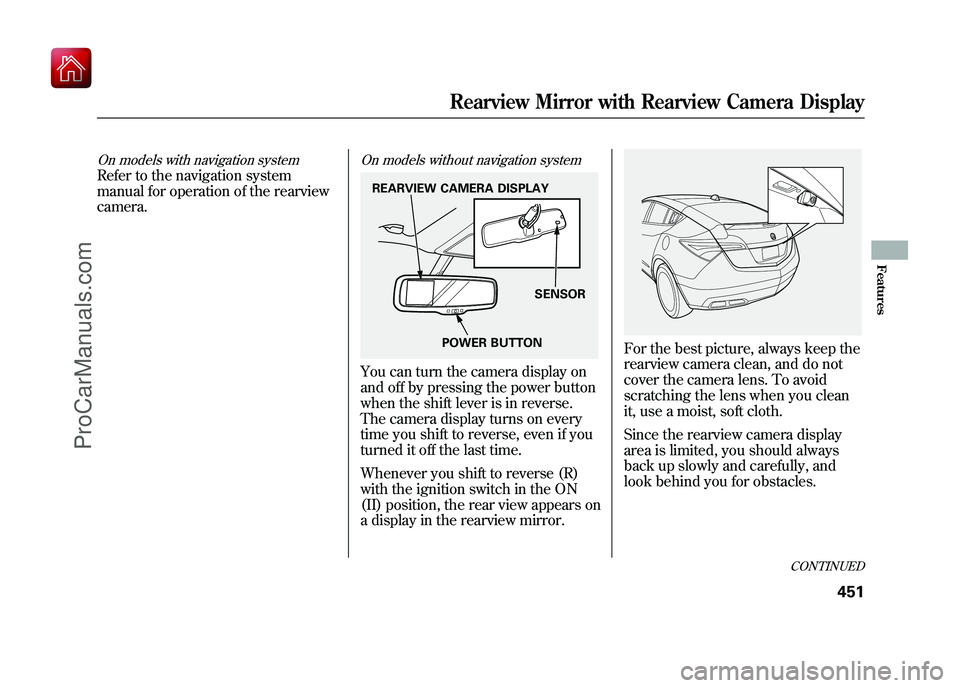
On models without navigation systemYou can turn the camera display on
and off by pressing the power button
when the shift lever is in reverse.
The camera display turns on every
time you shift to reverse, even if you
turned it off the last time.
Whenever you shift to reverse (R)
with the ignition switch in the ON
(II) position, the rear view appears on
a display in the rearview mirror.
For the best picture, always keep the
rearview camera clean, and do not
cover the camera lens. To avoid
scratching the lens when you clean
it, use a moist, soft cloth.
Since the rearview camera display
area is limited, you should always
back up slowly and carefully, and
look behind you for obstacles.
REARVIEW CAMERA DISPLAYPOWER BUTTON SENSOR
CONTINUED
Rearview Mirror with Rearview Camera Display
451
Features
09/10/28 17:15:37 10 ACURA ZDX KA KC New North America Own 50 31SZN600 enu
ProCarManuals.com
Page 457 of 645

If the engine has just been started, it
may take a short time for the system
to display the rear view.
The camera display brightness is
adjusted automatically by sensors. If
you use the camera display
continuously at high temperatures,
the image will gradually dim.
The inside mirror will be hot when
you use the monitor for an extended
period of time.
If a bright light (such as sunlight) is
reflected on the mirror, the image
may be difficult to see.
Rearview Camera Guide Line
The camera display has parking
guide lines that indicate distance
from your vehicle.
1st Line 7.8 in (0.2 m)
2nd Line 39 in (1 m)
3rd Line 79 in (2 m)
4th Line 118 in (3 m)
NOTE:●The rearview camera has a unique
lens that makes objects appear
closer than they actually are.●The rearview camera display has
limited coverage, and the size and
position of objects may appear
different than they actually are.
Make sure to check the
surrounding area carefully.
To turn off the guide lines, press and
hold the power button for more than
3 seconds. The guide lines appear
every time you shift to reverse, even
if you turned them off the last time.
SCREEN DISPLAY
ACTUAL DISTANCE
1st line
2nd line
3rd line
4th line
Rearview Mirror with Rearview Camera Display45209/10/28 17:15:37 10 ACURA ZDX KA KC New North America Own 50 31SZN600 enu
ProCarManuals.com
Page 477 of 645
Driving Guidelines
Your vehicle has higher ground
clearance that allows you to travel
over bumps, obstacles, and rough
terrain. It also provides good
visibility so you can anticipate
problems earlier.
Because your vehicle rides higher off
the ground, it has a high center of
gravity that can cause it to roll over if
you make abrupt turns. Utility
vehicles have a significantly higher
roll over rate than other types of
vehicles.
To prevent rollovers or loss of
control:●Take corners at slower speeds
than you would with a passenger
vehicle.●Avoid sharp turns and abrupt
maneuvers whenever possible.
●Do not modify your vehicle in any
way that would raise the center of
gravity.●Do not carry heavy cargo on the
roof.See page 528 for off-highway drivingguidelines.
Preparing to Drive
You should do the following checks
and adjustments before you drive
your vehicle.
1. Make sure all windows, mirrors, and outside lights are clean and
unobstructed. Remove frost, snow,
or ice.
2. Check that the hood is fully closed.
3. Visually check the tires. If a tire looks low, use a gauge to check its
pressure.
4. Check that any items you may be carrying are stored properly or
fastened down securely.
5. Check the seat adjustment (see page 161).
Driving Guidelines, Preparing to Drive47209/10/28 17:15:37 10 ACURA ZDX KA KC New North America Own 50 31SZN600 enu
ProCarManuals.com
Page 478 of 645
6. Check the adjustment of the insideand outside mirrors (see page
177).
7. Check the steering wheel adjustment (see page 145).
8. Make sure the doors and tailgate are securely closed and locked.
9. Fasten your seat belt. Check that your passengers have fastened
their seat belts (see page 16).
10. When you start the engine, check the gauges and indicators in the
instrument panel, and the
messages on the multi-information
display (see pages 63, 76 and 90). Starting the Engine
Your vehicle's starting system has an
auto control mode. When you turn
the ignition switch to the START (III)
position, this feature keeps the
engine's starter motor running until
the engine starts. Follow these
instructions to start the engine:
1. Apply the parking brake.
2. In cold weather, turn off all
electrical accessories to reduce the
drain on the battery.
3. Make sure the shift lever is in Park. Press on the brake pedal.
4. Without touching the accelerator pedal, turn the ignition switch to
the START (III) position, then
release the ignition switch. You do
not need to hold the ignition
switch in the START (III) position
to start the engine. The starter
motor can run for up to 9 seconds
to guarantee starting when the
outside temperature is very low. If you hold the ignition switch in
the START (III) position for more
than 7 seconds, the starter motor,
depending on the outside
temperature, runs for up to 25
seconds until the engine starts.
If the engine does not start, wait at
least 10 seconds before trying
again.
The immobilizer system protects your
vehicle from theft. If an improperly-
coded key (or other device) is used, the
engine's fuel system is disabled. For
more information, see page 149.
CONTINUED
Preparing to Drive, Starting the Engine (Models without Keyless Access System)
473
Driving
09/10/28 17:15:37 10 ACURA ZDX KA KC New North America Own 50 31SZN600 enu
ProCarManuals.com
Page 516 of 645
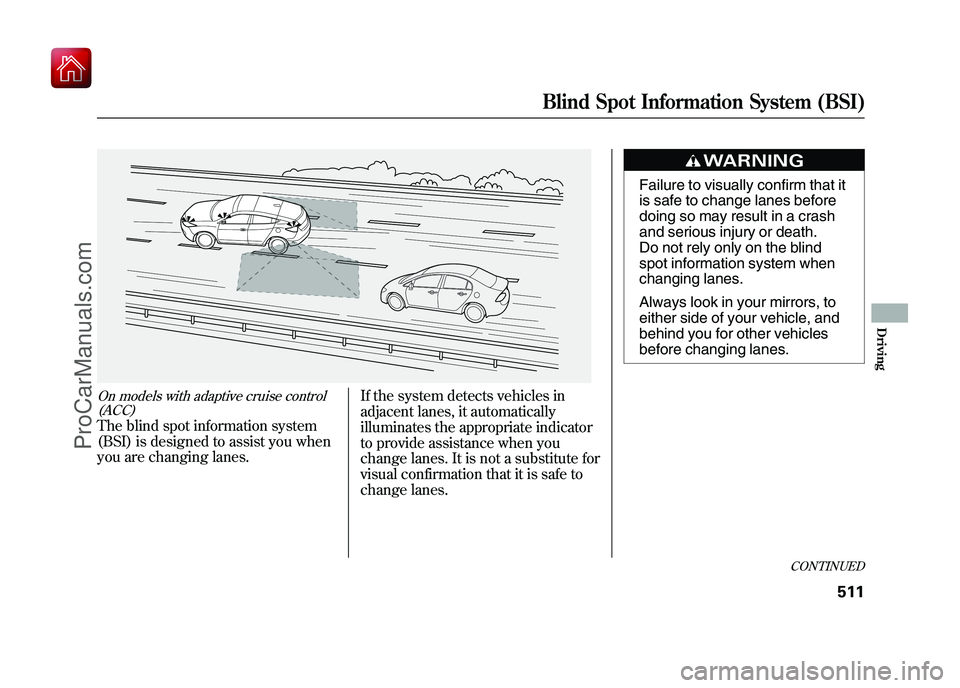
On models with adaptive cruise control(ACC)The blind spot information system
(BSI) is designed to assist you when
you are changing lanes. If the system detects vehicles in
adjacent lanes, it automatically
illuminates the appropriate indicator
to provide assistance when you
change lanes. It is not a substitute for
visual confirmation that it is safe to
change lanes.
Failure to visually confirm that it
is safe to change lanes before
doing so may result in a crash
and serious injury or death.
Do not rely only on the blind
spot information system when
changing lanes.
Always look in your mirrors, to
either side of your vehicle, and
behind you for other vehicles
before changing lanes.
CONTINUED
Blind Spot Information System (BSI)
511
Driving
09/10/28 17:15:37 10 ACURA ZDX KA KC New North America Own 50 31SZN600 enu
ProCarManuals.com
Page 517 of 645
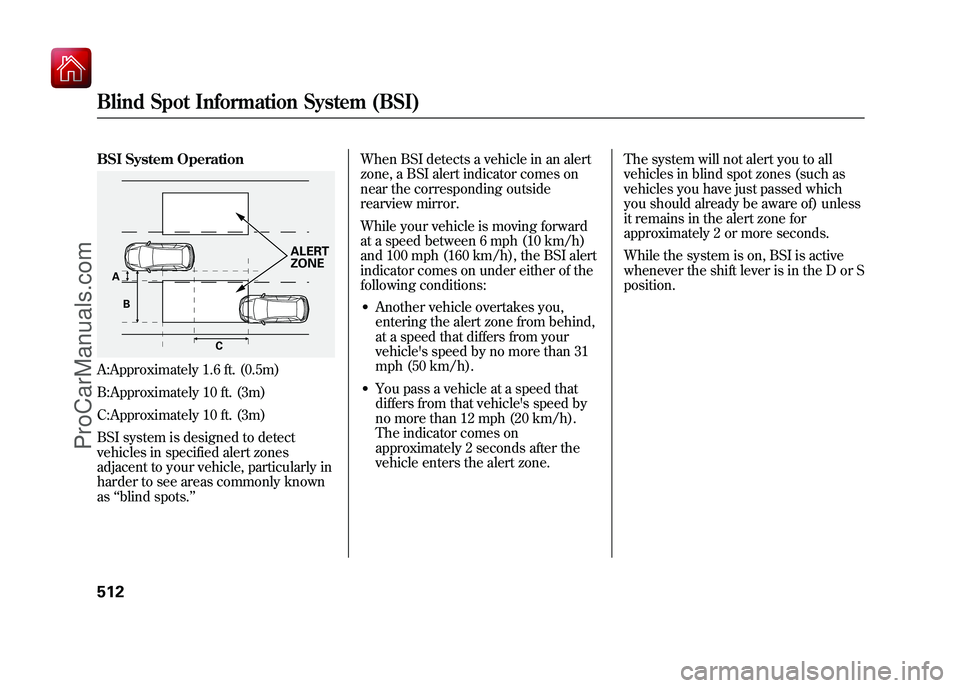
BSI System OperationA:Approximately 1.6 ft. (0.5m)
B:Approximately 10 ft. (3m)
C:Approximately 10 ft. (3m)
BSI system is designed to detect
vehicles in specified alert zones
adjacent to your vehicle, particularly in
harder to see areas commonly known
as‘‘blind spots. ’’ When BSI detects a vehicle in an alert
zone, a BSI alert indicator comes on
near the corresponding outside
rearview mirror.
While your vehicle is moving forward
at a speed between 6 mph (10 km/h)
and 100 mph (160 km/h), the BSI alert
indicator comes on under either of the
following conditions:
●Another vehicle overtakes you,
entering the alert zone from behind,
at a speed that differs from your
vehicle's speed by no more than 31
mph (50 km/h).●You pass a vehicle at a speed that
differs from that vehicle's speed by
no more than 12 mph (20 km/h).
The indicator comes on
approximately 2 seconds after the
vehicle enters the alert zone.
The system will not alert you to all
vehicles in blind spot zones (such as
vehicles you have just passed which
you should already be aware of) unless
it remains in the alert zone for
approximately 2 or more seconds.
While the system is on, BSI is active
whenever the shift lever is in the D or S
position.
C
A
B
ALERT
ZONE
Blind Spot Information System (BSI)51209/10/28 17:15:37 10 ACURA ZDX KA KC New North America Own 50 31SZN600 enu
ProCarManuals.com
Page 520 of 645
Important Precautions
Like all assistance systems, BSI has
limitations. Over-reliance on BSI may
result in a collision. Always look in
your mirrors, to either side of your
vehicle, and behind you for other
vehicles before changing lanes.The system should be turned off
when towing a trailer. Due to the
added mass and resulting changes in
radar coverage, the system cannot
operate as intended, and detection of
the trailer itself by the radar sensors
may cause the BSI alert indicators to
illuminate.Limitations
The BSI alert indicators may not
illuminate under the following
circumstances:
●The speed difference between
your vehicle and a vehicle
approaching from behind is
greater than 31 mph (50 km/h).●A vehicle is parked in a side lane.●The speed difference between
your vehicle and the vehicle you
are passing is greater than 6 mph
(10 km/h).●An object not detected by the
radar sensors approaches or
passes your vehicle.
CONTINUED
Blind Spot Information System (BSI)
515
Driving
09/10/28 17:15:37 10 ACURA ZDX KA KC New North America Own 50 31SZN600 enu
ProCarManuals.com
Page 521 of 645
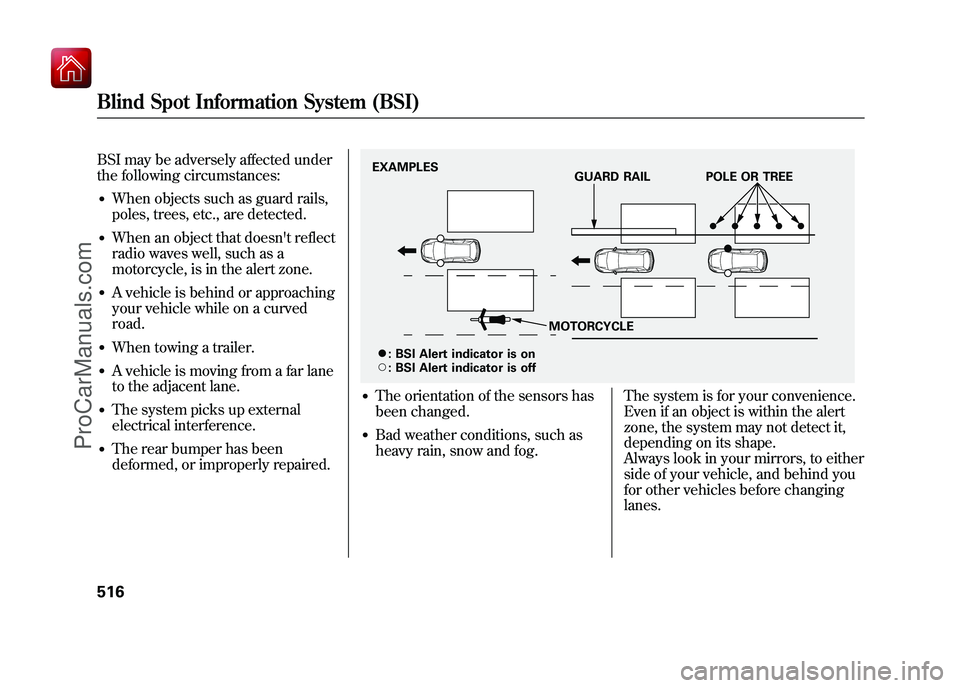
BSI may be adversely affected under
the following circumstances:●When objects such as guard rails,
poles, trees, etc., are detected.●When an object that doesn't reflect
radio waves well, such as a
motorcycle, is in the alert zone.●A vehicle is behind or approaching
your vehicle while on a curved
road.●When towing a trailer.●A vehicle is moving from a far lane
to the adjacent lane.●The system picks up external
electrical interference.●The rear bumper has been
deformed, or improperly repaired.
●The orientation of the sensors has
been changed.●Bad weather conditions, such as
heavy rain, snow and fog.The system is for your convenience.
Even if an object is within the alert
zone, the system may not detect it,
depending on its shape.
Always look in your mirrors, to either
side of your vehicle, and behind you
for other vehicles before changing
lanes.EXAMPLES
GUARD RAIL POLE OR TREE
MOTORCYCLE
ꭍ :
\b :BSI Alert indicator is on
BSI Alert indicator is off
Blind Spot Information System (BSI)51609/10/28 17:15:37 10 ACURA ZDX KA KC New North America Own 50 31SZN600 enu
ProCarManuals.com
Page 530 of 645
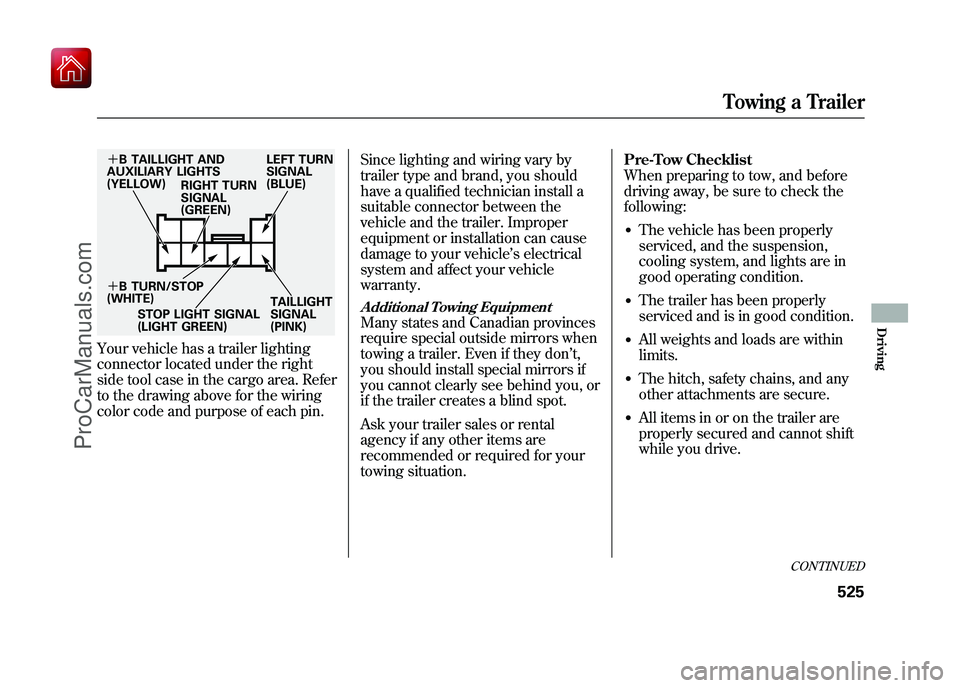
Your vehicle has a trailer lighting
connector located under the right
side tool case in the cargo area. Refer
to the drawing above for the wiring
color code and purpose of each pin.Since lighting and wiring vary by
trailer type and brand, you should
have a qualified technician install a
suitable connector between the
vehicle and the trailer. Improper
equipment or installation can cause
damage to your vehicle
’s electrical
system and affect your vehicle
warranty.
Additional Towing EquipmentMany states and Canadian provinces
require special outside mirrors when
towing a trailer. Even if they don ’t,
you should install special mirrors if
you cannot clearly see behind you, or
if the trailer creates a blind spot.
Ask your trailer sales or rental
agency if any other items are
recommended or required for your
towing situation. Pre-Tow Checklist
When preparing to tow, and before
driving away, be sure to check the
following:
●The vehicle has been properly
serviced, and the suspension,
cooling system, and lights are in
good operating condition.●The trailer has been properly
serviced and is in good condition.●All weights and loads are within
limits.●The hitch, safety chains, and any
other attachments are secure.●All items in or on the trailer are
properly secured and cannot shift
while you drive.
+
B TAILLIGHT AND
AUXILIARY LIGHTS
(YELLOW) RIGHT TURN
SIGNAL
(GREEN) LEFT TURN
SIGNAL
(BLUE)
+ B TURN/STOP
(WHITE)
STOP LIGHT SIGNAL
(LIGHT GREEN) TAILLIGHT
SIGNAL
(PINK)
CONTINUED
Towing a Trailer
525
Driving
09/10/28 17:15:37 10 ACURA ZDX KA KC New North America Own 50 31SZN600 enu
ProCarManuals.com