lock Acura ZDX 2012 Owners Manual
[x] Cancel search | Manufacturer: ACURA, Model Year: 2012, Model line: ZDX, Model: Acura ZDX 2012Pages: 645, PDF Size: 16.36 MB
Page 226 of 645
Personalization Setting
When you unlock the doors with
your remote transmitter (keyless
access remote on models with
navigation system), the driver’sID
(Driver 1 or Driver 2) is detected,
and the climate control settings are
turned to the respective mode
automatically with the ignition switch
in the ON (II) position, or the power
mode ON.
Voice Control SystemOn models with navigation systemThe climate control system can also
be operated by voice control. See the
navigation system manual for
complete details. Using Automatic Climate Control
The automatic climate control system
in your vehicle maintains the interior
temperature you select. The system
also adjusts the fan speed and airflow
levels.
1. Press the driver’
s or passenger’s
AUTO button. You will see AUTO
and the selected temperature on
the appropriate side of the display.
2. Set the desired temperature with the temperature control switch.
You can set the driver’ s side
temperature and the passenger ’s
side temperature separately.
The system automatically selects the
proper mix of conditioned and/or
heated air that will, as quickly as
possible, raise or lower the interior
temperature to your preference. The
system also dehumidifies the
interior.
Temperature ControlThe driver ’s side temperature and
the passenger ’s side temperature can
be set separately. Push up the switch
of the appropriate temperature
control to increase the temperature
of airflow. Push down the switch to
decrease it. Each set temperature is
shown in the display.
CONTINUED
Climate Control System
221
Features
09/10/28 17:15:37 10 ACURA ZDX KA KC New North America Own 50 31SZN600 enu
Page 234 of 645
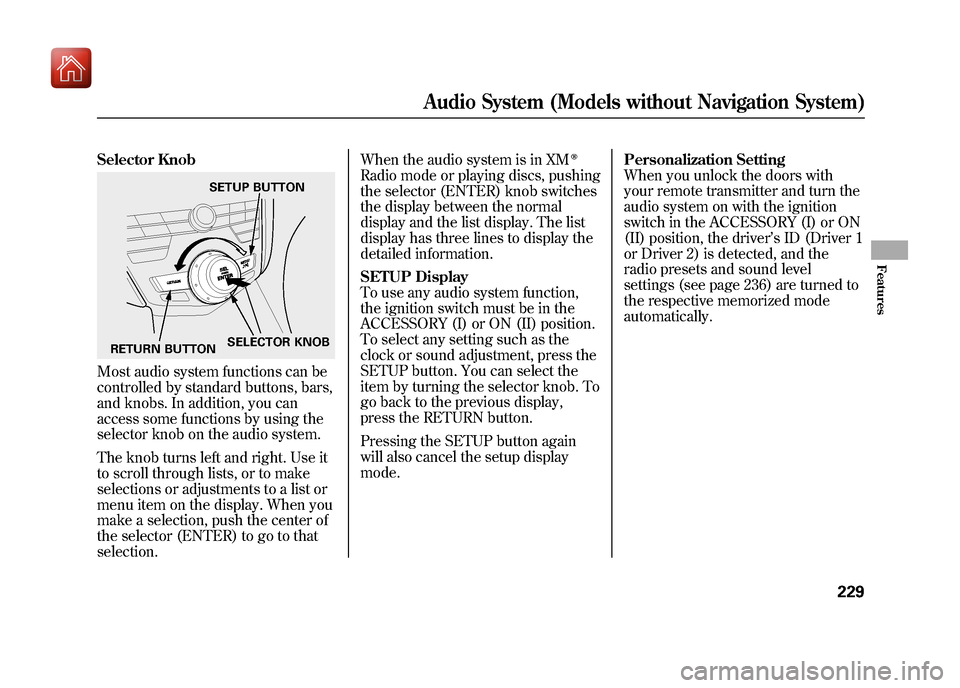
Selector KnobMost audio system functions can be
controlled by standard buttons, bars,
and knobs. In addition, you can
access some functions by using the
selector knob on the audio system.
The knob turns left and right. Use it
to scroll through lists, or to make
selections or adjustments to a list or
menu item on the display. When you
make a selection, push the center of
the selector (ENTER) to go to that
selection.When the audio system is in XM
ꭂ
Radio mode or playing discs, pushing
the selector (ENTER) knob switches
the display between the normal
display and the list display. The list
display has three lines to display the
detailed information.
SETUP Display
To use any audio system function,
the ignition switch must be in the
ACCESSORY (I) or ON (II) position.
To select any setting such as the
clock or sound adjustment, press the
SETUP button. You can select the
item by turning the selector knob. To
go back to the previous display,
press the RETURN button.
Pressing the SETUP button again
will also cancel the setup display
mode.
Personalization Setting
When you unlock the doors with
your remote transmitter and turn the
audio system on with the ignition
switch in the ACCESSORY (I) or ON
(II) position, the driver
’s ID (Driver 1
or Driver 2) is detected, and the
radio presets and sound level
settings (see page 236) are turned to
the respective memorized mode
automatically.
SETUP BUTTON
RETURN BUTTON SELECTOR KNOB
Audio System (Models without Navigation System)
229
Features
09/10/28 17:15:37 10 ACURA ZDX KA KC New North America Own 50 31SZN600 enu
Page 247 of 645
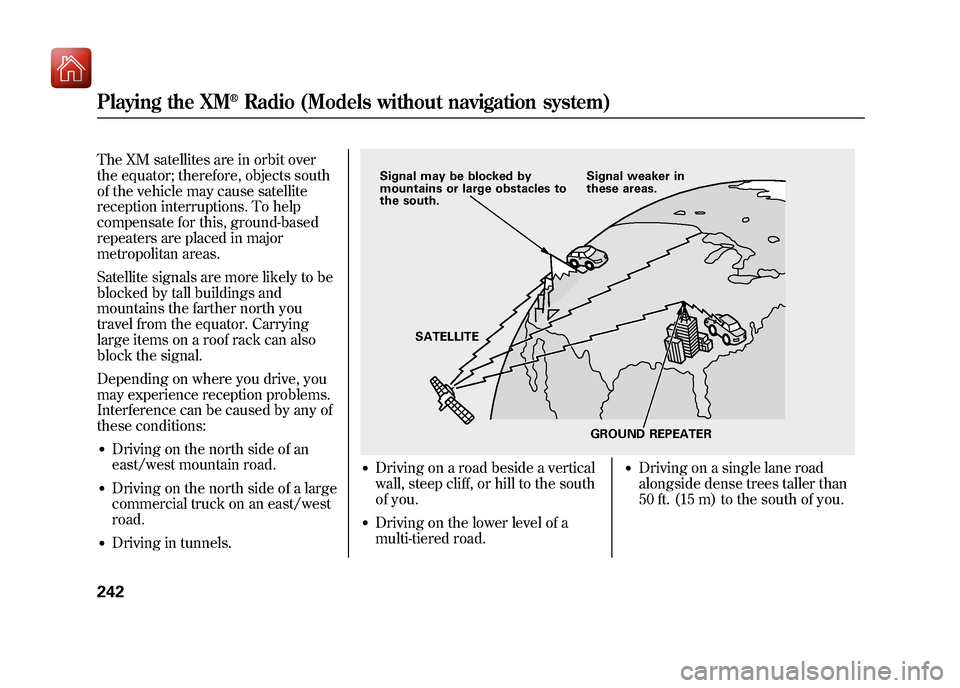
The XM satellites are in orbit over
the equator; therefore, objects south
of the vehicle may cause satellite
reception interruptions. To help
compensate for this, ground-based
repeaters are placed in major
metropolitan areas.
Satellite signals are more likely to be
blocked by tall buildings and
mountains the farther north you
travel from the equator. Carrying
large items on a roof rack can also
block the signal.
Depending on where you drive, you
may experience reception problems.
Interference can be caused by any of
these conditions:●Driving on the north side of an
east/west mountain road.●Driving on the north side of a large
commercial truck on an east/west
road.●Driving in tunnels.
●Driving on a road beside a vertical
wall, steep cliff, or hill to the south
of you.●Driving on the lower level of a
multi-tiered road.
●Driving on a single lane road
alongside dense trees taller than
50 ft. (15 m) to the south of you.
Signal may be blocked by
mountains or large obstacles to
the south.Signal weaker in
these areas.
SATELLITE GROUND REPEATER
Playing the XM
®Radio (Models without navigation system)
24209/10/28 17:15:37 10 ACURA ZDX KA KC New North America Own 50 31SZN600 enu
Page 270 of 645
To Play a USB Flash Memory
Device
The ignition switch must be in the
ACCESSORY (I) or ON (II) position.
This audio system can select and
play the audio files on a USB flash
memory device with the same
controls used for the disc player. To
play a USB flash memory device,
connect it to the USB adapter cable
in the console compartment, then
press the USB/AUX button.The audio system reads and plays
the audio files on the USB flash
memory device in MP3, WMA or
AAC
ꭧformats. Depending on the
format, the display shows MP3,
WMA or AAC when a USB flash
memory device is playing. The USB
flash memory device limit is up to
700 folders or up to 65535 files.
ꭧ : Only AAC format files recorded
with iTunes are playable on this
audio unit.
The recommended USB flash
memory devices are 256 MB or
higher, and formatted with the FAT
file system. Some digital audio
players may be compatible as well.
Some USB flash memory devices
(such as devices with security lock-
out features, etc.) will not work in
this audio unit. NOTE:
●Do not use a device such as a card
reader or hard drive as the device
or your files may be damaged.●Do not connect your USB flash
memory device using a HUB.●Do not use an extension cable to
the USB adapter cable equipped
with your vehicle.●Do not keep a USB flash memory
device in the vehicle. Direct
sunlight and high heat will damage
it.●We recommend backing up your
data before playing a USB flash
memory device.●Some devices cannot be powered
or charged via the USB adapter, if
this is the case use the accessory
adapter to supply power to your
device.
CONTINUED
Playing a USB Flash Memory Device (Models without navigation system)
265
Features
09/10/28 17:15:37 10 ACURA ZDX KA KC New North America Own 50 31SZN600 enu
Page 282 of 645
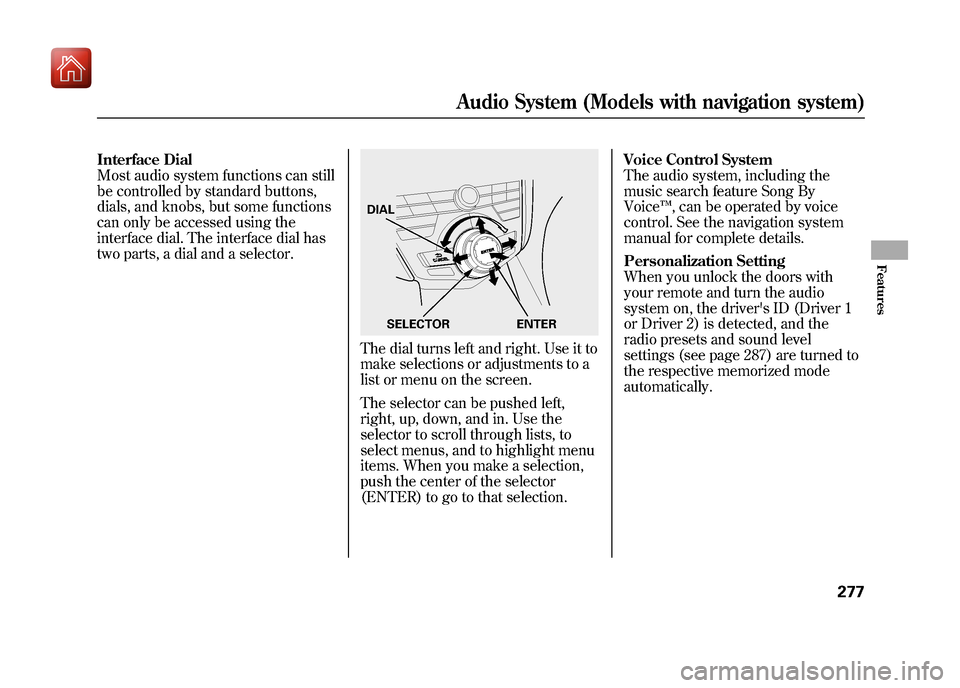
Interface Dial
Most audio system functions can still
be controlled by standard buttons,
dials, and knobs, but some functions
can only be accessed using the
interface dial. The interface dial has
two parts, a dial and a selector.
The dial turns left and right. Use it to
make selections or adjustments to a
list or menu on the screen.
The selector can be pushed left,
right, up, down, and in. Use the
selector to scroll through lists, to
select menus, and to highlight menu
items. When you make a selection,
push the center of the selector
(ENTER) to go to that selection.Voice Control System
The audio system, including the
music search feature Song By
Voice
™, can be operated by voice
control. See the navigation system
manual for complete details.
Personalization Setting
When you unlock the doors with
your remote and turn the audio
system on, the driver's ID (Driver 1
or Driver 2) is detected, and the
radio presets and sound level
settings (see page 287) are turned to
the respective memorized mode
automatically.DIAL
ENTER
SELECTOR
Audio System (Models with navigation system)
277
Features
09/10/28 17:15:37 10 ACURA ZDX KA KC New North America Own 50 31SZN600 enu
Page 301 of 645
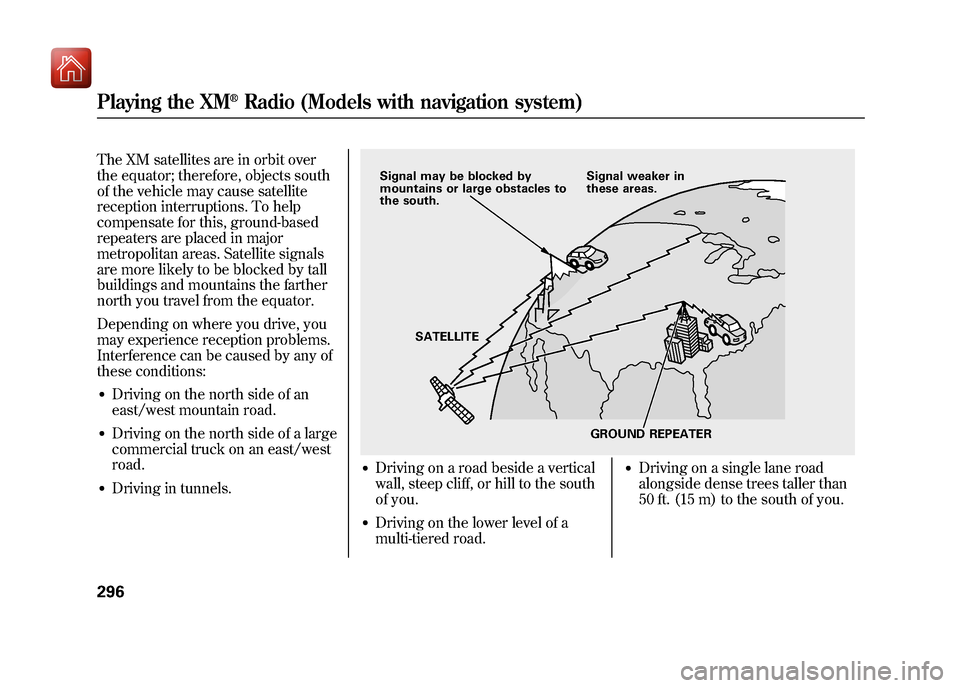
The XM satellites are in orbit over
the equator; therefore, objects south
of the vehicle may cause satellite
reception interruptions. To help
compensate for this, ground-based
repeaters are placed in major
metropolitan areas. Satellite signals
are more likely to be blocked by tall
buildings and mountains the farther
north you travel from the equator.
Depending on where you drive, you
may experience reception problems.
Interference can be caused by any of
these conditions:●Driving on the north side of an
east/west mountain road.●Driving on the north side of a large
commercial truck on an east/west
road.●Driving in tunnels.
●Driving on a road beside a vertical
wall, steep cliff, or hill to the south
of you.●Driving on the lower level of a
multi-tiered road.
●Driving on a single lane road
alongside dense trees taller than
50 ft. (15 m) to the south of you.
Signal may be blocked by
mountains or large obstacles to
the south.Signal weaker in
these areas.
SATELLITE GROUND REPEATER
Playing the XM
®Radio (Models with navigation system)
29609/10/28 17:15:37 10 ACURA ZDX KA KC New North America Own 50 31SZN600 enu
Page 355 of 645
To Play a USB Flash Memory
Device
This audio system can select and
play the audio files on a USB flash
memory device with the same
controls used for the disc player. To
play a USB flash memory device,
connect it to the USB adapter cable
in the console compartment, then
press the USB/AUX button until you
see‘‘USB’’ in the display. The power
mode must be ACCESSORY or ON.
Your vehicle has the engine start/
stop button instead of an ignition
switch. For more information to
select the power mode, see page 194. The audio system reads and plays
the audio files on the USB flash
memory device in MP3, WMA or
AAC
ꭧformats. The USB flash
memory device limit is up to 500
folders or up to 15000 files.
ꭧ : Only AAC format files recorded
with iTunes are playable on this
audio unit.
The recommended USB flash
memory devices are 256 MB or
higher, and formatted with the FAT
file system. Some digital audio
players may be compatible as well.
Some USB flash memory devices
(such as devices with security
lockout features, etc.) will not work
in this audio unit. NOTE:
●Do not use a device such as a card
reader or hard drive as it or your
files may be damaged.●Do not connect your USB flash
memory device using a hub.●Do not use an extension cable to
the USB adapter cable equipped
with your vehicle.●Do not keep a USB flash memory
device in the vehicle. Direct
sunlight and high heat will damage
it.●We recommend backing up your
data before playing a USB flash
memory device.●Some devices cannot be powered
or charged via the USB adapter, if
this is the case use the accessory
adapter to supply power to your
device.
Playing a USB Flash Memory Device (Models with navigation system)35009/10/28 17:15:37 10 ACURA ZDX KA KC New North America Own 50 31SZN600 enu
Page 380 of 645
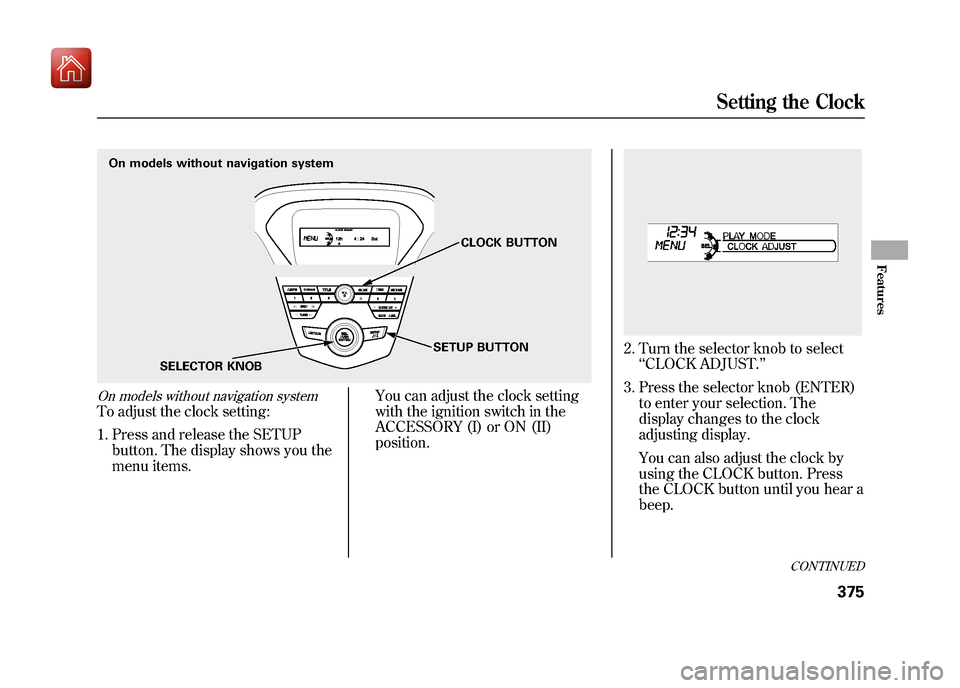
On models without navigation systemTo adjust the clock setting:1. Press and release the SETUP button. The display shows you the
menu items. You can adjust the clock setting
with the ignition switch in the
ACCESSORY (I) or ON (II)
position.
2. Turn the selector knob to select
‘‘CLOCK ADJUST. ’’
3. Press the selector knob (ENTER) to enter your selection. The
display changes to the clock
adjusting display.
You can also adjust the clock by
using the CLOCK button. Press
the CLOCK button until you hear a
beep.
On models without navigation system
SELECTOR KNOB CLOCK BUTTON
SETUP BUTTON
CONTINUED
Setting the Clock
375
Features
09/10/28 17:15:37 10 ACURA ZDX KA KC New North America Own 50 31SZN600 enu
Page 381 of 645
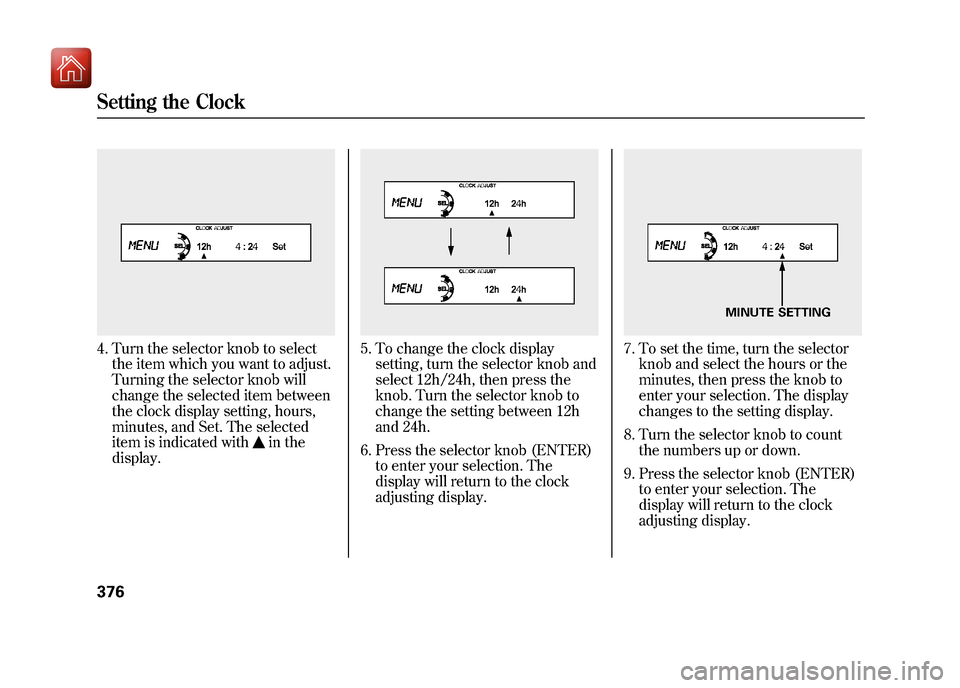
4. Turn the selector knob to selectthe item which you want to adjust.
Turning the selector knob will
change the selected item between
the clock display setting, hours,
minutes, and Set. The selected
item is indicated with
in the
display.
5. To change the clock display setting, turn the selector knob and
select 12h/24h, then press the
knob. Turn the selector knob to
change the setting between 12h
and 24h.
6. Press the selector knob (ENTER) to enter your selection. The
display will return to the clock
adjusting display.
7. To set the time, turn the selectorknob and select the hours or the
minutes, then press the knob to
enter your selection. The display
changes to the setting display.
8. Turn the selector knob to count the numbers up or down.
9. Press the selector knob (ENTER) to enter your selection. The
display will return to the clock
adjusting display.
MINUTE SETTING
Setting the Clock37609/10/28 17:15:37 10 ACURA ZDX KA KC New North America Own 50 31SZN600 enu
Page 382 of 645
While setting the clock, pressing
the RETURN button will go back
to the previous display.
Pressing the SETUP button again
will cancel this setting mode.
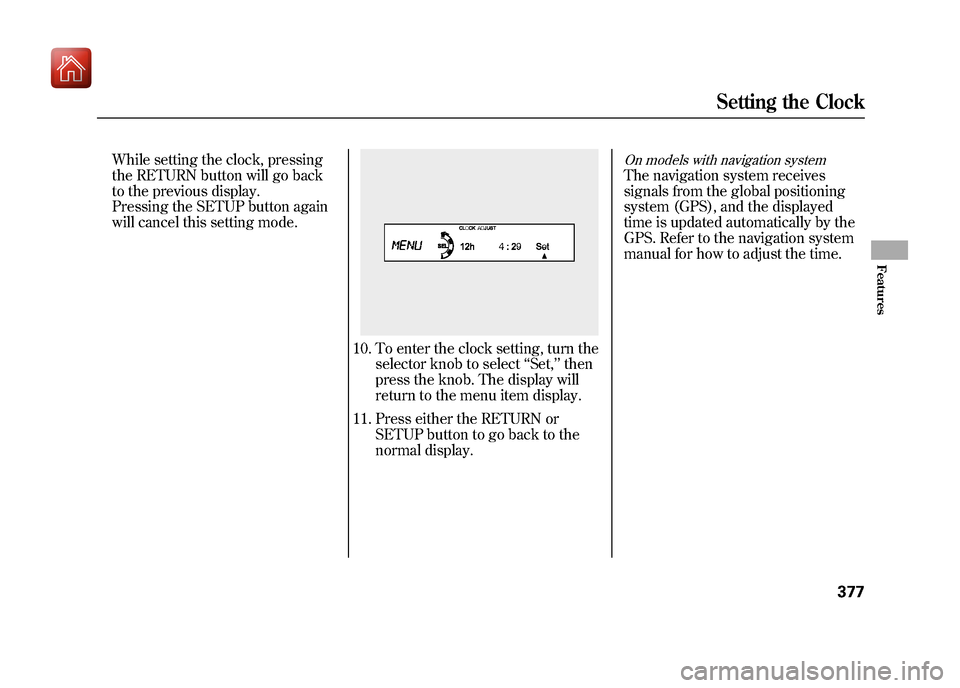
10. To enter the clock setting, turn theselector knob to select ‘‘Set, ’’then
press the knob. The display will
return to the menu item display.
11. Press either the RETURN or SETUP button to go back to the
normal display.
On models with navigation systemThe navigation system receives
signals from the global positioning
system (GPS), and the displayed
time is updated automatically by the
GPS. Refer to the navigation system
manual for how to adjust the time.
Setting the Clock
377
Features
09/10/28 17:15:37 10 ACURA ZDX KA KC New North America Own 50 31SZN600 enu