air condition Acura ZDX 2012 User Guide
[x] Cancel search | Manufacturer: ACURA, Model Year: 2012, Model line: ZDX, Model: Acura ZDX 2012Pages: 370, PDF Size: 10.06 MB
Page 245 of 370
243
uuWhen Driving uVSA ® (Vehicle Stability Assist), aka ESC (Electronic Stability Control), System
Continued
Driving
VSA ® (Vehicle Stability Assist), aka ESC (Electronic
Stability Control), System
VSA ® helps to stabilize the vehicle during corn ering if the vehicle turns more or less
than what was intended. It also assists in maintaining traction on slippery surfaces.
It does so by regulating engine ou tput and selectively applying the brakes.
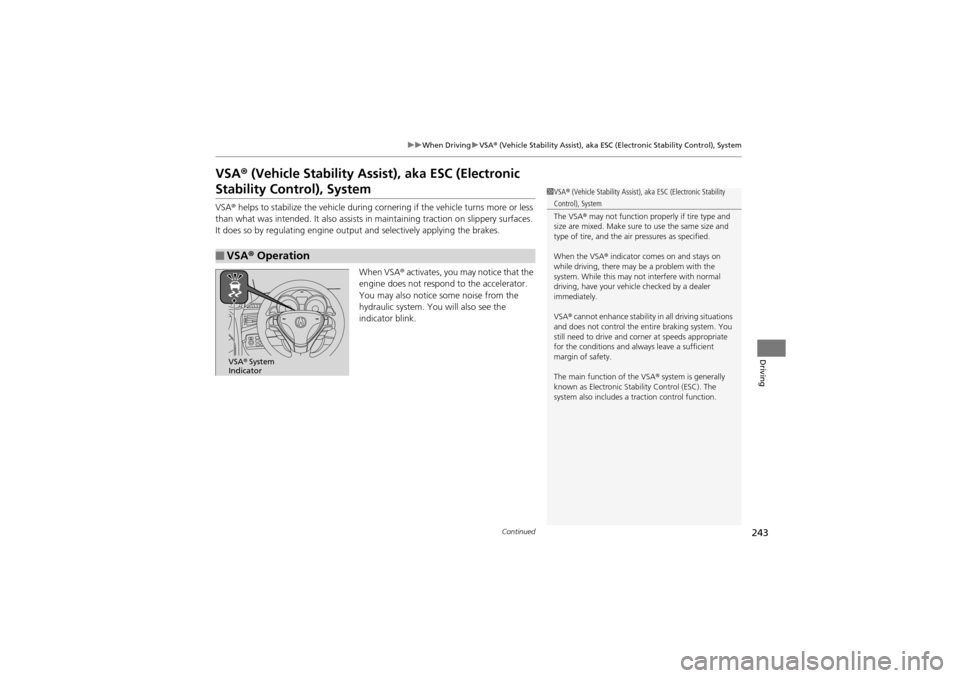
When VSA ® activates, you may notice that the
engine does not respon d to the accelerator.
You may also notice some noise from the
hydraulic system. You will also see the
indicator blink.
■VSA ® Operation
1 VSA ® (Vehicle Stability Assist), aka ESC (Electronic Stability
Control), System
The VSA ® may not function properly if tire type and
size are mixed. Make sure to use the same size and
type of tire, and the air pressures as specified.
When the VSA ® indicator comes on and stays on
while driving, there may be a problem with the
system. While this may no t interfere with normal
driving, have your vehi cle checked by a dealer
immediately.
VSA ® cannot enhance stability in all driving situations
and does not control the entire braking system. You
still need to drive and corner at speeds appropriate
for the conditions and always leave a sufficient
margin of safety.
The main function of the VSA ® system is generally
known as Electronic Stability Control (ESC). The
system also includes a traction control function.
VSA ® System
Indicator
Page 247 of 370
245
uuWhen Driving uSH-AWD ® (Super Handling-All Wheel DriveTM)
Driving
SH-AWD ® (Super Handling-All Wheel DriveTM)
The system controls and transfers varying amounts of engine torque to each wheel
in accordance with the driving conditions.
SH-AWD® helps to enhance driving stability, and lets you handle situations like
slippery surfaces, such as snow, sand, mud, and steep hill, better than when driving
with two wheel drive. However, the system does not help to enhance braking. Be
precautious about the following:
• It is still your responsibility to drive sa fely when you steer, accelerate, and apply
brakes.
• Leave a sufficient margin when braking on slippery surfaces.1SH-AWD ® (Super Handling-All Wheel DriveTM)
NOTICEAvoid continuously driving in sand or mud where a
wheel is likely to spin out, and do not drive once the
SH-AWD ® indicator starts blinking. Driving
continuously under such conditions can damage the
system’s torque distribution unit.
Do not drive through deep water.
The SH-AWD ® system may not function properly if
tire type and size are mixed.
Make sure to use the same size and type of tire, and
the air pressures as specified.
Page 249 of 370
247
uuWhen Driving uBSI (Blind Spot Information)*
Driving
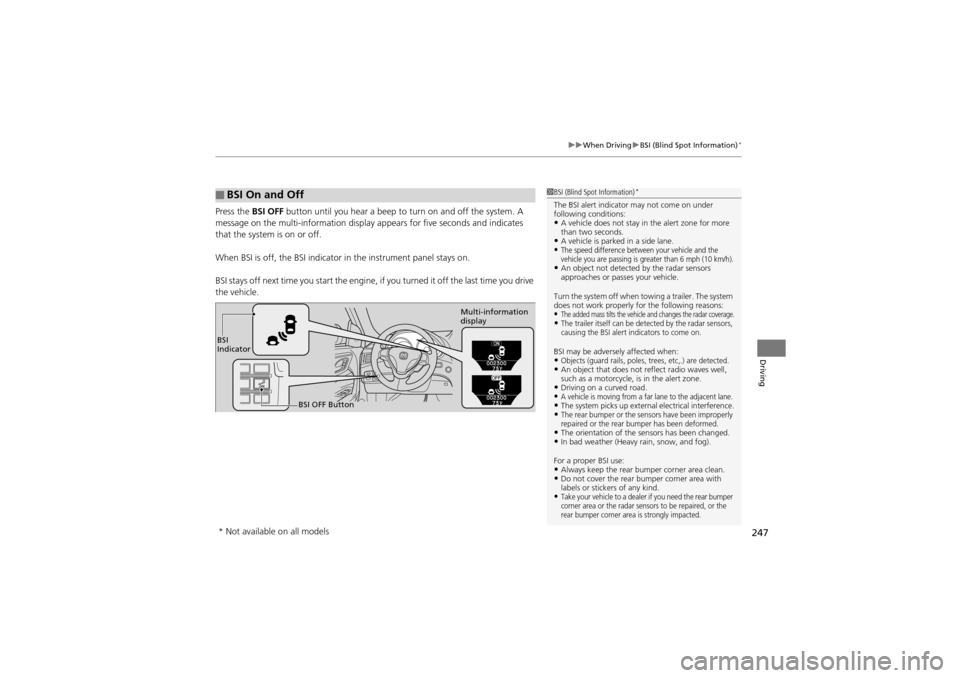
Press the BSI OFF button until you hear a beep to turn on and off the system. A
message on the multi-information display appears for five seconds and indicates
that the system is on or off.
When BSI is off, the BSI indicator in the in strument panel stays on.
BSI stays off next time you sta rt the engine, if you turned it off the last time you drive
the vehicle.
■BSI On and Off1 BSI (Blind Spot Information)*
The BSI alert indicator may not come on under
following conditions:
•A vehicle does not stay in the alert zone for more
than two seconds.
•A vehicle is parked in a side lane.•The speed difference between your vehicle and the
vehicle you are passing is greater than 6 mph (10 km/h).
•An object not detected by the radar sensors
approaches or passes your vehicle.
Turn the system off when towing a trailer. The system
does not work properly for the following reasons:
•The added mass tilts the vehicle and changes the radar coverage.•The trailer itself can be detected by the radar sensors,
causing the BSI alert indicators to come on.
BSI may be adversel y affected when:•Objects (guard rails, poles, trees, etc,.) are detected.•An object that does not reflect radio waves well,
such as a motorcycle, is in the alert zone.
•Driving on a curved road.•A vehicle is moving from a far lane to the adjacent lane.•The system picks up external electrical interference.•The rear bumper or the sensors have been improperly
repaired or the rear bumper has been deformed.
•The orientation of the sensors has been changed.•In bad weather (Heavy rain, snow, and fog).
For a proper BSI use:
•Always keep the rear bu mper corner area clean.•Do not cover the rear bumper corner area with
labels or stickers of any kind.
•Take your vehicle to a dealer if you need the rear bumper
corner area or the radar sensors to be repaired, or the
rear bumper corner area is strongly impacted.
BSI
Indicator
BSI OFF Button Multi-information
display
* Not available on all models
Page 262 of 370
uuBraking uCMBSTM (Collision Mitigation Braking SystemTM)*
260
Driving
The CMBSTM may activate even when you are aw are of a vehicle ahead of you, or
when there is no vehicle ahead. Some examples of this are:
■When Passing
Your vehicle approaches another vehicle ah ead of you and you change lanes to pass.
■At an intersection
Your vehicle approaches or passes another vehicle that is making a left or right turn.
■Through a low bridge at high speed
You drive under a low or narrow bridge at high speed.
■Speed bumps, road work sites, train tracks, roadside objects, etc.
You drive over speed bumps, steel road plat es, etc., or your vehicle approaches train
tracks or roadside objects [such as a traffic sign and guard rail] on a curve.
■With Little Chance of a Collision1 CMBSTM (Collision Mitigation Braking SystemTM)*
Avoid the following conditions that may cause the
radar aim to be temporarily out of range and prevent
the CMBS
TM from working properly.•A heavy load in the rear or modifications to the
suspension tilts your vehicle.
•The tire pressures are not correct, the tire sizes are
incorrect, the tire types are different, and/or the
tires are not in good condition.
For a proper CMBS
TM use:
Always keep the radar sensor cover clean.
Never use chemical solvents or polishing powder for
cleaning the sensor cover. Clean it with water or a
mild detergent.
Do not put a sticker on the emblem or replace the
emblem.
Take your vehicle to a dealer if you need the radar
sensor to be repaired, or removed, or the radar
sensor cover is strongly impacted.
* Not available on all models
Page 269 of 370
267
Driving
Accessories and Modifications
Accessories
When installing accessories, check the following:
•Do not install accessories on the windshi eld. They can obstruct your view and
delay your reaction to driving conditions.
• Do not install accessories on the side pillars or across the side windows.
Accessories installed in th ese areas may interfere with proper operation of the
side curtain airbags.
• Be sure electronic accessories do not overlo ad electrical circuits or interfere with
proper operation of your vehicle.
2 Fuses P. 338
•Before installing any electronic accessory, have the installer contact a dealer for
assistance. If possible, have a deal er inspect the final installation.
Modifications
Do not modify your vehicle or use non-Acura components that can affect its
handling, stability, and reliability.
Overall vehicle performance can be affected . Always make sure all equipment is
properly installed and maintained, and that it meets federal, state, province,
territory, and local regulations.
1 Accessories and Modifications
Acura Genuine accessorie s are recommended to
ensure proper operation on your vehicle.
3WARNING
Improper accessories or modifications can
affect your vehicle’s handling, stability, and
performance, and cause a crash in which
you can be seriously hurt or killed.
Follow all instructions in this owner’s
manual regarding accessories and
modifications.
Page 272 of 370
270
Maintenance
Before Performing Maintenance
Inspection and Maintenance
For your safety, perform all listed inspections and maintenance to keep your vehicle
in good condition. If you become aware of any abnormality (noise, smell, insufficient
brake fluid, oil residue on the ground, etc.), have your vehicle inspected by a dealer.
(Note, however, that service at a dealer is not mandatory to keep your warranties in
effect.) Refer to the separate maintenanc e booklet for detailed maintenance and
inspection information.
■Daily inspections
Perform inspections before long distance trips, when washing the vehicle, or when
refueling.
■Periodic inspections
• Check the automatic transmi ssion fluid level monthly.
2Automatic Tran smission Fluid P. 287
•Check the brake fluid level monthly.2 Brake Fluid P. 288
•Check the tire pressure monthly. Examin e the tread for wear and foreign objects.2Checking and Maintaining Tires P. 300
•Check the operation of th e exterior lights monthly.2Replacing Light Bulbs P. 291
•Check the condition of the wiper bl ades at least every six months.2Checking and Maintaining Wiper Blades P. 298
■Types of Inspection and Maintenance
1Inspection and Maintenance
Maintenance, replacement, or repair of
emissions contro l devices and systems may be
done by any automotive repair establishment or
individuals using parts that are “certified” to
EPA standards.
According to state and federal regulations, failure to
perform maintenance on the maintenance main
items marked with # will not void your emissions
warranties. However, all maintenance services should
be performed in accordance with the intervals
indicated by the multi-information display.
2 Maintenance Service Items P. 275
If you want to perform complex maintenance tasks
that require more skills an d tools, you can purchase a
subscription to the Serv ice Express website at
www.techinfo.honda.com .
2 Authorized Manuals P. 358
If you want to perform ma intenance yourself, make
sure that you have the nece ssary tools and skills first.
After performing ma intenance, update the records in
the separate maintenance booklet.
U.S. models
Page 273 of 370
271
uuBefore Performing Maintenance uSafety When Performing Maintenance
Maintenance
Safety When Performing Maintenance
Some of the most important safe ty precautions are given here.
However, we cannot warn you of every conceivable hazard that can arise in
performing maintenance. Only you can decide whether or not you should perform
a given task.
• To reduce the possibility of fire or expl osion, keep cigarettes, sparks, and flames
away from the battery and all fuel related parts.
• To clean parts, use a comm ercially available degreaser or parts cleaner, not
gasoline.
• Wear eye protection and pr otective clothing when working with the battery or
compressed air.
• Engine exhaust contains carbon monoxide, which is poisonous and can kill you.
u Only operate the engine if th ere is sufficient ventilation.
• The vehicle must be in a stationary condition.
u Make sure your vehicle is parked on level ground, the parking brake is set, and
the engine is off.
• Be aware that hot parts can burn you.
u Make sure to let the engine and exha ust system cool thoroughly before
touching vehicle parts.
• Be aware that moving parts can injure you.
u Do not start the engine unless instruct ed, and keep your hands and limbs away
from moving parts.
■Maintenance Safety
■Vehicle Safety
1 Safety When Performing Maintenance
3WARNING
Improperly maintaining this vehicle or
failing to correct a problem before driving
can cause a crash in which you can be
seriously hurt or killed.
Always follow the inspection and
maintenance recommendations according
to the schedules in this owner’s manual.
3WARNING
Failure to properly follow maintenance
instructions and precautions can cause you
to be seriously hurt or killed.
Always follow the procedures and
precautions in this owner’s manual.
Page 277 of 370
275
uuMaintenance MinderTMuTo Use Maintenance MinderTM
Continued
Maintenance
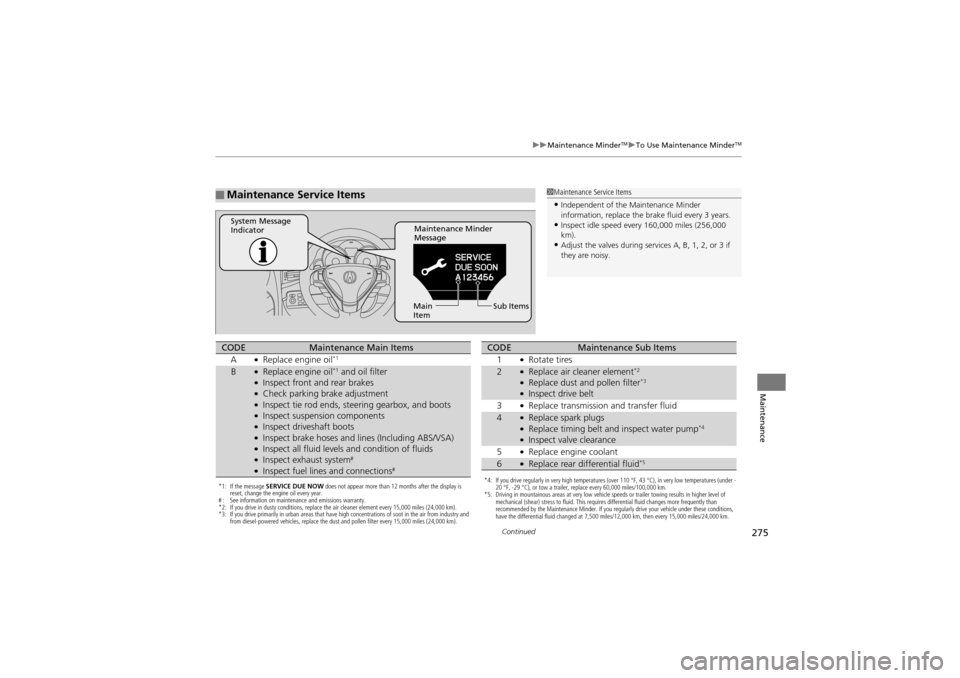
■Maintenance Service Items1Maintenance Service Items
•Independent of the Maintenance Minder
information, replace the brake fluid every 3 years.
•Inspect idle speed every 160,000 miles (256,000
km).
•Adjust the valves during services A, B, 1, 2, or 3 if
they are noisy.
Maintenance Minder
Message
System Message
Indicator
Sub Items
Main
Item
*1: If the message SERVICE DUE NOW does not appear more than 12 months after the display is
reset, change the engine oil every year.
# : See information on maintenance and emissions warranty.
*2: If you drive in dusty conditions, replace the air cleaner element every 15,000 miles (24,000 km).
*3: If you drive primarily in urban areas that have high concentrations of soot in the air from industry and
from diesel-powered vehicles, replace the dust and pollen filter every 15,000 miles (24,000 km).
CODEMaintenance Main Items
A●Replace engine oil*1
B●Replace engine oil*1 and oil filter●Inspect front and rear brakes●Check parking brake adjustment●Inspect tie rod ends, steering gearbox, and boots●Inspect suspension components●Inspect driveshaft boots●Inspect brake hoses and li nes (Including ABS/VSA)●Inspect all fluid levels and condition of fluids●Inspect exhaust system#
●Inspect fuel lines and connections#*4: If you drive regularly in very high temperatures (over 110 °F, 43 °C), in very low temperatures (under -
20 °F, -29 °C), or tow a trailer, replace every 60,000 miles/100,000 km.
*5: Driving in mountainous areas at very low vehicle speeds or trailer towing results in higher level of
mechanical (shear) stress to fluid. This requires differential fluid changes more frequently than
recommended by the Maintenance Minder. If you regularly drive your vehicle under these conditions,
have the differential fluid changed at 7,500 miles/12,000 km, then every 15,000 miles/24,000 km.
CODEMaintenance Sub Items
1●Rotate tires
2●Replace air cleaner element*2
●Replace dust and pollen filter*3
●Inspect drive belt
3●Replace transmission and transfer fluid
4●Replace spark plugs●Replace timing belt an d inspect water pump*4
●Inspect valve clearance
5●Replace engine coolant
6●Replace rear differential fluid*5
Page 302 of 370
300
Maintenance
Checking and Maintaining Tires
Checking Tires
To safely operate your vehicle, your tires must be of the proper type and size, in
good condition with adequate tread, and properly inflated.
■Inflation guidelines
Properly inflated tires provide the best comb ination of handling, tread life, and comfort.
Refer to the driver’s doorjamb label or spec ification’s page for the specified pressure.
Underinflated tires wear unevenly, adversel y affect handling and fuel economy, and
are more likely to fail from overheating.
Overinflated tires make your vehicle ride ha rshly, are more prone to road hazards,
and wear unevenly.
Every day before you drive, look at each of the tires. If one looks lower than the
others, check the pressu re with a tire gauge.
At least once a month or before long trip s, use a gauge to measure the pressure in
all tires, including the spare. Even tires in good condition can lose 1 to 2 psi (10 to
20 kPa, 0.1 to 0.2 kgf/cm
2) per month.
■Inspection guidelines
Every time you check inflation, also examine the tires and valve stems.
Look for:
• Bumps or bulges on the side or in the tread. Replace the tire if you find any cuts,
splits, or cracks in the si de of the tire. Replace it if you see fabric or cord.
• Remove any foreign objects and inspect for air leaks.
• Uneven tread wear. Have a deal er check the wheel alignment.
• Excessive tread wear.
2 Wear Indicators P. 305
•Cracks or other damage around valve stem.
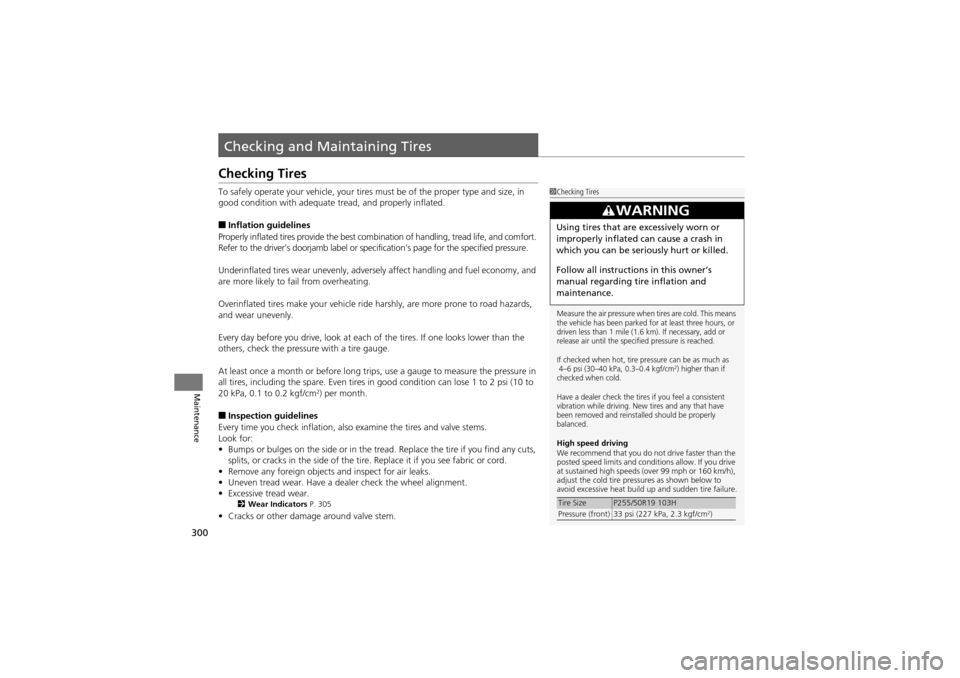
1Checking Tires
Measure the air pressure when tires are cold. This means
the vehicle has been parked for at least three hours, or
driven less than 1 mile (1.6 km). If necessary, add or
release air until the specified pressure is reached.
If checked when hot, tire pressure can be as much as
4–6 psi (30–40 kPa, 0.3–0.4 kgf/cm
2) higher than if
checked when cold.
Have a dealer check the tires if you feel a consistent
vibration while driving. New tires and any that have
been removed and reinstalled should be properly
balanced.
High speed driving
We recommend that you do not drive faster than the
posted speed limits and conditions allow. If you drive
at sustained high speeds (over 99 mph or 160 km/h),
adjust the cold tire pressures as shown below to
avoid excessive heat build up and sudden tire failure.
3WARNING
Using tires that are excessively worn or
improperly inflated can cause a crash in
which you can be seriously hurt or killed.
Follow all instructions in this owner’s
manual regarding tire inflation and
maintenance.
Tire SizeP255/50R19 103H
Pressure (front) 33 psi (227 kPa, 2.3 kgf/cm2)
Page 317 of 370
315
uuCleaning uExterior Care
Continued
Maintenance
Exterior Care
Dust off the vehicle body after you drive.
Regularly inspect your vehicle for scratc hes on painted surfaces. A scratch on a
painted surface can result in body rust. If you find a scratch, promptly repair it.
Wash the vehicle regularly. Wash more frequently when driving in the following
conditions:
• If driving on roads with road salt.
• If driving in coastal areas.
• If tar, soot, bird droppings, insects, or tree sap are stuck to painted surfaces.
Fold in the door mirrors. M ake sure to follow the instructions indicated on the
automated vehicle wash.
• Keep sufficient distance between the cleaning nozzle and the vehicle body.
• Take particular care around the windows. Standing too close may cause water to
enter the vehicle interior. Do not spra y water into the engine compartment.
■Washing the Vehicle
■Using an Automated Vehicle Wash
■Using High Pressure Cleaners
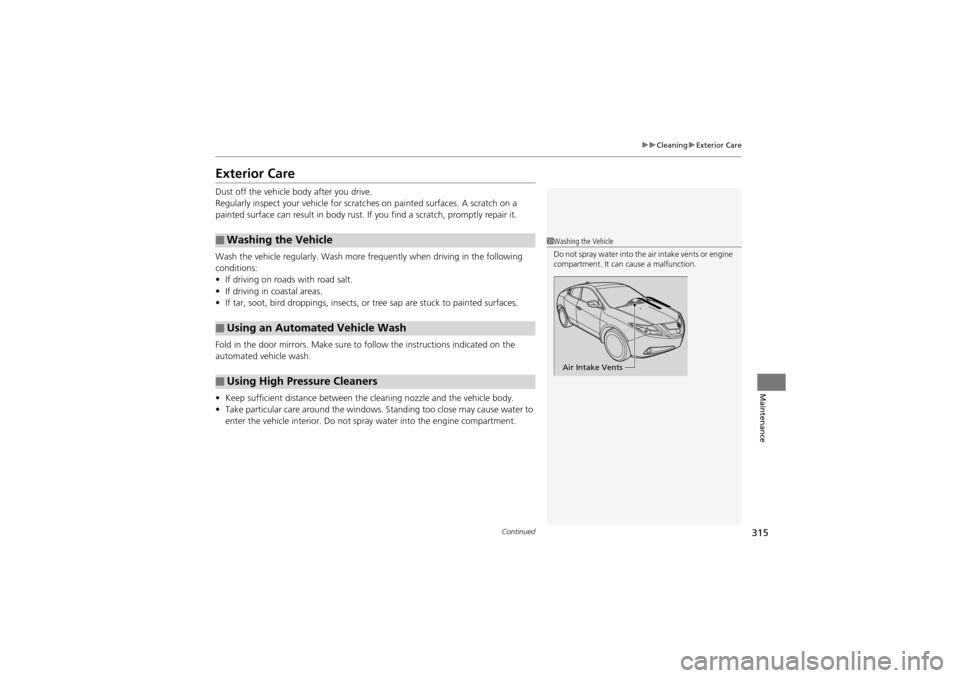
1Washing the Vehicle
Do not spray water into the air intake vents or engine
compartment. It can cause a malfunction.
Air Intake Vents