homelink Acura ZDX 2012 Owner's Manual
[x] Cancel search | Manufacturer: ACURA, Model Year: 2012, Model line: ZDX, Model: Acura ZDX 2012Pages: 370, PDF Size: 10.06 MB
Page 3 of 370
Contents
Child Safety P. 50Exhaust Gas Hazard P. 64 Safety Labels P. 65
Opening and Closing the Tailgate P. 114 Security System P. 120 Opening and Closing the Windows P. 123
Operating the Switches Around the Steering Wheel P. 127 Adjusting the Mirrors P. 141
Interior Lights/Interior Convenience Items P. 151 Climate Control System P. 163
Audio Error Messages P. 188 Audio Remote Controls P. 190
HomeLink ® Universal Transceiver P. 195
When Driving P. 223 Braking P. 253 Parking Your Vehicle P. 261
Accessories and Modifications P. 267
Maintenance Under the Hood P. 277 Replacing Light Bulbs P. 291
Checking and Maintaining Tires P. 300 Battery P. 309 Remote Transmitter Care P. 310
Cleaning P. 313
Engine Does Not Start P. 326 Jump Starting P. 329 Shift Lever Does Not Move P. 331
Fuses P. 338 Emergency Towing P. 344
When You Cannot Open or Close the Tailgate P. 347
Devices that Emit Radio Waves P. 352 Reporting Safety Defects P. 353
Authorized Manuals P. 358 Client Service Information P. 359
Quick Reference GuideP. 2
Safe DrivingP. 21
Instrument PanelP. 67
ControlsP. 101
FeaturesP. 167
DrivingP. 209
MaintenanceP. 269
Handling the UnexpectedP. 317
InformationP. 349
IndexP. 361
Page 6 of 370
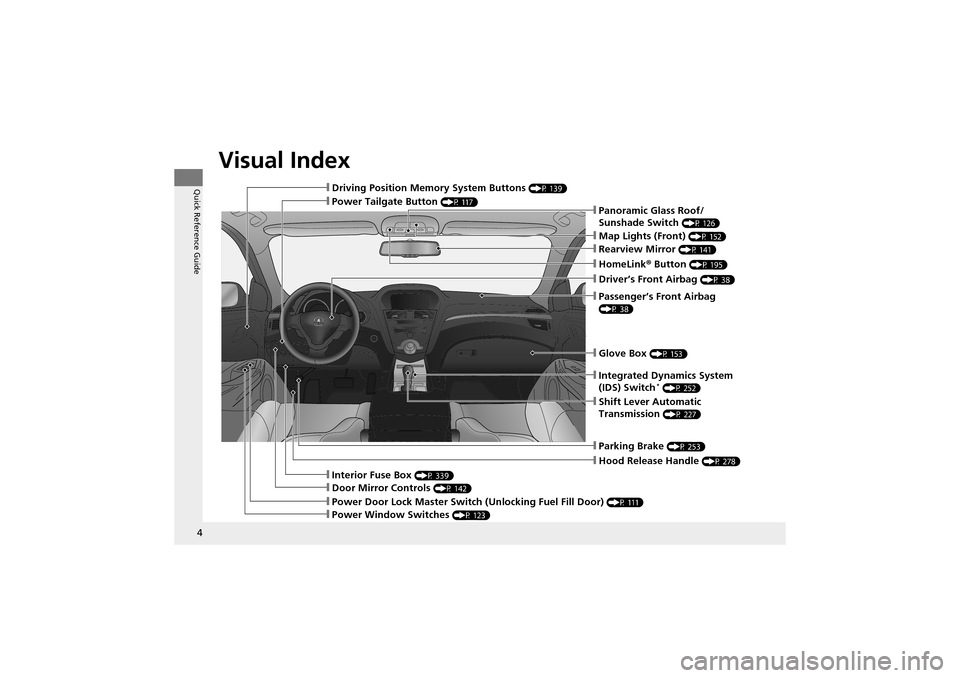
Visual Index
4
Quick Reference Guide❙Driving Position Memory System Buttons (P 139)
❙Power Tailgate Button (P 117)
❙Glove Box (P 153)
❙Parking Brake (P 253)
❙Hood Release Handle (P 278)
❙Power Door Lock Master Switch (Unlocking Fuel Fill Door) (P 111)
❙Interior Fuse Box (P 339)
❙Door Mirror Controls (P 142)
❙Power Window Switches (P 123)
❙Integrated Dynamics System
(IDS) Switch* (P 252)
❙Panoramic Glass Roof/
Sunshade Switch
(P 126)
❙Map Lights (Front) (P 152)
❙Rearview Mirror (P 141)
❙HomeLink® Button (P 195)
❙Driver’s Front Airbag (P 38)
❙Passenger’s Front Airbag
(P 38)
❙Shift Lever Automatic
Transmission
(P 227)
Page 169 of 370
167
Features
This chapter describes how to operate technology features on models without the navigation system.
Audio System
About Your Audio System ................ 168
USB Adapter Cable .......................... 169
Auxiliary Input Jack .... ...................... 169
Audio System Theft Protection ......... 170
Audio System Basic Operation ........ 171
Adjusting the Sound .... .................... 172
Playing the AM/FM Radio ................. 173
Playing the XM ® Radio ..................... 175
Playing a CD .................................... 177
Playing an iPod ®............................... 180
Playing a USB Flash Drive ................. 183
Playing Bluetooth ® Audio................. 186 Audio Error Messages
CD Changer..................................... 188
iPod ®/USB Flash Drive....................... 189
Audio Remote Controls .................... 190
General Information on the Audio SystemXM ® Radio Service ........................... 191
Recommended CDs ......................... 192
Compatible iPod® and USB Flash Drives........ 194HomeLink ® Universal Transceiver
Training HomeLink ........................... 195 Bluetooth® HandsFreeLink
®
Using HFL ........................................ 197
HFL Menus ...................................... 199
Page 197 of 370
195Continued
Features
HomeLink® Universal Transceiver
The HomeLink ® Universal Transceiver can be prog rammed to operate up to three
remote controlled devices around your home, such as garage doors, lighting, or
home security systems.
Refer to the safety information that comes wi th your garage door opener to test that
the safety features are functioning properly. If you do not have the safety
information, contact the manufacturer.
Before programming HomeLink, make sure that people and objects are out of the
way of the garage or gate to pr event potential injury or damage.
When programming a garage door opener, park just outside the garage door’s
path.
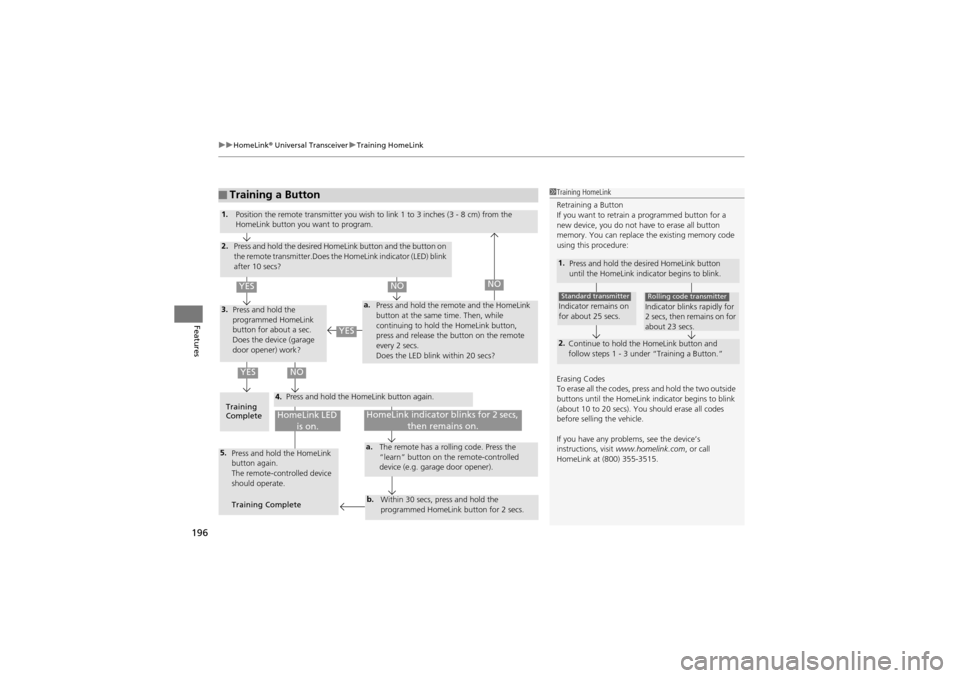
Training HomeLink
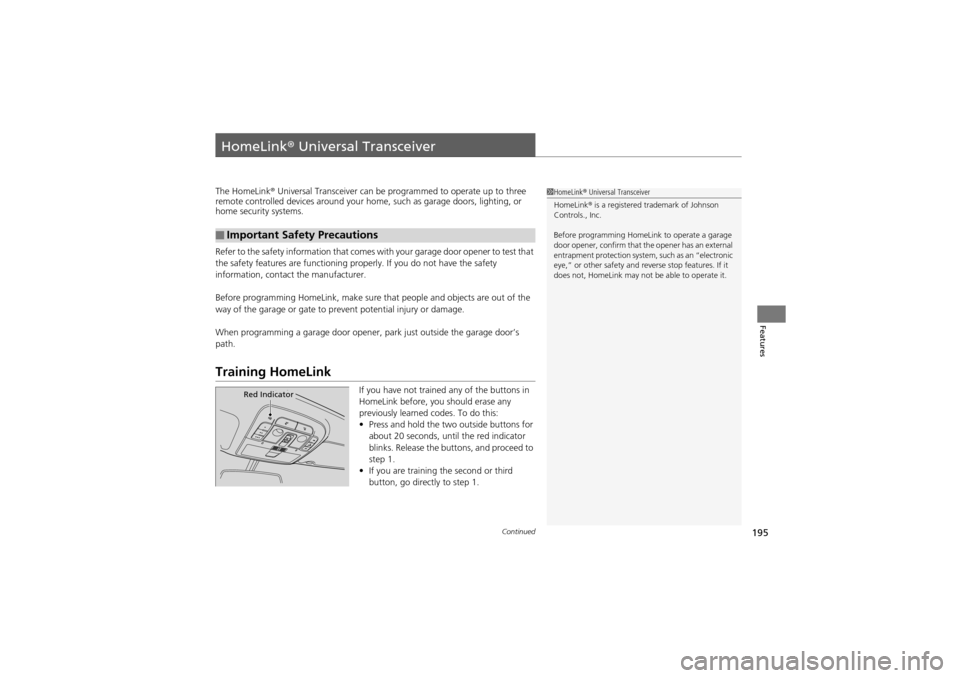
If you have not trained any of the buttons in
HomeLink before, you should erase any
previously learned codes. To do this:
• Press and hold the tw o outside buttons for
about 20 seconds, until the red indicator
blinks. Release the bu ttons, and proceed to
step 1.
• If you are training the second or third
button, go directly to step 1.
■Important Safety Precautions
1HomeLink ® Universal Transceiver
HomeLink ® is a registered trademark of Johnson
Controls., Inc.
Before programming HomeLink to operate a garage
door opener, confirm that the opener has an external
entrapment protection system, such as an “electronic
eye,” or other safety and re verse stop features. If it
does not, HomeLink may not be able to operate it.
Red Indicator
Page 198 of 370
uuHomeLink ® Universal Transceiver uTraining HomeLink
196
Features
■Training a Button1Training HomeLink
Retraining a Button
If you want to retrain a programmed button for a
new device, you do not have to erase all button
memory. You can replace the existing memory code
using this procedure:
1.
Press and hold the de sired HomeLink button
until the HomeLink indicator begins to blink.
2. Continue to hold the HomeLink button and
follow steps 1 - 3 under “Training a Button.”
Indicator remains on
for about 25 secs.Standard transmitterIndicator blinks rapidly for
2 secs, then remains on for
about 23 secs.Rolling code transmitter
Erasing Codes
To erase all the codes, press and hold the two outside
buttons until the HomeLink indicator begins to blink
(about 10 to 20 secs). You should erase all codes
before selling the vehicle.
If you have any proble ms, see the device’s
instructions, visit www.homelink.com , or call
HomeLink at (800) 355-3515.
4.
a.3.
2.
5.a.
b.
1. Position the remote transmitter you wish to link 1 to 3 inches (3 - 8 cm) from the
HomeLink button you want to program.
Press and hold the desired HomeLink button and the button on
the remote transmitter.Does the HomeLink indicator (LED) blink
after 10 secs?
Press and hold the
programmed HomeLink
button for about a sec.
Does the device (garage
door opener) work? Press and hold the remote and the HomeLink
button at the same
time. Then, while
continuing to hold the HomeLink button,
press and release the button on the remote
every 2 secs.
Does the LED blink within 20 secs?
Training
Complete Press and hold the HomeLink button again.
Press and hold the HomeLink
button again.
The remote-controlled device
should operate.
Training Complete The remote has a ro
lling code. Press the
“learn” button on the remote-controlled
device (e.g. garage door opener).
Within 30 secs, press and hold the
programmed HomeLink button for 2 secs.
HomeLink indicator blinks for 2 secs, then remains on.HomeLink LED is on.
YESNO
YES
YESNONO
Page 354 of 370
352
Information
Devices that Emit Radio Waves
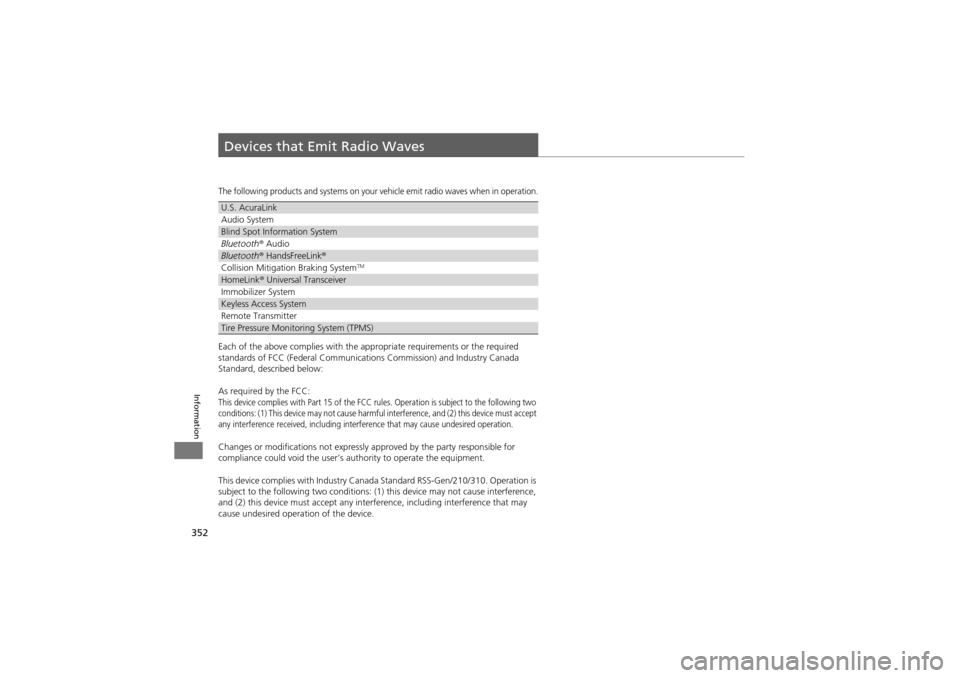
The following products and systems on your vehicle emit radio waves when in operation.
Each of the above complies with the appropriate requirements or the required
standards of FCC (Federal Communications Commission) and Industry Canada
Standard, described below:
As required by the FCC:
This device complies with Part 15 of the FCC ru les. Operation is subject to the following two
conditions: (1) This device may not cause harmful interference, and (2) this device must accept
any interference received, including interference that may cause undesired operation.
Changes or modifications not expressly approved by the party responsible for
compliance could void the user’s authority to operate the equipment.
This device complies with Industry Canada Standard RSS-Gen/210/310. Operation is
subject to the following two conditions: (1) this device may not cause interference,
and (2) this device must accept any inte rference, including interference that may
cause undesired operation of the device.
U.S. AcuraLink
Audio System
Blind Spot Information System
Bluetooth ® Audio
Bluetooth ® HandsFreeLink ®
Collision Mitigation Braking SystemTM
HomeLink® Universal Transceiver
Immobilizer System
Keyless Access System
Remote Transmitter
Tire Pressure Monitoring System (TPMS)
Page 366 of 370
364
Index
H
Halogen Bulbs........................................... 292
Handling the Unexpected ........................ 317
HandsFreeLink ® (HFL) ............................... 197
Help Features........................................... 198
HFL Buttons ............................................. 197
HFL Menus .............................................. 199
Information Display.................................. 198
Making a Call .......................................... 203
Muting a Call........................................... 204
Phone Setup ............................................ 201
Phonebook .............................................. 205
Receiving a Call ....................................... 204
Sending Numbers or Names During a Call ......................... 204
Transferring a Call ................................... 204
Hazard Warning Button ............................... 2
Head Restraints ......................................... 145
Headlights ................................................. 131
Aiming .................................................... 291
Automatic Operation ............................... 132
Dimming ......................................... 131, 133
Operating ................................................ 131
Heaters (Seat) ............................ 160, 161, 162
HFL (HandsFreeLink ®)............................... 197
High-Beam Indicator .................................. 75
HomeLink ® Universal Transceiver ............ 195
I
Identification Numbers ............................ 351
Engine and Transmission ......................... 351
Vehicle Identification .... ........................... 351
Ignition Switch ......................................... 127
Illumination Control ................................. 136
Button..................................................... 136
Immobilizer System .................................. 120
Indicator.................................................... 76
Indicators .................................................... 68
ABS (Anti-lock Brake System)..................... 71
Active Damper System............................... 73
Adaptive Cruise Control (ACC) .......... 78, 235
Charging System .......... ..................... 69, 334
CRUISE CONTROL ............................. 77, 233
CRUISE MAIN .................................... 77, 232
Door and Tailgate Open ...................... 26, 73
ECPS (Electric Controlled Power Steering) System ............................................ 73, 336
Fog Light ................................................... 75
High-Beam ................................................ 75
Immobilizer System ......... .......................... 76
Keyless Access System ............................... 77
Lights On .................................................. 75
Low Fuel ................................................... 71
Low Oil Pressure ................................ 68, 334
Low Tire Pressure/TPMS ............. 74, 248, 250
Maintenance Minder ............................... 273
Malfunction Indicator Lamp............... 69, 335
Parking Brake and Brake System ........ 68, 336
Seat Belt Reminder .............................. 28, 71 Security System Alarm............................... 76
SH-AWD
®......................................... 77, 245
Shift Position............................................. 70
Side Airbag Off ................................... 48, 75
Supplemental Restraint System ........... 46, 72
System Message ....................................... 74
Transmission ............................................. 70
Turn Signal ............................................... 75
VSA ®
(Vehicle Stability Assist) System ...... 72, 243
VSA ® OFF.......................................... 72, 244
Information .............................................. 349
Information Buttons .................................. 88
Instant Fuel Economy ................................ 92
Instrument Panel ........................................ 67
Brightness Control .................................. 136
Integrated Dynamics System (IDS) .......... 252
Interior Lights ........................................... 151
Interior Rearview Mirror ......................... 141
J
Jack (Wheel Nut Wrench) ........................ 323
Jump Starting ........................................... 329
K
Key Number Tag ...................................... 105
Keyless Access System .............................. 108
Keyless Lockout Prevention ..................... 107