service Acura ZDX 2012 User Guide
[x] Cancel search | Manufacturer: ACURA, Model Year: 2012, Model line: ZDX, Model: Acura ZDX 2012Pages: 370, PDF Size: 10.06 MB
Page 265 of 370
263Continued
Driving
Refueling
Fuel Information
■Fuel recommendation
Your vehicle is designed to operate on premium unleaded gasoline with pump
octane of 91 or higher. If this octane grad e is unavailable, regular unleaded gasoline
with a pump octane of 87 or hi gher may be used temporally.
The use of regular unleaded gasoline can cause metallic knocking noises in the
engine and will result in decreased engine performance. The long-term use of
regular-grade gasoline can lead to engine damage.
■Top tier detergent gasoline
Because the level of detergency and additive s in gasoline vary in the market, Honda
endorses the use of “TOP TIER Detergent Gasoline” where available to help
maintain the performance and reliability of your vehicle. TOP TIER Detergent
Gasoline meets a new gasoline standard jointly established by leading automotive
manufacturers to meet the need s of today’s advanced engines.
■Gasoline containing ethanol
Some gasoline today is blended with oxygen ates such as ethanol. Your vehicle is
designed to operate on oxygenated gasoline containing up to 10% ethanol by
volume. Do not use gasoline containing methanol. If you notice any undesirable
operating symptoms, try another service st ation or switch to another brand of
gasoline.
Premium unleaded gasoline, pump octane number 91 or higher
1 Fuel Information
NOTICEWe recommend quality gasoline containing
detergent additives that help prevent fuel system and
engine deposits. In addition, in order to maintain
good performance, fuel economy, and emissions
control, we strongly reco mmend the use of gasoline
that does NOT contain harmful manganese-based
fuel additives such as MMT, if such gasoline is
available.
Use of gasoline with these additives may adversely
affect performance, and cause the malfunction
indicator lamp on your instrument panel to come on.
If this happens, contact a dealer for service.
Page 266 of 370
uuRefueling uHow to Refuel
264
Driving
Qualifying gasoline retailers will, in most ca ses, identify their gasoline as having met
“TOP TIER Detergent Gasolin e” standards at the retail location. This fuel is
guaranteed to contain the proper level of detergent additives and be free of metallic
additives. The proper level of detergent additives, and absence of harmful metallic
additives in gasoline, help avoid build-up of deposits in your engine and emission
control system.
For further important fuel-related information for your vehicle, or on information on
gasoline that does not contain MMT, visit My Acura at owners.acura.com. In
Canada, visit www.acura.ca for additional information on gasoline. For more
information on top tier gasoline, visit www.toptiergas.com.
■Fuel tank capacity: 21.00 US gal (79.5 liters)
How to Refuel
1.Stop your vehicle with the service station
pump on the left side of the vehicle in the
rear.
2. Turn off the engine.
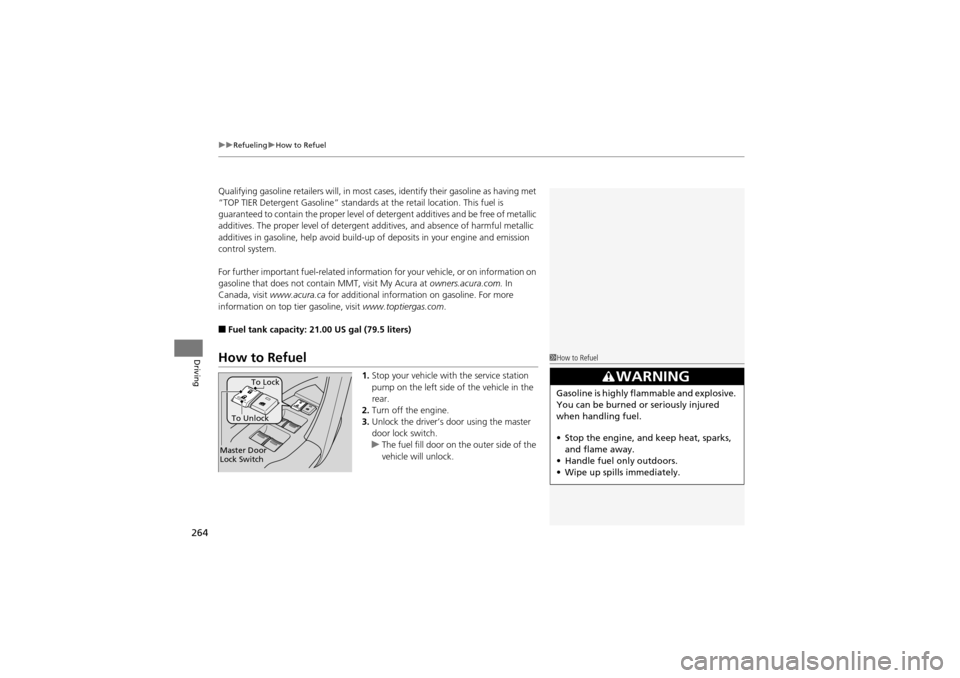
3. Unlock the driver’s door using the master
door lock switch.
u The fuel fill door on the outer side of the
vehicle will unlock.
1How to Refuel
3WARNING
Gasoline is highly flammable and explosive.
You can be burned or seriously injured
when handling fuel.
• Stop the engine, and keep heat, sparks,
and flame away.
• Handle fuel only outdoors.
• Wipe up spills immediately.
Master Door
Lock Switch To Unlock
To Lock
Page 271 of 370
269
Maintenance
This chapter discusses basic maintenance.
Before Performing MaintenanceInspection and Mainte nance ............ 270
Safety When Performing Maintenance..... 271Parts and Fluids Used in Maintenance
Service ........................................... 272
Maintenance Minder
TM..................... 273
Maintenance Under the Hood
Maintenance Items Under the Hood ..... 277Opening the Hood ........................... 278
Engine Compartment Covers ........... 279
Recommended Engine Oi l ................ 280
Oil Check ......................................... 281
Adding Engine Oil ............................ 282
Changing the Engine Oil and Oil Filter ..... 283Engine Coolant ................................ 285
Transmission Fluid ............................ 287
Brake Fluid ....................................... 288
Power Steering Fluid Check.............. 289
Refilling Window Washer Fluid......... 290
Replacing Light Bulbs ....................... 291
Checking and Maintaining Wiper
Blades .......................................... 298
Checking and Maintaining Tires
Checking Tires ................................. 300
Tire and Loading Information Label ...... 301Tire Labeling .................................... 301
DOT Tire Quality Grading (U.S. Vehicles) ...... 303Wear Indicators ............................... 305
Tire Service Life ................................ 305
Tire and Wheel Replacement ........... 306
Tire Rotation .................................... 307
Winter Tires ..................................... 308
Battery ............................................... 309
Remote Transmitter Care ................. 310
Climate Control System Maintenance..... 312Cleaning
Interior Care .................................... 313
Exterior Care.................................... 315
Page 272 of 370
270
Maintenance
Before Performing Maintenance
Inspection and Maintenance
For your safety, perform all listed inspections and maintenance to keep your vehicle
in good condition. If you become aware of any abnormality (noise, smell, insufficient
brake fluid, oil residue on the ground, etc.), have your vehicle inspected by a dealer.
(Note, however, that service at a dealer is not mandatory to keep your warranties in
effect.) Refer to the separate maintenanc e booklet for detailed maintenance and
inspection information.
■Daily inspections
Perform inspections before long distance trips, when washing the vehicle, or when
refueling.
■Periodic inspections
• Check the automatic transmi ssion fluid level monthly.
2Automatic Tran smission Fluid P. 287
•Check the brake fluid level monthly.2 Brake Fluid P. 288
•Check the tire pressure monthly. Examin e the tread for wear and foreign objects.2Checking and Maintaining Tires P. 300
•Check the operation of th e exterior lights monthly.2Replacing Light Bulbs P. 291
•Check the condition of the wiper bl ades at least every six months.2Checking and Maintaining Wiper Blades P. 298
■Types of Inspection and Maintenance
1Inspection and Maintenance
Maintenance, replacement, or repair of
emissions contro l devices and systems may be
done by any automotive repair establishment or
individuals using parts that are “certified” to
EPA standards.
According to state and federal regulations, failure to
perform maintenance on the maintenance main
items marked with # will not void your emissions
warranties. However, all maintenance services should
be performed in accordance with the intervals
indicated by the multi-information display.
2 Maintenance Service Items P. 275
If you want to perform complex maintenance tasks
that require more skills an d tools, you can purchase a
subscription to the Serv ice Express website at
www.techinfo.honda.com .
2 Authorized Manuals P. 358
If you want to perform ma intenance yourself, make
sure that you have the nece ssary tools and skills first.
After performing ma intenance, update the records in
the separate maintenance booklet.
U.S. models
Page 274 of 370
272
uuBefore Performing Maintenance uParts and Fluids Used in Maintenance Service
Maintenance
Parts and Fluids Used in Maintenance Service
The use of Acura genuine parts and fluids is recommended when maintaining and
servicing your vehicle. Acura genuine parts are manufactured according to the same
high quality standards used in Acura vehicles.
Page 275 of 370
273Continued
Maintenance
Maintenance MinderTM
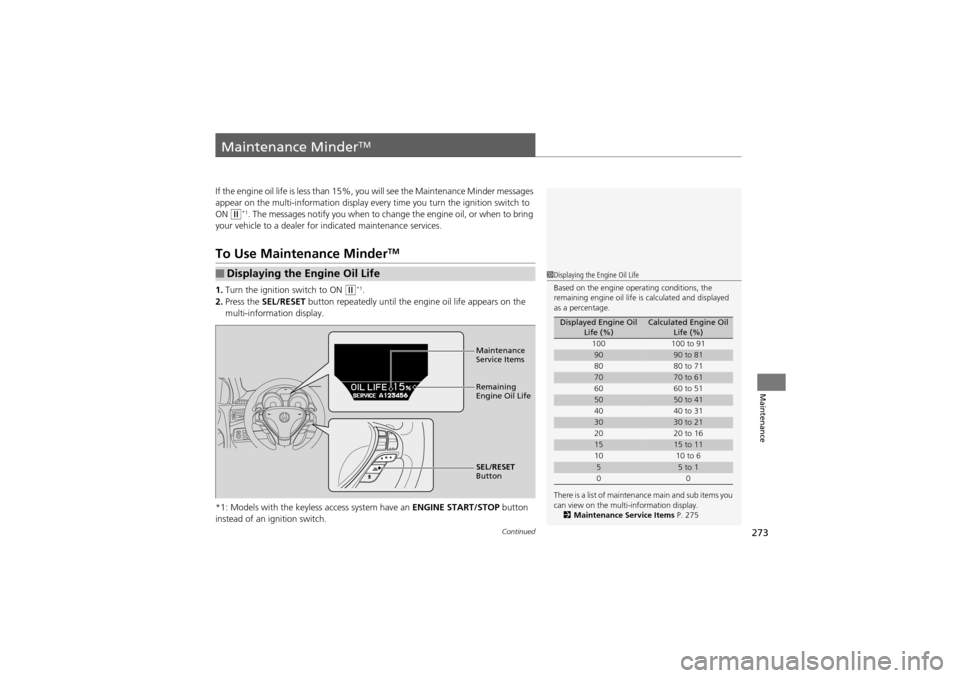
If the engine oil life is less than 15%, you will see the Maintenance Minder messages
appear on the multi-information display every time you turn the ignition switch to
ON
w*1. The messages notify you when to change the engine oil, or when to bring
your vehicle to a dealer for indicated maintenance services.
To Use Maintenance MinderTM
1.Turn the ignition switch to ON w*1.
2. Press the SEL/RESET button repeatedly until the engine oil life appears on the
multi-information display.
*1: Models with the keyless access system have an ENGINE START/STOP button
instead of an ig nition switch.
■Displaying the Engine Oil Life1Displaying the Engine Oil Life
Based on the engine operating conditions, the
remaining engine oil life is calculated and displayed
as a percentage.
There is a list of maintenance main and sub items you
can view on the multi-information display. 2 Maintenance Service Items P. 275
Displayed Engine Oil
Life (%)Calculated Engine Oil Life (%)
100 100 to 91
9090 to 81
80 80 to 71
7070 to 61
60 60 to 51
5050 to 41
40 40 to 31
3030 to 21
20 20 to 16
1515 to 11
10 10 to 6
55 to 1
00
Maintenance
Service Items
Remaining
Engine Oil Life
SEL/RESET
Button
Page 276 of 370
274
uuMaintenance MinderTMuTo Use Maintenance MinderTM
Maintenance
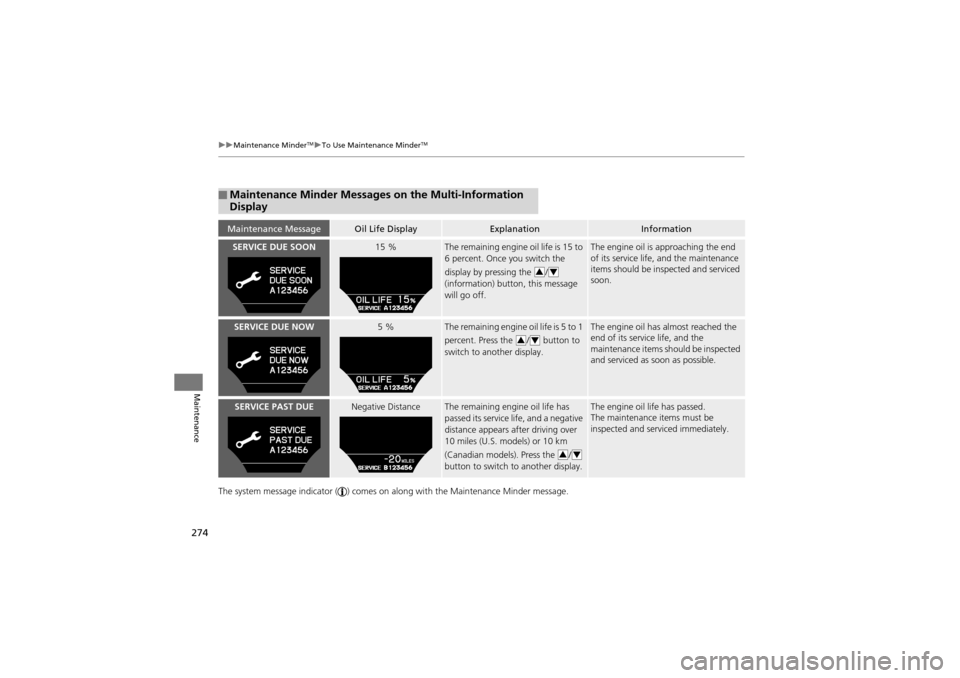
The system message indicator ( ) comes on al ong with the Maintenance Minder message.
■Maintenance Minder Messages on the Multi-Information
Display
Maintenance MessageOil Life DisplayExplanationInformation
SERVICE DUE SOON15 %The remaining engine oil life is 15 to
6 percent. Once you switch the
display by pressing the /
(information) button, this message
will go off.The engine oil is approaching the end
of its service life, and the maintenance
items should be inspected and serviced
soon.
SERVICE DUE NOW5 %The remaining engine oil life is 5 to 1
percent. Press the / button to
switch to another display.The engine oil has almost reached the
end of its service life, and the
maintenance items should be inspected
and serviced as soon as possible.
SERVICE PAST DUENegative DistanceThe remaining engine oil life has
passed its service life, and a negative
distance appears after driving over
10 miles (U.S. models) or 10 km
(Canadian models). Press the /
button to switch to another display.The engine oil life has passed.
The maintenance items must be
inspected and serviced immediately.
34
34
34
Page 277 of 370
275
uuMaintenance MinderTMuTo Use Maintenance MinderTM
Continued
Maintenance
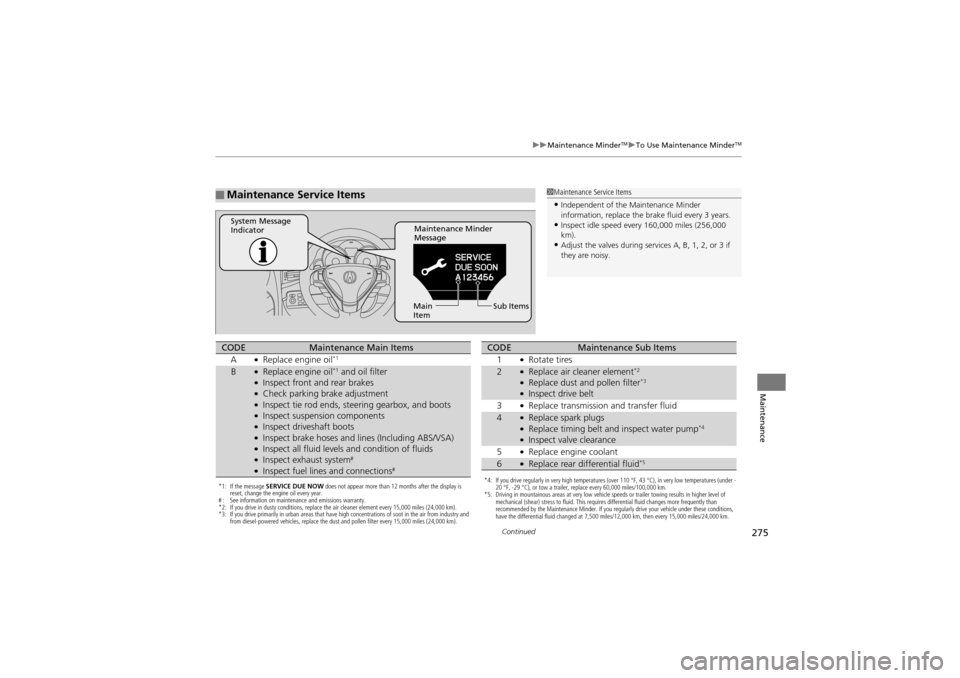
■Maintenance Service Items1Maintenance Service Items
•Independent of the Maintenance Minder
information, replace the brake fluid every 3 years.
•Inspect idle speed every 160,000 miles (256,000
km).
•Adjust the valves during services A, B, 1, 2, or 3 if
they are noisy.
Maintenance Minder
Message
System Message
Indicator
Sub Items
Main
Item
*1: If the message SERVICE DUE NOW does not appear more than 12 months after the display is
reset, change the engine oil every year.
# : See information on maintenance and emissions warranty.
*2: If you drive in dusty conditions, replace the air cleaner element every 15,000 miles (24,000 km).
*3: If you drive primarily in urban areas that have high concentrations of soot in the air from industry and
from diesel-powered vehicles, replace the dust and pollen filter every 15,000 miles (24,000 km).
CODEMaintenance Main Items
A●Replace engine oil*1
B●Replace engine oil*1 and oil filter●Inspect front and rear brakes●Check parking brake adjustment●Inspect tie rod ends, steering gearbox, and boots●Inspect suspension components●Inspect driveshaft boots●Inspect brake hoses and li nes (Including ABS/VSA)●Inspect all fluid levels and condition of fluids●Inspect exhaust system#
●Inspect fuel lines and connections#*4: If you drive regularly in very high temperatures (over 110 °F, 43 °C), in very low temperatures (under -
20 °F, -29 °C), or tow a trailer, replace every 60,000 miles/100,000 km.
*5: Driving in mountainous areas at very low vehicle speeds or trailer towing results in higher level of
mechanical (shear) stress to fluid. This requires differential fluid changes more frequently than
recommended by the Maintenance Minder. If you regularly drive your vehicle under these conditions,
have the differential fluid changed at 7,500 miles/12,000 km, then every 15,000 miles/24,000 km.
CODEMaintenance Sub Items
1●Rotate tires
2●Replace air cleaner element*2
●Replace dust and pollen filter*3
●Inspect drive belt
3●Replace transmission and transfer fluid
4●Replace spark plugs●Replace timing belt an d inspect water pump*4
●Inspect valve clearance
5●Replace engine coolant
6●Replace rear differential fluid*5
Page 278 of 370
uuMaintenance MinderTMuTo Use Maintenance MinderTM
276
Maintenance
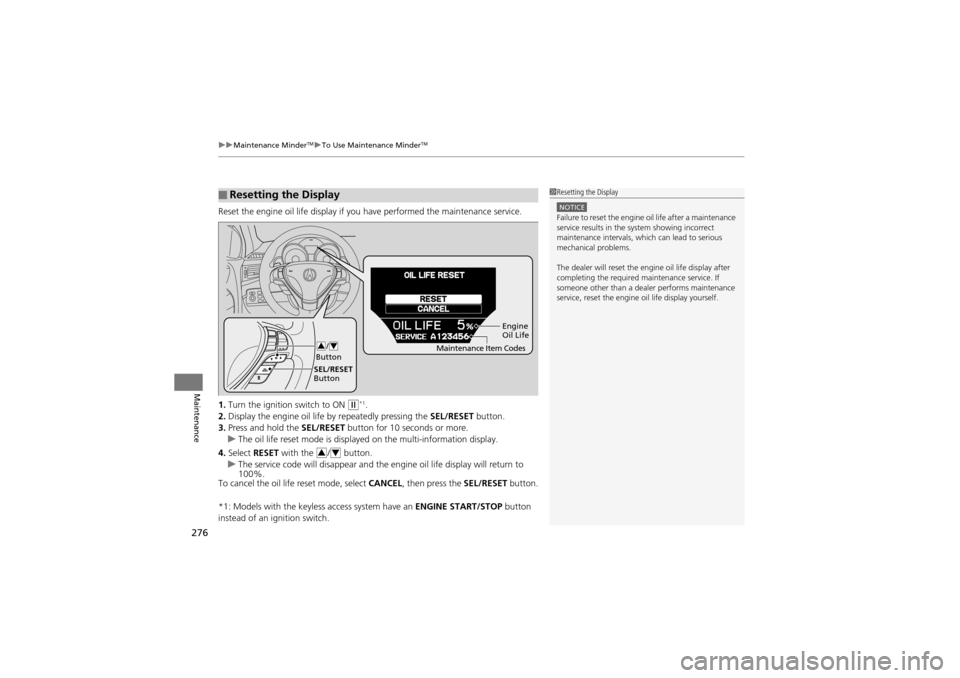
Reset the engine oil life display if y ou have performed the maintenance service.
1. Turn the ignition switch to ON
w*1.
2. Display the engine oil life by repeatedly pressing the SEL/RESET button.
3. Press and hold the SEL/RESET button for 10 seconds or more.
u The oil life reset mode is displayed on the multi-information display.
4. Select RESET with the / button.
u The service code will disappear and the engine oil life display will return to
100%.
To cancel the oil life reset mode, select CANCEL, then press the SEL/RESET button.
*1: Models with the keyless access system have an ENGINE START/STOP button
instead of an ignition switch.
■Resetting the Display1 Resetting the Display
NOTICEFailure to reset the engine oil life after a maintenance
service results in the system showing incorrect
maintenance intervals, which can lead to serious
mechanical problems.
The dealer will reset the engine oil life display after
completing the required ma intenance service. If
someone other than a dealer performs maintenance
service, reset the engine oil life display yourself.
Engine
Oil Life
SEL/RESET
Button /
Button
34Maintenance Item Codes
34
Page 305 of 370
303
uuChecking and Maintaining Tires uDOT Tire Quality Grading (U.S. Vehicles)
Continued
Maintenance
DOT Tire Quality Grading (U.S. Vehicles)
The tires on your vehicle meet all U.S. Federal Safety
Requirements. All tires are also graded for treadwear, traction,
and temperature performance according to Department of
Transportation (DOT) standards. The following explains these
gradings.
Quality grades can be found where applicable on the tire sidewall
between tread shoulder and maximum section width.
The treadwear grade is a comparative rating based on the wear
rate of the tire when tested under controlled conditions on a
specified government test course. For example, a tire graded 150
would wear one and one-half (1 1/2) times as well on the
government course as a tire graded 100. The relative performance
of tires depends upon the actual conditions of their use, however,
and may depart significantly from the norm due to variations in
driving habits, service practi ces and differences in road
characteristics and climate.
■Uniform Tire Quality Grading
■Treadwear
1 Uniform Tire Quality Grading
For example:
Treadwear 200
Traction AA
Temperature A
All passenger car tires must conform
to Federal Safety Requirements in
addition to these grades.