towing Acura ZDX 2012 User Guide
[x] Cancel search | Manufacturer: ACURA, Model Year: 2012, Model line: ZDX, Model: Acura ZDX 2012Pages: 370, PDF Size: 10.06 MB
Page 221 of 370
219
uuTowing a Trailer uTowing Your Vehicle
Driving
• Monitor your temperature gauge. If it n ears the red (Hot) mark, turn off the air
conditioning and reduce speed . Pull to the side of the road safely to cool down
the engine if necessary.
• Shift to the
S position if the transmi ssion shifts frequently.
Towing Your Vehicle
Your vehicle is not designed to be towed behind a motor home. If your vehicle needs
to be towed in an emergency, refe r to the emergency towing information.
2Emergency Towing P. 344
■Driving in Hilly Terrain1Driving in Hilly Terrain
If you use the paddle shifters when driving uphill and
downhill, select 2nd or 3rd gear, depending on the
vehicle speed and road conditions. Do not use 4th,
5th and 6th gears.
Page 224 of 370
uuOff-Highway Driving Guidelines uAvoiding Trouble
222
Driving
• Crossing a Stream - Avoid driving through deep water. If you encounter water
in your route (a small stream or large pu ddle, for example), evaluate it carefully
before going ahead. Make sure it is shallow, flowing slowly, and has firm ground
underneath. If you are not sure of the depth or the ground, turn around and find
another route. Driving through deep wate r can also damage your vehicle. The
water can get into the transmission and differential, diluting the lubricant and
causing an eventual failure. It can also wash the grease out of the wheel bearings.
• If You Get Stuck, carefully go in the direction that you think will get you
unstuck. Do not spin the ti res as this will only make things worse and could
damage the transmission. If you are unable to free yourself, your vehicle will need
to be towed. Front and rear tow ho oks are provided for this purpose.
2Towing Hook P. 344
1Off-Highway Driving Guidelines
Spinning the tires can also damage the SH-AWD
system.
Page 249 of 370
247
uuWhen Driving uBSI (Blind Spot Information)*
Driving
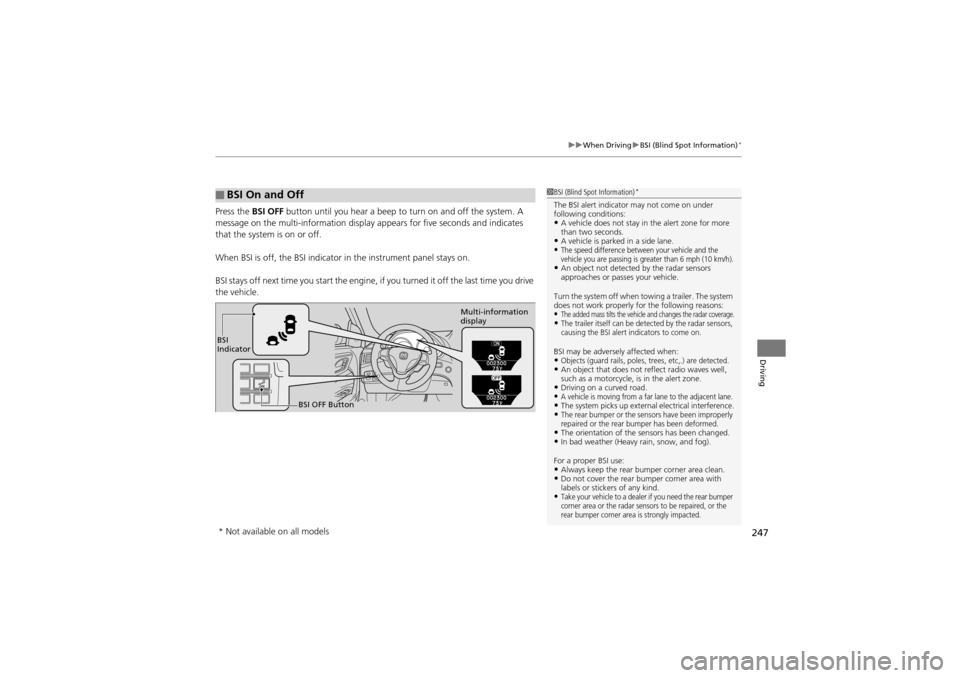
Press the BSI OFF button until you hear a beep to turn on and off the system. A
message on the multi-information display appears for five seconds and indicates
that the system is on or off.
When BSI is off, the BSI indicator in the in strument panel stays on.
BSI stays off next time you sta rt the engine, if you turned it off the last time you drive
the vehicle.
■BSI On and Off1 BSI (Blind Spot Information)*
The BSI alert indicator may not come on under
following conditions:
•A vehicle does not stay in the alert zone for more
than two seconds.
•A vehicle is parked in a side lane.•The speed difference between your vehicle and the
vehicle you are passing is greater than 6 mph (10 km/h).
•An object not detected by the radar sensors
approaches or passes your vehicle.
Turn the system off when towing a trailer. The system
does not work properly for the following reasons:
•The added mass tilts the vehicle and changes the radar coverage.•The trailer itself can be detected by the radar sensors,
causing the BSI alert indicators to come on.
BSI may be adversel y affected when:•Objects (guard rails, poles, trees, etc,.) are detected.•An object that does not reflect radio waves well,
such as a motorcycle, is in the alert zone.
•Driving on a curved road.•A vehicle is moving from a far lane to the adjacent lane.•The system picks up external electrical interference.•The rear bumper or the sensors have been improperly
repaired or the rear bumper has been deformed.
•The orientation of the sensors has been changed.•In bad weather (Heavy rain, snow, and fog).
For a proper BSI use:
•Always keep the rear bu mper corner area clean.•Do not cover the rear bumper corner area with
labels or stickers of any kind.
•Take your vehicle to a dealer if you need the rear bumper
corner area or the radar sensors to be repaired, or the
rear bumper corner area is strongly impacted.
BSI
Indicator
BSI OFF Button Multi-information
display
* Not available on all models
Page 277 of 370
275
uuMaintenance MinderTMuTo Use Maintenance MinderTM
Continued
Maintenance
■Maintenance Service Items1Maintenance Service Items
•Independent of the Maintenance Minder
information, replace the brake fluid every 3 years.
•Inspect idle speed every 160,000 miles (256,000
km).
•Adjust the valves during services A, B, 1, 2, or 3 if
they are noisy.
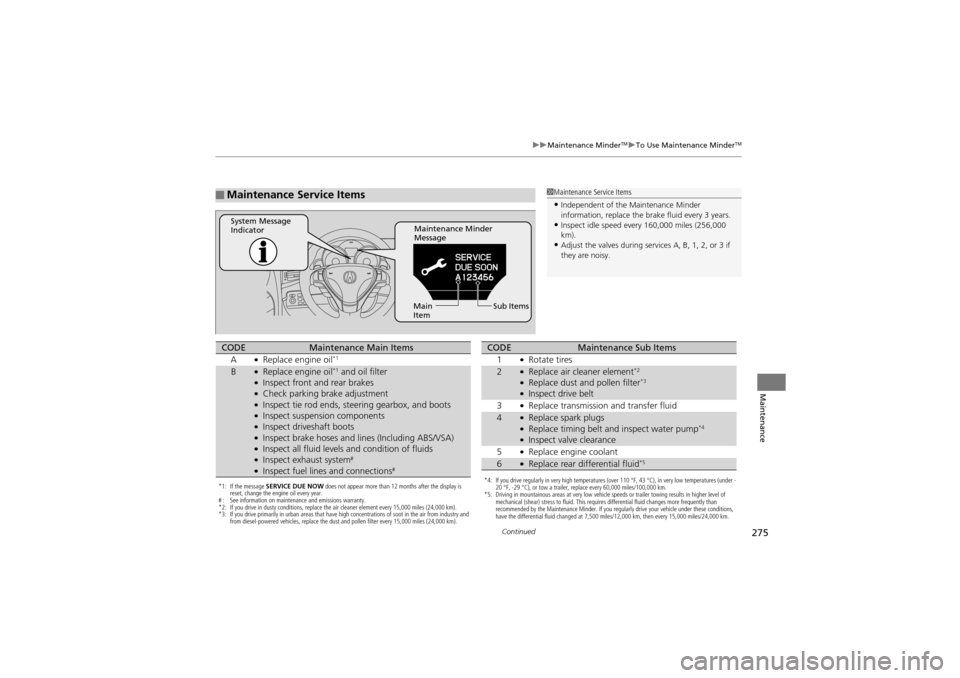
Maintenance Minder
Message
System Message
Indicator
Sub Items
Main
Item
*1: If the message SERVICE DUE NOW does not appear more than 12 months after the display is
reset, change the engine oil every year.
# : See information on maintenance and emissions warranty.
*2: If you drive in dusty conditions, replace the air cleaner element every 15,000 miles (24,000 km).
*3: If you drive primarily in urban areas that have high concentrations of soot in the air from industry and
from diesel-powered vehicles, replace the dust and pollen filter every 15,000 miles (24,000 km).
CODEMaintenance Main Items
A●Replace engine oil*1
B●Replace engine oil*1 and oil filter●Inspect front and rear brakes●Check parking brake adjustment●Inspect tie rod ends, steering gearbox, and boots●Inspect suspension components●Inspect driveshaft boots●Inspect brake hoses and li nes (Including ABS/VSA)●Inspect all fluid levels and condition of fluids●Inspect exhaust system#
●Inspect fuel lines and connections#*4: If you drive regularly in very high temperatures (over 110 °F, 43 °C), in very low temperatures (under -
20 °F, -29 °C), or tow a trailer, replace every 60,000 miles/100,000 km.
*5: Driving in mountainous areas at very low vehicle speeds or trailer towing results in higher level of
mechanical (shear) stress to fluid. This requires differential fluid changes more frequently than
recommended by the Maintenance Minder. If you regularly drive your vehicle under these conditions,
have the differential fluid changed at 7,500 miles/12,000 km, then every 15,000 miles/24,000 km.
CODEMaintenance Sub Items
1●Rotate tires
2●Replace air cleaner element*2
●Replace dust and pollen filter*3
●Inspect drive belt
3●Replace transmission and transfer fluid
4●Replace spark plugs●Replace timing belt an d inspect water pump*4
●Inspect valve clearance
5●Replace engine coolant
6●Replace rear differential fluid*5
Page 319 of 370
317
Handling the Unexpected
This chapter explains how to handle unexpected troubles.
Tools
Types of Tools .................................. 318
If a Tire Goes Flat Changing a Flat Tire ......................... 319
Engine Does Not Start
Checking the Engine ........................ 326
If the Keyless Access Remote Battery is Weak ..........................................327
Emergency Engine Stop ................... 328
Jump Starting .................................... 329
Shift Lever Do es Not Move.............. 331 Overheating
How to Handle Overheating............. 332
Indicator, Coming On/Blinking
If the Low Oil Pressure Indicator Comes On ............................................. 334
If the Charging System Indicator Comes
On ................................................. 334
If the Malfunction Indicator Lamp Comes On or Blinks ................................... 335
If the Brake System Indicator (Red) Comes On .................................. 336
If the ECPS Indicator* Comes On ..... 336 If the Low Tire Pres
sure/TPMS Indicator
Comes On or Blinks ....................... 337
Fuses Fuse Locations ................................. 338
Circuit Protected and Amps for Each Fuse............................................ 340
Inspecting and Changing Fuses ........ 343
Emergency Towing ........................... 344
When You Cannot Unlock the Fuel Fill Door ................................................. 346
When You Cannot Open or Close the Tailgate ............................................ 347
* Not available on all models
Page 322 of 370
uuIf a Tire Goes Flat uChanging a Flat Tire
320
Handling the Unexpected
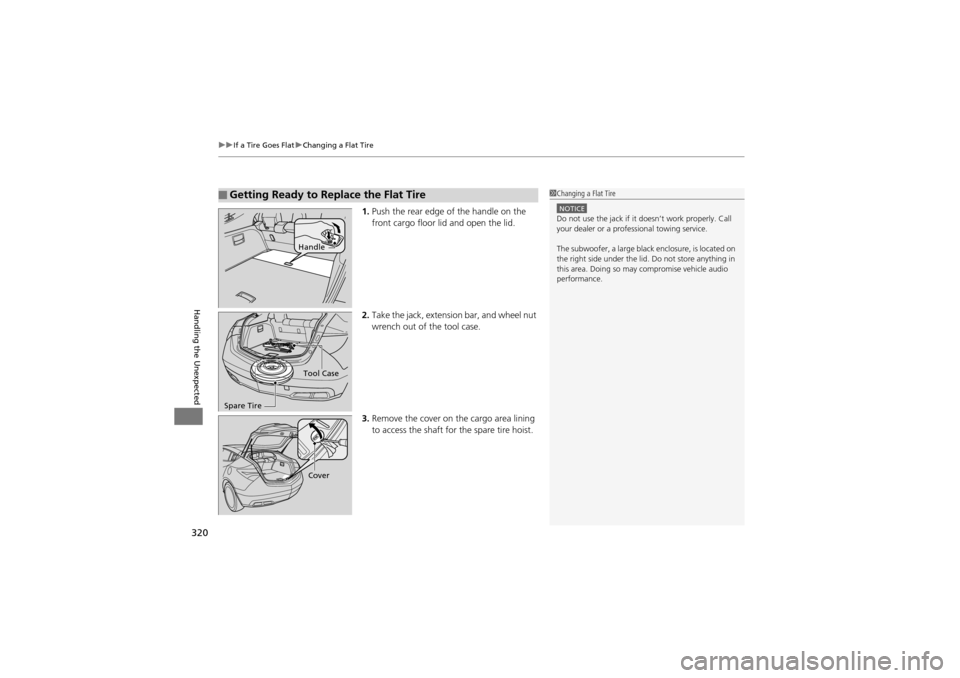
1. Push the rear edge of the handle on the
front cargo floor lid and open the lid.
2. Take the jack, extension bar, and wheel nut
wrench out of the tool case.
3. Remove the cover on the cargo area lining
to access the shaft fo r the spare tire hoist.
■Getting Ready to Replace the Flat Tire1Changing a Flat Tire
NOTICEDo not use the jack if it doesn’t work properly. Call
your dealer or a professional towing service.
The subwoofer, a large black enclosure, is located on
the right side under the lid. Do not store anything in
this area. Doing so may compromise vehicle audio
performance.
Handle
Tool Case
Spare Tire
Cover
Page 327 of 370
325
uuIf a Tire Goes Flat uChanging a Flat Tire
Handling the Unexpected
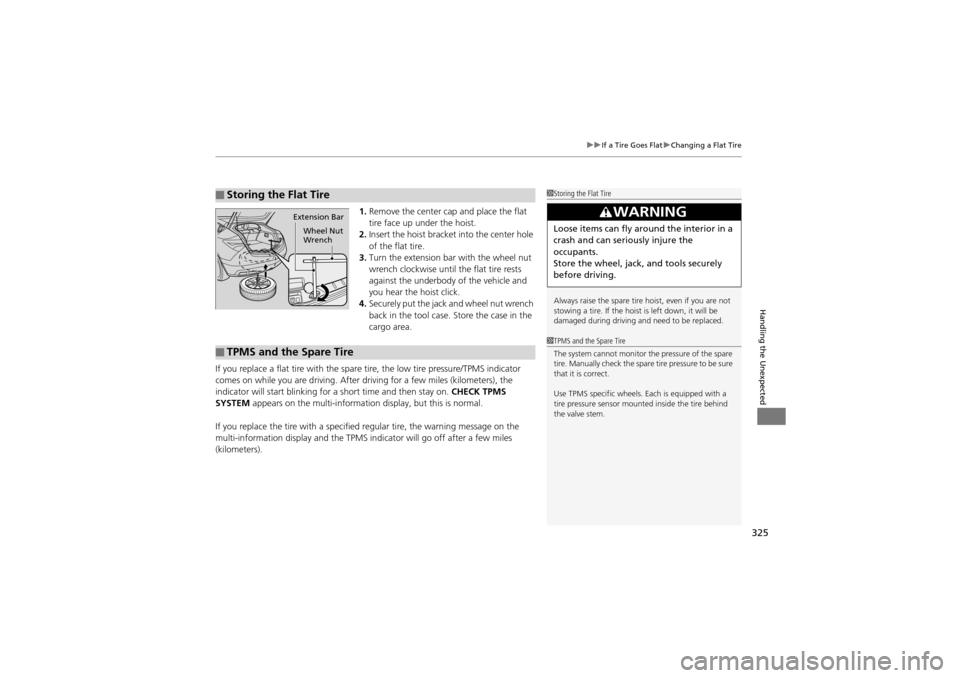
1. Remove the center cap and place the flat
tire face up under the hoist.
2. Insert the hoist bracket into the center hole
of the flat tire.
3. Turn the extension bar with the wheel nut
wrench clockwise until the flat tire rests
against the underbody of the vehicle and
you hear the hoist click.
4. Securely put the jack and wheel nut wrench
back in the tool case. Store the case in the
cargo area.
If you replace a flat tire with the spare tire, the low tire pressure/TPMS indicator
comes on while you are driving. After dr iving for a few miles (kilometers), the
indicator will start blinking for a short time and then stay on. CHECK TPMS
SYSTEM appears on the multi-information display, but this is normal.
If you replace the tire with a specified regular tire, the warning message on the
multi-information display and the TPMS indi cator will go off after a few miles
(kilometers).
■Storing the Flat Tire1 Storing the Flat Tire
Always raise the spare tire hoist, even if you are not
stowing a tire. If the hoist is left down, it will be
damaged during driving and need to be replaced.
3WARNING
Loose items can fly around the interior in a
crash and can seriously injure the
occupants.
Store the wheel, jack, and tools securely
before driving.
Extension Bar
Wheel Nut
Wrench
■TPMS and the Spare Tire
1TPMS and the Spare Tire
The system cannot monitor the pressure of the spare
tire. Manually check the spare tire pressure to be sure
that it is correct.
Use TPMS specific wheels. Each is equipped with a
tire pressure sensor mounted inside the tire behind
the valve stem.
Page 328 of 370
326
Handling the Unexpected
Engine Does Not Start
Checking the Engine
If the engine does not start, turn the ignition switch to START e*1 and check the
starter.
*1: Models with the keyless access system have an ENGINE START/STOP button
instead of an ignition switch.
Starter conditionChecklist
Starter doesn’t turn or turns
over slowly.
The battery may be dead. Check
each of the items on the right and
respond accordingly.Check brightness of the interior light.
Turn on interior lights and check brightness.
●If the interior lights are dim or do not come on at all2 Checking the Battery P. 309●If the interior lights come on normally 2 Fuses P. 338
The starter turns over normally
but the engine doesn’t start.
There may be a problem with the
fuse. Check each of the items on
the right and respond accordingly.Review the engine start procedure.
Follow its instructions, and try to start the engine again.
2 Starting the Engine P. 223
Check the immobilizer system indicator.
When the immobilizer system indicator is blinking, the engine cannot be started.
2Immobilizer System P. 120
Check the fuel level.
There should be enough fuel in the tank.
2 Fuel Gauge P. 87
Check the fuse.
Check all fuses, or have the vehicle checked by a dealer.
2Inspecting and Changing Fuses P. 343
If the problem continues:2Emergency Towing P. 344
1Checking the Engine
If you must start the vehi cle immediately, use an
assisting vehicle to jump start it.
2 Jump Starting P. 329
Page 346 of 370
344
Handling the Unexpected
Emergency Towing
Call a professional towing service if you need to tow your vehicle.
■Flat bed equipment
The operator loads your vehicle on the back of a truck.
This is the only way you can safely to transport your vehicle.
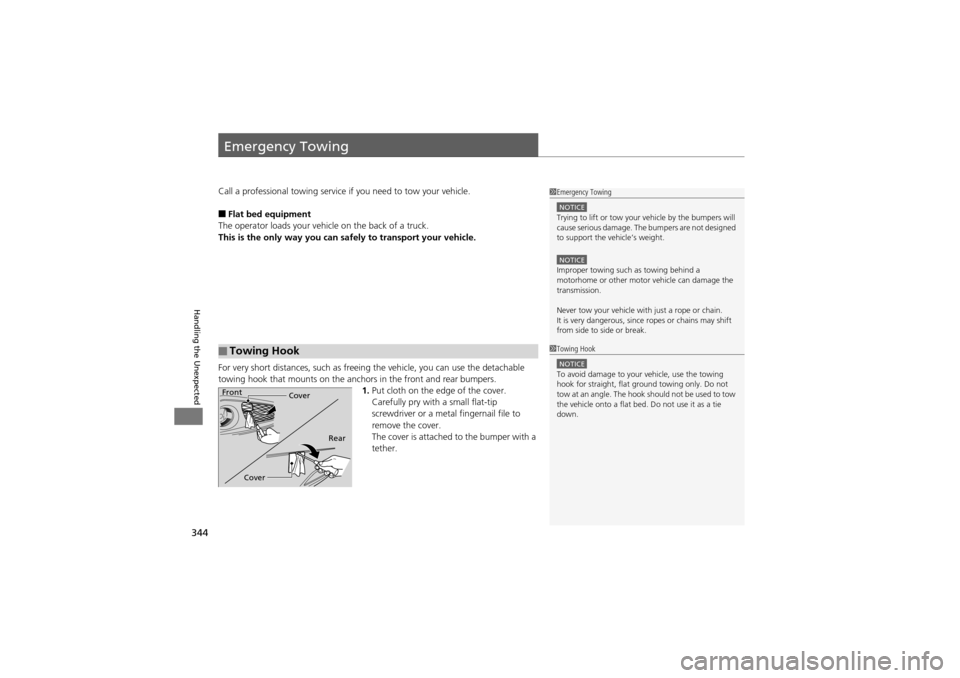
For very short distances, su ch as freeing the vehicle, you can use the detachable
towing hook that mounts on the anchors in the front and rear bumpers. 1.Put cloth on the edge of the cover.
Carefully pry with a small flat-tip
screwdriver or a metal fingernail file to
remove the cover.
The cover is attached to the bumper with a
tether.
■Towing Hook
1Emergency Towing
NOTICETrying to lift or tow your vehicle by the bumpers will
cause serious damage. The bumpers are not designed
to support the vehicle’s weight.
NOTICEImproper towing such as towing behind a
motorhome or other motor vehicle can damage the
transmission.
Never tow your vehicle with just a rope or chain.
It is very dangerous, since ropes or chains may shift
from side to side or break.
1 Towing Hook
NOTICETo avoid damage to your vehicle, use the towing
hook for straight, flat ground towing only. Do not
tow at an angle. The hook should not be used to tow
the vehicle onto a flat bed. Do not use it as a tie
down.
Front
Cover
Cover Rear
Page 347 of 370
345
uuEmergency Towing u
Handling the Unexpected
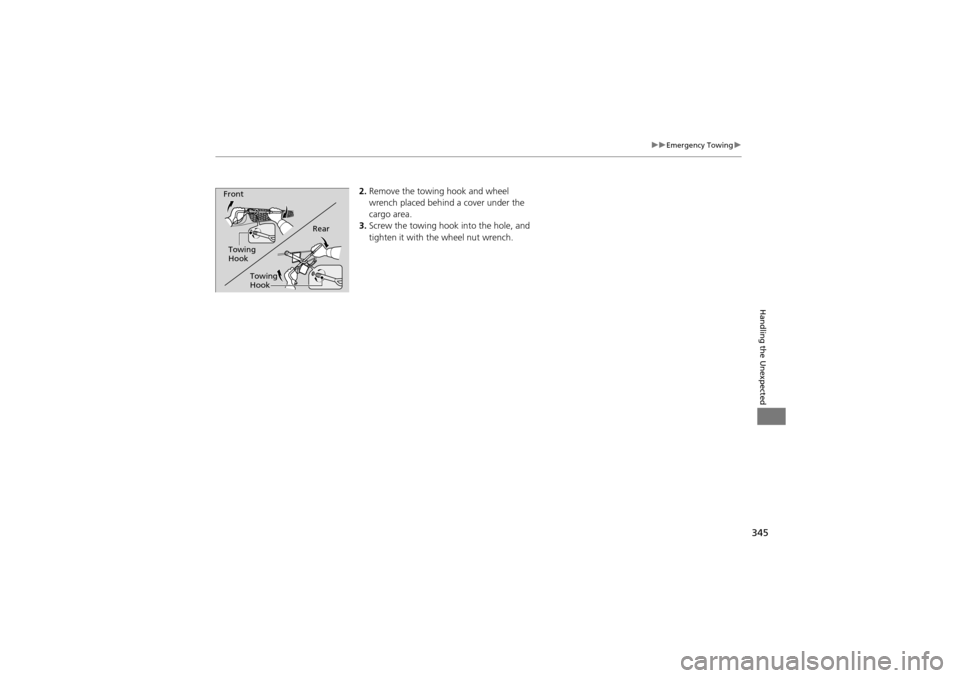
2.Remove the towing hook and wheel
wrench placed behind a cover under the
cargo area.
3. Screw the towing hook into the hole, and
tighten it with th e wheel nut wrench.
Rear
Towing
Hook
Front
Towing
Hook